


The next version of SQL Server (code name Yukon) has extensive support of the Common Language Runtime (CLR).
Previous versions of SQL Server (2000 and earlier) had a mechanism for creating custom data types. These data types were nothing more than aliases to system data types. In Yukon, you can create your own fully functional custom data types.
One key feature of CLR support is the ability to create User Defined Data Types (UDT). These UDTs are implemented using Visual Studio .NET and the .NET Framework. This article demonstrates how to create your own UDT using Yukon and the Whidbey-release of Visual Studio .NET (still in Alpha at this writing).
Getting Started
The process of creating a UDT begins with creating a .NET class that supports the proper API. Creating and using a UDT comes in two phases: creating the library and registering the UDT with SQL Server. The first step is to create your new data type in Visual Studio .NET. The listing for this article shows how to create a Social Security Number data type. When you create your UDT you will do the following:
- Create a new class library
- Import assembles
- Add two attributes to your class (Serializable() and SqlUserDefinedDataType)
- Implement the INullable interface
- Add required methods and properties to your class
- Compile your class
- Register your class library with SQL Server
Creating A Class Library
The initial phase of this process is to create a new class library. You create a new class by selecting New and then Project from the Visual Studio .NET menu. Select Class Library from either the C# or Visual Basic.NET (VB.NET) Projects list (this article demonstrates using VB.NET).
After creating your class library, you need to import the following assemblies
- System
- System.Data.SQL
- System.Data.SQLTypes
Adding Attributes
After adding the appropriate references, you need to “decorate” the class with two attributes. These attributes are Serializable() and SqlUserDefinedType. Serializable gives the CLR the ability to take the class and serialize it or to turn it into XML. SQL Server uses this capability to store and retrieve the class from its data store. The SqlUserDefineType attribute is used by SQL Server to determine how it should manage your class. This attribute has a number of properties. The two most important are Format and MaxByteSize. The Format property instructs SQL Server how to store the object. The MaxByteSize property determines how many bytes your data type can consume.
Object Interface
After decorating the class, you need to implement the .NET Framework INullable Interface. Interfaces are implemented using the Implements statement. The following snippet demonstrates how to implement the INullable interface.
Public ReadOnly Property _
IsNull() As Boolean
  Implements _
 System.Data.SqlTypes_
 .INullable.IsNull
   Get
     Return Me._IsNull
   End Get
End Property
After implementing the INullable interface, you are required to implement the ToString() and Parse() methods and the Null() property
The ToString method is a common function found on most .NET classes. This function returns a representation of your data type as a string. Remember when you return the value from the ToString() function you need to include a representation of NULL values. The following snippet shows the ToString() method for this article's example.
Public Overrides Function_
  ToString() As String
  If Me.IsNull Then
    Return "NULL"
  Else
    Return Me._cInternalValue
  End If
End Function
The other method that needs attention is the Parse() method. This is the method that SQL Server calls whenever someone inserts or updates data defined as your data type. The API for this method is as follows:
Parse(cData as SqlString) _
  as <YourType>
As you can see, this function receives a parameter declared as SqlString. Upon receiving this code, you perform a number of tasks. The first task is to determine whether or not the data passed in is NULL. If it is, return Nothing from this method.
The second task is to convert the passed-in data to a .NET data type. This is done with the Convert class. After converting the passed-in data to a .NET data type, you can validate the data. If the data passed in does not conform to your rules, you can throw an exception**. Figure 1** shows what an error thrown from a custom data type looks like.
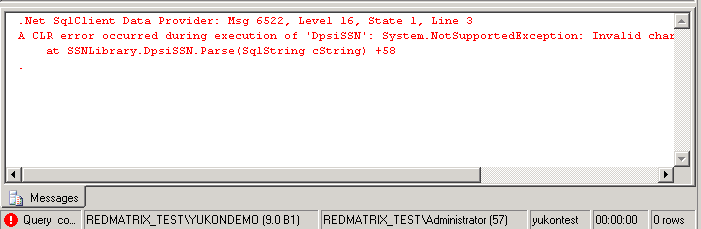
If the data passed to the Parse is acceptable to your validation rules, you need to create an instance of your class, set your custom properties on that class, and return it. This seems weird to me, having a class create an instance of itself, but it works. The following code demonstrates the completed Parse() routine for the example.
Public Shared Function _
Parse(ByVal cString As SqlString) _
As DpsiSSN

If cString.IsNull Then
   Return Nothing
End If

Dim cInternal As String =_
    Convert.ToString(cString)

If cInternal.Length <> 9 Then
  Throw New _
    NotSupportedException("Invalid SSN
       Length")

ElseIf Not AllDigits(cInternal) Then
 Throw New _
   NotSupportedException("Invalid
      characters found in SSN")
 Else
    Dim oType As New DpsiSSN
     oType.MySSN = cInternal
     Return oType

 End If

End Function
The final item to implement is the Null() property. This property has an interesting API as well. The API for the null property is:
Null() as <YourType>
As you can see by the implementation, the Null property returns an object declared as your data type. The following snippet demonstrates this concept.
Public Shared ReadOnly _
   Property Null() As DpsiSSN
   Get
     Dim oType As New DpsiSSN
      oType._IsNull = True
      Return oType
    End Get
End Property
Your Properties
Once you have created a class with the required API, you can begin adding your own custom properties. These custom properties are just simple properties like you would add to other .NET classes. The only requirement when adding these properties is that you add code to the Parse method to implement these properties. Listing 1 shows the code for a completed data type. Take a look at the MySSN property to see how you add your own custom properties.
Registering The Class
After you have created and compiled the class into a DLL, you need to go to SQL Server and perform two tasks.
- Register the assembly with SQL Server.
- Register the type with SQL Server.
The following SQL code demonstrates how to perform these tasks:
CREATE ASSEMBLY SSNLIbrary
FROM 'c:\test\SSNLibrary.dll'

CREATE TYPE [DpsiSSN]
EXTERNAL
NAME [SSNLibrary]:[SSNLibrary.DpsiSSN]
Using The Class
Once you have registered the class, you can begin using that class as a data type in a table definition. When you have created a table supporting your data type, you can begin adding data to your table. The following code snippet shows how to create a table using your custom data type, how to insert data into your table, and how to query data from a column defined as your custom data type.
-- Create table with data type
CREATE TABLE SSNTEST
  (ssntestid int primary key not null,
   cssn DpsiSSN)
GO

-- Insert some data
DECLARE @cParam DpsiSSN
SET @cParam = CONVERT(DpsiSSN,'123456789')

INSERT INTO ssntest (cssn)
  VALUES (@cParam)

SELECT cSSN::MySSN
 FROM ssntest
WHERE Right(cSSN::MySSN,4) = '0000'

SELECT cSSN::MySSN
 FROM ssntest
ORDER BY cSSN::MySSN
There are a couple of items to note from the above example. The first item is the use of the Cast() statement. In order to insert data into a custom data type, you need to Cast() the SQL Server data types into your own data types. The next item to note is the syntax for querying data from a custom data type. The syntax for querying data from a custom data type is <ColumnName>::<PropertyName>. From my tests, I was able to sort, group and query by attributes contained in my custom data type.
Conclusion
As you can see, creating custom data types in SQL Server Yukon is pretty simple stuff. Finally, you can create your own “real” data types with validation rules and all. I hope you can see now how to take advantage of this feature with minimal effort.
Listing 1. A completed Yukon Data Type
Imports System
Imports System.Data.Sql
Imports System.Data.SqlTypes
Imports System.Runtime.Serialization
<Serializable(), SqlUserDefinedType_
(Format.SerializedDataWithMetadata, _
MaxByteSize:=1024)> _
Public Class DpsiSSN
    Implements INullable

    Private _IsNull As Boolean
    Private _cInternalValue As String

    Public ReadOnly Property IsNull() As Boolean
      Implements System.Data.SqlTypes.INullable.IsNull
        Get
            Return Me._IsNull
        End Get
    End Property

    Public Overrides Function ToString() As String
        If Me.IsNull Then
            Return "NULL"
        Else
            Return Me._cInternalValue
        End If
    End Function

    Public Shared Function Parse(ByVal cString As _
         SqlString) As DpsiSSN

        If cString.IsNull Then
            Return Nothing
        End If

        Dim cInternal As String = _
             Convert.ToString(cString)

        If cInternal.Length <> 9 Then
          Throw New _
          NotSupportedException("Invalid SSN Length")
        ElseIf Not AllDigits(cInternal) Then
            Throw New _
            NotSupportedException("Invalid characters
            found in SSN")
        Else
            Dim oType As New DpsiSSN
            oType.MySSN = cInternal
            Return oType
        End If
    End Function

    Public Property MySSN() As String
        Get
            Return Me._cInternalValue
        End Get
        Set(ByVal Value As String)
            Me._cInternalValue = Value
        End Set
    End Property
    Public Shared ReadOnly Property Null() As DpsiSSN
        Get
            Dim oType As New DpsiSSN
            oType._IsNull = True
            Return oType
        End Get
    End Property

    Public Shared Function _
       AllDigits(ByVal cString As String) As Boolean
        Dim lRetVal As Boolean = True

        Dim lnKount As Integer
        For lnKount = 0 To cString.Length - 1
            If InStr("0123456789", _
              cString.Substring(lnKount, 1)) = 0 Then
                lRetVal = False
                Exit For
            End If
        Next
        Return lRetVal
    End Function
End Class
