


Reviewing where we’ve been over the last decade in the world of .NET and Visual Studio.
At the brink of a new release of .NET and Visual Studio, you may wonder where all of this new technology is taking us. Not only do we now have a number of new flavors of Visual Studio targeted to release on April 12, 2010, we also get to enjoy a plethora of new technologies such as Silverlight 4 and RIA Services, as well as new hardware platforms to consider, such as Windows Phone 7 Series. Understanding the future usually begins with a reflection upon the past so let’s take a look at how Visual Studio has changed in the last decade.
Ah, the year 2000. When I was a kid, the year 2000 always seemed mysterious and far away. According to Arthur C. Clarke, by 2000 we would be only a year away from an inter-planetary mission that will discover life off our planet! 2000 was a good year for me personally, as that was the year I got married, and to this day I still have very clear memories of sitting around with my “soon-to-be” wife listening to “Smooth” by Santana and Rob Thomas. (By the way, getting married in the year 2000 makes it really simple to remember how long you’ve been married). I have to admit; back in 2000, I was a Visual Basic 6 code machine!
In 2000, a few of us were desperately trying to build enterprise applications with Visual Studio and Visual Basic 6 with a sprinkle of C++. Our world was full of things like emissary and executant patterns and Microsoft Transaction Server in all of its glory. We struggled with the limitations of using a language that only provided us with interface inheritance and we fought to get Visual SourceSafe to support dozens of developers, business analysts, and project managers who were all trying to use the product to version source code, documents and design artifacts. We were burdened with piecing almost every aspects of our development environment together by hand. “Automated builds” where handled by VB-Build, we used Rational Rose for all forms of modeling, TestDirector to manage our tests, and CaliberRM to manage our requirements. None of these products really integrated with one another forcing us to silo our teams around the limitations of the tooling we used. Of course, at the time there were more integrated tools offered by vendors such as Borland, however, these tools tended to be priced outside of our budget constraints and thus we didn’t put a lot of emphasis on our integration needs; firmly believing that tools were tools - processes were processes. Having an integrated toolset for our teams was simply “nice to have.”
Rainier - The Birth of a new Era
In 2001 instead of finding life on other planets, we started to hear about this thing called Rainier (the code name for the next version of Visual Studio and this magical new technology called .NET). Rainier made its beta debut in 2001 and we were promised that it was going to solve the world’s problems. We couldn’t wait to jump on the Beta releases of the product since coming from a C++ background early in my career, I was really excited to get back to using true object-orientation as a way to express my code to solve problems. I was also really interested in the promise of a framework that was language agnostic since I never really got much into the Java world, which was language specific but platform agnostic. The concept of using whatever language you were more comfortable with to express yourself intrigued me.
My team quickly put this new technology to the test! We decided to do something fun and built a proof of concept application (in our spare time of course) that would address some of the real-life problems that we continually ran into when building distributed applications with Visual Studio 6 and Visual Basic 6. We came up with the idea of creating an application called Golf.NET (because at that time, it seemed like we used the term .NET for everything). Golf.NET would be a tool that golf courses could use to help book golf tee times. We decided to use a blend of languages; Visual Basic.NET for all of the presentation layer components and C# for all of the back end code. We wanted to leverage what is now called Web services (which we were already familiar with since we did a lot of work with SOAP prior to .NET becoming mainstream) as well as this new construct called a dataset. In fact, we also created a Windows Forms-based offline client built for Golf Course Managers that made calls into our Web service layer. What we discovered quite quickly was that all of this new stuff really worked the way it said it was going to work!!! We were so proud of what we had accomplished in such little time, we designed training material, community presentations around Golf.NET and proudly branded our sample app with a picture of Tiger Woods (hmm… I’m not sure we’d do that now). I can’t tell you how much we were ready for this change - how excited it made us to know that we wouldn’t really have to use Java and Eclipse to build what we considered enterprise software.
Something was still missing though. We were expecting that with these great new languages and tools we would also get another version of Visual SourceSafe with greatly improved features such as a transactional data store powering a true client/server architecture. We were wrong and quite disappointed since we relied on our source control management system to provide a heartbeat to our team throughout our projects. Adding to our discontent was the fact that with Rainer we had absolutely no new ways of managing requirements, modeling, tracking bugs, or project planning. It was always clear to us the impact of these omissions from the platform meant that there was still room for improvement.
Everett, a Quick Follow-up
In 2000 … our world was full of things like emissary and executant patterns and Microsoft Transaction Server in all of its glory.
Rainier was quickly followed up with the next version of Visual Studio code-named Everett, which was released in April of 2003. Everett also shipped with .NET 1.1 and the ability to develop Windows mobile apps (using the same languages we have already come to know and love in .NET - which was very cool) as well as some new tooling like Visio for Enterprise Architects that came bundled with the Enterprise Architect edition of Visual Studio. This new version of Visio gave us the hope of one day doing away with Rational Rose - allowing us to mock up our screens, create UML diagrams, as well as model our data and requirements using some pretty funky methods such as Object-Role Modeling
We quickly ran into some limitations with these tools. First, we really had to think about how we were going to version the models along with the source code - it turned out that Rational Rose’s file models worked much better due to the granularity of the model definitions and I have to admit, we struggled to find this balance on our projects with Visio. Visual SourceSafe didn’t seem to have changed at all.
The Problem Remained the Same
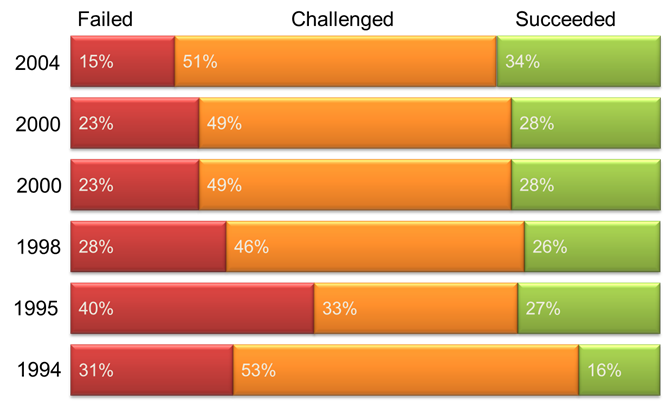
As we worked on larger and larger .NET projects, we found we still ran into the same old problems - problems with requirements, quality, getting things done, tracking stuff, getting the big picture, team management, reporting, etc. With all of this new technology and development tools these common issues didn’t seem to have changed at all… our projects weren’t necessarily getting done faster or more efficiently with these new tools. Our observations were reflected by the Standish Group’s Chaos report that they published every few years (Figure 1) that documented the success of 30,000+ software projects across the United States. The Chaos report clearly demonstrated that as technology improved, success didn’t.
As an organization deeply connected with software engineering practices we had already started realized the benefits of using Agile practices on our projects - we used RUP (we didn’t really consider RUP very agile) and slowly started adopting aspects of xp, and Scrum. These techniques, we found, were the true underpinnings of our success. Our teams also went so far as to use SharePoint to track budget, requirements, bugs, test cases, and the relationship between everything - leveraging the product’s rich collaborative features as well as declarative representation of just about anything we wanted to track.
The Chaos report clearly demonstrated that as technology improved, success didn’t.
During this time period I remember being at a dinner in Redmond, Washington with other Microsoft Regional Directors as well as a few Microsoft employees when I first hearing about a new top secret product. Microsoft had indicated that they were going to build a new tool that would help teams collaborate by integrating automated builds, source control, and work tracking under one roof. There was hope after all!
Whidbey and the Beginning of “Team”
Visual Studio 2005, codenamed Whidbey (more references to places in Washington State) was released in October of 2005 and was the first version where the word “Team” applied to Visual Studio. Not only did Visual Studio 2005 offer features like new project types, Cassini, and more 64-bit support, Microsoft updated the Office development tooling with .NET 2.0. Visual Studio licensing also got a bit more complicated due to the introduction of a few more SKUs like Visual Studio Team Edition for Software Architects, Software Developers and Software Testers. No one will argue that all of the features shipped as part of Visual Studio for Software Architects were a flop. However, the other editions provided some real value to developer productivity including static and dynamic code analysis, unit testing, code coverage analysis, code profiling (as part of the Developer edition) and load testing, manual testing, and test case management (as part of the Testing edition).
Of course, the 2005 release was much more than just a tool release. .NET 2.0 included enhancements such as generics, ASP.NET 2.0, Cassini (a local Web server that was separate from IIS), partial classes, anonymous methods, and data tables. Obviously in order to use a more expressive framework, the tools needed to be equally expressive.
The really exciting features, in my opinion, were the ones included in Team Foundation Server, which was an optional server-based component to Visual Studio. This was the new “top secret” project I had heard about in Redmond! Team Foundation Server provided a new source control repository (villagers everywhere were dancing in the streets), work item management (allowing teams to track just about anything), an automated build engine, as well as an extremely rich reporting and analytics engine built on SQL Analytics and SQL Report Services. Reports such as the Standish Chaos report convinced me that tooling wasn’t the secret to successful projects, rather, it was how teams work together that was the secret sauce to project success. I believed that tools such as Team Foundation Server help provide the fabric needed to facilitate great team interaction. This was why I decided to jump on the Team Foundation Server bandwagon with both feet, drink the cool-aid, swallow the pill, and get the implant. I wrote books, articles, spoke at conferences, and worked with customers to adopt all of this new technology all around the world. I knew in my heart that this new platform was going to make it easier for teams to develop and implement better processes that help more predictably release software... and it did - sort of. I found, much to my dismay, that most teams weren’t ready for all of the new quality and team tooling, that the adoption of this new technology could do more harm than good for those who did not fundamentally understand why these tools mattered or did not have a healthy set of software engineering practice and principles to begin with.
Orcas
In November of 2007, Microsoft released Visual Studio 2008 and Visual Studio Team System 2008 to MSDN subscribers along with .NET 3.5 (.NET 3.0 was released in 2006 introducing Windows Presentation Foundation, Windows Communication Foundation, Windows Workflow Foundation, and Windows CardSpace). From our perspective, Visual Studio 2008 was truly an incremental release, providing incremental improvements to the .NET Framework as well as in tooling. Microsoft also started to incorporate some additional roles into the Team System lineup, specifically for those who develop against databases, adding support for database versioning, sample data generation, and database unit testing, while incrementally providing support for the growing .NET Framework.
In addition to the core Visual Studio functionality, we also started to witness a greater amount of “out of band” releases of software that provided incremental value to the platform, specifically around tools like Entity Framework and Unity Application Block, which was a lightweight, extensible dependency injection container that helped to facilitate building loosely coupled applications. In fact, we were quite pleasantly surprised by the increased emphasis placed on design patterns and design techniques being expressed in separate downloads such as ASP.NET MVC, which provided a Model-View-Controller framework on top of the existing ASP.NET 3.5 runtime.
There was another revolution cooking as well; the User Experience revolution. Windows Presentation Framework was growing in popularity and with it, new problems, such as how to involve graphic designers in the software development processes. Of course, by now Silverlight was steadily growing in popularity, however, it was far from applicable for building line-of-business applications. It was clear by how often Microsoft was updating Silverlight (a new version every year) that Silverlight was going to quickly become the best choice for creating multi-platform rich Internet user applications.
2010 - The Odyssey Continues
Is it just me, or did 2010 arrive really quickly? A decade just went by in a blink of an eye. Arthur C. Clarke would not be impressed with our collective achievements. It turns out, however, that 2010 is a landmark year for Microsoft with new releases of Visual Studio, Office and SharePoint, as well as a new mobile platform.
It turns out, however, that 2010 is a landmark year for Microsoft.
From a Visual Studio perspective, in past versions it was possible for one person to maintain expert-level knowledge of the entire suite of tools and functionality. Visual Studio 2010 is the release where this will end. Visual Studio 2010 is a huge release, with lots of new tooling, especially for software testers. In fact, Visual Studio 2010 Ultimate and Test Professional editions come with some very powerful testing features such as test plan management, the ability to record and replay manual test scripts, and test lab management. Ultimate contains one more really important feature called historical debugging, which allows developers to have much greater insight into the state of software when bugs are found and submitted. Visual Studio 2010 Ultimate also contains some fully integrated modeling tools to help define requirements as well as to visualize implementations. Visual Studio 2010 also received more tooling to better support a broader range of solution types such as Silverlight 4 and SharePoint 2010 development, just to name a few. Team Foundation Server also got a facelift, giving us more ways to define work items and track and report on our work. In addition, we have much needed updates to version control, automated builds, and reporting.
What Does This Mean?
Every time we get new tools, we should get excited as they always provide us with more opportunities. Will the latest version of Visual Studio help us be more successful at building software? Will a new band saw help a carpenter build amazing furniture? We all know that there is still a lot more to building software than the tools we are using.
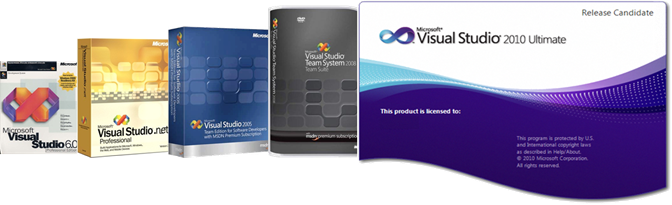
Visual Studio has kept up with our changing world (Figure 2). As developers on the Microsoft platform using Microsoft tools, we’ve never had it so good with regards to tooling and our ability to express ourselves through software. With all of this good, there is some bad as over the years the framework has become quite complex, from the countless ways of accessing data and rendering it on a user’s monitor to the plethora of new design patterns and must have community libraries; StructureMap, AutoMapper, FubuMvc, Castle.Windsor, MEF, StoryTeller, Albacore, and TopShelf to name a few. Keeping up with the pace of change is tough, and we’re relying more and more on tooling to introduce levels of abstraction in our world so we can be more productive even when complexity increases the fight against us.
The underlying pattern I continue to observe after experiencing firsthand the past decade of Visual Studio is that tools without people-centric practices, processes, and principles can be dangerous. The Microsoft Regional Director program encourages RDs to make predictions about future of software development and IT in general, so here is mine. Tools that go further and embrace the entire flow of software construction (from inception to sunset) from the perspective of people and not systems will be the ones that will truly make an impact. This is clearly something I would bet a company on. With Visual Studio 2010, Microsoft is one step closer to this reality, perhaps even one day helping to inverting Standish’s Chaos report to claim that “most software projects succeed.”
