


If you have been working with the ADO.NET Entity Framework, you have probably been extremely eager to get your hands on the next version that is now part of Visual Studio 2010 and .NET 4.0. Long referred to as “EF Version 2,” this version is now called Entity Framework 4 or EF4, to align with the .NET Framework 4.0 version.
Microsoft released Visual Studio 2010 Beta 1 in mid-May along with .NET Framework 4.0 Beta 1 and many developers have been digging deeply. VS 2010 offers many new features, but this article will focus on new features and improvements in the ADO.NET Entity Framework (EF). Although this is only the second version of EF, it’s version number is 4, to align with the .NET version, therefore many people call it EF4.
The changes in EF4 include numerous major improvements to the designer, the addition of model-first design, a new way to customize classes that are generated from the model, the ability to create POCO classes (Plain Old CLR Objects) that can be used in EF without having to be strongly bound to the EF APIs, and additions that will make using entities across processes (e.g. Web services) much easier for developers. I will highlight some of the bigger and more interesting features in the APIs. A future article will highlight designer changes and the tools released in the out of band Feature Pack.
Note that this article is not meant to be a primer on Entity Framework and therefore assumes that you have some experience working with the current version. Yet, rather than give only a high level overview of the new features, this article will give you insights into using a number of the new features.
Generating Custom Classes from a Model
Once you have designed an Entity Data Model, the designer triggers a code generator, which builds classes from the entities defined in the model. In the first version of Entity Framework, this code generation was handled by code in the System.Data.Entity.Design API. If you wanted to customize the generated code, it meant learning that API and writing your own code generation methods-a somewhat cumbersome task. For EF4, the team has leveraged a code generator that was introduced in Visual Studio 2008 called T4 (Text Template Transformation Toolkit). See the Resources sidebar for more information on T4 in general. Using T4 templates makes customizing the generated entity classes enormously simpler.
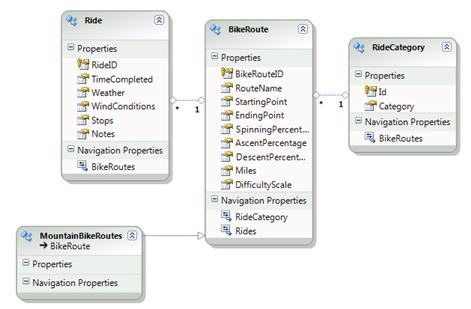
To demonstrate this, I’ll begin with a simple model to track my bike rides as shown in Figure 1.
There are two steps to this customization. First you need to get access to the default template file that is used to generate the classes. If you look at the MSDN documentation on T4, the topic title is “Generating Artifacts by Using Text Templates.” This knowledge helps make context menu option, Add New Artifact Generation Item… more obvious as the item to choose. Microsoft will change this post-Beta to a more clear description.
When you select this option, the wizard will open the Add Item dialog with the ADO.NET EntityObject Generator selected giving it a default name with the “tt” extension. Currently there is only one template available, but look for more templates to show up in the future iterations of Visual Studio 2010.
You’ll see the new template file in the Solution Explorer as shown in Figure 2. Additionally, notice that there is no longer a code file attached to the edmx file. Since the template is now responsible for generating the classes, the class file is attached to the template file.
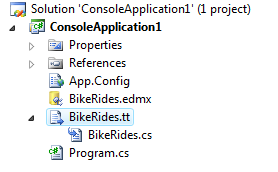
If you select the model in Solution Explorer, you’ll see in its property window that the Custom Tool property is now empty. The default generator, EntityModelCodeGenerator, will no longer be used. If you want to revert back to the default, you can just re-enter the default value and EF will take care of the rest.
Now that you have the template file accessible you can begin modifying it. Since my project is C#, the C# template was pulled in but there is also a template written in Visual Basic.
VS 2010 doesn’t have a built-in T4 editor, but you’ll find a number of third-party tools that make editing the template file easier. The T4 code listings that follow are formatted using tangible’s T4 Editor, which I have installed. See the Resources sidebar for info on T4 editors.
A T4 template has two types of content. The first is straight text, which is written directly to the target file. The second is executable code, called a directive, which is embedded in a pair of angle brackets with hash signs.
The directive will process some logic and write out the text that is the result of that logic. If you are used to working in HTML markup, this may look familiar.
This code snippet shows a directive that calls a method defined later in the T4 template.
># BeginRegion("Entities"); #>
This directive outputs a starting region tag in the generated code.
#region Entities
It might be helpful to compare the generated code file with the template to get an idea of how the template is built.
Let’s focus on the template section that generates a BikeRoute class and one of its properties, RouteName, shown in Listing 1.
The snippet below shows the template code that iterates through each entity in the model and writes out the class declaration.
First, you’ll see a directive with a comment in it that begins to look at the entities. Note that the color-coding for the T4 code is provided a Visual Studio extension by tangible Engineering called tangible T4 Editor. See the sidebar, Resources-T4, for more info.
<#
  ////////
  //////// Write EntityType classes
  ////////
  BeginRegion("Entities");
  foreach(EntityTypeWrapper entity
          in Edm.SourceEntities
         .OrderBy(e => e.ModelName))
   {
#>
After the end of the first directive, the template writes the beginning summary tag to the class file and then uses another directive to determine what goes into the summary comments.
/// <summary>
/// <#=entity.SummaryComment#>
/// </summary>
Next, another directive looks to see if there is a LongDescription for the entity and if so, writes that out.
<#=entity.GetLongDescriptionComment
   (_regionIndentLevel)#>
Now some more text is written followed by the model namespace, which is determined by another directive.
EF4 allows developers to create classes that can be simple classes yet still take part in the Entity Framework.
[EdmEntityTypeAttribute(
   NamespaceName=
    "<#=entity.ModelNamespace#>",
   Name="<#=entity.ModelName#>")]
[Serializable()]
[DataContractAttribute(IsReference=true)]
The template continues with more code that reads the xml in the edmx file and generates all of the code necessary for the entity classes.
Customizing the classes is a matter of modifying the template. For example, by deleting the line of template code that writes out the DataContractAttribute you can eliminate the DataContractAttribute from every entity class that is created.
With this syntax, you can have enormous control over the outcome of the entity classes that you will use in your application.
EntitySets Now Return ObjectSet Classes
In the conceptual model, an EntitySet is a wrapper for a particular set of Entity types. For example, the Customers Entity Set is a wrapper for Customer entities. If a type derives from the Customer entity, the Customers entity set wraps that type as well.
When writing queries, you do so by querying against this wrapper, for example:
IQueryable<BikeRoute> bikeRoutes =
  from b in context.BikeRoutes
  where b.Miles > 40
  select b;
This query tells the context to look at all of the entities that are represented by BikeRoutes and return only those with a particular distance.
In EFv1, the code generation creates a method based on each EntitySet defined in the model. These methods return an ObjectQuery<T> of the requested type.
public global::System.Data.Objects.
   ObjectQuery<BikeRoute> BikeRoutes
{
 get
 {
  if ((this._BikeRoutes == null))
  {
   this._ BikeRoutes = base.
    CreateQuery<BikeRoute>("[ BikeRoutes]");
  }
  return this._BikeRoutes;
 }
}
In EF4, this method is now designed to return an ObjectSet<T> rather than an ObjectQuery<T>. An ObjectSet is a special type of ObjectQuery that provides functionality to work directly with the entities that the set is wrapping. Its additional features make it something like a subset of the ObjectContext. With ObjectSet, you can Add, Attach, Detach and search Entities that are managed by the context, but you will only be working against the subset of entities that are wrapped by that ObjectSet. This gives you a number of benefits. In EFv1, many of the manipulations require identifying the type of entity set as a string, which is a great source of typos.
When writing a query, you won’t notice a difference. However, the ability to focus on the ObjectSet will help with functions such as Attaching and Adding entities to the context.
For example, in EFv1, the syntax for adding a new entity to the context requires you to use a string to identify which EntitySet the entity belongs to.
context.AddObject
  ("RidingEntities.BikeRides", newRide);
Any place you need to use a string when coding is painful. The code generator does help by creating a special AddTo method for each entity set in the model. So you would find methods such as context.AddToPeople, AddToBikeRoutes or AddToAddresses. This was a somewhat clunky solution because you could never call those methods generically.
With ObjectSet you can more easily perform this function because the ObjectSet comes pre-defined with the knowledge of which EntitySet you’re working with. Most importantly, everything is strongly typed.
context.BikeRides.AddObject(newRide);
context.BikeRoutes.AddObject(newRoute);
The IObjectSet<TEntity> interface will allow test-driven developers to mock the ObjectSet and build unit tests that can emulate querying and data updates.
ObjectSet gets its AddObject, Attach and DeleteObject methods from the new IObjectSet<T> interface. This interface will allow test-driven developers to mock the ObjectSet and build unit tests that can emulate querying and data updates. It will also provide more flexibility in a variety of other coding scenarios. See the sidebar, Resources, for more information.
Lazy Loading
Many ORMs provide a feature called lazy loading, which will automatically load related data as needed. Entity Framework v1 does have a Load method for reference data which must be called explicitly. For example, if you were to query BikeRoutes without specifying that the query should also return the related BikeRides; there would be no knowledge of BideRides in memory. Each BikeRoute would appear to have zero related BikeRides.
For a given route, you could call thisBikeRoute.BikeRides.Load() to force the related rides to be retrieved from the database. This is referred to as explicit deferred loading and allows the developer to have total control over when calls to the database are made.
Alternatively, many other ORMs, including LINQ to SQL, will implicitly load the related data whenever it is needed. To developers who are used to lazy loading, having to explicitly call Load to get at the related data is a big drawback of EFv1. EF4 adds the capability to implicitly load data. The new ContextOptions.DeferredLoadingEnabled property of ObjectContext provides this feature. This property, which is false by default, allows you to instruct an instantiated context to lazy load related data on demand.
In an e-commerce application, if you queried a Customer without eager loading all of the Orders for that Customer, setting DeferredLoadingEnabled to true will ensure that the Orders and any other data gets retrieved from the database as needed.
The following query only returns a Customer entity but the foreach enumeration requires the orders along with even more related data, Salesperson and Person.
context.ContextOptions
  .DeferredLoadingEnabled = true;

Customer aCust = context.Customers
  .Where(c => c.Orders.Any())
  .FirstOrDefault();

foreach (Order order in aCust.Orders)
{
  Console.WriteLine
   ("Order #: {0}, SalesPerson: {1}",
    order.OrderNumber,
    order.SalesPerson.Person.LastName);
}
Because DeferredLoadingEnabled is set to true, Entity Framework will execute additional queries to satisfy the requested related data. In the case of this example above, as the enumeration steps through each Customer, a query is executed to load the related Orders. Then for each order, an additional query is executed to retrieve the SalesPerson and Person data for that Order.
Be aware that this means one additional trip to the database for each Customer. If there are ten customers, then twenty additional calls to the database will be executed. If there are 150 customers, then you are causing 300 additional database trips to be made. There are differing opinions on when to use lazy loading. I prefer to consider each scenario and determine what will provide the best performance in my application. Then I can choose between eager loading with the Include method, explicit deferred loading where I have to call the Load method or lazy loading with DeferredLoadingEnabled set to true.
The new lazy loading feature is tied to the instantiated context, which you are currently using. Some other ORMs allow you to define the lazy loading based on the related properties; for example, the Orders property of Customer might be defined to always lazy load. While this new feature will satisfy many developers who are looking for lazy loading, it’s helpful to be aware of this difference.
POCO (Plain Old CLR Objects) Support
By default, classes that derive from a model inherit from EntityObject, which gives them the functionality they need to leverage identity management (EntityKeys), change-tracking and relationship management. For developers who prefer to create simple classes that are not tightly bound to a framework, this is a hindrance to using Entity Framework. EFv1 provides the ability to implement interfaces that enable classes to continue to benefit from the ObjectContext. But even those interfaces bind classes too tightly to the Entity Framework.
An important addition to EF4 allows developers to create classes that can be simple classes yet still take part in the Entity Framework. This support allows you to query the model with ESQL or LINQ to Entities, have the returned objects be managed by the ObjectContext and perform updates back to the database.
How is it possible? By following the pattern of “convention” which means these POCO classes will work in EF if EF can make some assumptions about them. The assumptions are that each class and its properties map directly to an entity and its properties. There is no physical map, only the fact that the entity names and the property names match.
For example, here is a simple Recipe class. It neither inherits from any classes nor implements any interfaces.
public class Recipe
{
  public int RecipeID { get; set; }
  public string Name { get; set; }
  public string Source { get; set; }
  public int PrepTimeMinutes { get; set; }
  public string PrincipalPrep { get; set; }
  public List<Ingredient> Ingredients
  { get; set; }
}
If your model contains a Recipe entity, as in Figure 3, that matched not only the class name, but also whose properties match the Recipe properties, EF4 will be able to figure out how to align the model entity to the class at runtime.
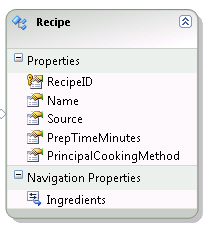
In this case, the model still needs to be accompanied by the other metadata (Store schema and mappings) that allow EF to figure out how to get back to the database. But you can now construct LINQ to Entities against the classes or Entity SQL queries against the model.
While the naming is critical, there is one other very important ingredient to enabling this feature.
You must create a separate class that inherits from ObjectContext to wrap these classes so that they can be used in queries and will be managed by the context.
Listing 2 shows the context class which I have placed in the same project as the model. Notice that it references the POCOClasses that are in a separate assembly.
This allows me to write queries such as:
from r in context.Recipes select r
and work with the resulting objects as I would with any that inherit directly from EntityObject.
Now you can have your cake and eat it too. The classes themselves know nothing about the Entity Framework, yet they can participate fully as entities and benefit from the functionality of the Entity Framework.
For an extensive look at the POCO implementation in EF, check the Resources sidebar for links to a series of POCO posts from the EF team blog.
State Management Methods
One of the bedeviling problems with EFv1 is controlling the state of objects. It doesn’t offer a lot of options to directly affect object state other than iterating through ObjectStateEntry properties and calling SetModified. EF4 offers ChangeState and ChangeRelationshipsState methods.
These are methods of ObjectStateEntry and cannot be used directly against the objects themselves. This makes sense considering that a POCO class will not inherit a method from EntityObject, but its ObjectStateEntry will always be available in the ObjectContext.
ObjectStateEntries are difficult to visualize in the debugger. About a year ago I created my own extension method to help with this. Look for a link in the Resources-My ObjectStateEntry Visualizer sidebar to download my ObjectStateEntry visualizer. I’ll use this to help demonstrate the new methods in the screenshots of the following discussion.
ChangeState for N-Tier Apps
You can use ObjectStateEntry.ChangeState to change an object’s state to Added, Modified, Deleted or Unchanged. You should be well aware of the impact that the various choices will have on your entities.
The purpose of these methods is to overcome problems with reconnecting entities that have come from other processes (Web applications and services, for example), currently quite tricky to do in EFv1.
Changing State of Unmodified Objects
Figure 4 shows my visualizer to observe the state of a Person entity when it is first attached to the context. This could be an entity that was returned from a client app to a Web service where the client app assigned a temporary ID to a new object.
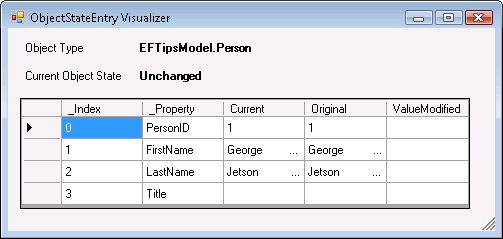
You can change the state of this entity to Added which you must do using its ObjectStateEntry.
Person aPerson = context.People.First();
ObjectStateEntry oseAPerson =
   context.ObjectStateManager
   .GetObjectStateEntry(aPerson);
oseAPerson.ChangeState(EntityState.Added);
Now look at the new state in Figure 5. The EntityState is Added and all of the original values are gone. What is not displayed is the fact that the method also created a new temporary EntityKey as any other Added object would have.
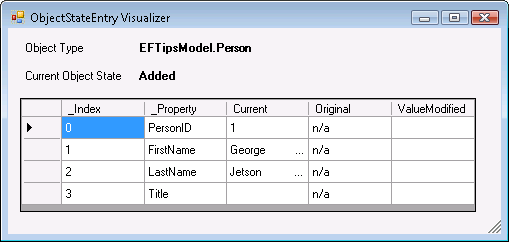
If you called SaveChanges at this point this new person will get added into the database with an Insert command. You may wonder how that could be considering that the PersonID is still intact. Because the state is Added and the EntityKey does not have the original tracking information, the PersonID is ignored when the Insert command is created and it is replaced with the new value that is generated by the database.
If you change an Unchanged entity to Modified, notice the effect on the entity as shown in Figure 6.
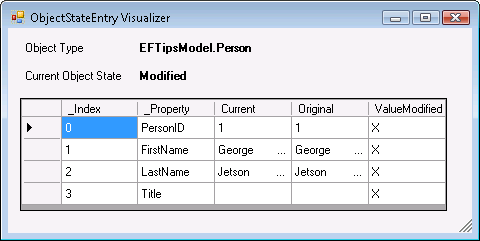
Not only is the state now Modified but all of the properties are seen as modified as well. Saving changes will cause an Update command to be created with every value passed in for updating.
Changing the state to Deleted will have the same effect as calling context.DeleteObject().
Changing State of Modified Objects
What happens if you begin with an object that has been modified?
Changing its state to Added will have the same impact as it did on the Unchanged entity.
Changing its state from Modified to Unchanged is another interesting scenario. Figure 7 shows the entity after the FirstName was edited.
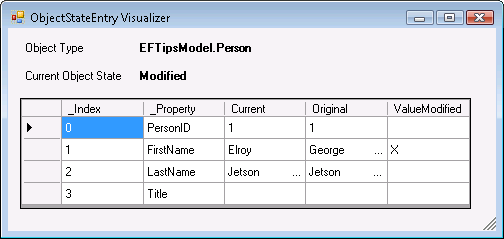
Figure 8 shows the impact of changing the state to Unchanged. All of the current values are pushed into the Original values and the state becomes Unchanged. Be careful not to think that the entity has just been rolled back to its original state because that is the opposite of what happens here. While this entity will be ignored during SaveChanges, it has still retained the latest version of the properties.
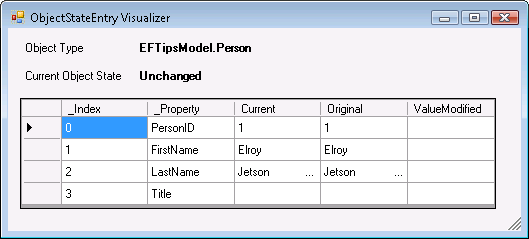
ChangeState will play a big role in fixing up EntityState when you are working across processes, e.g., using Services. Do not ignore the impact on graphs. It will still take some more exploration to have an understanding of how to work with graphs using the ChangeState method.
ChangeState will play a big role in fixing up EntityState when you are working across processes.
ChangeRelationshipState
SaveChanges also reads the state of relationships in order to properly set foreign keys in the database. Relationships are tracked by the ObjectContext as well as entities. If a relationship changes, EF notes that one relationship was deleted and another was added. If you are rebuilding the state of entities that have relationships, you will need to take the relationships into account as well. ChangeRelationshipState helps you orchestrate the graphs. Check the MSDN documentation for more details.
ApplyCurrentChanges and ApplyOriginalChanges
The ApplyPropertyChanges method in EFv1 updates one entity with the values from another entity. This is a useful method when working across processes, which I have employed frequently. In EF4, the method has been renamed to ApplyCurrentValues and has been joined by a sibling, ApplyOriginalValues.
ApplyCurrentValues is intended to update the current values of a change-tracked entity, presumably one that has just been retrieved from the database. This would allow the ObjectContext.SaveChanges to create the appropriate command to update the database with those new values.
ApplyOriginalValues presumes that the entity being change-tracked already has the values that need to go into the database, but is missing appropriate original values. This is a more natural way to deal with objects that have come across tiers from another process; it makes more sense to attach the object that was sent from the client. But by calling context.Attach (or using an ObjectSet, e.g., context.People.Attach) it will automatically become an Unchanged entity with matching current and original values. ApplyOriginalValues fixes this problem.
Figure 9, for example, shows an entity (sent from a client-side application) which has just been attached to the context and contains the values that I want to be saved back to the database. Because I have just attached it to the context, its state has been set to Unchanged and the original and current values of its ObjectStateEntry were both populated with the values of the entity.
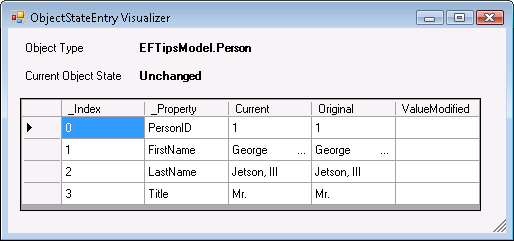
If I were to call SaveChanges now, the context would see nothing in this entity that needs updating so nothing will happen. If I have a copy of the object in its original state (which is detached from the context), I can call:
context.People.ApplyOriginalValues
  (originalPerson);
Now, as shown in Figure 10, the values from the original entity have been applied, the EntityState is Modified and the context is aware that the LastName and Title have been modified.. When you call SaveChanges, an Update command will be generated that will update the LastName of this person to Sampson.
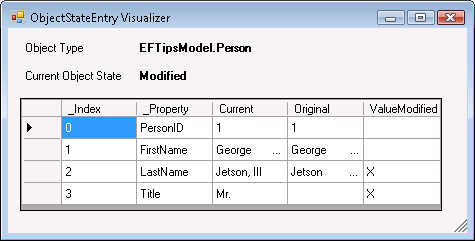
These new methods allow you to control the state of an entity without relying on the presumptions that EF makes about your data and its state.
Other Changes to Watch For
Microsoft made many other improvements in the Entity Framework. Some of these are in the current Beta, some will be coming in the next Beta of VS2010 and others will be provided in a “Feature Pack” until they can added into Visual Studio.
In Beta 1
One important change to be aware of is the way in which queries are generated under the covers, which has a great impact on query performance.
An addition to the model itself is the ability to define functions directly in the model. This is referred to as Model-Defined Functions and provides big advantages over our current ability to add custom properties to an entity.
Many changes to the designer, including naming of entities using logical Singular and Plural names, support for complex types and the ability to generate a database from a model are causing big sighs of relief for many developers.
Look for my next “What’s New in Entity Framework 4” article for an introduction to these designer improvements and the Model Defined Functions.
Coming in Beta 2
A big change that did not make it into Beta 1 but should be available in Beta 2 is strong Foreign Key support in the model. You will have the option to continue to design the model with Navigation associations or rely on Foreign Key associations instead.
Coming in the EF Feature Pack
Microsoft will also release an EF Feature Pack alongside of VS 2010 to provide two big features that the team couldn’t get wrapped into EF4 on time. The first will be the ability to work with EF without a model at all. The EF team currently refers to this as “Code Only” development where your classes can benefit from the ObjectContext without having to be linked to a model.
The Feature Pack will also have “Self-Tracking Entities” which will provide extensible entities that can retain their state values so that all of the attaching and detaching and often unintuitive patterns you must apply when working across processes, e.g., with services or Web applications, will no longer be necessary. While many developers will take advantage of Self-Tracking Entities, others will prefer to work with lighter weight classes and continue to rely on additional logic to make up for the loss of change tracking information.
Additionally, the Feature Pack will include more T4 templates, including those for creating POCO classes.
Check the EF Feature Pack sidebar for resource links and I will cover these features in the next installment of “What’s New in Entity Framework 4?”
Summary
The Entity Framework Team has been very attentive to feedback from the community about the first release of Entity Framework. While moving forward with the plans they have for evolving EF, they have also addressed many of the architectural challenges we have encountered with the current version.
There are numerous detailed changes, such as small but very useful functionality in the designer and some big conceptual changes such as the ability to use your own classes yet still benefit from EF’s querying and change tracking without having to be tightly bound to the framework at all.
Because Entity Framework is now the main focus of Microsoft’s data access going forward, this product will continue to evolve beyond EF4.
Remember that I wrote this article using the Beta 1 version of EF4. Microsoft will certainly make changes in Beta 2 as the team continues to wrap up their work and also respond to the feedback they received with the first Beta. The Beta 2 version will be much closer to what you should expect in the final release that will be part of Visual Studio 2010 and .NET 4.0.
Listing 1: Part of the BikeRoute class generated by the default template
[EdmEntityTypeAttribute(NamespaceName="BikeRides",
                        Name="BikeRoute")]
[Serializable()]
[DataContractAttribute(IsReference=true)]
[KnownTypeAttribute(typeof(MountainBikeRoutes))]
public partial class BikeRoute : EntityObject
{
  [EdmScalarPropertyAttribute(EntityKeyProperty=false,
                              IsNullable=false)]
  [DataMemberAttribute()]
  public global::System.String RouteName
  {
    get
    {
      return _RouteName;
    }
    set
      {
        OnRouteNameChanging(value);
        ReportPropertyChanging("RouteName");
        _RouteName = StructuralObject.SetValidValue(
                     value, false);
        ReportPropertyChanged("RouteName");
        OnRouteNameChanged();
      }

    }
    private global::System.String _RouteName;
    partial void OnRouteNameChanging
     (global::System.String value);
    partial void OnRouteNameChanged();
Listing 2: Class to provide a context that can be used to query and change track POCO entity classes
using System.Data.Objects;
using POCOClasses;

namespace POCOModelandContext
{
  public class RecipeContext: ObjectContext
  {
    private ObjectSet<Recipe> _recipes;
    private ObjectSet<Ingredient> _ingredients;

    public RecipeContext()
        : base("name=RecipesModelContainer",
               "RecipesModelContainer")
    {
      _recipes = CreateObjectSet<Recipe>();
      _ingredients = CreateObjectSet<Ingredient>();
    }
    public ObjectSet<Recipe> Recipes
    {
      get
      { return _recipes; }
    }
    public ObjectSet<Ingredient> Ingredients
    {
       get
       {  return _ingredients; }
    }
  }
}
