


This time around I’ll expand on these concepts and show you how you can use jQuery in combination with ASP.NET as an AJAX backend to retrieve data.
I’ll also discuss how you can create ASP.NET controls and otherwise interact with jQuery content from ASP.NET pages in Web Forms.
In the first part of this article series I introduced jQuery’s functionality and how it provides a rich client-side programming model.
jQuery is just a JavaScript library so it will work seamlessly with ASP.NET both from page code as well as through backend driven code using the Page.ClientScript object or ScriptManager. You can use jQuery on its own as a client side and AJAX library that communicates with ASP.NET or you can use jQuery in combination with ASP.NET AJAX. The two actually complement each other quite well as jQuery provides functionality that the ASP.NET AJAX library does not and vice versa. For the most part the interaction between the two libraries is trouble free except for a few very rare edge cases.
In this article I’m not going to be talking much about ASP.NET AJAX since that’s been covered ad infinitum in other places-the procedure doesn’t vary much if you’re using ASP.NET AJAX with jQuery. Instead I’ll focus on using purely jQuery on the client without the ASP.NET AJAX client library, and I’ll provide a few small helpers that I’ll describe below to make callbacks to the server easily. In the process you’ll get to see how some of jQuery’s AJAX features work.
First AJAX Steps with jQuery
One of the most obvious client-side features of any JavaScript client library is the ability to make AJAX calls to the server. jQuery includes a host of AJAX functions that make it easy to retrieve content from a URL in a variety of ways. Here’s a list of some of the functions available:
$.ajax(opt)
This the low-level AJAX function with many, many options that lets you create just about any kind of AJAX request. If you need full control over requests or you want to create a generic component that calls back to the server (like the WCF/ASMX client proxy I’ll discuss later) you’ll want to use this function. For now check out the documentation (http://tinyurl.com/4mcnaa) on the multitude of options available.
$(sel).load(url,callback)
The .load() function is the only AJAX function that works off a jQuery selector. It calls a URL on the server and loads the result as content into selected element(s). It’s a very quick and easy way to load HTML fragments and inject them into the client HTML document. You can provide an optional callback to be notified with the server result text when the callback completes, which is useful if you want to visually adjust the retrieved content-like applying an effect to visually cue the user to an update.
$.get(url,callback),$.post(url,data,callback)
These functions are simple helpers that provide basic get and post operations to the server. You specify a URL and a callback, which is called with the HTTP response from the server. $.post() also allows you to pass either a formatted POST buffer string or an object the properties of which are turned into POST encoded key value pairs.
$.getJSON(url,data,callback)
Similar to $.post(), but expects the result to be JSON which is automatically deserialized into a JavaScript value and passed to the callback as a parameter. While this function is handy for simple JSON results there are two things to watch out for: Dates are not parsed since there’s no date literal in JavaScript, so whatever the server returns will be used (typically a string). $.getJSON() also doesn’t support JSON POST data-only POST encoded variables. There’s no built-in JSON serialization. $.getJson() function is useful for simple JSON results returned from arbitrary services, but not usable for calling WCF or ASMX ASP.NET services since they expect JSON POST input. I’ll write more on this later in the article.
.getJSON() also supports cross-domain JSONP callbacks. If you specify a query string parameter of callback=? you can force the result to be routed to the callback you specify in the parameter list.
$.getScript(url,callback)
This function loads script code from the server and executes it once downloaded if you haven’t specified a callback. If specified, jQuery fires the optional handler instead and passes the JavaScript, plus the current AJAX request. This can be useful for JSONP cross-domain callbacks where you have no control over the parameters used.
Global AJAX Events
There are also a number of global AJAX events that you can take advantage of, all of which take callbacks as parameters: ajaxCallback(), ajaxError(), ajaxSend(), ajaxStart(), ajaxStop(), and ajaxSuccess(). These are useful for setting up global handlers that can centrally manage AJAX requests. You’re not likely to need these much unless you build components that need to know status of requests.
Getting Started with $().load()
The load() function is the easiest way to retrieve content from the server and display it. Let’s look at a simple stock quote example from the included code samples. It retrieves a stock quote from Yahoo and displays the results using the .load() as shown in Figure 1.
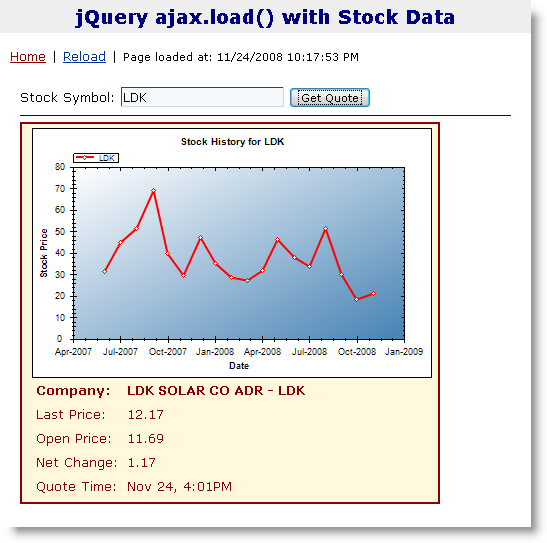
This page works by utilizing two HTML pages: One to hold the input form (StockAjaxLoad.aspx in the sample download) and one to display the actual stock chart (StockDisplay.aspx). The StockDisplay form is a standalone server page that renders an HTML fragment. It’s called from jQuery via .load() to return the fragment with the completed stock data.
You can access the stock display form simply via query string parameters by providing a symbol name, or providing an action=Chart key value pair to render the stock chart image. The two URLs the form accepts look like this:
StockDisplay.aspx?Symbol=msft
StockDisplay.aspx?Symbol=msft&action=Chart
The form itself is a plain server form with a few label controls. The codebehind loads up a stock quote by using a StockServer class that goes out to Yahoo from the server and retrieves stock data, parsing it into a stock quote object. The resulting quote data is then assigned to the label fields. The page is not a full HTML document but rather just a fragment that starts with a <div> tag and <table>-there’s no <html> or <body> tag since you’ll merge the output into the existing document. Check out and test the StockDisplay.aspx to see how the display and stock retrieval works.
The key part of the client page contains only the form fields and a placeholder, is very simple, and looks like this:
<div class="containercontent">
    Stock Symbol:
    <asp:TextBox runat="server"
                ID="txtSymbol"
                Text="MSFT" />
    <input type="button"
           id="btnSubmit" value="Get Quote"
           onclick="showStockQuote();" />
    <img src="../images/loading_small.gif"
         id="imgLoading"
         style="display: none"/>
    <hr />
    <div id="divResult"
         style="width:420px"></div>
</div>
To load a stock quote with jQuery you can now very easily read the symbol and use the .load() function to load the result into divResult:
<script type="text/javascript">
    function showStockQuote() {
      $("#divResult")
        .load("StockDisplay.aspx",
        { symbol: $("#txtSymbol").val() });
    }
</script>
That’s it! Call .load() with the URL plus the optional data parameter, which can be either a string (a raw POST buffer) or an object map, the properties of which turn into POST parameters. Here I’m passing an object with a single symbol property that is turned into a symbol POST variable on the server.
On the server form the StockDisplay.aspx fragment page code simply picks up the symbol with Request.Form["symbol"], retrieves the stock quote from Yahoo, updates the HTML display, and renders the page. Listing 1 shows the StockDisplay codebehind that handles both the stock display and stock chart image.
Note that the single page handles both the text and image displays by routing via query string and post variables and a little routing.
That was easy. Using .load() to call an external page is childishly simple.
But you probably should improve the sample a little bit. The first thing to do is to make the display a little more interactive. When you load a stock quote when one is already active it’d be nice to use an effect to “clear” the old quote and display the new one. You can use the .load() method and its callback parameter to coordinate sliding the display up and down again once the quote has loaded completely. This takes a little coordination as Listing 2 demonstrates.
jQuery’s .load() function makes it easy to load HTML fragments into the page.
ASP.NET ClientIDs and jQuery Selectors
In the code above I’m simply using the ID of the txtSymbol control. That works fine in this particular example, because the txtSymbol control is not contained inside of any ASP.NET naming container like a MasterPage or UserControl. If it did, the code above would fail because the ID would not be found.
Specifically inside of a master page you might find that the ID gets mangled by ASP.NET into: ctl00_Content_txtSymbol. I could change my code to read:
{ symbol: $("#ctl00_Content_txtSymbol").val()}
which works, but is pretty ugly and volatile because the parent IDs might change if you rename or move around a container.
Another option is to use a little server-side script markup to embed the ClientID:
{ symbol:
  $("#<%= txtSymbol.ClientID %>").val()
}
This is also ugly, but more reliable. However, this does not work if you end up moving your code into a separate .js script file. If you use client IDs like this a lot you might create a list of them as global variables:
var txtSymbolId =
   "<%= txtSymbol.ClientID %>";
var txtQtyId =
   "<%= txtQty.ClientID %>";
which then lets you reuse the variable a little more easily across all scripts:
{ symbol: $("#" + txtSymbolId).val() }
Finally, some time ago I created a ScriptVariables component that allows for creating variables on the server and rendering them into the client. Among its features this component can expose all control client IDs as object properties under a named object. You can find out more about this component here: http://tinyurl.com/cfknh3. Using this approach you end up with a server object variable of your choosing that has all control names attached to it as properties with an ID postfix. Code can then access this object like the following snippet where serverVars is the object name and txtSymbolId references the txtSymbolId.ClientID value:
{ symbol: $("#" + serverVars.txtSymbolId)
            .val()}
All of this is pretty ugly and might make you want to consider not using master pages and user controls in script-heavy pages. However, the workarounds are fairly easy, just tedious.
In the future ASP.NET 4.0 will bring some relief in this regard with a new Control property that lets you specify how control IDs are rendered with an option to override INamingContainer name mangling.
Using .load() with the Same ASPX Page
In the last stock example I used a separate ASPX page to display a result, which is great if what you’re rendering warrants a self-contained page. But often you simply want to render some HTML to load into the page by simply calling back to the current page to keep things self contained. Having a separate page (or even a user control) for each AJAX callback certainly can be overkill.
However, you can use pretty much the same process used in the last example to call back to the same page. The main difference is that you’ll need to do a little bit of routing to determine whether you are in a callback or whether you’re rendering the full page as a standard postback.
Let’s look at another example that demonstrates this Page callback process. In this example, I’ll use some server-side control rendering to render a ListView Control with data and return the HTML fragment result back to the client. Again the client page uses $(sel).load(). Figure 2 shows what the sample looks like.
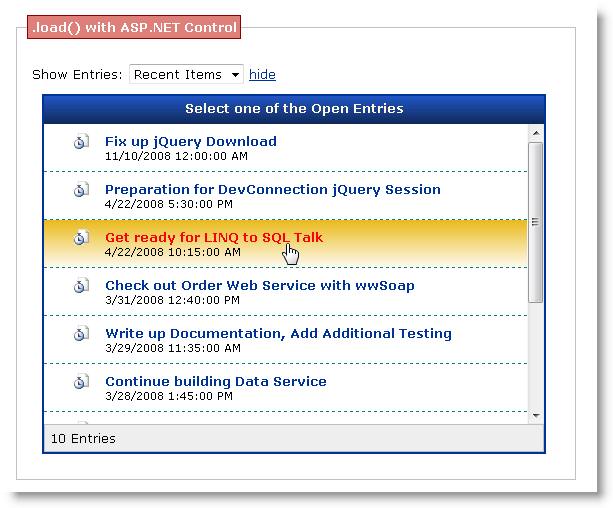
The layout of this portion of the sample is very simple. It contains merely the drop-down list plus a placeholder that receives the result from the server. The markup for this is shown in Listing 3.
The page also contains a non-visible ListView control and status bar wrapped into an initially hidden PlaceHolder control. When the page loads, the placeholder and its content is not rendered.
When the selection changes in the list, the showEntries JavaScript function runs and calls the server to retrieve the list based on the value selected in the filter drop-down list.
On the server side, the key to making page callbacks into the same page is routing. Notice the URL I’m using above which includes a Callback=EntryList query string parameter. This sample page contains several different callbacks and each of them has a unique Callback ID that I’ll use on the server side to route to the appropriate page method to process the callback appropriately. Listing 4 shows the server page that includes the routing logic.
The routing is very simple-the Page_Load() calls HandleCallbacks(), which looks for the Callback query string variable. If passed it goes into callback processing mode, otherwise the code simply resumes normal page processing. If it is a callback, routing takes over page processing, which eventually results in full page output being sent back to the client with the AJAX response.
HandleCallbacks simply maps the Callback ID to a specific method in the Page class. If I add a new callback all I have to do is add another ID and map it to another method. Each method should return a full HTTP response-including potentially managing errors.
For the entry list the routing is sent to the EntryList method, which loads data from LINQ to SQL into the ListView page control by running a query and data binding the ListView with data. Once bound, use a utility routine (provided with the samples) called WebUtils.RenderControl() to render the entire PlaceHolder containing the list view and headers and return just the HTML output. There’s also a WebUtils.RenderUserControl(), which allows you to specify a user control to load dynamically and render. RenderControl’s implementation is quite simple and shown in Listing 5.
This works great for list controls like ListViews and Repeaters or simple containers like PlaceHolder. But there are a few caveats: It will only work with simple controls that don’t post back to the server even when you don’t plan on using any Postback operations. For more complex controls or containers you’ll have to use the more complete RenderUserControl method in the same WebUtils library. You can read more about these two routines in this blog post (http://tinyurl.com/bwcff3) and review the code in the samples download.
Rendering controls is only one way to generate the HTML fragment output of course. You can also hand-code HTML output, or generate output from canned routines in your library-it doesn’t matter where the HTML comes from as long as you can return it back as a string. The same SimplePageCallbacks.aspx page contains a couple of other examples that return generated HTML data in a few other ways.
Returning JSON from a Page Method
To demonstrate returning data, let’s reuse the earlier stock display example, but instead of returning HTML let’s return a JSON string. JSON stands for JavaScript Object Notation. It’s an object representation format that JavaScript understands natively and can evaluate directly without custom parsers. This makes JSON very efficient and easy to use compared to say XML which has to be parsed and interpreted. JSON strings are simply evaluated, and as long as the JSON is valid the result is a JavaScript variable or object.
If you look back at the HandleCallbacks method in the page, one of the routes calls the GetStockQuote() function. This method uses the ASP.NET AJAX JavaScriptSerializer() class to create JSON on the server and return it to the client as shown in Listing 6.
This code is very simple. It generates a stock quote object by using the StockServer business object. The code then uses the JavaScriptSerializer to turn this StockQuote object into a JSON string.
The generated JSON string of the serialized StockQuote looks like this:
{"Symbol":"VDE",
 "Company":"VANGUARD ENRGY ET",
 "OpenPrice":0,"LastPrice":67.97,
 "NetChange":0.00,
 "LastQuoteTime":"\/Date(1227578400000)\/",
 "LastQuoteTimeString":"Nov 24, 4:00PM"}
This JSON is sent to the client, which requests it by calling back to the ASPX page with the Callback=GetStockQuote querystring. The code in Listing 7 demonstrates making a jQuery .getJSON() callback to retrieve and then display the stock quote.
ClientID management in JavaScript code is a pain.
The third parameter in the .getJSON() function call is a handler function that receives the AJAX result, which is based on the JSON response sent back from the server.
The anonymous function that handles the callback simply assigns the object property values to the appropriate DOM elements. Note that a few helper functions are used from the ww.jquery.js support library you can find in your samples. Here I used the formatNumber function to format numbers to the proper numeric display.
Those Pesky JSON Dates
.getJSON() works great in simple scenarios like this where you only receive a JSON result. I’m lucky however in that the date I’m interested in is provided as a string. I’m not using the LastQuoteTime property of the stock quote, but rather the preformatted string version LastQuoteTimeString, which is generated on the server.
Take a look at the LastQuoteTime date in the JSON string above again and notice how it’s formatted. The issue is that JavaScript does not a have a standard Date literal, so there’s no effective way to embed a date into JSON that is universally recognizable as a date by a parser. Microsoft uses a string that’s marked up like this:
"LastQuoteTime":
      "\/Date(1227578400000)\/"
This value is a special string encoding format that starts with slashes, and then has a pseudo-date function that contains milliseconds since 1/1/1970, which is the JavaScript 0 date. The format is easy to recognize and parse which is why I suspect Microsoft created it, but it’s still a string, so if you read this value with .getJSON() you’d get back a string rather than a date. Unless you have a parser on the client that understands this date format the date isn’t parsed and .getJSON() won’t parse it for you.
I’ll talk about how to address the date issue in the next section, but for now just keep in mind that JSON is a nice lean way to return data to the client and also send data back to the server.
JSON and Service-based AJAX
Returning JSON is a great way to build client-centric applications. One of the big draws of returning and also passing back JSON to the server is that you can make very small and atomic accesses and updates to the server with very little data travelling over the wire. HTML is bulky, where JSON is much more precise and results in much smaller payloads.
Using JSON amounts to a more client-centric approach to User Interface development. Rather than using the server to generate HTML from the current page or other pages, you can use the server as a service to return only data. You can then use client-side script code to update or create your User Interface, which given the flexibility that jQuery provides can often be much easier than generating the same server-side HTML.
It’s also easier to create JSON on the server side. The approach I showed is only one of many ways that you can generate JSON. Since I’m talking about a data format often times you don’t need to use ASP.NET pages (or MVC views for that matter) to generate JSON-instead you can use lightweight modules or, as you’ll see next, WCF or ASMX Web services.
Using jQuery with WCF and ASMX Services
If you are planning on using .NET as a data service to return data to client applications, there is a rich service infrastructure in the form of Windows Communication Foundation (WCF) or ASMX Web Services available. Both platforms as of .NET 3.5 support exposing services to JSON natively. If you’re using .NET 2.0, you can also use the ASP.NET AJAX Server Extensions 1.0 to provide the same functionality.
When using either WCF or ASMX JSON services, you have the choice of using ASP.NET AJAX to call these services using the ASP.NET ScriptManager to provide the client service calling infrastructure. I’m not going to cover this method in this article since this is covered in plenty of other places and doesn’t really affect jQuery usage. When you use ScriptManager and the client proxy generated by it, you can simply call the Web Service based on the proxy generated using the class and methods exposed by it. You can then use jQuery to apply the retrieved data as shown here or in Part 1 of this article series. I have also provided the BasicWcfServicesScriptManager.aspx example that mirrors the jQuery-only code I’ll describe in the next section.
Creating a WCF Service for AJAX Consumption
To create a WCF REST service that you can call with AJAX callbacks, you need to do the following:
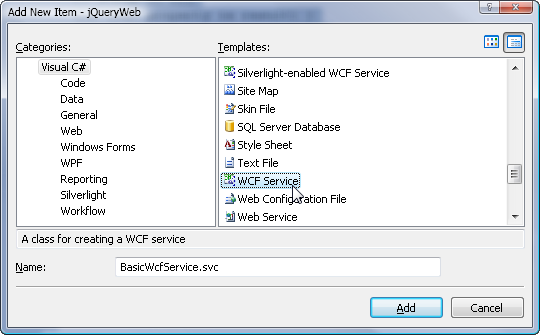
1. Add a new WCF Service to the Web Application as shown in Figure 3. This results in a new .svc file and codebehind file to be added to your project. Make sure that your Web Application or Project is a .NET 3.5 based project since only .NET 3.5 supports WCF REST Services.
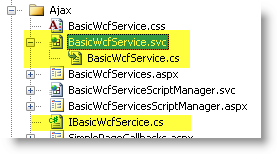
Once you’ve added the service you should see the service in the Web Application Project as shown in Figure 4. Note that if you are using stock Web Projects (rather than WAP as shown) the code-behind and interface file will be located in your APP_CODE folder instead.
2. Open up the .SVC file. In markup mode add a the WebScriptServiceHostFactory as follows:
<%@ ServiceHost Language="C#"
        Service="WcfAjax.BasicWcfService"
        CodeBehind="BasicWcfService.cs"
   Factory="System.ServiceModel.Activation.
          WebScriptServiceHostFactory" %>
This host factory is pre-configured to set ASP.NET AJAX style messaging that allows ASP.NET AJAX as well as your jQuery clients to effectively and consistently communicate with the server. The WebScriptServiceHostFactory configures requests in such a way that all requests must be made with the POST verb and expect JSON objects with parameter properties as input and wrapped JSON objects as output. Also, any service errors are returned as exception objects rather than raw HTML messages allowing you to effectively marshal service exceptions to the client.
3. Remove any Service configuration settings related to the new service from web.config. When the service was added by default it was added with wsHttpBinding, which is a SOAP binding that won’t work with AJAX. Remove all related entries as WebScriptServiceHostFactory provides all the necessary configuration settings for you. You can still configure the service later with custom binding behavior settings if necessary, but in most cases the default behavior of the factory is sufficient.
If you’d like to use ASP.NET Compatibility in your Web Service to be able to access the HttpContext.Current object in your code the same way as ASMX services did, you can add the following setting into the web.config file:
<system.serviceModel>
<serviceHostingEnvironment
aspNetCompatibilityEnabled ="true"/>
</system.serviceModel>
Using AJAX as a data service gives more fine-grained control than server HTML rendering.
4. Set up your Service Class. By default the WCF wizard will set up your service contract interface and implementation class as two separate classes. Traditionally in WCF you define your service contract in the interface where you specify the [OperationContract] and other attributes and any custom behaviors. You then create a class that implements the interface that provides the actual operational implementation. While you’re free to implement the contract interface and class separately, for AJAX services, which tend to be single focused and totally application specific, I prefer to implement only a single service class that implements both the contract and implementation on a single class as shown in Listing 8.
Using Only jQuery to Call WCF
To call this service only using jQuery you’ll need to do a little bit of work. As you’ve seen, jQuery has support for basic JSON retrieval in the form of the .getJSON() function, but this method isn’t adequate for calling WCF or ASMX services properly. There are two problems with .getJSON(): It doesn’t support client-side JSON serialization natively and it doesn’t know how to deal with ASP.NET-style date formats. To address this you’ll need:
MS AJAX-aware JavaScript JSON Serializer
jQuery does not include a JSON serializer. Since WCF/ASMX require parameters to be sent as POSTed JSON objects, a serializer is required on the client. The standard getJSON() deserialization also doesn’t work with the MS date format ("LastQuoteTime":"\/Date(1227578400000)\/") so special handling is required for deserialization as well. For this task I’ve provided a modified version of Douglas Crockford’s JSON2.js or ww.jQuery.js, both of which include JSON parsers that understand the Microsoft date format both for serialization and deserialization.
A Custom Service Callback Handler
Making a WCF callback requires setting quite a number of options on the $.ajax() function, and the results coming back have to be handled properly in order to yield consistent values. You need to “unwrap” WCF results and normalize any $.ajax() errors so that an error object is returned. To facilitate this process and make it easy to call service methods, I’ve provided the small ServiceProxy client class in Listing 11 as well as in ww.jquery.js (which provides a slightly more complete version).
In the following example, I allow the user to enter a set of stock symbols to retrieve StockQuotes objects that are then rendered into a list view like display on the client as shown in Figure 5.
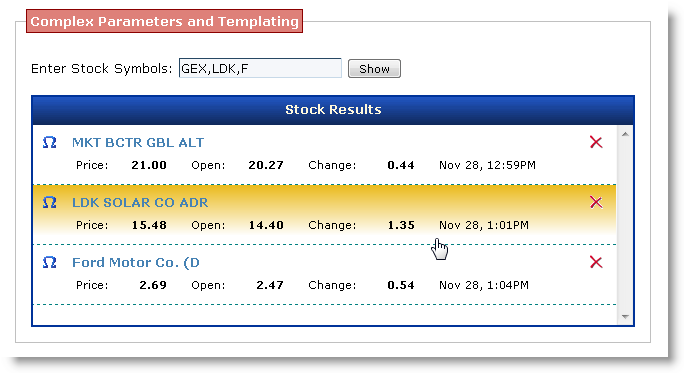
Unlike the Page examples earlier, in this example the server only provides JSON data rather than HTML to the client and the list is entirely client rendered. The client renders the result by using an empty “fake template” that exists in the HTML document and filling in the “data holes” with the data retrieved from the server for each of the retrieved stock quotes.
Listing 9 shows the JavaScript code used to make the callback to the server and handle the updating of the display when the callback returns using the ServiceProxy class.
The sample page uses the ServiceProxy class for the callback. The ServiceProxy constructor receives the URL of the service to call including the trailing backslash when instantiated. Once instantiated, you can call the .invoke() method of the proxy instance to make a callback to the server.
jQuery is a perfect complement to AJAX Web Services because it’s so easy to consume raw data and update page content dynamically.
When calling the GetStockQuotes method, the code first retrieves the input field value containing the comma-delimited symbols and splits them up into an array as the server method expects. I use the ScriptVariables short for Client IDs mentioned earlier that exposes all ClientIDs as properties of the serverVars object. So serverVar.txtSymbolsID contains the ClientID of the txtSymbols control. The user enters symbols as a comma-delimited list, which is .split() into an array of strings that the service method excepts as an input parameter. Client parameters should always match the server method parameters, and they are marshaled to the server via JSON.
Next you call the service with proxy.invoke(). You pass this method the name of the service method to call plus any parameters, which are provided in the form of an object with each parameter a property of the object. So the service method is defined like this:
[OperationContract]
public StockQuote[] GetStockQuotes
      (string[] symbols)
{
    StockServer server = new StockServer();
    return server.GetStockQuotes(symbols);
}
On the client I’m passing an object that has a symbols property with the symbols array as a value:
{ symbols: symbols }
If you had multiple parameters you’d express them as an object with multiple properties with each property matching the server parameter names:
{ symbol: "MSFT", years: 2 }
In the GetStockQuotes call the invoke method serializes the symbols array into JSON and sends it to the server for processing. The server-side method in the WCF service class receives the symbol array, and then retrieves a set of quotes as an array that is returned to the client. The JSON result is an array of StockQuote objects, which WCF returns like this:
{"d":
   [{"__type":"StockQuote:#WcfAjax",
     "Company":"LDK SOLAR CO ADR",
     "LastPrice":15.48,
     .. more quote properties
     "Symbol":"LDK"
    },
    {"__type":"StockQuote:#WcfAjax",
     "Company":"MKT BCTR GBL ALT",
     "LastPrice":21.00,
     .. more quote properties
     "Symbol":"GEX"
    }
   ]
}
Note the odd “root-level wrapped property” that’s typical of WCF and ASMX services. This is called the “wrapped” format I’ve been talking about previously and is a Microsoft convention used for services (WCF and ASMX services have always returned wrapped objects). What this means is that the root d property contains the actual result, which is a single value, namely an array of two stock quote objects. This silliness is all hidden for you inside of the proxy’s invoke method, which unpacks the wrapped element and just returns the actual result back to you.
So when the callback is made successfully, only the array of quotes is passed to the callback function, not the whole evaluated WCF structure.
If you look back on Listing 9 you see that the third parameter is a callback handler and it receives the result as an array of quote objects. The code that follows then parses through the array and effectively adds new items into the following placeholder in the HTML document:
<div id="divStockDisplay"
     class="blackborder"
     style="display:none;width: 600px;">
    <div >Stock Results</div>
    <div id="divStockContent"
style="overflow-y: scroll;height: 200px;">
    </div>
</div>
The code starts out by making the stock display visible and fading it in as it’s initially not displayed. Then all the content in divStockContent is cleared out since we will be loading a new set of items into the display container. Next the code loops through each of the quote objects using jQuery’s static $.each() function. $.each() loops over each item and calls the specified function in the context of the item parsed-in this case a StockQuote, which is exposed as the this pointer.
Inside of the .each loop, code then proceeds to load up the “template” as shown in Listing 10. I call it a template, but really it’s just a fragment of hidden HTML in the page that holds the empty layout of a stock quote without data.
The code picks up the empty template, clones it, and then fills in the “holes” with the retrieved data from the server. First the template is selected and cloned:
var jCtl = $("#StockItemTemplate")
                 .clone().show();
The result is a new jQuery object of that new, as of yet unattached, DOM element. One important thing to set is the ID property of the item so that each element can be uniquely identified later, so:
var ctl = jCtl
 .attr("id","stock_" + this.Symbol);
accomplishes that task. The code then stuffs the stock quote data into the appropriate “holes” in the template by using the find command and setting the .text() of the element like this:
jCtl.find(".itemstockname")
    .text(this.Company);
Finally when the item has been all updated it gets added to the bottom of the list with:
jDiv.append(jCtl);
which adds the newly cloned and formatted element to the content container. Rinse and repeat for each of the quotes returned and you end up with the result shown in Figure 5 without having to write out HTML code in JavaScript.
Voila! You’ve just called a WCF service with an array input and output value and nice jQuery logic to dynamically render the results on the client.
The ServiceProxy Simplifies Service Calls
The code above is not much more involved than the code you’d write with a ScriptManager generated proxy, but it doesn’t use any of the ASP.NET AJAX client library or ScriptManager. The main difference is that there is no proxy object so you end up calling the .invoke() method with a method name as a string and an object map for each of the parameters, rather than a simple method on the proxy. The rest of the behavior is pretty much the same.
The reusable ServiceProxy client class is basically a wrapper around the jQuery $.ajax() function that uses a slightly modified version of JSON2.js to handle serialization and deserialization and “unwrapping” of success and error responses so the behavior is consistent with object/value results returned in all situations. Listing 11 shows the implementation of the ServiceProxy class.
Most of the heavy lifting is handled by the jQuery $.ajax() function that performs the actual AJAX callback. The .invoke() method first manually serializes the input parameters using JSON2 before making the $.ajax() call. $.ajax() calls either a success or error function when implemented. On success the proxy class unpacks and deserializes the HTTP string result, and then it uses the first “property” value as the result value it passes to the user provided callback function.
The biggest chunk of code deals with error handling. $.ajax() errors can come in several different forms from protocol-level errors to errors in the service code. The error code basically checks for a JSON object, which WCF returns on service-level errors. If a protocol error occurs, the response is HTML and so the status code is retrieved and returned.
Handling Server-side Exceptions
The way error handling works means that you can throw exceptions on the server and receive those exceptions on the client as part of the error callback.
Consider the following service method:
[OperationContract]
public string ThrowServerException()
{
    throw new
      InvalidOperationException(@"Error.");
    return "Gotcha!"; // never fires
}
which you can call and produces expected results with this code on the client:
proxy.invoke("ThrowServerException",
             null,
             function(result) {
                 alert("Never Fired.");
             },
             function(error){
                  alert("Error: " +
                        error.Message);
             });
}
In this case the error function is called and error.Message is going to be “Error.”
Using WCF in combination with the ServiceProxy makes it very easy to create new callbacks on the server: Create a method in the service, and then simply call it with the ServiceProxy class’s .invoke() method.
If you want to take a look at a more involved sample application you can check out the JsonStockClient.aspx example (Figure 6), which uses the ServiceProxy class to create a rich User Interface entirely on the client side against a WCF Service interface.
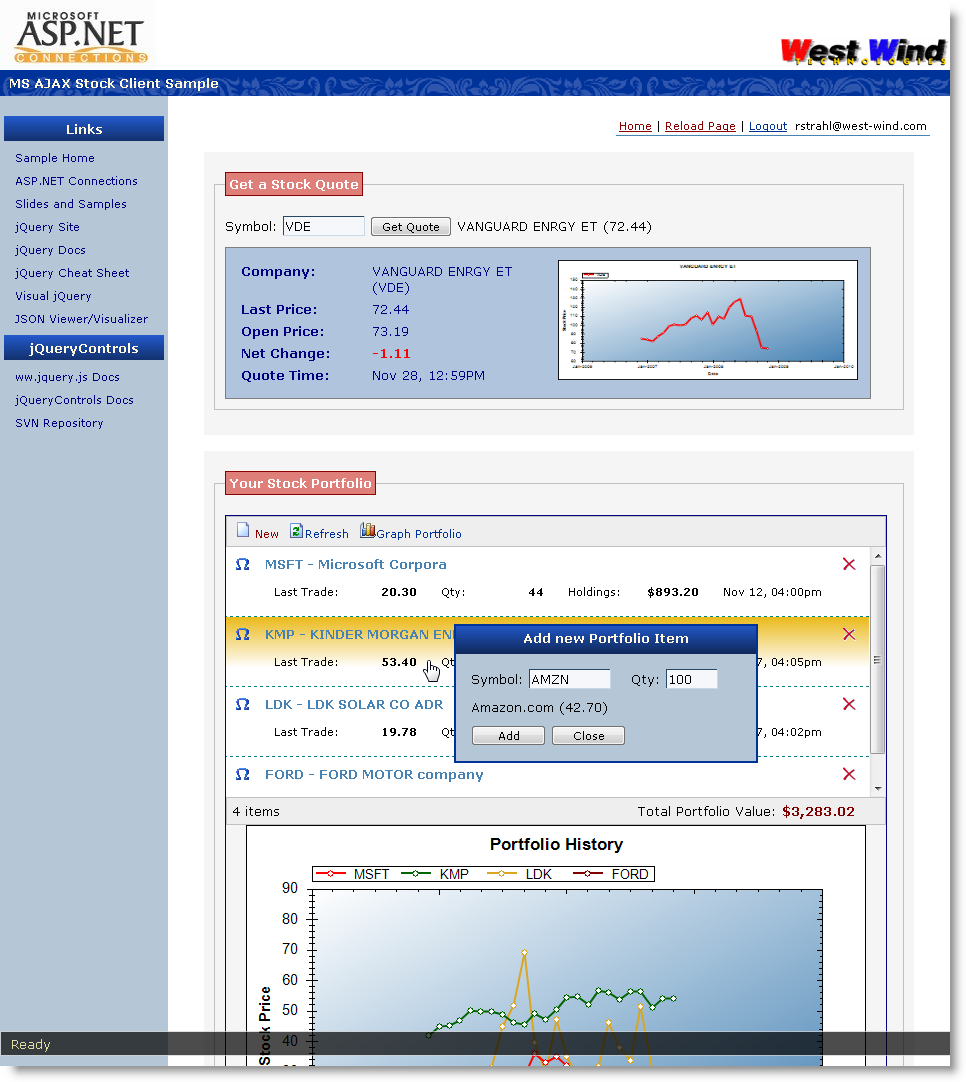
This application lets you retrieve stock quotes and manage a simple stock portfolio. It lists current pricing of stocks that you have added into the portfolio. A number of the concepts I’ve discussed are used in this project as well as the WCF functionality that allows returning image streams from the WCF service, which is used for the stock history graphs.
Creating Client Content with Templates
One other feature of interest in this example is templating. I’ve mentioned templating repeatedly in the first part of the article and again earlier when I used the “data holes” templating approach of cloning content, and then embedding it into the page. While this approach works, it’s still fairly work intensive as you have to explicitly use jQuery expressions to find the “holes” in the template and fill in the blanks.
There are a number of jQuery templating solutions available. I’ve used jTemplates (which has a Python-like templating language) successfully for some time, but I’ve recently switched over to a customized version of John Resig’s Micro Templating Engine (http://tinyurl.com/6c9kq9), which is very compact and uses plain JavaScript as the template language. The beauty of John’s engine is that it’s tiny and entirely uses a language that you should already be familiar with-JavaScript.
Because it’s so compact I’ve integrated the Micro Templating Engine with a few small modifications into my client library (ww.jquery.js). My customizations from John’s code change the template delimiters from <% %> to <# #> to avoid issues with ASP.NET’s page parser, add some basic error handling and display, and fix a small bug that has to do with quote characters. Listing 12 shows my version of the parseTemplate() function that is based almost entirely on John’s original base code.
The idea of a template engine is that you can create markup as you normally do, but embed the data as JavaScript expressions right into the content using tag delimiters. Hey, you know how to do that already in ASP.NET with <% %> tags. The difference is you want to do this on the client rather than on the server.
For example, in the StockPortfolio application, the individual user portfolio items are rendered using the parseTemplate() function above. When the page first loads, no data is rendered into the list by the server. Instead client script requests the portfolio items as an array as a callback, which is then parsed one item at a time using the template. You also use the same template to update items when the user changes a quantity or symbol or adds new items. The point is-define it one place for many different rendering scenarios (whole list, individual item added or updated).
Templates allow you to design the layout and data display in one place and re-use that template, potentially in multiple places. The template for an individual portfolio item is shown in Listing 13.
Note the <script type="text/html"> tag in the template, which is a great way to hide the template from normal HTML markup. This is valid XHTML and any XHTML parser and robot will simply ignore this script block as if it wasn’t there. Yet you can still retrieve the content of the script-the template string-based on its ID. This template is passed a stock quote object and the properties of the quote are accessed inside the <#= #> expressions. The expressions are plain JavaScript expressions and you can see that some of the values call functions like formatNumber and formatDate, which are part of the ww.jquery.js library. You can call any JavaScript expressions in scope. You can also embed code blocks into the page to loop through items, which I’ll show a little later.
Let’s look and see how the client code can retrieve the stock quote data. Listing 14 shows the code to retrieve the portfolio items, iterate through them, and then merge them into the template one at a time using the UpdatePortfolioItem method.
There’s not a lot of code in this sample and that’s really the point. The only thing of interest in regards to templating is the retrieval of the template and merging it with these two lines of code:
var template = $("#StockItemTemplate").html();
var html = parseTemplate(template,
                         stock);
The first line simply returns the template as a string from the script block. The second then merges the stock quote into the template and returns a string result of the merged data for an individual stock item.
The HTML is then turned into a jQuery object that then either replaces an existing item or adds a new one to the list. The UpdatePortfolioItem() function is called from LoadQuotes() as shown, but it’s also called from UpdatePortfolioItem(), which updates or adds new items to the list. So you re-use this function and the template in multiple locations without duplicate code or markup.
One piece of code, one piece of markup all maintained in one place-that’s the benefit of using templates on the client.
parseTemplate() can also work with code blocks so you can do things like loop through a list. The following is another example provided in the BookAdmin.aspx sample. One of the forms displays a search result from Amazon as a list as shown in Figure 7. The template that drives the Amazon book selection is shown in Listing 15.
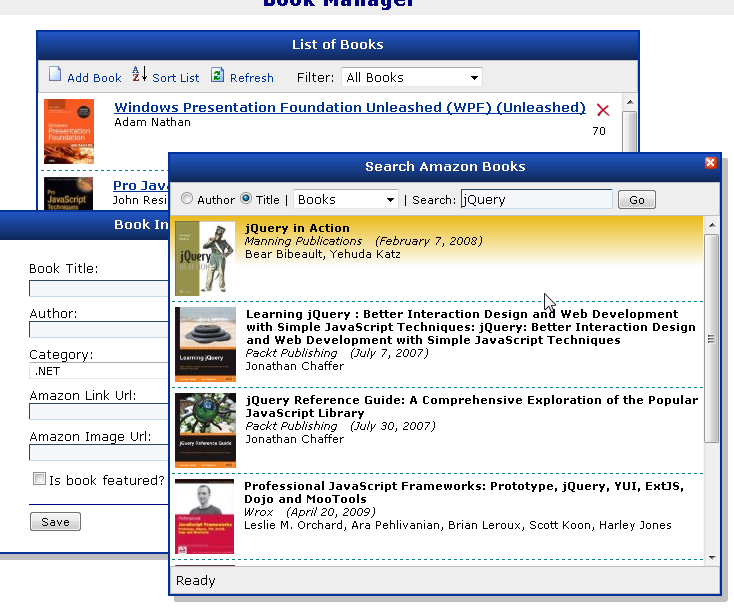
In the previous example I used a single item template to add one item at a time to the list and used JavaScript code to loop through the items. In this example, a single HTML string is generated for the entire list based on the template, where the template itself does the iteration. The following template uses code blocks and a for loop to run through all of the books.
Note the <# #> blocks that allow any sort of JavaScript code to be embedded. parseTemplate effectively works by taking the template and turning it into an executing JavaScript function, so you can use just about all JavaScript code in code blocks. You can loop, you can use if statements to display content conditionally, and you can access any global code that is in scope.
Templating is an extremely powerful mechanism for building rich-client applications without having to generate HTML by hand, filling holes explicitly, and most importantly, not repeating yourself when creating HTML markup.
It gives a whole new meaning to HTML layout as you are not forced to rely only on server-side rendering-you now get much of the same dynamic flexibility on the client for rendering that you get with ASP.NET server script tags.
parseTemplate() is only one templating mechanism but the general concepts are similar in just about all of them. There are a host of other template solutions available for jQuery (see Sidebar: Templates for Client Rendering).
Using AjaxMethodCallback in jQueryControls
The BookAdmin example actually uses yet another callback mechanism, which is provided as part of the jQueryControls project. This project contains an AjaxMethodCallback control, which can make JSON callbacks to the same page, a user or a server control on the same page, or an external HttpHandler to handle JSON callbacks. The control is based on a combination of client script and a server wrapper control that combine to provide the callback capability. The server control is optional-you can also use the AjaxMethodCallback client library on its own and it operates similarly to the way ServiceProxy works, but the server control adds a generated proxy and control-based configuration using standard ASP.NET tools.
The easiest way to use this functionality is to use the control and drop it onto the page or insert it via markup:
<ww:AjaxMethodCallback ID="Proxy"
                       runat="server" />
This uses all default settings, which allow you to call back to the current page and post back only method parameters. Alternately you can call an external handler and specify how POST data is to be sent:
<ww:AjaxMethodCallback ID="Proxy"
    runat="server"
    ServerUrl="AdminCallbackHandler.ashx"
    PostBackMode="PostNoViewstate" />
In the BookAdmin page callbacks are made using an ASHX handler, which is the most efficient way, but realize that the methods of the handler shown below could easily have been created as methods of the current Page.
Like WCF and ASMX services, you can create simple methods that are called from the client and receive JSON parameters and return a JSON response. Listing 16 shows a single method in the BookAdmin.ashx handler implementation.
The handler needs to inherit from CallbackHandler, which provides all the necessary plumbing to marshal the request to the appropriate method, call it, and return a result back to the client. Each method that is service accessible is marked as [CallbackMethod].
On the client, the server code is easy to call and uses a client proxy that works in the same way that the WCF/ASMX proxy works. The proxy is created with the same name as the AjaxMethodCallback control’s ID-Proxy in this case-and has methods for each of the exposed server methods. Each method has the same parameter signature as the server method plus the callback and errorCallbacks-just like service proxies discussed earlier. To call the server is as easy as:
function editBook(bookPk)
{
    Proxy.GetBook(bookPk,
       function(book) { // object result
           alert(book.Title + " " +
                 book.AmazonUrl);
ShowBookForm(book);
       },
       onPageError);
}
The actual page code in the sample of course is a bit more complex. It uses jQuery to pop up and display the edit window and populate its form fields. What is nice about AjaxMethodCallback is that it’s fully self contained and loads up jQuery.js and the ww.jquery.js script library (optionally-you can override resource load behavior), so you drop the control add methods and you’re on your way. It doesn’t require any of the ASP.NET AJAX or WCF components.
One additional benefit of this control is also the ability to use it to handle callbacks in page and control code, which is something sorely missing in ASP.NET AJAX. This means if you build a custom ASP.NET server control that needs to retrieve data from the client directly (rather than through a service reference), it’s easy to do by simply adding an AjaxMethodCallback to the page’s controls collection and pointing it at the class that will handle callbacks. You can point at any class to handle callback events including your custom server control so you can tie data retrieval directly to your own control code rather than configuring a separate service.
Summary
Phew-a lot of options for you to calling back to the server using jQuery. Keep in mind that I’ve given you a look behind the covers at a fairly low level so there’s a fair bit of code, but for development you’ll just end up using some of the pre-created tools like the ServiceProxy class to facilitate the actual development process.
Client Templates: One piece of code, one piece of markup all maintained in one place.
In this article I’ve covered both manually using ASP.NET pages to handle callback routing and returning both HTML and JSON data to the client. I’ve also covered three-count ‘em-mechanisms for making JSON based server callbacks that let you pass data between client and server.
Which approach is best? As always it depends.
For existing applications that need to add a little bit of AJAX functionality, page-level callbacks that return HTML fragments can be a quick way to provide little bits of content to update the client. Control or user control rendering can provide reuse of server-side components, or you can generate HTML from scratch to return to the client. Personally I prefer the “raw” AJAX approach, which uses the server as a data service for serving JSON data to the client, and then updates the client using either small chunks of DOM manipulation or, for more complex or markup intensive items, using templates. It’s a little more work but you can do so much more interesting stuff and you have way more control over your user interface.
When it comes to callbacks to the server you have lots of choices. I discussed three callback mechanisms-WCF, ASMX, and AjaxMethodCallback. WCF or ASMX are no brainers if you’re already using ASP.NET AJAX. If you’re not using ASP.NET AJAX, you can still use either WCF/ASMX on the server, and use the ServiceProxy class and the JSON parsers I introduced in the article on the client. Doing so lets you avoid loading the ASP.NET AJAX client library, which is overkill if you only need to make service callbacks. AjaxMethodCallback is very easy and fully self contained so you can just drop a control and you’re ready to go. It also is a bit more flexible since you can use the server component on a Page, a user or server control, in a high performance HTTP Handler, or even your own custom handling code via the generic JsonCallbackMethodProcessor class, which does all the dirty work of parsing input and output and generating JSON.
Using jQuery for ASP.NET AJAX callbacks is definitely a little more work than using the ASP.NET AJAX library, as the solution is not quite as integrated. However, I hope with the tools I’ve provided the process is fairly simple and integrated.
All approaches make it easy to make callbacks to the server with literally just a single line of code, so that you can focus on using the data returned effectively and use jQuery to update the UI. After all that’s really what it’s all about-service callbacks should just be plumbing. The logic of applying the results is where the real work usually comes in and that’s where jQuery really excels. If you’re building complex or repetitive UI layouts client side, make sure you check out templating for merging JavaScript-based templates with data. Templates make sure you don’t repeat yourself and keep your layout in one place even though you are working on the client side.
I hope Part 2 of this article has been useful to you. In Part 3, I’ll look a bit closer at integration between ASP.NET and jQuery in terms of creating server controls. I touched on this topic a little with the AjaxMethodCallback control, which integrates client jQuery components and plug-ins with a server control. I’ll look deeper into how you can build reusable ASP.NET components that interact with jQuery. Until then have fun calling server-side code with jQuery.
