



In this article you will learn how to isolate yourself from change by taking advantage of the Provider Model.
Designing your applications using the Provider Model will allow you to swap components out at runtime, thus allowing you to upgrade them easily.
Developers face the problem of constantly changing technology. When Microsoft releases a new version of a data provider, or a customer decides to switch databases from Oracle to SQL Server, this can cause you to have to rework a lot in the code you’ve already written. You can avoid much of this rework if you take the time to plan and code for such changes. One recommended way to do this is to develop components that take advantage of the Provider Model.
Microsoft provides a set of Provider Model Templates that you can download from their Web site. The difference between their model and the one that I will explain in this article is that Microsoft’s are really designed for Web applications. The method I show is UI agnostic.
A provider is a class or a component that provides specific functionality to an application. However, the Provider class used will not be known until runtime. In this article, you will learn how to create a data provider that will allow you to change from SQL Server to an OLE DB provider with no code changes! You will just have to change a setting in a configuration file.
Microsoft provides a set of Provider Model Templates that you can download from their Web site at http://msdn2.microsoft.com/en-us/asp.net/aa336558.aspx. The difference between their model and the one that I will explain in this article is that Microsoft’s are really designed for Web applications. The method I’ll show is UI agnostic. This means that you can use the same technique in Windows Forms, ASP.NET, Windows services, Web services, etc.
Creating a Provider
To build a provider you need to take advantage of a few technologies available in .NET. Essentially you’ll perform these four steps:
Before you learn how to implement a data provider, you need to look at three of the items that help you create a provider.
The Configuration Manager Class
The ConfigurationManager class, located in the System.Configuration.dll, is used to retrieve application settings from a configuration file. This configuration file can be a Windows Forms configuration file or a Web.config file in an ASP.NET Web application. ConfigurationManager replaces the old ConfigurationSettings class from .NET 1.1.
The ConfigurationManager class contains two properties that are designed for specifically retrieving values from two built-in sections in .NET 2.0 configuration files; namely AppConfig and ConnectionStrings. So given the following entry in a configuration file:
<appSettings>
<add key="StateCode" value="CA" />
</appSettings>
You can use the following code to retrieve the StateCode value:
In C#
ConfigurationManager.AppSettings["StateCode"];
In Visual Basic
ConfigurationManager.AppSettings("StateCode")
If you have the following entry in the configuration file:
<connectionStrings>
 <add name="Northwind"
      connectionString=
       "Server=Localhost;Database=Northwind;
        Integrated Security=True"/>
</connectionStrings>
You can use the following code to retrieve the Northwind connection string.
In C#
ConfigurationManager.
  ConnectionStrings["Northwind"].ConnectString;
In Visual Basic
ConfigurationManager. _
  ConnectionStrings("Northwind").ConnectString
Abstract Base Class or Interface
You use an abstract base class when you have a class that can implement some or most of the functionality of the classes that will be inheriting from it, but the inheriting class must provide the actual implementation. In other words, the class that inherits from the abstract base class will do some of the work and the abstract base class will do some of the work.
You use an Interface when there is no common code that could be put into a base class. In this case, you use an Interface so each class has a list of standard methods and properties that whatever consumes that class can rely on being there and being implemented.
System.Activator Class
Sometimes in an application you do not know what class to load until run time. This is normally due to a data-driven scenario where the name of the class is placed into a database table or in a configuration file as a string. Your application then needs to use this at run time to create an actual instance of a class. To do this, you can use the System.Activator class to build an object from a string. The example below shows how to dynamically create an instance of an object at run time.
In C#
IDataClass cust;
Type typ;
typ = Type.GetType("Customer");
x = (IDataClass)Activator.CreateInstance(typ);

MessageBox.Show(cust.GetData());
In Visual Basic
Dim cust As IDataClass
Dim typ As Type

typ = Type.GetType("Customer")
cust = CType(Activator.CreateInstance(typ), _
 IDataClass)

MessageBox.Show(cust.GetData())
In the code above you create an instance of a Customer class. This code assumes that the Customer class either inherits from an abstract base class or implements an Interface named IDataClass.
Building a Data Provider
To illustrate the points outlined so far in this article you can create a data provider to use SQL Server, OLE DB or the Oracle native providers based on settings in a configuration file. The advantage of this approach is your User Interface layer will only ever call the DataLayer class for all DataSets, DataReaders, commands, etc. The DataLayer class will ensure that the appropriate provider is used based on settings in the Configuration file (Figure 1).
Sample Application
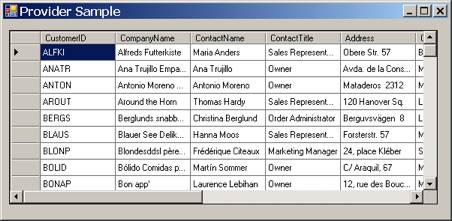
To test out this model you can create a sample Windows Form application with a GridView control on a form that will load the Customers table from the Northwind database (Figure 2).
Loading the Data
In the Form Load event procedure you will call a method named GridLoad. This method will be responsible for calling the GetDataSet method in the DataLayer class.
You can use the System.Activator Class to dynamically create an instance of a class at run time from a string variable.
In C#
private void frmMain_Load(object sender,
  EventArgs e)
{
  GridLoad();
}

private void GridLoad()
{
  string SQL = "SELECT * FROM Customers";

  grdCust.DataSource =
    DataLayer.GetDataSet(SQL,
    AppConfig.ConnectString).Tables[0];
}
In Visual Basic
Private Sub frmMain_Load( _
 ByVal sender As System.Object, _
 ByVal e As System.EventArgs) Handles MyBase.Load
  GridLoad()
End Sub

Private Sub GridLoad()
  Dim SQL As String = "SELECT * FROM Customers"

  grdCust.DataSource = _
   DataLayer.GetDataSet(SQL, _
   AppConfig.ConnectString).Tables(0)
End Sub
The GridLoad method must read the appropriate connection string from the configuration file for the application. For that purpose there is an AppConfig class that you will create to return the appropriate connection string. The code in the UI layer is very generic and you do not know which specific data provider is used to retrieve the data.
Configuration Settings
In the next code snippet you can see the configuration settings that you will need to create to provide not only the connection string, but the provider class to use for retrieving data. In the <appSettings> element you will need a key called ProviderName. The value for the ProviderName will correspond to another key in the <appSettings> element that has the fully qualified Namespace and Class name for the data provider class. In addition, the ProviderName value will also be the same as the name key in the <connectionStrings> element where the appropriate connection string for the data provider is stored.
<configuration>
  <appSettings>
    <add key="ProviderName"
         value="OleDbDataProvider"/>
    <add key="SqlDataProvider"
         value="DataCommon.SqlDataProvider"/>
    <add key="OleDbDataProvider"
         value="DataCommon.OleDbDataProvider"/>
  </appSettings>

  <connectionStrings>
    <add name="SqlDataProvider"
         connectionString="Server=Localhost;
         Database=Northwind;uid=sa;
         pwd=sa;Persist Security Info=False"/>
    <add name="OleDbDataProvider"
         connectionString="Provider=SQLOLEDB.1;
         Password=sa;
         Persist Security Info=False;User ID=sa;
         Initial Catalog=Northwind;
         Data Source=(local)"/>
  </connectionStrings>
</configuration>
AppConfig Class
To retrieve the appropriate connection string from the configuration file you will need to create the following static/Shared property in the AppConfig class. Notice that you have to read from the configuration file twice: once to get the ProviderName value, the second time to retrieve the connection string from the <connectionString> element.
In C#
public class AppConfig
{
  public static string ConnectString
  {
    get
    {
     string ProviderName;
     // Get Provider Name
     ProviderName =
       ConfigurationManager.
       AppSettings["ProviderName"];

     // Get Connect String
     return ConfigurationManager.
       ConnectionStrings[ProviderName].
       ConnectionString;
    }
  }
}
In Visual Basic
Public Class AppConfig
  Public Shared ReadOnly Property _
   ConnectString() As String
    Get
      Dim ProviderName As String

      ' Get Provider Name
      ProviderName = _
        ConfigurationManager. _
        AppSettings("ProviderName")

      ' Get Connect String
      Return ConfigurationManager. _
        ConnectionStrings(ProviderName). _
        ConnectionString
    End Get
  End Property
End Class
Note: To keep the code simple, the ProviderName value is read each time. In a real application you would want to cache the connection string after reading it the first time.
IDataProvider Interface
As mentioned earlier when you use the Provider Model you will need to create either an abstract base class or an interface that each provider class must inherit or implement. In this example you will use an interface called IDataProvider. Since each data provider class you write will vary widely in their implementation, an interface is the logical choice. There is no common code between the different data providers, so an abstract base class cannot be used in this particular case. You can see the interface class in the code below.
In C#
interface IDataProvider
{
  IDbConnection CreateConnection();
  IDbCommand CreateCommand();
  IDbDataAdapter CreateDataAdapter();
}
In Visual Basic
Public Interface IDataProvider
  Function CreateConnection() As IDbConnection
  Function CreateCommand() As IDbCommand
  Function CreateDataAdapter() As IDbDataAdapter
End Interface
DataLayer.GetDataSet Method
If you look back at the sample Windows Form (Figure 2) and you look at the code (reiterated below) you will see a call to the DataLayer.GetDataSet method. This method is called by passing in an SQL statement and a connection string. This method has fairly standard ADO.NET code in that it creates an instance of a DataSet class and uses a DataAdapter to fill that DataSet. The filled DataSet is then returned from this method and given to the DataSource property of the grid control.
In C#
private void frmMain_Load(object sender,
 EventArgs e)
{
  GridLoad();
}

private void GridLoad()
{
  string SQL = "SELECT * FROM Customers";

  grdCust.DataSource =
    DataLayer.GetDataSet(SQL,
    AppConfig.ConnectString).Tables[0];
}
In Visual Basic
Private Sub frmMain_Load( _
 ByVal sender As System.Object, _
 ByVal e As System.EventArgs) Handles MyBase.Load
  GridLoad()
End Sub

Private Sub GridLoad()
  Dim SQL As String = "SELECT * FROM Customers"

  grdCust.DataSource = _
    DataLayer.GetDataSet(SQL, _
    AppConfig.ConnectString).Tables(0)
End Sub
In the code on the form you cannot tell what data provider is used to retrieve the code. It could be SQL Server, Oracle or some OLE DB data provider. The UI code does not care. This works because the DataLayer class abstracts the specific code away from the UI layer. Let's take a look at the GetDataSet method in the DataLayer and see how it does its job.
The GetDataSet method itself does not use any specific provider like SqlDataAdapter or OleDbDataAdapter. Instead you use the interface IDbDataAdapter. The IDbDataAdapter is a .NET interface that anyone who writes a .NET native provider must implement when creating a DataAdapter class. You will find interface classes for each of the specific ADO.NET provider classes such as IDbConnection and IDbCommand.
In C#
public static DataSet GetDataSet(
 string SQL, string ConnectString)
{
  DataSet ds = new DataSet();
  IDbDataAdapter da;

  da = CreateDataAdapter(SQL, ConnectString);

  da.Fill(ds);

  return ds;
}
In Visual Basic
Public Shared Function GetDataSet( _
 ByVal SQL As String, _
 ByVal ConnectString As String) As DataSet
  Dim ds As New DataSet
  Dim da As IDbDataAdapter

  ' Create Data Adapter
  da = CreateDataAdapter(SQL, ConnectString)

  da.Fill(ds)

  Return ds
End Function
Instead of writing code in this method to create a specific instance of a data adapter, a method called CreateDataAdapter is called to perform this function. This method, also contained within the DataLayer, will load the appropriate data provider class that you are going to create.
DataLayer.CreateDataAdapter Method
In the CreateDataAdapter method you will have to do a couple of things to create an instance of a specific data adapter. First you will need to initialize the appropriate provider based on the information in the configuration file. The InitProvider method is responsible for this and will be shown in the next section. After the appropriate DataProvider class is loaded the CreateDataAdapter method on that specific provider will be called. This is where the SqlDataAdapter or the OleDbDataAdapter or the OracleDataAdapter is created.
In C#
public static IDbDataAdapter CreateDataAdapter(
 string SQL, string ConnectString)
{
  IDbDataAdapter da;

  // Make sure provider is created
  InitProvider();

  da = DataProvider.CreateDataAdapter();

  da.SelectCommand = CreateCommand(SQL,
   ConnectString, false);

  return da;
}
In Visual Basic
Public Shared Function CreateDataAdapter( _
 ByVal SQL As String, _
 ByVal ConnectString As String) As IDbDataAdapter
  Dim da As IDbDataAdapter

  ' Make sure provider is created
  InitProvider()

  da = DataProvider.CreateDataAdapter()

  da.SelectCommand = CreateCommand(SQL, _
   ConnectString, False)

  Return da
End Function
DataLayer.InitProvider Method
The InitProvider method is responsible for creating the actual provider object that will be used. To do this you first need a field/member variable to hold that data provider. You will create a variable named DataProvider that is of the type IDataProvider. Remember that the IDataProvider is the interface that each of the specific DataProviders that you create will need to implement.
The first time the InitProvider method is called the Provider name will be loaded by reading the value from the configuration file, then you will use the System.Activator class to create a new instance of this provider. The DLL with the appropriate provider class must already be referenced by your project for this to work.
In C#
private static IDataProvider DataProvider = null;

private static void InitProvider()
{
  string TypeName;
  string ProviderName;

  if(DataProvider == null)
  {
    // Get provider name
    ProviderName = ConfigurationManager.
      AppSettings["ProviderName"];
    // Get type to create
    TypeName = ConfigurationManager.
      AppSettings[ProviderName];
    // Create new DataProvider
    DataProvider = (IDataProvider)
      Activator.CreateInstance(
      Type.GetType(TypeName));
  }
}
In Visual Basic
Private Shared DataProvider As IDataProvider = _
  Nothing

Private Shared Sub InitProvider()
  Dim TypeName As String
  Dim ProviderName As String

  If DataProvider Is Nothing Then
    ' Get Provider Name
    ProviderName = _
      ConfigurationManager. _
      AppSettings("ProviderName")
    ' Get Type to Create
    TypeName = ConfigurationManager. _
     AppSettings(ProviderName)
    ' Create new DataProvider
    DataProvider = _
      CType(Activator.CreateInstance( _
      Type.GetType(TypeName)), _
      IDataProvider)
  End If
End Sub
DataProvider.CreateDataAdapter Method
Now you can finally look at the DataProvider class and its specific implementation of the CreateDataAdapter method. Look at the snippet below to see the class that uses the SqlClient.SqlDataAdapter.
In C#
class SqlDataProvider : IDataProvider
{
  public IDbDataAdapter CreateDataAdapter()
  {
    SqlDataAdapter da = new SqlDataAdapter();

    return da;
  }
}
In Visual Basic
Public Class SqlDataProvider
 Implements IDataProvider

 Public Function CreateDataAdapter() _
  As IDbDataAdapter _
  Implements IDataProvider.CreateDataAdapter
    Dim da As New SqlDataAdapter

    Return da
  End Function
End Class
While this is a very simple provider method to write, it is necessary to implement it this way to provide the maximum flexibility and reusability. This becomes more apparent when you look at the other Provider class that uses the OLE DB namespace to create instances of OleDbDataAdapters.
OLEDB DataProvider.CreateDataAdapter Method
Below is another DataProvider class that uses the OleDb native provider. Notice that this code is almost exactly the same as the SqlClient-just the provider used differs.
In C#
class OleDbDataProvider : IDataProvider
{
  public IDbDataAdapter CreateDataAdapter()
  {
    OleDbDataAdapter da = new OleDbDataAdapter();

    return da;
  }
}
In Visual Basic
Public Class OleDbDataProvider
  Implements IDataProvider

  Public Function CreateDataAdapter() _
   As IDbDataAdapter _
   Implements IDataProvider.CreateDataAdapter
    Dim da As New OleDbDataAdapter

    Return da
  End Function
End Class
Try it Out
In the sample application that you can download for this article, try using each of the different providers provided to see how each one is called just by changing the value in the configuration file from OleDbDataAdapter to SqlDataAdapter. Step through the code to see where it creates an instance of the OleDb or SqlClient DataAdapters. As an exercise you could create additional providers that implement the OracleClient or any other native provider you are using.
Conclusion
Using a Provider Model will make the code you write much more generic, easier to maintain, and easier to upgrade as Microsoft (and other companies) introduce new technology. Other areas where you should use the Provider Model include Exception Management to determine where to publish exceptions. You could also use the Provider Model to determine where to read configuration settings from. You could have providers that read configuration settings from an XML file, the registry, a database table, or even a Web service. With a little imagination you can apply the concepts presented in this article to many areas of your application development process.
