


The challenge of bringing data from efficient storage engines such as SQL Server into object-oriented programming models is hardly a new one.
Most developers address this challenge by writing complex data access code to move data between their applications and the database. This requires an understanding of the database so that you can access data either from the raw tables, from views, or from stored procedures.
More often than not, databases are managed by DBAs whose job it is to ensure that the database is available, powerful, efficient, and secure. The means of accomplishing this generally take the data further out of the scope of your own concepts of how your data should be structured in your applications. It requires a solid knowledge of the database schema, table definitions, and stored procedures along with their parameters and results, views, keys, and more so that you can create your data access code.
Entity-relationship modeling, introduced in the 1970s by Peter Chen, goes a long way to solve this problem. Using entity-relationship modeling, programmers create a conceptual model of the data and write their data access code against that model, while an additional layer provides a bridge between the entity-relationship model and the actual data store. Most modeling, to date, gets done on a whiteboard.
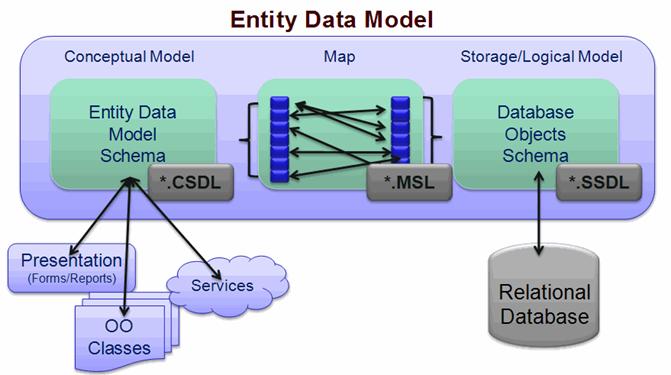
With the ADO.NET Entity Framework, Microsoft has made entity-relationship modeling executable. They achieved this by a combination of XML schema files, behind the scenes code generation (creating .NET objects), and the ADO.NET Entity Framework APIs. The schema files are used to define a conceptual layer, to expose the data store’s (e.g., a SQL Server database) schema, and to create map between the two. The ADO.NET Entity Framework allows you to write your programs against classes that are generated from the conceptual schema. The Framework then takes care of all of the translations as you extract data from the database and send it back in.
Figure 1 shows the Entity Data Model’s layers, how they relate to one another, and where the model fits into your application.
From DAL to a Foundation
The ADO.NET Entity Framework has a number of layers of abstraction. In its simplest form, you can use it as a data access layer complete with the ease of wizards and drag-and-drop controls. In its more complex form, the ADO.NET Entity Framework is truly a foundation for the future of data access in Microsoft’s Data Platform. A great example of this is to look at some of the projects that Microsoft is currently building based on the ADO.NET Entity Framework that were first presented at MIX07. One is currently codenamed “Astoria” and provides data through a specialized Web service. The service uses the Entity Data Model (EDM) to serve up a conceptual model of the data. Another project, code-named Jasper, uses the ADO.NET Entity Framework to build dynamic data layers with absolutely minimal effort on the end of the developer. By dynamic, this means that you build the data layer on the fly when you run the application and there is a lot of dynamic data binding, etc. Check the sidebars for links to more on these projects.
The point is that while the ADO.NET Entity Framework makes available APIs that developers can work with directly (the focus of this article), these APIs will also become building blocks for future development tools that Microsoft will provide down the road.
You can implement the ADO.NET Entity Framework in a range of scenarios, from using a default model with drag-and-drop data binding to constructing complex models to building services on top of the framework that you can use in a variety of ways.
In the rest of this article, you will see the simplest form of using the ADO.NET Entity Framework directly: drag-and-drop data binding against the default model. While this is a great entry point to understanding the ADO.NET Entity Framework, keep in mind that there are many layers exposed for developers to work with. You can access the model directly using Entity SQL or through the higher level Object Services API. The conceptual model is highly customizable, allowing you to do things such as inheritance or structure schemas that look very different than the data store upon which they depend.
Working with Beta 2
At the time of writing, Visual Studio 2008 Beta 2 is available as are ADO.NET Entity Framework Beta 2 and the ADO.NET Entity Framework Tools CTP 1. Eventually ADO.NET Entity Framework and its tools will be part of Visual Studio 2008, but currently it is necessary to install all three pieces. See the sidebars for the appropriate links.
It is important to note that you will need to do manual editing of the EDMX file for more complex scenarios.
The tools contain a wizard for creating a model from a database and a designer for editing the model. Since the tools are still currently in their first Community Technical Preview, expect them to evolve rapidly over the next few releases.
Build a Simple Entity Data Model
The first steps of learning ADO.NET Entity Framework involve using the wizard to create a simple Entity Data Model from an existing database. To follow these steps, it will be necessary not only to have the above programs and tools installed, but to also have access to a SQL Server or SQL Server Express database, so that you can create a simple EDM in a simple Windows Form application.
- Start by creating a new Windows Form project, and then add a new item to the project.
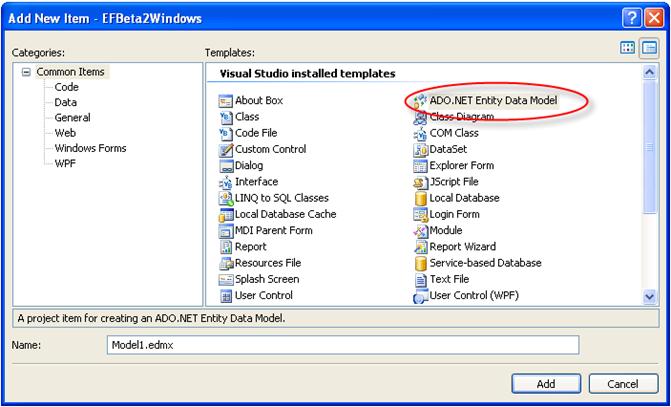
- In the item templates, select “ADO.NET Entity Data Model” which will open up the wizard.
- Click the database option as you will be creating an EDM from an existing database.
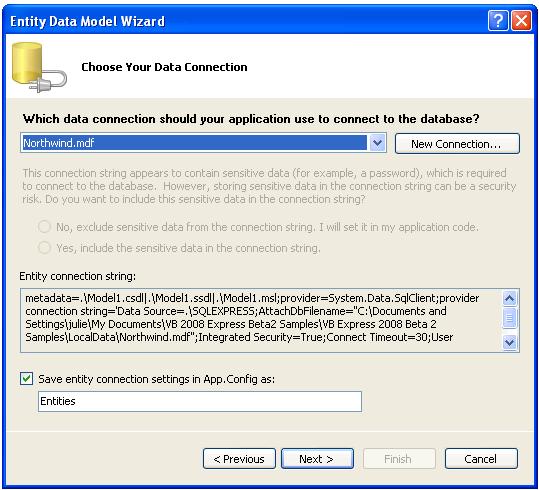
- On the next page of the wizard, shown in Figure 2, use the database drop-down list to select from an existing database connection or to create a new one on the fly. This example is based on the Northwind database.
- On this page, you have an opportunity to create a name that will be used for the Connection string in the application’s config file as well as for the main class that will give us access to the entities we are about to create. For this sample, I have renamed this “NWEntities”.
- On the last page, shown in Figure 3, you will have the ability to select which tables, views, or stored procedures from the database to include in the model. By default all are selected. For this example, leave all of the items selected, and then let the wizard finish its job.
The Visual EDM Designer
When the wizard is complete, you will see the new Model1.EDMX file. Double-clicking on the EDMX file will open up the model in the designer. The Tools CTP was released just before this article went to print and therefore, the article will not spend much time looking at the designer beyond a screenshot displayed in Figure 4. This is a section of what the model from the Northwind database will look like after the wizard has built it from the database.
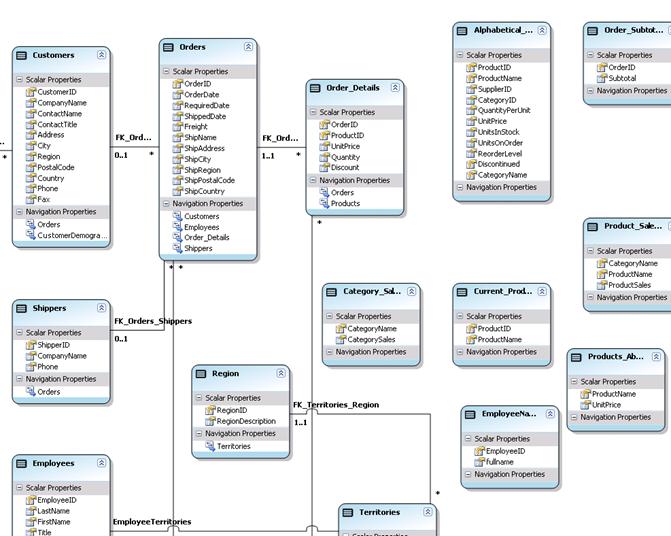
You can see that each entity is represented along with its properties and its relationships to other entities. The model displays the conceptual layer only and has an interface for mapping to the entities in the storage layer.
For links to more information about the designer, check the sidebar.
A Brief Look at a Schema File
While this article won’t delve into customization of the EDM, it is good to have a basic understanding of the actual schemas in the EDMX file. It is also important to note that you will need to do manual editing of this file for particularly more complex scenarios.
If you were to open up the EDMX file in the XML Editor (right click, choose Open With, and then select XML Editor) you will see that the file contains three major sections.
The first section is Conceptual Models. The core of the Conceptual portion of the schema file is the EntityTypes. Each table in the database is represented by an EntityType. EntityTypes contain Properties which define the fields of the table. Here is a simple EntityType for Shippers. While the wizard uses the actual table names to name the EntityTypes, a customized Entity might use the name Shipper, because the EntityType defines a single entity:
<EntityType Name="Shippers">
  <Key>
   <PropertyRef Name=" ShipperID " />
  </Key>
  <Property Name="ShipperID" Type="Int32"
            Nullable="false" />
  <Property Name="CompanyName" Type="String"
            Nullable="false" MaxLength="40" />
  <Property Name="Phone" Type="String"
            MaxLength="24" />
  <NavigationProperty Name="Orders"
  Relationship="NorthwindModel.FK_Orders_Shippers"
            FromRole="Shippers" ToRole="Orders" />
</EntityType>
An EntityType requires a Key so that the change tracking and updating can occur. In this case the ShipperID property will also be the Key for the Shippers entity. Each property is described through a variety of facets such as MaxLength. The properties and constraints of the database schema have been replicated in the EntityType.
The NavigationProperty references another element of the conceptual layer called an Association. An association defines which entities are involved in a relationship and what their multiplicity is. The FK_Orders_Shippers association defines a one to many relationship between Shippers and Orders:
<Association Name="FK_Orders_Shippers">
    <End Role="Shippers"
         Type="NorthwindModel.Shippers"
         Multiplicity="0..1" />
    <End Role="Orders"
         Type="NorthwindModel.Orders"
         Multiplicity="*" />
  </Association>
Once you have defined the association, the entity’s NavigationProperty further defines the direction of the relationship. In the case of the Shippers entity, start with Shippers and navigate through the relationship to Orders.
The other two sections of the schema are the Storage Models and the Mappings. The Storage Models are the representation of the database schema, while the mappings describe how to move between the entities and properties of the Conceptual Layer and the entities and properties of the Storage Layer. The Storage Layer schema will help the ADO.NET Entity Framework APIs do the actual interaction with the database.
The Generated Classes
In addition to the XML schema files, the wizard also generated classes that represent the entities defined by the conceptual layer.
If you choose Show All Files in the Solution Explorer, you will see there is also a class file listed as a child of the EDMX file named Model.Designer. This contains the classes that you will use in your code.
It is important to understand that these classes define schema only, not behavior. While they are partial classes and fully extensible, they are not meant to replace your application objects. The classes are a conduit between your data store and the tools you build to use that data-reports, object models, presentation layers, Web sites, Web services, etc.
Relationships and Associations
The relationships that the model defines are a critical part of the conceptual layer. With these relationships defined, ADO.NET Entity Framework can easily deliver related data without requiring the developer to build complex queries. In addition, you use the relationships when you add, modify, or delete data. You will see this in more detail later in this article.
With these relationships defined, ADO.NET Entity Framework can easily deliver related data without requiring the developer to build complex queries. In addition, you use the relationships when you add, modify, or delete data.
Drag & Drop Data Binding
Before digging into the code, it will be helpful to rename the default EntitySet for the Customer entity. The wizard gives both the entity and the EntitySet the name of the table. This is not optimal for an EDM where the entity is a single thing and the EntitySet is a collection of things. Fix the Customers Entity so that it will be more clear when coding against it. Open up the model in the designer; click the Customer entity, and then in the Properties window for the Customer Entity, change “Name” to Customer.
Next, you will create an Object Data Source in the same way that you would create one from any other type of class. If you do not have the Data Sources window open, you can open it by choosing Show Data Sources from the Data option of Visual Studio’s menu.
Add a new data source which will open up the Data Source Configuration Wizard. Select Object as the Data Source type and click Next. On the next screen, you will see all of the classes that were found in the solution. Open the tree node for the model’s namespace to see the various classes that the wizard created based on the tables in the database. As shown in Figure 5, select one of the tables from which to create the Object Data Source, for example Customers.
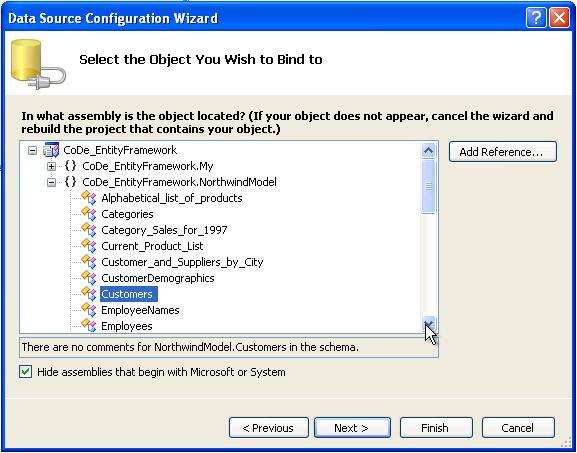
The beauty of this process is that the ADO.NET Entity Framework plugs right into your existing functionality. Other than running the Entity Data Model wizard, none of the above steps are any different than you have been performing in Visual Studio 2005.
Continuing on the familiar databinding path, drag the Customers object from the Data Sources window onto the form. This will result in a DataGridView bound to the Customer object and a navigation toolbar.
Copy the following into the form’s code to access the Customers and bind them to the database. Notice that there is no data access code being written here. All you need to do is get a reference to the Entities wrapper class; ask it to hand you the customers; and then bind the results to the BindingSource, which was bound to the grid in the drag-and-drop operation. The NWEntities context will keep track of any changes made to its objects (the customer entities) through the grid. To simplify the code even more, I am using implicitly typed local variables, a new language feature for C# 3.0 and Visual Basic 9.0, which means not always having to predefine a variable’s type:
'Declare the wrapper class to the entities
Dim NWEntities As NorthwindModel.NWEntities

Private Sub Form1_Load(ByVal sender As  _
   System.Object, ByVal e As System.EventArgs) _
   Handles MyBase.Load

  NWEntities = New NorthwindModel.NWEntities
  'Fetch the customers from the Entities class
  Dim custs = NWEntities.Customers
  'Bind the custs object to the BindingSource.
  CustomersBindingSource.DataSource = custs
End Sub
Run the application and you can see that with this minimal effort, the view is being populated with the customer data.
Although change tracking is happening, you have not done anything about actually updating these changes to the database. While this sounds like it may be a lot of work, it’s not.
Update the Data
Be sure that you have enabled the Save button on the navigator toolbar. You can do this by selecting the button and changing its Enabled property in the Property window to True. Double-click the Save button to get to its Click event handler. Add the following code to handle the data update:
NWEntities.SaveChanges()
Frighteningly simple; but honestly, that’s all you need because of the change tracking performed by the ADO.NET Entity Framework. With respect to performance, this method will only update the needed rows. It’s also important to note that by default ADO.NET Entity Framework uses Optimistic Concurrency for updates though you can modify this.
ObjectContext Handles Updating
How was it possible to save all of the changes with one simple command? The NWEntities class which you instantiated is not just a wrapper class for the entities. If you looked at the class file that was generated from the .csdl file, you can see that the NWEntities class inherits from System.Data.Objects.ObjectContext. System.Data.Objects represents the Object Services API and is part of the ADO.NET Entity Framework. ObjectContext is the real workhorse behind much of what you can do with the ADO.NET Entity Framework and Object Services.
In the case of the NWEntities class, in its role as an ObjectContext, you can see that it manages the entities (Customers, Employees, etc.). Not only does it hand you these entities when you ask for them, but it keeps track of anything that is done to the entities. Therefore, while the user of the application is making changes to the data in the grid, the grid is communicating all of the changes made to each of the entities in the list back to the mother ship, NWEntities. ObjectContext.SaveChanges will then coordinate sending all of the changes (adds, updates, and deletes) back to the database.
Deferred Loading
Another important aspect of querying against the ADO.NET Entity Framework is deferred loading. At some point, the ObjectContext must actually retrieve the data from the database. By default, this happens at the first point that your code explicitly needs the data. In the dbDataRecord sample, that will happen when you call “For Each dbrec in custs”. This becomes more important to be aware of when you are dealing with related data, which I’ll talk about more later in this article. If you are using SQL Server, you can open up SQLProfiler and see exactly when the call is made into the database.
At some point, the ObjectContext must actually retrieve the data from the database. By default, this happens at the first point that your code explicitly needs the data.
Loading Objects and Their Children
Because the conceptual layer is aware of the relations between data, related objects come along for free. When you request Customers, you also have access to the Customer’s orders. Orders, in turn, provide Employees (the sales person), Shippers, Customers, and Order Details. However, when requesting an Order, you may not necessarily want all of that related data to come along and if it did, it would be a waste of resources. To prevent this, the default behavior for ADO.NET Entity Framework is to use deferred loading (also called lazy loading). This means that the Framework will not load the related data until you explicitly ask for it using a simple Load method. Here is an example which iterates through Customers, and then through all of the orders for each customer.
Dim custs = NWEntities.Customers
For Each cust As Customers In custs
  cust.Orders.Load()
  Debug.WriteLine(cust.CompanyName)
  For Each o In cust.Orders
    Debug.WriteLine("   " & o.OrderDate.ToString)
  Next
Next
Prior to calling cust.Orders.Load, cust.Orders is Null. In order to access the orders, you need to explicitly Load them. Because Orders is a property collection of Customers, this is referred to as a collection navigation.
Note that it is necessary to use MARS (Multiple Active Result Sets) in order for this to work. MARS allows you to use a single connection to return multiple results. Add the parameter “MultipleActiveResultSets=True” to the connection string in the app.config file.
Going in the other direction, you can get the Customer object information for an Order:
Dim ords = NWEntities.Orders
For Each o As Orders In ords
  o.CustomersReference.Load()
  Debug.WriteLine(o.OrderDate)
  For Each c As Customers In o.CustomersReference
    Debug.WriteLine("   " & c.CompanyName)
  Next
Next
Notice the use of o.CustomersReference.Load, rather than o.Customers.Load. Customers is not a collection of objects within an order. Instead, the order has a reference to the related entity; this is referred to as a reference navigation.
It is possible to override this behavior using the ObjectQuery.Include modifier when referencing or querying the entity. Using the following line of code:
NWEntities.Customers.Span.Include("Orders")
would result in Orders coming along with each Customer entity.
Querying the Data Through the ADO.NET Entity Framework
In most cases, you probably do not want to retrieve the entire contents of a database table as the example is currently doing. While the ADO.NET Entity Framework does allow you to leverage existing stored procedures and views, there are a number of other ways to query data through the ADO.NET Entity Framework.
When you write queries against the entities in your Entity Data Model, the ADO.NET Entity Framework’s ObjectContext will translate the queries into the query language of the data store (e.g., T-SQL) and execute the query. When the data store returns the data to the ObjectContext, the ObjectContext will then take the tabular data, convert it into the objects representing the entities, and pass those populated entities back to you.
Methods of Querying Entities
There are three ways to query the Entity Data Model:
- EntityClient Provider using the Entity SQL Query syntax.
- Object Services’ ObjectQuery using Entity SQL query syntax.
- LINQ to Entities.
Depending on how you use the above methods, the query will return different data types such as DataReaders, entities, or even anonymous types. Figure 6 provides a map of the type of data returned by the various methods of querying.
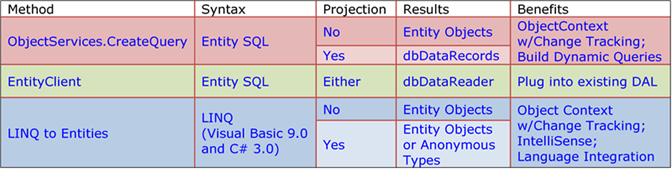
This introductory article will provide a very high level view of each querying method along with a few examples. Part II of this article will dig more in depth into querying entities.
EntityClient Provider
EntityClient follows the pattern of the other data providers such as SQLClient, OledbClient, and OracleClient. Like the other clients, you first create a connection, but instead of to the physical data store, you make the connection to the EDM. Then you create a command using a syntax devised for querying entities that is very similar to T-SQL. This querying syntax is called Entity SQL. Lastly you would execute the command. Again, like the other clients, the result is a DbDataReader.
EntityClient is not only familiar, but allows you to plug the ADO.NET Entity Framework into existing solutions that already return a DbDataReader (such as a SqlDataReader). Additionally, if you want the benefits of the EDM, but the performance of a DataReader, EntityClient gives you the best of both worlds.
Here is a simple example of using EntityClient to query Entity Data Models. This example asks for a particular column, rather than an entire Category entity:
Using con As New _
 EntityConnection("Name=NWEntities")
   con.Open()
   Dim cmd As New EntityCommand( _
    "SELECT c.CategoryName " & _
    "FROM NorthwindEntities.Categories AS c " & _
    "ORDER BY c.CategoryName", _
     con)
   Dim r As DbDataReader = cmd.ExecuteReader( _
    CommandBehavior.SequentialAccess)
End Using
ObjectServices
Much of the ADO.NET Entity Framework’s functionality is provided through Object Services, which is in the API System.Data.Objects. Using the ObjectServices CreateQuery method, you can pass in an Entity SQL query and return a set of Entity Objects:
Dim custs As ObjectQuery(Of Customers) _
= NWEntities.CreateQuery(Of Customers) _
("SELECT VALUE c FROM Customers AS c " & _
 "WHERE c.Country='Spain'")
The VALUE keyword in the query forces objects to be returned; in this case it will be a Customer object. If the VALUE keyword were not used, the result would be rows and columns. You can then use the resulting ObjectQuery for databinding or enumerate it through to perform additional functions on the returned Customer entities.
Because of the relationships that the Entity Model is aware of, you can also build queries that drill into related data. Here is a simple example which filters on related data:
Dim ord = NWEntities.CreateQuery(Of Orders) _
    ("SELECT VALUE o FROM orders as o " & _
     "WHERE o.Customers.Country='Spain'")
This example projects into related data. Notice that the query will return DbDataRecords. That is because you have not defined a class to match the schema of CompanyName, OrderData, and ShipCity:
Dim o = NWEntities.CreateQuery(Of DbDataRecord) _
("SELECT o.Customers.CompanyName,o.OrderDate," & _
 "o.ShipCity FROM orders as o " & _
 "WHERE o.Customers.Country='Spain'")
Querying into child collections (such as OrderDetails collection in an Order) requires a bit more work and again reminds us of Entity SQL’s foundation. T-SQL:
Dim custs = NWEntities.CreateQuery(Of Customers) _
  ("SELECT VALUE c FROM Customers as c " & _
   "WHERE c.CustomerID IN " & _
   "(SELECT VALUE o.Customers.CustomerID " & _
      "FROM Orders as o " & _
      "WHERE o.OrderDate > " & _
      "DATETIME'2007-07-01 00:00:00')")
LINQ to Entities
One of the exciting innovations introduced in Visual Studio 2008 is Language Integrated Query or LINQ, which surfaces as extensions to C# 3.0 and Visual Basic 9.0. LINQ to Entities is a variation on LINQ that understands how to query entities. With LINQ to Entities, although you lose the flexibility of building dynamic queries, you gain simplicity with IntelliSense and many other benefits of LINQ.
With LINQ to Entities, although you lose the flexibility of building dynamic queries, you gain simplicity with IntelliSense and many other benefits of LINQ.
This LINQ to Entities query returns a System.Linq.IQueryable of Order entities. An iQueryable is a collection that allows you to enumerate through the collection and also to query against it. None of the other methods of a collection are exposed for manipulating the group of objects. Once you have the results, you can build a query against them as well:
Dim orders = _
    From o In NWEntities.Orders _
    Where o.Customers.Country = "Spain" _
    Select o
If you type this into Visual Studio 2008 yourself, you will see that IntelliSense helps you construct the query as in Figure 7.
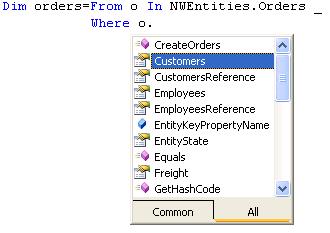
Here is a LINQ to Entities query that queries into a collection property (the Orders attached to a Customer) which leverages lambda expressions. Lambda expressions in Visual Basic 9.0 are quite different than in C# 3.0. (See the sidebars for links to helpful articles.) This query grabs only those customers who have orders placed after July 1, 2007:
Dim q = From cust In nwentities.Customers _
    Where (cust.Orders.Any(Function(o) _
    o.OrderDate > New DateTime(2007, 7, 1)))
Querying and Updating Across Relationships
So far, most of these introductory examples have focused on a single entity type. However, in the first LINQ to Entities example, the query traversed from Orders to related Customers data by filtering on the Customers.Country value of a particular order. This is made possible because of the associations in the schema. The schema has defined these relationships, so it is not necessary to re-define them in your queries. Whether you are getting the benefit of IntelliSense in LINQ to Entities to help you navigate through these relationships or you are using Entity SQL, ADO.NET Entity Framework will orchestrate retrieving and updating the related data. Here is a look at a few queries that span relationships.
Thanks to the Entity Objects, you can access related data as properties of the entities. The associations and navigation properties in the conceptual layer provide relationships in both directions-parent to child and child to parent.
Here are two Entity SQL queries that traverse from Orders to Customers. The first returns fields from orders and customers, the second filters on customer data:
Dim ord = NWEntities.CreateQuery(Of DbDataRecord)_
("SELECT o.Customers.CompanyName, " & _
  "o.OrderDate,o.Freight FROM orders as o " & _
  "WHERE o.ShipCity='Sao Paulo'")

Dim ord = NWEntities.CreateQuery(Of Orders) _
    ("SELECT VALUE o FROM orders as o " & _
     "WHERE o.Customers.Country='Spain'")
While you can also go the other way, this requires a little more work because you will be drilling from Customers into a collection (of Orders in this case). Collections in Entity SQL may be traversed only through SELECT/FROM expressions. Therefore you need a sub-query to get at the Customers.
This Entity SQL example of querying into a child collection looks very similar to T-SQL:
Dim custs = NWEntities.CreateQuery(Of Customers) _
  ("SELECT VALUE c FROM Customers as c " & _
   "WHERE c.CustomerID IN " & _
   "(SELECT VALUE o.Customers.CustomerID " & _
      "FROM Orders as o " & _
      "WHERE o.OrderDate > " & _
      "DATETIME'2007-07-01 00:00:00')")
The same query in LINQ to Entities looks like this (note that this C# example leverages lambda expressions, which will be available in Visual Basic in Beta 2 of Visual Studio 2008 and making it just as simple to construct the relevant query):
var q = from customer in northwind.Customers
        where customer.Orders.Any(
        o=>o.OrderDate > new DateTime(2007,7,1))
        select customer;
Non-Microsoft Providers
While Microsoft is building providers for SQL Server, there are many other vendors busy creating providers so that you can access their data through the ADO.NET Entity Framework as well. At TechEd 2007, IBM spoke about and demonstrated their prototype ADO.NET Entity Framework provider and discussed an Informix provider that they are working on. Earlier this year, MySQL demonstrated a prototype of a MySQL provider at their annual conference. An interesting point to remember is that a provider does not necessarily have to be a database. It can be any type of data storage, such as XML files.
Entity Framework Roadmap
While the ADO.NET Entity Framework will not be included in the Visual Studio 2008 RTM (expected by the end of 2007); it will be released in the first half of 2008.
There will be either a CTP (Community Technical Preview) or a Beta of ADO.NET Entity Framework released along with any Visual Studio 2008 releases including the Visual Studio 2008 RTM.
Next Steps
This article has provided a basic overview and introduction to ADO.NET Entity Framework; and it only scratches the surface. The ADO.NET Team has been writing a number of in-depth posts on their blog about various aspects of ADO.NET Entity Framework. There is also an enormous amount to learn in the forums. As more and more people explore this technology, you can expect to see articles that dig much deeper to explore building complex, real-world applications using ADO.NET Entity Framework.
