



Windows Communication Foundation (WCF) is a secure, reliable, and scalable messaging platform for the .NET Framework 3.0.
With WCF, SOAP messages can be transmitted over a variety of supported protocols including IPC (named pipes), TCP, HTTP and MSMQ. Like any distributed messaging platform, you must establish security policies for protecting messages and for authenticating and authorizing calls. This article will discuss how WCF accomplishes this.
A consistent set of fundamental security concepts apply in any distributed messaging system. Consider a message from sender (the calling application) to receiver (the target service receiving the message for processing):
-
Authentication. We typically think about authentication as identifying the message sender. Mutual authentication involves authenticating both the sender and the message receiver, to prevent possible man-in-the-middle attacks. -
Authorization. After authenticating the message sender, authorization determines what system features and functionality they are entitled to execute. -
Integrity. Messages should be digitally signed to ensure they have not been altered between sender and receiver. -
Confidentiality. Sensitive messages or specific message parts should be encrypted to ensure they cannot be openly viewed on the wire.
WCF provides a rich and configurable environment for creating security policies and setting runtime behaviors to control these security features. A variety of mutual authentication mechanisms are supported using token formats such as Windows tokens, username and password, certificates and issued tokens (in a federated environment). Authorization can be based on Windows roles, ASP.NET roles or you can provide custom authorization policies. Message protection (integrity and confidentiality) can be based on symmetric session keys, or asymmetric keys for single-hop protection.
“A consistent set of fundamental security concepts apply in any distributed messaging system.”
In the following sections, I’ll show you how to configure WCF security and then take you through some common WCF deployment scenarios and their specific security configurations that employ these fundamental security concepts.
Security, WCF Style
The first step to securing a WCF service is defining the security policy. Once you have established requirements for authentication, authorization, and message protection it is a matter of service configuration to enforce it.
Your binding selection will influence the available configuration options for the service security policy. When you expose a service endpoint you select a binding that represents the appropriate communication protocol and message encoding format. For example, for intranet communications or systems behind the firewall, TCP protocol with binary message encoding is usually preferred. For Internet access, HTTP protocol is a typical choice using text or MTOM encoding (depending on the message size).
There are a standard set of bindings that can satisfy these protocol and encoding choices. NetTcpBinding is the right choice for binary TCP communications that cross machine boundaries, BasicHttpBinding is the right choice for HTTP communications that must support legacy Web service protocols, and WSHttpBinding or WSFederationHttpBinding are the right choice for Web services that can leverage a richer set of standards including those for secure communications (the latter is used for federated security scenarios).
Beyond bindings, behaviors also provide information about client and service credentials, and affect how authorization is handled.
You can configure bindings and behaviors declaratively or through the runtime object model-but in the following sections I’ll focus on how you declaratively configure core security settings.
Default Security Settings
Each binding has a default set of security settings. Consider the following service endpoint that supports NetTcpBinding.
<system.serviceModel>
  <services>
    <service
name      ="HelloIndigo.HelloIndigoService" >
      <endpoint
contract      ="HelloIndigo.IHelloIndigoService"
binding      ="netTcpBinding" />
    </service>
  </services>
</system.serviceModel>
NetTcpBinding is secure by default. Specifically, callers must provide Windows credentials for authentication and all message packets are signed and encrypted over TCP protocol. Look at the expanded binding configuration illustrating these default settings.
<netTcpBinding>
  <binding name="netTcp">
    <security mode="Transport">
      <transport clientCredentialType="Windows" />
    </security>
  </binding>
</netTcpBinding>
When the security mode is set to message security, you can customize the default security settings for NetTcpBinding by configuring different values for clientCredentialType or algorithm suite. Other bindings such as WSHttpBinding also allow you to determine if a secure session will be established and control how service credentials are negotiated. Each of the standard WCF bindings supports only relevant security options for their typical usage. In the next sections, I’ll review some of the security-specific binding options available, and how you configure them.
Security Mode
Across all service bindings there are five possible security modes:
-
None. Turns security off. -
Transport. Uses transport security for mutual authentication and message protection. -
Message. Uses message security for mutual authentication and message protection. -
Both. Allows you to supply settings for transport and message-level security (only MSMQ supports this). -
TransportWithMessageCredential. Credentials are passed with the message and message protection and server authentication are provided by the transport layer. -
TransportCredentialOnly. Client credentials are passed with the transport layer and no message protection is applied.
You can turn off security completely, or allocate authentication and message protection between transport and message-level security. Each transport protocol (TCP, IPC, MSMQ, or HTTP) has their own mechanism for passing credentials and handling message protection. Message security supports passing credentials as part of the SOAP message using interoperable standards, and also makes it possible to protect the message independent of transport all the way through to the ultimate message receiver. Transport message protection is only good from point to point.
“NetTcpBinding is secure by default. Specifically, callers must provide Windows credentials for authentication and all message packets are signed and encrypted over TCP protocol.”
To control the security mode used for a particular binding, set the mode property for the binding’s <security> section. For Transport or modes that use transport security, the <transport> section should be expanded. You can see this illustrated in the <netTcpBinding> section shown earlier. For Message mode, settings are supplied in the expanded <message> section. For example, this <wsHttpBinding> snippet illustrates how to require UserName credentials be passed with the message.
<wsHttpBinding>
  <binding name="wsHttp">
    <security mode="Message">
      <message clientCredentialType="UserName" />
    </security>
  </binding>
</wsHttpBinding>
NOTE: Not all bindings support all security modes.
Client Credential Type
The choice of client credential type depends on the security mode in place. For transport security you can require a Windows credential or certificate-and there are variations on how Windows credentials are passed via TCP, HTTP and MSMQ. Message security supports any of the following settings for clientCredentialType:
- None
- Windows
- UserName
- Certificate
- IssuedToken
BasicHttpBinding only supports UserName and Certificate credentials since it is intended to be interoperable with Basic Security Profile per WS-I.
This code snippet illustrates how to select a clientCredentialType for message security.
<basicHttpBinding>
  <binding name="basicHttp">
    <security
mode      ="TransportWithMessageCredential">
      <message
clientCredentialType      ="Certificate"/>
    </security>
  </binding>
</basicHttpBinding>
Your choice of credential type may affect other configuration settings for the service. For example, UserName credentials require either transport message protection or a service certificate be used to protect the exchange.
Protection Level
By default, all secure WCF bindings will encrypt and sign messages. You cannot disable this for transport security, however, for message security you may wish to disable this for debugging purposes, or when an alternate method of protection is used such as IPSec.
Protection-level settings are controlled by the contract. You can specify protection level for all operations in the service contract using the ServiceContractAttribute. The following example illustrates disabling encryption.
[ServiceContract(Name="HelloIndigoContract",
Namespace=
"<a href="http://www.thatindigogirl.com/2006/06/Samples";>http://www.thatindigogirl.com/2006/06/Samples<;/a>",
ProtectionLevel=ProtectionLevel.Sign)]
public interface IHelloIndigoService
{
  string HelloIndigo(string inputString);
}
For more granular control, you can also indicate message protection per operation using the OperationContractAttribute.
[ServiceContract(Name="HelloIndigoContract",
Namespace=
<a href="http://www.thatindigogirl.com/2006/06/Samples";>http://www.thatindigogirl.com/2006/06/Samples<;/a>]
public interface IHelloIndigoService
{
  [OperationContract(ProtectionLevel=
  ProtectionLevel.Sign)]
  string HelloIndigo(string inputString);
}
You can also control protection level on message contracts providing granular control over specific headers or body elements.
ProtectionLevel options are: None, Sign, and EncryptAndSign. None disables message protection. EncryptAndSign provides full message protection and is the default behavior. Sign indicates the message should be signed but not encrypted.
The ProtectionLevel property serves a dual role. First, it specifies the minimum requirements for message protection. If the property is not specified, the default behavior is to encrypt and sign, but not enforce those settings on the binding. By specifying a value for the property using one of the attributes I mentioned, messages that don’t meet the requirement will be rejected for not satisfying the security policy. The second role is to control how message-level protection is applied (since it has no direct affect on transport protection).
Algorithm Suite
Choice of algorithm suite can be particularly important for interoperability. Each binding uses Basic256 as the default algorithm suite for message-level security. This suite defines the algorithms and key lengths for cryptographic operations like key signatures, encryption, and key wrap. Algorithm suites are described in the WS-SecurityPolicy specification, and can be applied by setting the algorithm attribute of the <message> section.
<wsHttpBinding>
  <binding name="wsHttp">
    <security mode="Message">
      <message clientCredentialType="UserName"
algorithmSuite      ="TripleDes"  />
    </security>
  </binding>
</wsHttpBinding>
Service Credentials and Negotiation
To support mutual authentication and message protection, services must provide credentials to the caller. When transport security is used, service credentials are negotiated through the transport protocol. Service credentials for message security can also be negotiated when Windows credentials are used, otherwise a service certificate must be specified in the <behaviors> section under <serviceCredentials**>.**
<behaviors>
  <serviceBehaviors>
    <behavior name="serviceBehavior" >
      <serviceCredentials>
        <serviceCertificate findValue="RPKey"
storeLocation      ="LocalMachine" storeName="My"
x509FindType      ="FindBySubjectName" />
      </serviceCredentials>
    </behavior>
  </serviceBehaviors>
</behaviors>
In this case, the caller must have access to the public key portion of the service certificate to encrypt messages sent to the service. This can be specified out of band, or negotiated with an initial handshake.
The default behavior for message security supports negotiation. That means that the service is dynamically asked for the correct token before any messages are exchanged. For Windows client credentials SPNego protocol is used, and for UserName, Certificate or Anonymous credentials, TLSNego protocol is used. Today these are not interoperable protocols, so it may be desirable to disable this negotiation.
You can set negotiateServiceCredential to false in the <message> section to accomplish this.
<wsHttpBinding>
  <binding name="wsHttp">
    <security mode="Message">
      <message clientCredentialType="UserName"
negotiateServiceCredential      ="false"   />
    </security>
  </binding>
</wsHttpBinding>
When negotiation is disabled for Windows client credentials, a Kerberos domain must exist. For other credential types the client must have access to the service public key to encrypt messages.
When you generate a service proxy with configuration settings for the client (using svcutil.exe) an encoded version of the public certificate is supplied in the <identity> section to handle this case.
<client>
  <endpoint
address      ="http://localhost:8000/HelloIndigo"
binding      ="wsHttpBinding"
bindingConfiguration      ="wsHttp"
contract      ="Client.localhost.HelloIndigoContract"
name      ="WSHttpBinding_HelloIndigoContract">
    <identity>
      <certificate encodedValue="
AwAAAAEAAAAUAAAAreiGqilku9hngWEQL1g+
…
oBd0vDwZaqjy47g0jFV9pF0VHhoVbTtOA=="/>
    </identity>
  </endpoint>
</client>
It is also possible to install the public key of the service in the client certificate store and retrieve it from there at run time.
Secure Session
Another feature of message security is the ability to establish a secure session to reduce the overhead of one-off key exchange and validation. By default, secure sessions are enabled for message security. A security context token (SCT) is generated through an initial exchange between caller and service. This token is used to authorize and secure subsequent message exchanges.
If the caller plans to make several calls to a service, secure sessions are more efficient. For a single call, however, you can disable this feature by setting establishSecurityContext to false.
<wsHttpBinding>
  <binding name="wsHttp">
    <security mode="Message">
      <message clientCredentialType="UserName"
establishSecurityContext      ="false" />
    </security>
  </binding>
</wsHttpBinding>
Authentication, Authorization, and Identities
From the discussion so far, you should gather that messages are secured according to service security policy. Mutual authentication is performed based on the supplied client and service credentials. Message protection is applied according to transport or message security configuration-which normally means that messages are both signed and encrypted. Token authentication, runtime identities, security principals, and authorization policies also play an important role in the WCF security story.
“Token authentication, runtime identities, security principals and authorization policies also play an important role in the WCF security story.”
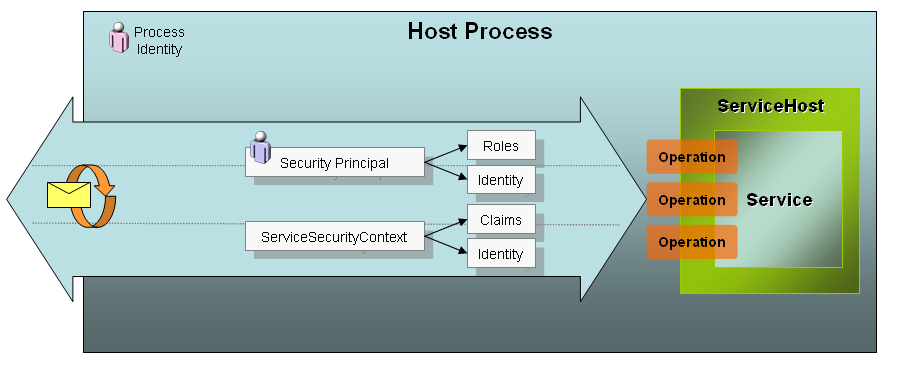
Access to resources during a service operation is influenced by three key elements:
-
Process Identity. Service operations are executed under the process identity of the service host. For ASP.NET hosts this is usually the ASP.NET account, and for self-hosting it may be a different service account. This process identity is the Windows account that governs what the service code can do at run time when attempting to access protected resources such as the database, registry or file system. -
Security Principal. If you are familiar with traditional .NET role-based security, you know that there is a security principal attached to each executing thread. That security principal holds the caller’s identity, which may or may not be tied to a Windows account and its roles. Roles govern which operations can be executed by the authenticated user when traditional .NET role-based security is applied. -
ServiceSecurityContext. Provides run time access to other relevant information about the security context for a service operation. The ServiceSecurityContext is a run time type that includes identities, a set of claims, and authorization policies. This information can be used to apply a more fine-grained security strategy specifically for services.
Figure 1 illustrates the relationship of these security elements. While the process identity is constant, each operation is executed on a request thread that contains a unique security principal and security context. In the following sections I’ll elaborate on the authorization process and the role of these and other security elements.
Claims-Based Identity Model
The identity model in WCF supports a rich, claims-based approach to authorization. A claim describes an individual right or action applicable to a particular resource. For example, an identity claim could represent a Windows token, a non-Windows user account, an X509 certificate or some other identity type. Claims can also be proof of possession of other information such as an e-mail address, birth date, or first and last name. Custom claims can be created to indicate the ability to access specific business entities or their storage location.
Claims are generated from security tokens. Security tokens are abstractions of credentials that are passed in the security headers of a message and validated against the security policy. When security tokens are validated and processed at the service, claims are extracted and placed into the security context for the operation being executed. Each credential type will result in a different set of claims (called a claimset) to evaluate-but you could unify the claimset by mapping the default claims to custom claims that will be evaluated by your code at run time.
Ultimately, a claimset is attached to the ServiceSecurityContext and available for any custom authorization code involved in the execution of the operation. Although traditional role-based security is still supported, a customized claims-based authorization model can add a welcome layer of granularity.
ServiceSecurityContext
ServiceSecurityContext provides access to claims at run time. Some key properties of the ServiceSecurityContext type are:
AuthorizationContext. Contains one or more claimsets for authorization. Use this information to perform custom authorization.
AuthorizationPolicies. Contains the policies used to grant claims.
**PrimaryIdentity. ** Contains the identity claim from the claim set, as a traditional IIdentity reference.
WindowsIdentity. Contains the identity claim from the claim set if it is a WindowsIdentity.
You can access the ServiceSecurityContext through the OperationContext.
ServiceSecurityContext security =
OperationContext.Current.ServiceSecurityContext;
With that reference, you could implement a custom authorization check that is based on claims. For example, you could check to see that the user was authenticated and that an e-mail claim was also provided.
string user = security.PrimaryIdentity.Name;
string email = null;

IEnumerable<Claim> claims = security.
AuthorizationContext.ClaimSets[0].FindClaims
(ClaimTypes.Email,Rights.PossessProperty);

foreach (Claim c in claims)
{
  email = c.Resource as string;
}
if (string.IsNullOrEmpty(user) || email == null)
  throw new SecurityException
  ("Unauthorized access. Email claim not found.");
This code illustrates using the ServiceSecurityContext for custom authorization inside an operation-but it can also be wrapped into a custom authorization policy to decouple from operation code and provide a unit of reuse.
The ServiceSecurityContext is also used during role-based authorization, to be discussed shortly.
Security Token Authentication
Claims are added to the security context while tokens are authenticated. One or more security tokens can be present in a message. Each token is authenticated by its own SecurityTokenAuthenticator type. Table 1 provides a list of commonly used token authenticators with a short description.
Windows tokens are authenticated against the Windows domain. Certificate credentials are authenticated against the certificate store based on authentication rules specified in the <clientCertificate> section of the service behavior. For example, the following configuration does not map certificates to Windows accounts, and will trust certificates placed in the TrustedPeople store-otherwise it will try to validate the chain of trust online.
<behavior name="serviceBehavior">
  <serviceCredentials>
    <clientCertificate>
      <authentication
certificateValidationMode="PeerOrChainTrust"
trustedStoreLocation="LocalMachine"
revocationMode="Online"
mapClientCertificateToWindowsAccount="false" />
    </clientCertificate>
  </serviceCredentials>
</behavior>
By default, UserName tokens authenticate against the Windows domain, but you can use the membership provider model of ASP.NET by changing the userNamePasswordValidationMode from “Windows” to “MembershipProvider” (see Listing 1). This setting engages the default ASP.NET provider model unless you specify an alternate membership provider, or a custom password validator in the <userNameAuthentication> section.
SAML tokens are not authenticated against a provider model, but the token itself is validated and its claims presented for authorization.
Clearly, token authentication is specific to the token type, and each has a specific set of behavioral settings appropriate to the token that control how authentication is carried out. The end result for successful authentication is a claimset that can later be used for authorization, and an identity attached to the security context and the thread.
Role-Based Authorization
Despite the importance and granularity of the claims-based authorization model in WCF, role-based security is still alive and well, and is useful for controlling access to service operations and business classes used downstream. This type of authorization is based on the security principal for the request.
“The identity model in WCF supports a rich, claims-based approach to authorization.”
The identity of the caller is attached to the executing request thread in the form of a security principal, accessible through the CurrentPrincipal property.
System.Threading.Thread.CurrentPrincipal
The security principal is a wrapper for an identity-its type directly related to the token type received. For example, it could be a WindowsIdentity, X509Identity, GenericIdentity, or a custom type that implements System.Security.Principal.IIdentity. The identity is created during authentication as I discussed.
The actual security principal is a type that implements System.Security.Principal.IPrincipal. This interface has two members:
- A read-only Identity property that returns a reference to the IIdentity for the request.
- An IsInRole() method that returns a true or false result after checking to see if the identity is in a particular role.
The choice of role provider for a request influences the type of security principal attached to the thread. Options for role provider include:
None. No role provider.
Windows. Use Windows roles and add a WindowsPrincipal to the security context.
UseAspNetProvider. Use the configured RoleProvider type, which defaults to the ASP.NET role provider. This adds a RoleProviderPrincipal to the security context.
Custom. Relies on a custom authorization policy to add a security principal to the security context.
The default role provider is “Windows” therefore a WindowsPrincipal is the default type. For Windows, UserName or Certificate credentials (when Certificates are mapped to Windows accounts) this will contain an authenticated WindowsPrincipal, otherwise the principal is unauthenticated and has no runtime use for role-based security.
If you aren’t expecting Windows credentials, you can change the role provider by setting the principalPermissionMode value of the <serviceAuthorization> behavior (Listing 1). If you are using the ASP.NET credentials database, you can set it to “UseAspNetProvider”. This causes a RoleProviderPrincipal to be attached to the thread instead of a WindowsPrincipal. This IPrincipal type is new to WCF, and holds a reference to the ServiceSecurityContext. When the identity is requested from the principal, it actually returns a reference to the ServiceSecurityContext’s PrimaryIdentity property (discussed earlier). When IsInRole() is invoked, it uses the configured RoleProvider (in this case, the default ASP.NET role provider) to check if this identity is in the specified role.
You can also customize this behavior with a custom ASP.NET RoleProvider or with a custom authorization policy.
In any case, .NET role-based security relies on the IPrincipal object attached to the thread to perform authorization checks. So, even with WCF you can use the PrincipalPermission type to demand things like:
- Is the user authenticated?
- Is the user in a particular role?
- Is a particular user calling?
At runtime, this can be done with an imperative permission demand within the WCF operation or any business component. Just create a PrincipalPermission object, initialize the values you want to enforce, and issue the Demand().
public string AdminsOnly()
{
  // unprotected code

  PrincipalPermission p = new
PrincipalPermission(null, "Administrators");
  p.Demand();

  // protected code
}
In this example, an exception will be thrown if the user is not in the Administrators group.
You can also place a declarative PrincipalPermissionAttribute on any WCF operation or business component method to apply the demand before the operation or method is invoked:
[PrincipalPermission(SecurityAction.Demand, Role =
"Administrators")]
public string AdminsOnly()
{
  // protected code
}
This approach is preferable since it decouples the security requirements from the actual code within the operation.
In both scenarios, the IsAuthenticated property of the identity is verified, and the IsInRole() method is invoked to check membership using the IPrincipal object attached to the thread.
Custom Authorization Policies
Credential authentication, default claimset generation, and access to the security principal for role-based demands are all features that are configurable as I’ve discussed so far in this section. These are features that you get “for free”, with little extra coding effort.
I also mentioned earlier that you can create custom authorization policies for your WCF services. These are types that implement the IAuthorizationPolicy interface from the System.IdentityModel.Policy namespace. Here are a few useful reasons to create a custom authorization policy:
- When the service requires SAML tokens as the client credential type the claims are not authenticated against any existing role provider. A custom authorization policy can inspect these claims and initialize the security context accordingly.
- A service may replace traditional role-based security with claims-based security. An authorization policy can be used to normalize the set of claims received from different tokens into a common set of claims used for claims-based security.
- Services that use a custom role provider must provide an authorization policy to create an IPrincipal for the security context. Without it, authorization will fail.
The code sample for this article includes an advanced sample that illustrates an IAuthorizationPolicy implementation.
Impersonation
With all this talk about authentication and authorization, impersonation is worth discussing. When Windows credentials are used, the service can be configured to impersonate callers so that the request thread operates under the impersonated Windows token. This makes it possible for services to access protected Windows resources under the identity of the caller, instead of the process identity of the service-for that request.
Using the OperationBehaviorAttribute you can apply impersonation rules per operation by setting the Impersonation property to one of the following:
-
ImpersonationOption.NotAllowed. The caller will not be impersonated. -
ImpersonationOption.Allowed. The caller will be impersonated if a Windows credential is provided. -
ImpersonationOption.Required. The caller will be impersonated and a Windows credential must be provided to support this.
This behavior is applied to service operations.
[OperationBehavior(Impersonation =
ImpersonationOption.Allowed)]
public string DoSomething()
{
  ...
}
You can also set this for all operations by declaratively configuring the impersonateCallerForAllOperations attribute for the service authorization behavior.
<behaviors>
  <serviceBehaviors>
    <behavior name="serviceBehavior">
      <serviceAuthorization
impersonateCallerForAllOperations      ="false"/>
    </behavior>
  </serviceBehaviors>
</behaviors>
Clients can also control impersonation, to prevent services from using their identity to access resources. Windows credentials have an AllowedImpersonationLevel property that can be set to one of the following:
- TokenImpersonationLevel.None
- TokenImpersonationLevel.Anonymous
- TokenImpersonationLevel.Identification
- TokenImpersonationLevel.Impersonate
- TokenImpersonationLevel.Delegate
None and Anonymous protect the caller’s identity but aren’t useful for authentication. Identify is the default and preferred setting since it allows services to identify the caller but disallows impersonation. Impersonate and Delegate will allow impersonation across one machine, or delegation with a Kerberos ticket, respectively.
You set the value on the proxy as follows:
localhost.HelloIndigoServiceClient proxy = new
Client.localhost.HelloIndigoServiceClient();
…
proxy.ClientCredentials.Windows.
AllowedImpersonationLevel =
TokenImpersonationLevel.Identification;
Applied WCF Security
At this point you should have a pretty good idea of the security-related settings that affect how authentication, authorization and message protection are applied. You should also have a clearer picture of the authentication and authorization process, and the relevance of identities to and role-based security. Still, it helps to look at concrete examples that apply these security features.
“In a federated scenario, the service can require that client applications send a security token generated and signed by a specific, trusted identity provider.”
If you take into consideration interoperability and the sheer number of custom situations disparate applications call for-it would be impossible to elaborate on every scenario. That said, in this section I’ll walk you through some common situations that require different bindings, security settings, and authorization techniques, to give you an idea of how that maps to an implementation in the sample code for this article.
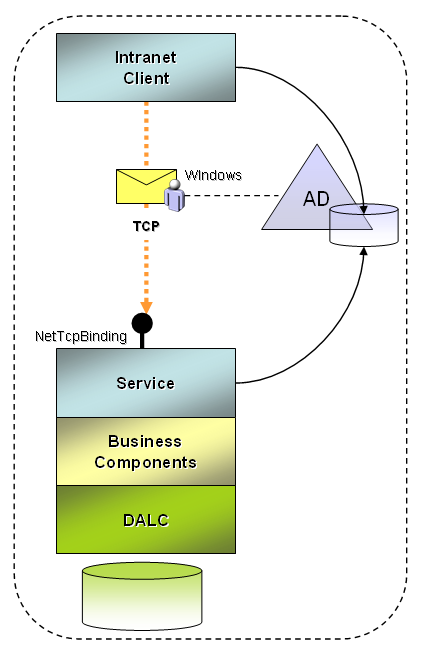
Intranet Applications
Internal applications that run on the intranet (and share the same Windows domain as the service) can generally take advantage of a faster transfer protocol like TCP. In terms of security settings, the following may apply:
- Windows client credentials are used for client authentication.
- Authentication and authorization use default Windows membership and role providers.
- Messages are encrypted and signed by the transport layer.
- The service will be self-hosted or hosted in the Windows Activation Service (WAS) for TCP access.
- The service implements role-based permission demands on protected operations.
- The service rejects impersonation of Windows accounts, and uses a trusted subsystem model.
Figure 2 illustrates this scenario. The NetTcpBinding service model configuration for this scenario is shown in Listing 2.
The client binding configuration to consume this service is equivalent but the behaviors are local to the service. Windows credentials of the logged in user will automatically be passed by the client channel. If you use a login dialog to collect credentials, set the Windows credentials on the proxy this way:
HelloIndigoServiceClient proxy = new
HelloIndigoServiceClient();

NetworkCredential creds = new NetworkCredential
("username", "password", "domain");

proxy.ClientCredentials.Windows.
AllowedImpersonationLevel =
TokenImpersonationLevel.Identification;

proxy.ClientCredentials.Windows.AllowNtlm = false;
proxy.ClientCredentials.Windows.ClientCredential
= creds;

string s = proxy.HelloIndigo("some string");
Setting AllowNtlm to false prevents workgroup authentication from being supported, but you will want this enabled for testing outside of a domain environment.
Internet Applications
When remote clients are not part of the Windows domain, they use Internet protocols to access services (HTTP or HTTPS). The configuration settings in this case will vary based on many factors, including the type of protocols client applications can support.
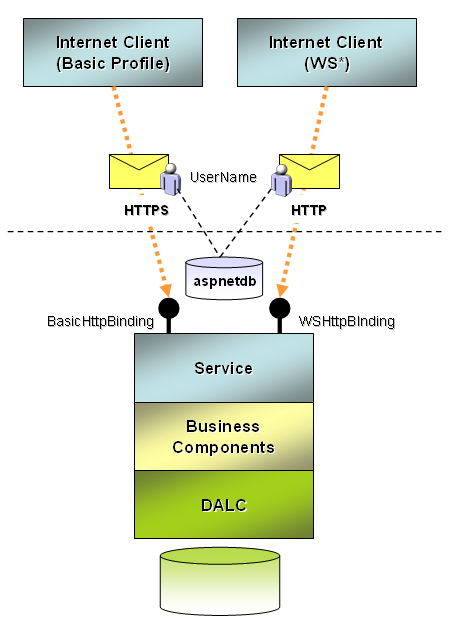
To expose an endpoint that supports earlier Web service standards, WS-I Basic Profile is the typical baseline. Usually the same endpoint will support WS-I Basic Security Profile for security-related settings. So, the requirements of the service might be:
- An SSL connection is used to identify the service and to protect message transfer over HTTPS.
- UserName credentials are used for client authentication.
- Authentication and authorization use the built-in ASP.NET membership and provider model.
- Services are hosted in IIS with ASP.NET integration.
Figure 3 illustrates this scenario. The BasicHttpBinding service configuration that implements these requirements is shown in Listing 1.
This endpoint can only be accessed over HTTPS since transport transfer security is specified. Service authorization and authentication settings are specified in the <serviceBehaviors> section, but for this binding, the <serviceCertificate> is unused since HTTPS is used.
Using svcutil.exe a proxy is created for the service, and configuration settings for both bindings in Listing 1. Here is the code to consume the Basic Profile binding and specify the UserName credential in code.
localhost.HelloIndigoServiceClient soap11proxy =
new BasicClient.localhost.HelloIndigoServiceClient
("BasicHttpBinding_IHelloIndigoService");

soap11proxy.ClientCredentials.UserName.UserName =
"Admin";
soap11proxy.ClientCredentials.UserName.Password =
"<a href="mailto://p@ssw0rd">p@ssw0rd</a>";

string s = soap11proxy.HelloIndigo("Soap 1.1
endpoint using BasicHttpBinding.");
For clients that can support advanced Web services standards (WS*) a whole range of possible options exist. Still, a typical scenario that is interoperable might have these requirements:
- A service certificate is supplied to identify the service and protect messages during transfer.
- UserName credentials are used for client authentication.
- Secure sessions and credential negotiation are disabled.
- Authentication and authorization use the built-in ASP.NET membership and provider model.
- Services are hosted in IIS with ASP.NET integration.
Figure 3 illustrates the same service exposing a WSHttpBinding alongside a BasicHttpBinding endpoint. Listing 1 illustrates the binding configuration for WSHttpBinding. This endpoint shares <serviceBehavior> settings with the BasicHttpBinding endpoint, however in this case, since message transfer security is used, the <serviceCertificate> element is required.
Since the client configuration generated by svcutil.exe includes an encoded service certificate (discussed earlier) no changes are required to successfully invoke the service. The following code instantiates the proxy for the WSHttpBinding endpoint, and invokes the service with WS* protocols:
localhost.HelloIndigoServiceClient soap12proxy =
new BasicClient.localhost.HelloIndigoServiceClient
("WSHttpBinding_IHelloIndigoService");

soap12proxy.ClientCredentials.UserName.UserName =
"Admin";
soap12proxy.ClientCredentials.UserName.Password =
"<a href="mailto://p@ssw0rd">p@ssw0rd</a>";

string s = soap12proxy.HelloIndigo("Soap 1.2
endpoint using WSHttpBinding.");
Business Partner Applications
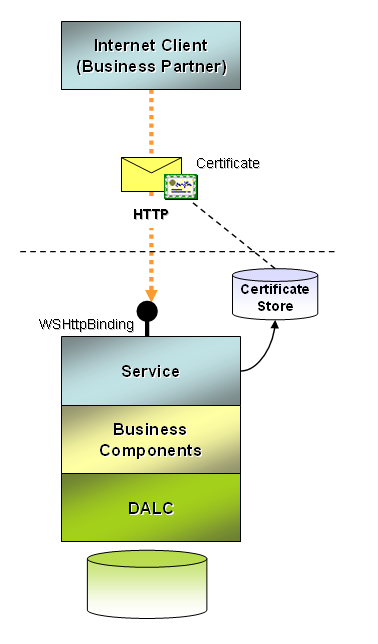
A business partner accessing your services over the Internet may require a different approach to authentication and authorization. Consider these requirements:
- A service certificate is supplied to identify the service and protect messages during transfer.
- Certificates are used to uniquely identify partners.
- Certificates are authenticated using the default certificate validation process.
- Certificates are authorized by placing the corresponding public key of each partner in the TrustedPeople folder for the LocalMachine certificate store.
Figure 4 illustrates this scenario and Listing 3 shows the required configuration settings for WSHttpBinding. Certificates can also be used with other bindings as a form of authentication.
The client configuration generated by svcutil.exe doesn’t include information about the location of the client certificate. You must make a modification to the configuration on the client to add the following behavior and associate it to the client endpoint:
<behaviors>
  <endpointBehaviors>
    <behavior name="clientBehavior">
      <clientCredentials>
        <clientCertificate findValue="SubjectKey"
storeLocation      ="CurrentUser" storeName="My"
x509FindType      ="FindBySubjectName"/>
      </clientCredentials>
    </behavior>
  </endpointBehaviors>
</behaviors>
Certificate credentials can also be useful for services authenticating across tiers behind the firewall.
Federated Security
It is impossible to include an in-depth discussion on federated security scenarios in this article, but it at least warrants an introduction to whet your appetite. In a federated scenario the service can require that client applications send a security token generated and signed by a specific, trusted identity provider (Figure 5).
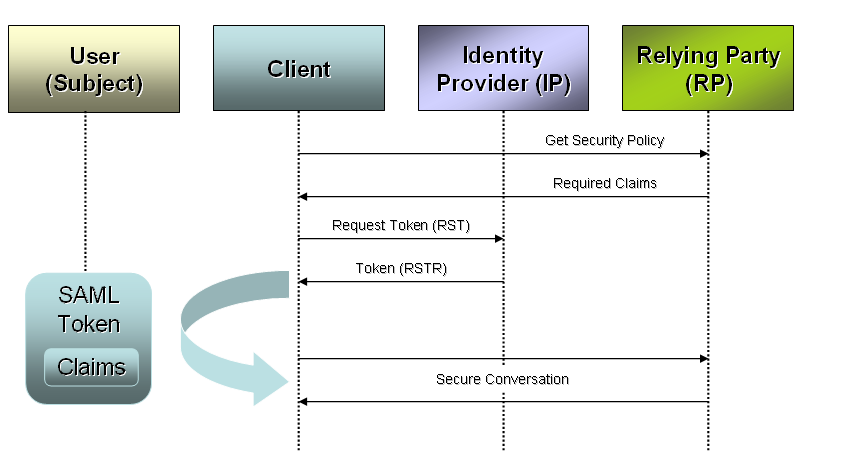
In some cases the identity provider is the same company as the target service-but they have decoupled token issuance from business services. The client application authenticates to the identity provider and requests a token for a particular subject (usually a user). The identity provider returns a signed and encrypted token that can be used for subsequent communications with the target service. It carries the claims requested if the subject is authorized, and the service can use this for a rich, claims-based authorization model.
For this situation, the target service may have the following requirements:
- Supply a service certificate to identify the service and protect messages during transfer.
- Require an IssuedToken for client credentials, identifying the authorized identity provider (another service known as a Security Token Service or STS).
- Use a custom authorization policy to validate that claims received in the token satisfy service requirements.
The service configuration for this scenario will use WSFederationHttpBinding-which allows you to specify which identity provider you require claims from, and which claims you expect the issued token to contain. An abbreviated version of this binding configuration is illustrated in Listing 4.
There are many details that warrant discussion in a federated security scenario including the detailed implementation of the identity provider, authentication requirements to the provider, SAML token generation, authorization of claims and the use of custom IIdentity and IPrincipal objects to streamline authorization. You can gain insight into these details from the federated security code sample provided with this article.
Conclusion and Next Steps
You’ve probably gathered from the details in this article that there are many intricacies in WCF security. I have covered most of the security-related binding properties, and many behavioral settings for specific scenarios-and this will definitely get you on the right track. Beyond these topics, you will still want to explore security scenarios for some of the bindings that I have left out of this discussion for simplicity. These have overlapping uses for the concepts I’ve discussed here but also introduce more possibilities. In addition, federated security scenarios and Windows CardSpace each warrant a focused discussion since they are quite advanced and relatively new concepts to most. You can find many resources on these subjects on the .NET 3.0 community portal here: http://www.netfx3.com/. Enjoy!
Listing 1: Possible service model configuration to support both BasicHttpBinding and WSHttpBinding endpoints for the same service
<configuration>
  <connectionStrings>
    <remove name="LocalSqlServer"/>
    <add name="LocalSqlServer" connectionString="data
source=localhost;Initial Catalog=aspnetdb;
Integrated Security=True; " providerName="System.Data.SqlClient"/>
  </connectionStrings>
  <system.web>
    <roleManager enabled="true"/>
    …

  </system.web>
  <system.serviceModel>
    <services>
      <service name="HelloIndigo.HelloIndigoService"
behaviorConfiguration        ="serviceBehavior">
        <endpoint contract="HelloIndigo.IHelloIndigoService"
binding        ="basicHttpBinding" bindingConfiguration="basicHttp"/>
        <endpoint contract="HelloIndigo.IHelloIndigoService"
binding        ="wsHttpBinding" bindingConfiguration="wsHttp"/>
      </service>
    </services>
    <bindings>
      <wsHttpBinding>
        <binding name="wsHttp">
          <security mode="Message">
            <message clientCredentialType="UserName"
negotiateServiceCredential        ="false"
establishSecurityContext        ="false"/>
          </security>
        </binding>
      </wsHttpBinding>
      <basicHttpBinding>
        <binding name="basicHttp">
          <security mode="TransportWithMessageCredential">
            <transport/>
            <message clientCredentialType="UserName"/>
          </security>
        </binding>
      </basicHttpBinding>
    </bindings>
    <behaviors>
      <serviceBehaviors>
        <behavior name="serviceBehavior">
          <serviceMetadata httpGetEnabled="true"/>
          <serviceAuthorization
principalPermissionMode        ="UseAspNetRoles"/>
          <serviceCredentials>
            <userNameAuthentication
userNamePasswordValidationMode        ="MembershipProvider"/>
            <serviceCertificate findValue="RPKey"
storeLocation        ="LocalMachine" storeName="My"
x509FindType        ="FindBySubjectName"/>
          </serviceCredentials>
        </behavior>
      </serviceBehaviors>
    </behaviors>
  </system.serviceModel>
</configuration>
Listing 2: Possible service model configuration for intranet scenarios
<system.serviceModel>
  <services>
    <service name="HelloIndigo.HelloIndigoService"
behaviorConfiguration        ="serviceBehavior">
      <endpoint contract="HelloIndigo.IHelloIndigoService"
binding        ="netTcpBinding" />
    </service>
  </services>
  <behaviors>
    <serviceBehaviors>
      <behavior name="serviceBehavior">
        <serviceAuthorization
impersonateCallerForAllOperations        ="false"/>
        <serviceCredentials>
          <windowsAuthentication allowAnonymousLogons="false"
includeWindowsGroups        ="true" />
        </serviceCredentials>
      </behavior>
    </serviceBehaviors>
  </behaviors>
</system.serviceModel>
Listing 3: Service model configuration to require certificate credentials and control authentication and authorization settings
<system.serviceModel>
  <services>
    <service name="HelloIndigo.HelloIndigoService"
behaviorConfiguration        ="serviceBehavior">
      <endpoint contract="HelloIndigo.IHelloIndigoService"
binding        ="wsHttpBinding" bindingConfiguration="wsHttp"/>
    </service>
  </services>
  <bindings>
    <wsHttpBinding>
      <binding name="wsHttp">
        <security mode="Message">
          <message clientCredentialType="Certificate"/>
        </security>
      </binding>
    </wsHttpBinding>
  </bindings>
  <behaviors>
    <serviceBehaviors>
      <behavior name="serviceBehavior">
        <serviceCredentials>
          <clientCertificate>
            <authentication
certificateValidationMode        ="PeerOrChainTrust"
trustedStoreLocation        ="LocalMachine"  />
          </clientCertificate>
          <serviceCertificate findValue="RPKey"
storeLocation        ="LocalMachine" storeName="My"
x509FindType        ="FindBySubjectName"/>
        </serviceCredentials>
      </behavior>
    </serviceBehaviors>
  </behaviors>
</system.serviceModel>
Listing 4: Partial listing of the WSFederationHttpBinding requiring tokens from a trusted identity provider
<wsFederationHttpBinding>
<binding name="wsFedBinding">
<security mode="Message">
<message issuedTokenType=
"<a href="http://docs.oasis-open.org/wss/oasis-wss-saml-token-profile-";>http://docs.oasis-open.org/wss/oasis-wss-saml-token-profile-<;/a>
1.1#SAMLV1.1" >
<claimTypeRequirements>
<add
claimType ="<a href="http://schemas.microsoft.com/ws/2005/05/identity/claims/";>http://schemas.microsoft.com/ws/2005/05/identity/claims/<;/a>
privatepersonalidentifier" isOptional="false"/>
...more claims...
</claimTypeRequirements>
<issuer
address ="http://localhost:2489/TokenIssuer/Service.svc"
binding ="wsHttpBinding" ... >
...
</issuer>
</message>
</security>
</binding>
</wsFederationHttpBinding>
Table 1: A subset of commonly used SecurityTokenAuthenticator types for authenticating security tokens.
| SecurityTokenAuthenticator Type | Description |
|---|---|
| WindowsSecurityTokenAuthenticator | Ensures a valid Windows token. Generates a WindowsClaimSet for authorization. |
| KerberosSecurityTokenAuthenticator | Ensures a valid Kerberos token. Generates a WindowsClaimsSet for authorization. |
| X509SecurityTokenAuthenticator | Validates the certificate and maps it to a Windows identity if applicable. Generates an X509ClaimSet and possibly a WindowsClaimSet. |
| WindowsUserNameSecurityTokenAuthenticator | Creates a Windows token for the username and password provided. Generates a WindowsClaimSet for authorization. |
| CustomUserNameSecurityTokenAuthenticator | Validates the username and password against the configured membership provider or password validator. Generates a UserNameClaimSet for authorization. |
| SamlSecurityTokenAuthenticator | Validates the SAML token (timestamp, signature, etc.). Resolves claims directly from the token for authorization. |
