



One of the classic problems with database applications is refreshing stale data.
Imagine a typical e-commerce site with products and categories. A vendor’s product list most likely does not change very often and their category list changes even less frequently. However, those same lists must be queried from the database over and over again every time a user browses to that Web site. This is an annoyingly inefficient use of resources and developers and architects have been stuck playing cat-and-mouse trying to reduce the waste.
Caching is one technique used to minimize this repetitive querying of nearly stagnant data. The data can be queried once and stored in a cache, and the application repeatedly accesses the cache for the data. Occasionally, the cache is updated to get fresh data. But here is where many of us get caught up in trying to pinpoint the perfect schedule for updating the cache. How often should you do it? How often do you expect your categories to change, for example? Once every few months? Then what if you refresh the cache every two months? You know what would happen. The categories would get updated the day after you refreshed the cache and the cache would then be stale for two months before the next update.
For client-side applications, limit your use of query notification to not more than ten concurrent users.
Enter Query Notification, a collaboration between Microsoft’s ADO.NET and SQL Server teams. In a nutshell, Query Notification allows you to cache data and be notified when the data has been changed in SQL Server. Upon notification, you can then refresh your cache or take whatever action you need to.
Query Notification is possible because of a new feature in SQL Server 2005 called Service Broker. Service Broker puts queuing functionality into the database with a coordination of queues that communicate with services that, in turn, know how to communicate back to the calling entity. The queues and services are first class objects just as tables, views, and stored procedures are. Although Service Broker can be leveraged completely within SQL Server, ADO.NET knows how to communicate with Service Broker to trigger this mechanism and retrieve the notifications back from the Service Broker.
On the .NET side, there are a number of ways of hooking into this functionality. ADO.NET 2.0 provides the System.Data.SqlClient.SqlDependency and System.Data.Sql.SqlNotificationRequest classes. SqlDependency is a higher-level implementation of SqlNotificationRequest and is most likely the one you will use when working with ADO.NET 2.0. ASP.NET 2.0 also communicates with Service Broker through the System.Web.Caching.SqlCache-Dependency class (that provides a wrapper around SqlDependency), as well as directly through functionality provided declaratively in an ASP.NET page using the <%OutputCache> directive. This allows ASP.NET developers to easily invalidate caches that are dependent on data from SQL Server.
How .NET Communicates with Service Broker
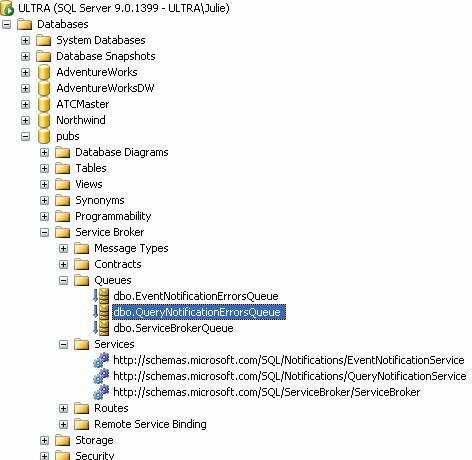
How does all of this come together to solve the caching conundrum? Although there are a number of actions you must take to allow SQL Server to provide this service to .NET, the key is that queries sent to SQL Server have a flag attached to them telling SQL Server that in addition to returning the resultset, SQL Server should register the query (and its requestor) into the Service Broker. It does this by creating a queue that is aware of the query and a service that is attached to the queue and knows how to get back to the client. If any of the rows in that resultset get updated in the database, the item in the related queue is triggered and in turn, sends a message to its service, and then sends a notice back to the application that initiated the request.
A screenshot of SQL Server Management Studio in Figure 1 shows the Queues and Services inside of the Service Broker section of the pubs database.
Here are some important things to understand about this process:
- There are rules about what types of queries are acceptable to SQL Server.
- Once SQL Server sends back the notice, the queue and service are removed. This means that you only get one notice per request. A typical application re-queries the database and at the same time, requests that a new dependency be created in Service Broker.
- The information returned to the application is not much more than “something changed.” The application does not get notified about what changed. (See the SQLNotificationEventArgs section below for more on this.)
- Although the dependency is tied to the rows that are returned from the query, it is not filtered by the individual columns of the query. If you have a query that returns the first and last names of the founding members of your organization and the address of one of those individuals changes (but their first or last name doesn’t), this triggers a change notification. Hopefully, this particular behavior will change in future versions.
- Notifications are returned through a single SqlConnection that is established solely for this purpose. This connection is not engaged in connection pooling. (See the information on SqlDependency.Start and Stop further on in this article for more information.)
When and When Not to Use Query Notification
Query Notification is designed for data that does not change frequently. It is also best used in server-side applications (such as ASP.NET or remoting) rather than client-side applications (such as a Windows Forms application). Remember that each request for a notification is registered in SQL Server. If you have masses of client applications each requesting a notification, this can create a resource problem on your server. Microsoft’s recommendation is that for client-side applications, you limit your use of query notification to not more than ten concurrent users.
Query Notification allows you to cache data and be notified when the data has been changed in SQL Server.
For large-scale applications, query notification can be a powerful aid in lieu of merely adding more and more servers to meet demands. Imagine a large software company that provides online software updates to thousands or even millions of users. Rather than having each user’s update trigger yet another query on the server to see which components are needed, the query results can be cached and matching queries can be served directly from the cache.
On a smaller scale, drop-down lists are another typical set of data that is not updated often but requested frequently. Product lists, state lists, country lists, vendors, sales people, and more-anything that changes at a much lower frequency than it is requested-is a great candidate for notifications.
Preparing SQL Server for Query Notification
Because of SQL Server 2005’s state of high security, you need to turn on some functionality in order to use Query Notification. Each database that you would like to use needs the Service Broker enabled. You can do this in T-SQL with the command
   USE mydatabase
   ALTER DATABASE mydb SET ENABLE_BROKER
Additionally, you need to grant a number of permissions in SQL Server to allow non-Administrative accounts to engage with Query Notification. These are listed in the sidebar, SQL Server Permissions for Query Notification.
SqlDependency.Start and Stop
SqlDependency and SqlCacheDependency both require that you call the static method SqlDependency.Start() prior to any notification requests. What this does is create a SqlConnection dedicated to receiving the notifications when data has changed. You need only set this up at the beginning of an application’s lifetime. For example, in an ASP.NET application, the global.asax file’s Application Start event is a good place to do this.
The Start method is called for each connection involved in notification. Therefore, if you access multiple databases in your application, you need to call Start for each one. In the following example, there is a connection string named pubsConn for the Pubs database defined in the web.config for this application.
To shut down this connection, use SqlDependency.Stop(), also a static method.
Sub Application_Start(ByVal sender as Object, _
 ByVal e as EventArgs)
   System.Data.SqlClient.SqlDependency.Start _
    (System.Configuration.ConfigurationManager.
   Connectionstrings("pubsConn").ConnectionString)
    End Sub
Sub Application_End(ByVal sender as Object,
 ByVal e as EventArgs)
   System.Data.SqlClient.SqlDependency.Stop _
  (System.Configuration.ConfigurationManager. _
   Connectionstrings("pubsConn").ConnectionString)
    End Sub
If you watch the SQL Server profiler while Start and Stop are being called, you will see a lot of interesting information. When Start is called, the application runs a query to ensure that Service Broker is enabled and then creates a Stored Procedure to be used later that clears out the SqlDependency queue and service in the Service Broker infrastructure. Lastly, it runs a SQL Server 2005 WaitFor command that queries for entries in the Notification Service area. These are all things that you would have to do explicitly if you used the lower level SqlNotificationRequest object in ADO.NET.
Over the course of .NET 2.0’s design, the underlying architecture of SqlDependency was changed from a push model (from SQL Server) to a pull model (from .NET). The reason for this was to solve some security issues that were caused by the first design. Sushil Chordia of Microsoft has a post on his weblog about this change and includes a fantastic description of how things are working under the cover. (See the Links sidebar for a link to this blog post.)
Your First Notification
Let’s use SqlDependency to investigate how all of this works together.
Start by creating a separate class for your data access. I’ll call mine NotificationTest. In this class, create a typical a function to query some data from the Authors table in the Pubs database returning a SqlDataReader.
Imports System.Data.SqlClient

Public Class NotificationTest

    Public Function DepTest() As SqlDataReader
        Dim conn As New SqlConnection(connstring)
        conn.Open()
    Dim cmd As New SqlCommand("SELECT * FROM _
        authors(", conn)")
        Dim rdr As SqlDataReader
        rdr = cmd.ExecuteReader()
        Return rdr
    End Function

End Class
Now let’s add in the dependency by modifying this code. First, declare a SqlDependency object named dep. Because you want this available to other functions in the class, make it a class variable.
Next, you need to change the query. Query Notification requires that you explicitly list the columns in your query as well as always use two-part table names. Note the new query text in the modified code sample.
Next, instantiate the new SqlDependency and attach it to the command.
That’s it. When the command is executed, the dependency goes along with it up to the database. At the same time that it processes the query, SQL Server sees the dependency and sends it along to the Service Broker to get it registered.
Imports System.Data.SqlClient

Public Class NotificationTest

        Dim dep As SqlDependency

    Public Function DepTest() As SqlDataReader
        Dim conn As New SqlConnection(connstring)
        conn.Open()
    Dim cmd As New SqlCommand("SELECT au_id, _
     au_lname,au_fname FROM dbo.authors", conn)
        dep = New SqlDependency(cmd)
        Dim rdr As SqlDataReader
        rdr = cmd.ExecuteReader()
        Return rdr
    End Function

End Class
Now the dependency is registered but you have nothing to catch the notification when it comes back to the application. The SqlDependency class provides two ways to be aware of a notification. One is the OnChange event, which you can create a delegate to capture, and the other is the property HasChanges, which you can test for in your application logic. In Listing 1, I have added code into the OnDepChange event used for testing the notification at a later point.
Now it is time to see it work. Place a breakpoint on the End Sub line of code in the OnDepChange event. Call the DepTest function from your favorite Web page, Windows form, or console application for testing purposes. After the SqlDataReader has been returned, open up the Authors table in Visual Studio 2005’s Server Explorer or in SQL Server Management Studio and edit something in one of the fields. As soon as that change is locked in, for example, when you move your cursor to a new row in the table, the breakpoint should get hit.
SQLNotificationEventArgs
When you recover from the small thrill of seeing the notification truly coming back from the database, take a look at the value of the variable e, which is a SqlNotificationEventArgs object. SqlDependency always returns this object with the OnChange event and it can be very useful. SqlNotificationInfo is an enum with 18 possible values. Some of these are good and some indicate problems. Among the enums are Update, Insert, and Delete, telling you what type of change took place in the data. There are others that will not be sent as a result of a change. For example, restarting the server fires all notifications. Drop or Truncate tell you that something was done to the dependent table.
SqlDependency is a higher-level implementation of SqlNotificationRequest and is most likely the one you will use when working with ADO.NET 2.0.
In addition, there are cases when the dependency cannot even be registered, for example Invalid returns if you attempt to set a dependency on an UPDATE query. Query indicates that the syntax of your query does not follow the strict rules for notification. These last two, as well as a few others related to not being able to register the query, are returned immediately upon executing the command.
You can get the full list of these enums by looking up the SqlNotificationInfo Enumeration document in the MSDN Library.
When I talk about Query Notification at conferences, I am always asked if notification tells you what changed. The answer is no. The event args give you the most detail you are going to see in a notification and can be really useful for troubleshooting.
Real-World Use of the Notification
Now that you have an understanding of how this works, let’s look at a more robust scenario. What really happens when that notification is returned?
In this next sample, a DataTable is used to cache some frequently used data that does not change often. It lives on the server and can be used, for example, in a Web service accessed by a Smart Client or in remoting. You can use it in an ASP.NET application, but there you also have the option of using SqlCacheDependency.
The DataTable is exposed by a static (C#) or shared (Visual Basic) method in a class. Static methods are available without instantiating the class they are a member of. The beauty of this is that the DataTable object will always be around and retain its state.
Whenever the cached data is requested, a method is called to retrieve the table. If the table has data in it, it is simply returned. If the table is empty, it is first populated with a database query and then returned.
Query notification comes into this pattern as a mechanism for clearing the data from the table and thereby requiring a data refresh. When the query is executed, a SqlDependency object is sent up to the database. When the notification is retrieved, the class reacts by clearing the DataTable. Therefore, the next time someone needs that DataTable, the class is forced to go to the database for fresh data.
Because of the differences in static/shared functionality between Visual Basic and C#, the structure of this code is different in C# than what you see here. A C# version of this class is available in the download for this article.
Create the main class. Mine is called RobustDependency. This class has two nested classes. The first, TableProxy, is a wrapper for the cached DataTable. The second, Retriever, communicates with SQL Server to populate the table and retrieve notifications.
Public Class RobustDependency
    Public Class TableProxy
    End Class
Public Class Retreiver
End Class
End Class
Next, build the Retriever class, which uses the SqlDependency. The Retriever’s GetData method looks much the same as the previous example, except for a few things. First, it takes the cached DataTable as a parameter. Next, it tests to see if there are rows in the table. If there are no rows, it fills the table using a command that has a SqlDependency attached, just as you did above. Notice the AddHandler code. It points to an OnDependencyChanged method that you will be creating in the other nested class, TableProxy. Remember that the TableProxy is a shared (static) class. Just as the table will always be around, so will this method because you make it shared, as well. You can see the results of these changes in Listing 2.
Now let’s build the TableProxy class. This is where the static DataTable object lives. In Visual Basic, static variables need to reside within shared methods (here, it is in the shared function called Table) in order to retain their state across instances of the class.
TableProxy has two methods:
- Table, which returns the cached table dt
- OnDependencyChanged, which gets called when the notification is retrieved. This second method is where the cached table gets cleared of its data.
Public Class TableProxy
    Shared Function Table() As DataTable
        Static dt As New DataTable
        Return dt
    End Function

    Public Shared Sub OnDependencyChanged _
     (ByVal sender As Object, ByVal e As _
     SqlNotificationEventArgs)
        Dim depdt As DataTable = Table()
        depdt.Rows.Clear()
    End Sub
End Class
Now you can glue this all together with functionality in the parent class, RobustDependency. Add the GetCache method, which again, because of the way Visual Basic handles shared methods and variables, must be shared. Then create a DataTable object, which you set equal to the cached DataTable inside of the TableProxy class, and then pass that into the GetData method of the retriever, which either does nothing to it or populates it with new data. This is demonstrated in Listing 3.
The Lowly SqlNotificationRequest
SqlDependency is a high level implementation of the SqlNotificationRequest class. With SqlNotificationRequest, you are required to create your own Service Broker Services and Queues in SQL Server as well as your own listener to grab the notification. You may choose to use this lower level class for more granular control over the notification architecture. Another benefit is that you can create your own messages that are returned along with the notification, similar to the SqlNotificationInfo values.
Here are the key parts you need for doing notification with the SqlNotificationRequest class.
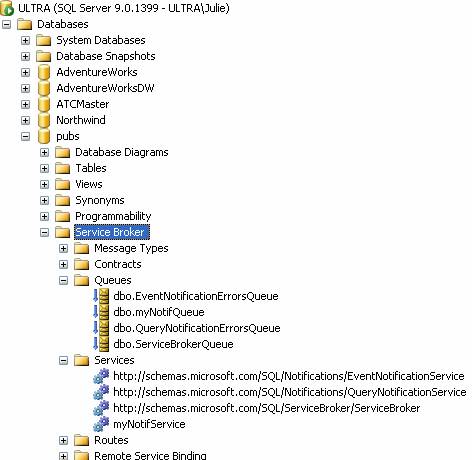
Create a queue and a then a service that hooks back to the queue in SQL Server using T-SQL. You can do this directly in SQL Server or just execute this code from your .NET application. The latter method gives you even more control and you can additionally remove them if you like. I have named mine myNotifQueue and myNotifService.
CREATE QUEUE myNotifQueue

CREATE SERVICE myNotifService ON QUEUE
myNotifQueue ([http://schemas.microsoft.com/
SQL/Notifications/PostQueryNotification])
Note that the schema is case sensitive. You won’t get an error message if you miscase it, but you won’t get your notification either.
Starting with what you now know about using SqlDependency, make a few changes to that process.
- Create a SqlNotificationRequest object rather than a SqlDependency object, but without the SqlCommand as a parameter. Attach it with the SqlCommand.Notification property.
- Define key properties of the SqlNotificationRequest: give UserID a GUID, point Options to the service you created previously, and apply a Timeout.
- Attach the request to the command through the SqlCommand.
- Most importantly, you must create a listener to retrieve notifications. This happens on a separate thread.
SqlNotificationRequest sets up its own SqlConnection for the notification to come back through. Therefore, this process does not require that you use the Start method used for SqlDependency and SqlCacheDependency.
The next example takes the RobustDependency class and replaces the GetData method with one that uses a SqlNotificationRequest instead. Additionally, because you won’t be using the SqlDependency OnChange event, you write your own method inside the TableProxy class to call when the notification is retrieved.
Here is the modified GetData method. If nothing happens within the timeout period, a notification is returned with an EventArg indicating that a timeout occurred.
Private Sub GetData(ByVal dtlocal As DataTable)
     If dtlocal.Rows.Count = 0 Then
         cmd.Notification = Nothing
         Dim snr As New SqlNotificationRequest()
         snr.UserData = New Guid().ToString()
         snr.Options = _
         "service=ContactChangeNotifications;"_
          & "local database=pubs"
         snr.Timeout = 600
         cmd.Notification = snr
         Using adapter As New SqlDataAdapter(cmd)
             adapter.Fill(dtlocal)
         End Using
         StartListener()
     End If
End Sub
The StartListener method sets up a new thread and then fires up the Listen method on that thread.
Listen creates a new T-SQL WaitFor command to query the queue you created for this job. Note that you have set the timeout of the command to 15 seconds more than the timeout of the QueryNotificationRequest. Listing 4 shows the code setting up the listener.
Listing 5 shows the rest of the class, including the new DataChanged method in the TableProxy class that replaces the event handler.
Query Notification and ASPNET’s Cache
In addition to the ADO.NET-based query notification, there is an entirely alternate set of tools built into ASP.NET 2.0 that build database cache invalidation into your Web site. The effect is, in some ways, similar to what you achieve with the middle tier caching samples above. This functionality is something that was done previously through a great deal of trickery using database polling, as detailed in Jeff Prosise’s April 2003 Wicked Code column. (See the sidebar for a link to his article.)
System.Web.SqlCacheDependency is a class that you can use in code, similar to SqlDependency, but then add into the Response.Cache to enable cache invalidation based on database updates. An even simpler way to achieve this is through the <OutputCache> directive in the page’s HTML. There are a few differences between these two methods.
- Using SqlCacheDependency attaches the dependency to a specific SqlCommand.
- Using <OutputCache> instructs the page to request a notification for any valid command that is called by the page.
- You have more fine-grained control over the cache with the SqlCacheDependency.
- <OutputCache> enables you to additionally create cache invalidation when using SQL 7.0 and SQL 2000. I will explain this in more detail below.
Listing 6 is an example of using SqlCacheDependency to request notification on a specific command. Creating the object is similar to creating the SqlDependency object in ADO.NET. Then you tie the notification into the page’s cache with Cache.AddDependency, setting the familiar caching properties. In this case, the cache is valid until it expires, which is either within 30 seconds or when a notification comes in, whichever happens first. When the page cache is invalidated, the next request for this page creates the page from scratch, forcing the data access to happen again.
Remember that you don’t see SqlDependency.Start here because it is in the Global.asax.
Invalidating the cache with the <OutputCache> in the page’s markup is even simpler. By using the new SqlDependency parameter of <OutputCache> and setting its value to CommandNotification, you are plugged right in to query notifications. Here is an example with only the minimal parameters being used.
<%@ OutputCache
SqlDependency="CommandNotification"
Duration="30" VaryByparam="none" %>
Any valid queries called from this page have a notification request registered in the Service Broker. The data access does not necessarily have to be done in the page’s client-side or server-side code code-behind). You can call into another class or even another assembly for the data access and it will still use query notification requested by the page.
The SqlDependency parameter can also take other values, but only the CommandNotification value, used with SQL Server 2005, gives you the Service Broker Query Notification. ASP.NET 2.0 is also wired up to give cache invalidation from SQL 7 and SQL 2000. One way to do this is by using the value database-name:table-name (for example, pubs:authors) as the SqlDependency value. The effect is that a polling type of query is performed. There are more pieces necessary to make this work, but as it is outside of the scope of this article, I will point you to the “Implementing SQL Server 7/2000 Dependency Caching” explanation and example in the Visual Web Developer Guide on the ASP.NET Web site. (See the sidebar for the link to this.)
Query Notification in Transactions
Query Notifications do work inside of transactions. However, you will only get one notification per transaction regardless of the number of changes made to the database within that transaction.
SQL Server Express
Query Notifications can be used with SSE but the SSE database must be a named instance. Named instance is a setup option.
Additionally, the database that you want to use must be an attached database.
Conclusion
Although Query Notification is definitely one of the big new features in .NET 2.0, it still plays underdog to other exciting features such as generics or the UI magic in ASP.NET. Whether you use it to prevent the incessant re-querying for a drop down list of the 50 U.S. states or to manage the Web-based updates of millions of client computers, it can help you reduce overhead on your resources. In its simplest use-through the ASP.NET OutputCache directive-or by building a complex caching mechanism in your Web application’s middle tier or Web service, Query Notification can be a powerful ally in creating extensible, responsive applications.
