


Windows Communication Foundation (WCF) provides a run-time environment for your services, enabling you to expose CLR types as services and to consume services as CLR types.
Although in theory you can build services without it, in practice, WCF significantly simplifies this task. WCF is Microsoft’s implementation of a set of industry standards defining service interactions, type conversion, marshaling, and various protocols’ management. Because of that, WCF provides interoperability between services, and it promotes productivity, including the essential off-the-shelf plumbing required by almost any application. This article describes the essential concepts and building blocks of WCF and its architecture, enabling you to build simple services. Future articles in this series will address specific aspects, such as transaction management and security.
What Are WCF Services?
A service is a unit of functionality exposed to the world. In that respect, it is the next evolutionary step in the long journey from functions to objects to components to services. Service-orientation (SO) is an abstract set of principles and best-practices for building SO applications, which are largely beyond the scope of this article.
WCF provides a run-time environment for your services, enabling you to expose CLR types as services and to consume services as CLR types.
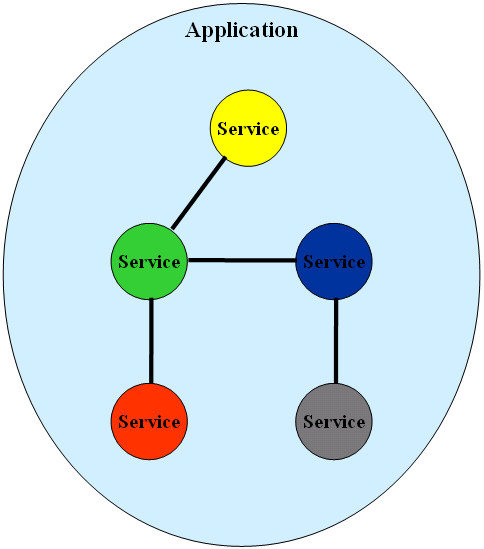
A service-oriented application (SOA) aggregates services into a single logical application (Figure 1), similar to the way a component-oriented application aggregates components or an object-oriented application aggregates objects. The services can be local or remote, developed by multiple parties using any technology, they can be versioned independently, and even executed on different timelines. Inside a service, you will find concepts such as languages, technologies, platforms, versions, and frameworks, yet between services, only prescribed communication patterns are allowed.
Clients and services interact by sending and receiving messages. Messages may transfer directly from client to service or via an intermediary. With WCF, all messages are SOAP messages. Note that the messages are independent of transport protocols-unlike Web services, WCF services may communicate over a variety of transports, not just HTTP.
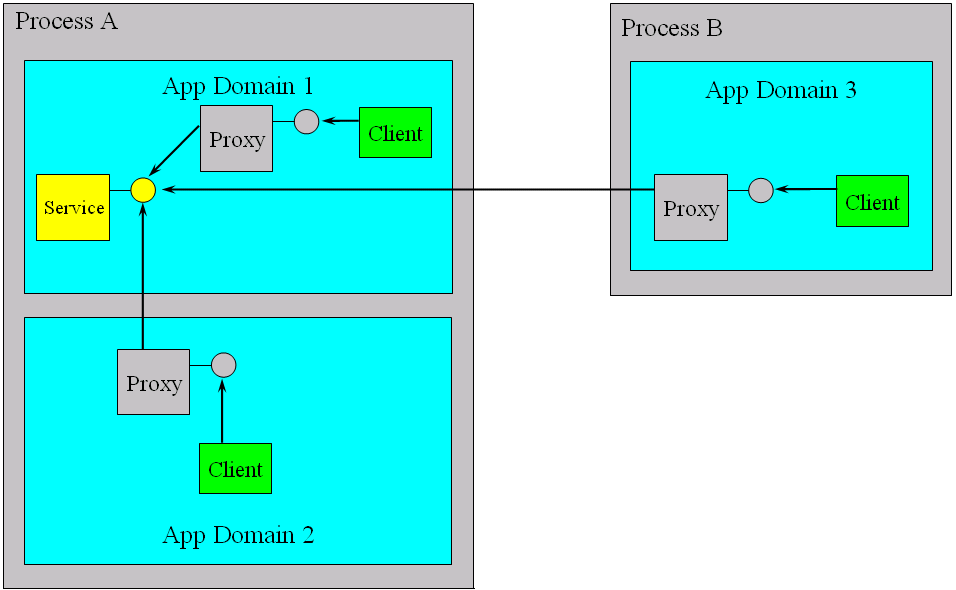
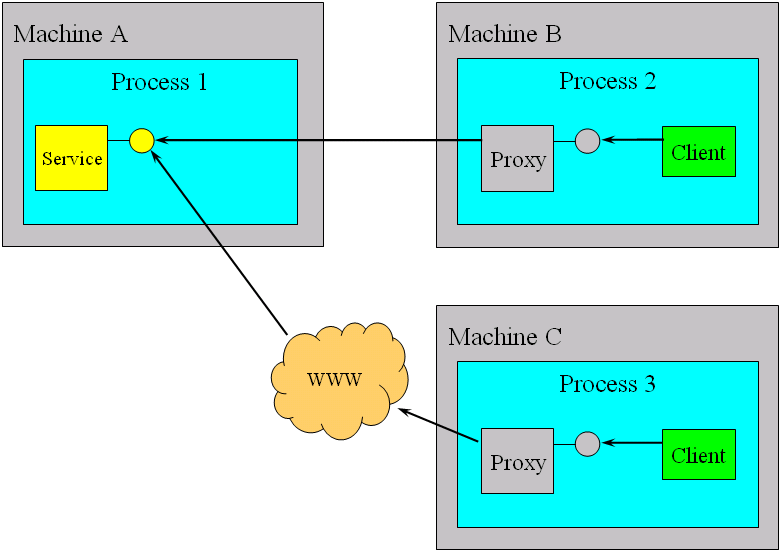
With WCF, the client never interacts with the service directly, even when dealing with a local, in-memory service. Instead, the client always uses a proxy to forward the call to the service. WCF allows the client to communicate with the service across all execution boundaries. On the same computer (see Figure 2), the client can consume services in the same application domain, across application domains in the same process, or across processes. Across computer boundaries (Figure 3), the client can interact with services in its intranet or across the Internet. Because all interactions are done via a proxy, WCF maintains the same programming model for the local and remote cases, thus not only enabling you to switch locations without affecting the client, but also significantly simplifying the application programming model. Most all of the WCF functionality is included in a single assembly called System.ServiceModel.dll in the System.ServiceModel namespace.
Service Address
In WCF, every service is associated with a unique address. The address provides two important elements: the location of the service and the transport protocol used to communicate with the service. The location portion of the address indicates the name of the target computer, site, or network, a communication port, pipe, or queue, and an optional specific path or URI. As for transports, WCF 1.0 supports the following:
- HTTP
- TCP
- Peer network
- IPC (Inter-Process Communication over named pipes)
- MSMQ
Addresses always have this format:
[base address]/[optional URI]
The base address is always in this format:
[transport]://[machine or
domain][:optional port]
Here are a few possible addresses for services:
http://localhost:8001
http://localhost:8001/MyService
net.tcp://localhost:8002/MyService
net.pipe://localhost/MyPipe
net.msmq://localhost/private/MyService
Service Contract
In WCF, all services expose contracts. The contract is a platform-neutral and standard way of describing what the service does. WCF defines four types of contracts.
Service contracts describe which operations you can perform on the service.
Data contracts define which data types are passed to and from the service. WCF defines implicit contracts for built-in types such as int and string, but you can easily define explicit opt-in data contracts for custom types.
Fault contracts define which errors are raised by the service, and how the service handles and propagates errors to its clients.
Message contracts allow the service to interact directly with messages. Message contracts can be typed or un-typed, and are somewhat analogous to late-binding invocation in the CLR. Message contracts are rarely used by SOA developers.
Of the four types of contracts, this article focuses on the service contract.
WCF allows the client to communicate with the service across all execution boundaries.
You define a service contract using the ServiceContractAttribute and you can apply the attribute on an interface or a class, as shown in Listing 1.
Service contracts are independent of the interface or class visibility-public or internal visibility is a CLR concept, not WCF. Applying ServiceContractAttribute on an internal interface exposes that interface as a public service contract, ready to be consumed across the service boundary. Without the ServiceContractAttribute, the interface is not visible to WCF clients, in line with the service-oriented tenet that service boundaries are explicit. To enforce that, all contracts must be strictly opt-in.
The OperationContractAttribute can be applied only on methods (not properties, indexers, or events, which are CLR concepts). OperationContractAttribute exposes a contract method as a logical operation to perform on the service contract. Other methods on the interface that do not have the OperationContractAttribute will not be part of the contract. This enforces the explicit service boundary and maintains an opt-in model for the operations themselves. Note that contract operations are independent of the method visibility. Listing 1 demonstrates the best practice of separating the service contract from its implementation by defining a contract interface.
You can also apply the ServiceContractAttribute and the OperationContractAttribute on the class directly, in which case, WCF infers a service contract out of the class and the methods with OperationContractAttribute. This is a technique to avoid:
//Avoid
[ServiceContract]
class MyService
{
   [OperationContract]//Visibility
                       does not matter
   string MyMethod(string text)
   {
      return "Hello " + text;
   }
   public string MyOtherMethod(string
                               text)
   {
      return "Cannot call this method
                            over WCF";
   }
}
The ServiceContractAttribute maps the CLR interface (or inferred interface) to a technology-neutral WCF contract. A single class can support multiple contracts by deriving and implementing multiple interfaces decorated with the ServiceContractAttribute. The class can implement the interfaces implicitly or explicitly because the method visibility has no bearing on WCF. There are, however, a few implementation constraints: Avoid parameterized constructors because only the default constructor will ever be used by WCF. Although the class can use internal properties, indexers, and static members, no WCF client will ever be able to access those.
Hosting
The WCF service class cannot exist in a void. Every WCF service must be hosted in a Windows process called the host process. A single host process can host multiple services and the same service type can be hosted in multiple host processes. WCF makes no demand on whether or not the host process is also the client process.
Obviously, having a separate process advocates fault and security isolation. It is also immaterial who provides the process or what kind of a process is involved. The host can be provided by IIS, by the Widows Activation Service (WAS) on Windows Vista, or by the developer as part of the application.
IIS Hosting
The main advantage of hosting a service in IIS is that the host process is launched automatically upon client requests, and you rely on IIS to manage the lifecycle of the host process. The main disadvantage of IIS hosting is that you can only use HTTP for transport on both IIS5 and IIS6; when using IIS5, you can only rely on port 80. Hosting in IIS is very similar to hosting a classic ASMX Web service. You need to create a virtual directory under IIS and supply a .svc file. The .svc file functions like an .asmx, and is used to identify the service code-behind file and class.
<%@ ServiceHost
       Language ="C#"
       Debug ="true"
       CodeBehind ="~/App_Code/MyService.cs"
       Service ="MyService"
%>
You can even inject the service code in-line in the .svc file, but that is unadvisable, as is the case with ASMX. Once you have the .svc file in place, you can navigate to it using a browser. If all is well, you will get a confirmation page.
Visual Studio 2005 can generate a new IIS-hosted service for you. From the File menu, select New Website and then select WinFX Service from the New Web Site dialog box. This causes Visual Studio 2005 to create a new Web site, service code, and matching .svc file. In addition, the Web site config file must list the types you want to expose as services. You need to use fully-qualified type names, including assembly name, if type comes from an unreferenced assembly.
<system.serviceModel>
   <services>
      <service name=
              "MyNamespace.MyService">
         ...
      </service>
   </services>
</system.serviceModel>
Self Hosting
Self hosting is the name for the technique used when the developer is responsible for providing and managing the lifecycle of the host process. Self-hosting is used both in the case of wanting a process (or computer) boundary between the client and the service and when using the service in-proc-that is, in the same process as the client. The process you need to provide can be any Windows process, such as a Windows Forms application, a Console application, or a Windows NT Service. Note that the process must be running before the client calls the service, which typically means you have to pre-launch it. This is not an issue for NT Services or in-proc.
Similar to IIS hosting, the hosting application config file must list the types of the services you wish to host and expose to the world. In addition, the host process must explicitly register the service types at run time and open the host for client calls. This is typically done in the Main() method using the helper class ServiceHost defined as:
public interface ICommunicationObject :
    IDisposable
{
   void Open();
   void Close();
   //More members
}
public abstract class
CommunicationObject :
       ICommunicationObject
{...}
public class ServiceHostBase :
             CommunicationObject ,...
{...}
public class ServiceHost :
ServiceHostBase,...
{
   public ServiceHost(Type
                      serviceType,
                      params Uri[]
                      baseAddresses);
   //More members
}
Provide the constructor of ServiceHost with the service type and optionally with default base addresses. The set of base addresses can be an empty set and later, you can configure different base addresses. Having a set of base addresses enables the service to accept calls on multiple addresses and protocols. Note that each ServiceHost instance is associated with a particular service type, and if the host process needs to host multiple types of services, you will need a matching number of ServiceHost instances. By calling the ServiceHost.Open() method on the host, you allow calls in, and by calling the ServiceHost.Close() method, you gracefully exit the host instance and finish sending data to current clients and yet refuse future client calls even if the host process is still running. Closing is typically done on host process shutdown. For example, to host this service in a Windows Forms application:
[ServiceContract]
interface IMyContract
{...}
class MyService : IMyContract
{...}
Write:
public static void Main()
{
   Uri baseAddress = new
                    Uri("http://localhost:8000/");
   ServiceHost serviceHost;
   serviceHost = new
       ServiceHost(typeof(MyService),
                         baseAddress);

   serviceHost.Open();

   //Can do blocking calls:
   Application.Run(new MyForm());

   serviceHost.Close();
}
Note that you can do blocking calls after the call to ServiceHost.Open() because the host accepts calls on worker threads. The call to ServiceHost.Open() loads the WCF run-time and enables accepting client calls. The host can register multiple base addresses as long as they differ at least by the transport:
Uri tcpBaseAddress = new
                 Uri("net.tcp://localhost:8001/");
Uri httpBaseAddress = new
                 Uri("http://localhost:8002/");
ServiceHost serviceHost = new
                    ServiceHost(typeof(MyService),
                  tcpBaseAddress,httpBaseAddress);
Visual Studio 2005 allows you to add a WCF service to any application project by selecting WCF service from the Add New Item dialog box. The service added this way is, of course, in-proc toward the host process, but can be accessed by external clients as well.
WAS Hosting
The Windows Activation Service (WAS) is a system service available with Windows Vista. WAS is part of IIS7 but can be installed and configured separately. To use the WAS for hosting your WCF service, you need to supply a .svc file just as with IIS. The WAS offers many advantages over IIS and self-hosting including idle time management, identity management, application pooling, and isolation, and is the host process of choice when available. Still, the self-hosted process offers singular advantages for in-proc hosting, dealing with unknown customer environment, relying on TCP or IPC when only IIS is available, utilizing multiple ports on HTTP when only IIS5 is available, and programmatic access to some advanced hosting features.
Binding
There are multiple aspects of communication with any given service. There are many possible communication patterns: messages can be synchronous request/reply or asynchronous fire-and-forget, messages can be bidirectional, messages can be delivered immediately or queued, and the queues can be durable or volatile.
A binding is merely a consistent pre-canned set of choices regarding the transport protocol, message encoding, communication pattern, reliability, security, transaction propagation, and interoperability.
There are many possible transport protocols for the messages such as HTTP (or HTTPS), TCP, P2P (peer network), IPC (named pipes), or MSMQ. There are a few possible message encoding options: you can chose plain text to enable interoperability, binary encoding to optimize performance, or MTOM (Message Transport Optimization Mechanism) for large payloads.
There are a few options for securing messages: you can choose not to secure them at all, you can use them to provide transport-level security only or to provide message-level privacy and security, and of course, there are numerous ways for authenticating and authorizing the clients. Message delivery might be non-reliable or reliable end-to-end across intermediaries and dropped connections, and the messages might be delivered in the order they were sent or in the order they were received.
Your service might need to interoperate with other services or clients that are only capable of using the basic Web service protocol, or they may be capable of using the score of WS-* modern protocols such as WS-Security and WS-Atomic Transactions. Your service may need to interoperate with legacy clients over raw MSMQ messages, or you may want to restrict your service to interoperate only with another WCF service or client.
In short, there are many aspects of communication involving dozens of parameters and decision points. Some of those choices may be mutually exclusive and some may mandate other choices. Clearly, both the client and the service must be aligned on all these options in order to communicate property. To simplify and make it more manageable, WCF groups together provide a set of such communication aspects in bindings.
A binding is merely a consistent pre-canned set of choices regarding the transport protocol, message encoding, communication pattern, reliability, security, transaction propagation, and interoperability. Ideally, you would extract all these “plumbing” aspects out of your service code and allow it to focus solely on the implementation of the business logic. Doing so enables you to use the same service logic over drastically different plumbing. Binding enables you to do just that.
You can use the WCF-provided bindings as is, or you can tweak their properties, or you can write your own custom bindings from scratch. A service publishes its choice of binding in its metadata, enabling clients to query for the type and specific properties of the binding because the client must use the exact same binding as the service. A single service can support multiple bindings on separate addresses.
Generally, the service does not specify about the binding itself. WCF defines nine standard bindings, listed in Table 1. Text-based encoding enables a WCF service (or client) to communicate over HTTP with any other service (or client) regardless of its technology and binary encoding over TCP or IPC yields the best performance but at the expense of interoperability, by mandating WCF to WCF communication.
Choosing MSMQ for a transport protocol mandates WCF to WCF or WCF to MSQM communication, but it provides for disconnected offline work. Choosing a binding for your service should follow the decision-activity diagram shown in Figure 4.
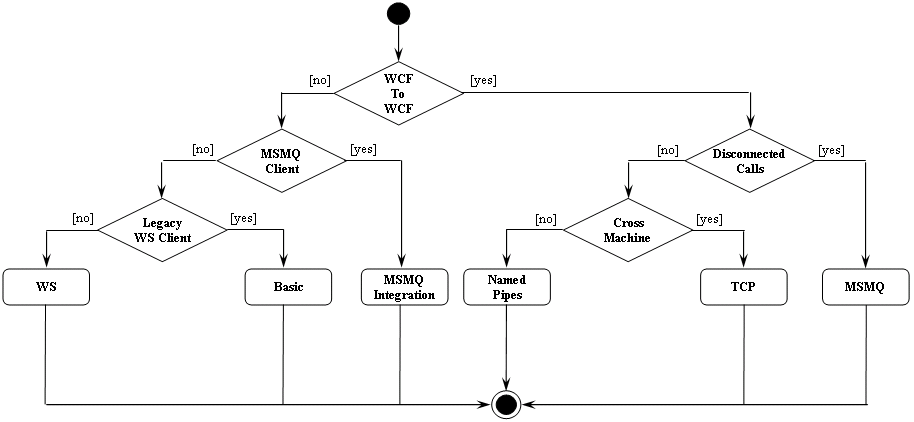
The first question you should ask yourself is whether or not your service needs to interact with non-WCF clients. If the answer is yes, and if the client is a legacy MSMQ client, choose the NetMsmqBinding that enables your service to interoperate over MSMQ with such a client. If you need to interoperate with a non-WCF client and that client expects basic Web service protocol (ASMX Web services), choose the BasicHttpBinding, which exposes your WCF service to the outside world as if it were an ASMX Web service.
The downside is that you cannot take advantage of any of the modern WS-* protocols. However, if the non-WCF client can understand these standards, choose one of the WS bindings, such as WSHttpBinding, WSFederationBinding or WSDualHttpBinding. If you can assume that the client is a WCF client yet it requires offline or disconnected interaction, choose the NetMsmqBinding that uses MSMQ for transporting the messages. If the client requires connected communication but could be calling across computer boundaries, choose the NetTcpBinding that communicates over TCP.
If the client is on the same computer as the service, choose the NetNamedPipeBinding that uses named pipes (IPC) to maximize performance. Note that a service using the NetNamedPipeBinding cannot accept calls from any other computer besides its own, and thus is also inherently more secure. You may fine-tune binding selections based on additional criteria such as the need for callbacks (WSDualHttpBinding) or peer network (NetPeerTcpBinding), or federated security (WSFederationBinding).
Endpoints
Every service is associated with an address that defines where the service is, a binding that defines how to communicate with the service, and a contract that defines what the service does. This triumvirate governing the service is easy to remember as the ABC of the service.
In fact, WCF formalizes this relationship in the form on an endpoint. The endpoint is the fusion of the address, contract, and binding (see Figure 5). Every endpoint must have all three, and the service exposes the endpoint. Logically, the endpoint is the service’s interface, and is analogous to a CLR or COM interface.
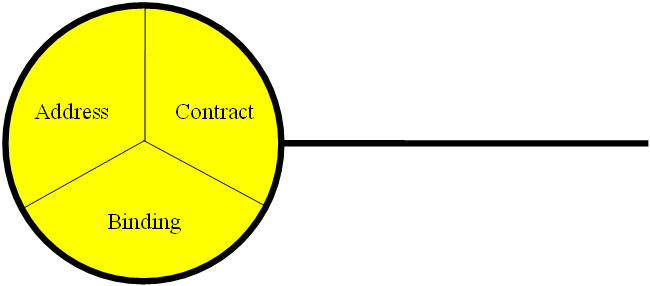
Every service must expose at least one business endpoint and each endpoint has exactly one contract. All endpoints on a service have unique addresses, and a single service can expose multiple endpoints. These endpoints can use the same or different bindings and can expose the same or different contracts. It is important to point out that nothing in the service code pertains to its endpoints and they are always external to the service code. You can configure endpoints either administratively using a config file or programmatically.
Administrative Endpoint Configuration
Consider the following service definition:
namespace MyNamespace
{
   [ServiceContract]
   interface IMyContract
   {...}
   class MyService : IMyContract
   {...}
}
Listing 2 shows the required entries in the host process config file. Administrative configuration is the option of choice in the majority of cases because it provides the flexibility to change the service address, binding, and even exposed contracts without rebuilding and redeploying the service.
Listing 3 shows a config file defining a single service that exposes multiple endpoints. Note that the endpoint must provide a base address that is consistent with the binding, such as HTTP with WSHttpBinding. A mismatch causes an exception at the service load time. You can configure multiple endpoints with the same base address as long as the URI is different:
<service name="MyNamespace.MyService">
   <endpoint
     address="net.tcp://localhost:8001/Service1/"
      ...
   />
   <endpoint
     address="net.tcp://localhost:8001/Service2/"
      ...
   />
</service>
You can also omit the address, in which case, the service uses the base address registered with the host (and the host must provide a matching base address):
<endpoint
   binding="wsHttpBinding"
   contract="MyNamespace.IMyContract"
/>
You can provide only a URI, in which case, the address is that relative address under the base address (and the host must provide a matching base address):
<endpoint
   address="SubAddress"
   ...
/>
When providing a base address, the endpoint overrides any base address provided by the host:
<endpoint
   address="http://localhost:8000/MyService/"
   ...
/>
Note that when hosting with IIS, the service must use the IIS base address (computer name + virtual directory over HTTP).
Programmatic Endpoint Configuration
Programmatic endpoint configuration is completely equivalent to administrative configuration yet it does not resort to a config file and instead, you make programmatic calls to add endpoints to the ServiceHost instance. Again, these calls are always outside the scope of the service code. ServiceHost provides overloaded versions of the AddServiceEndpoint() method:
public class ServiceHost :
ServiceHostBase
{
   public ServiceEndpoint
AddServiceEndpoint(
                        Type
implementedContract,
                        Binding
binding,
                        string
address);
   //Additional members
}
Listing 4 demonstrates programmatic configuration of the same endpoints as in Listing 3. To rely on the host base address, provide just the URI as the address:
Uri tcpBaseAddress = new
                    Uri("http://localhost:8000/");

ServiceHost serviceHost = new
    ServiceHost(typeof(MyService),
    tcpBaseAddress);

Binding tcpBinding = new
NetTcpBinding();

//Use base address as address
serviceHost.AddServiceEndpoint(typeof(
   IMyContract) , tcpBinding,"");

//Add relative address
   serviceHost.
AddServiceEndpoint(
   typeof(IMyContract) ,
   tcpBinding,"MyService");
//Ignore base address
serviceHost.AddServiceEndpoint(
   typeof(IMyContract)
 ,tcpBinding,"net.tcp://localhost:8001/
   MyService);
   serviceHost.Open();
Client-Side Programming
To invoke operations on the service, the client first needs to import the service contract to the client’s native representation. This implies that the service needs to expose a standard way for clients to retrieve its metadata. This is done by having the service expose a metadata exchange (MEX) endpoint. A WCF-based service can expose a MEX endpoint automatically as long as the service registers at least one base address of TCP, HTTP, or IPC base address with the host.
The endpoint is the fusion of the address, contract, and binding.
If the client uses WCF, the common way of invoking operations is to use a proxy. The proxy is a CLR class that exposes a single CLR interface representing the service contract. Note that if the service supports several contracts (over at least as many endpoints), the client needs a proxy per contract type. The proxy provides the same operations as the service’s contract, but also has additional methods for managing the proxy lifecycle and the connection to the service. The proxy completely encapsulates every aspect of the service: its location, its implementation technology and run-time platform, and the communication transport.
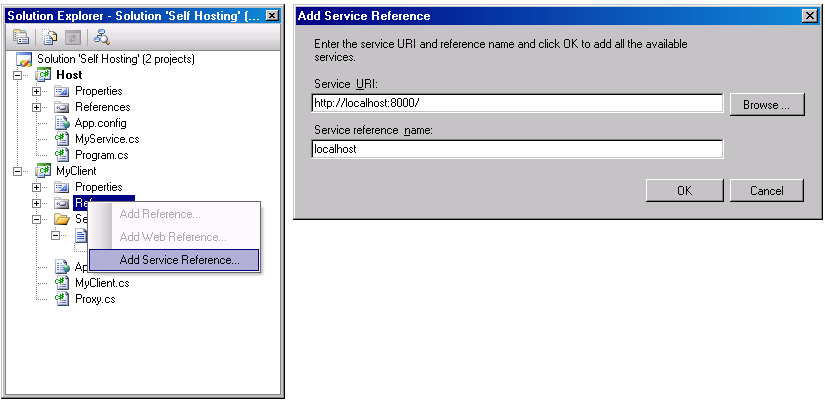
You can use Visual Studio 2005 to import the service metadata and generate a proxy. If the service is self-hosted, first launch the service and then select Add Service Reference… from the client project’s context menu. If the service is hosted in IIS or the WAS, there is no need to pre-launch the service.
Interestingly enough, if the service is self-hosted in another project in the same solution as the client project, you can launch the host in Visual Studio 2005 and still add the reference, because unlike most project settings, this option is not disabled (see Figure 5). This brings up the Add Service Reference dialog box, where you need to supply the base address of the service (or a base address and a MEX URI) and the namespace to contain the proxy.
Visual Studio 2005 uses the SvcUtil.exe command line utility, and you can use it yourself. The main reason is to use the numerous options offered by the SvcUtil switches. To use SvcUtil directly, provide it with the MEX address and, optionally, with a proxy filename. The default proxy file name is the name of the service-side class that implements the service. For example, when hosting the service MyService in IIS, simply run this command line:
SvcUtil http://localhost/MyService/
   MyService.svc
        /out:Proxy.cs
With self hosting, you are not limited to HTTP base addresses. Assume that the self-hosted service registers these base addresses:
http://localhost:8002
net.tcp://localhost:8003
net.pipe://localhost/MyPipe
Then launch the host and you can use any one of the following commands to generate the proxy:
SvcUtil http://localhost:8002/MEX
        /out:Proxy.cs
SvcUtil http://localhost:8002/
        /out:Proxy.cs
SvcUtil net.tcp://localhost:8003/MEX
        /out:Proxy.cs
SvcUtil net.pipe://localhost/MyPipe
        /MEX/out:Proxy.cs
For the service definition shown in Listing 1, SvcUtil generates the proxy shown in Listing 5.
The proxy class has no reference to the service-implementing class, only to the contract exposed by the service. The proxy can be used in conjunction with a client-side config file that provides the address and the binding or it can be used without a config file. Note that each proxy instance points at exactly one endpoint. The endpoint to interact with is provided to the proxy at construction time.
Administrative Client Configuration
The client needs to know where the service is located and use the same binding as its service, and, of course, import the service contract in the form of the proxy. In essence, this is exactly the same information captured in the service’s endpoint. To reflect that, the client config file contains information about the target endpoints and even uses the same schema as the host.
For example, Listing 6 shows the client configuration file required to interact with a service whose host is configured according to Listing 2. Note that the contract type (and namespace) in the client config file is the imported type (and namespace, if any) generated by SvcUtil, not the service type and namespace. The client config file may list as many endpoints as the service supports and the client may use any one of them to interact with the service. Listing 7 shows the client config file matching the host config file of Listing 3.
By default, SvcUtil also auto-generates a client-side config file called output.config. You can specify a config file name using the /config switch:
SvcUtil
http://localhost:8002/MyService/MEX
     /out:Proxy.cs
     /config:App.Config
And you can suppress generating the config file using the /noconfig switch:
SvcUtil
http://localhost:8002/MyService/MEX
        /out:Proxy.cs /noconfig
To support in-proc hosting, the application config file should list both the service and the client sections, as shown in Listing 8. Note the use of NetNamedPipeBinding for in-proc invocation.
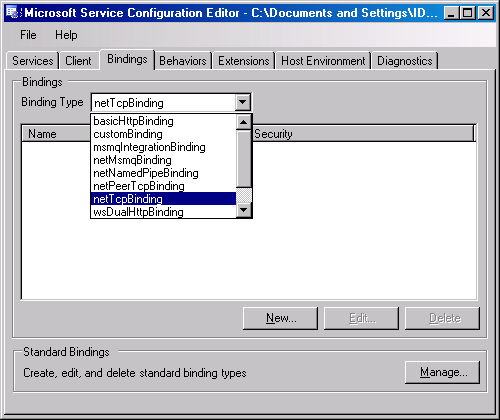
WCF provides a config file editor called SvcConfigEditor.exe that can edit both host and client configuration files (see Figure 7). At the time of this writing, SvcConfigEditor generates messy unreadable config files, so until that is amended, you should edit the files manually.
Creating and Using the Proxy
The SvcUtil-generated proxy class derives from the class ClientBase<T>, defined as:
public class ClientBase<T> :
   IDisposable
{
   protected ClientBase(
                string
           endpointConfigurationName);
   protected ClientBase(
                Binding binding,
                EndpointAddress
                remoteAddress);
   public void Close();
   public void Dispose();
   protected T InnerProxy{get;}
   //Additional members
}
The InnerProxy property is of the type of the contract the client needs to consume, and the SvcUtil-generated sub class of ClientBase<T> simply delegates it to the method call (see Listing 5). The client needs to instantiate a proxy object and provide the constructor with endpoint information: either the endpoint section name from the config file (see Listing 6) or the endpoint address and binding objects when not using a config file. The client can then use the proxy methods to call the service, and when the client is done, the client needs to close the proxy instance:
MyContractProxy proxy = new
MyContractProxy("MyEndpoint");
proxy.MyMethod();
proxy.Close();
Closing the proxy terminates the session with the service and closes the connection. Alternatively, you can use the Dispose() method of the proxy to close it. The advantage of the Dispose() method is that you can use the using statement to call it even in the face of exceptions:
using(MyContractProxy proxy = new
                    MyContractProxy("MyEndpoint"))
{
   proxy.MyMethod();
}
At most, one endpoint per contract type in the client config file can be designated as a default endpoint. The default endpoint is an endpoint section without a name tag or with an empty name (""):
<system.serviceModel>
   <client>
      <endpoint
         ...
         contract="IMyContract"
      />
      <endpoint name="OtherEndpoint"
         ...
         contract="IMyContract"
      />
   </client>
</system.serviceModel>
A default endpoint is just a nicety; when creating a proxy targeting the default endpoint, use the default constructor of the proxy to make it use the default endpoint:
MyContractProxy proxy = new
MyContractProxy()
proxy.MyMethod();
proxy.Close();
Programmatic Client Configuration
Instead of relying on a config file, the client can programmatically construct the endpoint and provide that to the proxy constructor. Listing 9 demonstrates this technique, showing the code equivalent to Listing 6 targeting the service in Listing 2. Programmatic configuration is useful when the endpoint decision is either completely dynamic, when it is taken at runtime based on the current input or conditions, or when the decision is static and never changes, in which case, you might as well hard code it.
WCF Architecture
This article so far covered all that is required to set up and consume simple WCF services. However, WCF offers immensely valuable support for reliability, transactions, security, and instance activation, all of which rely on the WCF interception-based architecture.
WCF offers immensely valuable support for reliability, transactions, security, and instance activation, all of which rely on the WCF interception-based architecture.
Having the client interact with a proxy means that WCF is always between the service and the client, intercepting the call, and performing pre- and post-call processing. The interpretation starts when the proxy serializes the call stack frame to a message and sends the message down a chain of channels.
Each client-side channel does pre-call processing of the message. The exact structure and composition of the chain depends mostly on the binding. For example, one of the channels is responsible for encoding the message (binary, text, or MTOM), another for passing security call context, another for propagating the client transaction, another for managing the reliable session, another for encrypting the message body (if so configured), and so on. The last channel on the client side is the transport channel, which sends the message over the configured transport to host.
On the host side, the message goes though a chain of channels as well, which perform host-side pre-call processing of the message. The first channel on the host side is the transport channel, which receives the message from the transport. Subsequent channels perform various tasks, such as decryption of the message body, decoding of the message, setting the propagated transaction to the execution thread, setting the security principal, managing the session, and activating the service instance. The last channel on the host side passes the message to the dispatcher. The dispatcher converts the message to a stack frame and calls the service instance. This sequence is depicted in Figure 8.
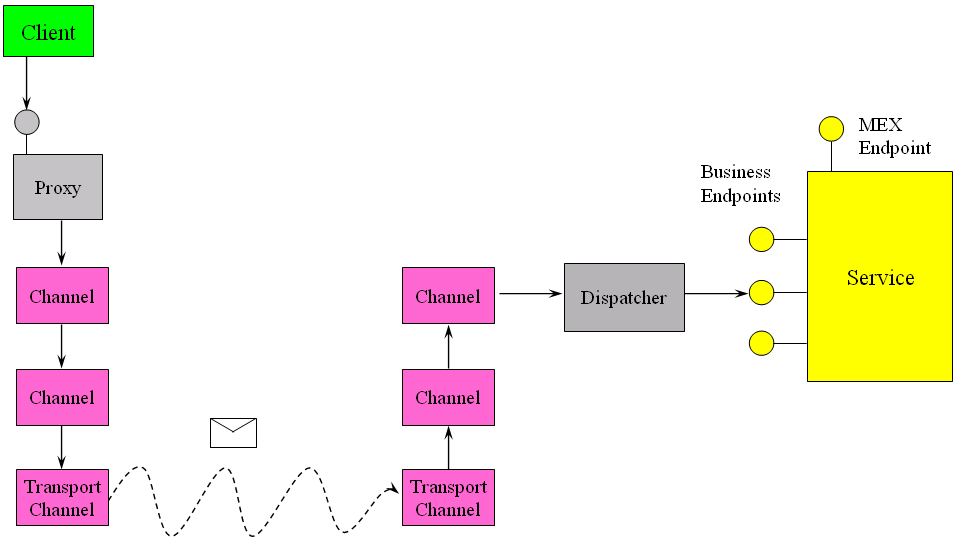
The interception both on the client and the service side ensures that the client and the service get the run-time environment they require to operate properly. The service instance executes the call and returns control to the dispatcher, which then converts the returned values and error information (if any) to a returned message. The process is now reversed: the dispatcher passes the message through the host-side channels to perform post-call processing, such as managing the transaction, deactivating the instance, encoding the reply, encrypting it, and so on. The returned message goes to the transport channel, which sends it to the client-side channels for client-side post-call processing: decryption, decoding, committing, or aborting the transaction, etc.
The proxy converts the returned message to a stack frame and returns control to the client. Most noteworthy is that almost all points in the architecture provide hooks for extensibility-you can provide custom channels for proprietary behaviors, custom instance management, or custom security. In fact, the standard facilities that WCF offers are all implemented using the same extensibility model.
Working with Channels
You can use channels directly to invoke operations on the service without ever resorting to a SvcUtil-generated proxy. The ChannelFactory<T> class shown in Listing 10 enables you to create a proxy on the fly. You need to provide the constructor with the endpoint-either the endpoint name from the config file or the binding and the address objects, or an endpoint object. Next, use the CreateChannel() method to obtain a reference to the proxy (the top-level channel) and use its methods. Finally, close the proxy by either casting it to IDisposable and calling the Dispose() method or to IClientChannel and calling the Close() method:
ChannelFactory<IMyContract> factory;
//Use default endpoint
factory = new
   ChannelFactory<IMyContract>("");

IMyContract proxy1 =
   factory.CreateChannel();
using(proxy1 as IDisposable)
{
   proxy1.MyMethod();
}

IMyContract proxy2 =
   factory.CreateChannel();
proxy2.MyMethod();
IClientChannel clientChannel =
                       proxy2 as
                       IClientChannel;
Debug.Assert(clientChannel != null);
clientChannel.Close();
Conclusion
WCF is an SDK for building service-oriented applications on Windows. It enables you to use classic CLR programming constructs, such as classes and interfaces, to deploy and consume services. The programming model is declarative and is largely attribute-driven. WCF interception-based architecture offers built-in facilities for managing many run-time aspects of services, and moving forward, it is the most productive way of building distributed applications on Windows.
