


Data is the blood in your system; it sits in its comfortable home of a database, and camps out in the tent of XML, but it deserves to be worked with in a reliable and consistent manner.
But why should only data-related operations be reliable? Shouldn’t you want to write reliable code for your other operations? The introduction of System.Transactions in .NET 2.0 brings a paradigm shift of how you will write reliable transactional code on the Windows platform. This article dives deep in the depths of how System.Transactions works, and how you can use it to your advantage. You will also see how you can leverage existing System.Transactions integration within ADO.NET, and why you need to really understand what is under the magic carpet.
I have never met a programmer that intentionally wanted to write bad code. I have never met a client that was happy to receive an unreliable system. Face it-computer software that keeps an airplane in the sky, controls a CAT scan machine, and the software system that manages your and my payroll and retirement, needs to be reliable.
Reliability in computer software can be broken down into two main spheres: availability and predictability. Your software systems may be unavailable due to many reasons, one of which could be unpredictable software. But given the same set of inputs, why should you ever have an unpredictable set of outputs? You shouldn’t!! But because the inputs to a concurrent system depend on the concurrent load experienced by the server, the inputs on a highly available and concurrent system can vary over time, and thus it becomes necessary for you to wrap ATOMIC operations in CONSISTENT, ISOLATED, DURABLE operations. Such operations are also referred to as transactions.
A Little History of Transactions
I am not the first person to emphasize the importance of transactions, and I am pretty sure I will not be the last. Transactions have been our good programming friends since the days of the mainframe. Historically, databases typically have had fantastic transactional support. You can use the BEGIN TRANSACTION statement to wrap a number of statements within one single transactional block. You can also choose to use advanced features such as savepoints, nested transactions, and various isolation levels in your transactions. But again, why should only databases enjoy the luxury of being reliable?
Transactions could be necessary in other operations as well, and recognizing that fact, architectures have been built over time to support transactions on non-database operations. Generally such transactions are managed by Transaction Managers (TM), and resources that need to be managed in a transactional manner are managed by Resource Managers (RM).
A number of RMs work in cooperation with a TM to wrap a number of operations within a single transaction. A common example of an RM is the piece of code that abstracts a database connection, typically the SqlConnection class. A common example of a transaction manager on the Microsoft Windows platform is the MSDTC (Microsoft Distributed Transaction Coordinator).
Two-Phase Commit
By definition, a transaction managed by a Transaction Coordinator involves one or more than one resource that needs consistency in a highly concurrent environment. In general, you can tie a number of such operations together within a transaction using various mechanisms, the most common one of which is commonly referred to as a two-phase commit process. These steps show how a two-phase commit process works.
There is a lot of to and fro dialog going on between the RMs and the TM. Even though the amount of data isn’t much, it is indeed extremely chatty in nature. This can be a problem because on networks, chatty communication can seriously hurt performance due to network latencies. This is a serious disadvantage of MSDTC but is not the only downside of using MSDTC. Here are some additional downsides of using MSDTC.
But does every single transaction have to be distributed? Certainly not!! Therefore, every single transaction shouldn’t have to pay the heavy cost of a distributed transaction either.
In fact, when you wrap a transaction using the SqlTransaction object, your default isolation level is ReadCommitted, and SQL Server doesn’t consult the MSDTC whether it can commit or not. But when you run a transaction using the BEGIN DISTRIBUTED TRANSACTION command, SQL Server indeed does leverage MSDTC behind the scenes to run the transaction. Similarly, for non-database entities that do not need a heavy-duty TM such as the MSDTC, such entities can be managed by an alternate TM called the Lightweight Transaction Manager (LTM). It is important to realize, however, that what transaction manager you pick is transparent to you as a consumer of the RM. However, as an author of the RM, you will have to make that decision.
In other words, when you use the SqlConnection class, you don’t worry about which transaction manager you will use, you simply use the SqlConnection object. But if you were writing the implementation of SqlConnection-something Microsoft has already done for you-you would indeed sit back and think, “What TM do I need?”
What TM Do I Need?
Now you get to see some code. I’ll first show you some pseudo code. What is the easiest way to make anything transactional? Take a look at the code block below.
Transaction
{
  Do Some Stuff #1;
  Do Some Stuff #2;
  Do Some Stuff #3;
  Do Some Stuff #4;
  Mark Transaction Complete;
}
That seems simple enough. Using System.Transactions is almost as simple as the above pseudo code. Here is a typical usage of System.Transactions.
using (TransactionScope txScope =
          new TransactionScope())
{
    // Do Transactional Operations
    txScope.Complete();
}
Where you see the comment, “Do Transactional Operations” is where you simply use the RM. However, when writing the RM, you have to choose between one of three methods in which an RM can choose to enlist itself within a transaction.
Volatile Enlistment
A RM that deals with resources that are not permanent in nature, such as an in-memory cache, is generally a good candidate for volatile enlistment. This means that a RM needs to perform the prepare phase, but in case of a rollback issued, the first phase need not be explicitly recovered. Also, in case your RM crashes, it doesn’t need to have logic for a recovery contract, or re-enlistment when the RM is instantiated again. Generally such an RM is managed by the LTM, thus you do not pay the extra penalty for MSDTC.
Durable Enlistment
Say you were writing logic to move files between servers and you wanted this logic to behave in a transactional manner. In this scenario, if your RM crashed, you would have to ensure that you both have enough information to perform a graceful recovery, and when another instance of the RM is brought up it can use that information to clean up after its previous incarnation. Also, say in the prepare phase you actually copied over the file, in case of Rollback, you would either have to delete the newly copied file, or you may have to restore a possibly overwritten file. In other words, when you are dealing with a durable resource, you have to deal with such complexity, and you need to hear the appropriate callbacks from the transaction manager. In order to participate in a transaction in such a durable manner, you would enlist your RM to enlist in a durable fashion, and such a transaction would generally be managed by MSDTC.
Do note, however, that file copy is a lot simpler than the transactional file system that could be a part of the upcoming Windows Vista operating system. For starters, the transactional file system may need to operate without MSDTC, because file operations may need to be done when MSDTC hasn’t started up yet.
Promotable Single-Phase Enlistment (PSPE)
In certain situations the RM itself has transactional capabilities built into itself. A good example is a database. Or maybe the RM in certain situations doesn’t care for a graceful recovery in certain situations. In those situations, it is unfair that those simpler situations should have to pay the heavy price of durable enlistment.
A midway approach would be Promotable Single Phase Enlistment (PSPE). Generally in these scenarios, a durable RM such as a database would take ownership of a transaction, which as conditions change can later be escalated to the appropriate transaction manager. For instance, if you have a single SqlConnection instance connected to SQL Server 2005 in a transaction, your transaction, in spite of durable resources, will still be managed by LTM. This is because the RM itself has taken ownership and responsibility for the transaction. However, as soon as a second open SqlConnection instance enlists itself within the same transaction, your transaction is then promoted to MSDTC.
Enough of the theory. Let’s see a demo.
Everybody Likes a Demo
As hardcore techies, you no doubt like to see code to understand all this theory, so roll up your sleeves and dive in. I’ll show you how to write a quick code sample demonstrating a distributed transaction involving two databases.
First you need two databases. You can easily set them up using the following T-SQL script.
Create Database db1
Go
use db1;
Create Table Test1
(
   Test1 varchar(50)
);

Create Database db2;
Go
use db2;
Create Table Test2
(
   Test2 varchar(50)
);
With this database setup, suppose you want to insert a simple test value into both tables-Test1 and Test2. If either fails, you want to roll back the entire transaction.
The following code will insert into a single database. Note there is nothing transactional about this code yet. This is plain vanilla ADO.NET code.
using (SqlConnection conn1 =
  new SqlConnection(connStr1))
{
    SqlCommand cmd1 =
      conn1.CreateCommand();
    cmd1.CommandText =
 "Insert Into Test1(Test1) values
 ('xxx')";
    conn1.Open();
    cmd1.ExecuteNonQuery();
    conn1.Close();
}
If you have two such blocks-one for each database, how do you make the entire operation transactional? That, as it turns out, is rather straightforward. As you can see in Listing 1, you simply wrap two such blocks inside one TransactionScope block and put TransactionScope.Complete at the very end.
Your code doesn’t change one bit-you just wrap everything inside a single TransactionScope instance. There is some diagnostic information that you’re peeping into, however, using the TransactionInformation variable you declared. Now run the above code and check the output.
You should see the following output.
Before:00000000-0000-0000-0000-
000000000000
After:376683f9-bde3-4303-81be-
b820bbe18af9
Interestingly, there isn’t a valid distributed identifier associated with the transaction until the second SqlConnection instance is opened. In fact, if you go to Control Panel, choose Administrative Tools, then choose Component Services-surprise surprise-the GUID shown next to the current running transaction, matches the output your program produces. See Figure 1.
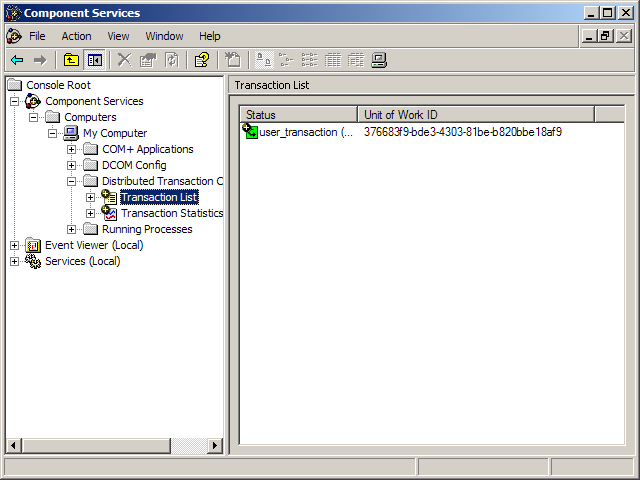
At this point the transaction has been promoted to MSDTC and its isolation level has also been escalated. You can verify that by attempting to run a select query using the default ReadCommitted isolation level from SQL Server Management Studio. You will find that as soon as the second SqlConnection, conn2, is opened, the inserted records on conn1 are no longer accessible unless you use the NOLOCK query hint or the ReadUncommitted isolation level.
The important take-away from this example is the ease by which you can wrap a number of operations within one transaction. But there are a number of questions to consider:
- If it is really this simple, why don’t I wrap all my data access within a single transaction scope? If you think I should do that, why isn’t my code transactional by default?
- If the SqlConnection instance, conn1, has been closed before the transaction was actually committed, how in the world does it manage to roll the transaction back in the event of failure?
- The above code demonstrated using ExecuteNonQuery, but what if I wanted to wrap DataAdapter.Update or use a TableAdapter and wrap those operations within a single transaction?
I can answer the first question rather easily. If it were that easy, then your code would have definitely been transactional by default. Unfortunately, a one-size-fits-all approach cannot work when you are dealing with disconnected data updates. This is evident when you call DataAdapter.Update, which ends up running multiple commands and saves your data in the database. Suppose that your DataAdapter tries to execute five commands and the third command errors out. Should you continue with the update? Should you roll back the first and second commands? Should you stop right there and do nothing? Should you revert the data back in the DataSet? Should you communicate the successful updates along with the failed rows? How do you extract the newly retrieved values out of the database and yet not mess up the row states for the rows that did not end up getting saved?
Oh my, that’s a lot of questions and possibilities. Needless to say, you need enough control to fine tune the exact behavior for your needs, and a one-size-fits-all approach just cannot work.
I’ll show you another practical example to answer the rest of the two questions.
Making TableAdapters Transactional
Before I cause any confusion, TableAdapters are to DataAdapters what strongly typed DataSets are to DataSets. In Visual Studio 2005, when you design strongly typed DataSets, you also have the option of being able to add TableAdapters, which give you a convenient way of storing querying and persistence logic right beside the DataTable.
Let us quickly chalk up a data-driven Windows Forms application leveraging strongly typed DataSets and TableAdapters. This application will demonstrate using TableAdapters to perform select and update operations on the Customers table on the Northwind database.
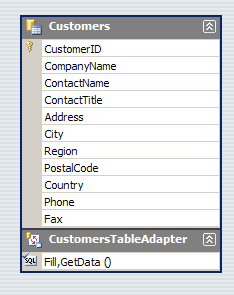
If it works, how can it be a bad application? Well, when you are designing a transactional update application, your application needs to perform reliably in concurrent scenarios. In other words, if both you and I attempt to give the database conflicting instructions, one of us should be refused, and one of us should be successful. Also, whatever process the application uses to ensure this mechanism must ensure the best possible performance.
Unfortunately, the above application will offer you terrible performance, and in the event of a conflict both parties will fail. This is why the application above is bad.
Now this is quite a tall claim. Let me take you behind the scenes of how this application works and prove this claim.
Dissecting the Application
In the above code, you never opened the connection. The TableAdapter, and hence the underlying DataAdapter, opened the connection for you. Also, since both your “Fill” and “Update” operations are within the same transaction, the data is kept consistent for you between the Fill and Update operations.
But the TableAdapter and the underlying DataAdapter closed the connection after the data was filled. So with a closed connection, how can your application ensure that it will keep the data consistent between the Fill and Update operations? There seems to be something fishy going on here.
The answer lies in the fact that the connection really isn’t closed. Connection pooling keeps it open. And worse, the connection that your application thinks is closed, and hence your application thinks that it has not locked any resources-is indeed open, and has locked the rows you read out of. The worst part is, you have no way to unlock those rows. The rows will unlock when you either commit or rollback, which can get funny in concurrent scenarios as you will see shortly.
A picture is worth 1024 words, so set a breakpoint at the Fill statement. With the breakpoint set, let’s see what connections are really open on the database. You can do this using the following T-SQL. Do note that dbid = 6 is Northwind in my case.
Select
   spid, status, program_name, cmd
from
   master.dbo.sysprocesses with
(nolock)
Where dbid = 6
Figure 3 shows sp_who2 before Fill has executed, and Figure 4 shows the results of sp_who2 after the connection has executed.

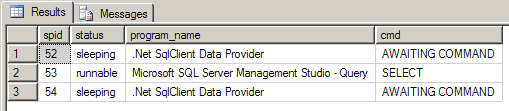
As you can see from Figures 3 and 4, even after Fill has finished executing, you still have a connection with spid = 54 that is sitting there locking resources. Now add a partial class to your project that extends the definition of CustomersTableAdapter as shown below.
public partial class
CustomersTableAdapter
{
   public bool IsConnectionOpen()
   {
      return Connection.State ==
     System.Data.ConnectionState.Open;
   }
}
Right after “Fill”, if you call IsConnectionOpen, it will indeed tell you that your SqlConnection is closed. So at this point, you have no control over the sysprocess with spid=54, which is now locking the entire Customers table.
You think that is bad? Wait until you run the above query right after the Update statement. You get yet another connection as shown in Figure 5.
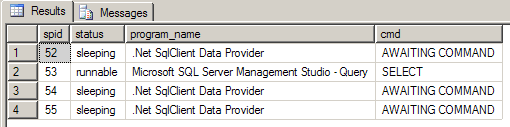
Now because you have yet another database connection (RM) in the same transaction, your entire transaction’s isolation level will be bumped up to Serializable, and the transaction will now be promoted to MSDTC. So your transaction will end up getting more expensive, especially in concurrent scenarios.
In a development environment, however, when you are developing in a single-user scenario, you wouldn’t even notice this. This Update will work because you had no second user conflicting your updates. Now consider what happens when a second user attempts to concurrently modify a row in the Customer’s table. Figure 6 shows the sequence of events.
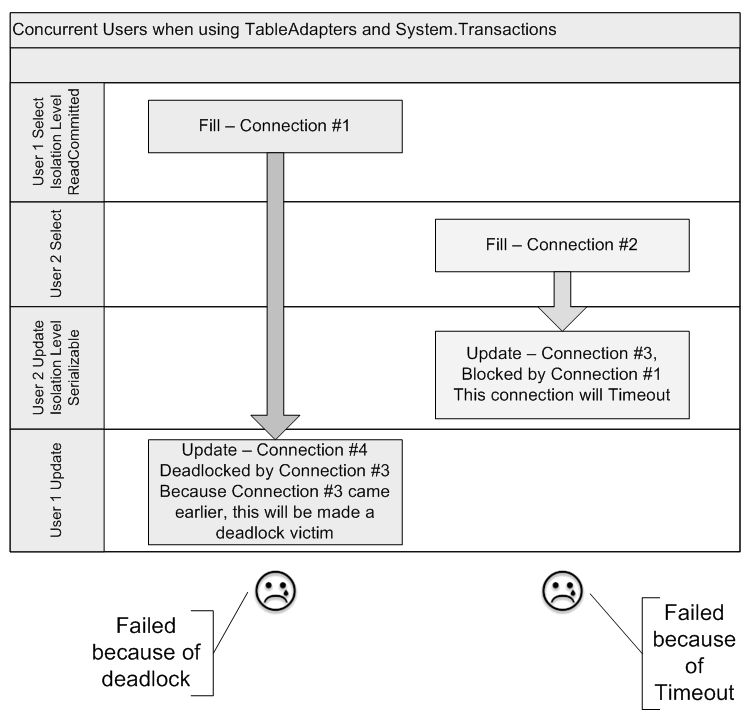
As you can see from Figure 6, the first user executes Fill, and without his knowledge, the underlying connection locks up all rows for a default time of one minute (time out for the transaction). Meanwhile, the second user reads from the very same table, opening a second connection.
When the second user attempts to issue an update, the database has locked the rows, so the update attempt from user 2, which is on connection #3, will head towards a command timeout, unless of course user 1 commits or rolls back his transaction before the timeout. At the same time, the isolation level of the transactions have been bumped up to Serializable, exclusively locking the relevant rows. In fact, you can’t be sure of what exactly is locked. Locking is a bit like going to your favorite fast food restaurant’s drive thru window. You ask for what you want at the broken speaker, but what you get may be entirely different ??. In the scenario above, you can’t be sure of what exactly is locked-that is the database’s decision.
When user 2 attempts to save his changes on connection #4, he is deadlocked by connection #3, which is timed out by connection #1.
So let’s get this straight: user1 (connection #4) is deadlocked by user 2 (connection #3), which is timed out by user 1 (connection #1). So user1 is stuck by user 1?
SQL Server will identify connection #4 as a deadlock victim, and user #1’s update will fail. Also, user #2’s update will also fail because it will eventually time out due to connection #1.
So the data didn’t get corrupted, but you have a concurrency mechanism scheme that not only performs much worse than a simple mechanism using SqlTransaction, it also rejects both users’ changes in the event of a conflict. The behavior gets exponentially worse as you add more users to the system. Note that this behavior is specific to a SqlConnection instance connected to SQL Server 2005, which exhibits PSPE (Promotable Single Phase Enlistment).
So What Is the Solution?
Well a good lesson learned from this dissection is that you need to understand how things work behind the scenes. Ideally, resource managers should abstract all these details from you, but you still need to understand how it works. As a best practice, you should avoid letting the DataAdapter manage the connection for you when using it with System.Transactions. You should pass in an open connection. Also, if possible, you should attempt to not use System.Transactions with DataAdapters. The example above used a TransactionScope, which will commit or rollback within a using block. If you use CommitableTransaction instead, which gives you a raw transaction (you choose what/when to enlist, and when to commit or rollback), you could do some serious damage to your application.
A better way to wrap TableAdapters in transactional behavior would be to author a partial class with a BeginTransaction method. This technique would give you a convenient mechanism to wrap all commands using one SqlTransaction object. See Listing 3 for an example.
As you can see, you would ensure a clean mechanism for wrapping all SqlCommands within a TableAdapter to enlist within the same transaction without excessive locking or performance penalties.
Conclusion
Writing reliable code is not a choice, it is a necessity. As our lives get more and more automated, we trust software systems to do more and more critical jobs. Also, a computer manages your data for you; the data your program manages is the reason you are writing a program, not the other way around. Someone won’t produce some data because you feel like writing a program. It thus becomes critical to understand how to work with data in any application. In this article, I showed you a paradigm shift introduced by .NET 2.0. System.Transactions and ADO.NET 2.0 present exciting and interesting new ways of writing reliable code. This topic is bigger than I can cover in a single article, but I hope this article piqued your interest in revolutionary way of writing reliable code. Happy coding.
Listing 1: A simple distributed transaction
using (TransactionScope txScope =
    new TransactionScope())
{
   TransactionInformation info =
     Transaction.Current.TransactionInformation ;
   using (SqlConnection conn1 =
      new SqlConnection(connStr1))
   {
      SqlCommand cmd1 = conn1.CreateCommand();
      cmd1.CommandText =
        "Insert Into Test1(Test1) values ('xxx')";
      conn1.Open();
      cmd1.ExecuteNonQuery();
      conn1.Close();
   }

   using (SqlConnection conn2 =
      new SqlConnection(connStr2))
   {
      SqlCommand cmd2 = conn2.CreateCommand();
      cmd2.CommandText =
        "Insert Into Test2(Test2) values ('yyy')";
      Console.WriteLine(
         "Before:" + info.DistributedIdentifier);

      conn1.Open();
      Console.WriteLine(
         "After:" + info.DistributedIdentifier);
      cmd2.ExecuteNonQuery();
      conn2.Close();
   }
   txScope.Complete();
}
Listing 2: A TransactionScope wrapping a TableAdapter operations into a transaction
CustomersDataSet.CustomersDataTable customers =
   new CustomersDataSet.CustomersDataTable();
CustomersDataSetTableAdapters.CustomersTableAdapter tblAdap =
   new CustomersDataSetTableAdapters.CustomersTableAdapter();

using (TransactionScope txScope =
    new TransactionScope())
{
    tblAdap.Fill(customers);
    customers.Rows[0]["ContactName"] =
       "Maria Velasquez";
    tblAdap.Update(customers);

    txScope.Complete();
}
Listing 3: Extending a TableAdapter to give it transactional behavior
public partial class CustomersTableAdapter
{
    public SqlTransaction BeginTransaction(
       SqlConnection dbConn)
    {
        if (dbConn.State != ConnectionState.Open)
        {
            throw new ArgumentException(
    "Cannot begin a transaction on a closed
     connection.");
        }

        Connection = dbConn;
        SqlTransaction tran =
             Connection.BeginTransaction();
        foreach (SqlCommand cmd in m_commandCollection)
        {
            if (cmd != null)
                cmd.Transaction = tran;
        }
        if ((Adapter.InsertCommand != null))
        {
            Adapter.InsertCommand.Transaction =
               tran;
        }
        if ((Adapter.DeleteCommand != null))
        {
            Adapter.DeleteCommand.Transaction =
               tran;
        }
        if ((Adapter.UpdateCommand != null))
        {
            Adapter.UpdateCommand.Transaction =
               tran;
        }
        if ((Adapter.SelectCommand != null))
        {
            Adapter.SelectCommand.Transaction =
               tran;
        }
        return tran;
    }
}
