


So much of the literature about writing application now involves Web services.
Many publications and blogs consider Web services to be the silver bullet because they are so easy to implement in .NET and do very easily interoperate with disconnected systems. But are people really using Web services the way they should be used? I beg to differ on that point.
Oh yes. Web services programming is easy. Who likes those crazy angle brackets crossing their networks, anyway? Who is interested in all the fancy details of those elaborate specifications? Developers just want to write software. All that they need are good tools that hide all the obviously unnecessary details.
A Web service is therefore a message-oriented communication means, period. You can implement service-oriented thinking, mindset, and methodologies through Web services?in a near to perfect manner.
Gotcha. Who can tell you what is necessary and what is not? Can you really ignore XML? In this article, I'll demonstrate how today's views about Web services are somewhat wrong and how to fix this situation. I'll show you a totally different approach to Web services design and implementation than what you've experienced in the past years implied by major tools and platform vendors. There is one fact you can be sure about: Web services' potential is much higher than what we can leverage with today's tools.
The Problem
It is just some six years ago that the first major release of SOAP hit the table. In those days developers shouted "Simple Object Access Protocol" when they talked about this new and revolutionary piece of technology. SOAP is one of the most basic and most important standards in the Web services realm. With the help of SOAP you pour an XML document into a certain shape, the message, which will then be sent over the wire. It does not matter which operating system, programming platform, or vendor is participating in this scenario. A simplified collaboration should be enabled just through the use of XML and ubiquitous transport mechanisms like HTTP, TCP, MSMQ or SMTP. Of course, on top of all that, SOAP in conjunction with HTTP can cross just about any existing network obstacle like firewalls. Welcome to the brave new world.
At least that's the theory. If you read the wording of the SOAP 1.1 specification you'll see that it tries to suggest a certain usage of SOAP. It actually seems that SOAP is a perfect means for achieving the long chased-for aim: platform agnostic remote method calls. A Java programmer just wants to call .NET objects and an AppleScript kid cannot stand to speak to some remote Java instances. This is how the picture of SOAP (and thus Web services) developed as platform independent remote procedure calls implemented using XML. SOAP as a simple object access protocol.
But this should not be it. Honestly, nobody in 1999 could ever imagine and see that developers would use SOAP to solve much more than just the afore mentioned technical low level problem. Because a lot of software communication problems come down to solving aspects of integration and interoperability, developers just need to get past the simple idea of connecting objects. In actuality, you often need to avoid it.
The Service Ecosystem
Many years in the software development business showed that creating and using abstractions are a very helpful means to focus on the real problem and its solution. For example, developers would not be able to build extensive and powerful applications if they still used assembler op-code. Likewise, they would not be able to produce maintainable and extensible programs without the notion of and tools for object-oriented programming.
But developers need more if they're going to achieve interoperability between systems running on different and heterogeneous platforms. It is simply not just about "wiring up" a connection between object A in .NET and object B in Java. A good software architect (whatever that means) wants to hide as many implementation details and internals of the Java applications from the .NET client and all other possible consumers of the application. This is because developers have learned a lot about deploying software systems that have coupling that is too tight. Sure, sometimes tight coupling and intimate knowledge of all the other "objects" is required and a good thing. But at least when developers talk about enterprise application integration (EAI) scenarios, all parties try to minimize the dependencies between all related systems and thus enable the highest possible flexibility in assembling application architectures. Welcome to the world of service orientation.
This article is surely not the right place to discuss all pros and cons of service orientation. But we can adhere to the fact that service orientation is a new level of abstraction in the software design and development world, beyond objects. Just to be clear on this point: it is not about objects vs. services, but merely services with objects, because you might implement a service with objects, but you are not required to do so. For this article, a service is a program that can accept messages and can send messages on it own?nothing more, nothing less.
In order to more thoroughly understand the universe of services, consider the diagram in Figure 1 which shows all the involved artifacts and their dependencies.
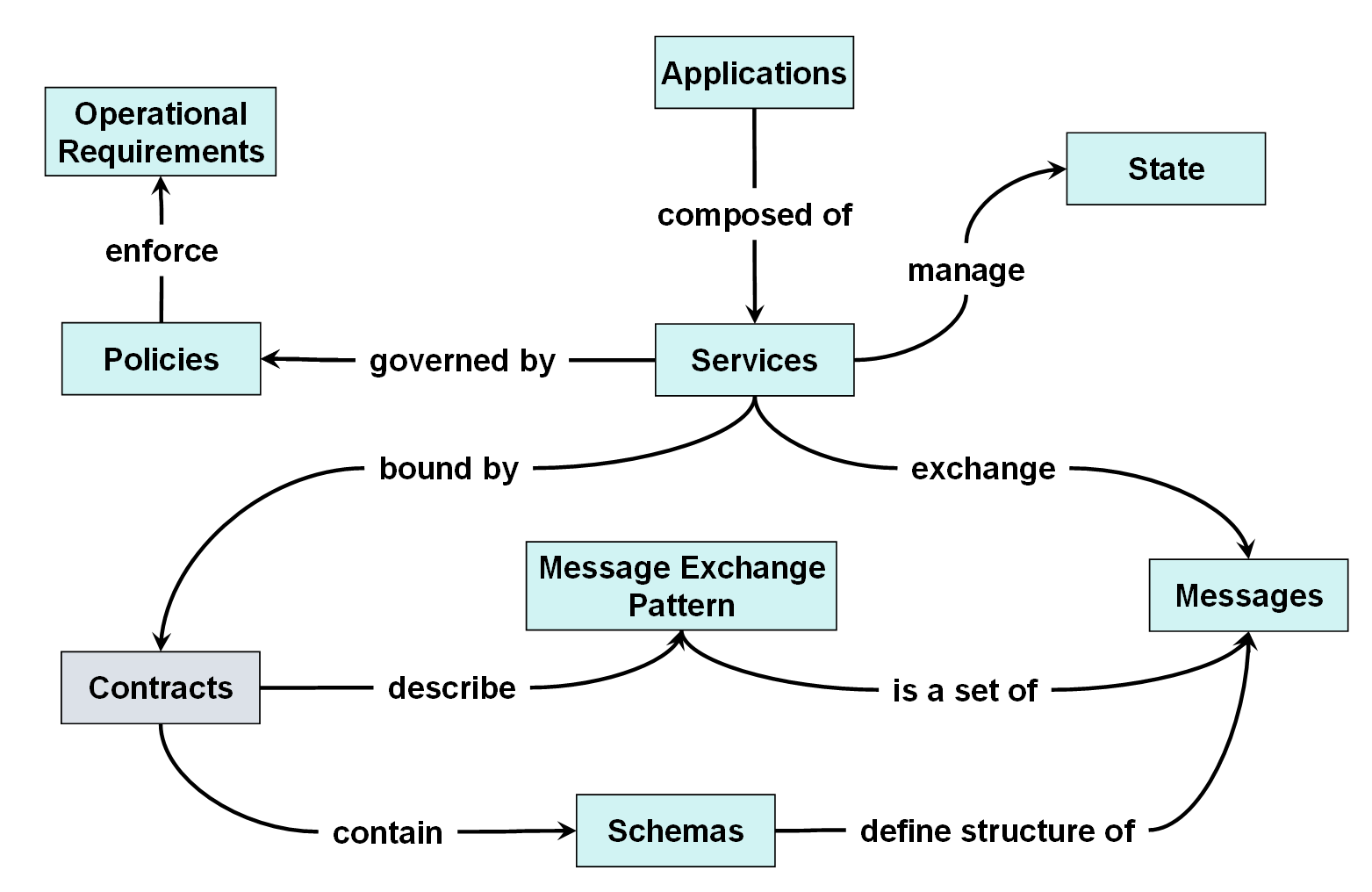
Let's look at the most important concepts in the diagram and apply the famous four rules for service-orientation:
- Boundaries are explicit.
- Services are autonomous.
- Services share schema and contract (not implementations).
- Service compatibility is negotiated through policies.
The most important rule for our needs is that a service always has a boundary to other services or parts of an application system. These boundaries are there because you want them to be there: they are explicit. This system boundary needs to be communicated through an interface, as you'll see shortly. And obviously you need to technically describe the interface to the service so that others can start communication with the service.
As you can see from Figure 1, the service contract is a very important element in the service ecosystem. Despite the fact that "contract" is an overloaded term, you can see a service's interface description as the service's contract. (There is more to tell about the contract story, but I'll just focus on this aspect here). A contract defines the whole interaction between services and service consumers. It contains the definition of all messages and their formats and manifests the message exchange sequences. In order to not further blur the term contract, I'll use interface contract when talking about such kind of contract. The service's interface contract consists of the data and message contracts (more on this later).
The second most important rule from the list above is that you share only schema and contract information between parties. This is one of the foundation pillars of service orientation and cannot be stressed enough. You do not need to know anything about the service's internal implementation. You just need to know the interface contract and which messages to send to a service and which messages you should expect to receive from a service.
OK, enough theory for now! With those basic ideas in mind, developers need a good and reasonable set of technologies to actually realize the essentials of services and service orientation. So let's talk about Web services.
Web Services
Contrary to all known acronyms, Web services are not just suited to realize XML-based remote method calls. Yes, many developers use them like this but it trims their potential considerably. As I discussed in the preceding paragraphs there was no notion of a special pattern of communication when it comes to services. I did not mention synchronous communication and I did not mention RPC (Remote Procedure Call) and the like. An RPC is always an abstraction of something more difficult-but surely it is not always a good and wise abstraction.
Although tools already exist in the .NET Framework SDK that help you to generate ASMX Web service code from XSD and WSDL, they are not sufficient for effective contract-first work.
A Web service is therefore a message-oriented communication means, period. You can implement service-oriented thinking, mindset, and methodologies through Web services-in a near to perfect manner. Web services are, harshly spoken, nothing more than an entry point into an application or program. Above all, Web services and SOAP are no substitution for existing component models and they are not the right place to put your business logic. They are really just competent data and message transformers. With such a view, Web services lose a lot of their aloofness and the confusion being caused by the word "Web."
You might have just read those lines with an uneasy feeling. Are Web services really seen this way on the .NET platform today? Are Web services used like this? Are our tools actually "selling" us Web services like this?
.NET Web Services Today
Web services are abundant in the .NET development environment. The primary technology stack for developing and consuming Web services is ASP.NET. Insiders call ASP.NET's Web services runtime the ASMX engine. In the last few years, many developers got used to viewing ASMX through their Visual Studio .NET glasses. They just need to open a wizard and then use the Web service implementation?just add some methods and attributes and they were all set. On the other side, you just need to select Add Web Reference... from the menu and you are automagically provided with a reference to a remote functionality. That's easy. But is it correct?
Maybe the outlined approach is enough for simple point-to-point integration based on the object-oriented and interface-based body of thoughts. But if you try to relate those ideas of service orientation with today's ASMX reality you'll soon hit the wall. But why?
First, consider the project wizard and dialogs. It suggests that ASMX Web services are just another XML-based object communication means. If you Google appropriately you'll find tons of articles revolving the magic of [WebMethod]. Just mark your business logic with this attribute and you are done forever. Paired with ASMX's limitation to HTTP as the transport protocol number one you have the perfect picture of an RPC-ish XML-based remote method call. I think this is just the wrong level of abstractions that developers need in order to take the next steps heading to service-orientation. ASMX is not bad, not at all. It is just used in the wrong way in most cases.
Maybe one of the biggest misconceptions is to allow the ASMX runtime to automatically create the WSDL (Web Services Description Language) for a given Web service implementation. By simply pointing to the ?wsdl parameter in a Web service's endpoint address you can retrieve the Web service's metadata. You don't need to know XML, SOAP, or WSDL-you don't need to use angle brackets. That's true love. But the hassle comes later.
This nice feature leads to a wrong approach to Web services. A lot of developers tend to just take their business logic classes and place a WebMethodattribute in front of those methods that should be accessible via SOAP. They neglect the fact that on the wire there are messages and that they must not think in .NET and its common type system for achieving interoperability and integration. Instead, they must rely on the common denominator of types, the XML Schema type system. In most cases they cannot just abstract away any of the XML and Web services-specific details. So how can they do better?
Contract-First
Believe it or not, the answer to the above question is simple: turn the tables. Focus on the data and the messages first, then let tools generate the skeleton code for your primary Web services engine. Practical experiences from projects have shown that thinking and acting in different notations and dialects is good when it comes to modeling the service interfaces. Being explicit is good, especially for service interface contracts. And it is even better to step back from using either C# or VB. NET for this important step and take a completely different means to describe your service's interface. Because the success of your Web service stands and falls with the service's interface. This idea is also called the contract-first approach to Web services design and implementation.
Schema or Code?
There are basically two philosophies for contract-first design: code-based and schema-based. Code-based means that a developer still uses a CLS-compliant programming language to write down the interface of their Web service. In addition they use a number of XML- and SOAP-specific .NET attributes in order to achieve their goals. I consider this a bit dangerous because it still centers on objects and the .NET BCL. Additionally, it does not hinder a developer to expose .NET idiosyncrasies like a dataset.
The schema-based alternative uses XML Schema and WSDL directly in order to explicitly distance itself from concrete programming platforms and languages like Java and C#. Starting from those XML-related representations, you can easily create platform-specific code. But the major problem of schema-based contract-first is that it is quite complex to learn (who wants to know all the XML Schema and WSDL details in syntax?) and very error-prone to use (there simply are no good tools or editors to leverage). For the remainder of this article I want to focus on the schema-based way to contract-first design your Web services and I'll show you a small and free tool later on that can lower the barrier considerably for interoperable Web service architectures.
But first I need you to take a closer look at how the schema-based approach actually works in detail.
The Phases
A picture tells a thousand words. So look at Figure 2 which shows the sequence of steps or phases involved in the contract-first design approach. (From now on when I mention contract-first I actually mean schema-based contract-first).
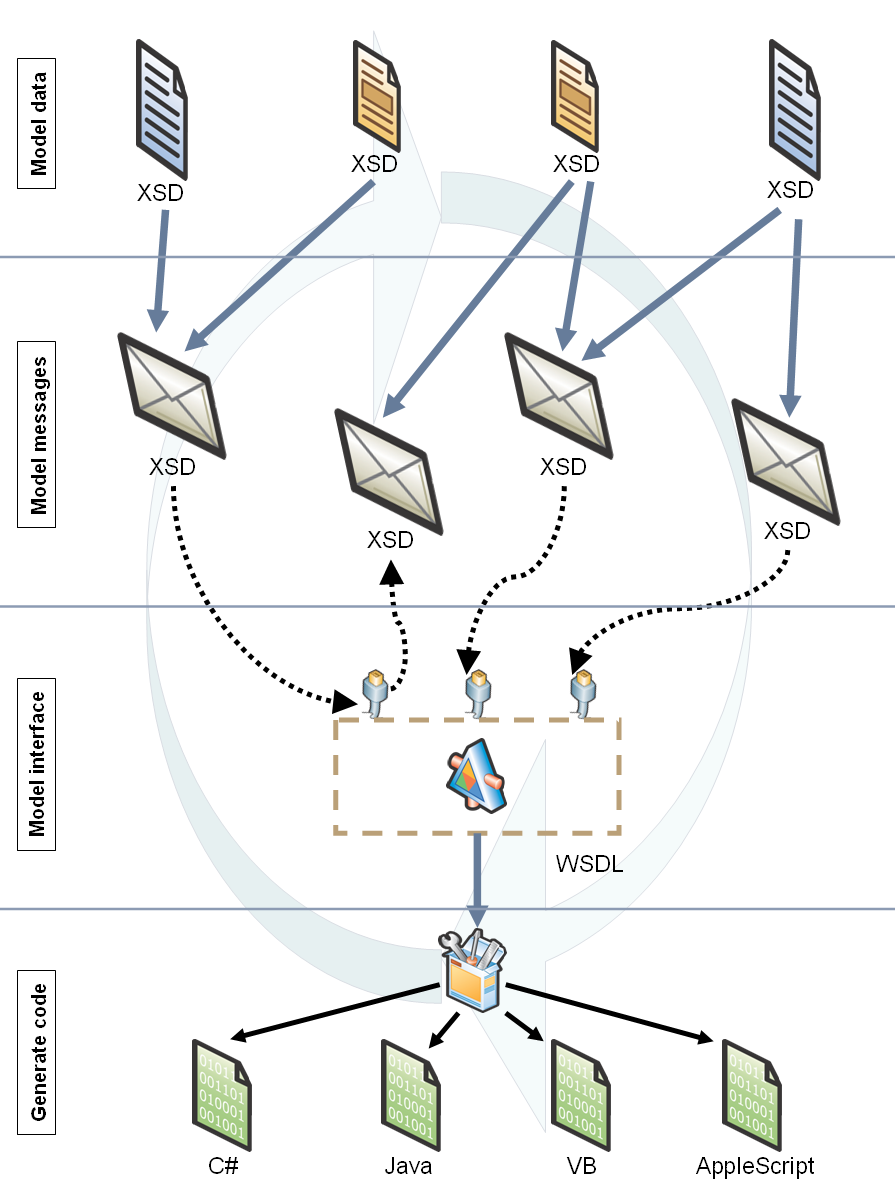
There are basically five steps to watch out for:
- Model your data. This step involves thinking about which data you need to exchange through your Web service interface. This is an explicit view on explicit data. One can think of it as the XML-ized way of defining data transfer objects. You'll use XML Schema (XSD) to model the data.
- Model your messages. Write down which messages you will need to exchange the data you have modeled in the previous steps. You'll use these messages later in your Web service interface. You'll use XML Schema (XSD) to model the messages. (Step 1 and 2 might be collapsed into one step).
- Model your operations. Define which operations you want to offer to the Web service consumer. Operations are made up of message exchange patterns (for example, one-way or request/response) and their associated messages?those messages you have designed before, which use the data you have defined in first place. You'll use WSDL (XSD) to model the operations and interface.
- Generate code. Generate your platform and programming language code as appropriate? based on the message and interface contract defined in the previous steps.
- Iterate. There is never a first match for your interface contract. You need to be able to refine existing service descriptions and thus also update existing code from it. This is not an explicit step but more an orthogonal action throughout the whole design and implementation process.
OK, this all sounds nice. You might now just start to hammer down your XML Schema for the data and the messages before you go into Notepad and write your WSDL manually. Ouch. There must be tools for it. And it turns out there are.
Tool Approach to Contract-First
Although tools already exist in the .NET Framework SDK that help you to generate ASMX Web service code from XSD and WSDL, they are not sufficient for effective contract-first work. Developers really need a good WSDL editor or even designer. For the XSD-related part of modeling data and messages you might want to rely on Visual Studio .NET's intrinsic XSD editor.
Let me tell you about a small tool called WSCF (Web services Contract-First) which solves a lot of the problems related to Web services, and it makes the contract-first approach to Web services easier. WSCF is primarily an add-in for Visual Studio .NET, but it also includes a command-line tool. It was designed to make implementing the above-outlined five steps of contract-first Web services as easy and smooth as possible. Therefore, WSCF has two main responsibilities: aid in the design of the data, message and service interface contract description in an interoperable fashion; and generate code from a given service interface description. You'll see how to accomplish this.
In order to get a better impression of what things actually look like and see how they work, I'll walk you through a simple example. Suppose that you're a member of a .NET user group, and you want to make some of the group's member data available to the outside world. You've decided to create a Web service that delivers and accepts data packed in SOAP messages and a client application that talks to this Web service.
Web Service Interface Design in Practice
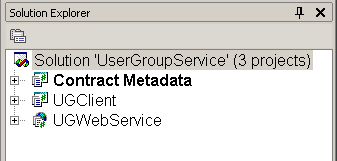
Your first want to model the metadata for your Web service's interface. You'll design your data and messages with XML Schema and you'll use Visual Studio's XML editor. You'll set up an initial project structure for your Visual Studio .NET solution. You'll name the empty solution UserGroupService and you'll add the projects to it in order to complete the sample.
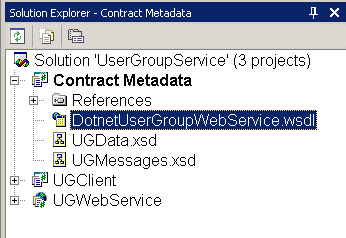
The first project (named ContractMetadata) is an empty C# project that will just hold all of the original XML metadata files. The second project is a Windows Forms application that implements the Web service consumer (called UGClient). Last but not least, you'll create an empty ASP.NET Web project. This project will be the home of your user group Web service, but you'll start with an empty project. Please refer to Figure 3 to see the initial solution setup.
Data and Message Contract
In the very first step you need to start modeling the data that you'll use in the service interface. You'll model the data in XML Schema and in this case it consists of simple and complex types. For the purpose of an integrated development experience you'll stay completely inside the Visual Studio .NET IDE and therefore use its intrinsic XSD editor. Listing 1 shows UgData.xsd, the file that contains the data. You can see one simple and two complex schema types in there. The enumeration DotnetExperience is the simple type, whereas the "structs" UgMember and UgMemberlist represent complex types. For those of you who are not too familiar with XML and XSD: imagine those data structures as an XML-ized variant of Fowler's data transfer objects (DTO).
Next you want to define the messages that you'll exchange through the service interface. Those messages will re-use the data structures modeled in the first step. So technically, this means that your schema file UgMessages.xsd needs an xsd:import statement for the UgData.xsd file.
<xs:import schemaLocation="UGData.xsd"
id="ugData" namespace="urn:thinktecture
com:demos:usergroup:data:v1" />
This simple line imports a certain XML namespace into the current document which makes all data types available inside the message schema definition file.
This example uses three messages: RegisterMemberMessage, GetMemberDataRequest, and GetMemberDataResponse (Listing 2). Those messages are just loosely placed inside the schema file and do not yet have any correlation amongst them. If you like, they are just raw messages.
Interface Contract
In the third step you'll have to design the actual service interface with its operations. This means you need to map the single messages to operations inside an interface. This phase is obviously the most tedious to complete. Here you won't just use XSD, but rather the quite complex WSDL dialect. Whereas tool support for XSD is extremely good for .NET developers, I haven't found good WSDL editors or designers. This is one of the major reasons why I started to develop and distribute the free WSCF tool. WSCF has a WSDL Wizard component to design the service interface contract of a Web service, as well as enhanced code generation features. Let me now walk you through how to use WSCF to create a WSDL description without having to grok every single detail of this specification or to even handcraft WSDL in Notepad.
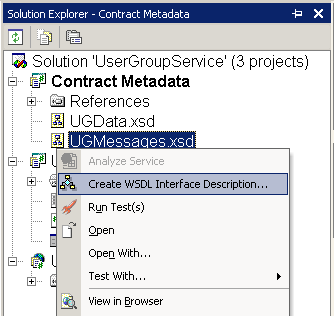
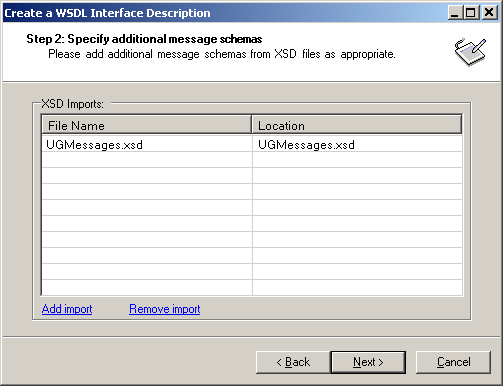
In order to get started using the WSDL Wizard you need to add the two existing XSD files for the data and the message types to your contract metadata project. Based on the messages you have designed, you now want to set up the interface. You just have to right-click on the UgMessages.xsd inside your Visual Studio .NET project and select Create WSDL Interface Description... from the context menu (see Figure 4). The WSCF WSDL Wizard opens with a welcome page. On the following page the user has to provide some basic information about the interface including the name, XML namespace and an optional comment. The next page in the wizard allows you to add additional message XML Schema files. Because sometimes you can start right away with one file, but actually have different kinds of message types distributed across several XSD files (see Figure 5).
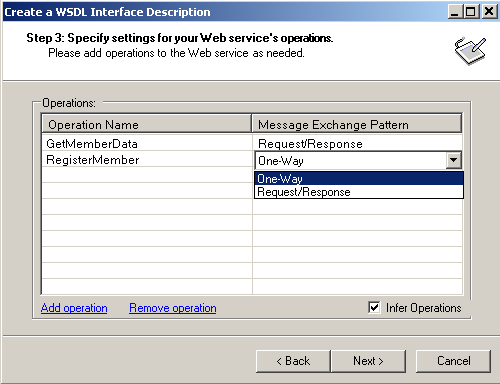
Now on to the real meat. Page three of the WSDL Wizard offers a listview component that allows you to add the interface's operations. For your user group scenario you decide to specify two operations named GetMemberData and RegisterNewMember. But this is not enough information to complete this step. There needs to be an explicit configuration of the message exchange pattern (MEP) to employ for each operation. Currently, there are two possible values for the MEP: One-Way and Request/Response. The former expresses that this is a one-shot action, which means you do not want any message sent back to the original sender. The latter indicates that there has to be an answer to the request message (Figure 6). If you are following certain naming patterns for the modeled messages, the wizard will be able to infer the operations from the messages. Just like GetMemberDataRequest and GetMemberDataResponse will result in the GetMemberData operation when using inference.
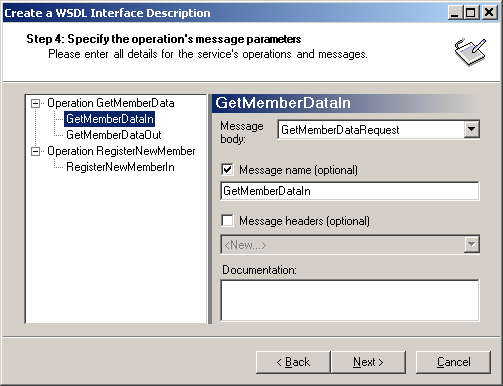
You're nearly done. The last important step lets you specify the operation's message parameters. On this page the user simply needs to map the appropriate message from the message XSD files to the message part of each operation. If you were using operation inference in the previous step the wizard has already set the right values here. Optionally, you can also set any number of message headers on this wizard page. Message headers accord to SOAP headers and you can use them to communicate out-of-band data and information like security credentials or transaction IDs (Figure 7). Although there are still some options on the last page of the wizard, you normally do not need them. That's it! Now you should have all the necessary data to actually get the service interface description generated by the tool. When you finish the wizard you have a newly added WSDL file called DotnetUserGroupWebService.wsdl in your project (Figure 8).
Design Patterns
Speaking of the WSDL, WSCF tries to follow the best practices and rules from the WS-I Basic Profile 1.1. For example, it only generates Document/literal style WSDL and creates one portType per service description (Table 2 lists the features supplied by the wizard). A more thorough look at the generated WSDL (Listing 3) unearths a small but very powerful implementation detail. The message schemas are not embedded in the WSDL but rather just imported.
<types>
  <xsd:schema>
    <xsd:import schemaLocation="UGMessages.xsd"
namespace="urn:thinktecture-
com:demos:usergroup:messages:v1" />
  </xsd:schema>
</types>
This approach has several advantages. The most obvious one is reusability and the second most obvious is that it lets you independently work on the message schemas and the interface contract. So you can easily use or re-use already existing schema for your service's messages.
All in all this makes three important metadata files. Both the Web service implementer as well as the client programmer will now need to receive the UGData.xsd, UGMessages.xsd and DotnetUserGroupWebService.wsdl files in order to start their work. You can add all three files to the respective projects for the Web service and the Windows Forms client application. Now you can head into the code generation process.
Generating Code
The first big phase is over. You now have your XSDs and WSDL in place. It is now time to get to the real code. You'll need to create a CLS-compliant representation of the data, message, and interface contract. Sure, you could use wsdl.exe for this task Because it is part of the .NET Framework SDK and delivers simple code generation features. But there are two major caveats: it is not fully integrated into the IDE (although there is the infamous Add Web Reference... dialog box) and?even more important?it does not generate good enough .NET code.
What does "good" code mean in this context? There are several factors for .NET code that gets generated from metadata. First, you should have an option that allows you to generate runtime serializable classes. Second, it is indispensable to have not just public fields in your data classes that get generated from the XSD data contract. Rather, you need a good OO style here that is reflected by having private fields and public properties. At least those two features are not present in .NET Framework 1.1. But the other strong side of WSCF provides an enhanced code generation engine that does not only fulfill these two requests. Please take a look at Table 1 for all code generation features of WSCF. A developer can choose to either use the command line tool wscf.exe or better yet use the add-in for Visual Studio .NET to smoothly stay inside their beloved development environment. For the purpose of this article I'll use the graphical add-in.
Creating Web Service Code
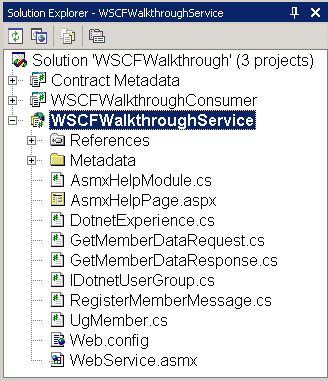
In order to see how code generation works with WSCF it is time to think like a Web service developer. The code generation process for the client application is analogous. Because it is as simple as right-clicking on the WSDL and selecting Generate Web Service Code....Figure 9 allows you to select different options for code generation. You will choose all of them in order to get a fully fledged .NET representation of your data, message, and interface contract. After you've finished generating code you'll see a number of files added to the Web services project (Figure 10). Let's take a look at each feature that WSCF provides in respect to code generation.
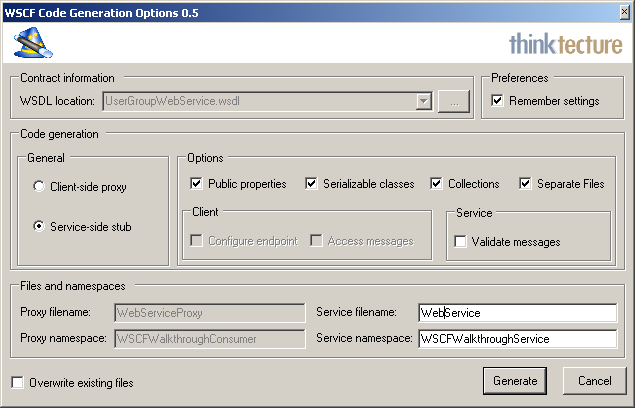
The first important fact to note is that WSCF exclusively works with .NET interfaces. It generates a .NET interface instead of the abstract class with all the unnecessary and duplicated ASMX attribute glue that gets spit out by tools like wsdl.exe for creating service-side stubs. This approach is extremely helpful if you want to separately host the service interface and the service implementation. For example, if you want to host the service implementation under COM+ and expose a service interface for Enterprise Services, one for WSE messaging and one for ASMX. In this case you have to define a shared interface that follows the same contract as the WSDL file. The tool also generates an interface for the consumer-side proxy if you choose to create a Web service proxy. You can imagine that this easily enables scenarios where the proxy generation and instantiation can be done by a configurable factory. By doing so you can hide the location and the chosen transport.
The second obvious feature is that WSCF can optionally create separate files for all data, message, and interface contract artifacts. In the sample you have files for the data types (UgMember, DotnetExperience), the message types (GetMemberDataRequest, GetMemberDataResponse, and RegisterMemberMessage), as well as for the service interface and base implementation (IDotnetUserGroup and WebService). All the types live inside the very same .NET namespace. This way a developer can easily just delete or exchange one or the other type by eliminating the file. This is sometimes useful because you might happen to have another, better implementation for example, for UgMember, in your enterprise- or project-wide types library that you would use rather than the one generated from the data contract.
If you dive into programming the Web service logic you'll discover another nice feature of the generated code. Each type has a default constructor with all necessary initialization parameters already in place. So if you want to wire up a sample implementation for the GetMemberData operation, you might proceed like the following (please consider the completely message-oriented programming model).
// Construct response message
GetMemberDataResponse resp =
   new GetMemberDataResponse();

// Create and fill data for response message
UgMember theMember =
   new UgMember("Christian",
   "Weyer",
   new DateTime(1974, 7, 7),
   DotnetExperience.GoogleRocks);
resp.MemberInfo = theMember;

return resp;
This makes it very easy to embrace the message-based programming model without the need to write many lines of code.
When your Web service receives a SOAP message it usually gets deserialized by the ASMX runtime with the help of XmlSerializerin order to build and fill the appropriate .NET objects that match the XSD-to-CLR mapping. But often this is just too much burden for the runtime to take. You might want to have the chance to validate the incoming (and also the outgoing) SOAP messages against the message and data schemas you already have in place. WSCF can optionally provide this feature for Web service implementations. When choosing this option it adds an external assembly to the project and implements a SoapExtensionfor handling all the schema validation logic.
Last but not least, you need an easy way to basically test your Web service. The ASMX runtime provides a documentation and help page for this purpose. But the problem with the default page is that you still might call ?wsdl on the .asmx endpoint. And this would still automatically render the WSDL inferred from the current Web service implementation, and would not use your pre-defined WSDL. WSCF takes the route that it adds a new custom help page that looks and feels like the original one but disables the ?wsdl feature completely. Because in the contract-first world you start from the WSDL, you do not want to have the WSDL available through the endpoint (although it would be technically possible).
Creating Client Code
For the sake of a complete overview of the sample scenario in this article, it will help to also take a look at the Windows Forms client application. All in all things look quite similar on the client compared to the Web service itself. The same class files get generated except that you now have a WebServiceProxy instead of a WebService type, but this is an obvious difference. Likewise, you can easily write code that has a sample call to your Web service on the other side. The following snippet shows how to create a message-oriented call to the service's GetMemberData operation.
DotnetUserGroup svc =
   new DotnetUserGroup();
   svc.Url =
      "http://localhost/WSCFWalkthroughService/
       WebService.asmx";
   GetMemberDataRequest req =
      new GetMemberDataRequest("42");
   GetMemberDataResponse result =
      svc.GetMemberData(req);
   propertyGrid1.SelectedObject =
      result.MemberInfo;
Did you notice the last line? The result data object is directly bound to a Windows Forms PropertyGrid control (Figure 11)-you didn't have to manually hack anything. This is possible because WSCF offers all the necessary attribute glue for it if you enable the appropriate code generation option.
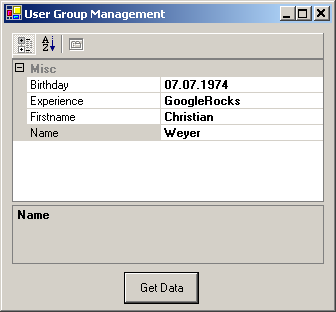
Another interesting point to discuss about the client is the ability to get read-only access to the SOAP request and response messages. It's not a big deal and there are not a lot of people who will ever need it, but I've heard of customers who complained about this features missing in the original .NET Framework implementation.
Now you're done with your application scenario. You've modeled your data and your messages to exchange with XSD. Afterwards you took WSCF's WSDL Wizard to hammer down the service interface contract. The tool abstracts from the nitty-gritty details of WSDL and aids in creating an interoperable WSDL. Finally, you provided the respective developers with the necessary metadata and they could get along with WSCF's code generation feature to create code from the XSDs and the WSDL - in a much more enhanced fashion than it is currently available in the .NET Framework SDK and Visual Studio .NET.
Refine the Contract
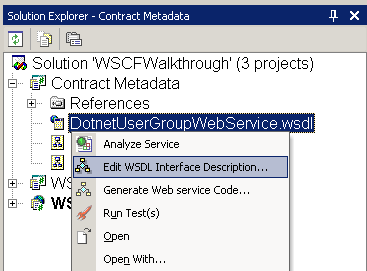
But honestly, there is never just one shot you never make everything just right the first time. Therefore it is indispensable to provide a round-tripping functionality for WSDL interface descriptions. Just imagine you've forgotten to add an operation for enumerating all registered members. This means that you need to add the ListAllMembers operation to the interface. And surely you want to leverage the WSDL Wizard one more time. When you right-click the WSDL file you'll see another entry called Edit WSDL Interface Description... (Figure 12). The wizard starts and pre-populates the pages with the metadata from the WSDL. From now on you can change about anything you like, including adding and removing operations and changing the mapping of operations and message types. It remains to say that WSCF does not support any style of WSDL out there in the wild, but rather can just handle WSDL descriptions that follow the same rules as those WSDL files generated by the wizard itself. That's it: a complete contract-first design and development lifecycle.
Wrap-Up
What did you think about Web Services as described by this article? Sure, this is just one valid point of view. You can still think and act in an RPC-fashioned manner, no problem. But when you are serious about interoperability and integration, I think you should at least take a look at contract-first design and development when it comes to Web services.
We are heading slowly towards maturing the Web services specs and features. Microsoft's Indigo run time and programming model will provide us with some very rich and powerful features regarding building distributed systems, especially with focus on the Web services world. With contract-first-based ideas you're also well shaped for the near future. Indigo e.g., has a notion of a data, message, and interface contract. These concepts should by now be quite familiar to you. So the future is bright, start to use it now.
Please note that this article comes with a beta version of WSCF 0.5. The final version should be available for download when you read this article, however. If there are any questions, problems or suggestions regarding contract-first design and development, please do not hesitate to contact me.
Download URL: http://www.thinktecture.com/WSCF/
