


Regular expressions, also referred to as “regex” in the developer community, is an extremely powerful tool used in pattern matching and substitution.
In this article, Jim will introduce you to regular expressions, what they are, why you would want to use them, and finally, how you can begin putting them to work in Visual Studio .NET.
Regular expressions. The name doesn't conjure up any grandiose ideas about what they are all about. How could it with the word “regular” in the title? For those of you who struggled to learn how to use them, you're probably thinking they should be renamed irregular expressions. How could something that looks like this…
^[\w-]+(?:\.[\w-]+)*@(?:[\w-]+\.)+[a-zA-Z]{2,7}$
...be called regular??? (That pattern, by the way, will validate nearly 99% of all e-mail addresses, but more about that later.)
I've broken this article down into three sections.
Describe regular expressions
Analyze some common patterns
Implement common expressions in Visual Studio .NET.
At the end of the article I've listed resources including Web sites, books, and regular expression software.
What Are Regular Expressions?
A regular expression allows you to efficiently search for strings within other strings using a pattern matching expression. You've probably used a regular expression before and didn't even know it. For example, have you ever used *.txt to search for or filter a list of files? If so, congratulations! You're a regular expression user!
Regular expressions play a key role in all kinds of text-manipulation tasks. Common uses include searching (matching) and search-and-replace. You can also use common expressions to test for specific conditions in a string, text file, Web page, or XML stream. You could use regular expressions as the basis for a program that filters spam from incoming mail. In this type of situation, you might use a regular expression to determine whether the “From:” e-mail address is the e-mail address of a known spammer. As a matter of fact, many e-mail filtering programs use regular expressions for exactly this reason.
One of the drawbacks to using a regex is that they tend to be easier to write than they are to read. Here's an example of a very common regex pattern.
((\(\d{3}\) ?)|(\d{3}-))?\d{3}-\d{4}
If this pattern looks overwhelming right now, don't worry, you'll know what it means by the time you finish reading this article.
You construct regex patterns using a series of different characters called metacharacters. Table 1 lists the most common metacharacters.
Character Matching
Character matching is the heart of working with regular expressions. It allows you to search for and match specific characters in a string.
Let's say you want to search a string for every occurrence of the string “takenote.” The regular expression would be:
takenote
It doesn't get any easier than that so I'm sure I haven't lost you so far. Let's take a look at some of the character matching metacharacters available to us. We'll start with the period (.).
.
The . matches any single character, except the newline character. So the pattern:
tak.note
will match strings like takenote, takznote, tak1note, and so on. Seems simple enough so far.
[ ]
You use brackets to match any one of the enclosed characters. For example:
takenote[123]
This expression will only match takenote1, takenote2, and takenote3 and will not match a similar string like takenote0 because it does not have a 1, 2, or 3 after the “e” in note. Ranges are also supported within brackets.
takenote[1-3]
This expression will only match takenote1, takenote2, and takenote3.
How could something that looks like this… ^[\w-]+(?:.[\w-]+)*@(?:[\w-]+.)+[a-zA-Z]{2,7}$ ...be called regular???
Commonly used ranges include [0-9], [a-z], and [A-Z]. You can also combine ranges like this [0-9a-zA-Z]. This range means that any single digit or letter is acceptable.
The [a-z] and [A-Z] ranges probably peaked your curiosity about case sensitivity. Yes, regular expressions are case sensitive. I'll discuss settings that instruct the regular expression engine to ignore case later in the article.
[0-9]takeNote
This expression will match strings like 4takeNote, 7takeNote and 9takeNote but will not match similar strings 420takeNote or 01takeNote because the pattern only calls for a single digit before the word “take.”
You can also specify a negative condition inside the brackets with a ^. This will cause anything to be matched EXCEPT what is specified.
[^0-5]takeNote
This expression will match 6takeNote and ztakeNote but will not match a similar string like 4takeNote because it starts with a 4, or 5takenote because the “n” in note is not capitalized.
|
You use | to implement an either or type matching pattern.
[T|t]ake[N|n]ote
This expression will match the strings TakeNote, Takenote, takeNote, or takenote but will not match similar strings like wakenote because it starts with a "w*,"* or takeote because it is missing the “n.”
Position Matching
Regular expressions support two metacharacters that you can use to force the string you want to search for to be at the beginning or the end of the searched string. The metacharacters involved with implementing this capability are the ^ and the $.
^
The ^ matches the beginning of a string.
^take
This expression will match takenote and take a note but will not match I think I've been taken by the Nigerian email scam! Why not? Because the word “take” must be at the beginning of the string.
$
The $ matches the end of a string.
[T|t]ake[N|n]ote$
This expression will match I work for TakeNote but will not match TakeNote is who I work for because the pattern calls for the word “takenote” to be the final characters in the string.
Developers often use the ^ and the $ together to define a pattern. For example, let's take a look at a fictitious inventory part number. Assume that in order for the part number to be valid it must be two letters followed by two digits.
^[A-Za-z][A-Za-z][0-9][0-9]$
This pattern, where each set of brackets represents a single character, matches AB12, BR54, and ZZ22, but does not match ABC1, S194, or ABCD. Even though the three non-matching examples are all four characters in length, they are not the correct characters.
If you're thinking that the following would have worked as well:
[A-Za-z][A-Za-z][0-9][0-9]
You are correct, sort of. Yes, AB12 and BR54 would still match, but so would ABCD1234 because the pattern is represented in the string. That's why you needed the ^ in the beginning and the $ on the end to define the beginning and ending structure of the pattern.
^[A-Za-z][A-Za-z][0-9][0-9]$
You now know that this pattern defines a 4-character string with two initial letters followed by two ending digits. What if the pattern called for four characters followed by six digits? All those brackets might get kind of confusing. Luckily there is regular expression notation for that type of character repetition.
Repetition Matching
Regular expressions provide a way to quantify how many occurrences of a previous expression will match a pattern. The metacharacters involved with implementing this capability are: ?, +, , *, ( ), and { }.
?
Now things start to get interesting. The ? matches 0 or 1 instances of the preceding character.
^takenotes?
This expression will match strings takenote and takenotes because the pattern calls for 0 or 1 instances of the letter “s.” That pattern will not match a similar string like takenotess because it has too many occurrences of the letter “s.”
+
The + metacharacter, similar to the ? metacharacter, matches 1 or more instances of the preceding character.
^takenote+
This expression will match strings like takenote, takenotee, and takenoteeeeee but it will not match similar strings like takenot because there has to be at least one “e” after the “t” in note.
One thing to watch out for is making sure you don't subconsciously read the + as a concatenation operator. It's an easy mistake to make.
\
What if you need to match a string that contains one of the metacharacters, "?" for example? Since the ? is a metacharacter you need to precede it with a \ to indicate that its metacharacter function should not be implemented.
^takenote\?
One thing to watch out for is making sure you don't subconsciously read the + as a concatenation operator. It's an easy mistake to make.
This expression will match takenote? but will not match the similar string takenote because the “?” is missing at the end of the string.
Let's try combining what you've learned so far. Take a look at this regular expression
[0-9][T|t]ak.[N|n]otes?
This expression will match strings like 0Takenote, 25takzNote, and 9TakkNotes but will not match this similar string, 4TakeNotes9 because it ends with a “9”. You still with me? Did the 25takzNote throw you off with it's leading two digits? Because the pattern does not use a ^ to specify that the string must begin with a single digit, 25takzNote matches the pattern.
*
The * matches 0 or more instances of the preceding character. It works just like the ? except that it matches 0 or more instances of the preceding character whereas the ? only matches 0 or 1 instances of the preceding character.
^takenotes*$
This expression will match takenote because it has 0 or more “s” characters, takenotes because it has one “s,” and takenotessss because it has more than one “s.”
^take*note$
This expression will match taknote because it has 0 or more middle “e” characters, takenote because it has 1 middle “e”, takeeeenote, and takeeeeeeenote because they have more than 1 middle “e” as well.
^takenote[0-9]*$
This expression will match takenote, takenote6, takenote49, takenote100, and so one because the pattern describes a character string with 0 or more digits on the end.
( )
You can also group characters with ( ).
^take(note)*$
This expression will match take, takenote, takenotenote, and takenotenotenote because the pattern calls for 0 or more of “note” on the end of the string.
{ }
The braces allow you to match a specified number of instances based on the values in the braces. So {n} will match exactly n instances of the preceding character.
^takenote{3}
This expression will match takenoteee but does not match takenote3. {n*,}* will match at least n instances of the preceding character
^takenote{3,}
This expression will match takenoteee, takenoteeee, and takenoteeeeee but will not match takenotee because it only has two trailing “e's”. {n,m} will match at least n and at most m instances of the preceding character.
^takenote{2,4}
This expression will match takenotee, takenoteee, and takenoteeee because they all have at least two but no more than four trailing “e's”. It will not match takenote or takenoteeeee because they don't fit the pattern of at least two “e's” but no more than four.
Special Characters
A number of special characters correspond to the non-text characters embedded in a typical character string. I will introduce you to the three most common.
\s
The \s metacharacter matches a single white space character, including space, tab, form feed, and line feed. It is the same thing as specifying [\f\n\r\t\v].
^take\snote$
This expression will match take note but not takenote because the pattern calls for a space between “take” and “note.”
\w
The \w metacharacter matches any alphanumeric character, including the underscore. You can use this in place of [A-Za-z0-9_].
^take\wote$
This expression will match takenote, takevote, take8ote, and so on because the pattern states that the fifth position can be any alphanumeric character.
\d
The \d metacharacter matches a digit character. You can use this in place of [0-9].
^\dtakenote$
This expression will match 3takenote, 7takenote, 9takenote and so on.
That wraps up the section on regular expression pattern development. Let's take this new knowledge and apply it to a number of common patterns.
An Analysis of Some Common Patterns
With the fundamentals of pattern building under your belt, think about these more popular general expressions in use today.
US Zip Code (5-digit)
\d{5}
This will match exactly five digits.
US Zip Code (5- or 9-digit)
\d{5}(-\d{4})?
As with the above pattern, the \d{5} will match exactly five digits. The key to this pattern is the (-\d{4})?. Working from the inside out you can see there needs to be four digits preceded by a hyphen. That pattern is then grouped and a ? qualifier is applied to it which says that 0 or 1 matching patterns of four digits will work. With this pattern 27624 and 27624-1234 are both valid. Slick huh?
U.S. Phone Number (999) 999-9999
((\(\d{3}\) ?)|(\d{3}-))?\d{3}-\d{4}
This is one of the patterns I used in the opening paragraphs. It looked daunting at the time. It may still look a bit confusing, but at least you should recognize all of the metacharacters I used to construct it. Let's break it down into more manageable parts.
If you start at the end of the pattern you will find \d{3}-\d{4}. This pattern will match exactly three digits followed by a hyphen and then exactly four digits. That part will be responsible for matching the phone number portion 999-9999 of the string. Now let's focus on the (((\d{3}) ?)|(\d{3}-))? subpattern. My eye is drawn to the ? on the end of the subpattern. It will match 0 or 1 instances of the pattern grouped by the parenthesis. This means that a phone number will be a match valid with or without an area code.
On the right side of the | (or) metacharacter is the (\d{3}-) pattern. It will match exactly three digits followed by a hyphen. The right side of the | is the ((\d{3}) ?) pattern. It uses the \ metacharacter to specify that a left parenthesis ( and a right parenthesis ) are part of the pattern and should not be considered grouping metacharacters. Between the ( and the ) is \d{3} which will match exactly three digits.
So, (555) 123-4567, 555-123-4567, and 123-4567 all match and will be considered valid U.S. phone numbers. See, that wasn't so bad after all.
U.S. Social Security Number
\d{3}-\d{2}-\d{4}
After that U.S. phone number this one should be easy. It specifies a pattern of exactly three digits followed by a hyphen then exactly two digits followed by a hyphen and exactly four digits. Strings that match would include 123-45-6789, 000-00-0000, and 555-55-5555. Notice, these may not be valid U.S. Social Security numbers but they do match the pattern.
Date
^\d{1,2}\/\d{1,2}\/\d{4}$
This pattern will match a date in the 99/99/9999 format. Starting from left to right, the ^\d{1,2} subpattern specifies that a number at least one digit in length but not longer than two digits must be at the beginning of the string. Next comes a / which makes the / act as a literal character. Next comes \d{1,2} again, followed by another /. Lastly this pattern specifies that exactly four digits must be at the end of the pattern.
Offensive Words
(\bBadWord1\b)| (\bBadWord2\b)|...|(\bbadWordn\b)
This pattern will match any words you specify as offensive and this pattern makes it easy to keep unwanted words from making their way into your data. The \b metacharacter matches any word boundary, such as a space.
(\bdratsl\b)|(\bshoot\b)|(\bdarn\b)
This pattern will match any text stream that contains the word drats or shoot or darn.
Table 2 contains a few more commonly used regular expression patterns.
Basic Credit Card
^(\d{4}[- ]){3}\d{4}|\d{16}$
This pattern will match a credit card number in the format of 9999-9999-9999-9999, 9999 9999 9999 9999, or 9999999999999999. Let's break this pattern down from right to left. One the right side of the | (or) we see \d{16} which specifies sixteen digits. That's pretty straightforward. The left side of the | (or) looks a bit more complicated. I'll start with the ^(\d{4}[- ]). This specifies a grouped string of four digits followed by a hyphen or a space. Next is {3} which specifies that there must be exactly three 4-digit grouped strings. Next is the \d{4} which specifies the final four digits.
You may have noticed that this pattern doesn't validate the number at all or categorize it by type of card. 4999-9999-9999-9999 is just as valid as 1999-9999-9999-9999 even though no credit card starts with the number 1.
Advanced Credit Card
^((4\d{3})|(5[1-5]\d{2})|(6011))-?\d{4}-?\d{4}-?\d{4}|3[4,7]\d{13}$
This is another credit card pattern but this time we're specifying that the card number must start with a 4, 5, 6, or 7. This pattern matches all the major credit cards including Visa which has a length of 16 and a prefix of 4, MasterCard which has a length of 16 and a prefix of 51-55, Discover which has a length of 16, and a prefix of 6011, and finally American Express which has a length of 15 and a prefix of 34 or 37. All of the 16 digit formats (Visa, MasterCard, and Discover) accept an optional hyphen between each group of four digits.
Let's start with the ^((4\d{3})|(5[1-5]\d{2})|(6011)). It's not as bad as it looks. The first thing to notice is that it is one big group with two OR conditions inside. This group is going to be the definition for the first four digits of the card. The string must start with a group comprised of a “4” followed by exactly three digits (4\d{3}) OR a group comprised of a “5” followed by a 1, 2, 3, 4, or 5, followed by exactly four digits (5[1-5]\d{2}), OR a group comprised of a 6011 (6011).
You can find out more about the RegEx Class in the Visual Studio .NET help.
Next is -?, which means that there can be 0 or 1 hyphens following the initial set of four digits.
Next is \d{4}-?, which refers to the second group of four digits. It means that exactly four digits followed by 0 or 1 hyphens are acceptable.
Next is another \d{4}-?, which refers to the third group of four digits. It, too, means that exactly four digits followed by 0 or 1 hyphens are acceptable.
Next is \d{4}, which refers to the fourth group of four digits. It means that exactly four digits are acceptable.
Next is the | (or) which signals the end of the 16 digit pattern and the beginning of the American Express pattern. This pattern, 3[4,7]\d{13}$ means that the string must start with “34” or “37” followed by 13 digits. In this pattern, spaces and hyphens are not acceptable in American Express card numbers.
Using Regular Expressions in Visual Studio .NET
Now that you've seen the fundamentals of building a regular expression pattern, and you've reviewed a number of popular patterns, it's time to find out how to implement a regular expression in Visual Studio .NET.
Visual Studio .NET supports regular expressions in ASP.NET via the RegularExpressionValidator control and in code via the RegEx class.
ASP.NET
While there is more than one way to use regular expressions in ASP.NET, the most common is to use the RegularExpressionValidator control.
A developer uses the RegularExpressionValidator control to make sure the entry in a watched control conforms to a specified regular expression. This allows you to check an entry against a pattern such as a U.S. Social Security number, telephone number, e-mail address, etc.
The following snippet lists the HTML for a RegularExpressionValidator control watching over a textbox containing U.S. phone number information.
<asp:RegularExpressionValidator
   id="regPhoneNumber"
   runat="server"
   ErrorMessage=
         "Please enter a valid phone number!"
   ControlToValidate="txtPhone"
   ValidationExpression=
         "((\(\d{3}\) ?)|(\d{3}-))?\d{3}-\d{4}">
</asp:RegularExpressionValidator></P>
The Property window in Figure 1 shows the regPhoneNumber Control.
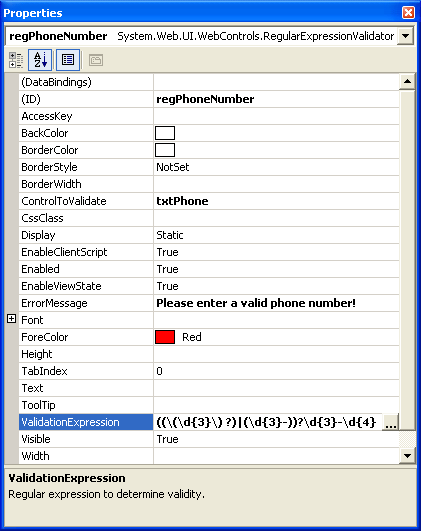
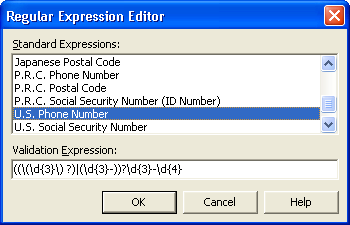
Recognize that pattern? That's the same U.S. Phone pattern you saw earlier. Fortunately for me I didn't have to type that into the ValidationExpression property. I used the Regular Expression Editor (see Figure 2), which has a number of pre-built Regular Expressions available for you to select from including e-mail addresses, Internet URLs, U.S. Social Security number, U.S. zip code, as well as international phone and postal code formats. Of course, you can also develop you own custom expressions.
The System.Text.RegularExpressions Namespace
In addition to the ASP.NET RegularExpressionValidator control, you can also take advantage of the classes contained in the .NET Framework regular expression engine. These classes are contained in the System.Text.RegularExpressions namespace.
The RegEx Class
The RegEx class handles the majority of the work in the System.Text.RegularExpressions namespace. The constructor of this class is critical because it contains the most important element of a regular expression, the pattern. You can code the constructor in one of three ways.
'Passing no parameters
RegEx()

'Passing the string pattern
RegEx(pattern)

'Passing the string pattern and option settings
RegEx(pattern,options)
The pattern parameter, if passed, needs to be a string. The options parameter, if passed, needs to be a member of the RegExOptions enumeration.
The RegExOptions enumeration contains the options that you can set when you create a RegEx object. IgnoreCase is a commonly used option that overrides RegEx's default case-sensitivity behavior. Include this option if you want to have a case insensitive regular expression. Another way to specify case insensitivity is to add (?i) to the beginning of the pattern.
^(?i)[a-z]{3}$
This expression will match abc, AbC, and ABC.
Since matching is one of the most commonly performed operations, let's start with it. The code below determines if you've entered a valid U.S. phone number into a textbox.
       Dim oRegEx As Regex = New _
    Regex("((\(\d{3}\) ?)|(\d{3}-))?\d{3}-\d{4}")
        Dim x As Boolean
        x = oRegEx.IsMatch(Me.TextBox1.Text)

        If x Then
            MessageBox.Show("Valid!")
        Else
            MessageBox.Show("Invalid!!!")
        End If
The IsMatch()method returns true if it finds the pattern in the passed string, false otherwise. The static version of IsMatch accepts three parameters: the string passed in, the pattern to check it against, and the RegExOptions required.
        If Regex.IsMatch(Me.TextBox2.Text, _
         "[a-z]{3}", RegexOptions.IgnoreCase) Then
Match Object
The RegEx.Match method returns a Match object that provides detailed information about a match, including whether or not a match was found, the value (the text matched), the index (position in the searched string), and length of the string matching the pattern.
      Dim SearchString As String _
         = "A cobra is a venomous snake!"
      Dim Pattern As String = "\bve\w*"
      Dim oMatch As Match

        oMatch = Regex.Match(SearchString, _
           Pattern, RegexOptions.IgnoreCase)

        If oMatch.Success Then
           MessageBox.Show(oMatch.Value)
           MessageBox.Show(oMatch.Index)
           MessageBox.Show(oMatch.Length)
        End If
The pattern in the above code will match any word (note the \b metacharacter) that begins with “ve”. It matches on the word venomous, therefore oMatch.Success return true. oMatch.Value contains “venomous,” oMatch.Index contains 13, and oMatch.Length contains 8.
Either RegEx.IsMatch() or Match.Success will work if you're only looking for a single match. What if you want to find all of the occurrences in a string that match the pattern? This is where NextMatch() comes in.
NextMatch() will return the next match in the searched string starting from the end of the current match. You can place NextMatch() inside a loop to iterate through a searched string to find all the occurrences of the pattern.
  Dim SearchString As String = _
    "A cobra is a very, very venomous snake!"
 Dim Pattern As String = "\bve\w*"
 Dim oMatch As Match
 Dim MatchHits As Integer = 0

 oMatch = Regex.Match(SearchString, _
    Pattern, RegexOptions.IgnoreCase)

  Do While oMatch.Success
     MatchHits = MatchHits + 1
     oMatch = oMatch.NextMatch()
       If oMatch.Success Then
          MessageBox.Show(oMatch.Value)
          MessageBox.Show(oMatch.Index)
          MessageBox.Show(oMatch.Length)
       End If
 Loop
The previous code will find three matches to the pattern, starting with the first occurrence of the word “very.” A loop then begins based on the success of the first match. The NextMatch() method is called within the loop to find the next pattern match.
While this technique may work for you in some circumstances, it has limitations. The technique doesn't provide a way to index any match or provide any metadata about the match set, such as a match count. In a previous example the code maintained a MatchHits variable manually.
MatchCollection
If you need the ability to iterate through the match set, if you need to know how many matches occurred, or if you need to be able to do ad-hoc indexing into the match set, then MatchCollection is the object for you.
 Dim SearchString As String = _
   "A cobra is a very, very venomous snake!"
 Dim oMatch As Match
 Dim oMatchCollection As MatchCollection
 Dim oRegEx As New Regex("\bve\w*")

oMatchCollection = oRegEx.Matches(SearchString)

MessageBox.Show(oMatchCollection.Count)
  For Each oMatch In oMatchCollection
    MessageBox.Show(oMatch.Value)
    MessageBox.Show(oMatch.Index)
    MessageBox.Show(oMatch.Length)
  Next
The above code does almost exactly the same thing as the preceding code sample that used NextMatch(). The difference is that this code uses the Matches method to create a MatchCollection object.
Replacement Strings
Replacement does exactly what you expect it to do?find a piece of text that matches a pattern and replace it with another.
Dim SearchString As String = _
  "A cobra is a very, very venomous snake!"
Dim Pattern As String = "\bven\w*"
Dim ReplacementString As String = "friendly"
Dim NewString As String

NewString = _
 Regex.Replace(SearchString, Pattern, _
ReplacementString)
The above code will find all occurrences of the word “venomous” and replace it with the word “friendly.”
The replacement capabilities of regular expressions are limitless. You could read an HTML file and remove all of the bold tags (<B> and </B>) with a simple Regex.Replace() call.
Dim SearchString As String = _
  "A cobra is a very, <B>very</B> venomous snake!"
Dim Pattern As String = "(<b>)|(</b>)"
Dim ReplacementString As String = ""
Dim NewString As String

NewString = _
Regex.Replace(SearchString, Pattern, _
ReplacementString, RegexOptions.IgnoreCase)
This code results in NewString containing “A cobra is a very, very friendly snake!”
(<b>)|(</b>)|(<i>)|(</i>)
This pattern expands on the previous example to remove italics tags as well.
Summary
My goal at the beginning of this article was to introduce you to the world of regular expressions and how to use them in Visual Studio .NET. While they can look complex and overwhelming to the uninformed, once you break them apart they're really not that bad to work with and they provide a powerful tool to add to your development toolbox.
Resources
You will find plenty of help and resources on regular expressions on the Web. Here are just a few of the resources you'll find:
Software
**RegExDesigner ** (freeware)
http://www.sellsbrothers.com/tools/
RegexDesigner.NET is a powerful visual tool for helping you construct and test .NET Regular Expressions. When you are happy with your regular expression, RegexDesigner.NET lets you integrate it into your application through native C# or VB .NET code generation and compiled assemblies (usable from any .NET language).
Web Site
A Web site with an extensive collection of contributed regular expression patterns. You can submit your patterns and/or test your patterns before you implement them with the Regular Expression Tester.
Books
Mastering Regular Expressions, Second Edition
Jeffrey Friedl
Regular Expressions with .NET (ebook)
by Dan Appleman
Visual Basic .NET Text Manipulation Handbook: String Handling and Regular Expressions
By Paul Wilton, Craig McQueen, François Liger
Table 1: Metacharacter listing
| Metacharacter | Meaning |
|---|---|
| Character Matching | |
| . | Matches any single character except the newline character. |
| [ ] | Matches any one of the enclosed characters. You can specify a range using a hyphen, such as [0-9]. |
| x|y | Matches either x or y. |
| Position Matching | |
| ^ | Matches beginning of string. |
| $ | Matches end of string. |
| Repetition Matching | |
| ? | Matches 0 or 1 instances of the preceding character. |
| + | Matches 1 or more instances of preceding character. |
| \ | Indicates that the next character should not be interpreted as a regular expression special character. |
| * | Matches 0 or more instances of preceding character. |
| ( ) | Groups a series of characters. |
| {n} | Matches exactly n instances of preceding character. |
| {n,} | Matches at least n instances of preceding character (where n is an integer). |
| {n,m} | Matches at least n and at most m instances of preceding character (where n and m are integers). |
| Special Characters | |
| \s | Matches a single white space character, including space, tab, form feed, and line feed. (Same as [\f\n\r\t\v]) |
| \w | Matches any alphanumeric character, including the underscore (same as [A-Za-z0-9_]). |
| \d | Matches a digit character (same as [0-9]). |
| \f | Matches a form feed. |
| \n | Matches a line feed. |
| \r | Matches a carriage return. |
| \t | Matches a tab. |
| \v | Matches a vertical tab. |
| \b | Matches a word boundary, such as a space. |
Table 2: Common patterns
| Description | Regular Expression Pattern |
|---|---|
| E-mail address | \w+([-+.]\w+)*@\w+([-.]\w+)*\.\w+([-.]\w+)* |
| Internet URL | http://([\w-]+\.)+[\w-]+(/[\w- ./?%&=]*)? |
| Real number (including +/-) | ^[-+]?\d+(\.\d+)?$ |
| Password (first character is a letter, 4 ? 15 characters, nothing but numbers, letters and underscore) | ^[a-zA-Z]\w{3,14}$ |
