


Modern applications are no longer isolated, stand-alone applications, limited to a single process or machine.
Distributed applications allow you to put components in close proximity to the resources they use, allow multiple users to access the application, enable scalability and throughput, and increase overall availability and fault isolation. Component-oriented programming is especially geared towards distribution because it is all about breaking the application into a set of interacting components, which you can then distribute to different locations. .NET has a vast infrastructure supporting distributed applications and remote calls. This article focuses on just a single aspect of .NET remoting: the different object activation models available to a distributed application.
The different activation modes control object state management, object sharing, object life cycle, and the way in which the client binds to an object.
Understanding the remote object activation models is key to successfully applying .NET in a distributed environment. .NET offers multiple activation models because modern applications often need to cater to drastically different scalability, throughput and performance requirements, and there is no one-size-fits-all solution. Consequently, choosing the right activation model is actually the single most critical design decision you will have to make when designing and building a distributed application in .NET. .NET remoting has a lot more to it than just the activation model, but in many respects these are mere programming details. Most of these details make no sense unless you understand the activation models, you know how to chose one, and you learn how to implement the matching components. I will cover other facets of .NET remoting in future articles. My emphasis in this article is on understanding the basic concepts, the tradeoffs they offer, and the practical aspects of the different activation models.
App Domains and Remote Objects Types
.NET applications run inside an unmanaged Windows process. However, .NET applications require a managed code environment. To bridge this gap, .NET introduces the app domain?a logical managed process inside a raw, physical process. App domains provide assemblies they load and the components inside them many of the same services an unmanaged process provides unmanaged objects and libraries. A single physical process can contain multiple app domains, although typically only large application frameworks require it. Every process starts with a single app domain. If the object is in the same app domain as the client then usually no proxies are involved and the client holds a direct reference to the object. The question is what happens when you try to call methods on a remote object in another app domain? By default, objects are not accessible from outside their app domain, even if the call is made between two app domains in the same process. The rationale behind this decision is that .NET must first enforce app domain isolation and security. If you want your objects to be accessed from outside their app domain, then you must allow it explicitly in your design and class definition. .NET provides two options for accessing an object across an app domain boundary: by value or by reference. By value means the object is first copied across the app domain boundary, so that the remote client gets its own cloned copy of the original object. Once a copy is transferred to the remote client, the two objects are distinct and can change state independently. This is similar to COM marshal by value, and it is often referred to as marshaling by value. The second way of accessing a remote object is by reference, meaning that the remote clients only hold a reference to the object in the form of a proxy. Access by reference is often referred to as marshaling by reference.
Marshaling by Reference
Marshal by reference is by far the more common way to access objects across app domains. When you use marshaling by reference the client accesses the remote object using a proxy (see Figure 1).
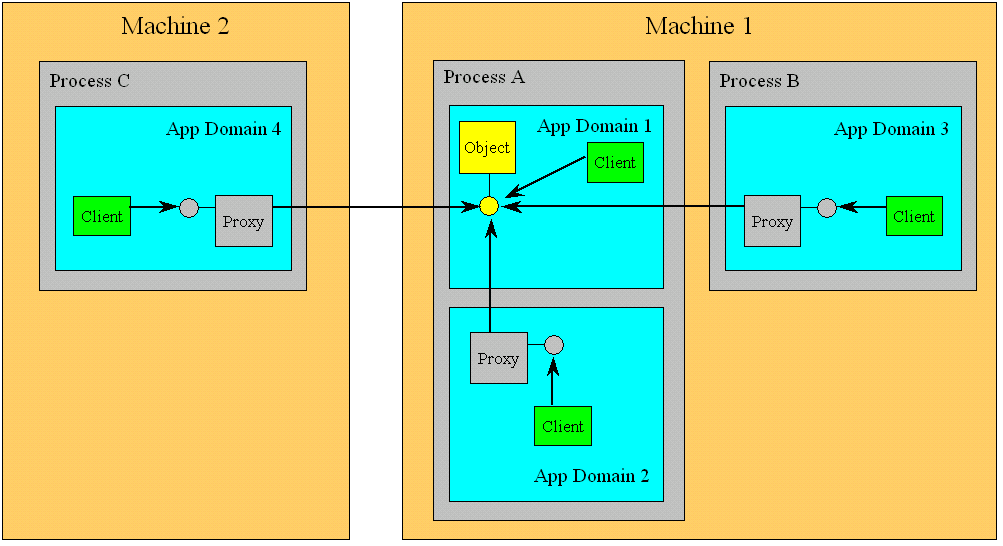
Client calls on the proxy are forwarded by the proxy to the actual object. To designate a component for marshaling by reference, the class must derive directly (or have one of its base classes derive) from the class MarshalByRefObject, defined in the System namespace. Objects derived from MarshalByRefObject are bound to the app domain in which they were created and can never leave it. Any static method or member variable on a marshaled by reference class is always accessed directly, and no proxy is involved, because statics are not associated with any particular object. The object's app domain is called the host app domain because it is hosting the object and exposes it to remote clients. I will show you how to set up a host in a future article.
Marshaling by Value
The second remoting option is marshaling an object by value. To marshal by value, .NET must make a copy the object's state, transfer the state to the other app domain, and build a new object based on that state. How does .NET know which parts of the object's state can be marshaled by value and which parts cannot? How does .NET save the state of an existing object and how does it build a new object based on that state? What if the object wants to provide some custom marshaling by value mechanism? Luckily, .NET already has the infrastructure to handle such issues: serialization. The requirements for marshaling by value and for generic serialization are identical. To marshal an object by value, all .NET has to do is serialize the object to a stream, and deserialize the object in the remote app domain. As a result, to enable marshaling by value, the component must be serializable.
Marshaling by value is considerably easier in .NET than it was with DCOM. (The only way to marshal by value in DCOM was to provide custom marshaling?a daunting task, even for proficient DCOM experts.) The primary use for marshaling by value is to pass a structure as a method parameter. Typically, structures are used as data containers and have no logic associated with them. Structures are very useful as method parameters, but unless a struct is serializable you will not be able to use it as a parameter to a remote call. When marshaling a struct by value to a remote object, you actually get the same semantics as with a local object because value types are by default passed in by value:
[Serializable]
public struct MyPoint
{
   public int X;
   public int Y;
}

public class RemoteClass : MarshalByRefObject
{
   public void MyMethod(MyPoint point)
   {
      point.X++;
   }
}
Changes made to the structure on the server side will not affect the structure on the client side:
//Remote client:
MyPoint point;
point.X = 1;
RemoteClass obj = new RemoteClass();
obj.MyMethod(point);
Debug.Assert(point.X == 1);
However, if you pass the structure by reference using the out or ref parameter modifiers, changes made on the remote server side will affect the client's copy of the structure:
public class RemoteClass : MarshalByRefObject
{
   public void MyMethod(ref MyPoint point)
   {
      point.X++;
   }
}
//Remote client:
MyPoint point;
point.X = 1;
RemoteClass obj = new RemoteClass();
obj.MyMethod(ref point);
Debug.Assert(point.X == 2);
The usefulness of marshaling by value for a class instance is marginal because the classic client-server model does not fit well with marshaling by value. Marshaling by value for reference types is useful when the client needs to make frequent calls of short duration to the object, and paying the penalty for marshaling the object state to the client is better then paying the penalty multiple times for marshaling the call to the object and back. Imagine, for example, a distributed image capturing and processing system. You would want the machine capturing the images to do so as fast as it can and you would want to do the processing on a separate machine. The capturing machine can create an image object, have the processing client access it (that would make it copy the image), and process it locally. That said, there is usually a better design solution, such as transferring the image data explicitly as a method parameter. In general, it is often a lot easier to simply marshal to the client a reference to the object, and have the client invoke calls on the object.
Marshal by Reference Activation Modes
.NET supports two kinds of marshal by reference objects: client-activated and server-activated. The two kinds of reference objects map to three activation modes: client-activated object, server-activated single call, and server-activated singleton. The different activation modes control object state management, object sharing, object life cycle, and the way in which the client binds to an object. The client decides whether to use client-activated or server activated objects. If the client chooses a client-activated object, then the client has just one activation model available. If the client chooses server-activated object, it is up to the hosting app domain to decide whether the client will get a server-activated single call object or a server-activated singleton object. It is called server activated because it is up to the host to activate an object on behalf of the client, and bind it to the client. The hosting app domain indicates to .NET, using server registration, which activation modes it supports. The host can support both client and server activated objects, or either one. It is completely at the discretion of the host. If the host decides to support the server-activated model, it needs to register it either as single-call or as singleton, but not both.
Client-Activated Object
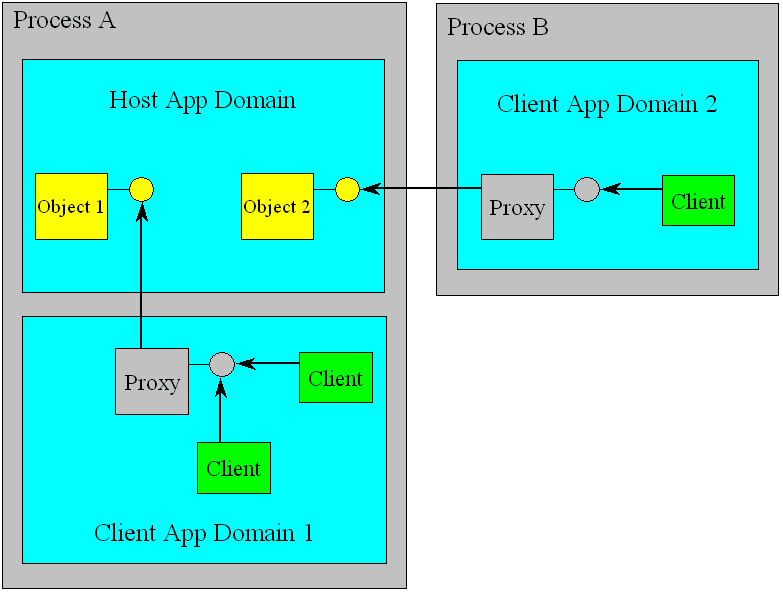
The Client-activated object model is the classic client-server activation model: when a client creates a new object, the client gets a new object. That object is dedicated to the client and it is independent of all other instances of the same class. Different clients in different app domains get different objects when they create new objects on the host (see Figure 2).
There are no limitations on constructing client-activated objects, and you can use either parameterized constructors or the default constructor. The constructor is called exactly once, when the client creates the new remote object, and .NET will marshal the construction parameters to the new object if parameterized constructors are used. Clients can choose to share their objects with other clients, either in their app domains or in other app domains. Like local objects, client-activated objects can maintain state in memory. To make sure the remote object is not disconnected from the remoting infrastructure and collected by its local garbage collector when making cross?process calls, client-activated objects require leasing to keep them alive as long as the clients use them. Leasing provides a timestamp extending the life of the object. Leasing and sponsorship merit a dedicated article. The Client-activated object model is similar to the default DCOM activation model with one important difference: The host app domain must register itself as a host willing to accept client-activated calls, before remote calls are issued. This means the process containing the host app domain must be running before such calls are made.
Server-Activated Single Call
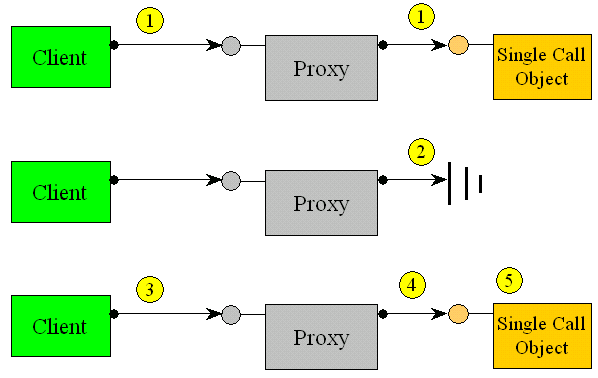
The fundamental problem with the client-activated object model is that it does not scale well. The server object may hold expensive or scarce resources such as database connections, communication ports, files, or it may allocate a large amount of memory, etc. Imagine an application that has to service many clients. Typically, these clients will create the remote objects they need when the client application starts, and dispose of them when the client application shuts down. What impedes scalability with client-activated objects is the potential that the client applications have for holding onto objects for long periods of time while actually using the object only in a fraction of that time. If your design calls for allocating an object for each client, you may tie up such crucial limited resources for long periods and your application may eventually run out of resources. A better object model design will allocate an object for a client only while a call is in progress from the client to the object. That way you will only have to create and maintain in memory as many objects as there are concurrent calls, not as many objects as there are clients. This is exactly what the single call activation model is about: when the client uses a server activated single-call object, for each method call .NET creates a new object, lets it service the call, and then disposes of it. Between calls the client holds a reference on a proxy that does not have an actual object at the server end of the wire. Figure 3 shows how single call activation works:
1. Object executes a method call on behalf of a remote client.
The client-activated object model is the classic client-server activation model: when a client creates a new object, the client gets a new object.
2. When the method call returns, if the object implements IDisposable, .NET calls IDisposable.Dispose() on it. .NET then releases all references it has on the object, making it a candidate for garbage collection. Meanwhile, the client continues to hold a reference to a proxy and does not know that its object is gone.
3. The client makes another call on the proxy.
4. The proxy forwards the call to the remote domain.
5. .NET creates an object and calls the method on it.
Benefits of single-call objects
The obvious benefit of using a single-call object is that you can dispose of the expensive resources the object occupies long before the client disposes of the object. By that same token, acquiring the resources is postponed until they are actually needed by a client. Keep in mind that creating and destroying the object repeatedly on the object side, without tearing down the connection to the client (with its client-side proxy) is cheaper than creating and disposing of the object. Another benefit is that even if the client is not disciplined enough to explicitly dispose of the object, it has no effect on scalability because the object will be disposed of automatically. If the client does call IDisposable.Dispose() on the object, it has a detrimental effect of recreating the object just so that the client can call Dispose() on it. This will be followed by a second call to Dispose() by the proxy. Make sure the object is designed to handle multiple calls on Dispose().
Designing a single-call object
Although in theory you can use single-call activation on any component type, in practice you need to design the component and its interfaces to support the single-call activation model from the ground up. The main problem is that the client does not know it is getting a new object each time. Single-call components must be state-aware, that is, they must proactively manage their state, giving the client the illusion of a continuous session. A state aware object is not the same as a stateless object. In fact, if the single-call object were truly stateless, there would be no need for single-call activation in the first place. Because a single call object is created just before every method call and deactivated immediately after each call, then at the beginning of each call the object should initialize its state from values saved in some storage, and at the end of the call should return its state to the storage. Such storage is typically either a database or the file system. However, not all of the state of an object can be saved as-is. For example, if the state contains a database connection then the object must re-acquire the connection at the beginning of every call and dispose of the connection at the end of the call, or in its implementation of IDisposable.Dispose(). Using the single-call activation model has one important implication for method design: every method call must include a parameter to identify the object whose state needs to be retrieved. The object uses that parameter to get its state from the storage and not the state of another instance of the same type. Examples for such parameters are the account number for bank account objects, the order number for objects processing orders, and so on. Listing 1 shows a template for implementing a single-call class.
When the client uses a server activated single-call object, for each method call .NET creates a new object, lets it service the call, and then disposes of it.
The class provides the MyMethod() method, which accepts a parameter of type Param (a pseudo type invented for this example) used to identify the object:
public void MyMethod(Param objectIdentifier)
The object then uses the identifier to retrieve its state and to save the state back at the end of the method call.
Another design constraint of dealing with single-call objects is constructors. Because .NET re-creates the object automatically for each method call it does not know how to use parameterized constructors, or which parameters to provide to them. As a result, a single call object cannot have parameterized constructors. In addition, because the object is constructed only when a method call takes place, the actual construction call on the client side is never forwarded to the objects:
MySingleCallComponent obj;
//No constructor call is made:
obj = new MySingleCallComponent();

obj.MyMethod();//Constructor executes
obj.MyMethod();//Constructor executes
Applying the single-call model
Single-call activation clearly offers a tradeoff in performance (the overhead of reconstructing the object's state on each method call) with scalability (holding on to the state and the resources it ties in). There are no hard and fast rules as to when and to what extent you should trade performance for scalability. You may need to profile your system and ultimately redesign some objects to use single-call activation and some not to use it.
In addition, the single call activation model works only when the amount of work to be done in each method call is finite, and there are no more activities to complete in the background once a method returns. For this reason you should not spin-off background threads or dispatch asynchronous calls back into the object because the object will be disposed of once the method returns. In every method call the single-call object retrieves its state from some storage, so single-call objects work very well in conjunction with a load-balancing machine as long as the state repository is some global resource accessible to all machines. The load balancer can redirect calls to different machines at will knowing that each single-call object is capable of servicing the call after retrieving its state.
Server-Activated Singleton
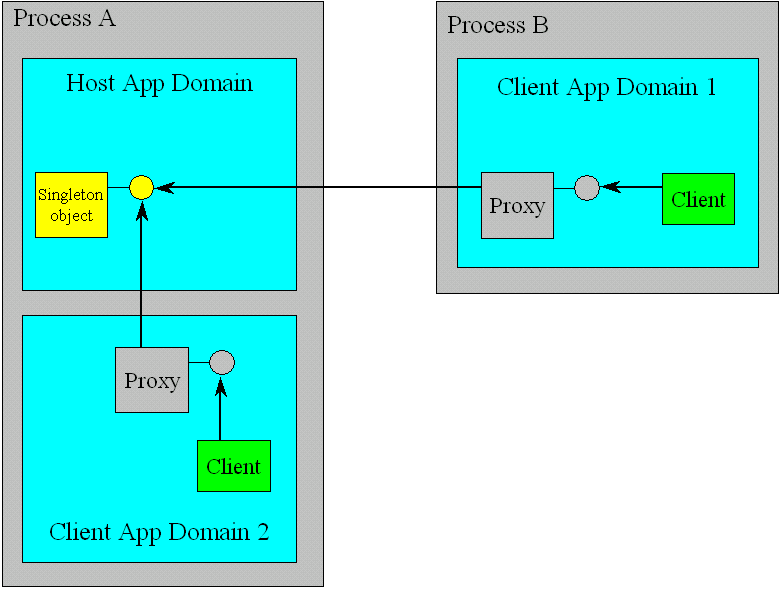
The Server-activated singleton activation model provides a single, well-known object to all clients. Because the clients connect to a single, well-known object, .NET ignores the client calls to new (to create a new instance), even if the singleton object is not created yet. (The .NET runtime in the client app domain has no way knowing what goes on in the host app domain anyway.) The singleton is created when the first client tries to access it. Subsequent client calls to create new objects and access attempts are all channeled to the same singleton object. Listing 2 demonstrates these points: You can see from the trace output that the constructor is only called once on the first access attempt, and that obj2 is wired to the same object as obj1.
The server-activated singleton activation model provides a single, well-known object to all clients.
Because the singleton constructor is only called implicitly by .NET under the covers, a singleton object cannot have parameterized constructors. Parameterized constructors are banned also because of an important semantic characteristic of the singleton activation model: At any given point in time, all clients share the same state of the singleton object (see Figure 4).
If parameterized constructors were allowed then different clients could call them with different parameters and that would result in different states per client. If you try to create a singleton object using a parameterized constructor, .NET will throw an exception of type RemotingException.
Using singleton objects
Singleton objects are the sworn enemy of scalability. There are only so many concurrent client calls a single object can sustain so you may choose to use them rarely. Make sure that the singleton will not be a hot spot for scalability and that your design will benefit from sharing the singleton's object state. In general, use a singleton object if it maps well to a true singleton in the application logic, such as a logbook that all components should log their activities to. Other examples include a single communication port, a single mechanical motor, etc. Avoid using a singleton if there is a chance that the business logic will allow more than one such object in the future, such as adding another motor, a second communication port, etc. The reason is clear: If your clients depend on implicitly being connected to the well-known object, and if more than one object is available, the clients would suddenly need to have a way to bind to the correct object. This could have severe implications on the application's programming model. Because of these limitations, I recommend that you avoid singletons in the general case and find ways of sharing the state of the singleton, instead of the singleton object itself. That said, there are cases where using a singleton is a good idea. For example, class factories are usually implemented as singletons.
Singleton object lifecycle
Once a singleton object is created it should live forever. That presents a problem to the .NET garbage collection mechanism?even if no client presently has a reference to the singleton object, the semantics of the singleton activation model stipulate that the singleton be kept alive so that future clients can connect to it and its state. .NET uses leasing to keep an object in a different process alive, but once the lease has expired, .NET will disconnect the singleton object from the remoting infrastructure and will eventually garbage collect it. When you work with singleton objects, you need to explicitly provide the singleton with a long enough (or even infinite) lease. A singleton object should not provide a deterministic mechanism to finalize its state, such as implementing IDisposable. If it is possible to deterministically dispose of a singleton object, it will present you with a problem: Once disposed of, the singleton object becomes useless. Furthermore, subsequent client attempts to access or create a new singleton will be channeled to the disposed object. A singleton by its very nature implies that it is acceptable to keep the object alive in memory for a long period of time, and therefore there is no need for deterministic finalization. A singleton object should only use a Finalize() method (the C# destructor).
Activation Models and Synchronization
In a distributed application, the hosting domain registers the objects with .NET that it is willing to expose as well as their activation modes. Each incoming client call into the host is serviced on a separate thread from the thread pool. That allows the host to serve remote client calls concurrently and maximize throughput. The question is, what effect does this have on the object synchronization requirements?
Client-activated objects and synchronization
When it comes to synchronization, client-activated objects work like classic client-server objects. If multiple clients share a reference to an object, and the clients can issue calls on multiple threads at the same time, then you must provide for synchronization to avoid corrupting the state of the object. It would be best if the locking were encapsulated in the component itself either by using synchronization domains or by using manual synchronization. The reason is clear: Any client-side locking (such as using the lock statement) will only lock the proxy, not the object itself. Another noteworthy point is thread affinity?because each incoming call can be on a different thread, the client-activated object should not make any assumption about the thread it is running on, and avoid mechanisms such as thread-relative static or thread local storage. This is true even if the object is always accessed by the same client, and that client runs always on the same thread.
Single-call objects and synchronization
In the case of a single-call object, object-state synchronization is not a problem because the object's state in memory exists only for the duration of that call and cannot be corrupted by other clients. However, synchronization is required when the objects store state between method calls. If you use a database then you have to explicitly lock the tables, or you can use transactions with the appropriate isolation level to lock the data. If you are using the file system then you need to prevent sharing the files you access while a call is in progress.
Singleton objects and synchronization
Unlike client-activated objects, the clients of a singleton object may not even be aware that they are sharing the same object, and may not take the necessary precautions to lock the object before access. As a result, you should enforce synchronization of a singleton object on the object side. You can use either synchronization domain or manual synchronization. Similar to a client-activated object, a singleton object must avoid thread-affinity.
Conclusion
Distributed applications have come a long way from the days of simple client-server over the wire. Developing modern distributed applications requires taking into account the scalability and throughput needs, and selecting the appropriate object model. In the past, programming models such as single-call objects required application server platforms such as COM+. .NET remoting natively offers developers a range of programming models that take into account the scalability and performance needs of the application, thus significantly simplifying the overall programming model. As long as your objects comply with the design guidelines of the respective object models described in this article, you should be well on your way to successfully developing and deploying a distributed .NET application.
