


Dynamic code execution is a powerful feature that allows applications to be extended with code that is not compiled into the application. Users can customize applications and developers can dynamically update code easily. In this article, Rick looks at what it takes to execute code dynamically with the .NET Framework and introduces a class that simplifies these tasks by wrapping the details of the process in an easy-to-use Interface that only requires a few lines of code.
I come from an xBase background and have been using Visual FoxPro for many years. One of the nice features of xBase is the ability to dynamically execute code in applications. In Visual FoxPro you can execute code from a string simply by calling EXECSCRIPT() or executing a single expression by calling EVALUATE(). In other environments, however, dynamic code execution is considerably more difficult to achieve, especially in true compiled languages that make it impossible to run code on the fly directly. Those tools have to rely on external tools like the Active Scripting control from Microsoft or other 3rd-party parsers.
Dynamic code execution is a powerful tool for extending applications and allowing customization of an application after it has shipped. Plug-ins and other end-user extensibility features almost exclusively rely on the ability to execute code after formal compilation of the application. Scripting engines and template formatting use dynamic code when it's necessary to mix data with the display output. A good example of this is ASP scripting, which basically is a sophisticated script parser that executes code on the fly.
.NET provides full control over dynamic code execution natively via the .NET SDK classes. However, the process is not nearly as trivial as it is in Visual FoxPro. It requires a fair amount of code to accomplish something similar and you need to know how .NET loads assemblies into the application. In exchange, .NET provides a lot of flexibility in using dynamic code with full control over the entire process including compilation, error reporting, loading objects, and controlling the environment.
Compiling Code on the Fly
.NET provides powerful access to the IL code generation process through the System.CodeDom.Compiler, Microsoft.Csharp, and Microsoft.VisualBasic namespaces. In these namespaces you'll find the tools that allow you to compile an assembly either to disk or into memory. You also need the Reflection namespace as it contains the tools to invoke an object and its methods once you've compiled the object.
In the following example I'll demonstrate how to execute an arbitrary block of code. The code is free standing and has no dependencies. The process to execute this code dynamically involves the following steps:
The example shown in Listing 1 demonstrates the code to perform these steps. Figure 1 shows an example of the form that utilizes this code. Please note that there's only minimal error handling provided in most code snippets for brevity's sake.
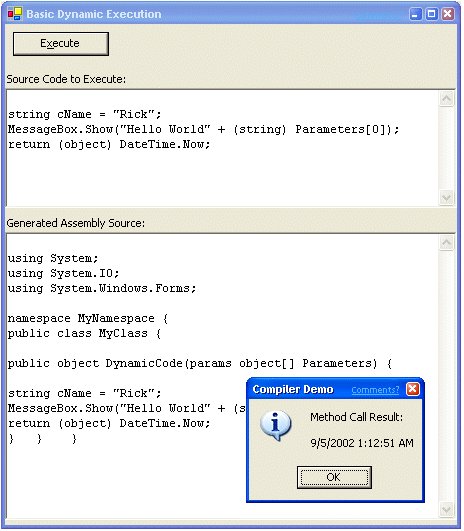
The code begins by creating various objects that are required for compilation. It then uses the CompilerParameters object to add any assembly references required during compilation. These are the physical DLLs that are required and are the equivalent of what you add in the VS.NET project References section. Note that it's very important that every reference is included or you will get compiler errors. This is one of the tricky parts about dynamic code compilation as this step must occur in your application code. Here the Windows Forms assemblies are included to allow using the MessageBox object to display output.
The next step is to generate the complete source code for an assembly. This example makes a few assumptions about the code in that it presets the method parameter and return value signature as:
public object DynamicCode(params object[] Parameters);
So a block of code MUST return a value of type object or null. It can also accept any number of parameters that can be referenced via the Parameters collection. A simple example of a string to execute might be.
string cName = "Rick";
MessageBox.Show("Hello World" + cName);
return (object) DateTime.Now;
If you wanted to access parameters dynamically instead you might do this:
string cName = (string) Parameters[0];
Note that you should cast parameters explicitly to the specific type since the object parameter is generic. You can also return any value as long as you cast it to an object type.
This code is now fixed up into an assembly by adding namespace, class, and method headers. The final generated code that gets compiled looks like this:
using System.IO;
using System;
using System.Windows.Forms;
namespace MyNamespace
{
   public class MyClass
   {
      public object DynamicCode(
         params object[] Parameters)
      {
         string cName = "Rick";
         MessageBox.Show("Hello World" + cName);
         return (object) DateTime.Now;
      }
   }
}
This code can now be compiled into an assembly by using the CompileAssemblyFromSource() method of the CodeCompiler. The CompilerResults object receives information about the result. You can retrieve compile errors via the HasErrors property and Error collection. If there were no errors you get a reference to the Assembly in CompiledAssembly property from which you can call CreateInstance() to create a live instance of the MyClass class.
This is where Reflection comes in: Because we've basically created a .NET type on the fly, the object reference and all method access must occur dynamically rather than through direct referencing. The compiler has no idea of the type at compile time, but must delay creation and type info until runtime. So when I called CreateInstance an object of type Object is returned and I have to use Reflection and InvokeMember to call a method on the object indirectly.
The actual call to the object method then proceeds and returns a reference to a generic object type (much like a variant). This type can contain data of any type and I suggest that you immediately cast the return type to an explicit type if possible. Notice also the error handling around the InvokeMember call - this is fairly crucial as it protects the calling application from any runtime errors that occur in the dynamic code.
I've demonstrated this technique by using Visual C# .NET as the dynamic code language here. You can also use Visual Basic by using the Microsoft.VisualBasic namespace and using the VBCodeProvider class instead to instantiate the loCompiler object. Of course, you'd have to change the assembly source code to VB syntax in addition to the actual dynamic code I show here. The class I'll present later provides the ability to execute both C# and VB code by setting a language property.
As I mentioned at the start of this article, .NET provides a lot of functionality and control over the compile and execution process. However, this is a lot of code to have to integrate into an application each time you want to execute dynamic code. To make life easier I've created a class that simplifies the process considerably and aids in handling errors and debugging the code should errors occur.
Understanding How .NET Loads Code
Before I dive into the dynamic code execution class I need to discuss the important subject of application domains and how they behave when assemblies are loaded. Application domains are the highest level isolated instances of the .NET runtime that host application code and data. Assemblies get loaded into a specific application domain and execute and use resources in it.
When you normally run a .NET application, .NET simply loads each assembly on your references list into the application's primary Application Domain (see sidebar: What's an Application Domain?). No problem there?you want all code to load into this domain and stay loaded there. So if there's code that dynamically uses the JIT compiler to compile code, the code will remain in the AppDomain cached and compiled so only the first access to it is relatively slow.
So far, so good. But here's the rub in our dynamic code execution scheme: Application domains load assemblies, but they cannot unload them! If you're only loading a handful of assemblies this won't be a problem, but often times when you run dynamic code it's quite possible that you will create a lot of snippets that need to run and compile independently then essentially throw them away. For example, I have a Desktop application that uses templates on disk to hold HTML mixed with .NET code. The application merges the content of a database record (actually an object view of it) into the template. The documents are merged on the fly and only on an as needed basis. This system can have thousands of entries and almost every page has to be compiled separately.
If you run the demo above in a loop for 10 - 20 times you will notice that memory usage increases with each instance of creating and releasing an assembly. The process consumes a few K each time depending on the size of the assembly and its related referenced assemblies. Once loaded, none of that space can be unloaded again if the assembly is loaded into the current application's AppDomain.
So what do you do? Unfortunately there's no simple answer - onlyy a convoluted one. The answer is to create a new application domain and load your dynamic assemblies into that. You can have a choice of loading into this AppDomain, running your code, and unloading it, or alternately you can run all of your dynamic code into the new domain and kill it later or when it reaches a certain number of executions or other metric. Unfortunately this process is not trivial and requires that you use an intermediary proxy object that can invoke a method in a remote AppDomain without referencing the object in the local application domain in any way (which again would lock the assembly into the local AppDomain). The process here is essentially the same as invoking a remote object over the network along with all the same complications.
Creating Code in Alternate AppDomains
Loading an assembly and creating a class instance from it in a different application domain involves the following steps:
The whole point of this convoluted exercise is to load the object into another AppDomain and access it without using any of the object's type information. Accessing type information via Reflection forces an assembly to load into the local AppDomain and this is exactly what we want to avoid. By using a proxy that only publishes an Interface your code load only a single assembly that publishes this generic Interface.
For the dynamic code execution class I'm going to create a very simple Interface (shown in Listing 2) that can simply invoke a method of the object.
This Interface is then used to make passthrough calls on the methods of the dynamic object. The code to generate the full assembly looks like this:
using System.IO;
using System;
using System.Windows.Forms;
namespace MyNamespace
{
   public class MyClass :
      MarshalByRefObject,IRemoteInterface
   {
      public object Invoke(string lcMethod,
         object[] Parameters)
      {
         return this.GetType.InvokeMember(lcMethod,
            BindingFlags.InvokeMethod,
            null,this,Parameters);
      }
      public object DynamicCode(
         parms object[] Parameters)
      {
         string cName = "Rick";
         MessageBox.Show("Hello World" + cName);
         return (object) DateTime.Now;
      }
   }
}
By doing this we're deferring the type determination via Reflection into the class itself. Note that the class must also derive from MarshalRefObject, which provides the access to data across application domain boundaries (and .NET Remoting boundaries) using proxies.
In addition to the Interface I'll show you how to create a proxy loader object that acts as an Interface factory: It creates an instance reference to the remote object by returning only an Interface to the client. Listing 3 shows the code for this single method class that returns an Interface pointer against which we can call the Invoke method across domain boundaries without requiring that you have a local reference to the type information.
This class and the IRemoteInterface should be compiled into a separate, lightweight DLL so it can be accessed by the dynamic code for the Interface. Both the client code and the dynamic code must link to the RemoteLoader.dll as both need access to IRemoteInterface.
To use all of this in your client code you need to do the following:
The revised code that loads an AppDomain, compiles the code, runs it, and unloads the AppDomain is shown in Listing 4. Revisions from the previous version are highlighted.
The key differences are loading the AppDomain and how you retrieve the actual reference to the remote object. The critical code that performs the difficult tasks is summarized in:
RemoteLoaderFactory factory =
   (RemoteLoaderFactory) loAppDomain.CreateInstance(
   "RemoteLoader",
   "Westwind.RemoteLoader.RemoteLoaderFactory")
   .Unwrap();
// *** create Interface reference from assembly
object loObject = factory.Create( "mynamespace.dll",
   "MyNamespace.MyClass", null );
// *** Cast object to remote Interface,
// *** to avoid loading type info
IRemoteInterface loRemote =
   (IRemoteInterface) loObject;
// *** Call the DynamicCode method with no parms
object loResult = oRemote.Invoke("DynamicCode",null);
This code retrieves a reference to a proxy. RemoteLoader loads the object in the remote AppDomain and passes back the Interface pointer. The Interface then talks to the remote AppDomain proxy to pass and retrieve the actual data. Because the Interface is defined locally (through the DLL reference), simply call the Invoke() method published by the Interface directly.
Creating an AppDomain, loading assemblies into it, making remote calls, and finally shutting the domain down does incur some overhead. Operation of this mechanism compared to running an assembly in process is noticeably slower. However, you can optimize this a little by creating an application domain only once and then loading multiple assemblies into it. Alternately you can create one large assembly with many methods to call and simply hang on to the application domain as long as needed. Still, even without creating and deleting the domain operation is slower because of the proxy/remoting overhead.
Making Life Easier with wwScripting
There's a lot of power in all of that code that shows how much flexibility there is in the .NET Framework, but you certainly wouldn't want to put all of that code into your application each time you need to execute code dynamically. It's reasonably easy to abstract all of this code into a class. You can find the code in the wwScript.cs source file and in the Westwind.Tools.Scripting namespace with the wwScripting class.
The class provides the following features:
- Transparent execution of C# and Visual Basic code
- Execution in the current AppDomain or via external AppDomains for shutdowns
- Error handling
- High level and low level methods
With the class running dynamic code gets a bit easier as shown in Listing 5.
If you want to load the code into a different AppDomain call the CreateAppDomain("Name") method before the ExecuteCode() method call.
The class also includes several methods for executing code. For example, ExecuteMethod() allows you to provide a full method including the signature defining parameters and return values. This makes it possible to create properly typed parameters and return values. For example, take a code snippet like this:
public string Test(string lcName, int x)
{
   string cHello;
   cHello = lcName;
   MessageBox.Show(cHello,"Compiler Demo");
   return DateTime.Now.ToString();
}
You can then run with this code:
string lcResult = (string)
   loScript.ExecuteMethod(lcCode,
   "Test","rick strahl",x);
Notice that you can access the parameters directly by name in the dynamic code snippet. It's a little cleaner if you pass parameter and return values this way. You can also pass multiple methods as a string:
public string Test(string lcName, int x)
{
   string cHello;
   cHello = lcName;
   MessageBox.Show(cHello,"Compiler Demo");
   return DateTime.Now.ToString();
}
public string Test2(string lcName, int x)
{
   return Test(lcName,x);
}
You can then call the two methods like this:
string lcResult = (string) loScript.ExecuteMethod(
   lcCode,"Test","rick strahl",(int) x);
lcResult = (string)
   loScript.CallMethod(loScript.oObjRef,
   "Test2","rick strahl",(int) x);
Note that making the second call is rather more efficient because the object already exists and is loaded. No recompilation or regeneration occurs on this second call.
CallMethod() is one of the lower level methods of the class. With it you can perform each step of the compile process individually. A number of other low level methods are (see Table 1 and Table 2).
Building an ASP-Like Script Parser
To show you how useful dynamic code execution is and how little code it takes to build powerful functionality, I've included another class wwASPScripting and a small sample app that demonstrates it with the source code. It's basically a simple ASP template parser you can use in your own non-Web applications. Although ASP.NET has a powerful script parser, it unfortunately only works with Web interfaces, not for general code (See sidebar: Why do we need a script parser?).
It isn't difficult to build a basic parser that can handle this task. Take a look at Figure 2, which shows both the generated C# code and the output.
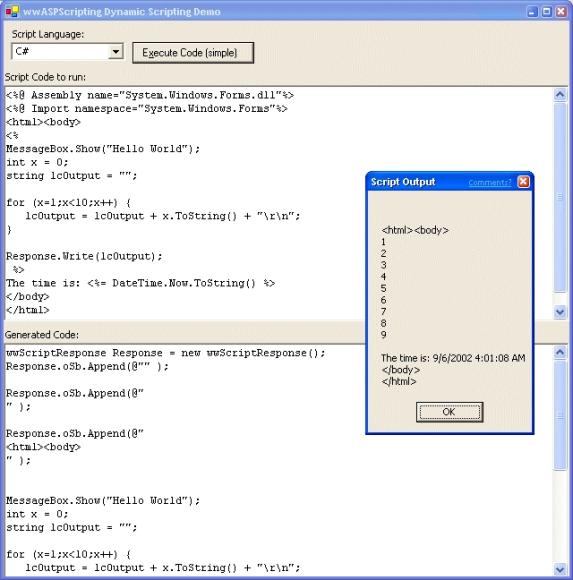
If you look closer at Figure 2 you can see what happens behind the scenes. The HTML template is turned into C# source code. The parser simply runs through the page finding all of the <% tags and inserts the appropriate Response.Write() or Response.oSb.Append() commands. Non-tagged text is expanded into strings delimited with quotes. As a special case the <%@ %> directive handles Assembly and Import keywords to allow importing namespaces and assembly files for linking. To include assemblies and namespaces you can use directives like this:
<%@ Assembly name="System.Windows.Forms.dll"%>
<%@ Import namespace="System.Windows.Forms"%>
I put together a separate class, wwASPScripting, to handle parsing strings into C# code. It's only a demo and provides rudimentary functionalitya first stab. This parser also only handles C# code at this time as VB code would require generating code quite differently and my VB skills lack a bit in that department.
Listing 6 shows the code to accomplish parsing a template page.
The key and new feature of this code is the ParseScript method that basically turns the ASP-style code seen in Figure 2 into runnable C# code that is then passed to the wwScripting class to dynamically execute.
The wwASPScripting class is only a first shot and doesn't do more than parse. It has a private implementation of a Response object that is used to write output into the output stream. The wwASPScripting class natively uses a string builder to allow output to be sent to a string or stream. The ParseScript method is rather short and you can review the source code of how the code conversion is performed in the wwAspScripting.cs source file included with the downloadable code.
You're So Dynamic!
It is interesting how .NET allows you to run dynamic codeessentially it provides you all the tools that a compiler uses to generate an executable. If you want to get even more low level you can use the System.Reflection.Emit namespace to generate IL level code directly. I am amazed how little overall code this mechanism requires even if coming up with that code wasn't quite so trivial, digging through the .NET docs (and help from several people on various newsgroups!). It's also interesting to see how to apply this technology and build a custom script parser with even less code. The process is relatively easy and straightforward once you can use the wrapper classes. Well, easy may be a little overstated. This whole exercise requires deployment of two DLLs in your applicationsthe wwScripting DLL that holds both the code execution and scripting classes as well as the remote loader DLL required to handle the AppDomain proxy Interface. I hope these classes and this discussionhelp you understand how to run dynamic code in .NET. I learned a lot about how .NET works under the covers and I hope this article and the provided helper classes are useful to you in extending your applications with dynamic code. I cannot live without this capability in my applications.
If you have any questions or comments, please comment on the CoDe Message board at:
http://www.west-wind.com/wwthreads/default.asp?Forum=Code+Magazine.
