


It didn't take long after the introduction of Windows Runtime (WinRT, the set of APIs that allow Windows Store apps to communicate with the Windows 8 operating system), for Microsoft to unveil the next generation of its mobile operating system, Windows Phone 8, which conveniently includes some of the APIs coming directly from WinRT. It's easy to imagine the APIs merging together at some point, as that would make writing applications for on-the-go devices such as tablets and mobile phones much easier.
It's easy to imagine the APIs merging together at some point, as that would make writing applications for on-the-go devices such as tablets and mobile phones much easier.
This article discusses the improvements in the new Windows Phone 8 SDK, walks through the requirements to build an app on this new platform, and explores several great new features in this platform.
Three New Features in Windows Phone 8 SDK
I think it's important to lay a solid foundation by understanding several new features included in the SDK before digging into the bits and writing code. Some of these features include
- New tile sizes and templates that let your app use the new small and wide tile sizes along with a couple of new templates
- A lock-screen background image provider and the ability to choose to add your app to the lock screen notification area
- Advancements in speech recognition that make the app read text to you as well as understand text that you speak to it
I have specifically targeted these three features as demos, as I'm sure you want practical examples that you can use in your next real-world app. This article barely scratches the surface of what is included in the Windows Phone 8 SDK. For a comprehensive list, please visit http://msdn.microsoft.com/library/windowsphone/develop/jj206940(v=vs.105).aspx
Getting Your Development Environment Up and Running
Before getting started, you need to download the following items:
- Windows 8 64-bit with a PRO SKU or greater. See the following link for upgrading or purchasing options: https://windows.microsoft.com/en-US/windows/buy
- Visual Studio 2012 Express Edition for Windows Phone or higher. This comes with several templates to jumpstart your development efforts. You can download it here: http://www.microsoft.com/visualstudio/eng/downloads#d-2012-express. This also works as an add-in if you already have Visual Studio 2012 Pro or later installed.
- Optionally, download the SDK separately if you already have a version of Visual Studio 2012 installed. You can use the Web installer or download the
.ISOfile found here: https://www.microsoft.com/en-us/download/details.aspx?id=35471
After you grab the necessary files, it's worth noting that the processor must support “Second Level Address Translation” (SLAT) and Hyper-V needs to be turned on. If your processor does not support SLAT, you won't be able to run the emulator. You can, however, deploy it to a physical device.
If you have a Windows Phone 8 device, you no longer have to install additional software (like Zune) to register it. Just plug your Windows Phone 8 device into an available USB port and open the Windows Phone Developer Registration program. You can find this application after you have installed the Windows Phone 8 SDK. You'll need to enter a valid username and password that's associated with your Windows Phone developer account. After this is complete, your phone is unlocked and you can deploy or sideload applications to it.
Windows Phone 8 Templates in Visual Studio 2012
Now that you have the necessary tools to begin building a Windows Phone 8 app, let's begin by launching Visual Studio 2012 from the Start Screen and selecting Templates > Visual C# > Windows Phone as shown in Figure 1. Please note the two highlighted templates, as I will discuss them shortly.
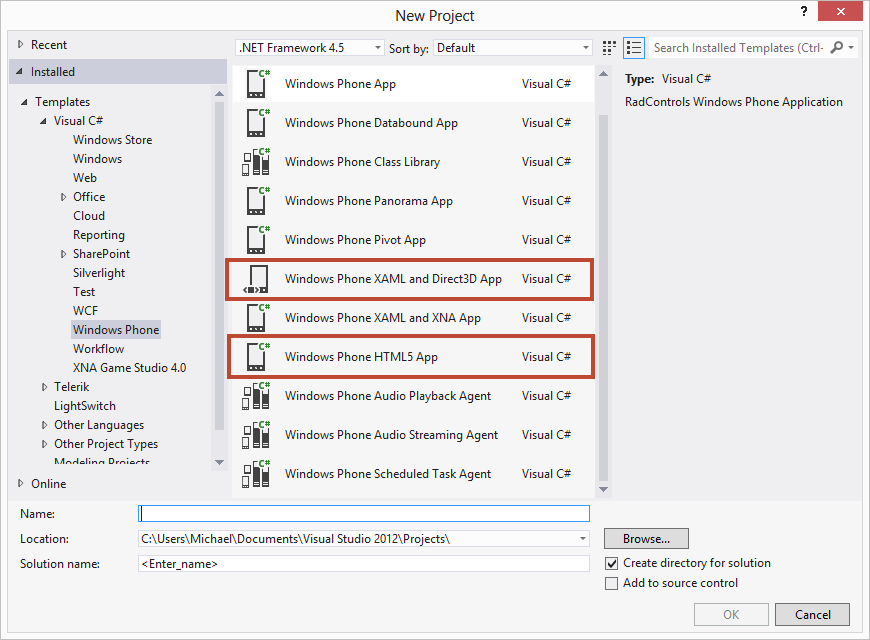
The templates that ship in the box are:
- Windows Phone App: A project for creating a basic Windows Phone application
- Windows Phone Databound App: A project for creating a Windows Phone application that uses list and navigation controls with a basic Model-View-ViewModel architecture
- Windows Phone Class Library: A project for creating a Windows Phone class library
- Windows Phone Panorama App: A project for creating a Windows Phone application that uses the Panorama control. The Panorama control is a long horizontal canvas that extends beyond a single screen.
- Windows Phone Pivot App: A project for creating a Windows Phone application that uses the Pivot control. The Pivot control lets you switch between views or pages within the app.
- Windows Phone XAML and Direct3D App (8.0 SDK Only): A project for creating a Windows Phone managed application with native components
- Windows Phone XAML and XNA App (7.1 SDK Only): A project for creating a Windows Phone XAML application that's capable of rendering graphics using the XNA Framework
- Windows Phone HTML5 App: A project for creating a Windows Phone application that uses primarily HTML content
- Windows Phone Audio Playback Agent: A class library project for creating a background agent to play audio
- Windows Phone Audio Streaming Agent: A class library project for creating a background agent to stream audio
- Windows Phone Scheduled Task Agent: A class library project for creating a background agent to perform a periodic or resource-intensive task
As you can see in Figure 1, only two new templates are provided with the SDK: Windows Phone XAML and Direct3D App and Windows Phone HTML5 App. In both templates, you can see that Microsoft added support for native code. The Windows Phone XAML and Direct3D App template comes with two projects upon first launch; the Windows Phone 8 project and a native (C++) app. What makes this interesting is that you can now reuse a majority of native code that was written ages ago, which will prove especially meaningful for those wanting to port games over to Windows Phone 8 without converting it to managed code, like C# or Visual Basic (VB).
What makes this interesting is that you can now reuse a majority of native code that was written ages ago, which will prove especially meaningful for those wanting to port games over to Windows Phone 8 without converting it to managed code, like C# or Visual Basic (VB).
The Windows Phone HTML5 App template is a WebBrowser control hosted in an XAML page. The template comes with an HTML folder to display HTML5 content, complete with an index.html and style sheet that resembles the native look and feel of the Windows Phone OS. This template has no relation to WinJS that Windows Store app developers are used to.
Emulator Options
After you select any template (except the XNA template), you are prompted to use either 7.1 (Windows Phone 7.5 OS) or 8.0 (Windows Phone 8 OS). If you select 8.0, then you'll see the following emulator options inside of Visual Studio 2012, as shown in Figure 2:
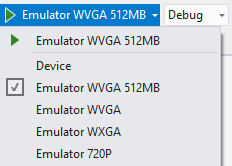
One of the first changes you will see that requires special attention is a list of screen resolutions supported by Windows Phone 8. Pay attention to the Phone Types supported by each resolution in Table 1.
As you can see, with Windows Phone 8, Microsoft has added two additional screen resolutions that you need to test your app against to ensure that it works on these new devices. You can opt-out of these additional screen resolutions by modifying the WMAppManifest.xml.
Simulation Dashboard
The Simulation Dashboard allows you to test your app in multiple conditions, such as various bandwidth speeds or no Wi-Fi connection. You can also trigger a reminder or notification. And, you can toggle the lock screen between locked or unlocked. Figure 3 shows an example of this screen.
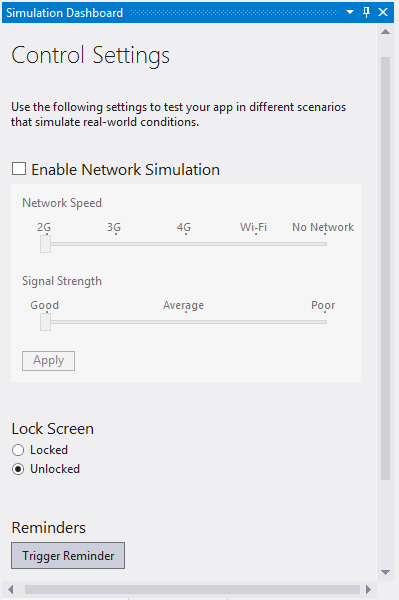
All of these new features allow you to test your app with real-life scenarios.
Other Honorable Mentions
Although it's not new to Windows Phone 8, Microsoft provided a built-in Store Test Kit for making sure that your application is marketplace ready, as well as Windows Phone Application Analysis that includes app monitoring and profiling. You should use both tools before submitting your app to the marketplace.
New Features in the SDK
So far, you have looked at the various components that make up a Windows Phone 8 application. Let's now switch gears and look at several new features, including Tiles, Lock Screens, and Speech Recognition.
Starting with Tiles
One of the major features in Windows Phone 7.5 was the ability to add tiles to the users' Start screen. You were able to customize the text, image and even add a count to a tile. You could also “flip” a tile and provide more information on the other side. This was great for weather, twitter, sports apps, and so forth, as the user could glance at the tile and see updated information.
Windows Phone 8 expands on these advancements and provides three tile templates out of the box.
- Flip Tile: Similar to the look and feel of Windows Phone 7.5 with the addition of a wide template.
- Iconic Tile: A new template based on the Windows Phone design principles that let you present content when your app isn't running.
- Cycle Tile: Used to cycle through up to nine images.
The easiest way to use the new templates is through the built-in editor in Visual Studio 2012. Open your Windows Phone 8 app and select Properties. Then double-click on WMAppManifest.xml. Scroll to the bottom and from there, you can add the large tile support as well as switch the tile template you wish to use, as shown in Figure 4.
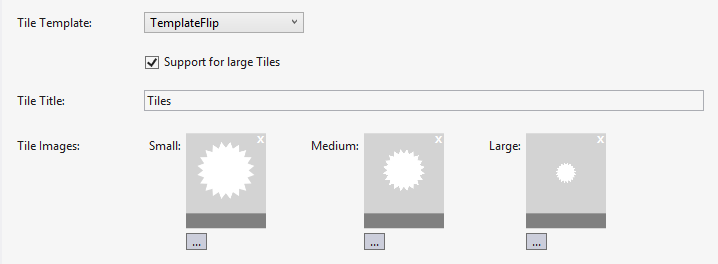
After you select a tile image, it automatically checks the resolution. If you switch the Tile Template from the default, TemplateFlip, to TemplateCycle or TemplateIconic, it automatically adjusts the Tile image selection. For example, the TemplateCycle allows you to cycle between one and nine images.
Static tiles are not that exciting. Livelier tiles that update the displayed data are more useful to the user and Microsoft provides classes that allow you to manipulate the tiles programmatically. They are the FlipTileData, CycleTileData and iconicTileData classes. Let's take a look at an example of FlipTileData and you can review the provided source code for the other two.
Livelier tiles that update the displayed data are more useful to the user and Microsoft provides classes that allow you to manipulate the tiles programmatically.
ShellTile tile = ShellTile.ActiveTiles.FirstOrDefault();
FlipTileData fliptile = new FlipTileData();
fliptile.Title = "michaelcrump.net";
fliptile.Count = 33;
fliptile.BackTitle = "back title";
fliptile.BackContent = "back content";
fliptile.WideBackContent = "back of the wide tile content";
fliptile.SmallBackgroundImage = new Uri("Assets
     /Tiles/FlipCycleTileSmall.png", UriKind.Relative);
fliptile.BackgroundImage = new Uri("Assets/
     Tiles/FlipCycleTileMedium.png", UriKind.Relative);
fliptile.WideBackgroundImage = new Uri("Assets/
     Tiles/FlipCycleTileLarge.png", UriKind.Relative);
ShellTile.Create(new Uri("/MainPage.xaml?id=flip",
     UriKind.Relative), fliptile, true);
In this snippet, you create an instance of the ShellTile class and select the first tile that it found. After that, you call out to the FlipTileData class and provide some content, such as the title, count, content, etc. Finally, set the images and create the tile. After the tile is created and the user taps on the tile, it loads the MainPage.xaml and passes an ID of “flip”. Your app can then override the OnNavigatedTo event to parse the data out and perform some other action.
You may want to set those properties (such as Title, Count, BackTitle, etc.) from a Web service or data that's persisted in Isolated Storage, for example, a weather or restaurant app. You might also check to see whether or not a tile already exists before trying to create one by using proper exception handling and update the pre-existing tile instead.
If you run the application and toggle between the various tile sizes as shown in Figure 5, you will see how each tile behaves.
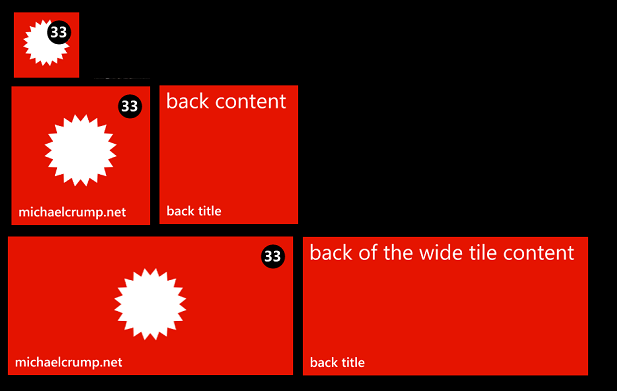
- Small: Contains the count, but does not display any text or flips to display content
- Medium: Shows text as well as the count and flips to display additional content
- Large: Very similar to medium tile except you can display additional lines of text.
Download the source code for this article to review demos of the Iconic and Cycle tile templates.
Lock Screens and Notifications
In Windows Phone 7.5, users were only able to change the lock-screen image manually and they only had a handful of notifications that they could turn on for the lock-screen notification area. This has changed in Windows Phone 8, as you can now set the lock-screen background programmatically as well as register your app to update the lock screen notification area. In this section, I'll show you how to do both.
Again, you'll start with a Windows Phone app and target the 8.0 operating system. Just like last time, select Properties, and then right-click WMAppManifest.xml and open it with an XML (text) editor.
You need to register three extensions for this app:
- LockScreen_Notification_IconCount: Allows you to set the count displayed by the images provided in the lock-screen notification area.
- LockScreen_Notification_TextField: Allows you to add custom text to be displayed in the lock-screen notification area.
- LockScreen_Background: Allows you to change the background image of the lock screen.
Add these extensions just under the Token category.
<Extensions>

<Extension ExtensionName="LockScreen_Notification_IconCount"
           ConsumerID="{111DFF24-AA15-4A96-8006-2BFF8122084F}"
           TaskID="_default" />

<Extension ExtensionName="LockScreen_Notification_TextField"
           ConsumerID="{111DFF24-AA15-4A96-8006-2BFF8122084F}"
           TaskID="_default" />

<Extension ExtensionName="LockScreen_Background"
           ConsumerID="{111DFF24-AA15-4A96-8006-2BFF8122084F}"
           TaskID="_default" />

</Extensions>
Make sure that you leave the ConsumerID and TaskID as they are listed above, as that registers your app to be available in the LockScreen menu under settings in the operating system (described in Figures 6 and 7).
You might notice that the DeviceLockImageUri is blank under Tokens. This is where you add an image (a 38 x 38 transparent file) to be used as the device lock image and point to its location with the following line.
<DeviceLockImageURI IsRelative="true"
                    IsResource="false">Assets\38x38.png
</DeviceLockImageURI>
Now you have a lock screen notification icon, but you still don't have a lock screen image to test out the new functionality. If you don't have one available, download the source code for this article and use mine (you're welcome to do the same for the lock screen notification icon). You'll add the LockScreen.jpg in the root of the application.
All that is required for setting the background image on the lock screen is the following code snippet:
if (!LockScreenManager.IsProvidedByCurrentApplication)
{
    await LockScreenManager.RequestAccessAsync();
}
if (LockScreenManager.IsProvidedByCurrentApplication)
{
    Uri imageUri = new
    Uri("ms-appx:///LockScreen.jpg", UriKind.RelativeOrAbsolute);
    Windows.Phone.System.UserProfile.LockScreen.SetImageUri(imageUri);
}
In this sample, you first request permission to change the lock screen background image. (By default, Microsoft doesn't allow you to set the lock screen background image without the end user granting permissions first.) If the permission is granted, you set the SetImageUri property to resource in the application which, in this case, is the LockScreen.jpg that you added earlier. The user now has a new background image. This could be very powerful if you added a Background Agent and scheduled a new lock-screen image periodically like the Bing application does. However, you're not done yet, so let's go ahead and look at the code to update the text and count in the lock-screen notification area.
ShellTile.ActiveTiles.First().Update(new FlipTileData()
{
    Count = 3,
    WideBackContent = "Unread CODE Articles",
});
Go ahead now and add the last two code snippets to the two buttons' Click event handlers and then run the application, but return to the Settings screen of the OS and tap Lock Screen. You can now change the background and the notification, as shown in Figure 6 and Figure 7.
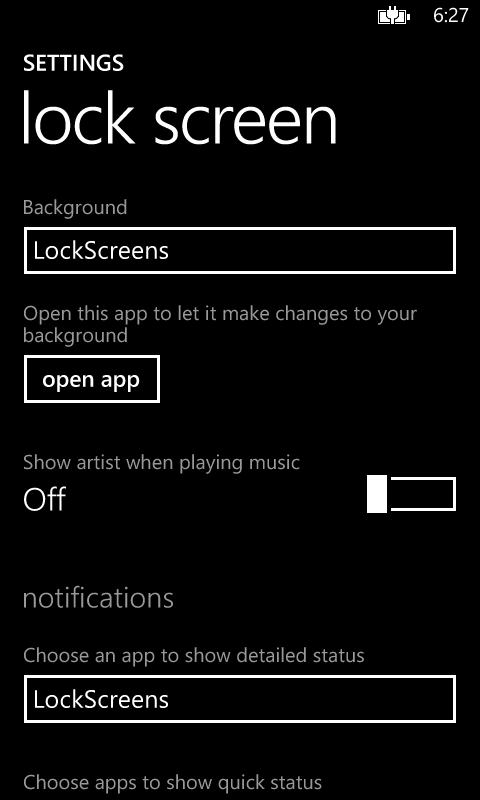
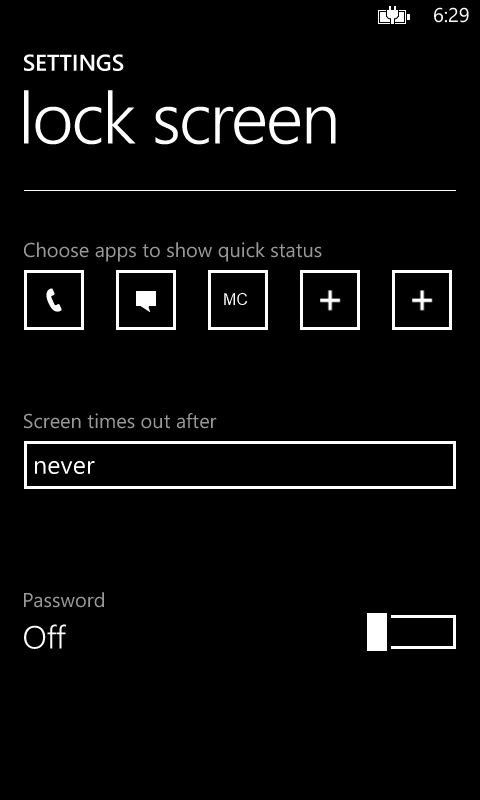
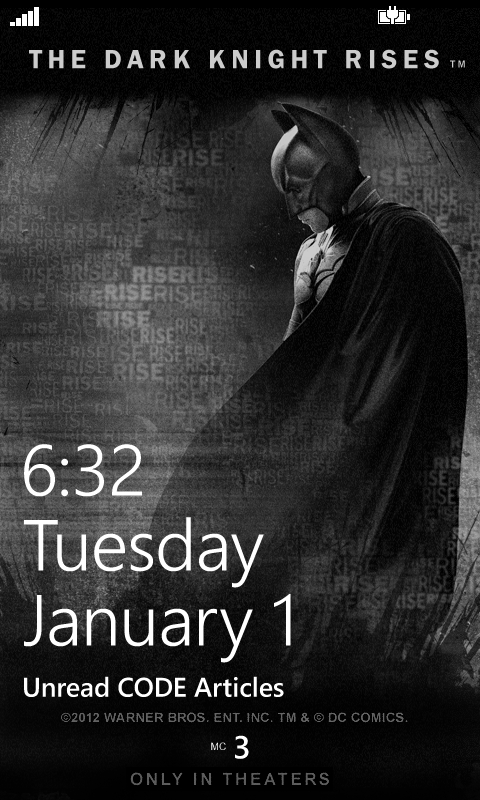
If you deployed the application and ran the last two code snippets, the screen now looks like Figure 8 after the device has been locked.
Speech Recognition
Before you begin, add the ID_CAP_SPEECH_RECOGNITION and ID_CAP_MICROPHONE capabilities in the WMAppManifest.xml.
Microsoft provides three speech components that you can integrate with your Windows Phone 8 app:
- Text-to-Speech (TTS): Allows your app to translate text to speech and output it through the phone's speaker. This is also known as “Speech Synthesis.”
- Speech-to-Text: Allows you to speak commands and accomplish tasks by using Speech Recognition. The app pops up a GUI that guides you through the process.
- Voice Commands: Allows the user to say “open” or “start” followed by the app's name.
You can integrate TTS with just a few lines of code:
SpeechSynthesizer ss = new SpeechSynthesizer();
ss.SpeakTextAsync("Hello CODE Magazine!");
You can also change the language and voice with a few more lines of code. In this example, I'll use the built-in English language and the Male Gender.
SpeechSynthesizer ss = new SpeechSynthesizer();
VoiceInformation vi = InstalledVoices.All.Where
    (v => v.Language == "en-US" && v.Gender ==
    VoiceGender.Male).FirstOrDefault();
ss.SetVoice(vi);
ss.SpeakTextAsync("Hello CODE Magazine!");
In this sample, you'll ask the user to navigate forward or backward and give them a hint of which words are available to use (next or previous). Once the user has spoken a word, you'll display it in a MessageBox.
SpeechRecognizerUI speechRecognizer = new SpeechRecognizerUI();
speechRecognizer.Settings.ListenText = "Navigate Forwards
    or Backwards?";
speechRecognizer.Settings.ExampleText = "next, previous";
speechRecognizer.Settings.ReadoutEnabled = true;
speechRecognizer.Settings.ShowConfirmation = true;
speechRecognizer.Recognizer.Grammars.AddGrammarFromList("answer",
    new string[] { "next", "previous" });
SpeechRecognitionUIResult result = await
speechRecognizer.RecognizeWithUIAsync();
if (result.ResultStatus == SpeechRecognitionUIStatus.Succeeded)
{
    MessageBox.Show(result.RecognitionResult.Text);
}
Voice commands allow the user to say “open” or “start” followed by the app's name. They can also use the voice commands to deep link into a page inside your application by holding down the Start button and speaking a prefix, followed by a command. I have added a sample of this sample code you can download for this article. You may also consult documentation by Microsoft at http://msdn.microsoft.com/en-US/library/windowsphone/develop/jj206959(v=vs.105).aspx if you find that your app is more complicated.
Conclusion
You now have an idea of how to get up and running with the Windows Phone 8 SDK, of the additional tools included, and three new features supported by the SDK. As you can begin to see, this release is a milestone for Windows Phone development and lights the way for how big mobile programming will become in the years to come. Once again, Microsoft has provided a rich API for the mobile developer that is becoming closer and closer to WinRT for Windows 8. I am definitely excited to be a part of both Windows Phone 8 and Windows 8 in its current state, and I can't wait to see what's in store for these two wonderful platforms.
Table 1:
| Resolution | Ratio | Phone Types | |
|---|---|---|---|
| WVGA (Wide Video Graphics Array) | 480*800 | 15:9 | Windows Phone 7.1 Devices only (Samsung Focus, HTC Titan, etc.) |
| WXGA (Wide eXtended Graphics Array) | 768*1280 | 15:9 | Windows Phone 8 Devices Only (Nokia Lumia 920) |
| 720P | 720*1280 | 16:9 | Windows Phone 8 Devices Only (HTC 8X) |
