


The big news about Windows 8 is its new mode based on the Metro design language and UI paradigm. Metro apps are based on the new WinRT (Windows Runtime) and can be built in two distinct ways. One utilizes HTML5 and JavaScript, while the other uses XAML for the user interface definition and C#, Visual Basic, or native C++ as the language behind the scenes. Not surprisingly, the later has often been compared to other XAML-based setups, in particular Silverlight, but also WPF. After all, “XAML is XAML,” the reasoning goes, so it should not be difficult to move both WPF/Silverlight skills as well as actual applications into the new world of WinRT. But is that really so?
To find out, I decided to take a small, yet real-world application and move it from Silverlight to WinRT. Silverlight should theoretically be a close match for WinRT’s XAML, since the paradigms match relatively closely. Both environments are client-side environments that rely heavily on services to retrieve data. Both have limited access to local resources. WPF, on the other hand, follows a different model in allowing developers full-trust on the local machine, which means the entire .NET Framework (potentially even server-side components) could be used directly in WPF applications. This doesn’t mean that WPF’s XAML concepts should not map to WinRT, but Silverlight seemed to be a more promising first step. (I will, however, explore WPF to WinRT conversions further down below as well.)
Theoretic Compatibility
Before I dive into a concrete conversion example, let me spend a bit of time exploring what XAML compatibility really means. I find that a lot of people are confused by the fact that the XAML-label is attached to different technologies. XAML is used for WPF (its original use), but it is also used for Silverlight, Silverlight for Windows Phone, now WinRT, and even non-UI environments such as the Windows Workflow Foundation. Clearly, it is not possible to simply take something written in XAML and just move it from one environment to another and just expect it to work. For instance, if one was to take a random WPF window defined in XAML and try to run it as part of a Windows Phone application, the experiment is doomed to fail for certain (Windows Phone doesn’t use the concept of “windows”), despite the fact that both environments use XAML. Nevertheless, people - especially managers and decision makers with little exposure to the “nitty gritty” - are often lured into ill-advised decisions by an incorrectly conceived belief that “since it is XAML is must be pretty close.” I have even seen people getting confused by the wide range of XAML capabilities within a single environment. Once company I worked with had graphics designers use XAML to define vector images that looked like user interfaces thinking they were building something that would result in working applications. It proved to be a very expensive mistake.
People are often lured into ill-advised decisions by an incorrectly conceived believe that “since it is XAML is must be pretty close.”
So what is XAML really? Many people would be surprised to learn that XAML is NOT a user interface definition language. XAML is simply an object instantiation language that happens to be very useful for user interfaces. Consider the following simple XAML example:
Many people would be surprised to learn that XAML is NOT a user interface definition language.
<Window xmlns="http://schemas.microsoft.com/winfx/2006/
xaml/presentation"
  xmlns:x="http://schemas.microsoft.com/winfx/2006/xaml">
  <StackPanel>
    <TextBox/>
    <Button>Search</Button>
  </StackPanel>
</Window>
This is a relatively trivial XAML example that defines a WPF window with textbox and button controls. Anyone familiar with WPF would have little difficulty identifying this code segment as a XAML snippet and the individual XML tags as valid “XAML tags.” But what does that mean exactly? Does XAML really understand what a <Window> tag or a <Button> tag means? The answer is “no!” XAML, in fact, has no clue what these specific tags mean. XAML only knows that these tags refer to class names that have to exist in the utilized UI framework (WPF in this case). These class names are part of the WPF namespaces in the .NET Framework. This is identified by the definition of the root namespace:
http://schemas.microsoft.com/winfx/2006/xaml/presentation
This “magic” namespace tells the XAML compiler that we intend to use a list of .NET Framework namespaces that are known to make up the WPF sub-system of the framework. (Note that the namespace even refers to WinFX, which was what Microsoft originally called components in the .NET Framework that were going to make up WPF and other things that were intended to be shipped with Windows Vista only but also ended up on Windows XP later. Some may find an interesting parallel here with what is now happening with WinRT.)
While the default namespace declaration was originally intended to map to a set of WPF namespaces in the .NET Framework, the same namespace URI was later also used in Silverlight XAML UIs as well as WinRT XAML, even though Silverlight and WinRT actually use different framework namespaces in their respective UI frameworks. Somehow, as a result of all of this, the WinFX moniker has thus made it into all kinds of XAML dialects. This may be slightly odd, but it helps compatibility somewhat, as XAML files aren’t automatically invalid in other XAML environments, just due to the namespace declaration (although they might be for lots of other reasons).
You can also introduce your own namespaces here. For instance, if you were to create a namespace called “Test” and added a special sub-class of a button object called MyButton, you could use it like so:
<Window xmlns="http://schemas.microsoft.com/winfx/2006/xaml/
presentation" xmlns:test="clr-namespace:Test">
  <StackPanel>
    <TextBox />
    <test:MyButton>Search</Button>
  </Grid>
</Window>
Again, XAML has no idea what <test:MyButton> really is, but it knows that it is supposed to be a class name which can be found based on the “test” namespace declaration. XAML can thus go out and try to find that class, and if it indeed finds it, create an instance of it and put it into your user interface.
This even works for non-UI elements. For instance, it would be perfectly fine to instantiate a “Customer” business object using the following XAML:
<business:Customer xmlns="http://schemas.microsoft.com/winfx/
2006/xaml/presentation" xmlns:business=
"clr-namespace:MyApp.BusinessLayer" />
This may not be a code example most XAML developers would recognize but it is still perfectly fine XAML. In fact, this XAML snippet doesn’t use any of the WPF (or Silverlight) classes, so the definition of the standard namespace is completely superficial here. You can eliminate it entirely and instead use your own namespace as the default namespace and thus re-write this example in the following fashion:
<Customer xmlns="clr-namespace:MyApp.BusinessLayer" />
We have now arrived at a point where most people would probably fail to identify this code snippet as XAML, but it in fact still is.
So why am I telling you all of this? Because it makes an important point: Whether something is written in XAML or not is relatively meaningless for compatibility. The fact that WPF, Silverlight, Silverlight for Windows Phone, and WinRT all use XAML doesn’t tell you anything at all about whether or not you’ll be able to achieve any degree of reuse. Instead, it is all about class and framework compatibility. You shouldn’t ask whether different systems all use XAML, but you should ask whether they use the same classes and whether those classes are compatible and if so to what degree.
The fact that different systems all use XAML doesn’t tell you anything at all about the level of reuse you’ll be able to achieve!
Will my original code snippet with the window, textbox, and button run in Silverlight or on the Windows Phone or in WinRT? It depends on whether or not these controls are available on those systems. (Hint: Some of them are not.) Will my customer object just work out of the box on WinRT? Well, certainly not unless I program such as an object for that environment.
Framework Compatibility
So now that you know what tree you need to bark up, let me discuss the level of compatibility on a class and framework level. When Microsoft originally announced WinRT at the BUILD conference in September of 2011, my friend and fellow RD (Regional Director) Carl Franklin (of .NET Rocks! fame) set out to do a quick comparison between Silverlight and WinRT. That, however, turned out to be a very labor-intensive task to do manually, so he was only able to do it at a very high level. As a result, it was interesting to see what he did, but it was difficult to really know what the average developer should make of it all. After some discussion on this subject in the RD community, I decided to follow a more automated approach to assess the situation.
As it turns out, framework compatibility is very difficult to assess and individual mileage will vary greatly.
I decided to create a tool (which is now available on Codeplex at http://xamldialects.codeplex.com) that takes inventory of all namespaces, classes, properties, methods, events, parameters, property types, and so forth, and allow on-the-fly comparison between any two class sets supported by any version of XAML. (I originally had planned to call it Framework Dialects, but that seemed to be too confusing for people, so I somewhat grudgingly ended up calling it XAML Dialect Comparer.) This way, you can pick a source environment (let’s say WPF v4) and compare it to any destination environment (such as Metro/WinRT). You can also pick the namespaces you want to include in the comparison, so you can eliminate those you are not using and that are thus of no consequence to you. (See Figure 1 and Figure 2 for screens shot of the tool and a set of analysis results, respectively.)
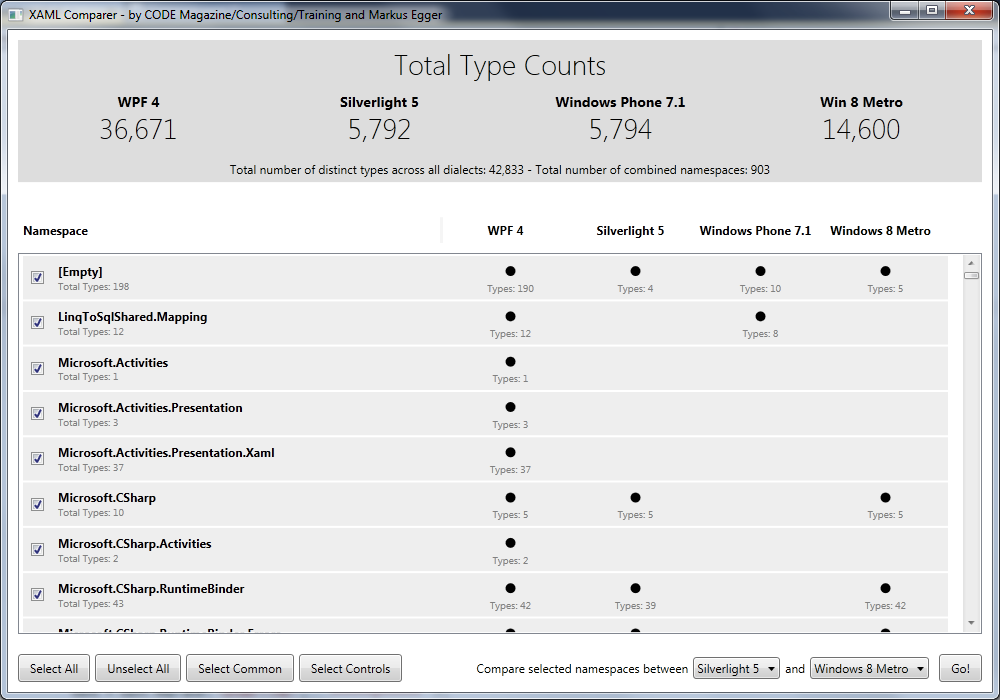
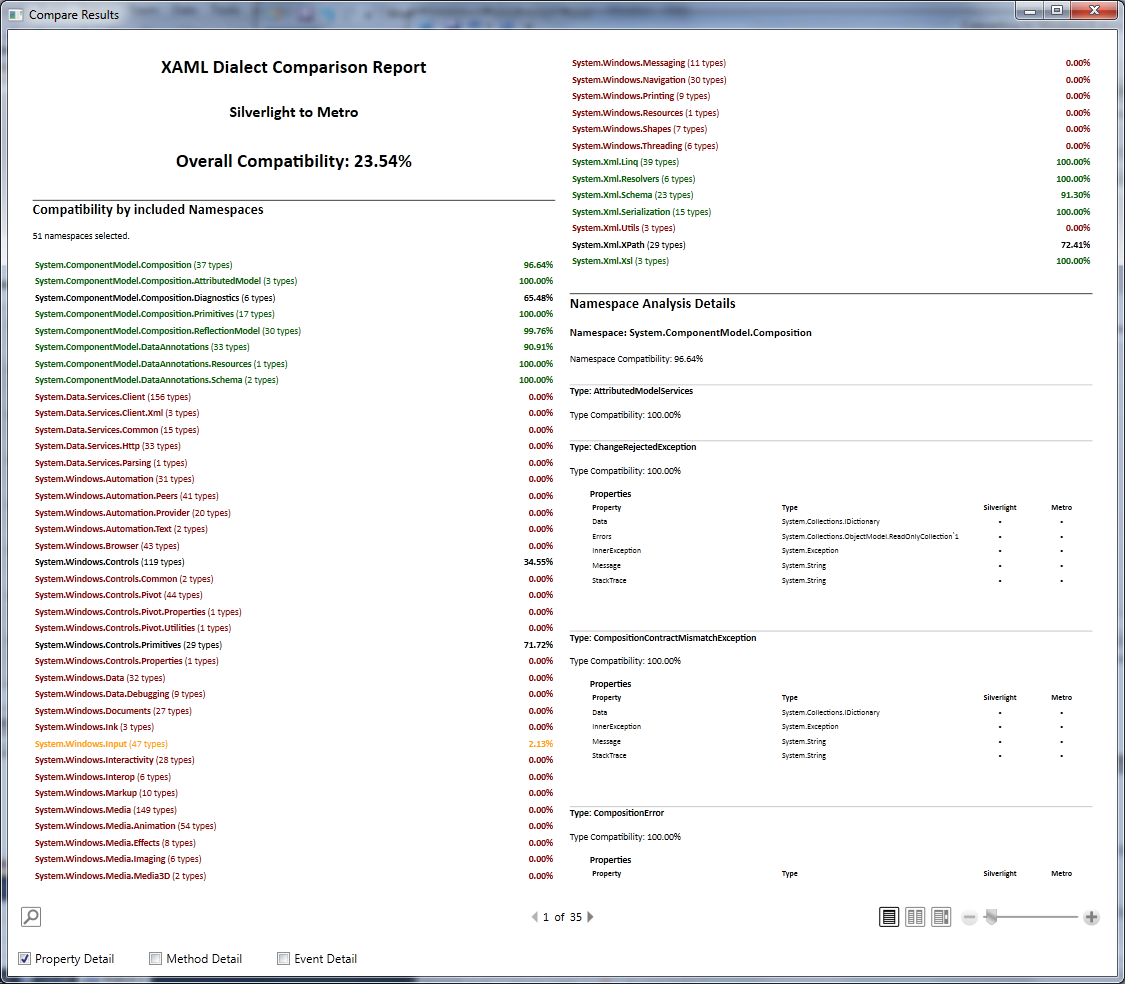
The results are both interesting and yet very difficult to make sense of. As it turns out, framework compatibility is very difficult to assess in the first place, and on top of it, the result may be more or less meaningful to each and every developer. This is based on two aspects: 1) it is difficult to define what compatible really means in a way that provides a valuable indicator in the real world, and 2) some classes may exist in both compared environments, yet have a largely different set of properties, methods and events, but the majority of incompatible members may be so obscure that they are hardly ever used, resulting in a high level of compatibility experienced by developers even though the measured compatibility may be low. (For instance, Button objects are available in all environments although their properties and compatibilities vary greatly. Nevertheless, most developers will perceive Buttons as relatively similar in all environments. However, if you happen to make extensive use of a more obscure feature, you may perceive compatibility as significantly lower than most developers.)
Let me give you a few examples as to why it is so difficult to define what compatibility actually means. Consider the Visibility property that is available on practically all controls in all environments. Visibility itself is a class (enum) that has three states in WPF (Visible, Hidden, Collapsed), but it has two states in other environments (Visible, Collapsed). One could thus argue that since that type exists in all environments, you can award compatibility points, and since two out of three states are compatible, you also award points for that as well. Maybe you’d rate the class as 66% compatible, or maybe you award 75% compatibility (to account for the core fact that the class exists in both places, in addition to two out of three states being compatible). But what does that number really mean? If you have used the Hidden state a lot, you will likely perceive the class as entirely incompatible, while developers who ignored that particular state (which is not an uncommon assumption) will perceive the class as 100% compatible. So we find ourselves at completely opposite ends of the spectrum! And there is more! Since every conceivable control exposes visibility, do we now dock every single class in compatibility percentage? Or do we consider the property completely compatible as long as it is there, since we already accounted for the incompatibility at the original class level? Again, individual mileage may vary greatly.
This is just a very trivial example that is repeated a thousand times over with much more complex types. Every type has a Resources collection for instance. What if the capabilities of that collection are different?!? Or what about markup extension classes? If you use DynamicResource in WPF, you will find that WPF is the only environment supporting it out of the box and you might thus find yourself in a pickle. Of course, you might be able to provide your own dynamic resource markup extension, and you might even be able to perform a simple string transformation before loading your XAML UIs (depending on how you load XAML) and that may take care of 100% of the problem. (NOTE: The dynamic resource problem specifically turns out to be relatively easy to deal with in real-world scenarios.)
What this all amounts to is that you want to take the results provided by this tool with a grain of salt. It only provides a very rough yard stick. However, it does a good job at making one point very clear: The overall level of compatibility between the different UI frameworks available in XAML is quite low. Silverlight 5 to WinRT is about 25% compatible, WPF to WinRT is about 11%, Windows Phone to WinRT about 19%, and so on. Again, these results vary depending on the exact set of namespaces you pick, and of course WinRT is still changing since it is only in beta. But it is clear that things will not just be reusable without change or further thought when moving to WinRT.
The XAML Dialect Comparer tool makes one aspect very clear: The level of compatibility is low!
And it isn’t much better going the other way either. I wondered whether WPF might be able to do much of what WinRT can do, since WPF is such an extensive and capable environment. This would have been a nice safety net in case investments into WinRT do not turn out as we all hope. However, the measured level of compatibility for this “reverse compatibility” is (perhaps not overly surprisingly) only about 19%.
Real-World Compatibility
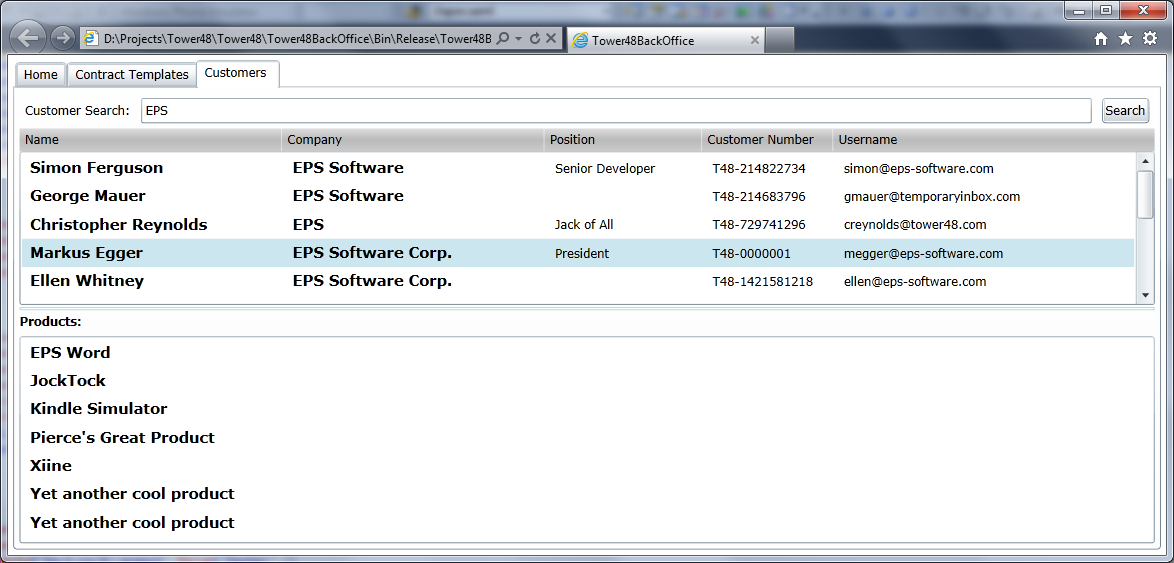
What does all this mean for real-world applications? To find out, let’s return to the Silverlight example I mentioned at the beginning of this article. I have a Silverlight in-browser application used to search for customers and look at some simple customer history (Figure 3). I chose this example, because it is a real-world application, warts and all. It uses a simple view model approach and the typical Silverlight web service call (SOAP/basic HTTP). It also takes a few “dirty” shortcuts, such as wiring up event handlers rather than binding everything directly to the view model. So all in all, this app is probably not unlike many of the applications “encountered in the wild.”
When converting a Silverlight application to WinRT, the first question is, “How do I turn my Silverlight solution into a WinRT solution?” The answer is “you don’t!” There is no automatic conversion wizard or anything of that kind. And truth be told, since the paradigms used by the two environments are not exact matches, such a conversion wizard would probably create a rather messy result. So before long, I found myself creating a new WinRT project from scratch using the templates Visual Studio provides.
My next step, then, was to replicate some of the core elements of the Silverlight application. I still needed to call web services and there is no simple way to just “copy a service over.” Instead, I added a new service reference to my project from scratch. A simple enough task that resulted in a clean setup of my service proxy. I did, however, take care to give it the same name as in the Silverlight project to give myself a better chance of compatibility.
Now I can migrate the actual UI. In Silverlight, the customer search UI is implemented as a user control. In WinRT, individual views are typically set up as “layout aware pages.” To follow the WinRT approach, I created a new page from scratch using the provided template, which allowed me to set up standard elements such as a title and a back button, and also use standard styles and colors. I then created a new user control in WinRT and copied all the XAML from the Silverlight control directly into it.
This worked surprisingly well with a higher level of compatibility than I would have guessed (especially after looking at the discouraging numbers provided by the XAML Dialect Comparer tool). This is due to a few aspects. For one, the UI is relatively simple, consisting only of a few text elements, a textbox, a button, and lists of data. For the obvious reason, a more complex UI would have probably faired much worse out of the gate. Secondly, the original UI definition was quite generic and used some best practices. For instance, rather than showing the list of customers and their history in DataGrid controls, the Silverlight app uses styled ListBoxes (a technique I personally prefer over data grids for the exact reason we are about to discover). While there is no DataGrid control in WinRT, the ListBoxes turned out to be no problem. This is not true for the ListBoxes’ styles, however. I ended up having to fix up the styles quite a bit, but that is probably not a huge problem in most real-world applications as styles should be shared across multiple ListBoxes, resulting in significant reduction of effort. Had I started out with DataGrids, however, most of my UI would have been dead in the water.
The biggest problem I encountered in this particular UI was the use of GridSplitter controls. These handy UI elements (available in WPF and Silverlight) are a great way to create a user interface with resizable elements. In the original Silverlight application, this allows users to change the size of the lists. If the user wants to see more customers at once, they can resize the UI so the history grid is smaller, and vice-versa. The resizable columns in both ListBoxes also use GridSplitters. This is a significant element of the original UI that makes it powerful, yet that element was completely lost in the conversion as Microsoft states manual resizing of any UI is not desired in a Metro environment. I follow Microsoft’s reasoning for touch-based scenarios. I would have still liked to continue using resizing for keyboard and mouse scenarios, which are equally supported by Metro. But alas! This option is not available.
Conversions from one paradigm to another are notoriously difficult.
This highlights a key issue with conversion of any XAML-based UI to WinRT: paradigm differences. Conversions from one paradigm to another are notoriously difficult. I could have probably solved this particular dilemma by following a more “Metro-ish” paradigm and perhaps create collapsible areas. This way, users can still choose what part of the UI they want to see the most of, without having to fiddle with touch-UI resizing. Of course, this would have also caused me a considerable amount of work, which I chose not to do at that point.
Nevertheless, with a few more minor changes (font sizes were off initially, for instance) I now had a working version of my UI. I still had to hook up behavior and data. To get the event handlers working, I simply wired up new event handlers and make calls into the view model to achieve the desired results. This was simple enough as there were few event handlers and each only had a single line of code.
The view model itself turned out to be surprisingly easy to convert. I created a new C# file in my new app (with its new namespace appropriate for the new application) and copied the original view model code into the new class file. This almost worked right away (in part because I was careful to name my service proxy the same as in the original). The only required change was in how the service was called. While Silverlight makes all asynchronous services calls using a call/complete-event pattern, Metro uses the new async/await pattern. Luckily, this is a relatively simple change to make with relatively little risk to code quality. In large real-world applications this might still result in quite a bit of work. Simple service calls are easy to convert, but calls that run in loops and similar constructs will require significantly more rework that might also result in higher risk of breaking things.
I view the ease of converting the view model as somewhat of a big deal, because view models are where the brunt of my test-effort goes (at least for the UI layer). If I can bring tested view models with associated behaviors into WinRT, I can breathe significantly easier and have eliminated a significant part of a project manager’s quality concerns. It doesn’t mean I do not have to do any testing, but it means that I can expect fewer problems and better quality right away.
I doubt Microsoft would have ever approved an app with such an unpolished look for Store deployment.
You can see the result of all this in Figure 4. It works and it behaves very much like the original. However, there is a problem! While the original Silverlight app (Figure 3) may not have been truly beautiful, it managed to serve its purpose. Using the same look in the new app, on the other hand, is absolutely unacceptable for a WinRT app. I doubt Microsoft would ever approve the app shown in Figure 4 for Store deployment (Remember: you depend on Microsoft approval in WinRT). Clearly, I needed to give the app a face-lift. I thus set out and re-arranged my UI, threw out the old styles for the lists and replaced them with some of the default Metro styles provided by the template. While still far from a polished UI, I ended my experiment when I reached the state shown in Figure 5.
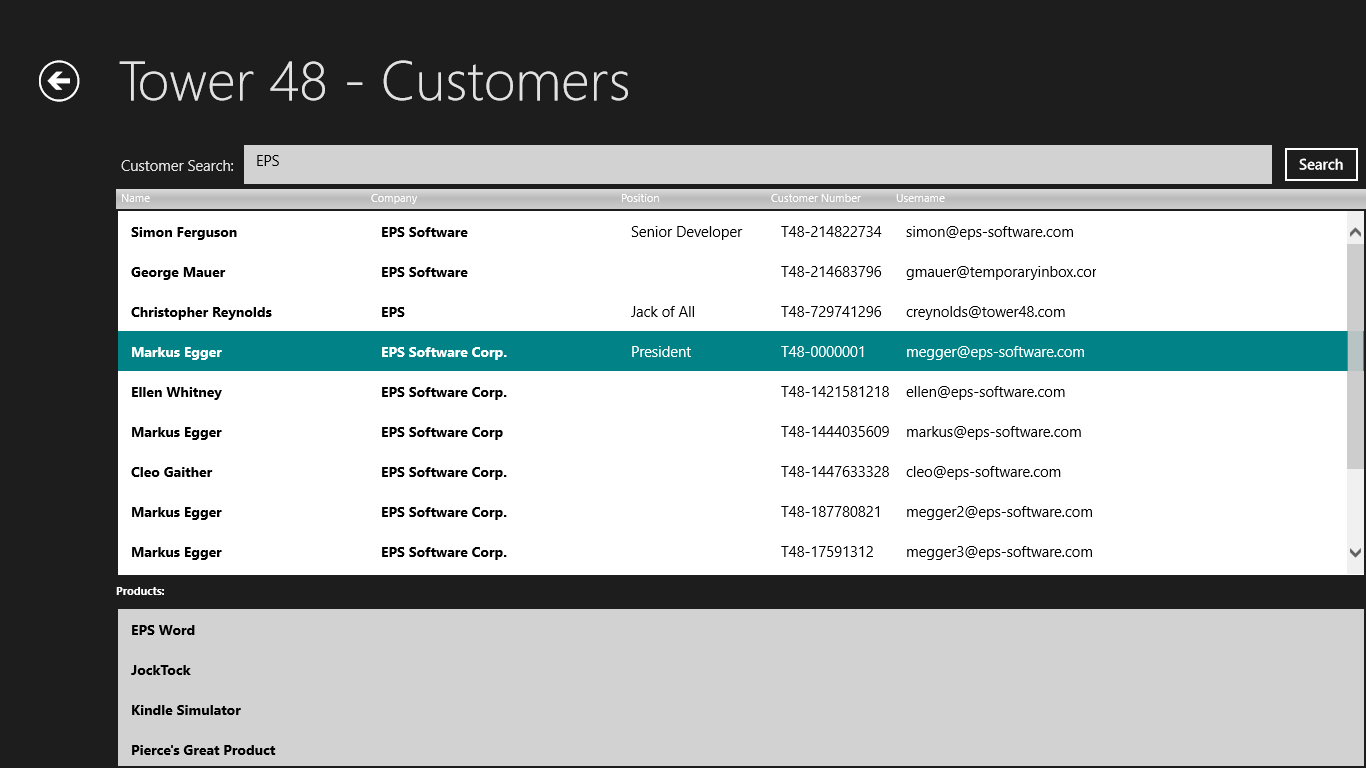

How would I rate the results of the experiment? Well, truth be told, I could have probably re-written my UI (view) from scratch faster than I was able to convert the old UI. Plus, this would have probably resulted in a better utilization of the new Metro paradigm. For instance, I should not have implemented the search the way I did. In a WinRT paradigm, I should have implemented the Search Charm instead. I do not expect (and other scenarios I have worked with seem to confirm this anecdotal evidence) this experience to improve with more sophisticated UIs. I would be very surprised if developers would find it feasible to simply convert XAML-based UIs of any source into WinRT without the need for major re-work without having specifically planned for reuse when creating the UIs originally. (This, however, is a very real possibility as I will discuss below.) On the other hand, I was very pleased to see that I was able to achieve a high degree of reuse for my view model. When starting out with a (presumably well tested) view model, this can be a very large benefit indeed.
It is worth pointing out that a second aspect of converting to WinRT is the ability to reuse one’s skill set. Anyone who has done WPF, Silverlight or Silverlight for Windows Phone development should face a very smooth transition into WinRT. There are a few new tricks to learn for sure (such as integration with Charms… see sidebar) but none of them should present serious hurdles for most developers.
Planned Compatibility
Does this mean you shouldn’t expect much reuse when transitioning to WinRT? No! It just means that you should expect a low level of reuse if you do not give this aspect any thought ahead of time. A random WPF, Silverlight or Windows Phone application will not “just work” in WinRT by any stretch of the imagination. However, if you create your original application using best practices and with an explicit eye for reusability and maintainability, you will be able to enjoy a high degree of reuse.
So how then do you plan for an application that provides a high degree of reuse in WinRT? The core idea remains the same as it is for reuse of XAML components across WPF, Silverlight and Silverlight for Windows Phone: You want to aim for a clear separation between the “mechanics” of the XAML layer (such as the need to use textboxes and to bind them to data) and the “look” of the UI (including both layout as well as cosmetic settings such as colors). This is a concept I have discussed in detail in my two articles about XAML super-productivity as well as some of my recent CODE Framework articles (which use these concepts, although CODE Framework is not required to apply these techniques).
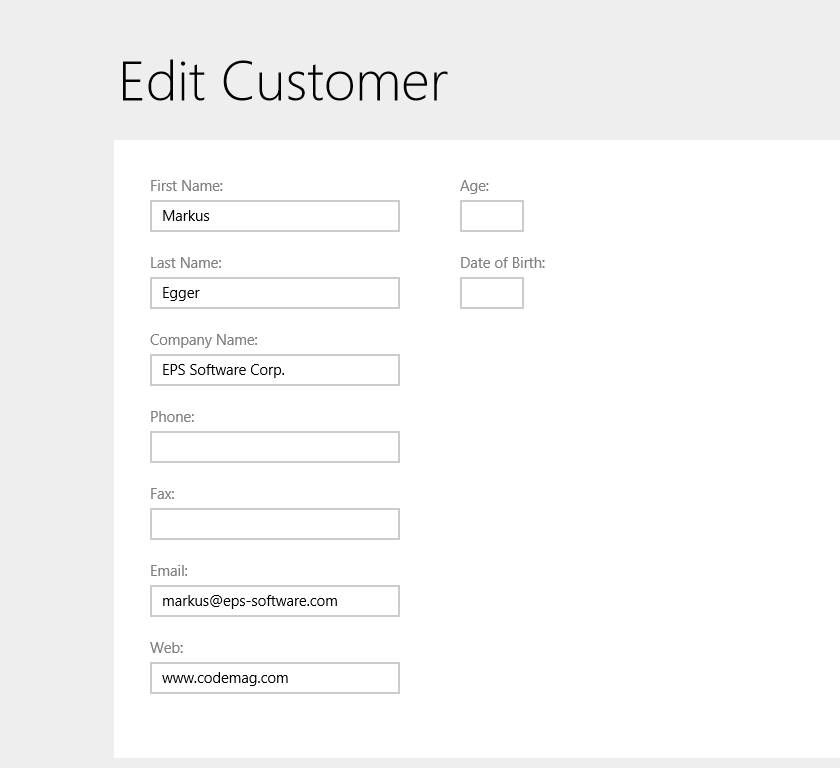
Figure 6 shows a customer edit view I have created in those articles for use in WPF, and I was able to reuse the same view unchanged in WinRT. Having Metro styles applied makes the view appear somewhat different (different colors, a different way to show the title, and even the layout of the individual elements with the labels above the text elements rather than to the left as in the original) but those differences are only based on styles and no change to the view’s XAML was required. A detailed discussion of the setup of this particular UI is beyond the scope of the current article, but it has been discussed in detail in the articles mentioned above.
Where does this leave us? That probably depends on your exact needs and expectations. It is clear that if you are aiming for XAML reuse, you need to give it some thought. XAML itself does not provide any level of automatic compatibility, but with proper planning, you can create XAML that works in many different environments.
