


SharePoint 2007, in many ways, was a v1 release. It was the first time .NET was properly applied to SharePoint, and from SharePoint 2007 onwards the product has done very well. Partly because of the rich built in functionality that comes with SharePoint and party because of its extensible nature - things developers can do.
As we are all painfully aware, the development tools for SharePoint 2007 were somewhere between absent and woefully inadequate. A huge part of that gap was filled by the community with tools such as WSPBuilder. If you have developed for SharePoint 2007, undoubtedly you must know about WSPBuilder (wspbuilder.codeplex.com).
Things changed with Visual Studio 2010. With it, Microsoft released a very mature, well-thought toolset for developing SharePoint 2010 solutions. For a v1 release, it was surprisingly good. For the last several years of SharePoint 2010-based development, I haven’t missed WSPBuilder.
We are at yet another cusp now. Microsoft is releasing new versions of everything: Windows, Office, SharePoint, Visual Studio, Metro apps, etc. Throughout 2012 we are going to experience a paradigm shift.
The question this begets is what is new in Visual Studio 11 Beta (rumored to be called Visual Studio 2012) specifically for SharePoint developers?
New Designers - Lists, Content Types and Site Columns
Admit it, you’ve done it! You’ve enrolled in the SharePoint university of reverse engineering (http://blah.winsmarts.com/2008-2-Dev_Tip__The_SharePoint_University_of_Reverse_Engineering.aspx), to first hand-create the content type you want, generate the XML for it, and then include that in your Visual Studio project. We have all done it - directly or indirectly using tools. This is no longer necessary.
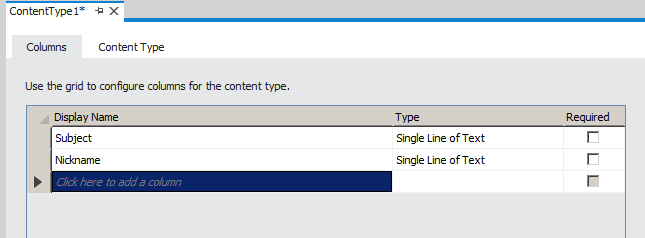
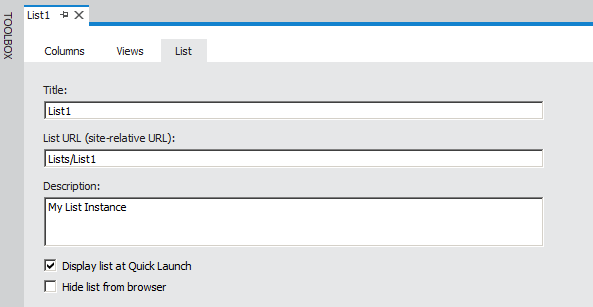
Visual Studio 11 Beta includes new designers for content types and lists making it so much easier than before to author these SPIs (SharePoint Items). When you add a content type or a list definition into your Visual Studio project, a list designer opens up or a Content Type Designer (Figure 1) opens up that lets you visually craft up the structure of the content type or list definition. The best part - the most difficult part of authoring views for a list definition - is now a matter of checking checkboxes for the columns you’d like to see in the view. You can see this in Figure 2.
As far as site columns, there is a new SPI called site column. You simply right-click on your Visual Studio project and choose to add a new site column, and then merrily edit the <Field> element in the newly added Elements.xml.
Silverlight Web Parts
While we argue about HTML5 vs. Silverlight, one thing we all can agree upon - developing Silverlight Web Parts in Visual Studio 2010 required too many repetitive manual steps. You had to create a SharePoint solution, a separate Silverlight project, and then with custom build action, copy the file over to a specific location - argh! In Visual Studio 2011, these steps are simplified to a single step - Create a “SharePoint 2010 Silverlight Web Part.”
That is basically it! Visual Studio 2011 now includes a project template that simplifies all those tasks.
Visual Web Parts Now Support Sandboxed Solutions
We have had two kinds of Web Parts in Visual Studio templates - normal Web Parts (server controls), and visual Web Parts (user controls). The user control-based Web Parts had an artificial limitation. Historically, we have always deployed user controls or .ascx files in a directory called _controltemplates. This has been standard and nothing more. The issue, of course, is _controltemplates resides on the physical disk, which requires a visual Web Part to be a farm solution. This is not necessary. In reality, you can have an .ascx land inside the content database using a module tag, and its code behind be packaged inside a DLL, much like you’d do with a Web Part. While you could do this in Visual Studio 2010 also, Visual Studio 11 Beta now includes a project template to make it easy.
Publish Directly to Office 365
Developing with Visual Studio is interesting. When you press “F5” in Visual Studio, the following actions take place:
- Deactivate Features
- Retract Solution
- Delete Solution
- Add Solution
- Deploy Solution
- Activate Features
- Launch Browser
Optionally, you may also have a resolution of conflicts and other similar commands. This approach works well, and historically we have developed on a machine that had Visual Studio and SharePoint installed locally. This is a necessity for SharePoint development. For farm solutions, this will continue to be the story.
But, sandbox solutions are interesting. Sandbox solutions do not need this level of operating system level access. They are simply uploaded to a document library called as the solutions gallery, and they run directly from there. This is especially interesting for Office 365 developers. Office 365 developers need to work with a local instance of a SharePoint server - a bit similar to an on-premise SharePoint environment. They develop sandbox solutions, and they copy those over to Office 365 when they are done.
Understand the steps - they purchase a subscription-based SharePoint installation so they don’t have to run SharePoint, only to end up running on-premise SharePoint albeit in a development environment to develop for the subscription-based SharePoint. So that’s not ideal.
With Visual Studio 11 Beta, you will now be able to deploy sandbox solutions directly from Visual Studio 11 Beta to Office 365, or, for that matter, deploy to any remote server. In order to do so, use the Publish command on the Build menu, select the Publish to SharePoint Site option and provide the remote server’s URL, such as https://someremoteserver.sharepoint.microsoftonline.com. To publish a SharePoint solution to a local server, select the Publish to File System option and provide a local system path.
Improvements for Sandbox Solutions
Writing code for sandbox solutions today in Visual Studio 2010 involves a little bit of guess work. Even though Visual Studio 2010 will try and help you out as much as it can in preventing you from using APIs not allowed in sandbox solutions, the reality is - if you insisted on typing everything, the solution will build and compile. With Visual Studio 2011, the compiler will show you an error if you try and use farm only API calls. Also, the IntelliSense is improved so you see only relevant API calls in sandbox solutions.
JavaScript Improvements
JavaScript is a strange animal. The biggest challenge with JavaScript - it is only the browser that truly knows what the full runtime will look like - at runtime. It is an incredibly difficult task for an external tool, such as Visual Studio, to fully replace browser-based debugging, and I do not expect Visual Studio 11 Beta to be able to do that. However, with Visual Studio 11 Beta, you can now debug JavaScript in SharePoint projects. Also, IntelliSense is provided when coding JavaScript in SharePoint projects, URL resolution for JavaScript is enabled for visual Web Parts in sandboxed solutions. This means that you can reference JavaScript files located in SharePoint’s content database in your SharePoint projects in Visual Studio. The code is automatically included at build time.
Better Organization of SharePoint Templates
Visual Studio 2010 SharePoint Project Templates were (at least as how I saw it):
- Empty SharePoint project
- A bunch of other templates that I almost never used
- And a couple of “Import” related templates
After a few years of experience, and most developers agreeing with my assessment of the templates above, Visual Studio 11 Beta has a much cleaner layout of SharePoint project templates. Specifically, there are only five templates now:
- SharePoint 2010 project
- SharePoint 2010 Silverlight Web Part
- SharePoint 2010 Visual Web Part
- Import SharePoint 2010 solution package
- Import SharePoint 2010 workflow
Once you have created a SharePoint 2010 project, you can now add the following item templates:
- Application Page
- BDC model
- Content Type - which now also shows you a content type designer
- Empty Element
- Event Receiver
- List - which now includes a list designer
- Module
- Sequential Workflow and State machine workflow
- Silverlight Web Part
- Site Column
- Site Definition
- User Control
- Visual Web Part
- Web Part
In addition, Visual Studio 11 Beta now clearly tells you what works in a farm solution and what doesn’t.
Profiling
Profiling has long been available to .NET applications. Profiling helps you identify bottlenecks within your application. SharePoint is a complex product, and sometimes it is not very obvious to the programmer why a certain piece of code works faster than another because the underlying API can be so complicated.
With Visual Studio 11 Beta, profiling is now available to SharePoint applications. This means, in a SharePoint project, you can start using the Visual Studio Profiling Tools Performance Wizard to create a performance session. You do this by clicking on “Launch Performance Wizard” on the “Analyze” menu in Visual Studio 11 Beta. This will pop open a wizard that asks you some basic questions, like the parameters you would like to profile the application upon - such as CPU usage. Alternatively, you can create a performance session in a unit test. You can do so by going to the Test Results window, open the shortcut menu for the unit test and select Create performance session.
After creating a performance session, you simply use the application, and Visual Studio will then run a profile analysis on your application. This will then create a simple report for you to read, which will include a graph of CPU usage over time, hierarchical function call stack, process and module view, functions view, etc. This will help you pinpoint any bottlenecks in your application.
All this is not new, except, now you can do all this with SharePoint.
Summary
Looks like Microsoft is serious - serious about making SharePoint development easier for all of us. But in fairness, because SharePoint is built on top of .NET, you will always see .NET tooling a step ahead of SharePoint. And that is okay because a lot of things that happen in .NET sometimes do not gain traction. In the SharePoint world, we get tried and tested practices.
Given everything else we can do with SharePoint, and development tools that constantly keep getting better, this continues to get more and more exciting.
What is your favorite Visual Studio 11 Beta SharePoint development feature? Let me know.
Until then, happy SharePointing.
