


In Part 1 of this article you learned how to work with orientation changes on the Windows Phone and how to create horizontally scrolling pages using Panorama and Pivot pages. In Part 2 you'll see how to interact with some of the built-in applications on the phone through the use of the Launcher and Chooser applications.
In addition, you will learn to create a common task bar for your Windows Phone using the Application Bar. This article assumes that you have Visual Studio 2010 and the Windows Phone tools installed along with it. You must download and install the Windows Phone tools separately to use them with Visual Studio 2010. You may also download the free Visual Studio 2010 Express for Windows Phone developer environment.
Launchers
The Windows Phone does not support multi-tasking (yet); however, you can interact with many of the built-in applications on the phone from within your application. You can interact with the built-in applications on the phone in two ways: passing in data, or get back data. A Launcher type of application lets you pass data from your application into the built-in phone application. In a Chooser type of application you will use a built-in phone application to select some data that is stored on your phone and return that data to your application.
The Windows Phone does not support multi-tasking (yet); however, you can interact with many of the built-in applications on the phone from within your application.
Using a Launcher
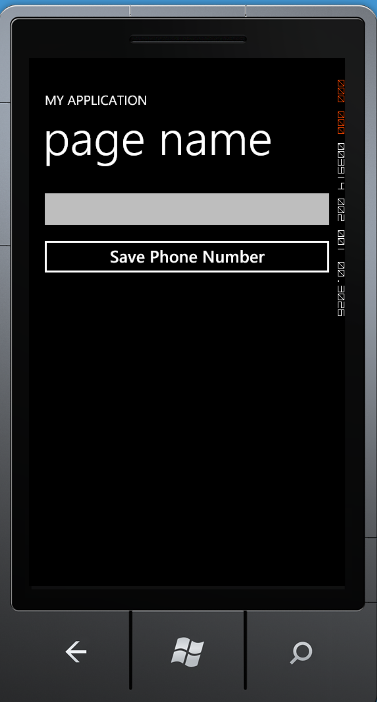
When you use the Launcher API on the Windows Phone, your application calls one of the built-in applications. The user will complete a task, and then control will return to your application. No data will be returned from a Launcher application; however, your application may pass in some data to the Launcher. As an example of using a Launcher, you might ask a user to input a phone number, and then you pass that phone number to the SavePhoneNumberTask as shown in Figure 1. If the user saves that phone number, a return result of OK will be returned, but no other data.
One important thing to keep in mind when using either the Launcher or Chooser API is that calling these applications could cause your application to be “tombstoned.” It will be your responsibility to restore any data that you want after your application is reactivated from the tombstoned state.
One important thing to keep in mind when using either the Launcher or Chooser APIs is that calling these applications could cause your application to be “tombstoned.”
Built-In Launchers
Windows Phone contains several built-in applications that your C# or Visual Basic code can launch by instantiating an instance of the appropriate class. You can find all of the Launcher classes in the Microsoft.Phone.Tasks namespace. The list below contains the Launcher classes you can use on the Windows Phone.
- EmailComposeTask
- MarketplaceDetailTask
- MarketplaceHubTask
- MarketplaceReviewTask
- MarketplaceSearchTask
- MediaPlayerLauncher
- PhoneCallTask
- SearchTask
- SmsComposeTask
- WebBrowserTask
To use any of the Launcher task classes, you first need to add a using statement at the top of your Page class.
using Microsoft.Phone.Tasks;
Next, you create a field in your Page class with a variable that will point to the specific Launcher you wish to use.
SavePhoneNumberTask _Task;
Now create an instance of the class in the constructor for your page and hook up the Completed event.
public LauncherPage()
{
  InitializeComponent();

  _Task = new SavePhoneNumberTask();
  _Task.Completed += new
    EventHandler<TaskEventArgs>(_Task_Completed);
}
You must create the instance of the task and hook up the Completed event handler in the constructor because your application will be tombstoned once it calls the Launcher application. Upon reactivating your application, the constructor will be called again and the completed event needs to be hooked back up so the Launcher can call the event.
In Figure 1 the user is asked to put a phone number into a text box named “txtPhone” on this page. When you click on the Save Phone Number button the Click event will fire. At this point you take the value from the txtPhone.Text property and set the PhoneNumber property on the SavePhoneNumberTask object. Now you call the Show() method of the task object and the Launcher application will run and receive the phone number from your application. Once the new application is running, your application will be tombstoned.
private void Button_Click(object sender,
RoutedEventArgs e)
{
  // Pass phone number into contacts
  _Task.PhoneNumber = txtPhone.Text;
  // Display contact info app
  // This WILL tombstone your app
  _Task.Show();
}
In the Completed event you will want to check the e.TaskResult to see if the user accomplished the task. For example, when saving a phone number, if they do not actually click the save button after adding the new phone number/contact, then the result will not come back as OK. Each Launcher may report different results depending on what each one is supposed to do. In the Completed event procedure below you will simply display a message box telling the user that the phone number was saved.
void _Task_Completed(object sender, TaskEventArgs e)
{
  if (e.TaskResult == TaskResult.OK)
    MessageBox.Show("Phone Number Saved");
}
Choosers
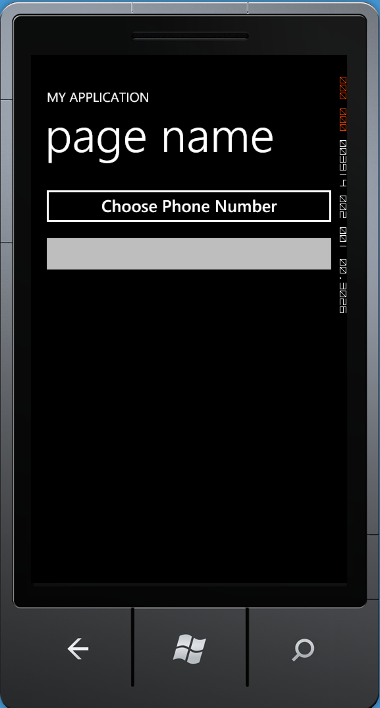
Just like a Launcher, a Chooser class also calls one of the built-in applications on the Windows Phone. However, a Chooser will return data from the application and allow your application to retrieve that data. The specific Chooser that you will use in this article will be the PhoneNumberChooserTask shown in Figure 2.
Overview of Choosers
The PhoneNumberChooserTask will make a call to the People on your Windows Phone, allow you to select a contact, and it will then return the phone number from the contact chosen. The data returned is specific to the task that you call. For a phone number, you will get a string that contains the phone number. For a photo Chooser you would get back an IO stream that contains the image. You could then turn this into an image to display in your application. The list below is the collection of Launcher classes you can use on the Windows Phone.
- CameraCaptureTask
- EmailAddressChooserTask
- PhoneNumberChooserTask
- PhotoChooserTask
- SaveEmailAddressTask
- SavePhoneNumberTask
The class names are pretty self-explanatory so you just need to figure out where you want to get the data that you need for your application. To use any of the Chooser task classes, you will first need to add a using statement at the top of your Page class.
using Microsoft.Phone.Tasks;
Create a field in your Page class with a variable that will point to the specific Chooser you wish to use.
PhoneNumberChooserTask task = null;
Now create an instance of the Chooser class in the constructor for your page and hook up the Completed event.
public ChooserPage()
{
  InitializeComponent();

  // Need to create this here as your app could
  // be tombstoned
  // Need to rehook the event for this Chooser app
  task = new PhoneNumberChooserTask();
  task.Completed += new
      EventHandler<PhoneNumberResult>(task_Completed);
}
You must create the instance of the task and hook up the Completed event handler in the constructor because your application could be tombstoned once it calls the Chooser application. Upon reactivating your application, the constructor will be called again and the Completed event needs to be hooked back up so the Chooser can call the event.
NOTE: Not all Choosers are tombstoned. Some are just temporarily deactivated. However, you should program defensively and always assume that your application will be tombstoned.
In the sample application shown in Figure 2 you will click on a button to invoke the PhoneNumberChooserTask using the Show() method. On the emulator there is a set of contacts that you will be able to select from so you can try this out even if you don't have a real Windows Phone. Once you select a phone number from your contact list you will be returned to your application. To make the call to the Phone Number Chooser call the Show() method of the task object in the button Click event procedure as shown in the code below.
private void Button_Click(object sender,
RoutedEventArgs e)
{
  // Show Phone Number Chooser
  // NOTE: This particular task does NOT necessarily
  // tombstone your app.
  task.Show();
}
In the Completed event you will want to check the e.TaskResult to see if the user actually selected a phone number from the Chooser. If the user goes to the Chooser, but immediately clicks on the Back button, then the e.TaskResult will NOT be equal to OK. If the user clicks on one of the contacts, then the Chooser application will immediately end and the phone number will be returned. In this case, the e.TaskResult will be set to OK and you can access the e.PhoneNumber property to place the phone number into the textbox in your application.
void task_Completed(object sender, PhoneNumberResult e)
{
  // See if task completed
  if (e.TaskResult == TaskResult.OK)
    txtPhone.Text = e.PhoneNumber;  // Get number
}
Application Bar
Another UI feature that you might use is the Application Bar. The Application Bar provides a place for you to put the common tasks for a particular page. You are only allowed one to four icons on the Application Bar. For example, you might have start, stop, pause and play icons below a page that displays videos. Optionally, you can have a set of menu items that will appear below the icons when the user selects the ellipsis on the Application Bar (Figure 3).
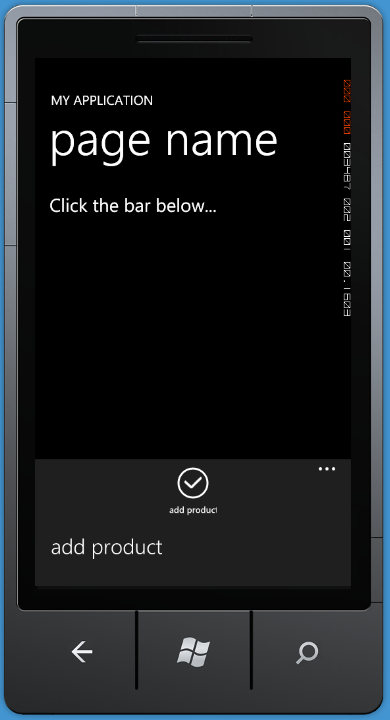
The Application Bar provides a place for you to put the common tasks for a page.
Windows Phone puts the Application Bar on the bottom edge of the page when your phone is positioned in portrait mode. When you turn your phone sideways (landscape mode) the Application Bar will be either on the right or left of the page depending on whether you turn your phone right or left. The Application Bar will always take up the complete length or height of the page. In addition, the height of the Application Bar is fixed and cannot be changed. The Application Bar is not a Silverlight control and thus does not support data binding on any of its properties. If you need items on the Application Bar to change such as the Text or IsEnabled property, you will need to write C# or Visual Basic code.
If you choose to use menus in combination with the Application Bar, an ellipsis will appears to the right (or below) the icons. Tapping on this ellipsis will display the menus below the icons. If you select a menu or you tap outside of the Application Bar area, then the menus will disappear from view. Menu text should be no more than 20 characters, though I find about 16 characters or less works best.
Creating Application Bar Icons
When you add a Portrait or Landscape page, at the very bottom of the page you'll see a commented-out section that is ready for you to un-comment and add your own icons. When using Pivot or Panorama pages, an Application Bar is not available for you to use. You will need to find or create your own Application Bar icons. You will find icons located under C:[Program Files]\Microsoft SDKs``\Windows Phone``\v7.x``\Icons\ (where v7.x refers to the version number of the phone SDK you have installed).
To create your own set of images to use in the Application Bar, you must make them a certain way. First, they need to be 48x48 pixels and the image portion needs to be 26x26 centered within the image. You need to use a transparent background for the entire image. The image portion should be all white or all black depending on whether you are targeting a light or dark theme on the phone. Do not draw the circle you see around each Application Bar icon; the Application Bar will do that for you.
Create an Application Bar
Drag the set of icons under the C:\[Program Files]\Microsoft SDKs``\Windows Phone``\v7.x``\Icons\light folder and drop them into an \Images folder in your project. Locate the appbar.check.rest.png and set the Build Action property on Content for this image. Now on one of your pages, scroll to the bottom and uncomment the application bar XAML. For this sample you can eliminate one of the ApplicationBarIconButton controls and one of the ApplicationBarMenuItem controls. In the ApplicationBarIconButton control that is left, modify the Text property to Add Product. Modify the IconUri property to /Images/appbar.check.rest.png. In the ApplicationBarMenuItem control, set the Text property to Add Product. Also, add a Click event procedure and connect both the IconButton and MenuItem controls to the same Click event procedure. Your XAML should now look like the following:
<phone:PhoneApplicationPage.ApplicationBar>
  <shell:ApplicationBar IsVisible="True"
IsMenuEnabled="True">
    <shell:ApplicationBarIconButton
             x:Name="icoAdd" Text="Add Product"
             IconUri="/Images/appbar.check.rest.png"
             Click="ApplicationBarIconButton_Click"/>
    <shell:ApplicationBar.MenuItems>
      <shell:ApplicationBarMenuItem
              Text="Add Product"
              Click="ApplicationBarIconButton_Click"/>
    </shell:ApplicationBar.MenuItems>
  </shell:ApplicationBar>
</phone:PhoneApplicationPage.ApplicationBar>
The Click event procedure you created can respond to both the icon and the menu item Click event. If you wish to determine which one was pressed, just check the type of the sender argument. However, most often you will perform the same action if the icon and the menu item are both doing the same thing.
private void ApplicationBarIconButton_Click(object
sender, EventArgs e)
{
  if(sender is
Microsoft.Phone.Shell.ApplicationBarIconButton)
    tbMessage.Text = "Icon Clicked";
  else if(sender is
Microsoft.Phone.Shell.ApplicationBarMenuItem)
    tbMessage.Text = "Menu Clicked";
}
Summary
While Windows Phone does not yet offer multi-tasking, this does not mean that you cannot interact with other applications on the phone. If you wish to interact with contacts or photos on the phone, you may launch those applications and either pass data to them or retrieve data from those applications. You will find quite an extensive list of classes that you can use under the Microsoft.Phone.Tasks namespace which will help you with this interaction. When you need a set of tasks for a user to perform on one or many of your pages, the Application Bar is an excellent way to present a common user interface to your user. You may use from one to four icons and a set of menus as well within this Application Bar. All Windows Phone applications use the Application Bar consistently so your user will be familiar with its operation.
