


Microsoft Visual Studio LightSwitch uses a model-centric architecture for defining, building, and executing a 3-tier LightSwitch application.
A model-centric architecture uses models to describe the structure and semantics of an end-to-end application. The applications that you build with LightSwitch have a traditional N-tier architecture.
In this article we discuss the LightSwitch model-centric approach and the main elements of a LightSwitch model. We’ll also look at the runtime architecture tiers (presentation, service, and data) and how they relate to the model.
Model-centric Architecture
Models sit at the center of the LightSwitch design time and runtime architecture. We will discuss several elements of the LightSwitch model-centric architecture: building blocks, models, designers, runtime, APIs and extensions.
Building blocks are the core concepts or vocabulary used to describe an application. Some of the LightSwitch building blocks include:
- EntityType and Query: describes the shape of data and queries against that data. Example of entity types are Customer, PurchaseOrder and ExchangeRate. Examples of queries are SalesByMonth and ActiveCustomers.
- Screen and Control: describes a screen, the controls it contains and its visual layout. Examples of screens are CustomerScreen and OrderEntry.
Building blocks have relationships to each other as well, with, for example, screens binding to queries that return entities.
Creating a project in LightSwitch creates a model, which contains a description of the application in terms of building blocks. The developer uses LightSwitch to create a model containing screens, entities, queries and so forth that describe the application.
Thus models are the core construct used to build applications, not code. The LightSwitch development environment contains a set of designers that know how to create models according to the building blocks, such as the screen, query and entity designers. Thus we see that many of the building blocks are top-level concepts in the LightSwitch development environment, while others are created on the developer’s behalf.
Models are just data without a runtime to give them behavior. The LightSwitch runtime loads the application, authorizes access, renders screens, retrieves data, runs business logic and many other tasks. It reads the model to perform many functions. The LightSwitch runtime does most of its work by employing many other Microsoft technologies that are integrated together according to best architectural practices for building business applications. These include Silverlight for rendering and client logic, WCF for communications, ADO.NET Entity Framework for data access, ASP.NET for authentication and diagnostics and much more. This integrated set of functionality is one of the greatest benefits of the tool: selecting the right technologies for the job and combining them effectively takes a lot of time and expertise.
While much can be done declaratively through modeling, coding is still important and LightSwitch provides APIs to do so. They can be divided into two kinds. The first are APIs for interacting with the runtime, such as to read or write data. The API also includes classes that are generated from model elements. For example, a Customer class is generated from a Customer entity, enabling business logic to be written against the Customer class. The runtime raises numerous events where business logic can be written.
The runtime also provides numerous extension points, enabling the addition of new controls, data types, visual themes, screen templates and more.
LightSwitch Application Model
When you use LightSwitch to create a model, you’ll see top-level concepts in the designer like Data Sources and Screens. These concepts are grounded in the LightSwitch building blocks. Some of the building blocks are concrete and have direct expression in the design environment such as a screen. Some of the building blocks are more abstract and used only under-the-hood.
Figure 1 shows some of the major LightSwitch building blocks.
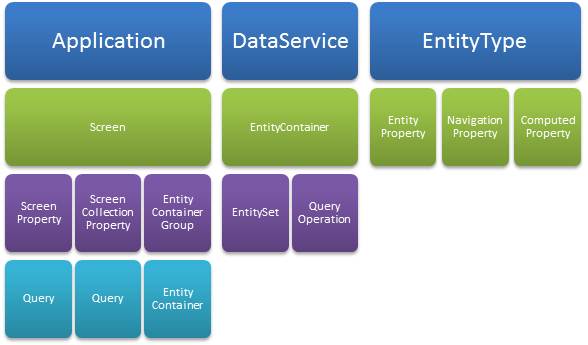
The Application building block refers to the client, which is composed primarily of Screens. A screen has properties that describe the data that the screen works with. There are simple ScreenProperties and ScreenCollectionProperties that hold lists of entities. A screen property can be initialized from a Query.
A Screen has access to all of the data sources in the application via an EntityContainerGroup, referred to at runtime as the DataWorkspace, which comprises a set of EntityContainers, where each EntityContainer is associated with a specific data source.
A DataService defines the service tier and exposes data from a specific data source. A DataService implements an EntityContainer. The EntityContainer describes the shape of the data in the service. This is one of the under-the-hood concepts in LightSwitch. The designer defines an EntityContainer implicitly as you add elements to a data source.
An EntityContainer has EntitySets and QueryOperations. An EntitySet is analogous to a database table. It is the logical location where instances of entities live. QueryOperations return a selection of entities from an EntitySet or from another QueryOperation.
An EntityType represents a specific kind of business data. For example, a Customer, an Invoice, a Book or a TimeCardEntry. EntityTypes can have KeyProperties, EntityProperties, and NavigationProperties. KeyProperties are determined by the designer. A normal EntityProperty can store simple data values, or it can be a computed value that is not stored. NavigationProperties define links to related EntityTypes, for example, the Customer for an Order.
EntityTypes are shared between the presentation and the service tier. The associated business logic (such as data validation) is executed identically on both tiers.
Runtime Architecture
A LightSwitch application follows the traditional 3-tier application architecture having a presentation tier, a service tier, and one or more data tiers. See Figure 2.
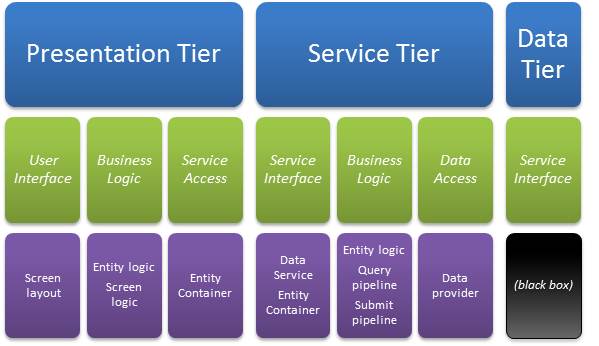
Each physical tier has internal logical tiers - for example, the user interface is logically distinct from data service access in the presentation tier.
Let’s look more closely at each physical tier and drill into its logical composition. We’ll see how various building blocks and runtime objects are used to define and execute the application.
The Presentation Tier
The LightSwitch presentation tier (or client) runs as a Silverlight 4.0 application configured to either run in a browser or out-of-browser as a desktop application.
For a desktop application, Silverlight is configured to install the application out-of-browser and the application startup sequence is controlled to ensure that the application is indeed installed and not running in the browser. Silverlight permissions are also elevated, giving LightSwitch desktop applications access to Windows and Office Automation and enabling the built-in Export-to-Excel functionality.
A LightSwitch browser application can be hosted within any browser and on any OS that Silverlight 4.0 supports. The application runs in the Silverlight sandbox. In that case access to OLE Automation is not available (thus Export-to-Excel is not available) and access to the Windows file system is restricted. LightSwitch prevents the common browser-app problem where unsaved changes can be lost when navigating away from the hosting page or closing the browser terminates the application.
Internally, the LightSwitch client is divided logically into the user interface, client business logic, and data service access.
User Interface
The LightSwitch user interface consists of the shell and screens, and controls.
Shell
The outermost part of the user interface is the shell. It provides the common elements for logging in, launching and activating screens.
LightSwitch also employs a theming service that controls basic visual attributes such as control colors, fonts, and to support the OS high-contrast themes. Intrinsic Silverlight controls support styling, but LightSwitch goes one further by defining a set of styles as a theme and ensuring that the controls used for the shell and screens will select styles from the current theme. Themes are also an extension point.
Screens
The most important elements of the UI are the screens themselves. The user interface for a screen has two runtime components: the content item tree and the visual tree.
The screen’s UI is modeled at design time as a tree of ContentItem building blocks. At runtime the model elements are translated into a tree of content item objects. A content item is a view model for a single element on the screen using the Model View ViewModel (MVVM) (http://en.wikipedia.org/wiki/Model_View_ViewMode) pattern. It forms a data-bindable bridge between the screen object (the model) and a Silverlight control in the visual tree (the view). We’ll discuss the screen object later on.
A content item represents some data item, list, or command that is reachable from the screen object. It may also represent a container for child content items. Each content item specifies a modeled Control type to specify how it should be visualized at runtime.
Content items are accessible at runtime from UI elements via data binding and from screen code for advanced scenarios. In most cases, you will not need to access it to define the business logic for a screen, but it may be useful to control some aspects of the UI.
The visual tree is the tree of Silverlight controls that appears on the screen. LightSwitch builds the visual tree dynamically from the screen’s content item tree, employing the Control type specified in the content item. The resulting Silverlight UI element is then bound to the content item to display things such as current value, display name and other child elements.
This dynamic layout strategy provides two important benefits. The first is professional 2D flow, spacing, control alignment, and automatic placement of labels. This is a huge time saver: No more hours spent tweaking the layout margins, borders, alignment and so forth. The second benefit is the ability to modify running screens when launching the application from within the LightSwitch development environment. When the screen is in “runtime design mode,” the runtime editor simply modifies the screen’s ContentItem model elements dynamically. The screen runtime can re-render the new visual tree and provide immediate live feedback to the developer.
Controls
The Control building block provides visualization or editing of a particular data type, or provides visual layout. LightSwitch has many built-in controls and new controls can be added as an extension point.
Existing Silverlight controls, including those you authored, can also be used at design time. LightSwitch also provides the ability for your controls to participate in LightSwitch’s built-in layout support.
Client Business Logic
The Screen and EntityType building blocks encapsulate most of the client business logic. LightSwitch animates these building blocks at runtime with a screen object or an entity object.
A screen object represents a high-level unit of work in the client such as looking up a Customer or adding a new Order. Screens have logic for which data to load and save, and for validating their own private properties. Screens can have user-defined commands that drive the UI workflow.
An entity object represents a copy of a durable piece of business data. It encapsulates business rules about the data, such as data validation. They also have attributes that drive defaults for visualization and data entry. Entities are also between the client and the service tier, so you write business logic such as validation once and LightSwitch can execute it on both tiers.
Business rules can be associated with a screen or entity, or one of its members (a property or command). Business rules come in several categories:
- Computed properties return a dynamically evaluated value for an entity property.
- Validation rules return a set of validation results for an entity or screen property.
- Read-only rules determine whether an entity or screen property is currently read-only.
- Can-execute rules determine whether a command is currently available for execution.
LightSwitch automatically evaluates and keeps track of these business rules. Evaluation is lazy: if no one is observing the state of a rule, the rule will not be evaluated. The rule is guaranteed to be up-to-date at the point you observe its results.
The results of business rules are observable in the API via the Details property. The details property also includes other view-model states such as display name and description.
Here are some of the detail properties from a ContactName property.
var cn = customer.Details.Properties.ContactName;
var value = cn.Value;
var displayName = cn.DisplayName;
var hasErrors = cn.ValidationResults.HasErrors;
Here are some detail properties of a user-defined screen command called “DoIt”.
var doItCmd = this.Details.Commands.DoIt;
if (doItCmd.CanExecute)
    doItCmd.Execute();
When coding in LightSwitch, the business rules that evaluate validation or can-execute are typically associated with a partial method on the generated building block class. At runtime, LightSwitch tracks the dependencies of the rule during evaluation. In this way it knows when a rule must be re-evaluated. So long as the code refers to LightSwitch defined screen or entity object properties, they can be properly tracked. However, rule changes are not tracked if the rule refers to something that is not defined by LightSwitch, such as DateTime.Now. You can force re-evaluation of a rule programmatically.
Some business rules are declarative and are specified in the designer. The built-in validation rules include Required and Range among others. Validation rules are also an extension point.
Data Service Access
The client data model centers on entities that are accessed from a data service on the service tier. The client’s local copy of entities are managed in a client data service. Each screen in the client has a data workspace that provides access to all of the data services in the application.
For example, if you add a “Northwind” SQL data source and a “MySharePoint” data source, you’ll see one client data service member for each in the data workspace.
var nw = this.DataWorkspace.NorthwindData;
var sp = this.DataWorkspace.MySharePointData;
Each client data service exposes access to the entity sets and query operations available in the data service. You can write LINQ queries against these to fetch remote data locally. Here is an example of fetching some Customers from the NorthwindData data service and iterating over them.
var customers =
    this.DataWorkspace.NorthwindData.Customers;
var query = from Customer c in customers
    where c.PostalCode == "98052"
    orderby c.City
    select c;
foreach (Customer cust in query){...}
The client data service has a single SaveChanges method for sending a change set from the client data service to the corresponding server data service.
this.DataWorkspace.NorthwindData.SaveChanges();
The screen’s Save command calls SaveChanges, so you typically don’t write this code yourself.
LightSwitch ensures that the data is valid on the client before posting the changes to the data service. If all the modified entities are valid, it is sent to the service where it is validated again. If any have validation errors, LightSwitch disables the screen’s Save command to prevent the end-user from attempting to save bad data.
If a save operation is successful, the client’s entities get updated with any changes that occurred to that data on the server, including updated key values for newly added entities.
The Service Tier
Each data source in the application is modeled as a DataService building block and is implemented as a data service in the service tier.
The service tier is hosted in an ASP.NET 4.0 application. This tier can be configured to run locally on the client machine in a headless Windows process. It can run in Microsoft Internet Information Services (IIS) 6.0 or 7.0, or it can be hosted in Windows Azure. This location is specified at the time you publish the application.
Each data service is logically made up of a service interface, the server business logic and the back-end data access providers.
Service Interface
The service tier exposes each data service as a WCF service endpoint. The shape of the service interface corresponds logically to the EntityContainer definition described above.
Server Business Logic
Business logic code accesses data in the service tier via a data workspace, using the same API as client-side data workspace, except that the server-side data workspace uses data providers to communicate to back-end data sources.
The server business logic consists of the query pipeline and the save pipeline. The logic defined for entities is also used for server-side data validation.
The save pipeline is described in detail in the article “The Save Pipeline in Visual Studio LightSwitch Applications,” also in this issue of CODE Magazine. Let’s look at the query pipeline in more detail.
Queries and the Query Pipeline
The QueryOperation building block defines a selection of entities from an EntitySet by specifying filter and ordering expressions. You define a QueryOperation when you create a new query in the LightSwitch designer. The query is implemented in the service tier by its data service.
When a query operation is invoked at runtime, execution passes through the query pipeline. Here is a quick summary of the query pipeline.
- Pre-processing
- CanExecute is called to determine whether the operation may be invoked.
- Executing is called before the query is processed.
- PreprocessQuery builds up the final query expression.
- Execution - LightSwitch passes the query expression to the data provider for execution.
- Post-processing, either
- Executed is called after the query is processed but before returning the results.
- or ExecuteFailed is called if the operation failed.
The italic elements represent points where you can write code to customize the pipeline.
In CanExecute, you can test user permissions to access the operation, or any other logic to determine if the operation is available. (LightSwitch also checks the CanRead status for the underlying entity set.) In the Executing phase, you can modify the transaction scope semantics. This is very advanced and typically not necessary.
During PreprocessQuery, you can append additional query operators using LINQ. This is helpful because some data providers support more complex query expressions than can be modeled in LightSwitch or serialized from the client.
In the Execution phase, LightSwitch transforms the query expression into one that can be used directly by the given data provider. In some cases this involves transforming the data types used from LightSwitch-specific entity types to data types used by the underlying provider.
Data Access Providers
LightSwitch data workspaces aggregate data from different data sources. A single LightSwitch application can attach to many different kinds data sources. LightSwitch provides a single developer API for entities, queries and updates regardless of the kind of data source kind. Data storage is accessed in one of three ways in LightSwitch:
- ADO.NET Entity Framework (http://msdn.microsoft.com/en-us/library/aa697427(VS.80).aspx) for access to SQL Server, SQL Azure and other sources for which a Entity Framework provider is installed
- WCF Data Services (http://msdn.microsoft.com/en-us/data/bb931106.aspx) for access to SharePoint 2010 via the OData protocol
- A shim to talk to an in-memory WCF RIA DomainService (http://www.silverlight.net/getstarted/riaservices/) for extensibility
LightSwitch supports Microsoft SQL Server 2005, 2008, 2008 R2 and Microsoft SQL Azure using the SqlClient for Entity Framework (http://msdn.microsoft.com/en-us/library/bb896309.aspx). LightSwitch supports referential integrity, transactions, and both SQL authentication and Integrated (Windows) authentication.
LightSwitch accesses Microsoft SharePoint 2010 using its OData feed. LightSwitch can access SharePoint Lists and supports relationships between lists.
Other Entity Framework providers can also be used; though be aware that there are a number of features that LightSwitch requires and not all providers implement them.
To access other kinds of data, the developer can write a WCF RIA Services DomainService class in Visual Studio Professional. The custom DomainService class is then imported into the LightSwitch project. (Only the class is used - LightSwitch does not publish it as a RIA Services endpoint.)
The Data Tier
LightSwitch can connect to external data from SQL Server, SQL Azure, SharePoint, and other custom data sources.
For application-defined EntityTypes, LightSwitch has a special data source called “ApplicationData,” also referred to as the intrinsic database. In addition to creating the service-tier data service for the intrinsic database, LightSwitch also creates and publishes the SQL database.
At design-time, LightSwitch uses a local SQL Server Express database on the developer’s machine for the intrinsic database. In production, LightSwitch deploys the intrinsic database to Microsoft SQL Server Express, Microsoft SQL Server or Microsoft SQL Azure.
LightSwitch generates the SQL database schema for the intrinsic database from its modeled EntityContainer and deploys the database schema when you publish the application. It will also attempt to update an existing database schema whenever you deploy an update to the application.
Summary
You have seen how LightSwitch employs a model-centric architecture. An application is modeled using building blocks such as screens, controls, entity types, queries, and data services. From the model, LightSwitch generates and deploys a 3-tier application with a Silverlight client and an ASP.NET-hosted data-services tier.
For more information about Microsoft Visual Studio LightSwitch, visit the LightSwitch Developer Center at http://msdn.microsoft.com/lightswitch.
