


WCF 4 is all about productivity.
A number of new features in WCF 4.0 will provide an immediate boost to productivity by simply lowering the learning curve for getting up and running quickly and easily. Whether you are new to WCF or a seasoned veteran, subtle yet powerful improvements to the configuration experience will help you accomplish more with less while new features around discovery and routing will reduce the cost-value gap in implementing more sophisticated service-oriented patterns for building smarter, more resilient applications with greater reach and looser coupling.
In this article, I’ll walk you through the simplified configuration experience in WCF 4.0-the latest release of the Windows Communication Foundation that ships with .NET 4.0 as well as introduce support in WCF 4 for dynamically discovering available services on a network. In my next article, I’ll dive deeper into more advanced discovery scenarios that will build on the foundational knowledge introduced here as well as a look at new support for advanced messaging scenarios using the Routing Service.
Convention Over Configuration
While the WCF programming model provides tremendous flexibility by exposing service and channel configuration knobs to the developer both imperatively and declaratively, in previous versions of WCF, developers new to WCF had to become quite intimate with service model concepts such as services, endpoints, addresses, bindings, contracts, endpoint behaviors and service behaviors just to get up and running. This became a source of frustration and confusion for those new to WCF who just wanted to get a service up and running in a style more familiar to them such as ASP.NET Web Services (ASMX) which required little more than an address to identify where the service would be listening. As the MSDN forums and comments/questions on my blog can confirm, even more experienced WCF developers were not impervious to the occasional configuration oversight that would cause hours of frustration.
In response to this feedback, the Connected Framework team worked hard to improve the configuration experience in WCF 4. The result is a more conventional approach in which the most basic configuration options are applied in lieu of explicit configuration. These changes allow developers to get up and running quickly and take their time learning more advanced concepts within the service model.
Default Endpoints
The most significant improvement to the configuration experience in WCF 4 is the automatic application of default endpoints. To quickly review, an endpoint consists of an address, a binding and a contract. While every WCF service is comprised of one or more endpoints, the developer no longer needs to be burdened with specifying this boilerplate configuration.
The most significant improvement to the configuration experience in WCF 4 is the automatic application of default endpoints.
Listing 1 shows a very simple yet common example of the boilerplate configuration that is typical for configuring a simple WCF service. The service and endpoint is explicitly defined as is the binding configuration and behavior configuration. For this particular service, when the host is opened, the WCF service model will create a service named Service1 with one endpoint listening on the HTTP protocol/scheme that is compatible with the WS-I Basic Profile 1 standard. When a message arrives at the endpoint, the service model will dispatch the message to the matching method that has been implemented per the configured contract. In addition, I have specified (via a service behavior) that I would like the service to provide a WSDL file over HTTP if requested, and in the event of an exception, the service should serialize low-level .NET exception details and return them in SOAP faults.
What I’ve just described is very typical of a standard configuration (in a production environment, it is highly advisable to set includeExceptionDetailsInFaults to false). While the intimidation factor of such a configuration is quickly eased with a bit of practice, whether you are new to WCF or a seasoned veteran, wouldn’t it be nice to dispense with the formalities and just hit F5 to get up and running?
Wouldn’t it be nice to dispense with the formalities and just hit F5 to get up and running?
This is exactly what Default endpoints in WCF 4 provide. Look at the configuration snippet below. There is absolutely no configuration whatsoever, but if you host this service with this configuration, you will find that a default endpoint is automatically created for every combination of protocol/schemes and service contracts your WCF service implements:
<configuration>
   <system.serviceModel/>
</configuration>
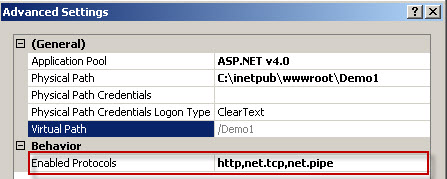
Demo1, found in the samples provided for this article, includes this basic configuration. If you run it, you will see the basic confirmation page in your browser with a link to view the WSDL document. If you deploy the service to IIS 7 WAS, and configure the protocol bindings as shown in Figure 1, the service model will create three endpoints for you automatically; one for each protocol scheme. Because I’ve enabled the generation of a WSDL document over HTTP via the service behavior, if I append ?wsdl to the address in my browser or click on the link generated in the service page, I can confirm that the following endpoints are, in fact, ready to be consumed as shown in the excerpt from the WSDL in Figure 2:

- A default endpoint with a BasicHttpBinding binding called BasicHttpBinding_IService1
- A default endpoint with a NetTcpBinding binding called NetTcpBinding_IService1
- A default endpoint with a NetNamedPipeBinding binding called NetNamedPipeBinding_IService1
As you can see, the service model is smart enough to enumerate the base addresses provided by IIS and create a default endpoint for each service contract that the service implements (i.e., the type mapped to the Service attribute in the svc file).
What if you want to take advantage of default endpoints, but instead of using BasicHttpBinding as the default binding for HTTP, you’d rather use a WS-* binding like WsHttpBinding or a REST binding like WebHttpBinding? You can accomplish this very easily by simply adding a “protocolMapping” element to your configuration as shown below:
<protocolMapping>
     <add scheme="http" binding="wsHttpBinding"/>
</protocolMapping>
After adding the element above, the default endpoint for the HTTP protocol will be configured with the WSHttpBinding binding. Try it!
The last productivity improvement around endpoints I want to talk about is the standard endpoint. A standard endpoint is simply a canned configuration of an endpoint for which properties of the endpoint typically have default settings, making it therefore redundant or unnecessary (not to mention error prone) to express in configuration.
The DiscoveryClient provides the ability to send probe requests across the network to any services that are configured to respond to probe requests, be they WCF services or services implemented on other vendor stacks.
A great use of standard endpoints is exposing your service for metadata exchange. As opposed to creating the same boilerplate endpoint with properties/attributes that do not change; the same result can be accomplished by using the “mexEndpoint” standard endpoint as follows:
<services>
   <service name="Demo1.Service1"
            behaviorConfiguration="metadata">

     <endpoint address="wsdl"
               name="wsdl"
               kind="mexEndpoint" />

<!- - More Endpoints -- >

   </service>
</services>
Note the pithy endpoint configuration including the new “kind” attribute which essentially saves you from having to remember static properties like the fully qualified IMetadataExchange contract. Hopefully you are starting to see a theme around improved productivity take shape.
As you’ll see later, another great example of using a standard endpoint is in simplifying the process of exposing UdpDiscoveryEndpoint endpoints on services, but there are other standard endpoints configured by default that will come in handy as you explore other new features in WCF 4 and WF 4.
Default Binding & Behavior Configuration
If you look again at Listing 1, you’ll notice that the serviceBehavior and basicHttpBinding elements have a name attribute. In WCF 3.x, behaviors and overrides to default binding configurations require that both behaviors and binding configurations be named and that those names be assigned to the service or endpoint using the appropriate behavior or binding configuration attribute.
This again was the source of confusion and frustration for some developers in previous versions of WCF because it was easy to forget to wire up a behavior or binding configuration to its parent element. If you are taking the time to configure these, and there is only one or a few endpoints and you haven’t expressed otherwise, shouldn’t it be obvious that the configuration is intended for the service and endpoint that you’ve already configured?
This is exactly the approach that the team took with binding and behavior configuration in WCF 4. As you can see in Listing 2 and Listing 3, I’ve added a service behavior and overridden the binding, and without explicitly wiring them up, they will automatically apply to the service and endpoint respectively. Easy!
Listing 4 provides a practical example of what the basic configuration experience is in WCF 4. This configuration will take advantage of default endpoints and will apply the default binding and behaviors to the service and endpoints implicitly. You will also notice that it is bereft of explicit service and endpoint configuration; however, it does override the default configuration by specifying that metadata should be provided over HTTP and that again, exception details should flow to the client.
Of course, nothing has been taken away in terms of traditional configuration. You are free to configure your services as you have before-more advanced scenarios may require it. That said, the productivity improvements for getting a service up and running quickly and easily so you can go from File, New Project, to F5 more easily are pretty significant.
WS-Discovery is an interoperable Oasis standard for discovering services (including Web services) by multicasting announcements as well as probes on a network.
Dynamic Service Discovery
If you have been doing any kind of distributed application development for some time, you have likely run into an endpoint management problem. Questions like the following are pretty common in this space:
- What endpoints are available?
- How do I dynamically determine my endpoint at runtime?
- What is the quality of service (QOS) of one endpoint or another?
There are many problem domains and business requirements that necessitate these types of capabilities, and chances are you’ve developed some nifty (and custom) solutions to these problems. The problem with customizing solutions for these types of requirements is that they are time consuming to implement, take away from the real business value of the software you are developing and are quite likely not very interoperable.
This is where standards bodies like Oasis can help. While standard specifications can range from the quite useful to esoteric (and painful to use, much less implement), WS-Discovery is a standard for discovering services or resources on a network that companies like Microsoft, Cannon, Oracle, and IBM agree on (they actually helped write it).
Choosing an accepted standard for any kind of plumbing is a good idea because it significantly increases interoperability…
Aside from developer economics, choosing an accepted standard for any kind of plumbing is a good idea because it significantly increases interoperability which is key to reuse. Reuse should be the goal of any distributed application developer, and if you want your services to be as easily discoverable as it is for you to discover other services, then WS-Discovery is for you.
Fortunately, you don’t need to master the WS-Discovery specification (however if you are up for some light reading, check out the sidebar “WS-Discovery”) to take full advantage of it because WCF 4 supports WS-Discovery right out of the box.
WCF 4 includes a new assembly called System.ServiceModel.Discovery.dll that provides a number of new namespaces and types that provide client and service support for working with discovery.
Ad-Hoc Discovery with Probe Messages
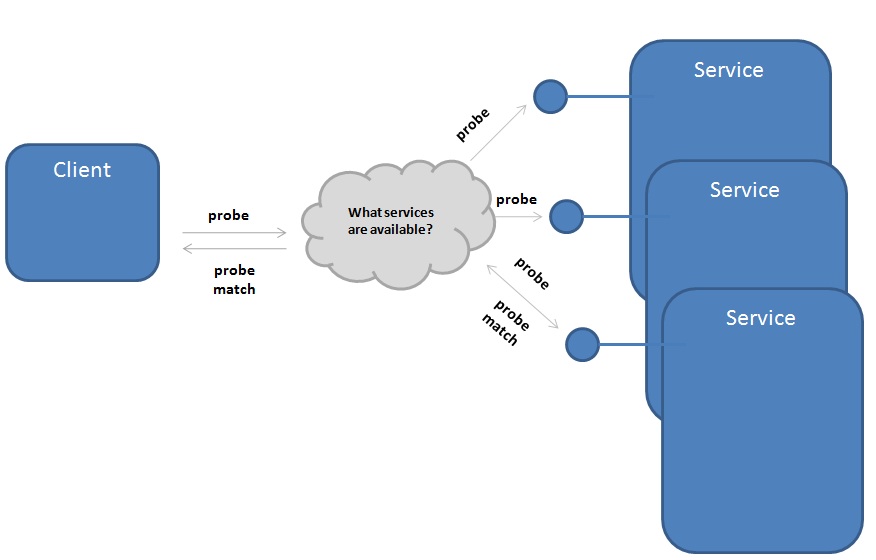
The idea behind discovery is simple. Consider Figure 3. A client is interested in consuming a service that meets a certain need. The client (which of course can also be a service) sends a probe request over the network. The probe request is sent multicast over UDP because it is essentially sending a shot across the proverbial bow to anyone who is listening. Every node on the subnet (and potentially beyond) will receive the probe request, and if the service meets the need expressed by the client, will respond with a probe match message. This approach to discovering available (and qualified) clients is referred to as Ad-hoc Discovery.
If you want a service to be discoverable, you must configure an endpoint that will respond to discovery/probe requests and enable a service behavior that will implement the support for responding to probe requests as required in the WS-Discovery specification.
This is easily accomplished by adding a standard endpoint that exposes the discovery endpoint along with a service behavior that implements the correct behavior. Of course, all of this can be accomplished imperatively, but for the purpose of simplicity, I’ll continue to show you the declarative configuration.
Configuring the Service for Discovery
Listing 5 includes the entire service-side configuration required to expose a service for discovery.
Notice the “udpDiscoveryEndpoint” standard endpoint which exposes the service for discovery over a UDP multicast binding with a default contract that supports WS-Discovery. These static attributes/properties make it an excellent standard endpoint. In addition, the “serviceDiscovery” element under “serviceBehaviors” enables the service to receive and respond to discovery/probe requests in accordance with the WS-Discovery protocol. You will also notice that I am mixing and matching traditional service/endpoint definitions with new additions to WCF 4 such as the standard endpoint and simplified service behavior configuration.
Configuring the Client for Discovery
The theme of this article is productivity, and having seen how simple it was to configure a service for discovery, what about the client side? Once the service has been configured for discovery, all you need to do on the client side from a configuration perspective is achieve binding equivalence by simply adding a standard endpoint and set the “kind” attribute to “udpDiscoveryEndpoint” as shown in Listing 6.
In addition to the endpoints and behaviors we’ve worked with so far, another addition to the new System.ServiceModel.Discovery.dll assembly is DiscoveryClient type in the System.ServiceModel.Discovery namespace. The DiscoveryClient provides the ability to send probe requests across the network to any services that are configured to respond to probe requests, be they WCF services or services implemented on other vendor stacks. In addition to opening up a client channel, it supports the ability to provide probe criteria, which is key to ensuring that only services that match your probe request respond.
Listing 7 demonstrates using an instance of the DiscoveryClient class to communicate with the “udpDiscoveryEndpoint” endpoint which I’ve called “Discovery”. Next, I use another new type, FindCriteria, to specify the criteria I want to use for identifying a match. In this case, I am only interested in services that match my contract, IService1.
The IService1 service contract specifies two trivial operations that simply echo back the contents of messages passed to them (for the purposes of this article, I am simply using the boilerplate service contract and implementation generated by the WCF Application project template because the implementation details of the service are unimportant).
Once I specify that I am only interested in services that implement my IService1 contract, I am ready to send a probe request by calling the Find method on my instance of DiscoveryClient and passing it my instance of FindCriteria. At this point, the probe request will be multicast to all nodes on the network.
As shown in Figure 4 all nodes with services that contain endpoints capable of receiving and responding to probe requests will receive and process the probe message. If the service hosts an endpoint that matches the IService1 service contract, it will respond with a probe match message in a unicast manner back to the DiscoveryClient using the message context of the matching probe message.
The contents of the probe match message are encapsulated in an instance of FindResponse, another new type in WCF 4. The FindResponse instance contains an endpoint element which maps to the probe match metadata which includes all of the endpoints for target services that responded with the probe match within the configured time threshold. If you invoke the Find method synchronously as in the code example I have provided in Listing 7, you will notice a pregnant pause before it returns. This is because the client is waiting for all target services to respond within the timeframe allocated. Once all responses to the probe request have been received, the DiscoveryClient will conveniently package all responses for you in the FindResponse instance that is returned.
From there (as you can see in Listing 7) all that is left is to pull the first address from the Endpoints collection in the FindResponse instance. I do this by using the First() extension method, however, you would likely apply some business logic in selecting the appropriate endpoint. From there, I simply instantiate a proxy and set the Address property of the proxy Endpoint property to the address I selected from the FindResponse instance.
Hopefully, you can immediately appreciate the power and simplicity of this approach. In just a few lines of code I have implemented a very simple pattern for dynamically determining the address of a service I wish to consume at runtime.
Scopes
Sometimes you may want to be even more specific about what target services are qualified to meet your needs. For example, perhaps there are several services available, each with a different quality of service, different versions or geographic location that will influence your endpoint selection. Or perhaps, from an Application Lifecycle Management (ALM) perspective, you want to be able to easily choose between endpoints deployed in integration, staging and production environments with a flip of the proverbial configuration switch.
All of these scenarios are possible by using scopes to refine your probe criteria. In fact, in the previous example, specifying the service contract type in the criteria was a type of scope that provides the most fundamental criteria for probing available services. To define additional scopes beyond the service contract, you use a URI. For example, the following are all valid scope criteria:
- http://Prod1/HR/HRService.svc
- http://localhost/HR/HRService.svc
- http://Stage1/HR/HRService.svc/1.1
- http://Stage1/HR/HRService.svc/beta
To refine the criteria for finding services, you specify one or more scopes and modify the service and client configuration. On the service side, if I want to specify a scope called “http://foo” I can do that by adding a named endpoint behavior and applying an endpoint behavior by defining the “endpointDiscovery” element with one or many scopes as shown below:
<endpointBehaviors>
        <behavior name="Scopes">
          <endpointDiscovery>
            <scopes>
              <add scope="http://foo"/>
            </scopes>
          </endpointDiscovery>
        </behavior>
      </endpointBehaviors>
Next, bind the endpoint behavior called “Scopes” to the endpoint called “Basic”:
<endpoint name="basic" binding="basicHttpBinding"
          contract="Demo2AdhocDiscovery.IService1"
          behaviorConfiguration="Scopes"/>
On the client side, again referencing Listing 7 as a starting point, all you have to do is add the scope to the instance of FindCriteria as shown below:
criteria.Scopes.Add(new Uri("http://foo"));
Now, only target services that match both the IService1 service contract and a scope of “http://foo” that is bound to the endpoint that matches the IService1 will return probe matches to the discovery client. Listing 8 shows the full configuration including scopes.
As you can see, Scopes are very powerful because they provide you with additional flexibility and control over the discovery and resolution of dynamic endpoints.
In My Next Article
I’ve covered the highlights of the configuration improvements in WCF 4, including default endpoints that make it easier to get up and running quickly and easily, and a more straightforward approach for working the behaviors and binding configurations via default bindings and default behaviors.
I also walked you through the basics for eliminating custom discovery solutions by quickly and easily implementing an open, interoperable and standards-based approach for discovering services at runtime with WS-Discovery.
Believe it or not, this is only a taste of new productivity features in WCF 4. In the next issue, I’ll continue to build on these tremendous productivity enhancements in WCF 4 by showing you some more advanced discovery scenarios including how to support service announcements and I’ll also introduce the new routing capabilities in WCF 4 that bring elegant messaging patterns such as service virtualization, multicasting and back up services to your fingertips with the new Routing Service.
