


SharePoint 2007 has been a very successful product for many reasons. Perhaps it is the good applicability of .NET to SharePoint. Maybe it is the fact that SharePoint gives you so much beyond plain vanilla ASP.NET, that it gets both techies and business users excited. Having been available for about three years now, there has been time
for developers to discover a few rough edges to the product as well.
And now that SharePoint 2010 is out, it takes off where 2007 left. There are numerous enhancements in SharePoint 2010 over SharePoint 2007. Clearly Microsoft listened. While there are too many new things to mention for a single article, I will discuss my top three favorite things about SharePoint 2010 that I, as an architect, have been waiting for with bated breath.
The Re-architected Services Model
In SharePoint 2007, specifically in MOSS 2007, there is a concept of the SSP, or the Shared Service Provider. When configuring your farm, you would generally also create one or more SSPs. These SSPs would be responsible for running a lot of background batch-oriented tasks and other frequently heavy-duty tasks. This was great, except there was one big limitation. While you could have as many SSPs in the farm as you liked, and one SSP could manage multiple Web applications; the converse was not possible, i.e., that multiple SSPs could manage one Web application. This presented a significant scalability problem, especially when using resource-hungry MOSS features such as Excel services that had to share the same SSP with other services.
In SharePoint 2010, Microsoft broke out individual services from the SSP model and you can configure them independently. Also third-party companies can add services to the platform as well. When you install SharePoint, you get a certain set of services with it. You can see them by visiting Central Administration and clicking the Manage Service Applications link.
Breaking these services out of the SSP Model, and the ability to configure them independent opens up a number of interesting scenarios:
You can now appoint administrators on a per-service basis. You can do so by selecting a given service, and then clicking the "Administrators" button on the ribbon. These users are then given access to Central Administration. However, they can manage the designated service.
You can now offer services to sites on an à-la-carte basis, rather than an all-you-can-eat-buffet style. For example, if a site does not need Excel Services, it does not get Excel Services. The administrator can pick and choose which services are made available to which sites.
The third interesting scenario is perhaps the most exciting. Farms can share services. In fact, now you can have an entire farm that can scale out, whose job is to do nothing but provide services to other farms. This opens up immense scalability options, and also a great deal of flexibility in the overall architecture considering things such as security, availability, etc. Now, the more cynical of you might think: What SQL Server permissions will I need to give in this cross-farm implementation? The answer is "None!" Managed Farm Services communicate through each other via proxies, thus obviating the need for direct SQL permissions to the parent farm's configuration or service databases.
Having this level of flexibility in managing the services on your farm also enables SharePoint to now function better as a hosted platform. Not only can you now share services across multiple "tenants," you can also partition data accordingly. Imagine trying to share profile information in SharePoint 2007 across multiple tenants? Actually, sharing wasn't the problem, partitioning the data and making sure profiles from one tenant did not interfere with another tenant was the real problem. Well not anymore!
Much Better Development Tools in Visual Studio 2010
It is always difficult to criticize the mothership! But it's easier to do so when the mothership comes out with a solution to one of the biggest problems with SharePoint 2007. If only I could get all those hours I wasted watching progress bars, fixing twiddly batch files, SharePoint spinners, and all that hair I lost trying to develop functionality for SharePoint 2007 using Visual Studio 2005 and Visual Studio 2008. When SharePoint 2007 came out-there was NOTHING! I know I sound like the complaining immigrant dad of a spoiled American kid here, but when you had to write functionality for SharePoint, you wrote a class library. You had a batch file call Makecab.exe, which relied on a cab.ddf file, which you had to painstakingly write and keep up to date. Awful!
Then over time developers released WSPBuilder, STSDev, and from Microsoft, VSeWSS. These made the picture better, though hardly an ideal solution. Ask any .NET developer who has dabbled with SharePoint development, and you will hear similar horror stories about the terrible development tools one dealt with in the 2007 times.
With SharePoint 2010, you youngsters have it easy! It's as easy as this: you open up Visual Studio 2010, and then create a new project based on one of the SharePoint 2010 templates, as shown in Figure 1.
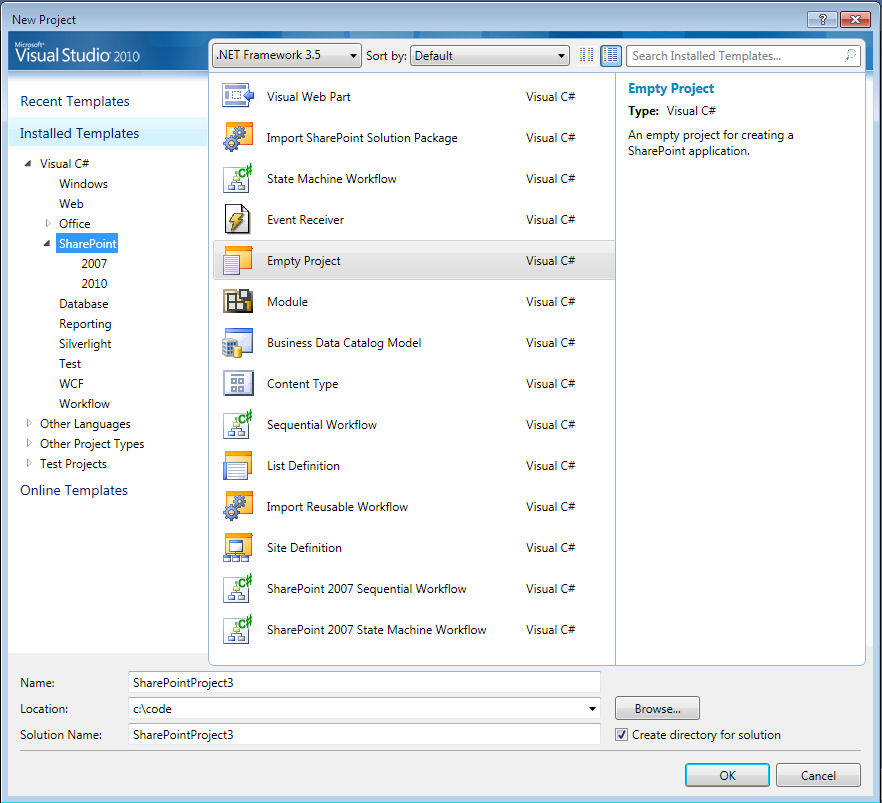
As you can see, the SharePoint 2007 workflow project templates introduced with Visual Studio 2008 are still there. But in addition to those, you have a whole number of Visual Studio 2010 project templates available. Also VSeWSS projects will easily upgrade to SharePoint 2010 projects.
When I write code for SharePoint, I like to package my solutions as logical bits of functionality instead of individual pieces of SharePoint. In other words, I like a solution to give "Invoice Approval" functionality to a site, rather than have a solution that contains a feature called a WebPart, and another feature called a List, etc. In that vein, I find myself using the Empty Project Template a lot.
When I create a project based on the Empty Project Template, I am presented with two choices, as shown in Figure 2.
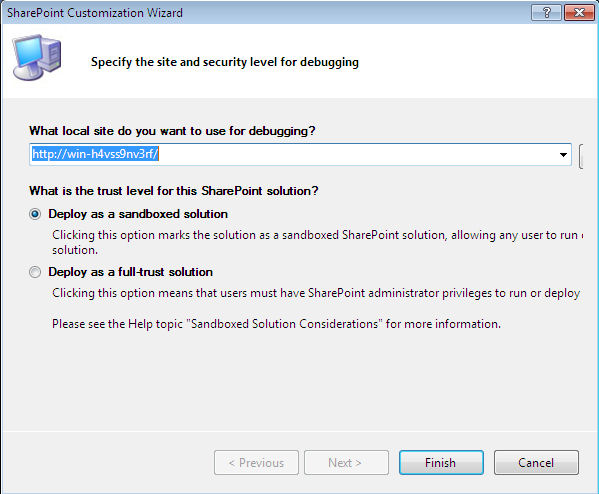
This is yet another huge improvement over SharePoint 2007. Now you have the ability to create "sandboxed" solutions, which run under a security sandbox. This means, certain facilities normal to SharePoint development are unavailable in a SharePoint sandboxed solution. On the flip side, however, site collection administrators now have the ability of uploading and deploying sandboxed solutions themselves, without having to go through a farm administrator. This will take away a lot of headaches from that one overtaxed farm administrator in your organization who is probably fed up with complaints and is looking for another job right now.
Once you do create such a project, you can then right-click on the project and choose to add a new item, which allows you to add many kinds of SharePoint artifacts, as shown in Figure 3.
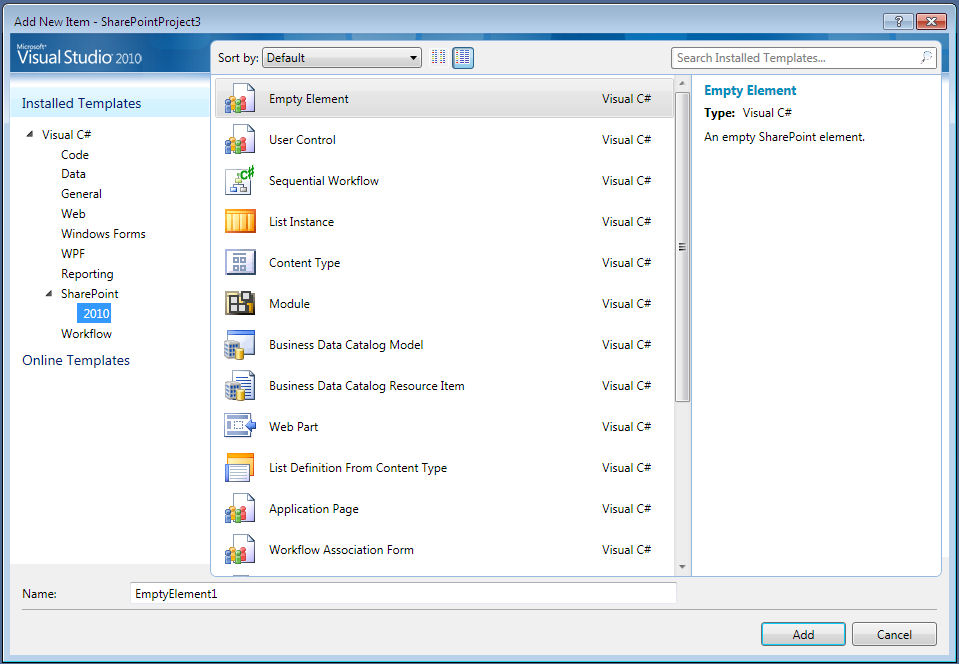
You can also package/repackage your project and various features as you deem fit and logical per the functionality you are trying to develop.
The best part perhaps is debugging. For years, I've felt quite jealous of my .NET compatriots, who press F9 to set a breakpoint, and then hit F5, and the breakpoint actually gets hit! Well, fear no more, With SharePoint 2010 you have the same level of productivity available to you. And the various commands available on a SharePoint 2010 project in Visual Studio will also allow you to perform common functions such as packaging, deploying, or retracting your SharePoint solution package. Anecdotally, I can also mention that the performance is quite acceptable as well.
There are many other aspects of developing for SharePoint 2010 using Visual Studio 2010, which I will be covering in numerous future articles. But for now, I will tell you one additional tidbit that will make developing for SharePoint 2010 a whole lot easier than developing for SharePoint 2007.
Starting with SharePoint 2010 and onwards, you can install and develop SharePoint 2010-based code on a client operating system such as Windows 7 or Windows Vista.
SharePoint 2007 required you to develop on a server operating system. Numerous wars have been fought between infrastructure ogres and developer fairies over whether developers should be allowed to run a server operating system on the corporate network! Developers have won, because really this was the only way it was going to work! Well, not anymore! Starting with SharePoint 2010 and onwards, you can install and develop SharePoint 2010-based code on a client operating system such as Windows 7 or Windows Vista.
Feature Upgrade Scenarios
Speaking of making things easier for developers, SharePoint 2007 had a concept called features, which were described using a feature.xml file. That feature.xml file had a <feature> element, with a "Version" attribute. The problem was that the Version attribute meant nothing-SharePoint itself simply ignored it in SharePoint 2007.
The problem was that the Version attribute meant nothing-SharePoint itself simply ignored it in SharePoint 2007.
In SharePoint 2010, however, these versions are now tracked in the SharePoint content databases according to the scope of the feature installation. When you activate a feature on a certain scope (Farm, WebApplication, Site Collection, or Site), SharePoint 2010 creates a feature instance that it associates with the current version of that feature. If you deploy a new version of that same feature in the same scope, SharePoint 2010 will detect that the associated feature instance needs an upgrade because the instance version number is less than the new version number specified in the new feature.xml file.
The new feature.xml file now has a section that you can use to specify the various upgrade actions that are required to upgrade a particular feature instance from an earlier version to the version being deployed. The upgrade infrastructure queries for the set of feature instances that need to be upgraded by using the "QueryFeatures" method, and then upgrades each of those feature instances. The QueryFeatures method is available on SPWebService, SPWebApplication, SPContentDatabase, and the SPSite classes and has various overloads to support various scenarios.
You declare the specific upgrade logic in the upgrade actions section of the feature.xml file, which can contain upgrade logic that is both declarative or code based. A sample upgrade section is shown in Listing 1.
Also, it is important to realize that SharePoint 2010 upgrades features in a top/down fashion. It upgrades them at the farm level first, followed by the Web-application level, site collection, and then finally the individual site level. When upgrading individual site levels, they start at the root Web, and then progressively go down the chain into child sites.
Also, SharePoint 2010 is smart enough to understand dependent features in the upgrade process. In other words, it upgrades dependant features after it upgrades the features they depend upon.
Feature Upgrade is somewhat optimistic though. If an upgrade fails, SharePoint 2010 does not upgrade the specified feature instance on which the error occurs; however, the process of upgrading continues for other features.
In addition, the SPFeatureReceiver abstract base class that defines a feature receiver also has some new methods that allow you to handle upgrades better. Specifically, you now have a FeatureUpgrading method, which is called when you are about to upgrade the feature. You would typically use this method in advanced scenarios where simple declarative logic is not sufficient to describe your intent to the system.
As an architect, I've always had a problem maintaining long-term continuity of my SharePoint installations. As release upon release with gobs of custom code is piled upon my SharePoint farm, the one thing that has always worried me is disaster recovery. Since every subsequent version needs to also take into account existing data in the farm, it is important to maintain a recovery path from a fresh install to the current state. Of course, it is difficult to convince the bill-paying business user why it is important to invest time in disaster recovery as well, until of course a disaster happens. So most organizations don't have a good story around this problem.
Also, this is not an easy problem to solve, when you consider that a lot of that knowledge is embedded inside badly written documents and the minds of developers who no longer work with you. Invariably, this made disaster recovery of significantly customized SharePoint installations a near impossible thing to do. Now you can enforce all that knowledge as executable and maintainable code. As an architect, I can breathe easier now.
Summary
Okay I lied! These are three of my favorite new things in SharePoint 2010, but there were so many great things to choose from. The above three give a SharePoint architect so much more flexibility in implementing and delivering SharePoint projects that they will invariably prove to be extremely valuable. There are, however, many other improvements in SharePoint 2010 over SharePoint 2007. I will dissect more and more of them in subsequent articles.
Happy SharePointing.
