


If you have been working with the ADO.NET Entity Framework, you have probably been extremely eager to get your hands on the next version that is now part of Visual Studio 2010 and .NET 4.0. Long referred to as “EF Version 2,” this version is now called Entity Framework 4 or EF4, to align with the .NET Framework 4.0 version.
Part 1 of this article appeared in the September/October 2009 issue of CODE Magazine and covered API changes. In that article, you will find details on:
- T4 support for custom code generation
- The new ObjectSet class
- Lazy loading support
- POCO support
- Enhanced state management methods
EF4 also contains a lot of highly anticipated improvements to the Entity Data Model (EDM) designer as well as some very interesting additions to the EDM itself. This article will focus on these changes.
Model defined functions allow you to add functions that are based on items in the model.
Pluralization and Singularization by the EDM Wizard
In the Visual Studio 2008 EDM Wizard, entity names come directly from the names of the database table names from which the model is derived. The same is true for each entity’s EntitySet name (the wrapper for a set of entities) and the navigation properties. If you don’t manually fix up all of these names, coding with these entities can be very confusing. You could have a query like this:
from person in context.Person
where person.Address.Count()>0
select person;
The query would make more sense if the various pieces of the expression had the proper singular or plural names. By changing the EntitySet of the Person entity to the plural form, People, and changing the navigation property that points to all of the Address entities for that person to the plural form, Addresses, the query is more logical.
from person in context.People
where person.Addresses.Count()>0
select person;
Fixing up the names in the model in the current version of Entity Framework (hereafter, EFv1), is a critical and oftentimes consuming step. If you have a model with a lot of entities in it, the process can be quite frustrating. Microsoft corrected this behavior in the new EF4 designer.
Figure 1 shows the wizard displaying some challenging table names to turn into entity, EntitySet and navigation property names. Some of the table names are singular and some are plural and many of them use words that need much more than the addition of an “s” to pluralize. Brewery, for example, becomes Breweries. Person becomes People. Conversely, some of the already plural table names need more than the removal of an “s” to turn them into a singular name. Addresses is an example of this.
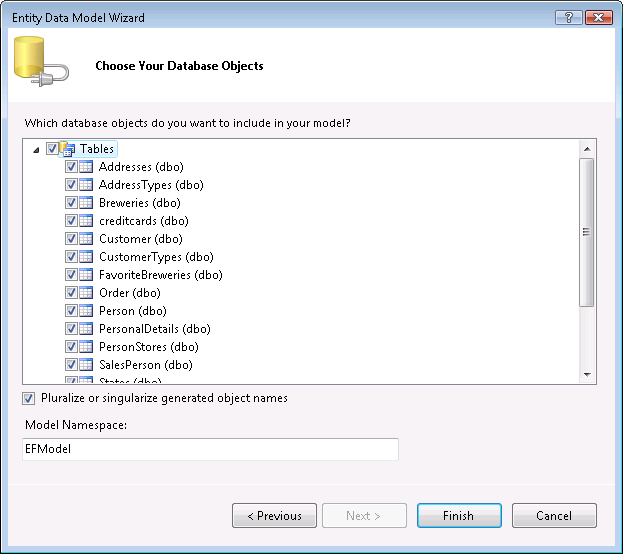
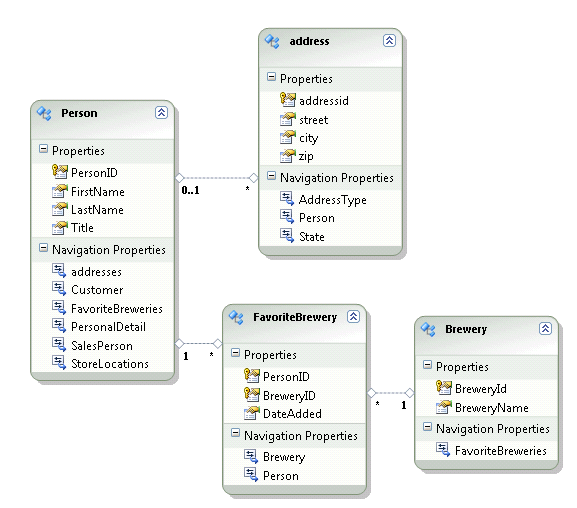
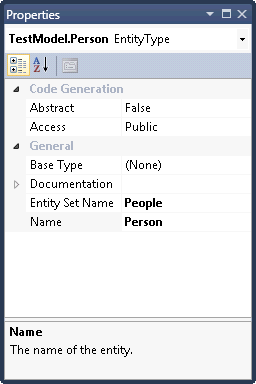
Below the object list is an option, new to EF4, called Pluralize or singularize generated object names, which is checked by default. As shown in Figure 2 and Figure 3, when the model is generated, all of these names have been worked out. The names of the entities are all correctly singular; the EntitySet names are plural (e.g., People, Addresses, Breweries). Not only are the entity and entity set names worked out, but the navigation properties as well. Navigations that point to an EntityReference are all singular (e.g., Address.Person) and those which point to an EntityCollection are all plural (e.g., Person.Addresses).
Complex Type Support
Complex types are an extremely useful feature of an Entity Data Model that allow you to encapsulate a selection of properties into a new sub-type in an entity. If you have a Person entity with a number of properties to describe personal details such as BirthDate, MaritalStatus and TwitterUserName, you could combine these into a complex type and make that type a property of the Person entity. Complex types are not new to EF, but unfortunately, the first version of the designer does not support them, which makes them difficult to use.
The most important improvement to stored procedure support is the ability to incorporate stored procedures that return unknown types.
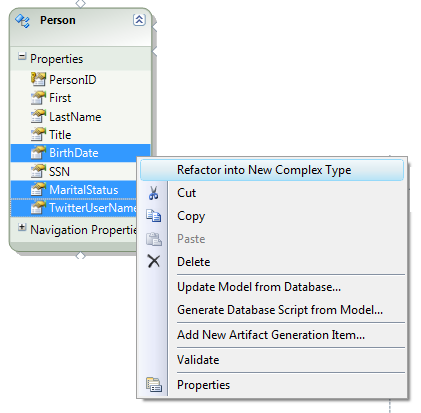
Thankfully, the EF4 designer now supports complex types. You can create one by choosing “Refactor into New Complex Type” from the context menu when you’ve selected the desired properties (Figure 4).
Creating the complex type has two effects on the model. First, a new type is created in the conceptual model. This is not displayed in the designer, but is visible in the Model Browser as shown in Figure 5. The default name of my new type is ComplexType1, which I will eventually change to something more meaningful.
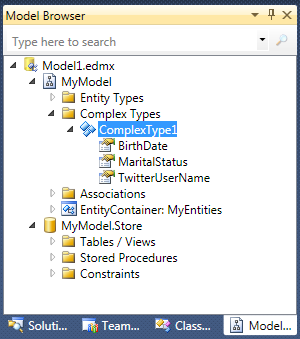
Using the Model Browser you can access the Properties window for the complex type’s properties (BirthDate, etc.) if you want to change any of their attributes.
Back in the designer, you will see a new property in the entity where you created the type. The default name of the property is ComplexType, which I have changed to Personal. Notice in the entity mappings shown in Figure 6 that the BirthDate, MaritalStatus and TwitterUserName properties have been changed to Personal.BirthDate, Personal.MaritalStatus and Personal.TwitterUserName.
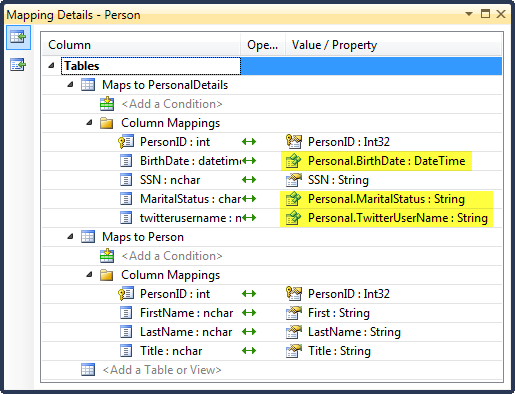
Once you have created this complex type, if you have other entities that contain these same properties, you can reuse the complex type there as well.
Complex types have been available since the first version of Entity Framework and are a great tool for developers who are fond of using value objects. However, the lack of designer support made them nearly impossible to use. I think with EF4, people will truly take advantage of these types. You can read more about how to use them in your applications in this MSDN Online topic: http://msdn.microsoft.com/en-us/library/bb738466(VS.100).aspx.
Model First Design
While designing a model based on an existing database is very convenient, quite often you are beginning a project from scratch and don’t have a database already in place. EF4 allows you to design a model in the EDM Designer and then generate script to create the database for you on the fly. This is an iterative process so that as you evolve your model, you can regenerate the database. Notice, however, that I said regenerate, not update, a database from a modified model. When you run the script to recreate all of the database objects, the database will not retain your data. Therefore, you will need to create a way to save and repopulate any data after the fact. To work around this problem, I’ve been using the Database Publishing Wizard to create a script to recreate just the data, not the objects, and then running that script after I have regenerated the database.
In addition to recreating the database when the model changes, you can also update the model if the database changes. You may have the benefit of a DBA who can assure that the database is well-designed, then apply those modifications back to the model.
As an example scenario, I’ve decided that I want to keep track of my bike rides in more detail than what I have been doing in an Excel spreadsheet. I can create a new ADO.NET Entity Data Model item but select the ever-present “EmptyModel” option in the wizard. This option has been available from the early days of EF, but until now, there wasn’t much support for going down this path.
Using the designer tools, I’ve created a fairly simple model show in Figure 7 that contains some one-to-many relationships as well as an inheritance to single out the routes that I don’t want to try on my road bike.
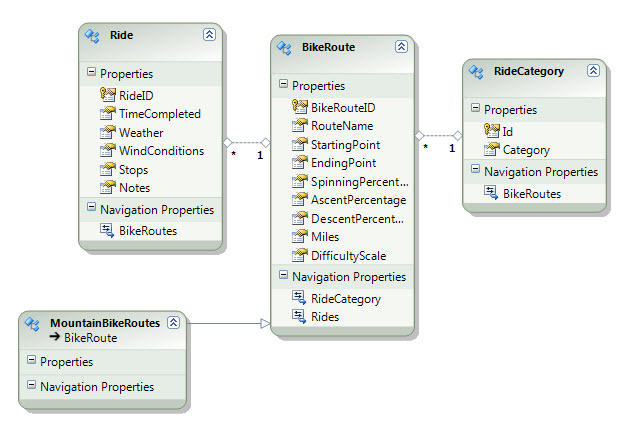
Remember that you are using the model to describe everything about your database schema. You will need to explicitly define attributes such as default values and identity columns. For each of the entities in my model, I have selected the EntityKey properties (RideId, BikeRouteID and Id) and changed their StoreGeneratedPattern property to Identity. That way I know my database will auto-increment the keys.
The model’s context menu has an option to “Generate Database Script from Model…”. When you select this option you’ll find that you do need to point to an existing database. The script won’t create the database itself, just the schema, which means that you’ll need to create the database yourself in advance.
After selecting the database, the script will be generated and presented in the wizard as in Figure 8.
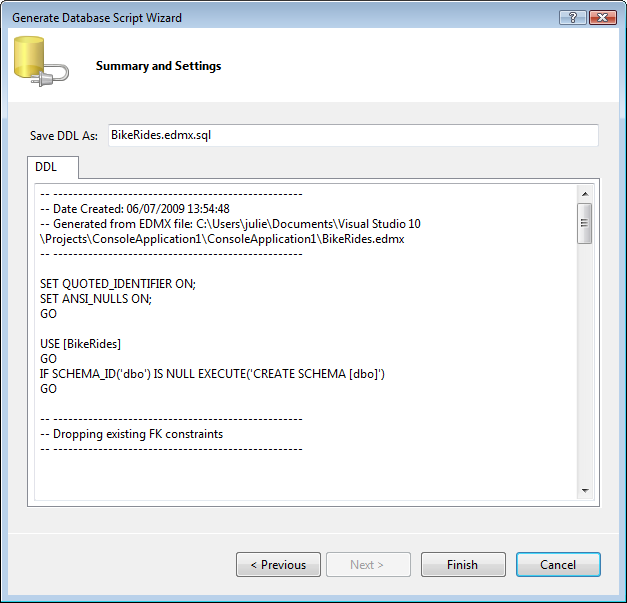
When you click Finish, a warning screen will pop up telling you that the model’s SSDL and MSL metadata files will be overwritten. Unless you have customized those files, this will normally be okay.
When the wizard is complete, your database still has not been impacted. It is up to you (or your DBA) to run the script. The tables are built along with the primary keys and the constraints that define the foreign key relationships.
The inherited type was interpreted as a new table, which translates to Table per Type hierarchy. I thought about how I could have forced a Table per Hierarchy (TPH) inheritance where both types are defined in a single database table. I could do this by including an IsMountainBikeRoute scalar property in the BikeRoute entity, generating the database, and then modifying the mappings between BikeRoute and MountainBikeRoutes. However, this is not a sustainable solution because if I wanted to regenerate the database, I would have to repeat these steps.
Customizing the DB Generation Script
The mechanism that reads the model and generates the database script is completely customizable and contains two parts. The first is a T4 template (Text Template Transformation Toolkit) which is a code generation feature that was introduced to Visual Studio 2008. You will read more about how EF4 takes advantage of T4 templates further on in this article. See the Resources sidebar for more information on T4 in general. By editing the T4 template, you can impact the generated script file.
Part two of the mechanism is a workflow associated with the script generation. Look in the Resources sidebar for a link to a blog post by Danny Simmons from the EF team about impacting the model’s workflow.
Other Designer Enhancements
The designer includes a number of other improvements including bug fixes and enhanced schema support.
One bug that has caused developers a lot of pain in EFv1 is a problem that occurs if you make changes to a model but close it without saving. You can no longer open the model in the designer and have to open it up in XML first to fix the problem. This was not an obvious work-around, and it was one of the first things I looked for in the EF4 designer. Happily, the EF team fixed it.
Another interesting problem in the first designer occurred if you deleted an entity from the model. The related table description in the SSDL would not get deleted. Because of this, if you ran the update wizard, you would not have the opportunity to pull the table back into your model. In the new designer, if you delete an entity from the design surface you will be presented with a confirmation screen as shown in Figure 9.
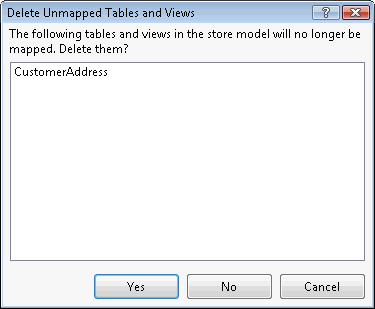
But look at its question carefully. It is not asking the typical “are you sure?” Instead, it is asking if you want the table to be deleted from the store model (SSDL). If you are planning to use that table for other purposes, perhaps to map into a split entity, then you do not want to remove it from the SSDL. However, if there is a chance you may need to bring the table back in, then you do need to remove it. The reason is that the update wizard compares the actual database schema to the store model (the SSDL) and only presents tables that do not already exist in the store model.
Thankfully, the EF4 designer now supports complex types.
The EF team surfaced many properties in the designer that previously required going directly into the XML. Some notable properties that you will find are:
-
OnCascadeDelete provides client-side cascade deletes of in-memory entities related to one that is being deleted. -
StoreGeneratedPattern allows you to indicate that the database will take care of populating a field, such as an auto-incremented identity field. This is used only for the database script generation when using the model-first design. -
Referential Constraint In associations, you can also now define PK/FK constraints right in the designer. Developers will find this very helpful when Microsoft introduces foreign key support to the EDM in VS2010 Beta 2.
Much Improved Stored Procedure Support
One of the core tasks of the Entity Framework is its ability to generate database commands from your LINQ to Entities or Entity SQL queries. Version 1 has some stored procedure support but what is there is minimal and a good chunk of it is not even supported by the designer.
But so many developers are dependent on stored procedures that the lack of robust stored procedure support was one of the loud complaints about EFv1.
The Beta 1 of EF4 features a number of great improvements around stored procedures.
Relaxed Function Mapping
Function mapping gives you the ability to map Insert/Update and Delete stored procedures directly to entities. When you use these mappings, EF will use your stored procs for those entities rather than build commands on the fly when you call SaveChanges.
In EFv1, function mapping was an all or nothing venture. If you wanted to map one stored procedure, you needed to map all three. Now you can map just one or two and EF will generate a command for whichever operation does not have a function mapped to it.
There are two caveats to be aware of in Beta 1. The first is that you cannot map functions entities that contain ComplexTypes. The second is that if you have the Update function mapped but no Delete function, you will get an UpdateException if you try to delete one of those entities. Assuming the entity type is Customer, the error message is “Cannot find the DeleteFunctionMapping for EntityType ‘Customer’ in the mapping file.”
One rule that remains in place is that if you do function mapping for an entity in an inheritance hierarchy, you must map the other entities in that hierarchy.
A 5-Star Feature: Using READ Stored Procedures that Return Non-Entities
The most important improvement to stored procedure support is the ability to incorporate stored procedures that return unknown types. In EFv1, there was no way to incorporate stored procedures that return random columns. If your procedure’s return data did not match an entity or a scalar value, you could not use it without doing a lot of grunt work that involved creating entities and manually creating virtual SSDL metadata to map those entities to. For most developers, it was just not worth the effort.
In EF4, you can now map stored procedures to complex types. Complex types are not required to map back to the database in the way that entity types are. Let’s take a look at how this works.
In the Beta 1 version of EF4, the first step is to create the complex type manually. This is not optimal since it would be much nicer to be able to automatically create these types from the stored procedure the way LINQ to SQL is able to. But it’s what we have in Beta 1 and we can only hope that the story will improve as we move towards RTM.
Earlier in this article, you created one from a set of entity properties. However, there’s another way. You can create one directly in the Model Browser.
Let’s first take a look at the stored procedure that we want to base this on. This procedure returns a list of years with total sales for each year for any years whose total sales is greater than the supplied minimum.
CREATE PROCEDURE dbo.SalesbyYearMinimum
@MinSales int

AS

SELECT
  MIN(YEAR(orderDate)) AS Year,
  SUM(subtotal) AS AnnualSales
FROM SalesLT.SalesOrderHeader
GROUP BY YEAR(orderdate)
HAVING SUM(subtotal)>@minsales
Our complex type will need to have a string for the Year value and a Double for the AnnualSales.
In the Model Browser, expand the Model view, right-click Complex Types and choose Create Complex Type from the menu.
A new type will be displayed in the Complex Types section, which you will want to rename from the default. I changed mine to AnnualSales.
Now you can add properties to the complex type by right-clicking and selecting Add, Scalar Property and the appropriate type, as shown in Figure 10.
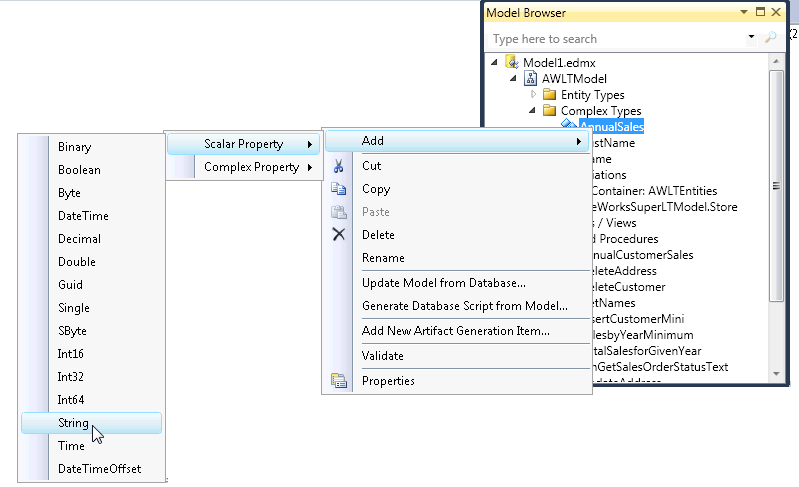
Modify the property names and metadata in the Properties window.
Next, you want to import the function. This assumed that you already have included the stored procedure in the model. If you haven’t yet done that, run the Update wizard and select the stored procedure. With the procedure in the model, it will be displayed in the Store section of the Model Browser under Stored Procedures as you can see in Figure 11.
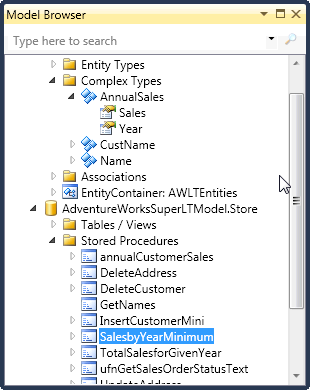
Right-click the stored procedure and select the Add Function Import menu option.
This wizard is not new to EF4, but the Complex option is. Choose Complex and then select the desired complex type from the drop-down list (Figure 12).
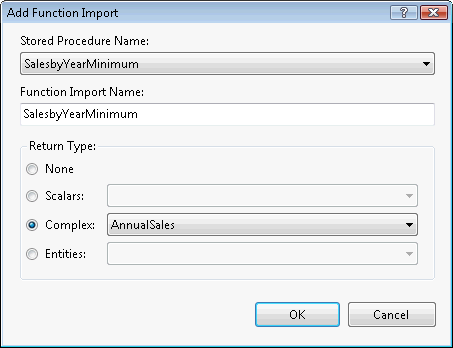
If you are using the default code generation, or have not removed the bits from a custom T4 template that will perform the next step, you should now find this function as a method of your ObjectContext as shown in Listing 1. Be sure to save the model to get the code re-generated.
The critical code in there is the ObjectContext.ExecuteFunction method.
Now I can simply call this method from my context and get back types that I can work with.
List<AnnualSales> sales=
  context.SalesbyYearMinimum(5000).ToList();
It’s important to remember that these complex types are not entities. Changes to their values will not be tracked by the context.
The designer support for this feature is much improved, but could benefit from a few more tweaks. I don’t like having to create the complex type myself and I don’t want to have to repeat this process if I have lots of stored procedures. Nevertheless, it is so much better than the laborious workaround required in EFv1. So I’ll live with this and hope that the feature will be improved upon for Beta 2.
Better Access to READ Stored Procedures that Return Non-Entities
One thing you may have noticed in the previous section is that I was able to call the function easily from the ObjectContext. This is also new to EF4. In EFv1, you can create function imports for stored procedures that return scalars. But the only way to call those functions is using EntityClient, meaning you were back to coding up connections and commands.
Now both types of these functions-those which return scalars and those which return complex types-can easily be called from the context with the generated method, or directly using the ExecuteFunction method.
What About Multiple Entity Type Results?
In the EF Extensions that the Entity Framework team have built and shared on MSDN Code Gallery (code.msdn.com/adonetefx), you will find an extension for EFv1 to enable calling stored procedures that return multiple entity types. I was not able to find a comparable feature built into the Beta 1 of EF4.
Model Defined Functions
A frequent requirement when creating models is to add properties that are computed from other entity properties. A standard example of this begins with a database that provides both a FirstName and LastName column in a particular table. While it makes sense to keep these separate in data entry, we typically want to present those properties as a single FullName property.
EFv1 makes this possible by extending the generated classes and adding the FullName property there. However, this means that you must add this new property to your code, not to the model. Quite often, it is preferable to place this logic directly in the model for better reuse. More importantly, you cannot use the class-level properties in queries. EF4 changes this with the new model defined functions.
Model defined functions allow you to add functions that are based on items in the model. They are described in the conceptual model where you already have the ability to add functions (those that map back to functions/stored procedures in the SSDL). There is a new child element of the Function element called DefiningExpression and it is this DefiningExpression that allows you to add logic into the model.
A DefiningExpression is expressed in Entity SQL as though you were merely writing an Entity SQL query against the model. However, you only write the projection (SELECT) portion.
For example, if you want to write an Entity SQL query to calculate the full name of a person, it would look like this.
SELECT Trim(p.FirstName) + “ “ + p.LastName
FROM MyEntities.People AS p
For the DefiningExpression, you would just need the projection from the query.
<DefiningExpression>
  Trim(p.FirstName) + “ “ + p.LastName
</DefiningExpression>
The DefiningExpression is wrapped in a Function element along with a parameter declaration. The FullName function below defines a String return type and a Person parameter and then the expression.
<Function Name="FullName"
          ReturnType="Edm.String">
  <Parameter Name="Person"
             Type="TestModel.Person">
  </Parameter>
  <DefiningExpression>
    Trim(Person.FirstName) + " " +
    Person.LastName
  </DefiningExpression>
</Function>
It is simple to use these functions in Entity SQL queries in your code.
SELECT VALUE TestModel.FullName(p)
FROM TestEntities.People AS p
The default code generator that builds your entity classes from the model does not include these functions in those classes. Therefore, they are not readily accessible to LINQ to Entities queries. To call it from LINQ requires that you define a method in your business classes so that LINQ will know how to find the function.
Be aware that the method does not go into the partial class of any of the entities. I use a common static (Shared in VB, or you can use a Module) class, which I call Functions, to expose the functions to LINQ to Entities queries. Note the syntax of the method. It will throw an exception if an attempt is made to call the function directly as it can only be used in a LINQ to Entities query.
public static class Functions
{
  [EdmFunction("TestModel", "FullName")]
  public static string FullName(Person p)
  {
    throw new NotSupportedException
    ("This function can only be used “ +
      “in a query");
  }
}
Now you can use a LINQ query to call the function.
from p in context.People
select Functions.FullName(p)
Model defined functions are quite flexible. For example, the function could define its own return type.
This function in Listing 2 defines a ReturnType that contains two properties, FullName and Age, and then uses the DefiningExpression to return both values. Because the return type is a RowType, you will need to use the Entity SQL Row() function to return a row.
When calling this function, there is no specific type to return and therefore you need to catch it in a DbDataRecord whether you are calling it from Entity SQL or from LINQ to Entities. Then you must extract the values from the DbDataRecords in the same way that you do with rows of a DbDataReader. It’s a little extra work to build your own objects from the results. But consider the fact that this is a simplistic example, and depending on the scenario you may want to use, the extra effort can certainly be justified. Look in the Resources sidebar for a link to an MSDN article on reading DbDataRecords as well as a blog post of mine that details working with MDF more deeply.
Although you could add this logic into the entity’s partial classes, having the ability to customize your model this way makes it easier to share your models across projects and business domains without having to rely on the use of redundant code. You could easily change the generated code to automate the additional step of adding the method calls for LINQ queries.
Defining functions directly in the model also opens up a lot of possibilities that may be realized by the time EF4 releases or in future versions. However, this capability also forces you to be explicit about which functions belong in the model and which should be coded into your business logic.
Just Some Reminders
Unfortunately, as of this writing, Beta 2 is still not available yet so I am not able to add anything about the much-anticipated foreign key support. Until then, keep an eye on the two critical blogs from the Entity Framework team: http://blogs.msdn.com/adonet and http://blogs.msdn.com/efdesign. The EFDesign blog already has a number of posts on the foreign key support. The ADONET blog has a lot of great posts on the Feature CTP which contains the Code-Only design support, the Self-Tracking Entities and some helpful templates for POCO. The Feature CTP is also getting it’s first overhaul and you can read about what’s coming on the EFDesign blog.
Summary
As you have seen, the changes coming to Entity Framework in Visual Studio 2010 and .NET 4.0 could not even fit into one article! And there is more still that I have not covered. For example, I’ve been happy to find many small but useful bug fixes and enhancements in the designer.
EF4 is so different that I am in the process of revising my book, Programming Entity Framework, so that it continues to be relevant with the new version.
If you haven’t yet downloaded the beta for Visual Studio, you can find it at msdn.microsoft.com/vstudio. The beta includes many changes to Visual Studio and .NET besides what’s changed in Entity Framework. It’s a great step forward.
Listing 1: The SalesbyYearMinimum function generated in the ObjectContext class
public ObjectResult<AnnualSales> SalesbyYearMinimum
 (Nullable<global::System.Int32> minSales)
{
  ObjectParameter minSalesParameter;
  if (minSales.HasValue)
  {
    minSalesParameter =
     new ObjectParameter("MinSales", minSales);
  }
  else
  {
    minSalesParameter = new ObjectParameter("MinSales",
                         typeof(global::System.Int32));
  }
  return base.ExecuteFunction<AnnualSales>
  ("SalesbyYearMinimum", minSalesParameter);
}
Listing 2: The CalculatedDetails function defined in the conceptual model
<Function Name="CalculatedDetails">
  <ReturnType>
    <RowType>
     <Property Name="Age" Type="Edm.DateTime"
               Nullable="false"/>
     <Property Name="FullName" Type="String"
               Nullable="false" />
    </RowType>
  </ReturnType>
  <Parameter Name="Person" Type="TestModel.Person" />
  <DefiningExpression>
    Row(DiffYears(Person.PersonalDetail.BirthDate,
              CurrentDateTime()),
    Trim(Person.FirstName) + " " + Person.LastName)
  </DefiningExpression>
</Function>
