


Hot on the heels of the groundbreaking release of ASP.NET MVC 1.0, the ASP.NET MVC team at Microsoft has already released the first Community Technology Preview (CTP) of version 2. I have already predicted that Microsoft’s MVC Framework will become the new way to develop Web applications on top of ASP.NET. In this article, I will give a first
look at the plans for version 2 and some of the features that already work in the first CTP.
Microsoft is targeting the second release of the ASP.NET MVC Framework for the enterprise customer. The main two themes that Microsoft is focusing on are:
- Improved productivity
- Enterprise ready
Some companies are already leveraging ASP.NET MVC 1.0 on large systems. Others are slower to adopt. At this time, Microsoft released MVC 1.0 only about 6-8 ago and some more conservative clients are still using Visual Studio 2005 for development. With the pace of Microsoft’s releases, I believe we will see a large number of companies who haven’t adopted .NET 3.5 yet jump straight to .NET 4.0.
When Visual Studio 2010 releases, many companies will feel the strong urge to upgrade development platforms so that they aren’t left behind. It is not a good place to be when you are two versions behind current. If a large number of companies jump to Visual Studio 2010, I think we’ll see a massive retooling of these developers. Not only will they pick up C# 4.0, but they will also have a choice between Web Forms and MVC.
Most of these developers who are retooling will choose ASP.NET MVC because of its refreshing simplicity and also because of the massive productivity enhancements over Web Forms. While Web Forms continues to dominate the designer experience, ASP.NET MVC marches on toward enhanced productivity in code, not in the designer. This is one of its greatest strengths, and libraries like MvcContrib add to the benefits of adoption.
This article is an introduction to ASP.NET MVC 2 using CTP 1. It assumes knowledge of version 1, which you can gain by reading one of the several books on the topic such as ASP.NET MVC in Action(Palermo, Scheirman, Bogard, published by Manning Publications Co.): http://mvcbook.jeffreypalermo.com/.
Let me first discuss some of the plans for version 2 and then run through some examples that are possible with the CTP 1 bits.
Version 2 Release Plan
Microsoft has a detailed roadmap on the CodePlex site that they keep up to date at http://aspnet.codeplex.com. Their published theme is to improve productivity and make the framework enterprise ready. What that means is up to the reader, but some of the major areas on which they are working are:
- Templated helpers
- Areas
- Support for data annotations
- Client validation
- Asynchronous controller actions
- Fixing known issues
The first three have some working bits in the first CTP, and I will look at that code in this article. First, I’d like to give some commentary on the deployment configuration and then the implications of each of these major features and why you should or should not care about them.
The CTP includes pretty good implementations of template helpers as well as the data annotation and model binder validation.
Dependencies and Runtime
ASP.NET MVC 2 will ship in the box with Visual Studio 2010, but it will also be available as an add-in for Visual Studio 2008 SP1. The server will require .NET 3.5 SP1 minimum to run a version 2 Web application.
It will also work seamlessly with MSDeploy for deploying apps to IIS, file locations, FTP and more. If you aren’t familiar with MSDeploy, think of it as the .NET WAR file (from the Java space). It will allow you to package up your ASP.NET MVC application in a single zip file and deliver it to your production server administrators. Then, your server administrators will be able to unpack your deploy package and run an installation routine you created on the production server. Automated deployment packages are long overdue, and MSDeploy is the ticket to not rolling your own installation frameworks like many of us have. Check out http://blogs.msdn.com/webdevtools/archive/2009/03/10/how-does-web-deployment-with-vs10-and-msdeploy-work.aspx for more info on MSDeploy from Vishal Joshi.
The GuestBook Application
The following example code and figures are from a combined sample that uses template helpers, the new HttpPost attribute, the new DefaultValue attribute, and DataAnnotation validation. Because readers of my articles and books are typically tired of trivial examples, this application is a fully separated app. It leverages Onion Architecture and puts a small domain model in the center. I’m using NHibernate for the data access and one view model per view as my dominant presentation pattern. I’m doing manual mapping to and from my domain model to view models, but in larger projects, I’d pull in the AutoMapper library in a heartbeat.
I’ll start creating an ASP.NET MVC 2 project in Visual Studio 2010. Figure 1 shows the default start page.
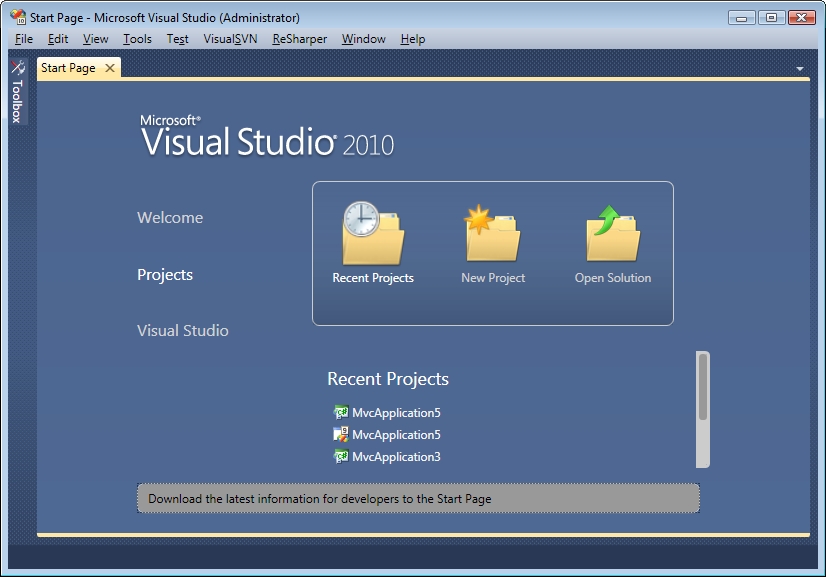
You can see that it looks quite different from Visual Studio 2008. VS 2010’s UI is almost completely WPF. You can expect the next version of WPF to have some needed enhancements because using it for Visual Studio’s UI uncovered some serious limitations in the framework.
I’ll select New Project and you can see a redesigned New Project dialog box as shown in Figure 2.
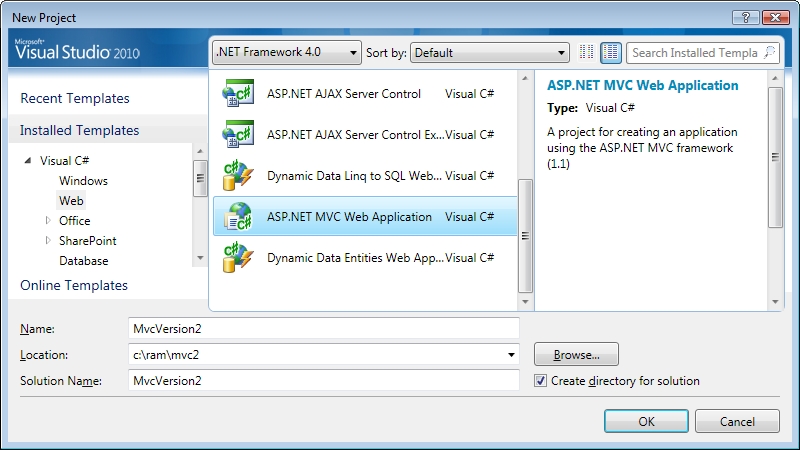
In VS 2010, ASP.NET MVC 2 ships in the box as the default version, so I will select it directly. Visual Studio still enjoys multi-targeting and so if you select .NET 3.5, you can still create an ASP.NET MVC 1.0 application.
Because there are a few annoying bugs in VS 2010, I will use VS 2008 with ASP.NET MVC 2 CTP1 installed.
Application Overview
Now let me show you the domain:
using System;
using System.Drawing;

namespace Core
{
   public class Guest
   {
     public virtual Guid Id { get; set; }
     public virtual string FirstName { get; set; }
     public virtual string LastName { get; set; }
     public virtual KnownColor FavoriteColor {
        get; set; }
   }
}
The domain is very simple and consists of a single aggregate root, the Guest class. Some may argue that this simple of a model is not a domain model, but that isn’t important to this article. I am also using the repository pattern for persistence. The IGuestRepository interface looks like this:
namespace Core
{
   public interface IGuestRepository
   {
      void Save(Guest guest);
      Guest[] GetRecentGuests(int numberOfGuests);
   }
}
The Core project owns the repository interface, and the Infrastructure project implements the interface. Data access is implemented in a decoupled way with an NHibernate mapping as follows:
<?xml version="1.0" encoding="utf-8" ?>
<hibernate-mapping xmlns="urn:nhibernate-mapping-
2.2"
                           namespace="Core"
                           assembly="Core">

   <class name="Guest" table="Guests"
             dynamic-update="true">
      <id name="Id" column="Id" type="Guid">
         <generator class="guid.comb"/>
      </id>
      <property name="FirstName"/>
      <property name="LastName"/>
      <property name="FavoriteColor"/>
   </class>
</hibernate-mapping>
From this point forward, I won’t dig into data access because ASP.NET MVC is a presentation layer framework and is completely agnostic to the method of persistence. If you would like to examine the entire application in great detail, you can download the full source code for the article.
Before jumping into UI code, I am going to give you a quick run through of how the application behaves. First, if you go to the home page, you will see a list of people who have signed the guest book. Figure 3 shows the two people who have signed in so far.
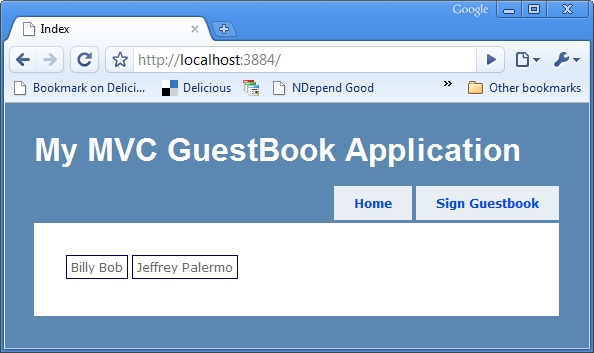
I can also click the navigation to sign in to the guestbook as shown in Figure 4.
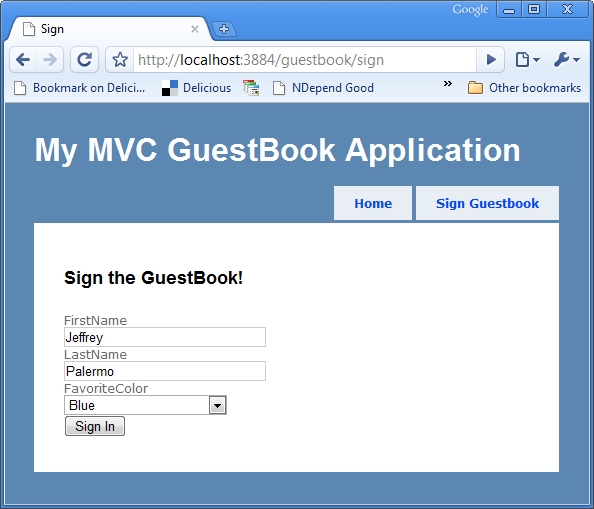
Next, I’ll show you the code necessary to make this possible. I’ll look at both the HomeController and the GuestBookController. Each of these controllers are almost as you would expect to see them with version 1.0 of ASP.NET MVC. Most of the enhancements I’ll show you are additions that you can use within a view model class and views.
Templated Helpers
THIS FEATURE IS THE MOST GROUNDBREAKING ONE ON THE LIST! There! I got that off my chest. Seriously, this, above all others, is the key to developing applications with light speed. On top of that, the views become very small because the common HTML markup is in templates and is used over and over. Combine template helpers with one view model per view page, and this approach results in application with very small views and very structured and consistent markup.
The template helpers come with support for display pages as well as pages for form posting. I will cover each of these independently.
Display Enhancements
Listing 1 shows the HomeController. This controller uses the IGuestRepository for retrieving the most N recent guests. You can see here that we are leveraging the new DefaultValue attribute on the Index action. If you don’t provide this parameter, the default will be model-bound in as 10.
The rest of the action merely maps the domain model into a view model that can be sent to the view for rendering. You’ll see that view models are very special classes, and for real applications, it is seldom appropriate to send a domain model entity directly to the view. Our view model class is GuestDto. This view model is just for display purposes and has two properties as shown in Listing 2.
You can also see that we’re mapping a Guest object to a GuestDto, and that GuestDto is performing the mapping work inside its constructor. If this application gains a few more entities, I would quickly introduce the AutoMapper library to handle object-to-object mapping. Moving between domain model and view models requires mapping each way, and that code can become repetitive. AutoMapper reduces that chore to convention-based configuration and I highly recommend it. Jimmy Bogard manages the AutoMapper open-source project. Jimmy harvested AutoMapper from several of his projects at Headspring Systems. You can find it at http://www.codeplex.com/AutoMapper.
Now that you have an array of GuestDto in ViewData, let me show you what the view looks like for HomeController’s Index action in Listing 3.
Notice right away that you aren’t doing much formatting in the view. In fact, the new API you’re using from ASP.NET MVC 2 is:
<%=Html.DisplayFor(x=>dto) %>
This examines the view model and decides how to render the object for display. You’ll call this line once for each object in the array.
Moving between domain model and view models requires mapping each way, and that code can become repetitive. AutoMapper reduces that chore to convention-based configuration.
Glance back at Figure 3 and you can see that you have customized the view by putting a box around each guest and floating the boxes left. The template helpers feature allows the definition of DisplayTemplates based on type. Figure 5 shows the views structure where you’ve defined a view for GuestDto.
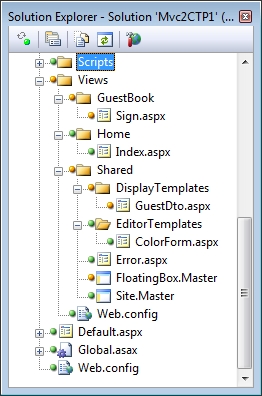
The DisplayTemplates go inside /Views/Shared and the templates are reusable in an unlimited number of views. The DisplayTemplates (and the EditorTemplates, which you’ll explore in just a bit) are partial views. Partial views can use either the ASCX extension or ASPX extension. It makes no difference which one you use and there is no performance difference as well. The one advantage to using ASPX for partial views is that you can create template partials using master pages. The following two snippets show the sources for GuestDto.aspx and FloatingBox.Master.
<%@ Page Language="C#"
   Inherits="ViewPage<GuestDto>"
   MasterPageFile=
"~/Views/Shared/FloatingBox.Master" %>
<%@ Import Namespace="UI.Models"%>

<asp:Content ContentPlaceHolderID="Main"
runat="server">
   <%=Html.DisplayFor(x=>x.FirstName) %>
   <%=Html.DisplayFor(x=>x.LastName) %>
</asp:Content>
<%@ Master Language="C#"
   AutoEventWireup="true"
   Inherits="System.Web.Mvc.ViewMasterPage" %>

<div
   style="float:left;border:solid 1px navy;
margin: 2px;padding:4px;">
   <asp:ContentPlaceHolder ID="Main"
runat="server" />
</div>
The key to the partial for GuestDto are the lines such as:
<%=Html.DisplayFor(x=>x.FirstName) %>
These new HTML helpers are strongly typed around view model properties. Not only does that render a text box for string values, but they also render labels. I have completely overridden the default templating, which is very basic.
Now that you have seen how to display values from a view model using template helpers, let’s examine how this changes the data entry and validation game.
Support for DataAnnotations
In short, support for data annotations is UI validation. Before you jump to conclusions, this is not a business rules engine or a comprehensive validation framework.
Microsoft has enhanced the default model binder so that it looks for any attributes that derive from:
System.ComponentModel.DataAnnotations.
ValidationAttribute
When it finds one of these, it runs the validation code in the attribute class to determine if there is a ModelState error to report. Along with the built-in data annotation attributes shown in Figure 6, you can easily create your own, and ASP.NET MVC 2 will run the validations just before the action method is called but right after the GET or POST request is model-bound into the action parameters.
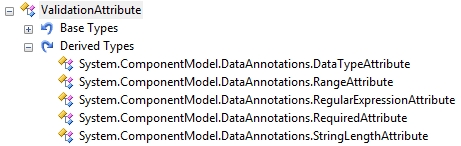
The advantage of this is that you get data consistency checks very early on and mostly for free. Before you run any code in an action method, you will know if the entered value is a valid DataTime. You will know if a required field was omitted.
Many ASP.NET MVC teams are already leveraging Castle Validators with a custom model binder to provide this same functionality. If you need this functionality now, you will want to read Gokhan Altinoren’s tutorial on hooking up Castle Validators at http://altinoren.com/PermaLink,guid,bca0aba7-dbaa-4ccf-bcf3-4d76efab1a40.aspx, or you can borrow the code from CodeCampServer at http://codecampserver.org.
Data Entry Enhancements
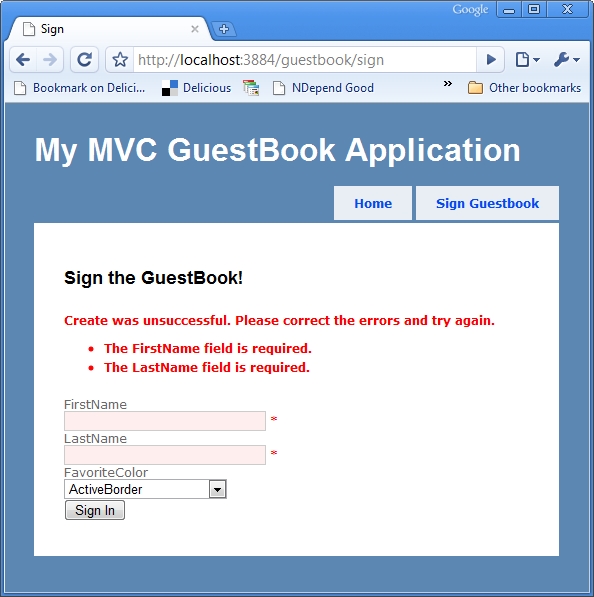
You saw in Figure 4 the screen that is rendered by the GuestBookController. This is a simple data entry screen with three required fields. Listing 4 shows the view for this page. Normally, you would have expected to see the layout for this data entry view here, but it is quite short. In fact, it can be distilled down to the following four lines of code.
<% using (Html.BeginForm()) {%>
   <%=Html.EditorFor(x=>x) %>
   <input type="submit" value="Sign In" />
<% } %>
The new Html.EditorFor template helper is the data entry counterpart for DisplayFor. Like the display templates, you can leave rendering up to the defaults or you can provide a custom template based on the type being rendered. Glance back at Figure 5 and you will see the EditorTemplates. Before you dive into what makes this view work as expected, you’ll find value in examining the view models in play. Listing 5 shows the GuestForm class and ColorForm class. Using the suffix “Form” is a convention you can adopt for view model types that serve to capture data from a form post only for the purpose of first-level validation.
Remember that you’re performing manual mapping so you can ignore the MapToGuest() method. Now turn your attention to the Required attributes affixed to each property. These are from the DataAnnotations namespace that come with ASP.NET Dynamic Data. They are a good start to first-level validation, but Castle Validators is much more comprehensive and very easy to wire in in the same fashion. This is only the first CTP, however, and it will mature as the release gets closer. The default validators include ranges and regular expressions, so they are quite flexible. You can also derive from System.ComponentModel.DataAnnotations.ValidationAttribute if you’d like to perform some completely custom validation.
Let’s take a peek at the meat of the GuestBookController’s Sign action here:
[HttpPost]
public ActionResult Sign(GuestForm form)
{
   if (!ModelState.IsValid)
   {
      return View(form);
   }

   _repository.Save(form.MapToGuest());
   return RedirectToAction(Constants.INDEX,
Constants.HOME);
}
You can see two things going on here. First, model state validation occurs before the action method is called. The DataAnnotations are detected and run automatically, and any errors are added to ModelState. You can immediately check the validity of model state and re-render the form if necessary.
The second new item you will notice is the HttpPostAttribute that is used on this action to denote that it can only be run on an HTTP Post request.
You saw in Figure 4 that the data entry form wasn’t completely standard. There is a color select form element on the screen. Let’s dive into what makes that happen.
In the GuestForm class, you see that the type of the FavoriteColor property is ColorForm. ColorForm has a single property, which is System.Drawing.KnownColor, and enum. System.Web.Mvc.ViewPage<T> has a limitation where T can only be a reference type. That will probably be changing, but for now, I have wrapped KnownColor in a reference type so that I can provide a partial editor template for it.
In Figure 5, you see that there is a ColorForm.aspx view in the EditorTemplates folder. When rendering an edit screen and encountering the type ColorForm, this custom partial will be rendered. The view contains the following code:
<%@ Page Language="C#" Inherits="<ColorForm>" %>
<%@ Import Namespace="System.Drawing"%>
<%@ Import Namespace="UI.Models"%>
<%=Html.DropDownList("", new SelectList(
   Enum.GetNames(typeof(KnownColor)))) %>
Five short lines of code is all it takes to instruct ASP.NET MVC to render a select list with a list of the known colors. The last piece that closes the loop is a custom model binder that binds a string into a ColorForm instance. The model binder code is registered in the Global.asax file using a single line of code:
ModelBinders.Binders.Add(typeof(ColorForm),
   new ColorFormModelBinder());
You can see the source for ColorFormModelBinder in the following code snippet. It controls how to transform a string that comes out of the HTTP POST into a ColorForm object.
public class ColorFormModelBinder : IModelBinder
{
   public object BindModel(ControllerContext
        controllerContext,
      ModelBindingContext bindingContext)
   {
      ValueProviderResult result =
        bindingContext.ValueProvider[
          bindingContext.ModelName];
      string value = result.AttemptedValue;
      return new ColorForm(value);
   }
}
Validation functions of the GuestForm object require all three fields. If you omit a value, you’ll see the standard errors similar to Figure 7.
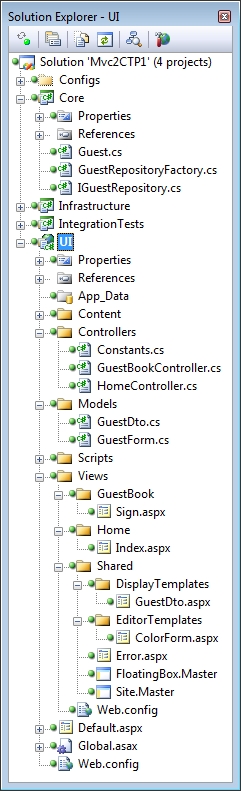
Matching a custom partial by type is just the beginning, and I hope that by the time Microsoft releases version 2 we can specify template helpers by any criteria we wish, not just types. Also, standard formatting like label positions, example text and required field indicators are all things that will benefit from further enhancements to the templated helpers introduced in CTP1 of ASP.NET MVC. Figure 8 shows most of the solution expanded so that you can see the different parts that came into play in this example.
Areas
Several Web frameworks support the concept of an area. An area is a subsection of the Web site that is under a top-level URL fragment. For instance, http://jeffreypalermo.com/blog is the area for my blog within JeffreyPalermo.com. On the server side, ASP.NET MVC 2 will allow the necessary controllers and views to be completely isolated so that the whole system is easier for the team to divide and conquer.
Some customers want to be able to put an area in its own Web application project, so ASP.NET MVC 2 will support that capability. Other teams that work on very large ASP.NET MVC applications actually collapse the number of projects because as the solution gets large, Visual Studio and build automation slows to a crawl. These teams want areas all within the same project, so Microsoft’s areas implementation in CTP 1 supports both models.
An “areas” implementation is the key to a workable componentization strategy for ASP.NET MVC. Once you can pull some controllers and views into a dedicated area, the next step is pretty simple to package that area up for redistribution. As long as the routes, controllers, views, and static files are all packaged up together, control vendors should be able to deliver some pretty compelling multi-page components that just drop into an application.
It remains to be seen how far Microsoft will be able to go with this in version 2 since it is tied to the Visual Studio 2010 release. If you need an areas implementation now and can’t wait, you will probably be interested in Steve Sanderson’s examples at http://blog.codeville.net/2008/11/05/app-areas-in-aspnet-mvc-take-2/. He takes an early concept from Phil Haack’s blog and improves upon it.
Since Microsoft didn’t implement the areas tooling in CTP1, I won’t show you any of the code, but take a look at Figure 9 for an example that has controllers and views organized into areas.
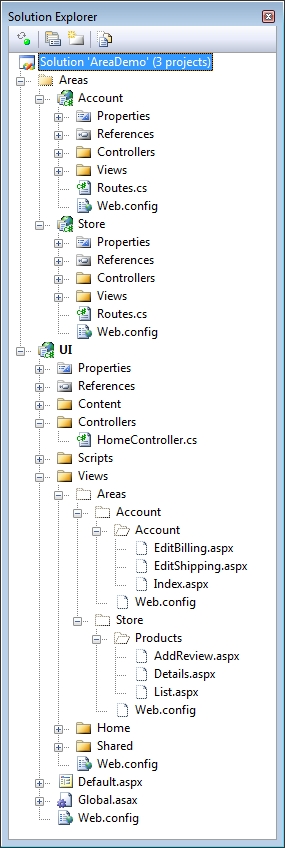
The areas concept is rather simple. The main application, UI, registers its own routes on startup, and then it immediately calls into both area projects to register their routes, hence the Routes.cs files in each area project. For deployment, all the views and content of the areas must be merged with the main Web site. I have displayed excluded folders and files to show that the views for the areas’ controllers have been duplicated in the main Web project.
This concept will also work if you prefer to put the areas inside a single UI project. When MVC applications start to get large, you often remove friction by collapsing the number of projects down to just a few. If your project uses Continuous Integration (CI) then you are motivated to develop with as few Visual Studio projects as possible so that the build moves swiftly through the compile step. The areas implementation that developers will finally see when ASP.NET MVC 2 releases still has a ways to go from the implementation you see here, but that is the purpose of the CTP.
Client Validation
The template helpers and the model binding validation provide a consistent way to do basic first-level validation. The lion’s share of the business rules will still have to have pre-conditions validated in another place besides the UI. For UI validation, many applications rely on a round trip to the server just to find out that a required field was missing.
Microsoft didn’t include client validation in the first CTP, but they plan to ship the jQuery validation plug in with ASP.NET MVC 2 so that jQuery behaviors can be automatically attached to form elements based on the view model. This does require using strongly typed view model objects, however. One view model per view is a good practice anyway because it pulls us away from the template of using our domain model in the view. In nontrivial applications, it is not appropriate to send a Customer or Product object directly to the view. These objects are not intended for use in the presentation layer, and using them as such causes view code to increase because of the code necessary to format them to the screen’s specifications. ASP.NET MVC presentation objects are called view model objects, and it is a good practice to dedicate a view model object to a single view and have it represent exactly the data points necessary for that view. It may be displaying just some of a product, or it may be accepting a form post of a product’s name and description change. Either way, except for trivial 3-page sites like PartyWithPalermo.com, it is not appropriate to send your larger domain objects directly through the presentation layer.
With jQuery validation behaviors being automatically attached to elements that come from annotated view model properties, merely marking a view model property as required will cause jQuery to quickly mark the field and notify the user when appropriate. In this manner, many round trips to the server can be avoided because users will be aware of first-level validation errors right away, even before sending the request to the server.
Asynchronous Controller Actions
Because Web Forms has this feature, many customers are asking Microsoft for the same feature in ASP.NET MVC. It is an interesting feature, but it is one that I would advise you to not intentionally use.
An asynchronous controller would release the ASP.NET worker thread to serve another request if the controller was merely waiting on a Web service call or a long-running operation. When the long-running operation finishes, the controller would grab another ASP.NET worker thread and finish processing.
For Web sites that call long-running processes directly from the presentation layer, performance often suffers when the application is put under moderate load. This is where the asynchronous feature comes to the rescue by stopping the blocking of the worker threads that ASP.NET needs to serve requests.
In my opinion, neither the async feature in Web Forms nor the upcoming async feature in ASP.NET MVC should be a part of your architectural plan from the beginning. You can use the feature to fix bad production performance quickly, but you should design the system better from the start.
When your application calls out to any other application, system, or resource, you have the potential for bad performance. Building in asynchronicity into the architecture is a better approach than confining it to the presentation layer. E-commerce sites do it all the time by giving you a confirmation number right away and then dealing with the case of a declined credit card. They could possibly call MasterCard’s validation Web service immediately, but under heavy load, that breaks down.
It is good that Microsoft is porting this Web Forms feature to the MVC Framework. It will help many teams get through some tough performance problems for long enough to redesign the problematic portion of their system.
Summary
In this article, I have covered the roadmap for ASP.NET MVC 2 and given my opinionated view on the significance of each of them. I have also demonstrated a sample application that uses some of the features that Microsoft delivered with CTP1. The ASP.NET MVC team has plans to release many more CTPs before the final RTM, so we will all be able to see the release mature over time.
ASP.NET MVC 2 is aimed at being enterprise ready and at enhancing developer productivity. In this author’s opinion, the concept of templated helpers does a lot to reduce duplicative code in views, and reducing duplication is a big productivity booster.
