



Why is it that over time, any machine you buy just seems to get slower and slower? Well, I am sure you can chalk some of it up to perception, as your time gets squeezed more and more by work demands and personal demands. However, there are other factors at work on your computer that periodically need your attention. Of course, there
are the obvious things you can do to speed up a machine such as adding more RAM or getting a faster CPU, but there are a few tuning things you can do within the OS and on your hard drive that can make a dramatic difference in the speed of your computer. As a developer, you need to pay attention to what Visual Studio and .NET do to your computer as well. This article will share some ideas on how to maintain a good development machine.
As a developer, you need to pay attention to what Visual Studio and .NET do to your computer…
Yes, .NET and Visual Studio are great for development, however, as you run, compile, and debug with Visual Studio and .NET, they will often leave a lot of little “packages” all over. I can think of a few locations on your hard drive that you should check to see if you have left-over folders or files that you can delete. I have attempted to gather as much data as I can about the various versions of .NET and operating systems. Of course, your mileage may vary on the folders and files presented in this article. As part of this article, I’ll include a handy little WPF application that will show you the list of folders that you might wish to clean up on a regular basis. Figures 1 and 2 show examples of what this application will report back to you depending on your operating system. The WPF application is a VS.NET application, with source code, that you can download from the CODE Magazine website. I am sure you will find this utility handy in helping you clean up the folders as described in this article.
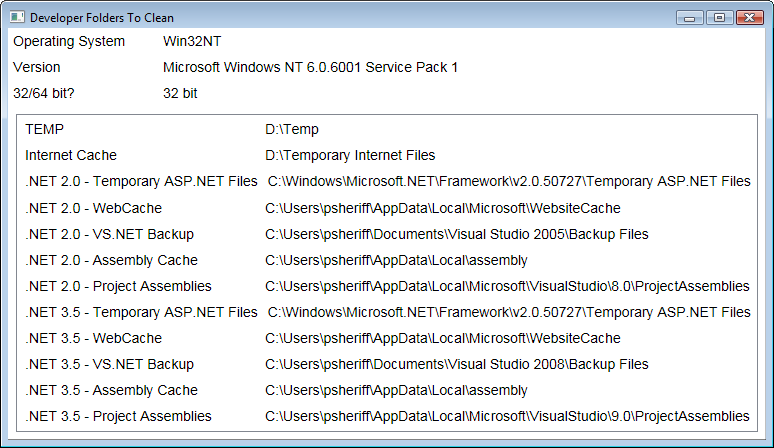
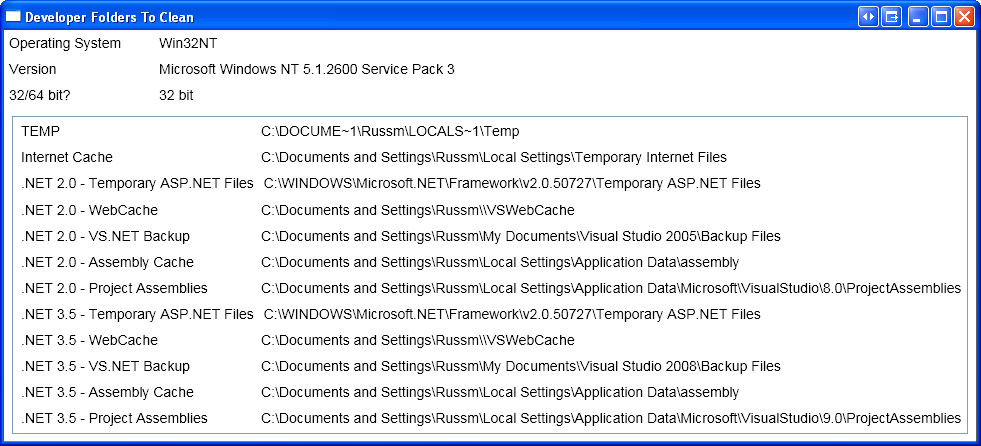
Each operating system will store temporary files in different folders. The problem is that the files are not always temporary. Sometimes these files do not get cleaned up like they should. Read below for a description of each folder that you should review periodically and delete files within.
Temporary ASP.NET Files
As you create and run ASP.NET applications, the ASP.NET runtime places files into a special folder located under your “Windows” folder in
<sysdrive>:\Windows\Microsoft.NET\Framework[64]\
<vernum>\Temporary ASP.NET Files
You can remove the folders and files within this folder with no harm to your development computer. Do not remove the “Temporary ASP.NET Files” folder itself, just the folders underneath this folder. If you use IIS for ASP.NET development, you may need to run the iisreset.exe utility from the command prompt. IIS will sometimes keep files it uses in this folder, so run iisreset to release these files so you can delete them.
Do not remove the “Temporary ASP.NET Files” folder itself, just the folders underneath this folder.
Website Cache
This folder is similar to the ASP.NET Temporary Files folder in that it contains files from running ASP.NET applications. You can find this folder in each user’s Local Settings folder but the exact location will vary a little depending on the operating system. For example on Windows Vista, the folder is located at:
<sysdrive>:\Users\<UserName>\AppData\Local\
Microsoft\WebsiteCache.
Windows XP users can find this folder at:
<sysdrive>:\ Documents and Settings\<UserName>\
Local Settings\Application Data\Microsoft\
WebsiteCache
Check these locations periodically and delete all files and folders under this directory.
VS.NET Backup
VS.NET uses a backup folder to store temporary files while you develop in Visual Studio. VS.NET doesn’t clean this folder out, so you should periodically delete all files and folders under this directory. On Windows XP, you can find this folder located at:
<sysdrive>:\Documents and Settings\<UserName>\
My Documents\Visual Studio 200[5|8]\Backup Files
On Windows Vista you’ll find this folder located at:
<sysdrive>:\Users\<UserName>\Documents\
Visual Studio 200[5|8]\
Assembly Cache
No, this is not the global assembly cache (GAC). It appears that this cache is only created when doing WPF or Silverlight development with VS.NET 2008. On a Windows Vista machine, you’ll find this folder in:
<sysdrive>:\ Users\<UserName>\AppData\Local\
assembly\dl3
On Windows XP, look for this folder at:
<sysdrive>:\ Documents and Settings\<UserName>\
Local Settings\Application Data\assembly
If you have not done any WPF or Silverlight development, you may not find this particular folder on your machine.
Project Assemblies
ProjectAssemblies is yet another folder where VS.NET stores temporary files. On a Windows XP machine, you will find a folder for each project you have opened and worked on at:
<sysdrive>:\Documents and Settings\
<UserName>Local Settings\Application Data\
Microsoft\Visual Studio\[8|9].0\ProjectAssemblies
On Microsoft Vista you will find this folder at:
<sysdrive>:\Users\<UserName>\AppData\Local\
Microsoft\Visual Studio\[8|9].0\ProjectAssemblies
Remember that not all of these folders will appear on your particular machine. Which ones do show up will depend on what version of Visual Studio you are using, whether or not you are doing desktop or Web development, and the operating system you are using.
General Hard Drive Clean Up
You know the standard files and folders that you should clean up on your hard drives, however, how many of you actually do it? In case you need a little reminder, here is a list of folders and files that you can safely and easily delete.
- Delete everything you can in your TEMP folders.
- Delete all files in your Internet Cache.
- Delete everything in your Recently Used Files List.
- Delete any Memory.dmp, User.dmp, and Mini.dmp files.
- Delete any *.chk files left over from any Check Disk operations.
- Delete all Thumbs.db files on your hard drives.
- Empty your Recycle bin.
You will find that the less clutter you have on your hard drive, the faster your computer will run. Windows gets a little “cranky” when it does not have enough hard drive space. You do not need to delete everything listed above, but the more you get rid of, the more performance you can get from your machine.
Get a Faster Hard Drive
If you can afford it, get a high-speed hard drive. I think you should have a minimum of 7200 RPM in your machine. If you have a slower drive than this, you might consider upgrading. If you can have two physical hard drives, such as one external hard drive running off a USB 2.0 port at 7200 RPM, you could put all your data and projects onto this drive, and let the OS just run off your main hard drive. This division of labor can sometimes speed up loading and running of .NET applications.
Disk Cleanup
Right-mouse click on your hard drive and select Properties… | Disk Cleanup… This will allow you to delete any unnecessary files that the OS finds. Definitely take a look at running this utility once a month or so.
Unused Users
If you have ever created any additional users on your computer and they no longer use your computer, you might want to delete them. Each time you create a new user, Windows creates a new set of folders under the Document and Settings folder on your system drive. Deleting these unused users will delete these folders. If you want to keep the users on your system, at least make sure that their temporary files and folders are cleaned up.
Archive Old Files
Your hard drive may contain old projects or old files that you have not used in a long time. Consider archiving these old files to an external hard drive. You can get a good 80gig+ external USB 2.0 hard drive that runs at 7200 RPM and then you can move your old files off to this hard drive. This can also make a good backup disk for the valuable files on your hard drive.
De-fragment Your Hard Drive
Of course you should also de-fragment your hard drive periodically, and in particular after you have cleaned up files as described previously. This allows Windows to retrieve data from files faster and gives the OS more room to store new files in a contiguous area on disk.
Virtual Paging File
When Windows runs out of physical memory, memory will be moved to a temporary file on your hard disk. You should ensure that this paging file is large enough to handle your memory requirements. Of course, you might want to turn on performance monitor and see how many times per day the OS is swapping out to this file. If you find that the OS is using this file a lot during the day, you should increase the memory in your machine. I find that one (1) gigabyte of memory is a minimum for developers today. If you have two physical hard drives, place the paging file on the hard drive that is the fastest.
Operating System Tuning
Each Windows operating system has a lot of services running. Many of these services are not needed for most of your day-to-day operations, but are turned on when the OS is installed. Turning off services will free up CPU cycles and reduce memory requirements; both of these will lead to increased performance on your machine.
Every developer’s situation is different, so the services you have on may be different from someone else’s services. The key is to closely analyze your usage of the services that are turned on to see which ones you absolutely need. Try turning off as many services as you can and run your OS with these turned off. Keep a list of which items you turned off, so when something does not work as it used to, you can go back and turn a particular service back on.
Visual Effects
Windows XP and Vista support an option to turn on or off Visual Effects. Ensure that you have selected the best performance setting. You do not really need all those animated windows when minimizing or maximizing, and fading or sliding menus into view does not do much for your development. On Vista you should change your color scheme to Windows Vista Basic. Changing the color scheme will help your performance and if you use any on-line program sharing applications like Windows Live Meeting, WebEx or GoTo MyPc, you will encounter less problems and less lock-ups.
On Windows Vista you should change your color scheme to Windows Vista Basic.
Desktop Options
If you have a background picture on your desktop, you should consider removing it. It takes up memory and makes screen refreshes much slower. In Vista, go into the Control Panel and choose Desktop Background. Set the background to Solid Colors and choose a color that you like. In addition, if you are using Vista, you might consider turning off the Sidebar. This gadget takes up memory and also has to be refreshed as windows open and close, slowing down your machine. Having a lot of icons on your desktop will also slow down screen refreshes.
Performance Options
Starting with the Windows 2000 operating system, Microsoft added a Performance Option that you can set. You can adjust the OS for Programs or for Background Services. For a development machine you should ensure this is set to Programs.
Anti-Virus Utilities
You should have an anti-virus application running on your computer. However, anti-virus applications are not all created equally. For example, the Norton anti-virus suite of tools has a very heavy-duty algorithm for checking all files that are opened. So when you open a VS.NET project with a lot of files, this can really slow down the load process. If you can switch to McAfee or some other virus checking program you will be much happier. Of course, if Norton is your corporate standard you are probably stuck. Check around for any settings you can tweak in the utilities to see if you can eliminate certain files from Norton’s overly aggressive file checking.
Summary
You can do many things to speed up your computer. You can even find tools on the Internet to help you speed up your computer. Take some time every month to go through this check list and your computer should run much more efficiently. I have guided many of my clients through these processes on their development computers and they are always very happy afterward. You can apply many of these tips to normal user computers, in addition to development computers.
