


On the surface, this article is about the techniques of dependency injection and inversion of control. Underneath, the intent of the words and code samples is to get you to think about the questions of “why” and “when” you might want to use these two closely related techniques, as well a series of similar evolutionary techniques that lead up to the full-blown dependency injection. The initial code samples are admittedly (and deliberately) simple; I do not want the content of the code to obscure the intent of the code.
I’ll use the code samples to take you on a journey. I’ll start with some very simple code and evolve that code through a number of revisions, not unlike the revisions that happen to real programs. The programs will be of limited use to you (unless you live in a particularly impoverished development shop). What is more important is the “color commentary” that accompanies each of these “Zen koan” code samples. [The Zen Master teaches the student by posing “koans” to expand a student’s thinking. A koan is essentially an open-ended riddle or story upon which the student meditates and, in time, achieves wisdom.] With some luck, all of this will lead you to understand the Zen of Inversion of Control.
Genesis
Some time ago, I was looking for a file. I had created the file a year before to support some decisions about employment benefits, made the decisions, and moved on. I had not touched the file for a year. With storage as cheap as it is, I knew that I had kept the file but had only a vague idea of where I might have archived it. I could not remember the name of the file. I knew that it was a spreadsheet, but I was not sure if it had an .xls or .xlsx extension. I decided to write a simple program to look for the file in the most likely places. Once I found it, I could update it and make my decisions about employment benefits for the next year.
The main procedure instantiates a Scanner class that walks the file hierarchy, looking for the file in question. The Scanner class is the protagonist in this story: I’ll show you how this character “grows” as the tale evolves. Listing 1 shows the first version of the Scanner class.
Let me now offer the first round of color commentary. The program does use recursion to walk down the file hierarchy but other than that it is very simple. The functionality of this software, which serves as the first Zen koan to focus our minds, is to:
- Specify the path to the initial directory.
- Specify the extension to test for.
- Specify the path to the log file.
- Navigate the file hierarchy.
- Test each file for relevancy.
- Write the path of each relevant file (along with its containing directory) to the log file.
As this story progresses, I’ll return to this list of functions to see what changes. One important aspect is that the program is totally in control of what it does. If I give you a copy of this program, about the only decisions that you (through the main program) can make are: (1) to run it or not run it, and (2) what computer to run it on. All other aspects of control are lodged in the Scanner class. The consequence of this is that the Scanner class, for a very specific and narrow purpose, is useful, but outside of that area, it is not at all interesting.
Beginnings
As a software developer, my first response is to fix these deficiencies in the Scanner class by adding parameters that specify the initial directory to start the scan in, the extension of the file that I am looking for, and the location of the log file in which to hold the full paths for the files that the scanning class finds. Listing 2 shows the next “Zen koan” to mark this part of the journey.
The functionality is not much different from the first example, but because I have introduced external inputs, I have added some validation of the input values; this might be a “toy” program but professional practices are professional practices. You might not typically think of parameters as inversion of control, but the Scanner class has, by accepting these parameters, given up some aspects of control to an external mechanism. That is, the program is now dependent upon the values of these parameters that I am “injecting” into the program from an external source. The functionality of this altered software is to:
The main program that instantiates and invokes the Scanner class now has much more control over what the Scanner program does. If the main program exposes the options for the Scanner class as program parameters, you and I, as users of this program, get more control. Because the Scanner class is more flexible, it has become more popular (albeit at the cost of losing some of the control over its functionality). I, and others, could use this program to find all sorts of files. (And, yes, you can find utilities that do this much better but these utilities do not illustrate my points nearly as well.)
Delegates
At this point, I am very proud of my Scanner class and show it to my fellow programmers. They are somewhat impressed, but they (being accomplished software developers themselves) suggest all sorts of extensions to the class. Can you add a parameter to specify the minimum and maximum size of the file? How about a pair of parameters to specify the date range when the file was created? Ditto last written? Ditto last accessed? Can you add parameters to specify more than one extension? How about the ability to specify a regular expression for the file name test? And on it goes. I could, of course, write code for each of these possibilities, but it is clear that this would be a never-ending task. Each time that I got one possibility working, someone would suggest yet another possibility. My nice simple Scanner class would be “junked up” in no time.
One of the goals of writing a class is to get it “done”. That is, I want to write the code, write the unit tests, write the documentation, create the deployment logic, and so on, and then put all of this “on the shelf” where I can re-use it. The principle that I’m interested in here is called the “open closed” principle. I want the Scanner class to be open for extension and closed for modification. In other words, I want to create a Scanner class that implements a certain amount of functionality (that is done) that I can extend by specifying parameters or though one of the techniques that I’ll cover in this article. I do not want to have to keep going back to working (and tested) code to make modifications. To achieve this state of near-nirvana is difficult but not impossible. One of the ways to achieve this state of ultimate tranquility is to focus on the relevant essentials and ignore everything else.
If the Scanner class squints its eyes (to abstract out the irrelevant details), it becomes obvious that the only thing that is relevant to the Scanner (for all of the above possible extensions) is whether the individual file “is of interest or not”. The Scanner class really does not care about how this determination is made or even where it is made. All that you have to do is to define a “predicate” function that accepts information about the file and returns a Boolean “true” or “false”. You could make this an overrideable function and create derived child classes that provide the specific implementation of the predicate function or you could create a delegate method signature for the predicate function and pass in an appropriate delegate to handle the relevance test. I’ll show you how to use this second approach. You can see the next “Zen koan” to mark the journey in Listing 3.
The Scanner class walks down the hierarchy, creating instances of the FileInfo class for each file that it finds. It then passes each of these FileInfo class instances to the predicate function. The predicate function determines if the file is of interest or not. I also have made a number of significant changes to the program. Because I was adding a number of different delegates, I decided to create the GUI component in Figure 1.
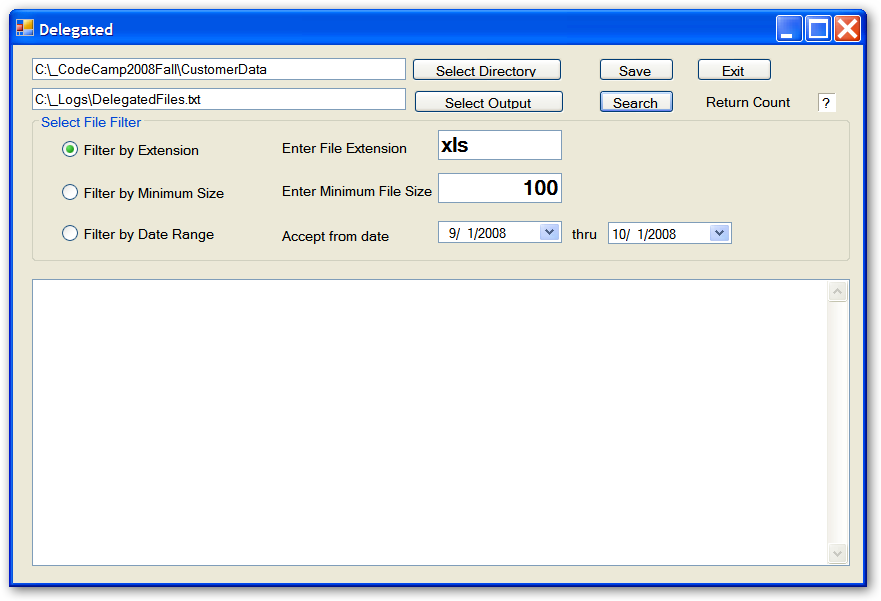
This GUI presents three different options (along with modifying parameters) for the predicate function delegate. Since I am using a GUI, I changed the file name capture logic from writing to a specified log file to raising an event that the caller could capture; in the example, the GUI displays the data on a scrollable textbox. Finally, I added the delegate logic to test the relevance of the file.
What have I done here? Take a look at the function list. I’ve altered the functionality of this software to do the following:
- Accept the path to the initial directory (loss of control to an external mechanism).
- Accept the extension to test for (loss of control to an external mechanism).
- Navigate the file hierarchy.
- Invoke the delegate to test for relevancy (loss of control to an external mechanism).
- Raise an event for each relevant file (loss of control to an external mechanism).
Two interesting things have happened here. First, I injected the logic for the relevancy test into the Scanner class. Second, I’ve removed the logic from the Scanner class that handles each relevant file; the above code raises an event with the path of each relevant file but has no idea of what will be done, if anything, with that value. It could be written to the console, written to a log file, displayed on a GUI control, and so on. The essence of the Scanner class now is to navigate the file hierarchy; test each file for relevancy, and raise an event for the files that pass the relevancy test. I’ve removed everything else. Paradoxically, the class does less but has become much more useful. Note that I am still passing in the extension. This is really not needed but this is typical of programs that evolve: this is a vestigial parameter that has not quite withered away.
May You Live in Interesting Times
Time has passed. A lot of time has passed. While the vision and implementation of the Scanner class might have seemed close to the sought-after state of perfection, the Scanner class and its supporting software have continued to evolve. (I won’t continue the Zen references from this point forward because now we’re going to deal with the more tangible realities of developing software in a business environment.) In the time that passed since the enhancements I walked you through in the previous section of this article, your development team has modified the Scanner class to respond to requests for:
- The ability to capture and process the data in the relevant files.
- The ability to rollup processing after all of the individual files are processed.
- The ability to output the captured and processed data in various ways.
Vicki Vice President found about this software based on the Scanner class and asks that you build a revenue reporting system for the company’s ancient Rocks-a-Lot order entry system. This is a system that has been in place for almost 30 years and is the system for the division. As each order comes in, the Rocks-a-Lot system creates a file with the details of the order and saves the file within the directory structure where the directory path specifies the company and reporting period. The order fulfillment system scans the directory structure and ships the product. At this point, your inner software developer is screaming that there are an infinite number of opportunities for improving this system. Be patient, Grasshopper. The careers of several vice presidents have crashed upon the shores of the Rocks-a-Lot system in futile efforts to upgrade or replace the system. It has become the dreaded “third rail” of IT systems within the company. Nobody, even the ultra-capable Miss Vicki, wants to take on this particular monster. The only safe thing to do is to build out from the original system.
The Era of Interfaces
As a part of the Rocks-a-Lot Reporting Extension (no upgrades or replacements for us, thank you), your team has implemented two major changes:
First, the team changed the language for creating extensions from C# to Visual Basic. The company determined that they have more Visual Basic software development resources available, (plus Vicki Vice President had coded in classic Visual Basic “a long time ago”). This is not a problem; the development principles that I’ll show you apply to any language.
Second, the scanner class has shifted from using delegates to using the more flexible interfaces that allow for multiple methods. I’ll walk you through a brief history of the key interfaces in the order that the team introduced the interface into the program:
The first interface is essentially the delegate predicate function from above packaged as an interface. The GUI form injected the filter interface as a constructor parameter when it instantiated the Scanner class:
Public Sub New(ByVal filter As IFilterFile)
The next interface handles the processing of a file that passed the relevancy filter:
Public Sub New(ByRef filter As IFilterFile,
               ByVal processor As
                 IProcessFile)
This next interface handles the post processing of all files that passed the relevancy filter:
Public Sub New(ByVal filter As IFilterFile,_
               ByVal processor As
                  IProcessFile, _
               ByVal postProcessor As
                  IPostProcessFile)
As you can see here, the next interface abstracts the physical file system (introduced to allow for unit testing and to allow the scanner to process XML files that hold summary data):
Public Sub New(ByVal storage As
                  IStorageSystem, _
               ByVal filter As IFilterFile,_
               ByVal processor As
                  IProcessFile, _
               ByVal postProcessor As
                  IPostProcessFile)
Now it’s time to handle the file contents. This next interface splits the processing of a relevant file into two interfaces: one for extracting/building the contents of the relevant file and a second to process those contents:
Public Sub New(ByVal storage As
                 IStorageSystem, _
               ByVal filter As IFilterFile,_
               ByVal contentFilter As
                 IFilterContents, _
               ByVal processor As
                 IProcessFile, _
               ByVal postProcessor As
                 IPostProcessFile)
I’ll next add an interface to format the contents of the processed data:
Public Sub New(ByVal storage As
                  IStorageSystem, _
               ByVal filter As IFilterFile,_
               ByVal contentFilter As
                 IFilterContents, _
               ByVal processor As
                 IProcessFile, _
               ByVal postProcessor As
                 IPostProcessFile, _
               ByVal formatter As
                 IFormatOutput)
Well, you can see where this is going. The truth of the matter is that I taught the Visual Basic programmers about interfaces and dependency injection and they went a little (actually, a lot) overboard. If it moved, there was an interface defined and at least one (but usually just one) class that implemented the interface. The addition of “Moderation in All Things” posters in the development work spaces came too late to do any real good.
Some developers argue that the use of interfaces can degrade performance (true, but typically not particularly relevant), but the real issue with going overboard on interfaces is one of maintenance. The team got to a point in the development of the Scanner class where they had a constructor with nine different parameters, each representing the implementation of a particular interface needed by the Scanner class. The team’s noble Scanning class had become the poster child for pincushions around the world: injection after injection. The biggest problem was that the responsibility for passing the interface implementations to the Scanner class lay with the GUI. Click on the “Capture Rocks-a-Lot Reporting Data” (the actual unedited caption for the button) and the GUI would instantiate and configure each of the interface implementations in preparation for passing them as parameter values in the Scanner constructor. Remember my earlier description of the “open closed” principle? Suppose you want to “interview” the Scanner class. The interview might go something like this:
“I understand the need to be a team player. If something comes up that needs to be done and I can be of help, then I stand ready to take on the task. But I have to tell you, every time this Scanner class needs a new interface, the developers come trooping through my front room with their muddy boots. I have to have the carpet cleaned each time that happens. Mind you, I don’t begrudge Scanner any of the interfaces. Lord knows, Scanner does yeoman duty. Without Scanner we would all be out of jobs, but my question to you is, why do I have to be involved? My GUI does not change, but here I am instantiating and configuring things that I really have no knowledge of. I wake up some mornings with the shakes: what would happen if I mess up? There just has to be a better way!”
You want to be able to finish the work on the GUI for once and for all. In an ideal world, changes to the Scanner class that do not absolutely require changes to the GUI logic should never cause changes to the GUI class. The problem is that you’re injecting the dependencies through the constructor of the Scanner method and the GUI is responsible for the instantiation of the Scanner class.
The Rise (and Fall) of the Factory Method
One way out of this problem is to refactor the GUI logic so that the Scanner instantiation and configuration is done somewhere else. The home for this logic would be called a factory method. I am introducing a level of indirection here. The logic in the GUI class would call an intermediate “broker” or “factory” method. The factory method would instantiate the Scanner class, configure it as needed, and return it to the GUI class. The GUI class would invoke the Scanner Process method with the path to the initial file directory. All of the “just one more interface” changes would happen in the factory method rather than in the GUI class. No more muddy boot prints on the GUI carpet.
This arrangement is clearly better than having the GUI class handle the instantiation. You can nail the GUI class down and say with some truth that it is truly done. The GUI class has a single responsibility as does the factory method. However, you’re not at the state nirvana yet. The factory method has too much knowledge of the innards of the Scanner class and of the classes that the Scanner class uses. I’ve focused on the Scanner class and how I can inject dependencies into that class. I need to extend the awareness to the cast of dependent classes. It is quite possible that each of the dependent classes also have dependencies that need the injection treatment. Rinse and repeat for as many levels of dependencies that your program has. In a real-world system, you could have several dozen such dependencies, spread over a dozen different assemblies/components.
You can make it even more complicated. Suppose that you have three different formatting classes, F1, F2, and F3, each of which implements the IFormatOutput interface. Suppose that F1 is self-contained and has no dependencies, and that F2 needs dependencies Q1 and Q2, and F3 needs dependencies Z1, Z2, and Z3. If this is not complicated enough for you, suppose that each of the classes Q1, Q2, Z1, Z2, and Z3 have different dependencies. Trust me on this! I can keep going until your head explodes. The poor factory method is getting way too complicated. The GUI class is content, but now the factory method calls out, “There must be a better way!”
A Primitive Broker
There is a better way! Let’s take a look at what the factory method (or the GUI class before it) is trying to do. It is instantiating the classes that implement the interfaces and it is injecting those interfaces into the classes that have dependencies on these interfaces. Suppose that you split those responsibilities apart: one for instantiation and a second for injection.
Let’s look at the injection responsibility first. Each class that has a dependency knows that it has a dependency. The overall goal is not to pretend that the dependency does not exist but to keep the class from knowing the details of how the dependency is satisfied. What if the class with the dependency could just “ask” for an instance of a class that implements the interface and just gets it without having to know how it was instantiated? I put the “ask” action in quotes to suggest a metaphorical inquiry rather than a necessarily explicit request. For example, the constructor parameters described above could easily be interpreted as requests for the various interfaces. (Anybody that has been married for a long time should recognize that type of request.) The class could mark certain setter methods to indicate that the setter represented a dependency. Finally, the class could make an explicit request. Each of these approaches has positive and negative aspects, but all of these methods serve to decouple the class with the dependency from the classes that might be used to satisfy those dependencies.
Let’s assume that each class makes an explicit request for each dependent interface to a “broker” class that has the responsibility of instantiating objects that implement the specified interface. A very primitive broker might consist of a big case/switch statement that instantiates a hard-coded class for each type of interface. This is admittedly crude but still it is effective. A little less primitive broker might then use reflection to find the parameters in the constructor or the setters of the newly instantiated class that are marked as dependencies and recursively call itself to satisfy these dependencies. You could write this in roughly 100 lines of code and debug in a matter of hours.
This is not a perfect solution but it does go a long way toward simplifying the logic. Each class is responsible for injecting its own direct dependencies. None of these classes needs to know how to instantiate its dependencies. The broker class needs to know how to instantiate classes to satisfy the various interfaces but does not need to know who might need the dependencies. The broker certainly does not need to know about the hierarchy of dependencies.
Remember that this is a technique, not a technology. There is nothing to download, nothing to install, and nothing to add to the references. All that you have to do is to change the way that you think about dependencies. Oh yes, there is the business about disciplining the development process to prevent direct instantiation of dependent classes that you might want to switch out sometime in the future. Simple!
A Clever Broker
Even though you have decoupled the Scanner class from the means of satisfying its dependencies, there are other problems to solve. The primitive broker is still hard-wired. The application is still strongly coupled to the broker. This becomes a problem if you want to be able to instantiate different implementations of the various interfaces depending upon the execution context.
In addition to production, one of the most obvious contexts is unit testing. In unit testing you want to isolate the logic of each class so that you can test the functionality of that class without all of the baggage of the dependent classes. Since the Scanner class is dependent upon interfaces (rather than concrete classes), the unit test context could satisfy these dependencies with “fake” versions of the interfaces. The unit test context could do that if the Scanner class was not tightly coupled to a specific broker.
So here you want to insert “yet another layer of indirection” that will allow you to further decouple the Scanner class from the broker. The first thing that you have to do is to introduce another interface:
Public Interface IResolveDependencies

   Sub RegisterImplementationOf(Of T)(ByVal
     component As T)
   Function GetImplementationOf(Of T)() As T

End Interface
This interface defines the key functions of the broker. The Register Implementation method allows the caller to supply an instance of a class that implements a specified interface. The Get Implementation method allows the caller to retrieve an instance of a class that implements the specified interface.
Next you have to create a “container” to hold the current broker. Different environments would store different versions of the broker in this container. Each class that wanted to retrieve one of its dependencies would ask the container to resolve the dependency by calling the “Get Implementation Of” method of the container. The container, in turn, would pass the request on to the inner broker.
Public Module DependencyResolver

   Private _resolver As IResolveDependencies

   Public Sub RegisterResolver(ByVal
      resolver As IResolveDependencies)
      _resolver = resolver
   End Sub
   Public Sub RegisterImplementationOf(Of
      T)( _
      ByVal component As T)
      _resolver.RegisterImplementationOf(Of
      T)(component)
   End Sub
   Public Function GetImplementationOf(Of
      T)() As T
      Return _resolver.GetImplementationOf(
      Of T)()
   End Function

End Module
Each environment (e.g., production, Q/A, and Unit Test) would call the Register Resolver method to supply the particular broker that would handle that environment.
Note that I make no claim to having invented this technique. James Kovacs wrote a very nice MSDN Magazine article on how to use this technique (http://msdn.microsoft.com/en-us/magazine/cc337885.aspx).
A Sophisticated Broker
You’re getting closer to perfection, but there is still room for improvement. So far, you’ve hard-coded the logic to instantiate the classes that will satisfy the interface dependencies. That is, you are specifying the interface implementations at compile time. Now you’ll want to introduce some configuration options that would specify the classes to instantiate for each interface at run time. The Scanner class would “make a request” to the broker for an implementation for each dependent interface. The broker would read the configuration data, locate the linkage between the desired interface and the class that implemented that interface, and instantiate the specified class. At this point, you’ve achieved near-perfection with respect to decoupling the Scanner class from its dependencies.
This perfection comes at a cost, however. The logic to manage the configuration data and to instantiate the various classes can be challenging. You can easily generalize this logic to apply to any application and you have a situation where you could create a standard component to hold this logic. Such components are typically called “inversion of control (IOC) containers”. There are a number of these IOC containers available for use in your applications. Although my intent is not to delve into the details of each of these IOC containers, I will list a few that you might want to consider:
- Unity (http://www.codeplex.com/unity).
- StructureMap (http://www.codeplex.com/unity).
- Spring.NET (http://www.springframework.net/).
- Castle Windsor (http://www.castleproject.org/castle/download.html).
Conclusion
Almost every class that is of some interest is dependent on external elements to accomplish its work. The usefulness of the class is inversely proportional to how concrete the specifications of these external dependencies are. The less control that the class has over its environment, the more useful the class can be in a variety of environments. One aspect of good design is to reduce or even eliminate the control that each class needs to have. In this article I covered a variety of different control extraction techniques from introducing parameter values, to using delegates, to supporting pairs of interfaces and implementations of those interfaces. You can use each of these techniques to allow the class to specify its needs in the most abstract way possible. Each of these techniques is a valid response to the dependency issues in various situations.
Once the dependency is specified, the next issue is how to satisfy the dependency. In the case of parameters and delegates, the responsibility for satisfying the dependencies lies with the logic that invokes the class. In the case of interfaces, the responsibility can be satisfied by the invoking logic but as the density of interface usage increases, you must look for other ways to reduce the “conceptual congestion.” The specification of dependencies in terms of interfaces opens up the possibility of using a broker mechanism to resolve the dependencies. The broker can range from a hard-coded primitive broker to a configuration-driven sophisticated broker that can be shared across multiple applications.
The intent of this article has not been to lead you to use a single approach but rather to help you understand the underlying principles so that you can choose the approach that makes sense in your particular situation.
Listing 1: The first version of the Scanner class
public class PrimativeScanner
{
   public void Process()
   {
      using (StreamWriter writer = new
         StreamWriter(@"C:\_Logs\AGenesisXLSFiles.txt",
         false))
      {
         try
         {
            // hard-coded alert
            ProcessDirectory(@"C:\_Projects", "*.xls",
            writer);
         }
         catch (Exception e)
         {
            OutputLine(e.ToString(), writer);
            throw;
         }
      }
   }
   private void ProcessDirectory(string directoryPath,
      string fileExtension, StreamWriter writer)
   {
      bool directoryHasFilesOfInterest = false;

      string[] myFiles = Directory.GetFiles(directoryPath,
        fileExtension);
      foreach (string myFileName in myFiles)
      {
         if (!directoryHasFilesOfInterest)
         {
            OutputLine("Directory: " + directoryPath,
              writer);
            directoryHasFilesOfInterest = true;
         }
         OutputLine("    File: " + myFileName, writer);
      }
      string[] mySubDirectories =
         Directory.GetDirectories(directoryPath);
      foreach (string mySubDir in mySubDirectories)
      {
         // recursion alert
         ProcessDirectory(mySubDir, fileExtension, writer);
      }
   }
   private void OutputLine(string line, StreamWriter writer)
   {
      Console.WriteLine(line);
      writer.WriteLine(line);
   }
}
Listing 2: The addition of parameters to the Scanner class
public class ParameterizedScanner
{
   public void Process(string initialDirectoryPath,
      string fileExtension, string outputPath)
   {

      if (string.IsNullOrEmpty(initialDirectoryPath))
      {
         throw new ArgumentException
            ("Initial directory path must be specified");
      }

      if (!initialDirectoryPath.EndsWith(@"\"))
      {
         initialDirectoryPath += @"\";
      }

      if (string.IsNullOrEmpty(fileExtension))
      {
         throw new ArgumentException
            ("file extension must be specified");
      }

      string myDirectoryPath =
          Path.GetDirectoryName(initialDirectoryPath);

      if (!Directory.Exists(myDirectoryPath))
      {
         throw new ArgumentException
            ("Initial directory path must exist");
      }

      if (string.IsNullOrEmpty(outputPath))
      {
         throw new ArgumentException("output path must be
         specified");
      }

      using (StreamWriter writer = new
        StreamWriter(outputPath, false))
      {
         try
         {
            ProcessDirectory(initialDirectoryPath, "*." +
               fileExtension, writer);
         }
         catch (Exception e)
         {
            OutputLine(e.ToString(), writer);
            throw;
         }
      }
   }
   private static void ProcessDirectory(string directoryPath,
      string fileExtension, StreamWriter writer)
   {
      bool directoryHasFilesOfInterest = false;

      string[] myFiles =
         Directory.GetFiles(directoryPath, fileExtension);
      foreach (string myFileName in myFiles)
      {
         if (!directoryHasFilesOfInterest)
         {
            OutputLine("Directory: " + directoryPath,
            writer);
            directoryHasFilesOfInterest = true;
         }
         OutputLine("    File: " + myFileName, writer);
      }
      string[] mySubDirectories =
         Directory.GetDirectories(directoryPath);
      foreach (string subDirPath in mySubDirectories)
      {
         // recursion alert
         ProcessDirectory(subDirPath, fileExtension, writer);
      }
   }
   private static void OutputLine(string line, StreamWriter
     writer)
   {
      Console.WriteLine(line);
      writer.WriteLine(line);
   }
}
Listing 3: The addition of delegates to the Scanner class
public delegate bool IsOfInterest(FileInfo fileInfo);

public class DelegatedScanner
{

   public event CaptureOutputEventHandler CaptureOutput;
   public delegate void CaptureOutputEventHandler(string
     message);

   public static DelegatedScanner GetScanner()
   {

      return new DelegatedScanner();

   }
   private DelegatedScanner()
   {
      // just the factory method, please
   }
   public void PerformScan(string initialDirectoryFilePath,
      string fileExtension, IsOfInterest selector)
   {
      if (string.IsNullOrEmpty(initialDirectoryFilePath))
      {
         throw new ArgumentException
            ("Initial directory path must be specified");
      }
      if (!initialDirectoryFilePath.EndsWith("\\"))
      {
         initialDirectoryFilePath += "\\";
      }
      string myDirectoryPath
         = Path.GetDirectoryName(initialDirectoryFilePath);

      if (!Directory.Exists(myDirectoryPath))
      {
         throw new ArgumentException
            ("Initial directory path must exist");
      }
      if (fileExtension.IndexOf(".") < 0)
      {
         fileExtension = "*." + fileExtension;
      }
      try
      {
         ProcessDirectory(myDirectoryPath,
            fileExtension, selector);
      }
      catch (Exception e)
      {
         SendToOutput(e.ToString());
         throw;
      }
   }
   private void ProcessDirectory(string theDirectoryPath,
      string fileExtension, IsOfInterest selector)
   {

      bool directoryHasFilesOfInterest = false;
      FileInfo fileInfo = default(FileInfo);

      string[] myFiles
         = Directory.GetFiles(theDirectoryPath,
           fileExtension);
      foreach (string fileName in myFiles)
      {
         fileInfo = new FileInfo(fileName);
         // delegate usage alert
         if (selector(fileInfo))
         {
            if (!directoryHasFilesOfInterest)
            {
               SendToOutput(theDirectoryPath);
            }
            directoryHasFilesOfInterest = true;
            SendToOutput(fileName);
         }
      }
      string[] mySubDirectories
         = Directory.GetDirectories(theDirectoryPath);
      foreach (string mySubDir in mySubDirectories)
      {
         // recursion alert
         ProcessDirectory(mySubDir, fileExtension, selector);
      }
   }
   private void SendToOutput(string message)
   {
      if (CaptureOutput != null)
      {
         CaptureOutput(message);
      }
   }
}


public delegate bool IsOfInterest(FileInfo fileInfo);

public class DelegatedScanner
{

   public event CaptureOutputEventHandler CaptureOutput;
   public delegate void CaptureOutputEventHandler(string
     message);

   public static DelegatedScanner GetScanner()
   {

      return new DelegatedScanner();

   }
   private DelegatedScanner()
   {
      // just the factory method, please
   }
   public void PerformScan(string initialDirectoryFilePath,
      string fileExtension, IsOfInterest selector)
   {
      if (string.IsNullOrEmpty(initialDirectoryFilePath))
      {
         throw new ArgumentException
            ("Initial directory path must be specified");
      }
      if (!initialDirectoryFilePath.EndsWith("\\"))
      {
         initialDirectoryFilePath += "\\";
      }
      string myDirectoryPath
         = Path.GetDirectoryName(initialDirectoryFilePath);

      if (!Directory.Exists(myDirectoryPath))
      {
         throw new ArgumentException
            ("Initial directory path must exist");
      }
      if (fileExtension.IndexOf(".") < 0)
      {
         fileExtension = "*." + fileExtension;
      }
      try
      {
         ProcessDirectory(myDirectoryPath,
            fileExtension, selector);
      }
      catch (Exception e)
      {
         SendToOutput(e.ToString());
         throw;
      }
   }
   private void ProcessDirectory(string theDirectoryPath,
      string fileExtension, IsOfInterest selector)
   {

      bool directoryHasFilesOfInterest = false;
      FileInfo fileInfo = default(FileInfo);

      string[] myFiles
         = Directory.GetFiles(theDirectoryPath,
           fileExtension);
      foreach (string fileName in myFiles)
      {
         fileInfo = new FileInfo(fileName);
         // delegate usage alert
         if (selector(fileInfo))
         {
            if (!directoryHasFilesOfInterest)
            {
               SendToOutput(theDirectoryPath);
            }
            directoryHasFilesOfInterest = true;
            SendToOutput(fileName);
         }
      }
      string[] mySubDirectories
         = Directory.GetDirectories(theDirectoryPath);
      foreach (string mySubDir in mySubDirectories)
      {
         // recursion alert
         ProcessDirectory(mySubDir, fileExtension, selector);
      }
   }
   private void SendToOutput(string message)
   {
      if (CaptureOutput != null)
      {
         CaptureOutput(message);
      }
   }
}
