


Content by Category
.NET 1.x
.NET 2.0
.NET 3.0
.NET 3.5
.NET 4.0
.NET Assemblies
.NET Framework
.NET Getting Started
Accessibility
ADO.NET
Advertorials
Agile Development
AJAX
Architecture
ASP.NET
ASP.NET MVC
ASP.NET WebForms
Azure
B2B (Business Integration)
Bing
BizTalk
Book Excerpts
Build and Deploy
C#
C++
ClickOnce
Cloud Computing
Code Contracts
CODE on the Road!
COM+
Community
Conferences
Continuous Integration
Crystal Reports
CSLA.NET
CSS
Data
Design Patterns
Development Process
Display Technologies
Distributed Computing
DotNetNuke
DSL
Dynamic Programming
Editorials
Enterprise Services ("COM+")
Entity Framework
Events
Expression Blend
F#
Fox to Fox
Frameworks
Functional Programming
Git
Graphics
Internet Explorer 8.0
Interviews
iPhone
Iron Ruby
Java
Java Script
jQuery
LINQ
Linux
Mac OS X
MDX
Microsoft Application Blocks
Microsoft Business Rules Framework
Microsoft Dynamics
Microsoft Expression
Microsoft Office
Mobile Development
Mobile PC
Mono
MsBuild
Network
NHibernate
Object Oriented Development
Open Source
Opinion
Opinions
Oracle
ORM
Other Languages
Parallel Programming
Patterns
Podcasts
Post Mortem
PowerPoint
Print/Output
Product News
Product Reviews
Project Management
Python
Q&A
Rails
Rake
Reporting Services
REST
RIA Services
Ruby
Ruby on Rails
Search
Security
Services
SharePoint
Silverlight
SOA
Social Networks
Software & Law
Software Business
Source Control
Speech-Enabled Applications
SQL Server
SQL Server 2000
SQL Server 2005
SQL Server 2008
SQL Server CE/AnyWhere/Mobile/Compact
Subversion
Sync Framework
Tablet PC
TDD
Team System
Techniques
Testing and Quality Control
Tips
UI Design
UML
User Groups
VB Script
VB.NET
Version Control
VFP and .NET
VFP and SQL Server
Virtual Earth
Vista
Visual Basic
Visual Basic 6 (and older)
Visual FoxPro
Visual Studio .NET
Visual Studio 2005
Visual Studio 2008
Visual Studio 2010
Visual Studio Tools for Office
VSX
WCF
Web Development (general)
Web Services
WF
Whitepapers
Windows 7
Windows Azure
Windows Live
Windows Server
Windows Vista
WinForms
Workflow
WPF
XAML
XML
XNA
XSLT


DevConnections


CODE TRAINING

Reader rating:
Click here to read 2 comments about this article.
Article source: CoDe (2009 Mar/Apr)

Silverlight Enabled Live Search

Tapping the full potential of RIA applications means involving remote Web services. In this article, I’ll present techniques that demonstrate how to communicate between Silverlight and Live Search using Silverlight’s services infrastructure.

This article is excerpted from John Papa’s book, Data-Driven Services with Silverlight 2, published by O’Reilly Media, Inc. ISBN-13: 978-0596523091 and is reprinted with the author’s permission.

Silverlight 2 brings a tremendous number of tools to the client to allow creating a rich user interface. It also has the ability to consume a variety of services across a network or the Internet. The ability to communicate with different types of Web services in different ways (through RESTful services, syndicated feeds, and SOAP services to name a few) allows Silverlight 2 applications to take advantage of the features these services expose. Silverlight 2 clients provide a robust user experience and the ability to interact with a variety of services, which makes Silverlight 2 a great choice for interactive and service-based applications. This article demonstrates how to build a Silverlight application that communicates with the Live Search Web services.

Calling Live Search

There are many services available on the Web that can be called. Some of these Web services are discoverable like Live Search and others are not and use REST, like Amazon ECS. Most of these services require a unique key be sent to the service so that the request can be tied back to whoever the key belongs. Live Search calls their key an AppID.

Instructions for creating an AppID for Live 
Search can be found at 
http://msdn.microsoft.com/en-us/library/bb266187.aspx. Instructions for using 
the Live Search service can be found at 
http://msdn.microsoft.com/en-us/library/bb251808.aspx.

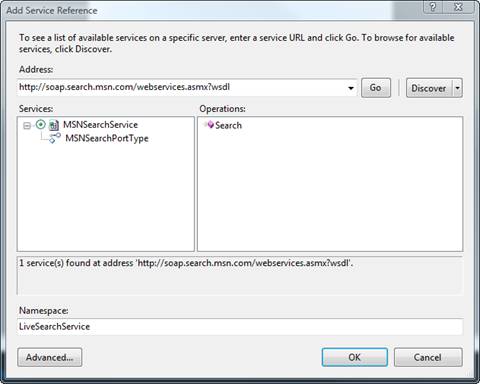
The following example shows how you can conduct a simple search using a SOAP-based Web service provided by Live Search. First, the AppID must be requested and used in the LiveSearchClient sample program (available from the CoDe Magazine site for download). Next, you must add a service reference to the Live Search service. (You can find this service at http://soap.search.msn.com/webservices.asmx?wsdl.) The sample names the service LiveSearchService as shown in Figure 1.
Click for a larger version of this image.

Figure 1: Referencing Live Search.

Once you’ve referenced the service you can create a proxy to the service and invoke its SearchAsync method. This method requires a SearchRequest parameter, which can include a lot of intricate parameters defining the type of search. This Live Search example will keep the search parameters simple and simply return the first 10 hits (shown by the Offset property in Listing 1). Listing 1 shows the creation of the proxy object, the setup of the search parameters, the adding of the event handler for the completion of the search, and the asynchronous SearchAsync method call to the Web service.

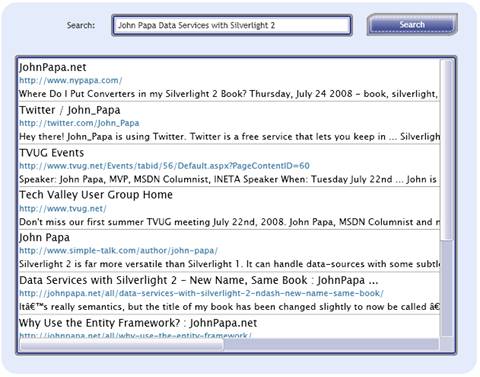
Once the search has been completed, the proxy_SearchCompleted event handler (shown in Listing 2) executes and binds the result to the ListBox control. A DataTemplate simply displays the Title, Url and Description of each search result in the ListBox. Figure 2 shows the results of a sample search.
Click for a larger version of this image.

Figure 2: Live Search Results.

When the Silverlight client makes the Web service request, the call originates from the local Web site that hosts the Silverlight application on the Live Search domain. This call crosses the domain boundary. Silverlight will request the clientaccesspolicy.xml file and will find it (shown in Listing 3).

The clientaccesspolicy.xml file indicates that it will allow any SOAP request from any domain to use the Web services located anywhere on the Web site, which is http://soap.search.msn.com.

Wrap Up

Silverlight clients can call any discoverable Web services using ASMX Web services and WCF Web services. While Silverlight can also call services that do not describe themselves, such as REST services, self-describing services are beneficial since they can tell the client application exactly how they should be called and what type of data they will return (if any).

John Papa

&

By: John Papa

John Papa (ASPSOFT), author of the book, Data-Driven Services with Silverlight 2 by O’Reilly, is a Microsoft C# MVP, INETA speaker, member of the WPF and Silverlight Insiders, consultant, speaker, author, and trainer for ASPSOFT who specializes in professional application development with Microsoft technologies. John has written over 60 articles for MSDN Magazine and authored several books on data access technologies including Silverlight, ADO.NET, ASP.NET, WPF, XML, and SQL Server. You can often find him speaking at industry conferences such as VSLive and DevConnections, and viewed on MSDN Web Casts. You can always find John at johnpapa.net.

john@7papa7.net

Fast Facts

Many Web services offer a variety of ways to communicate with them including SOAP-based Web services and RESTful Web services. Web services can return often return XML or JSON. Silverlight can communicate with any of these types of services and parse the results using LINQ.


Listing 1: Searching asynchronously
' C#
private void btnSearch_Click(object sender, RoutedEventArgs e)
{
    MSNSearchPortTypeClient proxy = new MSNSearchPortTypeClient();
    proxy.SearchCompleted += new 
    EventHandler<SearchCompletedEventArgs>(proxy_SearchCompleted);

    SourceRequest[] sourceRequests = new SourceRequest[1];
    sourceRequests[0] = new SourceRequest();
    sourceRequests[0].Source = SourceType.Web;
    sourceRequests[0].ResultFields = 
          ResultFieldMask.All | ResultFieldMask.SearchTagsArray;
    sourceRequests[0].Count = 10;
    sourceRequests[0].Offset = 0;

    SearchRequest searchRequest = new SearchRequest();
    searchRequest.AppID = appID;
    searchRequest.Query = tbSearch.Text;
    searchRequest.CultureInfo = "en-US";
    searchRequest.Requests = sourceRequests;
    searchRequest.SafeSearch = SafeSearchOptions.Moderate;
    searchRequest.Flags = SearchFlags.None;

    proxy.SearchAsync(searchRequest);
}

// VB

Private Sub btnSearch_Click(ByVal sender As Object, _
ByVal As RoutedEventArgs)
   Dim proxy As New MSNSearchPortTypeClient()
   AddHandler proxy.SearchCompleted, _
      AddressOf proxy_SearchCompleted

   Dim sourceRequests(0) As SourceRequest
   sourceRequests(0) = New SourceRequest()
   sourceRequests(0).Source = SourceType.Web
   sourceRequests(0).ResultFields = ResultFieldMask.All _
     Or ResultFieldMask.SearchTagsArray
   sourceRequests(0).Count = 10
   sourceRequests(0).Offset = 0

   Dim searchRequest As New SearchRequest()
   searchRequest.AppID = appID
   searchRequest.Query = tbSearch.Text
   searchRequest.CultureInfo = "en-US"
   searchRequest.Requests = sourceRequests
   searchRequest.SafeSearch = SafeSearchOptions.Moderate
   searchRequest.Flags = SearchFlags.None

   proxy.SearchAsync(searchRequest)
End Sub


Listing 2: Binding the Live Search results
'  C#
private void proxy_SearchCompleted(object sender, 
SearchCompletedEventArgs e)
{
    if (e.Error != null)
    {
        lbMessage.Text = e.Error.Message;
        return;
    }

    SearchResponse searchResponse = e.Result;
    var resultsList = searchResponse.Responses[0].Results;
    lstResults.DataContext = resultsList;
}
// VB

Private Sub proxy_SearchCompleted(ByVal sender As Object, _
ByVal As SearchCompletedEventArgs)
   If e.Error IsNot Nothing Then
      lbMessage.Text = e.Error.Message
      Return
   End If

   Dim searchResponse As SearchResponse = e.Result
   Dim resultsList = searchResponse.Responses(0).Results
   lstResults.DataContext = resultsList
End Sub


Listing 3: clientaccesspolicy.xml File for Live Search
<?xml version="1.0" encoding="utf-8" ?> 
<access-policy>
   <cross-domain-access>
      <policy>
       <allow-from http-request-headers="SOAPAction,Content-
        Type">
          <domain uri="*" /> 
         </allow-from>
         <grant-to>
          <resource path="/" include-subpaths="true" /> 
         </grant-to>
    </policy>
   </cross-domain-access>
</access-policy> 


How would you rate the quality of this article?
1 2 3 4 5
Poor      Outstanding

Tell us why you rated the content this way. (optional)

Average rating:
4.2 out of 5

11 people have rated this article.

      CODE TRAINING


iPhone iPad Developers Conference