


Silverlight 2 just went RTM. This product is unique because for the first time in the Microsoft world, you have .NET running cross platform, in a secure way, without all the deployment hassles. It has the ability to bring rich UI, right within the browser-much like Flash, but with more capabilities and a .NET heart.
So, what does this mean to you-the SharePoint developer? Well, as I elucidated in my previous article, developing rich UIs in SharePoint 2007 isn’t exactly my idea of a good time! In fact, it is a bit like a 3-year old playing drums on your head all night long while his 7-year old sister is sticking chewing gum in your hair as you are trying to sleep because you have an early morning 7 AM meeting tomorrow in a recessionary economy. Take heart! The thin .NET 3.5 development model makes it all easier.
In this article, I will illustrate an example that builds a Silverlight front-end to SharePoint functionality. The Silverlight control will work within the SharePoint context, and will thus allow you to access the SharePoint object model from the retarded (restricted) Silverlight CLR. Throughout this article, I will focus on illustrating the specific development steps I follow to make my development of Rich UIs within SharePoint a whole lot easier. Let’s begin with defining the problem first.
Problem Definition
I find the calendar list in SharePoint quite useful. In this article, I will build a Silverlight UI that shows me appointments for today while remaining under the current user’s context. These appointments will be stored in the calendar list and will be rendered in a rich Silverlight UI. At the very onset, this seems to tell me that the Silverlight UI running inside SharePoint would need to have full access to the SharePoint context. How in the world would I achieve that in the retarded Silverlight CLR?
In order to achieve this, I will need to write:
- A Silverlight .xap file. I will have to work with both Visual Studio 2008 SP1 with Silverlight tools, and Expression Blend 2 SP1 to craft this UI.
- A WCF service that works in-context, and retrieves the appointments under the security context of the currently logged in user. This WCF service will be consumed by the Silverlight UI using basicHttpBinding.
- A contract that specifies how the Silverlight application will talk to the WCF service. This is the same as the WCF contract.
As you can clearly tell, it all begins by defining the WCF contract. This snippet shows the contract:
[ServiceContract]
public interface IAppointments
{
    [OperationContract]
    List<BO.Appointment>
     GetAppointments();
}
In the above code, the BO.Appointment is a custom business object I created as shown below:
[DataContract]
public class Appointment
{
    [DataMember]
    public DateTime AppointmentTime {
     get; set; }
    [DataMember]
    public string Title { get; set; }
}
With the contract defined, let me show you how to write up the pieces around the contract.
Writing the Silverlight Application
Now, the nice thing about the thin .NET 3.5 development model is that as long as I have a contract ironed out, I can take SharePoint completely out of the picture, and thus along with the virtual machine, the attaching to W3WP.exe, and the GAC DLL version whose breakpoint never seems to get hit. I’ll simply stub out the project on my Vista development machine as shown in Figure 1.
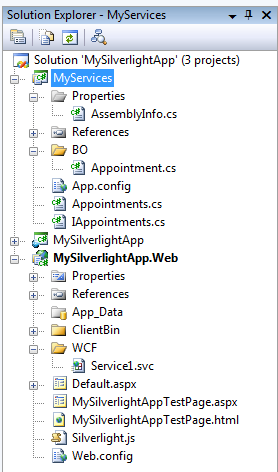
I created the project shown in Figure 1 using the Silverlight tools for Visual Studio 2008 SP1, and a WCF service library that I added to the project. As you can see, the MyServices class library is a WCF service library, which hosts a service in Appointments.cs that implements the contract I defined earlier. Since I am not running inside SharePoint so far, I will simply stub out fake appointments as shown in Listing 1.
The code in Listing 1 is rather terse to write because I used a concept called Object and Collection Initializers introduced with C# 3.0. You can read more about them at http://blah.winsmarts.com/2006/05/21/demystifying-c-30--part-5-object-and-collection-initializers.aspx.
Next I’ll start crafting up the UI of my Silverlight application. I need a DataBindable UI that I can bind the results of the WCF service call to. This snippet below shows how to implement it:
<ListBox x:Name="UserAppointments"
     ItemTemplate=
       "{StaticResource ShowTime}">
</ListBox>
The “ShowTime” static resource is a DataTemplate that I defined as a resource, shown below:
<DataTemplate x:Key="ShowTime">
    <StackPanel Margin="10">
        <ContentControl
           Template=
"{StaticResource clockTemplate}"
Width="120" Height="108" DataContext=
"{Binding Path=AppointmentTime}"/>
        <TextBlock
           Text="{Binding Path=Title}"
        HorizontalAlignment="Center"/>
    </StackPanel>
</DataTemplate>
For the eagle eyed amongst you, the ContentControl that points to a StaticResource is another application level resource I have created. This is nothing but just a ControlTemplate that takes a DateTime and renders a good looking Analog Clock out of it. You can find the source code for the clock ControlTemplate at http://blah.winsmarts.com/2008-10-Clock_Template_for_Silverlight.aspx.
That’s it, my UI is done. It’s really that easy. Now I’ll give it some life with some data so you can see it running and in action.
The Silverlight UI will get its data from the WCF service using basicHttpBinding. In order to do so, I first need to add a WCF service reference to my Silverlight application, as described at http://blah.winsmarts.com/2008-7-SilverLight_WCF_References_in_SharePoint_-_The_right_way.aspx.
With the reference added, I can use the WCF service proxy to get Appointments data, and Databind the appointments to the UI that I created above. I can achieve this using the code shown in Listing 2.
An important thing to note in Listing 2 is that you should always call WCF services from Silverlight UIs in an asynchronous manner. Failing to do so could lock up the browser, and the end user won’t be happy about that.
When I compile and run the above application above, I see a UI as shown in Figure 2.
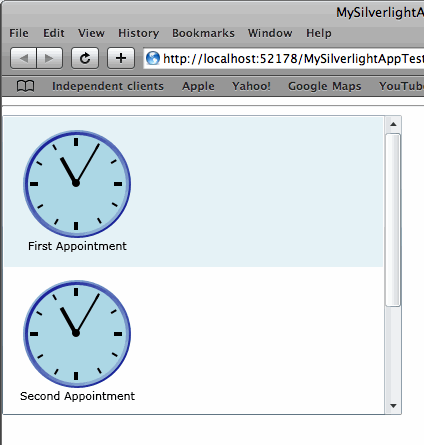
Did you notice; I haven’t even touched SharePoint yet! So technically, the above could have been developed entirely by a non-SharePoint developer, good ones of which are in rather short supply.
With my UI and WCF service skeleton done, let’s take the above to SharePoint.
Enter SharePoint: Authoring the WCF Service
Now, earlier I stubbed out the WCF service-I even created mock objects to get my UI done. What will it take to make this work inside SharePoint?
Two simple steps:
- SharePoint will need to support WCF, which you can achieve by activating the feature you will find at www.codeplex.com/SPWCFSupport.
- You’ll have to edit the WCF service code to extract actual appointments under the security context of the currently logged in user. In other words, you’ll need to replace the dummy WCF service that I authored earlier with a real WCF service that extracts appointments obeying the currently logged in user’s security context.
Since the first step is self explanatory if you follow the link, I will focus on the second in this article.
The catch phrase here is “obeying the currently logged in user’s security context.”
Now, you could run the WCF service completely out of SharePoint, and thus on a different domain than your Silverlight application will be running under. But in that case you would have to set a cross-domain policy, allowing cross-domain calls to work. In my example I intend to host the WCF service, within SharePoint, on the same domain, so I don’t need to worry about it. But if you are interested in learning more about cross-domain policy, you should watch this video: http://channel9.msdn.com/posts/mtaulty/Silverlight-Making-Cross-Domain-Requests/.
WCF, by default, works outside of ASP.NET, and thus outside of SharePoint. This is reasonable since WCF’s scope is much larger than what only ASP.NET provides. But WCF does have an ASP.NET compatibility mode, which allows a WCF service to get a hold of HttpContext.Current, and SPContext.Current. You can read the background and implementation details at http://blah.winsmarts.com/2008-9-Getting_SPContextCurrent_in_a_SharePoint_2007_WCF_Service.aspx.
So let’s get this straight; a beautiful Silverlight UI running on MacOS/Safari can now talk over a WCF service that fully participates in the SharePoint object model, in the current SharePoint context, and thus the current security context? And by the way, no deployment issues either!
This makes me more excited than a five-year old in a candy store with no parents around to police. The possibilities are clearly immense.
Well with the current context in hand and a little SPQuery magic, I easily modified my WCF service implementation code as shown in Listing 3.
I then updated my endpoint address to the relevant SharePoint address and rebuilt the .XAP file, which I will then steal and place in my SharePoint .wsp solution package so I can deploy it along with the other pieces.
Deploying All this in SharePoint
Let me make this section really simple. You should deploy everything as a solution, and the easiest way to create solutions is WSPBuilder. Here are the high-level things I am deploying:
- The WCF service deployed as a part of the solution as described at http://blah.winsmarts.com/2008-9-Deploying_WCF_EndPoints_as_solutions_in_SharePoint_2007.aspx. Note that in this case the WCF Service will need to run under the ASP.NET compatibility mode.
- The same solution also deploys the .XAP file in a document library using the <Module> tag in the relevant elements.xml. You could also deploy the .XAP as a physical file if you wish.
- And finally, the same solution also deploys an application page, and creates a custom action menu item for it.
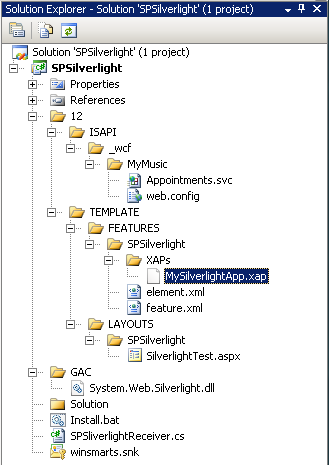
In short, the class library that WSPBuilder creates a solution out of, looks like Figure 3.
And when you activate the feature, and browse to the application page, you will see a Silverlight application running in the browser, with full access to the SharePoint context, under my (the currently logged in user) security context in a nice looking UI (see Figure 4).
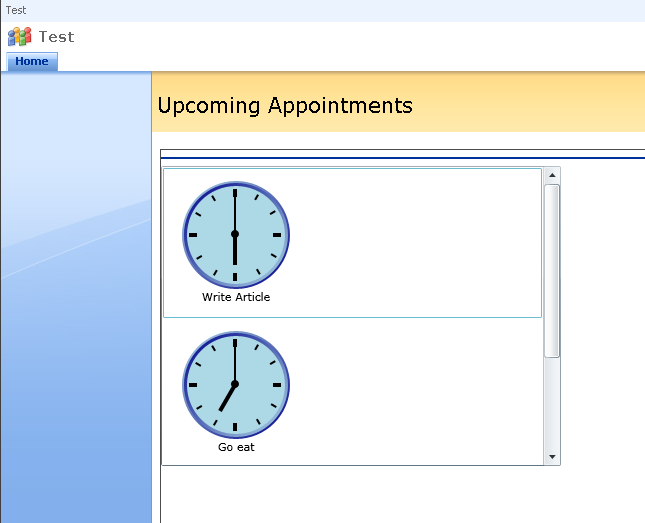
While I have the above running in an application page, it could just as easily run inside a Web Part, or anything else.
Summary
So there you have it folks. In this article, I demonstrated how the thin .NET 3.5 development model makes SharePoint development easier, and the platform more appealing than ever. I did the bulk of my development outside of SharePoint, and incrementally deployed my functionality to SharePoint as I built it. This has the following significant advantages:
- A better development experience. I did most of the difficult development outside of the virtual machine that runs SharePoint on a Vista OS.
- You have the ability to scale out and leverage different skill sets in your team, rather than finding the super hero that is an expert at Silverlight, SharePoint, WCF and more-and is available at a reasonable price.
- The developed code is more modular. The SOA-based architecture ensures that this application doesn’t affect any others.
- This model will allow you to follow better development practices, such as effective source control and effective unit testing.
- Finally, and this is perhaps the most important, crafting such a modular solution means your product is much more maintainable and requires less effort to write in the first place. When was the last time you saw both of them together?
In my next article, I will raise the bar further by demonstrating how the thin .NET 3.5 development model helps me author Rich HTML UIs using concepts such as AJAX. Of course, the underlying theme will be developer productivity, and maintainable code, working within the SharePoint 2007 platform.
Stay tuned!
