


I read somewhere that nearly 80% of all data has some location-related aspect to it.
Common business questions in data include: Where do we ship these orders? Where are flood plains located and what rainfall amount are problematic for them? Where are vendors and/or customers located? What delivery route should we use? Can we track using GPS? Where are voting districts located? Where are the best hospitals located? Where are the sales regions that produce the most revenue? And so on. It is highly likely that a significant portion of the data you work with has a location-related aspect to it. Visually presenting this information could lead to better management decisions or possibly uncovering trends that were not evident before. A good application can present this information using a location-oriented approach. That is where Microsoft Virtual Earth fits in.
In this article, I want to start you on your way developing applications with Virtual Earth and get you thinking outside the box in regards to how you display information to visitors to your websites or to your corporate management. For example, consider a postal code sales report sorted descending by sales percentage. Maybe you could improve upon that report by presenting the data as a pie chart to help management see how specific postal codes compare to each other. Taking that idea even further, you could overlay that same information on a map and see that the top three postal codes are all on one side of a particular highway. Maybe that’s important, maybe it’s not, but that fact would go unnoticed on a report or a pie chart. Geographically visualizing data takes the analysis to an entirely new visualization level.
Virtual Earth makes it easy to get started with developing location-based applications. First you’ll need to decide which technology you want to use. You have two choices; one uses the Virtual Earth AJAX Map Control where all the coding is done in JavaScript, and the other uses the ASP.NET Map Control contained in the just released Windows Live Tools for Visual Studio November 2008 CTP. In this article I’ll show examples that use both, but the ASP.NET Map Control has the advantage of being able to use managed code (Visual Basic, C# or any .NET language) and substantially reduces or totally eliminates the amount of JavaScript code you need to write. Managed code or JavaScript? I don’t know about you, but I will go with managed code every time. The AJAX Map Control’s primary advantage is that it is platform independent. Though it works in ASP.NET, it does not require ASP.NET. You can use it on any Web development platform.
But I’m getting ahead of myself. Let me back up and start with an answer to the question, what is Virtual Earth?
What Is Virtual Earth?
Virtual Earth is a group of services from Microsoft that provides a high-quality geospacial data and imagery platform for you to work with. Unfortunately that sounds like a Microsoft definition. What that really means is that Microsoft provides you, the developer, with a platform, API, and other tools to visualize your data on a map. That data could be something as simple as push-pin points indicating where retail stores are located, or maybe lines connecting points, or possibly polygons covering a geographic area, or a combination of all three.
Virtual Earth allows you to add content in several ways. You can add points, lines, and polygons via code or you can import data from other locations such as GeoRSS feeds, Keyhole Markup Language (KML), or GPS eXchange (GPX) files. In my examples, I’ll show you how to add content to a map using code and then I’ll move on to importing data from a GeoRSS feed.
The Virtual Earth platform consists of a number of features including imagery, buildings, geocoding, Yellow Pages and points of interest (POI), traffic, search & proximity, routing & directions, 3D models and more. These features are delivered by two separate but complimentary pieces: the Virtual Earth AJAX Map Control and new to version 6.2, the Virtual Earth Web Services 1.0.
You can learn much more about Virtual Earth, download the SDK, check out Virtual Earth team blogs, and so on at http://dev.live.com/virtualearth.
Your First AJAX Control Map
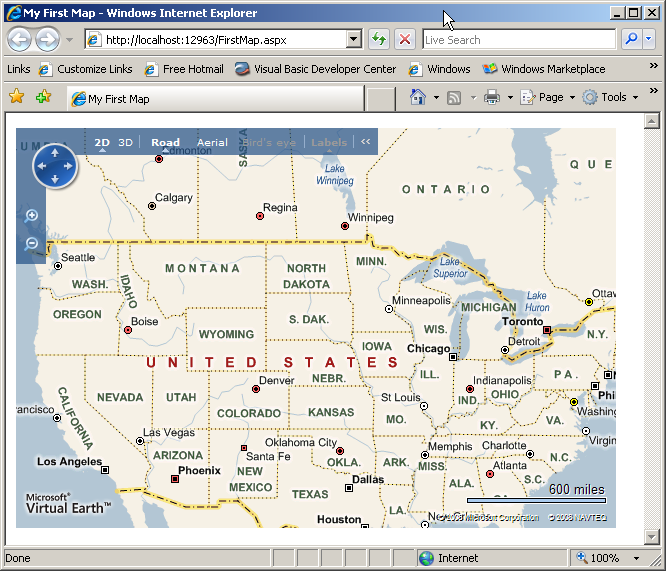
Unlike ASP.NET controls that you drag and drop onto an ASPX page, you add the Virtual Earth AJAX Map Control to a page via JavaScript code. The code required to add a Virtual Earth map to a Web page is minimal and does not require you to download or install anything on your development machine. Although I used Visual Studio to create an ASPX page, I could have dropped this code into a plain HTML page as well (Listing 1). You can see that the FirstMap.aspx Web form has two script sections. The first defines the reference to the Virtual Earth AJAX Map Control (v6.2). The second contains the JavaScript code required to launch the map. First a map variable is defined followed by the GetMap function. The GetMap function is called from the onload argument in the <body> tag. When the body of the page is loaded it launches the GetMap function. The GetMap function creates a new instance of the VEMap class in the <div id=’myMap’> tag located in the <body>. Opening the page in a browser causes the map to be displayed and in this example, since a specific geographic location was not specified for the map, the default map of the United States is displayed (Figure 1). Refer to the Virtual Earth SDK for additional properties and methods for the VEMap class.
With your simple map displayed, head over to http://dev.live.com/virtualearth/sdk/ for additional information pertaining to the Virtual Earth API, examples, on-line SDK, documentation, links to forums, and other developer-related information. For example, on the Learn More tab you will find a link to download the Virtual Earth Map Control SDK (CHM) file for off-line viewing (Figure 2).
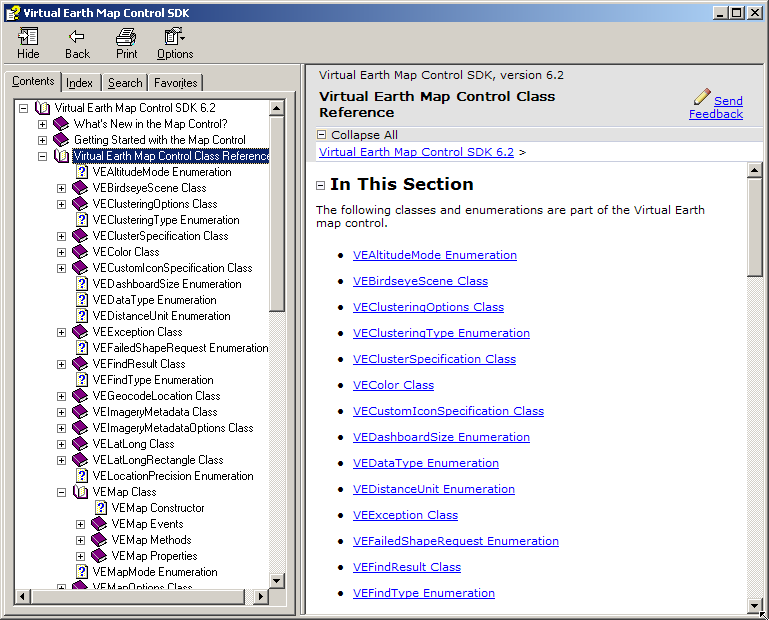
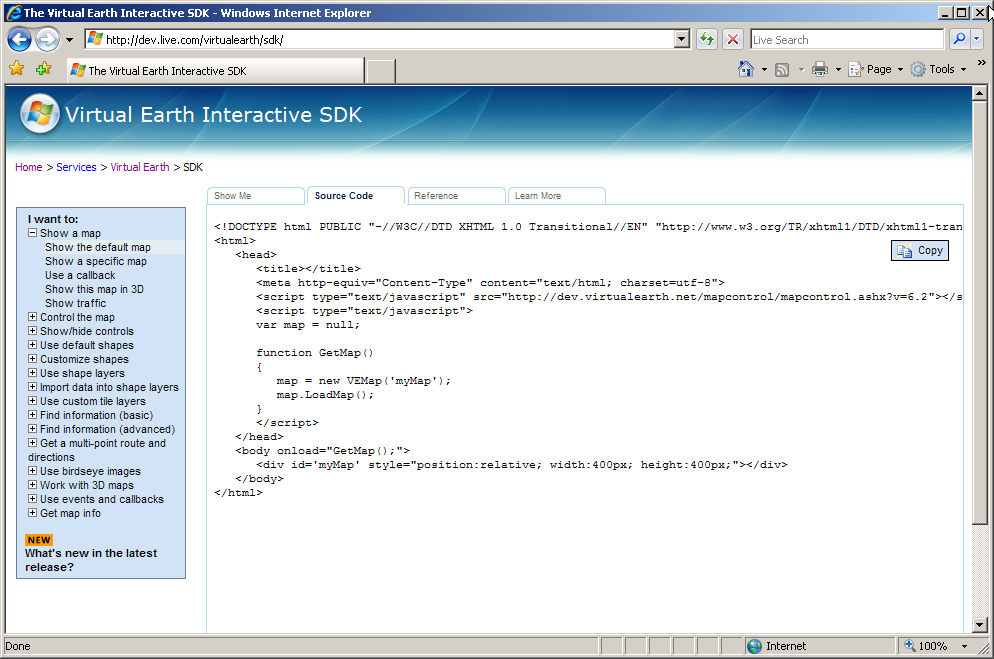
The Virtual Earth Map Control SDK presents an interactive way to learn about the different things you can do with Virtual Earth. It displays all of the JavaScript source code for every example (Figure 3).
Location, Location, Location
In order to display a specific location on the map you will need to provide the longitude and latitude for the location. The process of determining the latitude and longitude coordinates of a particular location, such as an address, is called geocoding. For example, the code in Listing 2 displays a map centered on the Microsoft campus in Redmond (Figure 4).
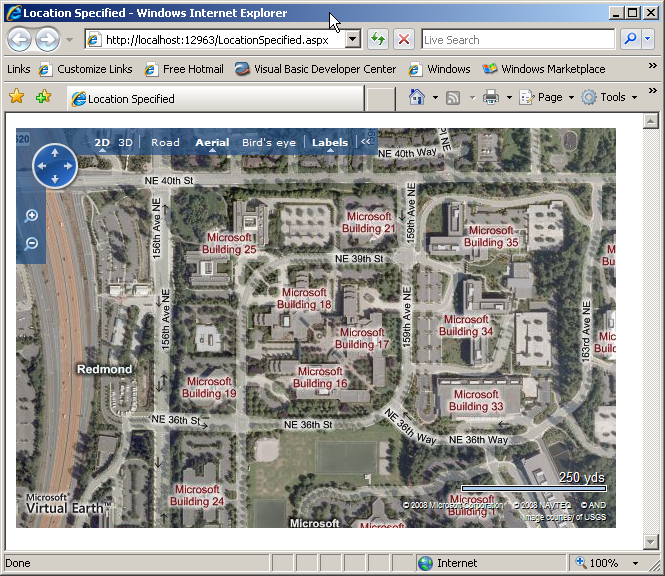
This code introduces the VELatLong class which specifies the latitude and longitude of a single point on a map. It also expands on the arguments available for the LoadMap method (Table 1).
Want to get rid of that annoying birds-eye popup displayed when the map loads? Add this code just after the <script> line defining the map control.
<!-- Hide the bird's eye notification pop-up -->
<style type="text/css">#MSVE_obliqueNotification
   {visibility: hidden;} </style>
Determining the Latitude and Longitude Coordinates
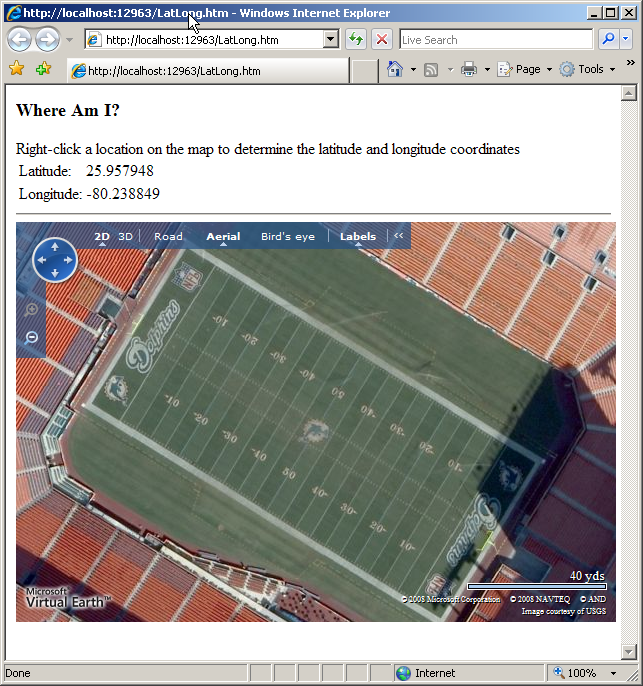
I am a life-long Miami Dolphins football fan. I have been since I was a kid growing up in South Florida but even I did not know that 25.957948, -80.238849 are the latitude and longitude coordinates at the center of the 50-yard line in Miami Dolphin Stadium (Figure 5). How do I know that now? Because Virtual Earth provides map events that you can code handlers for. Take a look at the line immediately following the map.LoadMap line in Listing 3. The AttachEvent method specifies that the onclick event will be handled by the OnClickHandler function. Passed into the OnClickHandler is the event argument, e, which provides the button clicked and the x and y coordinates for the location clicked. The VEPixel object created from the e.mapX and e.mapY coordinates gets passed into the map’s PixelToLatLong method in order to create the clickedLatLong object. The clicked position’s latitude and longitude coordinates are then assigned to their respective locations on the screen. See the Mouse Events section in the Virtual Earth Map Control SDK for additional supported mouse events.
Ogres Are Like Onions
If you have seen the move Shrek then you know that ogres are like onions; they have layers. Virtual Earth maps are like onions as well in that they also have layers. Adding content to a map involves adding items (pushpins, polylines, and polygons) to a layer and then adding that layer to a map. I have taken the prior map of the Microsoft campus and added a few pushpins, lines, and a polygon (Listing 4) to produce the map in Figure 6.
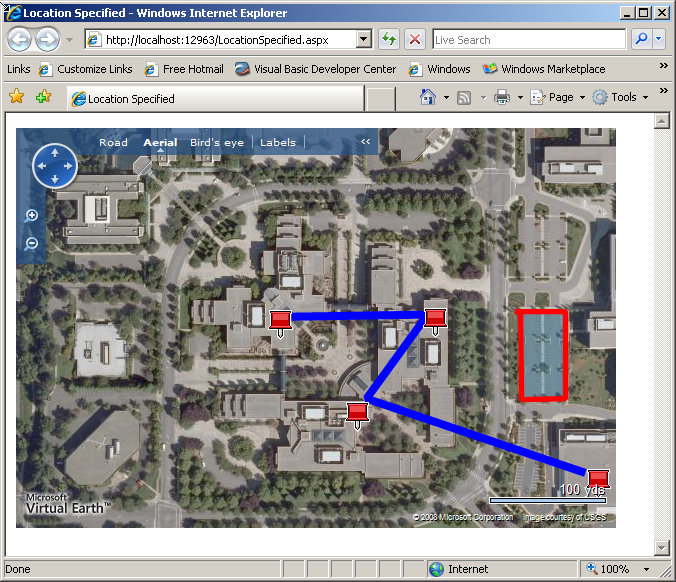
I created the layer to contain the map objects in the CreateLayer function. Then I added all the Virtual Earth objects through calls to the AddPushpins(), AddPolylines(), and AddPolygon() functions. I introduced two key classes in Listing 4, VEShapeLayer and VEShape.
A VEShapelayer class contains VEShapes (pushpins, polylines, and polygons). You can create shape layers manually via JavaScript code or you can have them created for you based on data imported from GeoRSS data, custom map tiles, or from Live Search Map collections. I will cover importing data in an upcoming section.
VEShape classes represent the objects that are displayed on the map. The most important property, ShapeType, has three options: pushpin, polyline and polygon. The code in Listing 4 also demonstrates a number of other properties for the VEShape class including setting the shapes title, description, line width, line color, URL for additional information, and so on. Refer to the Virtual Earth SDK for additional properties, methods, and code samples for the VEShapeLayer and VEShape classes.
That covers the fundamentals of displaying content objects with the Virtual Earth AJAX Map Control. In the next section I will introduce you to the ASP.NET Map Control contained in the Windows Live Tools for Visual Studio November 2008 CTP.
Introducing the Windows Live Tools for Visual Studio
Microsoft released the Windows Live Tools for Microsoft Visual Studio November 2008 CTP to help developers quickly and easily add Windows Live services to their ASP.NET applications. It provides a set of controls that you add to a Web page to add Windows Live services into your Web applications. A deeper investigation of all the tools provided in the toolkit is better left for another article, but I will say that the MessengerChat and Contacts controls do look interesting. Obviously for this article I will focus on the ASP.NET Map Control. The ASP.NET Map Control provides access to the methods and properties derived from the Virtual Earth AJAX Map Control.
So what is the big deal about the ASP.NET Map Control? It sounds like it provides all the same features as controlling the Virtual Earth control via JavaScript code. The big deal is that you can implement nearly all of the same functionality utilizing managed code. That’s right, you can use Visual Basic, C#, or your favorite .NET language with the control, and like other ASP.NET controls, it provides a complete drag and drop experience inside Visual Studio 2008. If you are still using Visual Studio 2005, now might be the time to upgrade to Visual Studio 2008 since the Windows Live Tools for Visual Studio requires Visual Studio 2008 or Microsoft Visual Web Developer 2008.
You can find a link to the ASP.NET Map Control on the Windows Live Tools for Visual Studio page at http://dev.live.com/tools/.
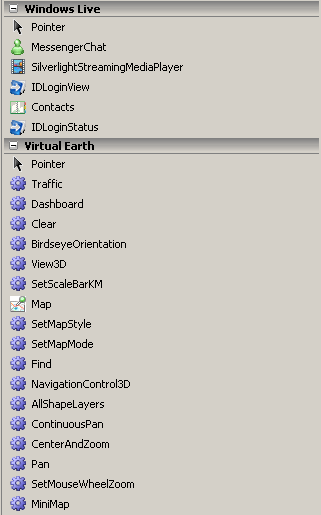
Once you have the toolkit installed and launch Visual Studio 2008 you should see the Windows Live and Virtual Earth tabs added to your toolbox (Figure 7).
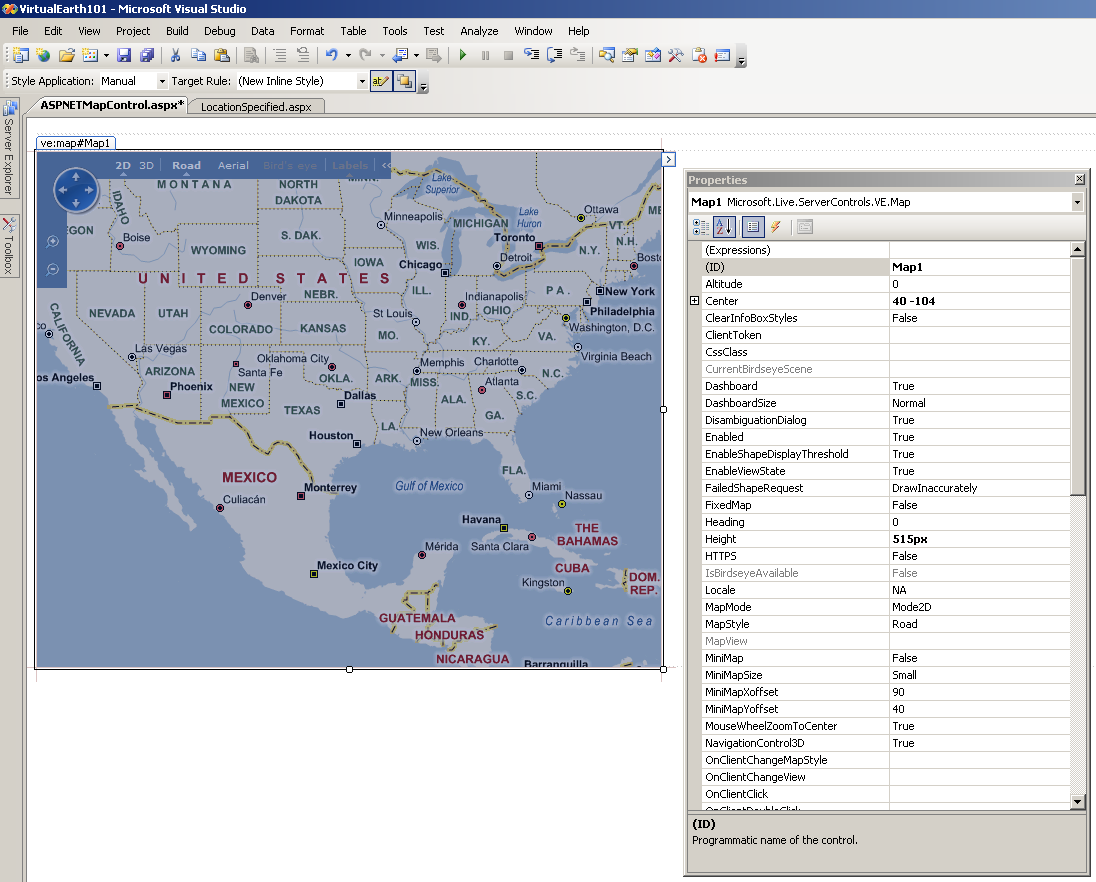
To use the control, drag the ASP.NET Map Control from the Virtual Earth tab onto a <div> tag and viola! instant map. You can size the ASP.NET Map Control with your mouse and set properties via the Properties window (Figure 8). The control is also available and fully configurable in Source mode.
<ve:Map ID="Map1" runat="server"
  Height="400px" Width="400px" ZoomLevel="4" />
The map displayed in Visual Studio is static and will not reflect any of the property changes you make until you run the page.
While being able to work with the ASP.NET Map Control at design time is nice, the real advantage is being able to manipulate and work with the control in the code-behind file. For example, this code centers the map over the Microsoft campus, zooms in to level 17, and sets the map style to Aerial.
Map1.Center.Latitude = 47.6439
Map1.Center.Longitude = -122.129
Map1.ZoomLevel = 17
Map1.MapStyle =
<a href="http://Microsoft.Live.ServerControls.VE">Microsoft.Live.ServerControls.VE</a>.MapStyle.Aerial
Look close at the code above. Do you see any JavaScript? No you don’t, and that is the primary advantage to using the ASP.NET Map Control.
Now I will replicate the same map that I created earlier using the AJAX Map Control and JavaScript but this time I will use the ASP.NET Map Control. Listing 5 shows the Visual Basic code required in the Page_Load event that matches the functionality of the prior sample. Figure 9 shows the page that gets executed has the same the results.
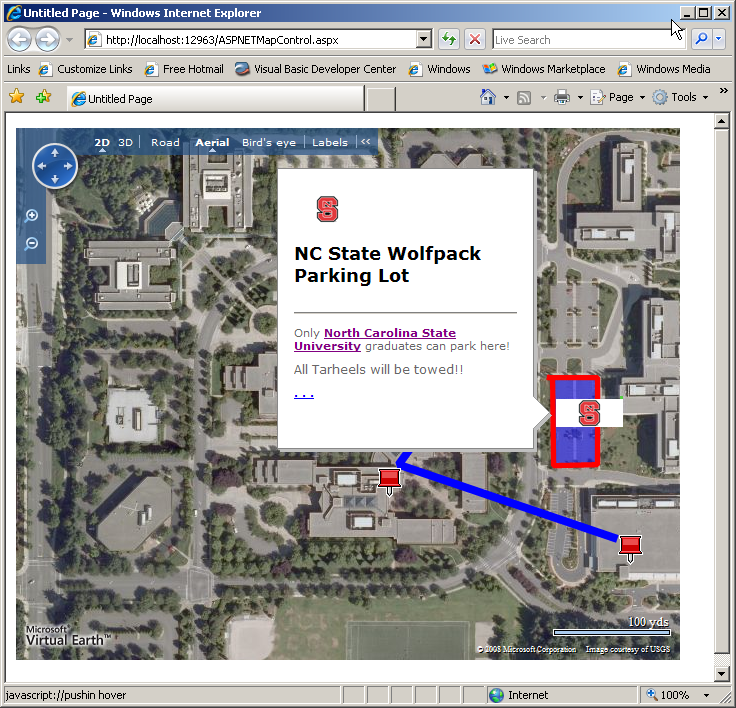
The code in Listing 5 really isn’t tremendously different than the JavaScript code used before. The primary difference, of course, is that this code is managed .NET code and the code resides in the code-behind file instead of in the file containing the markup or maybe even an external JavaScript library file.
I added an Imports statement to reference the Microsoft.Live.ServerControls.VE namespace in order to be able to reference the Virtual Earth classes. Then in the Page_Load I set the coordinates of the map, the zoom level, and the map style.
Map1.Center.Latitude = 47.6439
Map1.Center.Longitude = -122.129
Map1.ZoomLevel = 17
Map1.MapStyle = _
  <a href="http://Microsoft.Live.ServerControls.VE">Microsoft.Live.ServerControls.VE</a>.MapStyle.Aerial
Next I created a shape layer and added it to the map. That shape will contain the pushpins, polylines and polygon.
'Add shapelayer to the map. Yes, this is done
'before items are added to the layer
Map1.AddShapeLayer(layer)
By the way, yes, you can add multiple layers and control them independently. For example you could build a map to display your retail outlets. You could create three layers, one representing profitable stores, a second displaying the break-even stores, and the third the non-profitable stores. Through the use of a dropdown or perhaps option buttons you could set the Visible property for the specific layer to display and include a Show All option to display them all concurrently. After I created all the pushpins I created the polyline which uses a list of points to indicate the path of the line on the map.
Next I created the polygon, set some additional properties, and then created the list of points that define it. One thing to note is the use of HTML markup in a number of the properties. If you have ever wondered how pictures, text, graphics, links, etc., appear when you select an item on a map, now you know. Another property to take a look at is CustomIcon. In this example, I point to a graphic file on a remote Web server. I could have also referenced a graphic stored on the local Web server. My space here is limited but I suggest you take the time to review the Shape class to see what else you might want to use.
Importing GeoRSS Data
Now that you have seen how to create maps and manually add shapes (pushpins, polylines and polygons) with both the AJAX Map Control and the ASP.NET Map Control, I will show you how to import data to overlay your map.
So what is GeoRSS? GeoRSS is a variation on the popular RSS format and adds tags for point, polyline, and polygon data. Listing 6 contains the same pushpoint, polyline, and polygon information used to create the AJAX Map of the Microsoft campus earlier in the article.
At this point you should recognize some of the tags including the title and description. Obviously the <georss:point>, <georss:line> and <georss:polygon> correspond to pushpoints, polylines, and polygons. This GeoRSS file is very simple. When I review the file I’ll be using for the GeoRSS data import using the ASP.NET Map Control, you’ll see that I’ve added some additional tags.
Importing GeoRSS Data with the AJAX Map Control
In Listing 7 you can see that all of the code to manually add those map objects has been stripped out and replaced with these three lines.
var mylayer = new VEShapeLayer();
var veLayerSpec = new VEShapeSourceSpecification(
   VEDataType.GeoRSS, "MSFT_AjAX.xml", mylayer);
map.ImportShapeLayerData(veLayerSpec, null);
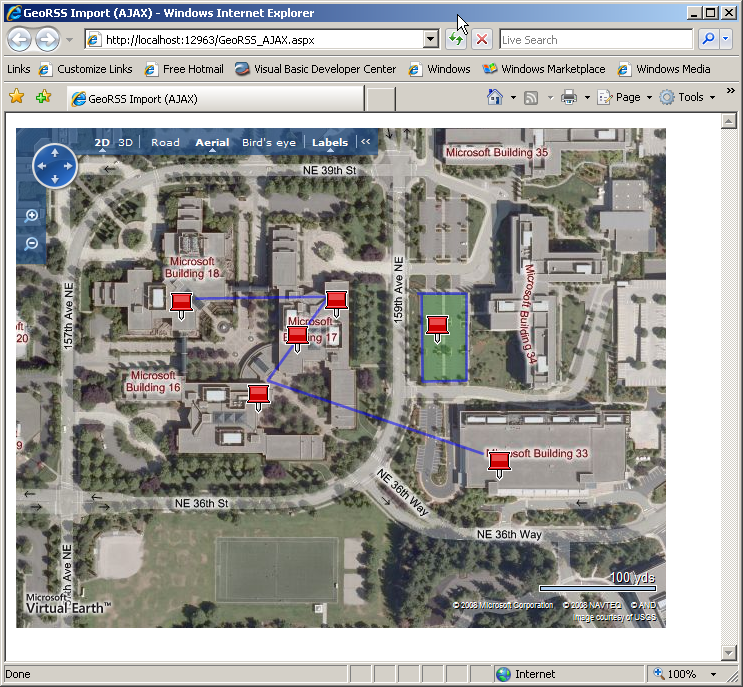
A new VEShapeLayer is created to contain the imported data points. Next a VeShapeSourceSpecification object is created and specifies that the import format (VEDataType.GeoRSS), the name of the GeoRSS file (MSFT_AJAX.xml), and the layer it will be imported into (mylayer). Finally, the map’s ImportShapeLayerData method is called and imports the data.
Listing 6 contains the GeoRSS data being imported in this example. Running the page from Listing 7 results in the same map being displayed (Figure 10) as you saw earlier when I manually added the map objects.
Importing GeoRSS Data with the ASP.NET Map Control
The steps to import GeoRSS data using the ASP.NET Map Control are very similar. The code in Listing 8 imports an existing GeoRSS file (MSFT_ASPNET.xml) and displays it. First the initial position, map type, and zoom level are initialized. Next a shape layer is created and added to the map. The import happens on the next two lines. A ShapeSourceSpecification object is created with the import type specified (GeoRSS), the name of the GeoRSS file to import, and finally the layer to import the data on to. The DataType enum values are GeoRss, ImportXML, and VECollection. ImportXML is used primarily to import KML files and VECollection is used to import collections you may have created on Virtual Earth. I created Virtual Earth collections to get the latitude and longitude coordinates for all the samples in this article. Check out Virtual Earth for more information on creating and managing collections.
Lastly, the code calls the map’s ImportShapeLayerData method specifying the name of the ShapeSourceSpecification object, the name of the client-side JavaScript function to call when the import has completed, and a Boolean value which determines if the map focus should shift to display the imported data.
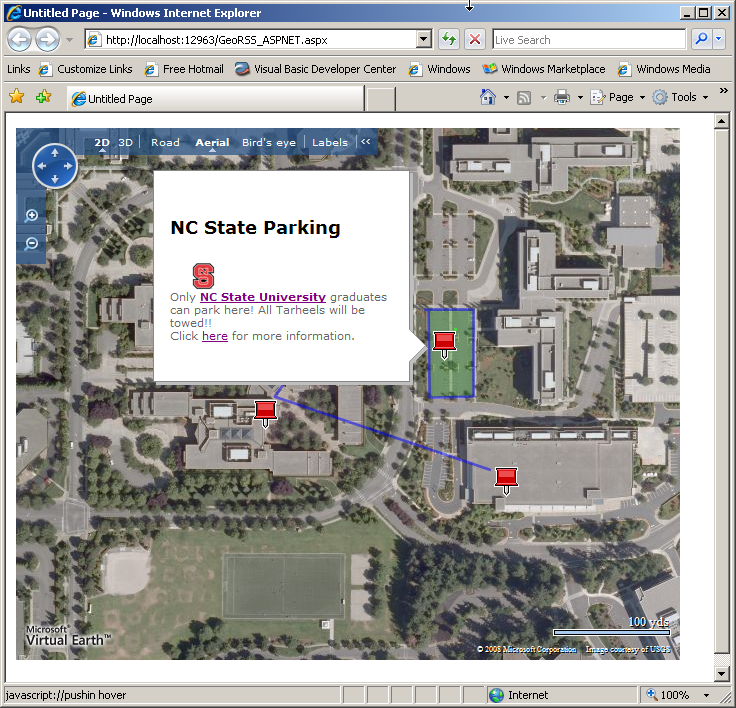
The GeoRSS data imported into the ASP.NET Map Control (Listing 9) is very similar to the data I used with the AJAX Map Control. The difference is in the polygon section at the end of the file. Just like I added HTML markup to some of the properties when manually adding map objects earlier in the article, you can add HTML markup to the GeoRSS file (which I did here) and use it to display a richer user experience.
Running the code in Listing 8 produces the map displayed in Figure 11.
Additional Data Importing Options
The two Virtual Earth map controls can import more than just GeoRSS formatted data. Other supported formats include KML, GPX and VECollection. Keyhole Markup Language (KML), like GeoRSS, is an XML-based format for managing the display of geospatial data in Google Maps and Google Earth. The GPS eXchange format (GPX) is a format for managing GPS data.
Another prime candidate for importing data is SQL Server. While SQL Server 2005 does not have the new geospacial data types that SQL Server 2008 provides, you could easily store latitude and longitude values for addresses in your databases. You could create a query to generate a list of your retail stores along with their address, website URL, manager name, phone number, latitude and longitude coordinates, and so on in order to generate a GeoRSS file to import into a map. You could add links to your corporate logo, store picture, etc., to create a rich user experience when they click on a specific store location.
Summary
I hope this introduction to developing Virtual Earth applications gets you thinking about new ways of delivering data to your users. There is still much to learn. For example, SQL Server 2008 has new geospacial data types that are tailor made to working with Virtual Earth. The Virtual Earth MapCruncher feature allows you to overlay your own map images over the Virtual Earth maps. You can learn more about MapCruncher and download it from http://dev.live.com/virtualearth/mapcruncher/. The Virtual Earth Web Services 1.0, new in version 6.2, provides imagery, search, geocoding, and routing services.
There are additional server-side and client-side events to learn how to handle. For example, one of the samples in the Interactive SDK on the http://dev.live.com/virtualearth/sdk/ page demonstrates via JavaScript how to react to client-side events like zooming in and out and another demonstrates how to handle other mouse events like clicking and double-clicking. Other features like providing driving directions, displaying points of interest, working with birds-eye view, 3D maps and much more await your discovery. Check out the sidebars in this article where I’ve added a number of resources to help you continue the learning process. Good luck and happy mapping!
Listing 1: Code for FirstMap.aspx
<html xmlns="<a href="http://www.w3.org/1999/xhtml";>http://www.w3.org/1999/xhtml<;/a>" >
<head>
<title>My First Map</title>
<meta content="text/html; charset=utf-8"
http-equiv="Content-Type" />
<script
src="<a href="http://dev.virtualearth.net/mapcontrol/";>http://dev.virtualearth.net/mapcontrol/<;/a>
mapcontrol.ashx?v=6.2"
type="text/javascript">
</script>
<script type="text/javascript">
var map = null;
function GetMap()
{
map = new VEMap('myMap');
map.LoadMap();
}
</script>
</head>
<body onload="GetMap();" style="font-family: Arial">
<div id='myMap' style="position: relative;
width: 600px; height: 400px;"></div>
</body>
</html>
Listing 2: Code for LocationSpecified.aspx
<script type="text/javascript">
    var map = null;
    var MSFTLocation = new VELatLong(47.643900, -122.129000);

    function GetMap()
    {
       map = new VEMap('myMap');
       map.LoadMap(MSFTLocation,16,VEMapStyle.Hybrid,
     false,VEMapMode.Mode2D,true);
    }
</script>
Listing 3: Code to handle onclick event and determine map coordinates
<script type="text/javascript">
    var map = null;

    function GetMap() {
       map = new VEMap('MyMap');
       map.LoadMap(new VELatLong(25.957948, -80.238849),
           19, VEMapStyle.Hybrid, false);
       map.AttachEvent("onclick", OnClickHandler);
    }

    function OnClickHandler(e) {
       if (e.rightMouseButton == true) {
         // Map metadata available in Aerial & Hybrid modes only
         if (map.GetMapStyle() == VEMapStyle.Aerial ||
            map.GetMapStyle() == VEMapStyle.Hybrid) {
              // Determine the pixel the user right clicked
              var clickedPixel = new VEPixel(e.mapX, e.mapY);
              // Determine the Lat & Long of the pixel
              var clickedLatLong =
                 map.PixelToLatLong(clickedPixel);
              // Write the coordinates to the page
              var span_latitude =
                 document.getElementById("span_latitude");
              span_latitude.innerHTML =
                 clickedLatLong.Latitude.toFixed(6)
              var span_longitude =
                 document.getElementById("span_longitude");
              span_longitude.innerHTML =
                 clickedLatLong.Longitude.toFixed(6);
         }
         else {
            alert("Map display must be Aerial and Hybrid");
         }
       }
    }
</script>
</head>
<body onload="GetMap();">
  <form id="form1" runat="server">
     <div style="font-size: large;font-weight: bold;">
        Where Am I?
     </div>
     <br />
     <div>
         Right-click a location on the map to determine the
         latitude and longitude coordinates
     </div>

     <table "width:500px">
         <tr>
             <td>Latitude:</td>
             <td><span id="span_latitude"></span></td>
         </tr>
         <tr>
             <td>Longitude:</td>
             <td><span id="span_longitude"></span></td>
         </tr>
     </table>
     <hr />
     <div id='MyMap' style="position: relative;
            width: 600px; height: 400px;"></div>
  </form>
</body>
Listing 4: Expanded code for LocationSpecified.aspx
<script type="text/javascript">
var map = null;
var MSFTLocation = new VELatLong(47.643900, -122.129000);
function GetMap()
{
map = new VEMap('myMap');
map.LoadMap(MSFTLocation,17,VEMapStyle.Aerial,
false,VEMapMode.Mode2D,false);
CreateLayer();
AddPushpins();
AddPolylines();
AddPolygon();
}
function CreateLayer()
{
layer = new VEShapeLayer();
map.AddShapeLayer(layer);
}
function AddPushpins()
{
var msft = new VELatLong(
47.64326923318957, -122.12855637073517);
var shape16 = new VEShape(VEShapeType.Pushpin, msft);
shape16.SetTitle('Building 16');
shape16.SetDescription('What happens in Building 16??');
map.AddShape(shape16);
var msft = new VELatLong(
47.64395232145461, -122.12771415710449);
var shape17 = new VEShape(VEShapeType.Pushpin, msft);
shape17.SetTitle('Building 17');
shape17.SetDescription('What happens in Building 17??');
map.AddShape(shape17);
var msft = new VELatLong(
47.64393786465262, -122.12937712669372);
var shape18 = new VEShape(VEShapeType.Pushpin, msft);
shape18.SetTitle('Building 18');
shape18.SetDescription('What happens in Building 18??');
layer.AddShape(shape18);
var msft = new VELatLong(
47.642788536093015, -122.12595999240876);
var shape33 = new VEShape(VEShapeType.Pushpin, msft);
shape33.SetTitle('Building 33');
shape33.SetDescription('What happens in Building 33??');
layer.AddShape(shape33);
}
function AddPolylines()
{
var points = [
new VELatLong(47.64399207763941, -122.1292269229889),
new VELatLong(47.64400653442639, -122.12781071662904),
new VELatLong(47.643399345928714, -122.12845981121066),
new VELatLong(47.642868050203774, -122.12615847587584)
];
var shape = new VEShape(VEShapeType.Polyline, points);
shape.SetLineWidth(6);
shape.SetLineColor(new VEColor(0,0,255,1.0));
shape.HideIcon();
layer.AddShape(shape);
}
function AddPolygon()
{
var points = [
new VELatLong(47.64402460540448, -122.12683975696565),
new VELatLong(47.64402460540448, -122.12633550167084),
new VELatLong(47.643395731690326, -122.12633550167084),
new VELatLong(47.64339211745171, -122.12680220603941),
new VELatLong(47.644017377014, -122.12681829929353),
new VELatLong(47.64402460540448, -122.12683975696565)
];
var shape = new VEShape(VEShapeType.Polygon, points);
shape.SetLineWidth(4);
shape.SetLineColor(new VEColor(255,0,0,1.0));
shape.SetFillColor(new VEColor(0,100,150,0.3));
shape.SetTitle("Parking Lot");
shape.HideIcon();
shape.SetDescription("Let's park here.");
shape.SetMoreInfoURL("<a href="http://www.takenote.com">http://www.takenote.com</a>");
layer.AddShape(shape);
}
</script>
Listing 5: Expanded code for LocationSpecified.aspx
Imports <a href="http://Microsoft.Live.ServerControls.VE">Microsoft.Live.ServerControls.VE</a>
Partial Public Class ASPNETMapControl
Inherits <a href="http://System.Web.UI">System.Web.UI</a>.Page
Protected Sub Page_Load(ByVal sender As Object, _
ByVal e As System.EventArgs) Handles Me.Load
'Initialize map properties
Map1.Center.Latitude = 47.6439
Map1.Center.Longitude = -122.129
Map1.ZoomLevel = 17
Map1.MapStyle = _
<a href="http://Microsoft.Live.ServerControls.VE">Microsoft.Live.ServerControls.VE</a>.MapStyle.Aerial
'Create new layer to contain shapes
Dim layer As New ShapeLayer
'Add shapelayer to the map
'Yes, this is done before items are added to the layer
Map1.AddShapeLayer(layer)
'Create a pushpin and add to layer
Dim PushPin16 As New Shape()
PushPin16.Type = ShapeType.Pushpin
PushPin16.Title = "Building 16"
PushPin16.Description = "What happens in Building 16"
Dim MyPoints16 As New List(Of LatLongWithAltitude)
MyPoints16.Add(New LatLongWithAltitude( _
47.643269233189571, -122.12855637073517))
PushPin16.Points = MyPoints16
layer.AddShape(PushPin16)
'Create a pushpin and add to layer
Dim PushPin17 As New Shape()
PushPin17.Type = ShapeType.Pushpin
PushPin17.Title = "Building 17"
PushPin17.Description = "What happens in Building 17"
Dim MyPoints17 As New List(Of LatLongWithAltitude)
MyPoints17.Add(New LatLongWithAltitude( _
47.643952321454613, -122.12771415710449))
PushPin17.Points = MyPoints17
layer.AddShape(PushPin17)
'Create a pushpin and add to layer
Dim PushPin18 As New Shape()
PushPin18.Type = ShapeType.Pushpin
PushPin18.Title = "Building 18"
PushPin18.Description = "What happens in Building 18"
Dim MyPoints18 As New List(Of LatLongWithAltitude)
MyPoints18.Add(New LatLongWithAltitude( _
47.643937864652621, -122.12937712669373))
PushPin18.Points = MyPoints18
layer.AddShape(PushPin18)
'Create a pushpin and add to layer
Dim PushPin33 As New Shape()
PushPin33.Type = ShapeType.Pushpin
PushPin33.Title = "Building 33"
PushPin33.Description = "What happens in Building 33"
Dim MyPoints33 As New List(Of LatLongWithAltitude)
MyPoints33.Add(New LatLongWithAltitude( _
47.642788536093015, -122.12595999240877))
PushPin33.Points = MyPoints33
layer.AddShape(PushPin33)
'Create a polyline and add to layer
Dim PolyLine1 As New Shape()
PolyLine1.Type = ShapeType.Polyline
PolyLine1.LineWidth = 6
PolyLine1.LineColor = New Color(0, 0, 255, 1.0)
PolyLine1.HideIcon()
Dim PolyLinePoints As New List(Of LatLongWithAltitude)
PolyLinePoints.Add(New LatLongWithAltitude( _
47.64399207763941, -122.12922692298891))
PolyLinePoints.Add(New LatLongWithAltitude( _
47.644006534426389, -122.12781071662904))
PolyLinePoints.Add(New LatLongWithAltitude( _
47.643399345928714, -122.12845981121066))
PolyLinePoints.Add(New LatLongWithAltitude( _
47.642868050203774, -122.12615847587584))
PolyLine1.Points = PolyLinePoints
layer.AddShape(PolyLine1)
'Create a polygon and add to layer
Dim ParkingLotTitle As String
ParkingLotTitle = "<img src='<a href="http://graphics.fansonly.com/";>http://graphics.fansonly.com/<;/a>"
ParkingLotTitle += "schools/acc/graphics/ncstate-1-bds.gif'>"
ParkingLotTitle += "<H3>NC State Parking Lot</H3><HR>"
Dim ParkingLotDescription As String
ParkingLotDescription = "Only <a href='<a href="http://www.ncsu.edu">http://www.ncsu.edu</a>'>"
ParkingLotDescription += "<b>NC State University</b></a> "
ParkingLotDescription += "graduates can park here! <P>"
ParkingLotDescription += "<P>All Tarheels will be towed!!"
Dim ParkingLotIcon As String
ParkingLotIcon = "<img src='<a href="http://graphics.fansonly.com/";>http://graphics.fansonly.com/<;/a>"
ParkingLotIcon += "schools/acc/graphics/ncstate-1-bds.gif'>"
Dim Polygon1 As New Shape()
Polygon1.Type = ShapeType.Polygon
Polygon1.LineWidth = 4
Polygon1.LineColor = New Color(255, 0, 0, 1.0)
Polygon1.Title = ParkingLotTitle
Polygon1.Description = ParkingLotDescription
Polygon1.CustomIcon = ParkingLotIcon
Polygon1.MoreInfoURL = "<a href="http://www.ncsu.edu">http://www.ncsu.edu</a>"
Dim PolygonPoints As New List(Of LatLongWithAltitude)
PolygonPoints.Add(New LatLongWithAltitude( _
47.644024605404482, -122.12683975696565))
PolygonPoints.Add(New LatLongWithAltitude( _
47.644024605404482, -122.12633550167084))
PolygonPoints.Add(New LatLongWithAltitude( _
47.643395731690326, -122.12633550167084))
PolygonPoints.Add(New LatLongWithAltitude( _
47.643392117451711, -122.12680220603941))
PolygonPoints.Add(New LatLongWithAltitude( _
47.644017377014, -122.12681829929353))
PolygonPoints.Add(New LatLongWithAltitude( _
47.644024605404482, -122.12683975696565))
Polygon1.Points = PolygonPoints
layer.AddShape(Polygon1)
End Sub
Listing 6: GeoRSS data for AJAX Map control
<?xml version="1.0" encoding="utf-8"?>
<rss xmlns:georss="<a href="http://www.georss.org/georss";>http://www.georss.org/georss<;/a>" version="2.0">
<channel>
<title>Microsoft Campus</title>
<description />
<item>
<title>Building 17</title>
<description />
<georss:point>47.64395232145461 -122.12771415710449
</georss:point>
</item>
<item>
<title>Building 16</title>
<description />
<georss:point>47.64326923318957 -122.12855637073517
</georss:point>
</item>
<item>
<title>Building 18</title>
<description />
<georss:point>47.64393786465262 -122.12937712669372
</georss:point>
</item>
<item>
<title>Campus Line</title>
<description />
<georss:line>47.64399207763941 -122.1292269229889
47.64400653442639 -122.12781071662904
47.643399345928714 -122.12845981121066
47.642868050203774 -122.12615847587584
</georss:line>
</item>
<item>
<title>Building 33</title>
<description />
<georss:point>47.642788536093015 -122.12595999240876
</georss:point>
</item>
<item>
<title>Parking Lot</title>
<description />
<georss:polygon>47.64402460540448 -122.12683975696565
47.64402460540448 -122.12633550167084
47.643395731690326 -122.12633550167084
47.64339211745171 -122.12680220603941
47.644017377014 -122.12681829929353
47.64402460540448 -122.12683975696565
</georss:polygon>
</item>
</channel>
</rss>
Listing 7: Importing GeoRSS data with AJAX Map control
<html xmlns="<a href="http://www.w3.org/1999/xhtml";>http://www.w3.org/1999/xhtml<;/a>" >
<head id="Head1" runat="server">
<title>GeoRSS Import (AJAX)<</title>
<meta content="text/html; charset=utf-8"
http-equiv="Content-Type" />
<script
src ="<a href="http://dev.virtualearth.net/mapcontrol/mapcontrol.ashx?v=6.2";>http://dev.virtualearth.net/mapcontrol/mapcontrol.ashx?v=6.2<;/a>"
type="text/javascript">
</script>
<!-- Hide the bird's eye notification pop-up -->
<style type="text/css">#MSVE_obliqueNotification
{visibility: hidden;} </style>
<script type="text/javascript">
var map = null;
var Location = new VELatLong(47.643900, -122.129000);
function GetMap()
{
map = new VEMap('myMap');
map.LoadMap(
Location,17,VEMapStyle.Hybrid,false,VEMapMode.Mode2D,true);
var mylayer = new VEShapeLayer();
var veLayerSpec = new VEShapeSourceSpecification(
VEDataType.GeoRSS, "MSFT_AjAX.xml", mylayer);
map.ImportShapeLayerData(veLayerSpec, null);
}
</script>
</head>
<body onload="GetMap();" style="font-family: Arial">
<div id='myMap' style="position: relative;
width: 650px; height: 500px;">
<</div>
</body>
</html>
Listing 8: GeoRSS data for AJAX Map control
Imports <a href="http://Microsoft.Live.ServerControls.VE">Microsoft.Live.ServerControls.VE</a>

Partial Public Class GeoRSS_ASPNET
    Inherits <a href="http://System.Web.UI">System.Web.UI</a>.Page

    Protected Sub Page_Load(ByVal sender As Object, _
      ByVal e As System.EventArgs) Handles Me.Load
        'Initialize map properties
        Map1.Center.Latitude = 47.6439
        Map1.Center.Longitude = -122.129
        Map1.ZoomLevel = 17
        Map1.MapStyle = _
        <a href="http://Microsoft.Live.ServerControls.VE">Microsoft.Live.ServerControls.VE</a>.MapStyle.Aerial

        'Create new layer to contain shapes
        Dim layer As New ShapeLayer
        Map1.AddShapeLayer(layer)

        Dim ShapeSpecs As New ShapeSourceSpecification( _
          DataType.GeoRSS, "MSFT_ASPNET.xml", layer)
        Map1.ImportShapeLayerData(ShapeSpecs, "", True)
    End Sub

End Class
Listing 9: GeoRSS data for ASP.NET Map control
<?xml version="1.0" encoding="utf-8"?>
<rss xmlns:georss="<a href="http://www.georss.org/georss";>http://www.georss.org/georss<;/a>" version="2.0">
<channel>
<title>Microsoft</title>
<link><a href="http://maps.live.com">http://maps.live.com</a></link>
<description />
<item>
<title>Building 17</title>
<description />
<georss:point>47.64395232145461 -122.12771415710449
</georss:point>
</item>
<item>
<title>Building 16</title>
<description />
<georss:point>47.64326923318957 -122.12855637073517
</georss:point>
<</item>
<item>
<title>Building 18</title>
<description />
<georss:point>47.64393786465262 -122.12937712669372
</georss:point>
<</item>
<item>
<title>Campus Line</title>
<description />
<georss:line>47.64399207763941 -122.1292269229889
47.64400653442639 -122.12781071662904
47.643399345928714 -122.12845981121066
47.642868050203774 -122.12615847587584
</georss:line>
</item>
<item>
<title>Building 33</title>
<description />
<georss:point>47.642788536093015 -122.12595999240876
</georss:point>
<</item>
<item>
<title>&lt;H3&gt;NC State Parking&lt;/H3&gt;</title>
<description>&lt;img src='<a href="http://graphics.fansonly.com/schools/acc/graphics/ncstate-1-";>http://graphics.fansonly.com/schools/acc/graphics/ncstate-1-<;/a>
bds.gif'/&gt;&lt;br/&gt;Only &lt;a href="<a href="http://www.ncsu.edu/";>http://www.ncsu.edu/<;/a>"
target='_blank'&gt;&lt;b&gt;NC State University&lt;/b&gt;&lt;/a&gt;
graduates can park here! All Tarheels will be towed!!
&lt;br&gt;Click &lt;a
href='<a href="http://www.ncsu.edu">http://www.ncsu.edu</a>'&gt;here&lt;/a&gt; for more
information.
</description>
<georss:polygon>47.64402460540448 -122.12683975696565
47.64402460540448 -122.12633550167084
47.643395731690326 -122.12633550167084
47.64339211745171 -122.12680220603941
47.644017377014 -122.12681829929353
47.64402460540448 -122.12683975696565
</georss:polygon>
</item>
</channel>
</rss>
| Argument | Example | Description |
|---|---|---|
| Location | MSFTLocation | Refers to the location of the map center. |
| Zoom Level | 16 | Specifies the initial zoom level for the map. |
| Map Style | Hybrid | Specifies which type of map to display, road, aerial, or hybrid for example. Use the VEMapStyle enumeration for all the possible values. |
| Location Fixed | False | Specifies if the map location is fixed or not. This determines if the user can click and drag to change the map location. |
| Map Mode | Mode2D | Specifies if the map is viewed in 2D or 3D mode. 3D mode requires a browser plug-in be installed but provides a complete 3D experience without having to install client software as Google Maps does. |
| Display Dashboard | True | Specifies if the dashboard in the upper left corner displays the ability to switch between 2D and 3D modes. |
