


jQuery is a small JavaScript library that makes development of HTML-based client JavaScript drastically easier.
With client logic getting ever more complex and browsers still diverging in features and implementation of features, jQuery and other client libraries provide much needed normalization when working with JavaScript and the HTML DOM.
Ok, I admit it. For many, many years I hated JavaScript. I hated writing JavaScript code, and even more I hated the pain that goes along with dealing with different browsers using reams of script code. I still hate the same problems today, but thanks to a recently gained better understanding of JavaScript and a small JavaScript client library called jQuery, I no longer dread the days when I have to write client-centric AJAX script code. In fact, I welcome them now.
I started out as a JavaScript neophyte and stayed that way for a long time. Sure I used JS here and there for validation and few simple manipulation tasks 12 years ago, but it wasn’t until a few years ago when AJAX surfaced that I even took a more serious interest. It took me some time after that to slowly get up to speed on modern JavaScript principles I had never even thought about up until then: effective use of closures, the Prototype model, class definitions, and using functions as code, all of which require some getting used to when you are primarily dealing with static languages like C# as I do for most of my work.
But even knowing JavaScript reasonably well is not enough. These days it’d be silly to work with raw JavaScript for DOM programming and not use some sort of library to help bridge the browser-specific quirks and provide utility functionality to make it easier to work in a browser-agnostic environment. I’ve checked out a number of different libraries over the last couple of years, but the one that really grabbed me is jQuery (www.jQuery.com). jQuery is a relatively small library that is based on a few very simple and intuitive principles. To me, this library strikes the right balance between size, feature set, and ease of use. Even originally after using it for just a few days I already felt like “this is what JavaScript and DOM programming should be!”
jQuery can bring tremendous productivity gains and it’s easy to learn and work with. It’s one of those tools that has drastically changed how I think about client-side development and frankly it has helped me improve my skill set significantly. It’s also made me much more productive and more confident in being able to tackle complex UI and front-end logic in JavaScript reliably.
Key Features of jQuery
Let me show you why you should take the time to look at jQuery. It has quite a bit of functionality, and I think you should look at these key features:
- DOM Element SelectorsjQuery Selectors allow you to select DOM elements so that you can apply functionality to them with jQuery’s operational methods. jQuery uses a CSS 3.0 syntax (plus some extensions) to select single or multiple elements in a document. Using CSS means that you use selector syntax you’re probably already familiar with from HTML styling and even if not, it’s fairly easy to pick up the key CSS selector features. I’ll go as far as saying that jQuery is the reason I really started to grok CSS. Using CSS syntax you can select elements by ID, CSS class, attribute filters, or by relationship to other elements, and you can even chain together filter conditions. Look at this simple example to select all 2nd column TD elements in a table with a simple selector: $("#gdEntries td:nth-child(2)").
- The jQuery Object: The Wrapped SetSelectors result in a jQuery object that is known as the wrapped set, which is an array-like structure that contains each of the selected DOM elements. You can iterate over the wrapped set like an array or access individual elements via the indexer ($(sel)[0] for example). More importantly though, you can also apply jQuery functions against all the selected elements.
- Wrapped Set OperationsThe real power of the wrapped set comes from applying jQuery operations against all selected DOM elements simultaneously. The jQuery.fn object exposes about 100 functions that can operate on the matched set and allows you to manipulate and retrieve information from the selected DOM objects in a batch. For example, you can easily manipulate all alternate rows in a table by adding a CSS class with $("#gdEntries tr:odd").addClass("gridalternate"). jQuery applies the .addClass() function against each of the matched elements with one command. Intuitive methods allow you to get and set .css() styles directly including smart logic that accounts for browser differences of assignment types (number and string translations mostly) and values (opacity does the right thing on all browsers). You can set and retrieve attributes with .attr(), or retrieve or set a value with .val(), .text(), or .html(). You can clone selected DOM elements or create new elements from HTML text used as a selector and inject them into the document with methods like .appendTo(), .prependTo(), or reversely use a parent element to .append() or .prepend() the new or selected element(s). You can apply some basic but useful effects methods to .show() and .hide() elements in a smart way that checks for opacity, display, and visibility, and adjusts all to show or hide elements. You can do all of this and much more against all of the selected elements. Most wrapped set operations are also chainable so that they return the jQuery wrapped set object as a result. This means you can chain together many methods in a single command. Effectively this means you can select once and operate many times against the same object and even filter or expand the wrapped set with methods like .find(), .filter(), or .add(). The beauty of many of these functions is that they do things you actually want to do, and they are intuitively overloaded. Methods like .val() or .text() act both as retrieval and setter methods. Methods that deal with numeric values can take either text or numeric values. jQuery automatically fixes CSS assignments to browser dependent tags. Although the number of functions provided by jQuery is relatively small, many of the functions provide overloaded functionality to perform intuitive behaviors. The end result is that you have a relatively small API to learn, but a much broader range of functionality that is available on it.
- Simplified Event HandlingMuch of what you do in JavaScript code from DOM manipulation to AJAX calls is asynchronous using events and unfortunately the DOM implementations for event handling vary considerably between browsers. jQuery provides an easy mechanism for binding and unbinding events and providing a normalized event model for all supported browsers that makes it easy to handle events and hook up result handlers. jQuery calls all event handlers in the context of the element that caused the event (i.e., the this pointer) and they receive a fixed up and browser normalized event object that is consistent.
- Small FootprintjQuery is a fairly compact base library yet it’s feature packed with stuff you’ll actually use. In my relatively short time of jQuery use, I’ve gone through well over 85% of the jQuery functions with my code, which points at how useful the library is. All this functionality ends up in a compressed size of just around 16 KB (94 KB uncompressed with comments). For that you get selectors, a whole slew of operations that you can perform on the wrapped set, DOM normalization for most browsers, AJAX functionality, a host of utility functions for object/array manipulation, and a number of basic effect functionality. Given my high utilization of jQuery, this 16 KB of script download provides a tremendous amount of “Bang for the Buck.”
- Easy Plug-in ExtensibilityjQuery is a language and DOM extension library and it provides a core set of useful features. It’s small and tightly focused on providing core functionality and no more. For everything else, jQuery provides a very easy plug-in API that has spawned hundreds of plug-ins for almost every conceivable common operation you might think up to perform on a set of DOM elements. jQuery’s API allows extending the core jQuery object’s operations simply by creating a function and passing the jQuery wrapped set as a parameter. In this way, plug-ins receive the wrapped set and can operate on it and participate in the jQuery chaining. This very simple but powerful plug-in model is very easy to work with and likely the key to why so many plug-ins exist and jQuery has become so popular so quickly. If you need some specialty functionality, chances are that a plug-in already exists with the functionality you’re looking for. And if it doesn’t, it’s easy enough to create it yourself with the help of jQuery or another plug-in as a baseline.
Ok, so now that you have some idea of what jQuery provides, I’ll show you how to take it for a spin. In this article, I’ll introduce you to core jQuery concepts of document manipulation purely from a client-side perspective. In part 2, I’ll discuss how to use jQuery in combination with ASP.NET on the server for AJAX callbacks and how to integrate jQuery with server-side controls and components.
Getting a Feel for jQuery
Let’s start by looking at the basics of jQuery syntax and usage. Mind you this only covers a few features of jQuery, but it should give you an idea of the basic principles as well as some of the power of this library.
Adding jQuery to Your Page
jQuery is a client script library and so you have to add a script reference to your page. You can download the latest version of jQuery from the jQuery site at www.jQuery.com.
You can include jQuery into your ASP.NET pages in a number of ways:
- Reference a local copy via a <script> tag in the page.
- Reference a local copy with ScriptManager.
- Embed script from Resource using the ClientScript object.
- Reference a remote copy from jQuery.com or Google AJAX API (http://code.google.com/apis/ajaxlibs/).
Both jQuery.com and Google host the jQuery script files on their sites. Google’s repository includes both static files and Google API dynamic links to load libraries for both jQuery and jQuery.ui and the Google site tends to be faster and more reliable.
Personally I prefer to have local copies of my libraries available so I’m not dependent on an online resource if my connection is down or if I’m offline. I use local scripts and stick them into a /scripts folder of my Web application and that’s what I’ll use in the samples below:
<html xmlns="http://www.w3.org/1999/xhtml">
<head runat="server">
    <title></title>
    <script src="scripts/jquery.js"
 type="text/javascript"></script>
</head>
<body>
If you’re interested in more info on the pros and cons of the various script inclusion methods, check out this blog post (http://www.west-wind.com/Weblog/posts/413878.aspx).
Getting Started with Selectors
Selectors make jQuery useful. You start by selecting content, and then applying a jQuery function to it. You can select a single element:
$("#gdEntries")
    .css("border", "solid 1px navy");
Or select by CSS class (.):
$(".gridalternate")
    .css("background", "lightsteelblue ");
or by multiple CSS selectors separated by commas as in CSS. Here elements that match either of two CSS classes are matched:
$(".gridrow,.gridalternate")
    .attr("tag", "row");
You can also select elements by tagname (div, tr, input, etc.) and apply filters to the elements. The following selects all input elements that are buttons and attaches a click handler to all of them:
$("input:button,input:submit")
    .click(function(event){
            alert("clicked");
           });
A more complex selector might select all rows in a table:
$("#gdEntries>tbody>tr")
    .css("border", "solid 1px red");
If you’re at all familiar with CSS, all of this should look familiar: You can use the same syntax selectors CSS style sheets use (with the exception of the :button filter-jQuery adds a number of custom filters) to find elements to style. The idea is simple: Use what you already know rather than some custom syntax. CSS is quite powerful in selecting elements on a page and given a reasonably thoughtful HTML layout should make just about any element or group of elements easily in a document selectable.
If you’re rusty on CSS, Table 1 shows a few of the common jQuery/CSS selector types that you can apply (you can see a full list at http://docs.jquery.com/Selectors).
Selectors can get quite sophisticated. Say you want to look for any cells in a table that have an ID that starts with the value pk:
$("#gdEntries>tbody>tr>td[id^=Pk]")
.width(30);
Cool eh? You get a lot of control over picking up the exact elements you are looking for.
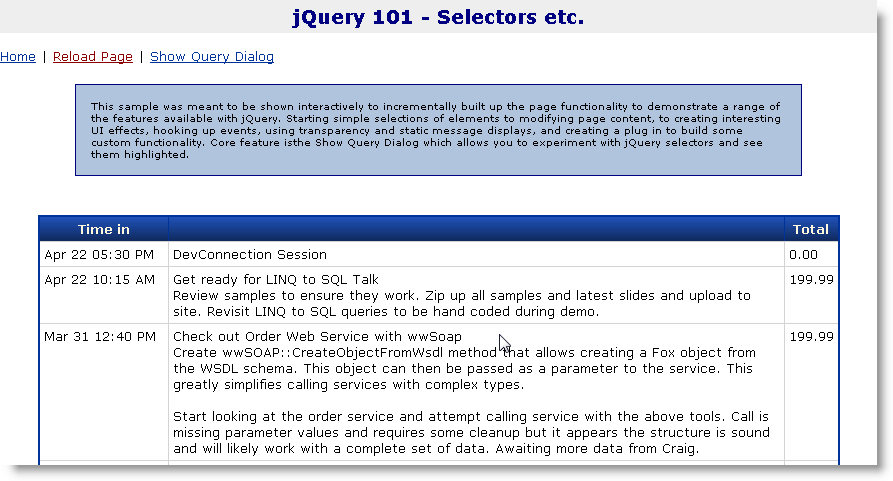
Let’s look at a simple, concrete example of an ASP.NET page and use jQuery on the client side to fix up the page to highlight some of jQuery’s features. The following page contains a GridView to display a plain table loaded from data. I’m going to add jQuery and a bit of code to manipulate the page. You can follow along if you like by downloading the code accompanying this article. Listing 1 shows the abbreviated ASP.NET page I’ll work with (I’ve also provided a plain HTML file in the sample download):
This sample applies minimal formatting to the GridView and if you run the page you get a very plain, black and white grid display as shown in Figure 1.
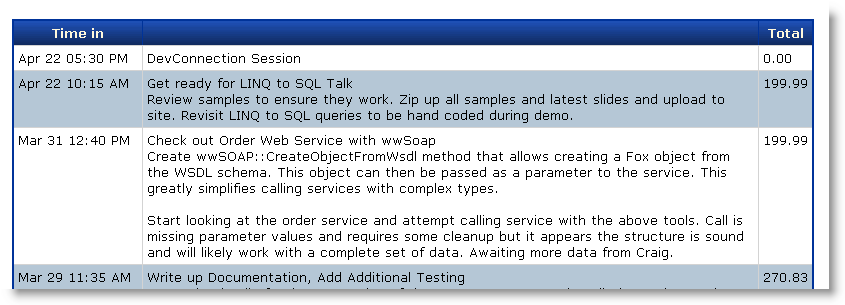
In this next example I’ll show you how to use jQuery to select elements and make the table look a little nicer and add some interactivity. I’ll start by applying an alternating row effect to the table rows.
First I’ll add a script tag to the bottom page just above the </form> tag like this:
<script type="text/javascript">
    $(document).ready( function() {
      $("#gdEntries tbody tr:even")
         .addClass("gridalternate");
    });
</script>
Figure 2 show the alternate row striping for the rows.
The jQuery()/$() Object
Take a look back at the script block on the bottom of the page and notice the $ symbol in the script block, which is an alias to the jQuery object. $ is just a shortcut for the jQuery object and you can use the two interchangeably. So above I could have used jQuery(document) or jQuery("#gdEntries") just as easily as $(document) or $("#gdEntries"). The jQuery object takes a selector as a parameter. Typically selectors are expressed as strings, but you can also pass DOM elements or another jQuery object.
For example, $(document) passes a document DOM element and results in a single element wrapped set that contains the document object. $("#gdEntries") selects the gdEntries table on the page where # is the ID identifier just as in CSS.
The $(document).ready() Handler
Notice the use of the $(document).ready() handler. .ready() is a jQuery event handler and your first exposure to how to handle events with jQuery. This particular event handler fires when you can access the Document and when scripts have completed loading. This ensures that your code can access all DOM elements and script code reliably. You can place a .ready() handler anywhere on the page and you can even have multiple ready handlers in a single page.
Although a .ready() handler is optional and not always required, for consistency and reliability’s sake it’s best to always wrap any script “startup code” into a .ready() handler to ensure consistent operation on all browsers.
jQuery implements the handler using an anonymous function, which means it declares the handler right inline of the .ready() function call:
$(document).ready( function {…} );
This is a common practice with jQuery, because inline functions are an easy way to write the short handler code that is so common in JavaScript. There are other advantages to inline functions, but for now just note that inline anonymous functions are a common way to write event handlers and you’ll see more of them shortly. You can also pass a function pointer instead of an anonymous function:
$(document).ready( onLoaded );
… more script here

function onLoaded(e) { … }
Selectors Again
Let’s come back to the grid example code that performs the selection of the rows in the example. $("#gdEntries tbody tr:even") selects all the even rows in the grid view’s table output. In plain English the selector means: select the gdEntries element (#) and find any child tbody elements (space=child) find any tr elements below it (space=child) and then return a filtered set(:even=filter) that includes only the even elements.
The result of the selector is a wrapped set of all even rows in the table. The .addClass("gridalternate") function then applies the .gridalternate CSS style to each matched element, which gives it its new highlighted appearance. Finally the .css function applies some custom styling to each matched element. Both .addClass() and .css apply their operations against all the matched elements at once.
Selectors Often Select More Than You Expect
If you’re following along in the sample, you’re probably noticing that while the above works to highlight even rows, there’s also a funky side effect in the table: If you look at the pager-which ASP.NET renders as a table-you’ll find that its alternating rows have also been marked up with the .gridalternate class. The problem is that ASP.NET’s GridView rendering is, uhm, rather imprecise. It doesn’t render proper tbody and tfoot tags to delineate table headers and footers so the selector query is too broad as the selector also matches the child elements, which include the child Pager table in the footer.
There are a number of ways to fix this to make it work properly. First you can apply a filter to the selection by excluding certain elements:
$("#gdEntries tbody tr")
    .not(":first,:last")
    .filter(":even")
    .addClass("gridalternate")
    .css("border","solid 1px lightgrey");
So instead of filtering on all odd rows I first filter the rows and omit the first and last rows (the header and the footer). I then filter the list and grab only the even items out of that set. Another even easier way is to use only direct children using the > operator rather than spaces, which select all children:
$("#gdEntries>tbody>tr:even")
Another common and efficient way to filter elements that offers the developer the most control is via CSS class matching. You can add CSS classes or mere “marker” classes that have no matching CSS class to elements in markup.
Take another look at the way the GridView’s rows are rendered:
<RowStyle CssClass="griddatarow" />
This adds a class=”griddatarow” to each row rendered in the HTML. There’s no griddatarow CSS class, but jQuery can still match on it in the selector expression. So the following works:
$("#gdEntries tr.griddatarow:odd")
Or even as simple as:
$(".griddatarow:odd")
The latter works, but the first is preferable even if it is more verbose. It’s best to be as specific as possible in order to optimize selection for jQuery in the document. The former finds the gdEntries table and only searches for children in it, while the latter has to parse the entire document. The fewer elements matched by the first selector filters the fewer elements jQuery has to iterate over. Be precise if possible.
For kicks let’s say you wanted to select the second cell of the third row in the grid:
$("#gdEntries>tbody>tr:nth-child(3)" +
  ">td:nth-child(2)")
      .addClass("gridalternate");
Or maybe all second columns:
$("#gdEntries>tbody>tr>td:nth-child(2)")
   .addClass("gridalternate")
Easy! Think about how cool this is: If you had to do this manually via script code this would be a fairly complex task, but with a selector it’s a single line that is fairly easy to write and more importantly, easy to understand at a glance.
The Wrapped Set
The result of $("#gdEntries>tbody>tr:even") is a jQuery object which is an array-like structure that has a length property and an array containing each of the matched elements. You can reference the DOM elements in the wrapped set directly:
var res = $("#gdEntries>tbody>tr:even");
var len = res.length; // match count. 0 =
                       // no matches
var el = res[0]; // first element
el = res.get(0); // same but
                      // 'official'syntax
The jQuery constructor always returns an object result, so even if the selector finds no matches it always returns an object and you can check the .length property to determine if the selection returned matches.
Once you have a set of matches you can iterate manually with a for loop or use the .each() wrapped set function to iterate over the list. What’s nice about .each() is that it assigns the this pointer to the selected DOM element so you can do this:
$("#gdEntries tbody tr:even").each(
   function(index) {
       alert(this.id + " at index: " +
             index);
  });
Wrapped Set Functions
Manual iteration is useful at times, but more commonly you’ll use one or more of jQuery’s over 100 operational functions to operate on the resulting wrapped set’s elements. The jQuery selector applies both the .addClass() and .css() functions you saw above against all the elements that it matches to those you created with the jQuery() or $() function-in this case each of the rows you selected. You can find all the jQuery functions on the API reference page or if you’re into terse lookup sheets you can check out this jQuery cheat sheet you can print out (http://tinyurl.com/yw7p2c).
Function Chaining
jQuery lets you use a fluent interface for most function calls, which means that you can chain many jQuery function calls together in a single command. You’ve already seen examples of this earlier:
$("#gdEntries tbody tr")
    .not(":first,:last")
    .filter(":odd")
    .addClass("gridalternate")
    .css("border","solid 1px lightgrey");
This syntax chaining works because most jQuery functions return a matched set as a result. For example, .addClass and .css both return the original matches they acted on. Other functions like .not and .filter are actually filters and they modify the original matched set and return a new matched set. There’s also an .end() function that you use to remove any filters and return to the original matched set that you specified at the beginning of the chain.
Chaining is a great way to keep code compact, but it’s optional. If you prefer you can also write more traditional code like this:
var matches = $("#gdEntries>tbody>tr");
matches.addClass("gridheader");
matches.removeClass("gridhighlight");
Chained statements can sometimes be difficult to debug, because you get a single result value at the end. Explicit methods allow you to see changes each step of the way, which can be useful for debugging. For example, I often break commands up just for debugging and put them back together once fully debugged.
Not all jQuery functions can be chained. For example, functions like .val(), .text(), and .html() return string values; .width() and .height() return numbers; and .position() returns a position object. If you look at the jQuery function list though it should be pretty clear what the result types of most functions are. Typically functions that you would expect to return a void result return a matched set-all others return values or data.
Event Handling
Event handling is one of the nicest aspects of jQuery because it makes the process easy and consistent across browsers. jQuery provides the high level .bind() and .unbind() functions to generically attach and detach event handlers on matched set elements. This means it’s very easy to attach events to many objects at once-like the click handler attached to the rows in the example earlier. In addition, most of the common events like click, key, and mouse events have dedicated handler functions like .click(), .mousedown(), change(), and .keydown(). jQuery event handlers simply take a function as a parameter; and jQuery tracks these handlers so that it can unbind them later. Coding doesn’t get any easier than this. There’s even an option to name event handlers uniquely so that you can consistently remove them:
$("#gdEntries tr")
    .bind("click.MyHandler",function(e) {…});
…
$("#gdEntries tr")
    .unbind("click.MyHandler");
The extra name after the event name allows you to specifically identify an individual event handler rather than the default behavior that removes all event handlers for an event that were assigned with .bind() or the various convenience handlers like .click().
There’s also .one() which fires an event exactly once then disconnects the handler, .toggle() which toggles between alternating clicks, and .trigger() which can trigger events on elements through code.
jQuery also provides a common model for event handlers:
- The this pointer always equals the element the event fired on.
- jQuery always passes an event object as a parameter.
- The event object is cross-browser normalized (http://tinyurl.com/3d3ucm).
Let’s build on top of the earlier grid example by highlighting grid rows when hovering over them regardless of browser. The following block of code uses jQuery’s .hover() event function, which fires as a user hovers over an element. .hover takes both an entry and exit event function handler as parameters.
Let’s change the previous selector chain to:
$("#gdEntries>tbody>tr") .not(":first,:last")
    .hover( function() {
       $(this).addClass("gridhighlight");
    }, function() {
       $(this).removeClass("gridhighlight");
    })
   .filter(":even")
   .addClass("gridalternate");
Note that I re-arranged the order of the original operations a little so that I can apply the hover behavior to all rows and then filter the list afterwards to include only the even rows to apply the alternating style to those.
The .hover() function is an example of a jQuery event handler. It happens to be a special one, because unlike most it takes two callback functions as parameters. The first is for the mouseenter and the second for the mouseout operation. jQuery handles .hover() smartly detecting only “real” mouseout events when leaving the container unlike the DOM mouseout event which also fires when entering child elements.
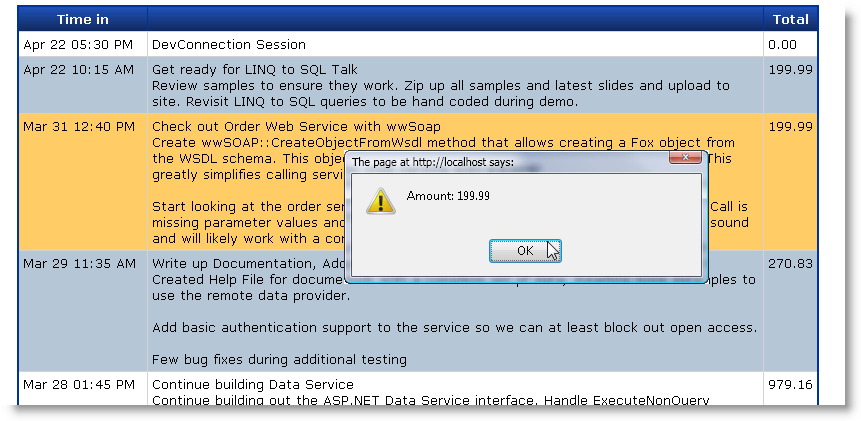
If you run the page now you should get an orange highlight for each row that the mouse hovers over.
Next let’s handle clicks on the row and pop up a dialog that shows the value of the selected third column, which you can easily do with the following .click() handler:
$("#gdEntries>tbody>tr")
    .not(":first,:last")
    .hover( function() {
        $(this).addClass("gridhighlight");
    },function() {
        $(this) .removeClass("gridhighlight");
    })
    .click( function(e) {
        alert("Amount: " +
              $(this) .find("td:nth-child(3)") .text());
    })
   .filter(":even")
   .addClass("gridalternate");
This code hooks up a click handler to every row in the matched set. Figure 3 shows what the grid looks like now. jQuery always calls event handlers in the context of the element that caused the event-so this points at the row DOM element. You can turn this into a jQuery object $(this) and then apply further filtering to this single element to find the third child cell and display its content.
Displaying the amount is not all that useful though. A more common scenario is for navigation where you click and navigate or perform some AJAX request based on the row selection. Unfortunately the ASP.NET GridView doesn’t provide any sort of ID or context on the client side so it’s not easy to take a context-based action. If you want to navigate or post back data in some sort of useful context, you have to take matters into your own hands. It’s pretty easy to fake GridView context though, knowing that you can use jQuery to easily access document content. You can embed an ID value into the generated content of one of the cells. The grid already has a template column so I’ll change it to:
<asp:TemplateField ItemStyle-
CssClass="descriptionField">
    <ItemTemplate>
    <div style="display:none">
       <%# Eval("pk") %></div>
    <div id="entrytitle">
         <%# Eval("Title") %></div>
    <div id="entrydescription">
         <%# Eval("Description")) %></div>
    </ItemTemplate>
</asp:TemplateField>
which embeds the pk into the generated output. You can then handle the .click() event by retrieving that PK value in the second column and looking at the first <div> tag and getting its text:
.click( function(e) {
    var pk = $(this)
    .find("td:nth-child(2) div:first-child")
    .text();
    window.location=
      "someotherpage.aspx?id="+ pk;
})
When you use jQuery and its flexible selector syntax, you can easily use HTML and the DOM as data storage, which stores state content in the HTML and lets you get at it via selectors as in this example. It also makes it possible even to use an inflexible component like the GridView and make it more dynamic. Approaches like this can completely change the way you think about the purpose of client UI and interactivity. For example, you can do in-place editing of content in the browser and then pick up that content later to post to the server via AJAX or even via Postback. The possibilities are endless.
Creating New HTML and Embedding It into the DOM
You can also create jQuery objects directly by simply passing an HTML string as the parameter to the jQuery object. To create HTML and add it to the document is as easy as:
$("<div></div>")
    .attr("id","_statusbar")
    .addClass("statusbar")
    .appendTo(document.body)
You can inject HTML anywhere in the document with .appendTo() or .prependTo() which inserts into the child items of the selector element(s). .append() and prepend() insert to the current selected element instead.
You can also .clone() existing nodes easily. Try this on the example above:
$("#gdEntries").clone()
        .appendTo(document.body)
        .attr("id","gdEntries2");
And you’ll see the entire GridView duplicated in the page. Not terribly useful, but there are a number of situations where cloning makes sense. For example, you can use cloning for a sort of templating mechanism. To insert a new row with new content in the table above you can use code like this:
var row =
      $("#gdEntries>tbody>tr:nth-child(2)")
            .clone();

row.find("td:first-child")
   .text(new Date().formatDate("MMM dd));
row.find("td:nth-child(2)")
   .html(new Date().formatDate("hh:mm:ss"));
row.find("td:last-child")
   .text( 199.99.formatNumber("c"));

row.insertBefore(
        "#gdEntries>tbody>tr:nth-child(2)")
   .show();
(Note the format functions are a few helper functions that you can find at ww.jquery.js provided with the source download.) The nice thing with this approach is that you don’t have to create HTML on the client-you’re only injecting text or data and maybe a little markup rather than HTML strings. The HTML structure comes from the cloned DOM element and you’re only “filling in the blanks.”
Content doesn’t have to pre-exist either. You can load “template” content from non-visible HTML elements on the page or embedded inside of a scriptblock.
This example is simplistic because I’m injecting static content, but you could retrieve content from an AJAX callback or captured form input fields and load that into the cloned “template.”
Templating is a powerful topic and I’ll come back to it in Part 2 of the article when I look at a couple of different templating tools you can use in combination with jQuery. (If you’re eager to check it out now, look at jTemplates (http://tinyurl.com/5f3pud) or John Resig’s cool Micro-Template engine (http://tinyurl.com/6c9kq9).)
jQuery Effects Functions and Some jQuery UI Features
One nice touch of jQuery is that it includes a few simple yet very effective effects methods. For example, if I wanted to add a little pizzazz to those new elements added in the last example, instead of calling .show() I could fade in the elements with simple code like this:
row.insertBefore(
        "#gdEntries>tbody>tr:nth-child(2)")
        .css("background", "paleyellow")
        .hide()
        .fadeIn(1000);
The .fadeIn() and .fadeOut() functions do exactly as their name implies and provide a very easy way to provide a visual clue that something is updating on the page. Other methods include .slideUp() and .slideDown() which slide content from the top or bottom to the current absolute position again with speed indicators. For lower-level animation there’s the .animate() function which allows you to animate numeric CSS properties to a new value over a timeout period to provide custom animations. In addition, there are many animation plug-ins that provide all sorts of fade and transitions effects. It’s pretty impressive what you can do with very little effort, but even the basic built-in functions do a lot to liven up a Web page. Just remember to keep it simple and not just add noise to the page. Use effects responsibly kids!
Another Simple Example Showing a Popup Window
jQuery can also help to create utilitarian UI features. Let’s add a pop-up window to the example, and allow dynamically typing selectors that select and highlight matched elements in the entire page. The end result is shown in Figure 4.
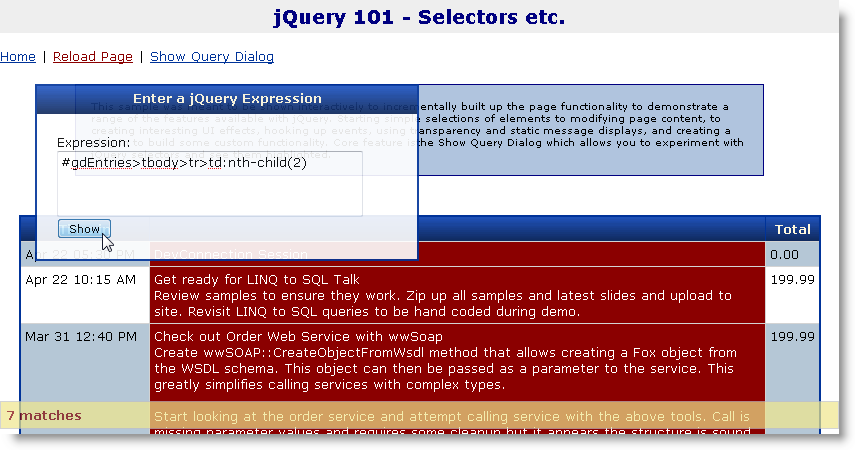
A user pops up the “dialog” by clicking the Show Query Dialog window, which “slides in” the dialog from the top of the page and displays it with a slightly transparent background on top of the page content. You can then type a jQuery selector in the text area and effectively apply it against the document. When you click the button, the selected elements are highlighted in dark red in the document and then removed after a few seconds.
The dialog is stored on the page as a simple <div> tag element that’s styled and looks like this in markup:
<div id="divjQueryDialog"
     class="blackborder">
    <div class="gridheader">
       Enter a jQuery Expression</div>
    <div class="containercontent">
        Expression:
        <span id="lblExpressonMsg">
        </span><br />
        <textarea id="txtExpression"
        style="width: 300px; height: 60px;">
        </textarea>
        <input type="button" value="Show"
               id="btnExpression" />
    </div>
</div>
There’s also some styling for the dialog that makes it transparent, initially hidden, and absolutely positioned on the page:
#divjQueryDialog
{
   width: 380px;
   position: absolute;
   left: 100px;
   top: 70px;
   display: none;
}
The code that makes the panel visible, applies opacity, and handles the matching and selection is relatively simple too and shown in Listing 2.
The code initially makes the div visible and applies opacity. It then hooks up a click handler to the button and an anonymous function to handle the processing of the click. That code captures the input text and then uses jQuery to “evaluate” the selector applying a special class to the matched set. The code also sets up a timeout that removes the highlight class after 5 seconds.
I mentioned nesting anonymous functions earlier and the above code shows another example-the code above is quite asynchronous, yet it is written in a single block of code that keeps context. The inner click handler has access to the dialog without having to reselect it. This is due to the way JavaScript handles nested closures or function blocks, which can see private variables defined higher up in the function definition stack-even if the code is asynchronous. In this example this is trivial, but if the fade out code (or “class”) contained more state, it’s quite convenient to have the state passed to the handler merely by virtue of being declared inside of the parent closure. This type of coding can often be easier to read as it keeps relative logic together in one place.
A couple of other things to highlight here: Notice the code to make the dialog transparent:
dialog.hide()
       .slideDown("slow")
       .css("opacity",.90);
jQuery is smart about how it handles certain CSS tags that browsers handle differently, such as opacity. Internet Explorer doesn’t support the opacity style (because it’s not officially part of the CSS 2.1 standard), but jQuery automatically does the right thing applying a filter style for Internet Explorer. jQuery applies similar rules for other CSS properties and certain functions. For example, .text() retrieves text consistently and .scrollLeft/Top retrieves scroll position safely. So jQuery acts as a normalizer between different browser implementations.
One last enhancement: If you want to make the window draggable so you can move it around the page, this is also easy to do using the draggable plug-in from jQuery UI. To use this plug-in, download jQuery UI and dump the library into your scripts folder (relevant portions provided in the sample). Then add:
<script src="scripts/ui.core.js"
        type="text/javascript"></script>
<script src="scripts/ui.draggable.js"
        type="text/javascript"></script>
To the page and simply add:
var dialog = $("#divjQueryDialog");
dialog.draggable();
That’s it. You’ve just made your “window” a lot more window-like with a single line of code through use of the draggable plug-in. There are a number of options you can apply to draggable-for example to set the drag handle to the window’s header you can use:
dialog.draggable({ handle:
         $("div.gridheader") });
which makes only the header initiate a drag operation, which is more natural window behavior.
Plug-ins for Everything Else
Plug-ins are one of the main reasons that jQuery has become so popular. Part of the reason for this is that jQuery has a super simple API for plug-ins. There is a jQuery.fn property which hosts any operational functions that can operate on the matched set. By simply implementing a new function on jQuery.fn you effectively create a new matched set function that works like jQuery’s built-in functions. Here’s a very simple pulse plug-in that pulses an element by fading it out partially and then fading back to full visibility:
$.fn.pulse = function(time)
{
    if (!time)
      time = 2000;

    // this == jQuery instance
    this.fadeTo(time,0.30,
          function() {
                $(this).fadeTo(time,1);
          });

    return this; // return jQuery
}
You can now simply use a jQuery instance and the pulse function on it to pulse matched elements. For example, earlier you added a new item to the grid-you can pulse this item instead of fading it in:
row.insertBefore(
     "#gdEntries>tbody>tr:nth-child(2)")
        .css("background", "paleyellow")
        .pulse(2000);
This plug-in also works against many matched elements:
$("#gdEntries>tbody>tr")
  .filter(":even")
  .addClass("gridalternate");
  .pulse(1000);
which pulses only the even rows.
A plug-in receives a this pointer that is the jQuery matched set. So you can apply further functionality to this matched set in the plug-in code. If the plug-in doesn’t have a distinct return value you should always pass the jQuery result set back as a return value so that the function is chainable for additional jQuery functions:
$("#gdEntries>tbody>tr")
   .filter(":even")
   .addClass("gridalternate");
   .pulse(1000)
   .addClass("small");
This plug-in is overly simplistic. More commonly you need a little bit of set-up data as well some logic to loop and manipulate the matched elements individually. Listing 3 shows another slightly more realistic plug-in that centers any elements in the browser window or inside of another element.
This plug-in includes a couple of common patterns. First it has a set of option parameters that you can pass in as an object map (i.e., {container: "#divContainer"} ). Notice that opt is defined as a private variable and then extended with the option parameter object. $.extend() is a wonderful utility function that extends an object with the content of another object. This makes parameter processing easy for the user, by passing in only the parameters you are interested in. Most plug-ins accept options parameters in this fashion and it’s a good idea to implement options in your own plug-ins.
The next common plug-in pattern is to return this.each( function() {…}); which ensures the jQuery matched set is returned. The .each function iterates through each of the matched DOM elements individually and lets you operate against each of them one at a time. Inside of the .each() function handler, the this pointer is always the DOM element iterated over. You can use $(this) to get a jQuery instance for that element, which is typically what you want to manipulate the element.
Because it’s so easy to create plug-ins, I’ve ended up creating quite a few myself both for my own and shared use. The simple plug-in model is a genius concept: It allows for jQuery to stay small with only a core set of features while still exposing all of the functionality that the core library has to any extensions. It’s a model more API vendors should embrace and execute as nicely as jQuery has.
What's Not to Like?
If all of this sounds like a glowing commercial for a tool, you can be assured that I’m just a happy user who’s stumbled onto this library some time ago and fell in love with it the first time I used it. I tend to be very critical of the tools I use, but I have yet to have any serious complaints about jQuery. This library just works for me and it works the way I like to work.
The library is not “the perfect tool” and doesn’t solve every JavaScript and DOM problem for you; however, in my time of over a year with jQuery I haven’t run into a showstopper problem. You may still need a set of a few helper functions to help with non-DOM related functionality. For example, I still use my old JavaScript library for a number of UI and JavaScript utility functionality like date and number formatting, providing windowing support, and a host of other features. This is unlikely to ever go away. But I can simply toss out large parts of my old library because jQuery replaces functionality-in most cases much more elegantly than my own code did.
To be honest I’m grasping to find fault with jQuery for balance here because my editor mentioned I should mention the downsides. Sorry-you’ll have to dig up your own dirt. Good luck with that. A quick search around the Web seems to confirm my feelings-there’s not a lot of negative content that digs up dirt on jQuery. But you can judge for yourself by trying it out. My bet is you’ll dig it because it’s quick to pick up, highly intuitive to use, and so practical that it will quickly feel criminal to work on JavaScript without it.
AJAX and ASP.NET Server Side Next Time
In this article I’ve introduced jQuery’s core functionality for DOM manipulation and JavaScript extensions. I’ve focused on the client-side functionality without any thought given to the server side because ultimately this is what jQuery excels at most.
One big area I left out is AJAX and server-side integration with ASP.NET and that’ll be the focus of the next installment. I’ll look at jQuery’s AJAX functionality and how you can use ASP.NET as a back end to receive these AJAX calls in a variety of ways from plain Page callbacks, to REST calls, to using WCF. I’ll also look at integration on how to create ASP.NET controls that use jQuery or jQuery plug-ins in combination with server-side components and how to manage jQuery scripts in general in your ASP.NET applications.
Until then check out jQuery for yourself and get excited about the possibilities it offers for improving your client-side Web development. You won’t be disappointed.
