


Reliability and privacy are two must-have features for every Web user.
To that end, Internet Explorer 8 Beta 2 introduces powerful and easy-to-use features that improve the dependability of your browsing experience and the security of your personally identifiable information. Read on for all the details.
Reliability
For Internet Explorer, reliability means that the browser should always start quickly, perform well, connect to the Internet, and show websites without crashing or hanging. Most users want their browser to work, recover smoothly after a crash, and display the Web correctly. Users are not as concerned with what causes the problem, whether that be a poorly functioning add-on or poorly performing website. As part of Microsoft's ongoing commitment to improve reliability, we have done a great deal of work in Internet Explorer 8 Beta 2 to make the browser more robust in all of these areas: performance, recovery and display. In particular, this article will discuss:
- Loosely-coupled Internet Explorer: An architectural feature that helps isolate different parts of the browser from each other for smoother browsing performance.
- Automatic Crash Recovery: A feature that is designed to get users back to browsing as quickly as possible after a crash.
Loosely-coupled Internet Explorer
One of the Internet Explorer team's most significant investments is in a feature called Loosely-coupled Internet Explorer (?LCIE?), which is an architectural attribute that helps isolate different parts of the browser from each other, most notably, the frames from the tabs. LCIE is the foundation on which we have built several of our features, including Automatic Crash Recovery.
Have you ever wanted to take your Web browsing ?off the record??
In Internet Explorer 8 Beta 1, we isolated the frame window, which roughly corresponds to the ?chrome,? from the tabs by putting them in their own separate processes so that a tab can now crash without bringing down the rest of your browser. Visually, this separation would look like Figure 1, with the frame area highlighted and the tab area dimmed.
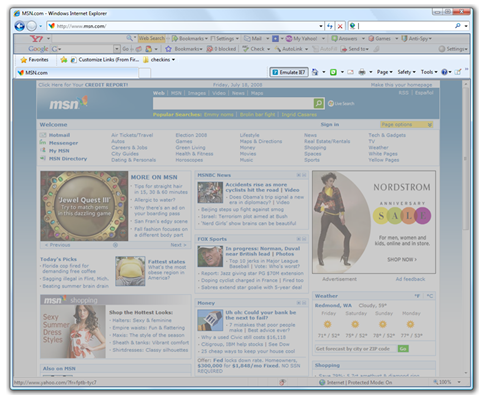
Building on Internet Explorer 8 Beta 1, we have continued to develop LCIE in Internet Explorer 8 Beta 2 to further improve reliability and performance. For Beta 2, we added the following changes:
Frame Process Merging
To help improve startup performance, we have reduced the number of processes that Internet Explorer starts. Instead of firing up two processes every time you launch the browser (one for the frame and one for your tabs), we now only fire up one frame process the first time you launch Internet Explorer. Subsequent launches will only start a new tab process or make a new tab in an existing tab process.
For users that are accustomed to browsing websites in multiple ?sessions?-for example if you want to log in to multiple e-mail sites simultaneously-you can specify the ?-nomerge? command line option to disable this feature.
More Tab Processes
It turns out that the vast majority of all Internet Explorer sessions contain three or fewer tabs. Accordingly, in Internet Explorer 8 Beta 2 we try to give users three efficient tab processes. This is contingent on the user's computer capabilities, but the more capable a computer is, the more processes Internet Explorer will use, up to a point. Adding more processes gives users much better isolation in the event of a failure. If each tab is in its own process, websites are completely isolated from each other.
Virtual Tabs
We have also added the internal capability to ?hot swap? the process from underneath a tab. Previously, Protected Mode worked on a per-process basis. For example, say you add a website to your trusted sites in Internet Explorer 7. If that site links to another site that is not in your trusted sites, it will cause you to switch browser windows when you click the link.
We improved this in Internet Explorer 8 Beta 1 with LCIE when we split the frame from the tabs. With the split, Internet Explorer can create a new tab in the same window and switch you to that tab as opposed to being ?punted? to a new window.
Virtual tabs lets you navigate across Protected Mode in the same tab since Internet Explorer just switches the process under the tab to the correct integrity level. This is really just ?UI-sugar?-virtual tabs do not impact security or protected mode in any way, other than to make it more convenient to transition between Protected Mode on and off.
LCIE's ability to isolate different parts of the browser, coupled with more tab processes and virtual tabs, helps improve Internet Explorer's performance and overall reliability.
Automatic Crash Recovery
In the event of a crash, Automatic Crash Recovery is designed to get you back to browsing as quickly as possible. It uses LCIE's tab isolation to help localize the failure to your tab. If you experienced a crash in Internet Explorer 8 Beta 1, you may have noticed the bubble shown in Figure 2.
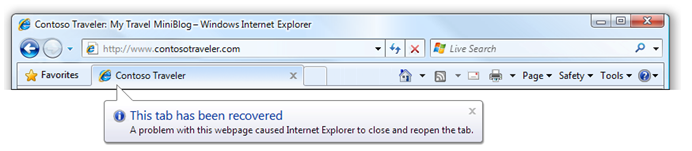
This is the ?tab recovery experience.? The failure has been confined to your tab. Your browser never goes away and Internet Explorer gets you back to the site quickly.
What's happening behind the scenes is that Internet Explorer is keeping track of an array of information about your tab. In Internet Explorer 8 Beta 1, the following data about each tab was stored:
- Current URI
- The travel log (your back/forward history)
- Tab order
- Which tab was active
When you crash, Internet Explorer tears down the old tab process, creates a new tab process, and recovers the stored data back into the tab. For many websites this works well; however, there are other websites, such as sites with Web forms, or sites that you need to log in to, that Internet Explorer 8 Beta 1 didn't recover successfully.
In Internet Explorer 8 Beta 2, we improved this further by adding session cookie and form data recovery.
Session cookies are often used for authenticating the user to a website. Session cookies are temporary cookies that only persist for the lifetime of your browsing session. When you log in to a website, they usually give you a session cookie that contains a unique token that identifies you while you are logged in. As you navigate around the website, Internet Explorer sends your session cookie to the site, and the site can examine this token and determine that you are authenticated. Unlike persistent cookies, they are not written and retained on your hard disk.
In Internet Explorer 8 Beta 2, we recover your session cookies too, and still do not write them to disk! Internet Explorer stores copies of your session cookies in the frame process. When your tab crashes, Internet Explorer just copies them back from the frame into the tab, and the user is automatically logged back into the site they were using (Web-based e-mail, blog sites, social networking sites, etc.).
Note that session cookie recovery only takes place for tab crashes. If the whole browser crashes, the session cookies are lost; however, we do expect that the overwhelming majority of crashes will be isolated to the tabs as most crashes are caused by malfunctioning add-ons, which are now isolated to a tab process.
In Internet Explorer 8 Beta 2, we improved crash recovery further by adding session cookie and form data recovery.
In addition to keeping you logged in with session cookies, Internet Explorer can now recover your form data. If you typed information, such as an e-mail, blog post, comments, into an HTML form, Internet Explorer can now recover that information.
Leveraging LCIE's tab isolation allows Automatic Crash Recovery to quickly restore the user to their browsing session without having to log back in to their sites or re-enter new data into forms. Combined, LCIE and Automatic Crash Recovery provide an innovative and graceful way to recovery from crashes.
Privacy
Have you ever wanted to take your Web browsing ?off the record?? Perhaps you're using someone else's computer and you don't want them to know which sites you visited. Maybe you need to buy a gift for a loved one without ruining the surprise. Either way, your browsing history is your data, and you should be able to easily control it.
Delete Browsing History
In Internet Explorer 7, we added a feature called Delete Browsing History, which lets you delete all of the information that Internet Explorer saves in one click. This is a useful tool that has become a standard feature across all browsers. If there are things in your Web browsing past that you want to erase, you can do that easily.
Combined, Loosely-couple Internet Explorer (LCIE) and Automatic Crash Recovery provide an innovative and graceful way to recovery from crashes.
The problem is that usually you don't want to delete everything! Cookies, in particular, are really useful for storing preferences on websites that you use frequently. Many sites have a ?remember me? option. Other sites, particularly financial websites, will store a cookie on each computer that you use to eliminate extra challenge questions (for instance, ?What was your high school mascot??).
Internet Explorer 8 Beta 2 solves this problem by adding an option that lets you keep cookies and temporary Internet files from websites in your Favorites list, as shown in Figure 3.
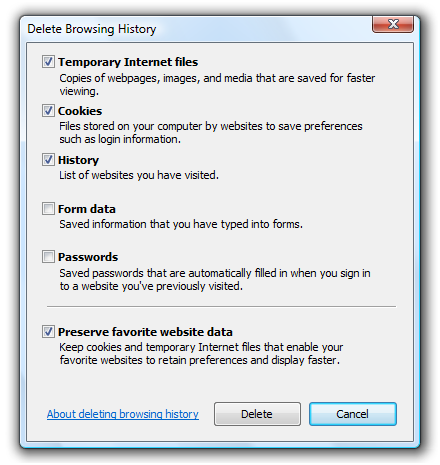
To avoid having your favorite sites ?forget you,? simply add them to your Favorites, and make sure the ?Preserve Favorites website data? checkbox is selected. Internet Explorer will preserve any cookies or cache files that were created by websites in your favorites.
Oh, by the way, we heard your feedback about checkboxes! Now Delete Browsing History will remember your preferences. We also added a ?Delete Browsing History on Exit? feature if you really want to keep your history squeaky-clean!
InPrivate? Browsing
If you use a shared PC, or you're borrowing a laptop from a friend, or using a public PC, sometimes you don't want other people to know where you've been on the Web. Internet Explorer 8's InPrivate Browsing lets you browse the Web without storing history, cookies, temporary Internet files, and other data.
Using InPrivate Browsing is as easy as launching a new InPrivate Browsing window (see Figure 4). When you're done, just close the window and Internet Explorer will take care of the rest.
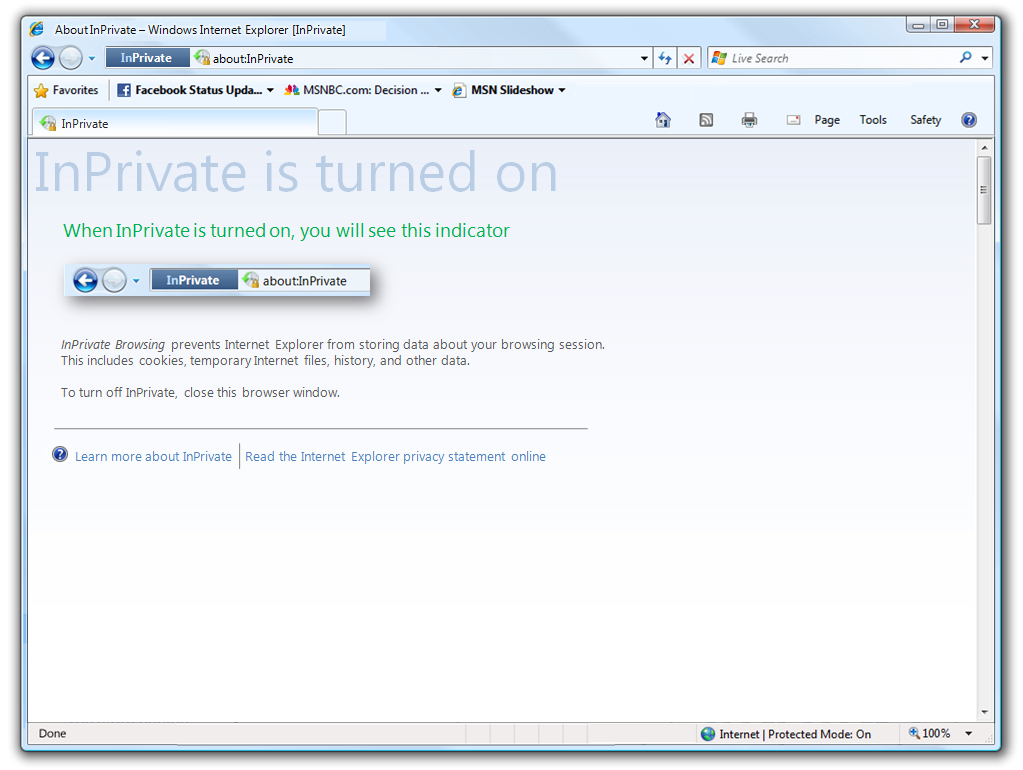
While you're using InPrivate Browsing, the following takes place:
- New cookies are not stored
- All new cookies become ?session? cookies
- Existing cookies can still be read
- The new DOM storage feature behaves the same way
- New history entries will not be recorded
- New temporary
Internetfiles will be deleted after the InPrivate Browsing window is closed - Form data is not stored
- Passwords are not stored
- Addresses typed into the address bar are not stored
- Queries entered into the search box are not stored
- Visited links are not stored
Whether you know ahead of time that you don't want your history recorded, or you just want to clean up your history without wiping out your preferences, Internet Explorer 8 Beta 2 puts you in control.
