


Internet Explorer?8 Beta 2 provides a programming model for AJAX (Asynchronous JavaScript and XML) development that is simpler yet more powerful than ever before, spanning browser, Web page, and server interaction.
You'll be able to build pages that are faster and more functional, with better end-user experiences. Plus, the APIs Microsoft has added to Internet Explorer?8 Beta 2 are based on the World Wide Web Consortium (W3C) HTML 5.0 or Web Applications Working Group standards.
Inside this article, you'll find information on all of the AJAX enhancements available in Internet Explorer 8 Beta 2.
In Internet Explorer?8 Beta 2, the maximum number of concurrent connections from a single host process connecting via broadband to a single server has been increased from 2 to 6.
These include tools to improve performance and client-side state management: local storage APIs, AJAX navigations, increased connections per host (plus a way to detect the number of connections on a host), and a scriptable connectivity event.
We've also worked on enhancing our communication objects and protocols. For example, safer and easier cross-domain communication is now possible through the XDomainRequest object and the W3C's Access Control draft, as well as HTML 5.0's cross-document messaging.
For up-to-the minute information on AJAX and other technologies in Internet Explorer, visit the Internet Explorer Developer Center at http://www.msdn.com/ie.
AJAX Navigations
One of the great benefits of implementing AJAX-indeed, one of the main reasons for its existence-is the ability to update page content without navigating to a new page. With this convenience, though, come drawbacks that can confuse users. On an AJAX-heavy page, the Address bar is not updated with each update. Subsequently, the “travelog,” or browsing history, isn't updated either.
As an example, consider a mapping Web site such as Windows Live? Search Maps or Google Maps. When using the AJAX-enabled features of those applications-such as pan and zoom-neither the Address bar nor the travelog is updated. Users who are used to the Address bar changing with each new page they navigate to or who rely on the browser's Back and Forward buttons to navigate back and forth a page at a time may find this jarring. While some Web sites work around this limitation by navigating a hidden IFrame when updating content through AJAX, this technique can decrease performance.
To enable AJAX navigations, Internet Explorer?8 Beta 2 in IE8 mode (the default compatibility mode) treats updates to the window.location.hash property like individual, “traditional” navigations. When the hash property is updated, the previous document URL (which may be from the previous hash fragment) is updated in the Address bar and the travelog (and therefore the Back button). At the same time, a new hashChanged event is raised and the hash URL fragment is saved before navigating away from the page.
On AJAX-enabled pages that take advantage of this new functionality, when AJAX content changes, navigation is as seamless as usual, but the user can back up and go forward as if the AJAX navigation was a traditional navigation. The markup sample in Listing 1 demonstrates a use for this new functionality. In this case, the hash property is set when the onendzoom event of the Microsoft? Virtual Earth? map control occurs. In other words, every time the user zooms in or out, the Address bar and travelog are both updated, enabling the user to navigate back and forth between zoom levels by using the Back and Forward buttons.
Listing 1: AJAX Navigations sample markup
<!DOCTYPE HTML PUBLIC "-//W3C//DTD HTML 4.0//EN" "http://www.w3.org/TR/REC-html40/strict.dtd";>
<html>

<head>
    <meta content="IE=8" http-equiv="X-UA-Compatible">
    <!-- The meta tag ensures the page renders in IE8 mode. -->
    <title>AJAX Map</title>
</head>

<!-- Load the Virtual Earth map control. -->
<script src="http://dev.virtualearth.net/mapcontrol/mapcontrol.ashx?v=6"; type="text/javascript"></script>
<script type="text/javascript">
    var oMap = null;
    var iZoomLevel = 0;

    function GetMap()
    {
        oMap = new VEMap('myMap');
        oMap.LoadMap();

        oMap.AttachEvent("onendzoom", ZoomHandler);
        iZoomLevel = oMap.GetZoomLevel();
        window.location.hash = iZoomLevel;
    }

    function ZoomHandler(e)
    {
        iZoomLevel = oMap.GetZoomLevel();

        // The following declaration sets the hash property to a variable containing the URL fragment to be saved.
        window.location.hash = iZoomLevel;
    }

    function HashChangeHandler()
    {
        var hash = window.location.hash;
        var iNewZoomLevel = hash.substr(1);

        if (iNewZoomLevel != iZoomLevel)
        {
            iZoomLevel = iNewZoomLevel;
            oMap.SetZoomLevel(iNewZoomLevel);
        }
    }
</script>
<!-- Attaching the event handler to a new onhashchange event allows
the page to detect when the hash has changed and an AJAX navigation has occurred. -->
<body onhashchange="HashChangeHandler();" onload="GetMap();" style="overflow: scroll; height: 100%">

    <div id="myMap" style="position: relative; width: 500px; height: 500px; vertical-align: middle"></div>

</body>

</html>
Every time the user zooms in or out, the fragment identifier in the Address bar is updated, as shown in Figure 1. On this page, that simply means the integer after the number sign (#) is incremented.

DOM Storage
To store data on local machines, Web sites today often use the document.cookie property. However, cookies are limited in their capabilities; sites can only store fifty key/value pairs per domain, and the cookie programming model requires parsing the entire cookie string for data. DOM Storage objects-specified in the W3C's HTML 5 Working Draft and implemented in Internet Explorer?8 Beta 2-provide a much simpler and more flexible global and session storage model for structured data on the client side.
Consider this scenario: A user is trying to find the best pair of tickets for a popular concert on an online ticketing site. For that purpose, the user opens several windows to make multiple requests, just to see the best seats she can get. If the site's application is using cookies to store its session state, information could “leak” from one transaction into the other, potentially causing the user to purchase seats that she didn't want without noticing. The potential for this sort of information “leak” becomes even more widespread as applications become more capable of offline behaviors, such as storing values locally for later return to the server, and as people start using more tabs to connect to the same Web site in parallel.
DOM Storage offers essential differences from cookies. For one, it offers significantly more available disk space than cookies. In Internet Explorer, cookies can store 4 kilobytes (KB) of data, whereas DOM Storage provides about 10 megabytes (MB) for each storage area. Furthermore, DOM Storage doesn't transmit values to the server with every request as cookies do, and data in a global store never expires. Unlike cookies, it's easy to access individual pieces of data using an interface that is supported in Internet Explorer?8 Beta 2 and other browsers, and sites can choose to store data for the life of a tab or until the site or the user clears the data.
The following JavaScript snippet introduces the DOM Storage property localStorage by using it to create a store and then setting (setItem method), getting (getItem method), and removing an entry (removeItem method), plus clearing the store entirely (clear method).
// Store a key-value pair.
localStorage.setItem("Sean","Purcell");

// Retrieve value string for a given key.
var storeditem = localStorage.getItem("Sean");

// Remove item from store.
localStorage.removeItem("Sean");

// Clear the store.
localStorage.clear();
Now let's see DOM Storage in action. Listing 2 is a code sample that will present you with a page (shown in Figure 2) with a text box and two buttons. Type something in the text box and then click Send to Store. This serializes the string to the DOM store. Now, close the browser tab or window, open a new one, and navigate to the same page again. In Internet Explorer?8 Beta 2, what you typed into the text box and committed to the store will still be there.
Listing 2: DOM Storage sample markup
<!DOCTYPE html PUBLIC "-//W3C//DTD HTML 4.01 Transitional//EN" "http://www.w3.org/TR/html4/loose.dtd";>
<html>

<head>
    <meta content="IE=8" http-equiv="X-UA-Compatible">
    <title>HTML 5.0 DOM Store</title>
    <script type="text/javascript">

        var key1 = 'defaultkey';

        function getValue()
        {
            var storeditem = localStorage.getItem(key1);
            if(storeditem != null)
            {
                document.getElementById("textinput").value = storeditem;
            }
        }

        function setValue()
        {
            var itemindex = document.getElementById('textinput').value;
            alert(itemindex);
            localStorage.setItem(key1,itemindex);
        }

        function clearItems()
        {
            localStorage.clear();
        }

        function clear_text()
        {
            document.getElementById('textinput').value = '';
        }

    </script>
</head>

<body onload="getValue();">

    <h1>Type into the text area and retrieve your text from the local store in Internet Explorer 8.</h1>
    <div>
        Enter Text:
        <input id="textinput" onclick="clear_text();" size="60" type="text" value="Your message here">
        <input onclick="setValue();" type="submit" value="Send to Store">
    </div>
    <button onclick="clearItems();">Clear Stored selection</button>

</body>

</html>
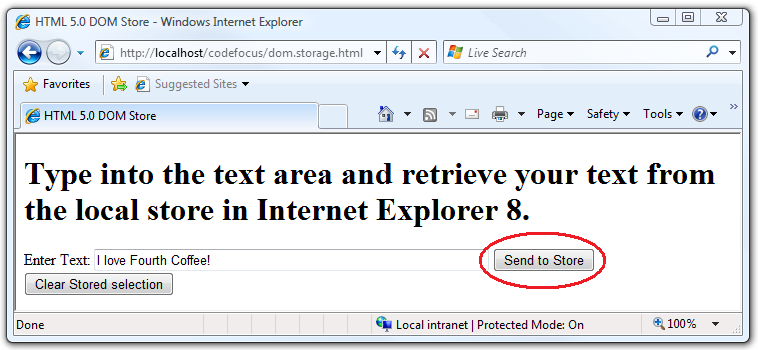
To see what happens without the DOM store, remove the body onload event to observe the past behavior.
On AJAX-enabled pages that take advantage of new AJAX navigations functionality, when AJAX content changes, the user can back up and go forward as if the AJAX navigation was a traditional navigation.
It's important to note that DOM Storage is just a mechanism for Web applications to simply store data, and that there is no database behind it. For example, you can't perform complex queries like search by value on the DOM store.
Connectivity Enhancements
Internet Explorer?8 Beta 2 introduces several connectivity enhancements, including more accurate connectivity status information and an increase in the default number of concurrent connections to a single server.
Connectivity Status Indication
With Internet Explorer?8 Beta 2, your AJAX application can now fine-tune the user experience in the event the user's connection is lost. Where before, there was no way for script running in Internet Explorer to determine the host's connectivity status, Internet Explorer?8 Beta 2 can determine when the user has lost the connection, enabling your AJAX application to act accordingly.
The onLine property of the window.navigator and window.clientInformation objects has been available since Internet Explorer 4. However, through Internet Explorer 7, the onLine property only indicated whether the system was in “global offline mode,” which users initiated by choosing Work Offline from the File menu. This was not useful in determining whether the user truly had an active connection. In Internet Explorer?8 Beta 2, however, the onLine property indicates whether the system is actually connected to the network.
Internet Explorer?8 Beta 2 also introduces new simple events. When the window.navigator.onLine property changes after a page is loaded, a simple event is raised on the page's body element as follows.
- If onLine changes from
truetofalse, the offline simple event is raised on the body element. - If onLine changes from
falsetotrue, the online simple event is raised on the body element.
Finally, Internet Explorer?8 Beta 2 introduces new callback handlers to indicate a change in the status of a connection. The onoffline handler is raised when the user's computer loses its network connection-for example, when the network cable is unplugged or the network adapter is disabled. The ononline handler is raised when the computer's network connection is restored. Of course, these handlers are also raised when the user toggles the Work Offline setting on or off.
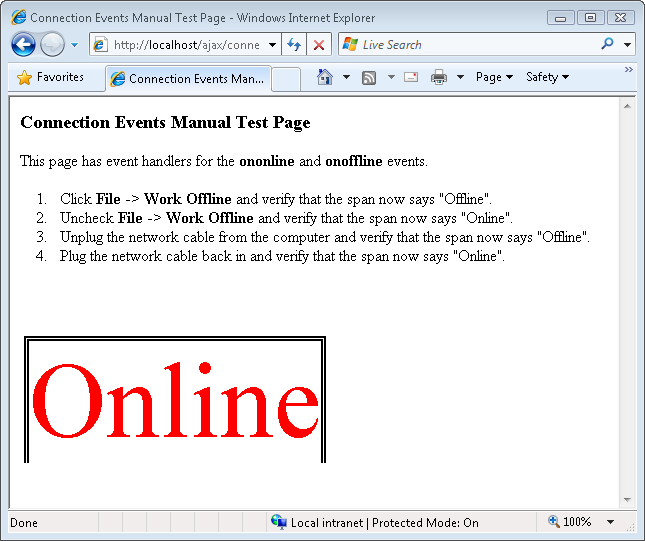
Let's see these new connectivity status enhancements at work. Listing 3 is a sample that creates a page (shown in Figure 4) displaying the current connectivity status. It will automatically update as your network connection is enabled and disabled.
Listing 3: Connectivity Status enhancements sample markup
<!DOCTYPE HTML PUBLIC "-//W3C//DTD HTML 4.01 Transitional//EN" "http://www.w3.org/TR/html4/loose.dtd";>
<html>
<head>
<title>Connection Events Manual Test Page</title>
<meta content="text/html; charset=UTF-8" http-equiv="Content-Type">
<script type="text/javascript">
function onli()
{
connectivity.innerText = "Online";
connectivity.style.color = "red";
}
function onof()
{
connectivity.innerText = "Offline";
connectivity.style.color = "blue";
}
function Start()
{
// Check whether currently connected to a network.
if (window.navigator.onLine)
{
onli();
}
else
{
onof();
}
}
</script>
</head>
<!-- The body element, with event handlers onoffline and ononline. The onload event is raised when the page first loads. -->
<body onload="Start();" onoffline="onof();" ononline="onli();">
<h3>Connection Events Manual Test Page</h3>
<p>This page has event handlers for the <strong>ononline</strong> and <strong>onoffline</strong> events. </p>
<ol>
<li>Click <strong>File</strong> -> <strong>Work Offline</strong> and verify that the span now says "Offline".</li>
<li>Uncheck <strong>File</strong> -> <strong>Work Offline</strong> and verify that the span now says "Online".</li>
<li>Unplug the network cable from the computer and verify that the span now says "Offline".</li>
<li>Plug the network cable back in and verify that the span now says "Online".</li>
</ol>
<br><br><br>
<span id="connectivity" style="border: double 5px black; width: 30%; margin: 4px 4px 4px 4px; font-size: 80pt; color: red;">Online</span><br>
</body>
</html>
More Connections per Server
If you're an Internet Explorer and AJAX expert, you may already know that with versions of Internet Explorer prior to Internet Explorer?8, you were limited to two concurrent connections to a single HTTP 1.1 server. Things were a bit better with HTTP 1.0 servers, as the limit was 4, but HTTP 1.1 connections are far more common today.
This two-connection limit was due to a mandate in the Internet Engineering Task Force's RFC 2616. In 1999, when the spec was drafted, this limit was appropriate, considering the dominance of dial-up Internet connections, the uncommonness of script-heavy Web applications, and the relative scarcity of broadband connections. Today, however, broadband is much more commonplace. The need for more per-host connections is especially strong considering the increase in popularity of AJAX applications and pages, many of which send large amounts of data asynchronously. That and other improvements to general Web infrastructure have led to an increase in the maximum number of concurrent connections in Internet Explorer?8.
In Internet Explorer?8 Beta 2, the maximum number of concurrent connections from a single host process connecting via broadband to a single server has been increased to 6. It's important to note, however, that the maximum number of concurrent connections over dial-up (with a modem over a telephone line) to a single server remains the same as for Internet Explorer?7 and earlier.
If you've implemented workarounds to circumvent the previous connection limitations, you may have compatibility concerns with this new behavior. In that case, and to avoid overwhelming your Web server, you may want to tailor content delivery based on the number of connections each client computer is capable of having open concurrently. For that reason, Internet Explorer?8 Beta 2 includes two new read-only properties of the window object that enable your server to determine the number of available connections on the client computer. Table 1 lists the new properties and their return values.
Depending on the value the property returns, you can choose to parallelize downloads or to change the priority of content delivery.
The sample in Listing 4 shows you these new properties in action. In Internet Explorer?8 Beta 2, this page will display the number of maximum connections available to your computer. If you are connected via broadband to the Internet, it will display “6” for each value. If you are connected via dial-up, the values will be “2” for HTTP 1.1 servers and “4” for HTTP 1.0 servers.
Listing 4: Number of maximum connections status sample markup
<!DOCTYPE HTML PUBLIC "-//W3C//DTD HTML 4.01 Transitional//EN" "http://www.w3.org/TR/html4/loose.dtd";>
<html>

<head>
    <meta content="text/html; charset=UTF-8" http-equiv="Content-Type">
    <title>More Connections Per Host</title>
    <script type="text/javascript">

        function Start()
        {
            // Get the value of the maximum number of connections per HTTP 1.1 server.
            http_1_1.innerText = window.maxConnectionsPerServer;

            // Get the value of the maximum number of connections per HTTP 1.0 server.
            http_1_0.innerText = window.maxConnectionsPer1_0Server;
        }

    </script>
</head>

<body onload="Start();">

    <h3>Taking Advantage of Six Connections Per Host on Broadband</h3>
    <div style="border: double 5px black; margin: 4px 4px 4px 4px; font-size: 40pt;">
        <span>This is for HTTP 1.1 servers: </span>
        <span id="http_1_1" style="color: red;"></span><br>
        <span>This is for HTTP 1.0 servers: </span>
        <span id="http_1_0" style="color: blue;"></span><br>
    </div>

</body>

</html>
XMLHttpRequest Enhancements
The XMLHttpRequest object was invented nearly a decade ago, primarily to enable Microsoft Outlook? Web Access to display e-mails without requiring a page refresh. Since its creation, however, its adoption has scaled up beyond the scope of its original design, while its functional design has not changed. Your advanced AJAX application may need finer control over AJAX requests than has typically been available.
XMLHttpRequest has been updated to add timeouts. This means that if your page periodically uses XMLHttpRequest to poll a server for response text and there is a delay, you can specify the length of time in milliseconds for the host to wait for a response before timing out the connection. Consider the potential reduction in user frustration for lack of feedback; where before, your page might have appeared “hung” indefinitely, it can now gracefully time out and inform the user of the timeout.
In addition, as you just read in the previous section, even though Internet Explorer?8 raises the maximum number of per-host connections to a server in broadband scenarios from two to six, dial-up scenarios are still limited to two. This means that, without a timeout set, Internet Explorer cannot open any new connections beyond the two-connection limit in dial-up scenarios. Timeout support enables you to preset a period of time after which the request will abort and make a new connection available.
The following JavaScript snippet introduces the timeout property and the ontimeout event handler:
// Create a new XMLHttpRequest object.
xhr = new XMLHttpRequest();

// Set the XMLHttpRequest timeout value to 5
// seconds.
xhr.timeout = 5000;

// Event handler for XMLHttpRequest timeout.
xhr.ontimeout=timeoutFired;
Now check out the new XMLHttpRequest capabilities for yourself. The code sample in Listing 5 cycles through the values of the XMLHttpRequest readyState property (the property that represents the state of the request) to demonstrate a timeout.
Listing 5: New XMLHttpRequest timeout sample markup
<!DOCTYPE HTML PUBLIC "-//W3C//DTD HTML 4.01//EN" "http://www.w3.org/TR/html4/strict.dtd";>
<html>

<head>
    <meta content="text/html; charset=UTF-8" http-equiv="Content-Type">
    <title>XMLHTTPRequest Enhancements</title>
</head>

<!-- The tests start on load. -->
<body onload="run_test()">

    <h1>Test starts onload</h1>
    <script type="text/javascript">
        var xhr;

    function alert_readystate()
    {
        alert(xhr.readyState);
    }

    function alert_timeout()
    {
        // When the timeout is reached an alert is presented.
        alert("timed out");
    }

    function run_test()
    {
        // Create a new XMLHttpRequest object.
        xhr = new XMLHttpRequest();
        xhr.onreadystatechange  = alert_readystate;
        xhr.ontimeout           = alert_timeout;

        // The URL is preset in the text area.
        // This is passed in the open call with a GET request.
        xhr.open("GET",
        "http://www.fourthcoffee.com/index.php";, true);

        // The timeout is set to .02 seconds.
        // You must set the timeout after open.
        xhr.timeout = 20;

        // The request is sent to the server.
        xhr.send(null);
    }

</script>

</body>

</html>
Open the page in Internet Explorer?8 Beta 2 and click through the dialog boxes. These are alerts that cycle through the readystate property values:
- 1: LOADING.
Theobject has been created, but the send method has not been called. - 2: LOADED. The send method has been called. Headers are available.
- 3: INTERACTIVE. Some data has been received.
- 4: COMPLETED. All the data has been received.
Since the timeout is set to 0.02 seconds, you will quickly see a “timed out” alert. If you want to cycle through more alerts, increase the timeout value.
Cross-domain Request (“XDR”)
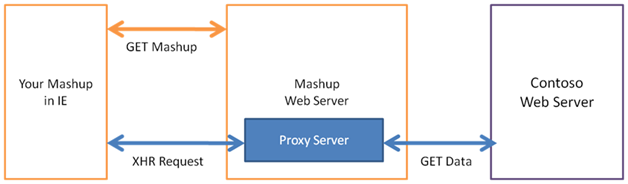
Web browsers have a security policy called the same site origin policy, which blocks Web pages from accessing data from another domain. Web sites often work around this policy by having their server request content from another site's server in the backend, thus circumventing the check within the browser. Figure 4 illustrates this process for a typical mashup site.
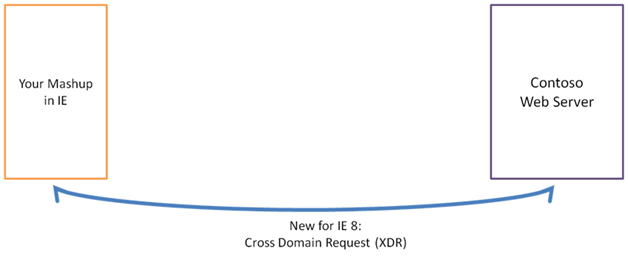
In Internet Explorer?8 Beta 2, Web pages can simply make a cross-domain data request within the browser using the new XDomainRequest object, and without server-to-server requests. Figure 5 illustrates a cross-domain request (XDR). XDRs require mutual consent between the Web page and the server. You can initiate a cross-domain request in your Web page by creating an xdomainrequest object off the window object and opening a connection to a particular domain. The browser will request data from the domain's server by sending an Origin header with the value of the origin. It will only complete the connection if the server responds with an Access-Control-Allow-Origin: header. This behavior is part of the W3C's Web Application Working Group's draft framework on client-side cross-domain communication that the XDomainRequest object integrates with.
It's important to note that to protect user data, cross-domain requests are anonymous, which means that servers cannot easily find out who is requesting data. As a result, you only want to request and respond with cross-domain data that is not sensitive or personally identifiable.
Compared to cookies, HTML 5 DOM
Storageobjects provide a much simpler and more flexible global and session storage model for structured data on the client side.
The following JavaScript snippet introduces the XDomainRequest object and its events:
// Creates a new XDR object.
xdr = new XDomainRequest();

// Indicates there is an error and the request
// cannot be completed.
xdr.onerror = alert_error;

// The request has reached its timeout.
xdr.ontimeout = alert_timeout;

// The object has started returning data.
xdr.onprogress  = alert_progress;

// The object is complete.
xdr.onload      = alert_loaded;
This snippet introduces the XDomainRequest properties and methods.
// Sets the timeout interval.
xdr.timeout = timeout;

// Gets the content-type header in the request.
var content_type = xdr.contentType;

// Gets the body of the response.
var response = xdr.responseText;

// Creates a connection with a domain's server.
xdr.open("get", url);

// Transmits a data string to the server.
xdr.send();

// Terminates a pending send.
xdr.abort();
As mentioned previously, XDR has two components: a client side that makes a request for data to a URL across domains, and a server side that responds with the Access-Control-Allow-Origin: header and the data, which Internet Explorer then makes available to the requesting domain after performing security checks.
The code sample in Listing 6 demonstrates the client-side component of XDR. The sample refers to a fictional server, so you should feel free to use your local machine or a sandbox server to try this out.
Listing 6: Cross-domain request sample markup
<!DOCTYPE HTML PUBLIC "-//W3C//DTD HTML 4.01 Transitional//EN" "http://www.w3.org/TR/html4/loose.dtd";>
<html>

<head>
    <meta content="text/html; charset=utf-8" http-equiv="Content-Type">
    <title>Internet Explorer 8 - XDomainRequest</title>
    <script type="text/javascript">
        var xdr;

        function read_data()
        {
            var output = document.getElementById('text_response');
            if(output)
            {
                // To view the responseText on the page, click the Read button.
                output.innerText = xdr.responseText;
            }

            // The Read button also displays the content type and length of response in alerts.
            alert("Content-type: " + xdr.contentType);
            alert("Length: " + xdr.responseText.length);
        }

        function alert_error()
        {
            alert("XDR onerror");
        }

        function alert_timeout()
        {
            alert("XDR ontimeout");
        }

        function alert_loaded()
        {
            alert("XDR onload");
            alert("Got: " + xdr.responseText);
        }

        function alert_progress()
        {
            alert("XDR onprogress");
            alert("Got: " + xdr.responseText);
        }

        function req_abort()
        {
            if(xhr)
            {
                xdr.abort(); // Abort XDR if the Stop button is pressed.
            }
        }

        function req_init()
        {
            var url = document.getElementById('input_url').value;
            var timeout = document.getElementById('input_timeout').value;
            if (window.XDomainRequest) // Check whether the browser supports XDR.
            {
                xdr = new XDomainRequest(); // Create a new XDR object.
                if (xdr)
                {
                    // There is an error and the request cannot be completed.
                    // For example, the network is not available.
                    xdr.onerror = alert_error;

                    // This event is raised when the request reaches its timeout.
                    xdr.ontimeout = alert_timeout;

                    // When the object starts returning data, the
                    // onprogress event is raised and the data can be
                    // retrieved by using responseText.
                    xdr.onprogress = alert_progress;

                    // When the object is complete, the onload event
                    // is fired and the responseText ensures the data is available.
                    xdr.onload = alert_loaded;

                    xdr.timeout = timeout;

                    // The URL is preset in the text area. This is
                    // passed in the open call with a get request.
                    xdr.open("get", url);

                    // The request is then sent to the server.
                    xdr.send();
                }
                else
                {
                    alert('Failed to create new XDR object.');
                }
            }
            else
            {
                alert('XDR does not exist.');
            }
        }
    </script>
</head>

<body>

    <h1>XDomainRequest</h1>
    <form action="">
        <!-- Assign URL and timeout values from their text boxes to variables. -->
        <input id="input_url" type="text" value="http://www.fourthcoffee.com/thedata.txt";><br>
        <input id="input_timeout" type="text" value="10000"> <br>
        <input onclick="req_init()" type="button" value="Get">
        <input onclick="req_abort()" type="button" value="Abort">
        <input onclick="read_data()" type="button" value="Read">
    </form>
    <div id="text_response"></div>

</body>

</html>
On the server side, the browser will request data from it by sending an Access-Control-Allow-Origin: header. It will only complete the connection if the server responds with an Access-Control-Allow-Origin with a value of *.*.
Cross-document Messaging (“XDM”)
As you discovered in the section of this article on XDR, the browser's same site origin policy blocks Web pages from getting data from other domains. This means that a richer experience is prevented since different domains on a single Web page can't communicate with each other. Web sites work around this policy by creating nested IFrames and retrieving data transmitted through URLs. Another way Web sites work around this policy is by directly hosting script and other resource files from other domains. This second workaround only allows one-way communication. It is also a security risk because embedded script and resources run with the same privileges as the host Web site and have access to the user's data like that stored in cookies.
Cross-document messaging (“XDM”) provides a postMessage() method off of the document object. The postMessage method, along with the onmessage event, allows different domains to communicate with each other, given mutual consent. XDM provides a much simpler, more efficient mechanism for two-way cross-domain communication than the workarounds mentioned previously. The following JavaScript snippet introduces both the postMessage method (used in the sender) and the onmessage event (used in the receiver):
// Posts the message data (text_sent) to the target URI ("http://www.fourthcoffee.com").
target iframe.contentWindow.postMessage(text_sent, "http://www.fourthcoffee.com");

// Runs myFunction once a message is received.
window.attachEvent("onmessage", myFunction);
Take a look at XDM in action to better understand how it works. Listing 7 is a page that sends a message to an IFrame (Listing 8) within the page. In our example, the page in Listing 7 resides on the domain contoso.com and the IFrame in Listing 8 resides on the domain fourthcoffee.com.
XMLHttpRequest timeout support enables you to preset a period of time after which the request will abort and make a new connection available.
Listing 7: Cross-document messaging sample origin page markup
<!DOCTYPE HTML PUBLIC "-//W3C//DTD HTML 4.01 Transitional//EN" "http://www.w3.org/TR/html4/loose.dtd";>
<html>

<head>
    <title>Internet Explorer 8 - Cross Document Messaging</title>
    <meta content="text/html; charset=UTF-8" http-equiv="Content-Type">
    <script type="text/javascript">

        // This function runs when you click "Send to Frame" and posts content to the IFrame using Cross-document Messaging.
        function post_to_frame()
        {
            var text_sent = document.getElementById('finput').value;
            if (text_sent != '' && text_sent != 'Type text you want to send here')
            {
                var target_iframe = document.getElementById('remote_iframe');

                // Post message to secure receiver document. The
                // message will only be sent if the target IFrame has
                // the same protocol and host as the specified target
                // URI (in this case, http://www.fourthcoffee.com).
                target_iframe.contentWindow.postMessage(text_sent, "http://www.fourthcoffee.com");
            }
        }

        function clear_text()
        {
            document.getElementById('finput').value = '';
        }
    </script>
    <style type="text/css">
        #remote_iframe {
            width: 800px;
            height: 300px;
        }
    </style>
</head>

<body>

    <h1>Post a Message to an IFrame using HTML 5.0 Cross-document Messaging</h1>
    <div>
        Enter Content:
        <input id="finput" onclick="clear_text();" size="32" type="text" value="Type text you want to send here">
        <input onclick="post_to_frame();" type="submit" value="Send To Frame">
    </div>
    <iframe id="remote_iframe" src="Test_IFrame.htm"></iframe>

</body>

</html>
Listing 8: Cross-document messaging sample receiving page markup.
<!DOCTYPE HTML PUBLIC "-//W3C//DTD HTML 4.01 Transitional//EN" "http://www.w3.org/TR/html4/loose.dtd";>
<html>

<head>
<title>XDM Receiver Frame</title>
<meta content="no-cache" http-equiv="pragma">
<script type="text/javascript">
    // Runs the receiver function when the onmessage event is raised (a message is received).
    if (window.attachEvent)
    {
        window.attachEvent("onmessage", receiver); // IE
    }
    else
    {
        window.addEventListener("message", receiver, false); // Other browsers
    }

    // The input to the receiver function is the message.
    function receiver(e)
    {
        // Check to make sure message is not blank and origin is expected (http://www.contoso.com).
        if (e.data != '' && e.origin == 'http://www.contoso.com')
        {
            // Assign values to spans for display within the frame.
            document.getElementById('fdomain').innerHTML = e.origin;
            document.getElementById('fdata').innerHTML   = e.data;
            document.getElementById('fcurrentpage').innerHTML = window.location.href;
        }
    }
</script>
</head>

<body>

    <div>
        <b>Remote Message Receiver</b><br>
        IFrame HREF: <span id="fcurrentpage"></span><br>
    </div>
    <br>
    <div>Incoming Message</div>
    <br>
    <span>Recieved From: </span><span id="fdomain"></span><br>
    <span>Recieved Data: </span><span id="fdata"></span><br>

</body>

</html>
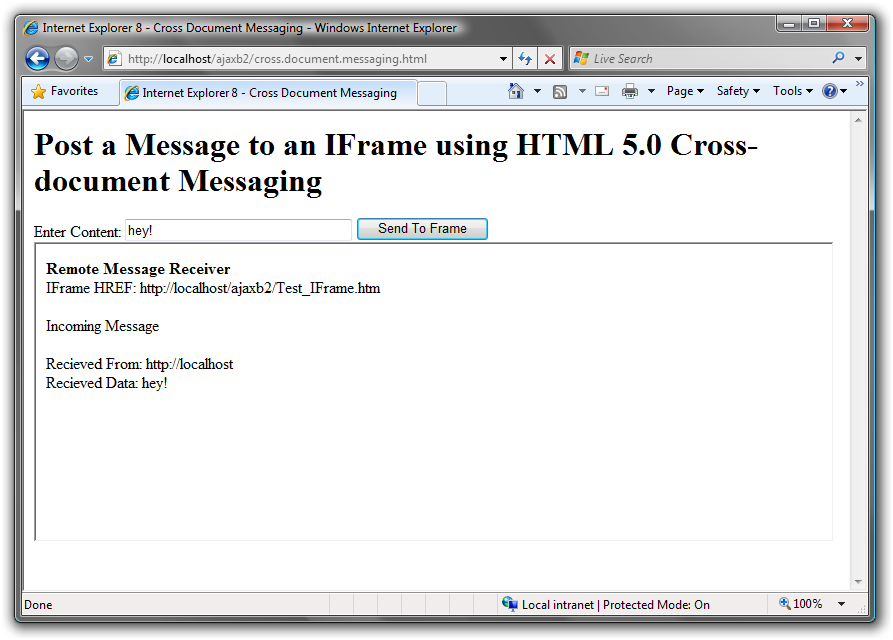
You can try this out on your own locally. Just replace both http://www.fourthcoffee.com and http://www.contoso.com with http://localhost (of course, you'll need to enable IIS (Internet Information Services) first) and place both files in the inetpub folder on your hard drive. What you'll see looks a lot like Figure 6.
Conclusion
We hope you've enjoyed learning about the ways you can develop AJAX applications in a way that's better and smarter than ever before. If you haven't downloaded Internet Explorer 8 Beta 2 yet, now's a great time to do so, and try out the new functionality!
| Server Type | Scriptable Property | Return Value |
|---|---|---|
| HTTP 1.1 | window.maxConnectionsPerServer | MaxConnectionsPerServer |
| HTTP 1.0 | window.maxConnectionsPer1_0Server | MaxConnectionsPer1_0Server |
