



When you build complex UI applications, it is all too easy to end up with a messy, tightly coupled, interwoven mess that is difficult to develop and maintain; and impossible to test.
Too avoid that, you need to employ good design patterns in your UI layer that help you keep things loosely-coupled and testable. Composite Application Guidance for WPF is a set of libraries, documentation, and sample code from Microsoft patterns & practices that helps you to build clean, maintainable applications. In this article, I’ll show you what this set of guidance provides and how to use it to build your WPF applications.
The first question you may be asking yourself is “What’s a composite application?” In simple terms, it is an application that is composed from multiple loosely-coupled parts. WPF itself is built on the concept of composition. You compose your UI out of granular UIElements which form the whole that the user sees as a Window or Page on their screen. Composite Application Guidance for WPF (or Composite WPF for short) focuses at a more abstract level, specifically on how you compose the code artifacts that contain both the UI definitions and the logic code that supports the UI presentation. Composite WPF provides the Composite Application Library (CAL), a Reference Implementation sample application, a set of QuickStart applications, and documentation of everything provided in the guidance.
“You could just put all your view logic in the code behind of the user control, but that is not a great idea from a separation of concerns perspective, and will reduce the testability and maintainability of your views.”
Although the simplest way to get started building a WPF application is to start adding Windows and UserControls to a project and fleshing everything out with a jumble of XAML and code-behind, this will quickly lead you down the path to a difficult to develop and maintain application. You will almost certainly end up with complex object and assembly reference paths interwoven through your code, and tight coupling between the logic code and the specific UI elements in your application.
If you care about productivity and maintainability, then you need to employ good UI design patterns to prevent this, and you need a way to allow different parts of the application to be developed independently, but still come together easily into a single, coherent whole at design and runtime. You will also want to be able to unit test the logic in your UI application, which requires that logic to be decoupled from the associated UI layout and controls as much as possible. This takes a little more up front work as you define each of the pieces your application is composed of, but will result in an overall reduction in your development time because it avoids the downstream complexities that really get you bogged down in integration, testing, and maintenance.
Composite WPF helps you do this by providing the following features:
- Modular loading: You can decompose your application into multiple loosely-coupled modules that get dynamically loaded at runtime.
- UI composition: You can dynamically compose portions of your UI out of loosely-coupled views, and you can follow UI design patterns to keep the logic code decoupled from the UI definition.
- Commands: You can use a commanding infrastructure that overcomes limitations in WPF Routed Commands and that allows command handlers to be decoupled from the UI itself.
- Loosely-coupled Pub/Sub events: You can publish and subscribe to strongly-typed events from logic code scattered across your application without any direct references between publishers and subscribers. You also have control over what thread the event notifications are made on, and have the ability to filter notifications based on the contents of the event data payload.
A good way to make these concepts concrete is to talk through a fairly simple application using Composite WPF. The download code for this article contains the completed sample application but I’ll spend most of the article stepping you through the core parts. This sample sits somewhere between the Stock Trader Reference Implementation sample and the QuickStarts that come with Composite WPF in terms of complexity. The business scenario is an appointment management application.
Composite Application Structure
Your Composite WPF application should always have a standard structure to it. You will have a WPF Application project (EXE) that is called the shell project. The contents of the shell project should be mostly ignorant of the implementation details of the specific business problem the application addresses. It just provides the top level structure for the application, the main window structure, and the initialization code to set up the execution environment. The shell project will contain the Shell, which is the main window for the application, and a bootstrapper class that gets everything rolling. It may contain shared resources and styles for the entire application, as well as shared services. However, those can also be factored out into other shared assemblies.
Most of the functionality of the application will be provided by modules, which are the top-level building blocks of composite apps. Technically you can have more than one module class in a single assembly, but the recommended approach is to have a separate class library for each module. Module assemblies contain a module class that acts as the entry point or initializer for the module. It will also contain all the view definitions and their supporting code for whatever portion of the business functionality that module encapsulates.
Figure 1 shows how the shell and modules contribute to create the runtime application. As the shell executable starts, the bootstrapper takes care of initializing the environment and creates and displays the Shell main window. The bootstrapper sets up any shared services for the application and then loads the modules that the application is composed of. Each module then initializes its own views and services, and adds its views to known locations in the shell, called regions.
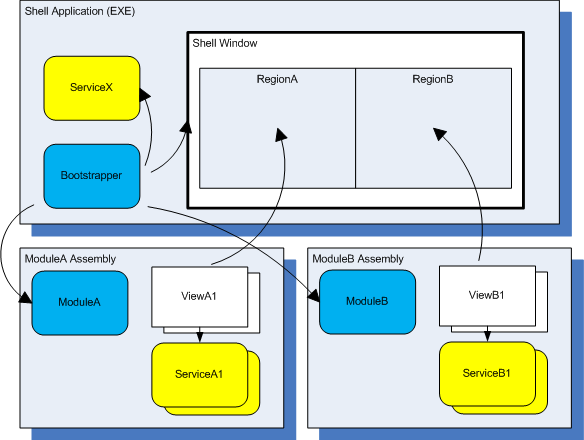
Figure 2 shows the project structure for the application I will cover in this article. The three class library projects under the CAL solution folder are the libraries that ship with the Composite Application Guidance for WPF, collectively called CAL. The AppointmentManager project is the shell project. The Appointment.Infrastructure is a shared library that is referenced by the shell project and the module projects. This is where you will put shared types such as constants, event types, entity definitions and interfaces. The application is composed of two modules, one for viewing appointments and one for editing appointments.
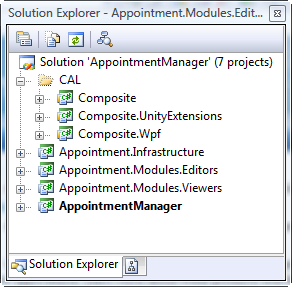
In any project where you will be using CAL, you will generally want to reference all three CAL libraries: Composite, Composite.Wpf, and Composite.UnityExtensions.
Bootstrapper
To create your bootstrapper, you can simply inherit the UnityBootstrapper base class from CAL:
class AppointmentBootstrapper : UnityBootstrapper
{ ... }
Public Class AppointmentBootstrapper
    Inherits UnityBootstrapper
    ...
End Class
By doing so, CAL will take care of setting up Unity as the dependency injection container, and it will also set up the infrastructure for using several other CAL services that we will cover later in this article, specifically the module loading service, the region manager service, and the event aggregator service.
You will need to override two methods in your bootstrapper: the CreateShell method and the GetModuleEnumerator method.
protected override DependencyObject CreateShell()
{
   Shell shell = new Shell();
   shell.Show();
   return shell;
}

protected override IModuleEnumerator
GetModuleEnumerator()
{
   return new ConfigurationModuleEnumerator();
}
Protected Overrides Function CreateShell()
  As DependencyObject
    Dim shell As New Shell()
    shell.Show()
    Return shell
End Function

Protected Overrides Function
GetModuleEnumerator()_
  As IModuleEnumerator
    Return New ConfigurationModuleEnumerator()
End Function
In CreateShell you construct an instance of your main window type, show it, and return it so the base class can configure the region manager service for that window. In the GetModuleEnumerator method, you return an instance of your module enumeration service. I’ll cover module loading in more detail shortly, but CAL has three module enumerators you can use out of the box.
A module enumerator is a class that tells the module loading service which modules to load. For most scenarios, you can just use the enumerator classes provided in CAL. In this application, I am using the ConfigurationModuleEnumerator which uses information in the config file to determine what modules to load. CAL also includes a DirectoryLookupModuleEnumerator which scans a directory to find all the modules in assemblies in that directory; and a StaticModuleEnumerator, which allows you to programmatically tell the module enumerator which modules to load. You can find examples of using those module enumerators in the QuickStarts that come with the Composite Application Guidance for WPF.
For the appointment manager sample application, I also need a data service that provides appointment data to all the loaded modules. I chose to implement that service in the Appointment.Infrastructure class library, and get it loaded at the first opportunity in the bootstrapping process, immediately after the dependency injection container has been initialized by the base class. The UnityBootstrapper class provides a hook for you to either provide your own container or do additional initialization steps like this through an override of the ConfigureContainer method:
protected override void ConfigureContainer()
{
   base.ConfigureContainer();
   Container.RegisterType<IAppointmentDataService,
      AppointmentDataService>(
      new ContainerControlledLifetimeManager());
}
Protected Overrides Sub ConfigureContainer()
    MyBase.ConfigureContainer()
    Container.RegisterType( _
      Of IAppointmentDataService, _
      AppointmentDataService) _
     (New ContainerControlledLifetimeManager())
End Sub
Here I just use the RegisterType method on the IUnityContainer interface (exposed to me through the UnityBootstrapper.Container base class property) to register the type with the container so that classes in the loaded modules can obtain it from the container and use the same service instance. The ContainerControlledLifetimeManager makes it so the instance references handed out by the container will follow the singleton pattern.
Once the bootstrapper class is defined, you need to make a slight modification to the way the application starts up from the normal style of WPF applications. First you remove the StartupUri property from the Application element in App.xaml.
<Application x:Class="AppointmentManager.App"...
StartupUri="Window1.xaml">
Then you add an override for the OnStartup method in the code behind of the Application class to create the bootstrapper and call Run on the base class.
protected override void OnStartup(
   StartupEventArgs e)
{
    base.OnStartup(e);
    new AppointmentBootstrapper().Run();
}
Protected Overrides Sub OnStartup(ByVal e _
  As StartupEventArgs)
    MyBase.OnStartup(e)
    CType(New AppointmentBootstrapper(), _
      AppointmentBootstrapper).Run()
End Sub
Defining the Shell and Regions
The Shell is nothing more than a normal WPF window class, and will contain the layout controls that determine the overall layout structure of your top level window. It will typically also define named regions, which are injection points where modules can put their views when they load up. The process of injecting a view is done through the region manager service provided by CAL, and the code for doing that will be covered later when I talk about the region manager. For now I’ll just focus on how to define the regions.
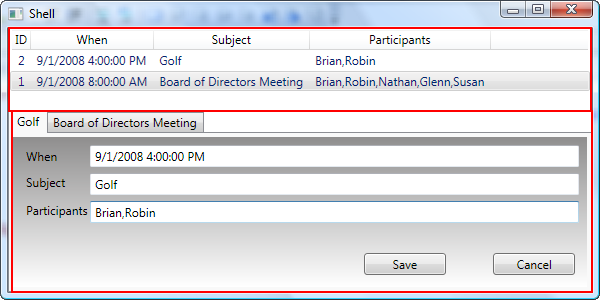
In the case of the appointment manager, I want to have a simple top and bottom pane layout, where appointment viewers can be presented in the top pane, and appointment editors can be presented in the bottom pane. The Shell.xaml looks like the following:
<Window x:Class="AppointmentManager.Shell"...>
    <Grid>
        <Grid.RowDefinitions>
            <RowDefinition Height="*"/>
            <RowDefinition Height="Auto"/>
        </Grid.RowDefinitions>
        <ContentControl Grid.Row="0"
         cwpf:RegionManager.RegionName=
        "{x:Static infra:AppointmentConstants.
          AppointmentViewsRegion}"/>
        <TabControl Grid.Row="1"
        cwpf:RegionManager.RegionName="{x:Static
          infra:AppointmentConstants.
          AppointmentEditorsRegion}"/>
    </Grid>
</Window>
The top pane is defined using a content control into which modules can inject viewer views, and the bottom pane is a TabControl into which modules can inject edit views. The regions are identified using the RegionName attached property in the RegionManager class. I chose to factor out the string names of the regions to constants in the infrastructure library because they are a shared contract of sorts between the shell and the modules, and the modules will have to refer to those constants as well. That is usually preferred to repeating the string in many places, which will not be caught by the compiler if you get one or more of them wrong.
The resulting UI is shown in Figure 3 with the views that have been loaded into the regions by the modules already shown. The regions are outlined in the figure.
Loading the Modules
The module loader service in CAL will take care of loading the modules and calling an initialization method in the module classes. Before it can do that, the module enumerator gets called to determine what modules the application is composed of. In the appointment manager bootstrapper, we constructed the ConfigurationModuleEnumerator. I now need to specify what modules to load to the enumerator through the app.config file. First you need a config section that points to the CAL class that knows how to deserialize the module information:
<configuration>
  <configSections>
    <section name="modules"
type ="Microsoft.Practices.Composite.Modularity.
  ModulesConfigurationSection,
  Microsoft.Practices.Composite"/>
  </configSections>
...
Then you need to specify the module information:
  <modules>
    <module
assemblyFile ="Appointment.Modules.Viewers.dll"
moduleType ="Appointment.Modules.Viewers.
  AppointmentViewersModule"
moduleName ="ApptViewersModule"/>
    <module
assemblyFile ="Appointment.Modules.Editors.dll"
moduleType ="Appointment.Modules.Editors.
  AppointmentEditorsModule"
moduleName ="ApptEditorsModule"/>
  </modules>
</configuration>
Each module specifies its assembly information, the type of the module class within that assembly, and the name of the module. The name can be used to specify inter-module dependencies by putting a nested collection of dependencies (not shown) under each module element. There is also a property you can set to tell the module loader to defer loading the module until an on-demand call is made to the module loader to load the module later.
Modules
As mentioned previously, modules provide the core functionality for the application. In this sample, there are two modules, one which provides the appointment viewing capability (Appointment.Modules.Viewers), and one which provides the appointment editing capability (Appointment.Modules.Editors). They are class library projects that include references to the CAL libraries, and they contain a single module class definition each.
Module Classes
A module class is just a class that implements the IModule interface defined by CAL:
public class AppointmentViewersModule : IModule
{
      public void Initialize() {}
}
Public Class AppointmentViewersModule
  Implements IModule
    Public Sub Initialize() Implements _
      IModule.Initialize
      ...
    End Sub
End Class
The Initialize method is where the module does all its startup code, similar to the bootstrapper for the Shell. Typically this will involve registering any types with the container that the module contributes, and then setting up any views and showing them through the region manager.
For example, the full implementation of the AppointmentViewersModule class is shown in Listing 1. The class has a parameterized constructor so that the Unity container can inject its dependencies, which include the container itself and the region manager. The Initialize method first calls a helper method called RegisterViewsAndServices. You don’t have to have this, but that is something that almost any module will need to do, so I usually factor it out into a method of this name as shown. In this case, the only type registered is the AppointmentListView type based on its interface.
The Initialize method then resolves the view model (which I’ll talk more about shortly) and gets an IRegion reference out of the region manager service. It then adds the view from the view model into that region and activates it. This is what makes it show up in the Shell region defined earlier.
Defining Views and View Models
The easiest way to define a view for a composite application is through a user control. For example, in the Appointment.Modules.Viewers library, the AppointmentListView user control contains the grid that is presented in the top portion of the window. You could just put all your view logic in the code behind of the user control, but that is not a great idea from a separation of concerns perspective, and will reduce the testability and maintainability of your views.
Instead, you should use one of several UI composition patterns that are popular, including Model-View-Controller, Model-View-Presenter, or Model-View-ViewModel. I am using the latter in the appointment manager sample application, but also have it combined with Model-View-Controller in the editing module. Model-View-ViewModel is also known as Presentation Model (http://msdn.microsoft.com/en-us/library/cc707885.aspx), but ViewModel is a popular name for this pattern, specifically in the context of WPF.
The idea with view models is that you define a class called a ViewModel that is similar to a presenter in Model-View-Presenter in that it sits between the view and the model (domain model). The main purpose of the view model is to offer up data to the view in the way the view wants to see it. In other words, the view model should expose properties that make hooking up the UI elements of the view easy through simple data binding expressions. The ViewModel might also expose commands as properties that the view can bind to.
By leveraging data binding in WPF and defining your UI logic in a ViewModel class, you can usually keep your code behind file empty of any code except the constructor and InitializeComponent call that are required for proper construction of the XAML. You might have to occasionally handle an event from a UI control in the code behind of the view (this is done in the AppointmentListView class), but if so, you should immediately dispatch that call into the ViewModel to keep all the real handling logic in the ViewModel or other non-view classes such as a controller. Doing this makes it easier to unit test the logic in your application. In fact, by separating your logic code from your view definition in this way, you can even define views in WPF with just a combination of a data template defined in a resource dictionary and the ViewModel that it binds to.
Listing 2 shows the view definition for the AppointmentListView user control. You can see it contains a ListView control that is bound to an Appointments collection property, with each of the columns specifying a DisplayMemberBinding to a property on the contained items in that collection. Thanks to the data binding mechanisms of WPF, you don’t have to specify in the view exactly where those properties are coming from or what type the bound data object is. This keeps the view nicely decoupled from the underlying data, which will be provided by the ViewModel. Also notice that there is a context menu hooked up to an edit command in the view. I’ll cover Composite WPF commands in a little bit, but this shows the hook up for one of those commands.
Listing 3 shows the ViewModel for the appointment list view. Note that the pattern I am using has the ViewModel responsible for constructing its view through dependency injection in its constructor, and it exposes that view as a public property. This is done so that the module (shown in Listing 1) can construct the ViewModel, but can still get to the View reference for the purposes of adding it to a region. The view class implements the IAppointmentListView interface, which defines an event that the ViewModel can listen to for user selections in the list. You can look at the download code for the full details on that aspect. The ViewModel also sets itself as the DataContext for the View. This allows the view to data bind to the properties exposed by the view. The AppointmentListViewModel class is constructed by the Unity container, and it takes care of injecting the other dependencies that the class has as specified by its parameterized constructor. These include the view itself, the appointment data service, and the event aggregator service (which I’ll cover later).
Another important part of the design of a ViewModel is that for any of the properties exposed to the view for data binding, you need to make sure those properties raise events to the view when they change so that the view stays up to date with the underlying data. You can do this one of two ways. You can implement INotifyPropertyChanged on the ViewModel as is shown in Listing 3 and raise the PropertyChanged event in the set block of each property, or you can derive the ViewModel from DependencyObject and implement the properties as DependencyProperties. I chose the former since the implementation is a little more straightforward. Implementing the properties as DependencyProperties might make sense if you were going to animate those properties in some way since you can only animate DependencyProperties in WPF.
Adding Views to Regions
To add a view to a region, you just need a reference to the region manager service and an instance of the view. If you look again at the module in Listing 1, you will see these lines of code in the Initialize method:
IRegion region = m_RegionManager.Regions[
AppointmentConstants.AppointmentViewsRegion];
region.Add(viewModel.View);
region.Activate(viewModel.View);
IRegion region = m_RegionManager.Regions( _
AppointmentConstants.AppointmentViewsRegion)
region.Add(viewModel.View)
region.Activate(viewModel.View)
The region manager service reference was obtained through dependency injection in the constructor of the module class. You first index into the Regions collection with the name of the region to get back an IRegion reference. Then you call Add on that region, passing the view reference. In this case, I get the view reference through the property exposed on the ViewModel. Finally, if you want to be sure the view is displayed immediately you will need to call Activate on the region, passing the view again. It is up to the region implementation to decide whether to present a view immediately when adding it, and in this case, when the region is based on a ContentControl, the view is not displayed unless you call Activate.
Composite Commands
Routed commands in WPF are very powerful and useful, but they have some shortcomings when applied to a composite application. The first is that they are entirely coupled to the visual tree-the invoker has to be part of the visual tree, and the command binding has to be tied in through the visual tree. This is because routed events are actually used under the covers to deliver command messages. The second shortcoming is that they are tightly tied in with the focus tree of the UI. You can overcome this with command targets, but that tends to be a fragile and tightly coupled solution as well. Finally, when a routed command is invoked, only one command handler will actually be called, even if there is more than one in the focus tree.
As a result of these facts, if you want your command handlers to be in your presenters or view models, and you want to be able to address scenarios like a “Save All” command that will potentially have multiple handlers, you need something that goes above and beyond what routed commands offer. Composite WPF commands do just that. CAL contains definitions for two types of commands to supplement the capabilities of routed commands: DelegateCommand and CompositeCommand. Both are based on the same ICommand interface that routed commands in WPF are, but allow more flexibility in hooking up handlers in places other than the visual tree, are not tied into the focus in the UI at all, and allow multiple handlers of a single command.
ICommand defines three members:
- CanExecute: Called by command invokers to determine if they should enable or disable their associated UI (i.e., menu item or toolbar button).
- Executed: Called when the command is invoked.
- CanExecuteChanged: Event that is fired when the state represented by CanExecute has changed. This causes command invokers to re-query CanExecute to get the current enabled state of the command.
DelegateCommand is designed to target a single handler in a ViewModel, presenter, or controller (or really wherever you want to put it, usually outside the visual tree). DelegateCommand allows you to point through a delegate to the methods on some object (i.e., a ViewModel) that you want to be called for the CanExecute and Executed methods of the ICommand interface.
CompositeCommand acts as a container for a collection of command references to other commands. CompositeCommand calls the CanExecute on each of the child commands, and only declares itself to be enabled if all of the child commands are enabled. When the CompositeCommand is invoked (Executed called), it calls Executed on each of the child commands.
The EditAppointmentCommand that is hooked up to the context menu in Listing 2 is a CompositeCommand declared in the Appointment.Infrastructure shared library as a static object. This mimics the way WPF routed commands are usually defined, allowing them to be hooked up easily in any XAML declaration of a UI. The EditingController class in the Appointment.Modules.Editors module library declares a DelegateCommand named m_EditCommand that is hooked up to a handling method within that controller in the constructor. After hooking up the DelegateCommand to its target handling method, the constructor adds the command to the EditAppointmentCommand CompositeCommand through the RegisterCommand method. Note that the command handling hookup can be strongly typed based on the expected command parameter type, even though invokers in WPF are all based on object with no type safety:
public class EditingController :
IEditingController
{
  DelegateCommand<AppointmentItem> m_EditCommand;

  public EditingController(...) { ...
        m_EditCommand =
          new DelegateCommand<AppointmentItem>
          (OnEditAppt);
        AppointmentCommands.EditAppointmentCommand
         .RegisterCommand(m_EditCommand);
    }

    void OnEditAppt(AppointmentItem item) { ... }
Public Class EditingController
    Implements IEditingController

    Private m_EditCommand As _
      DelegateCommand(Of AppointmentItem)

    Public Sub New(...)
        ...
        m_EditCommand = New DelegateCommand( _
        Of AppointmentItem)(AddressOf OnEditAppt)

       AppointmentCommands.EditAppointmentCommand.
       RegisterCommand(m_EditCommand)
    End Sub

    Sub OnEditAppt(item As AppointmentItem)
        ...
    End Sub
Just like with WPF routed commands, if you only specify a handling method for the Executed method, then the CanExecute is implicitly true always for that command.
Even though in this example there is only one child DelegateCommand added to the CompositeCommand, in general it supports adding as many child commands as your scenario dictates. You might also sometimes just declare a DelegateCommand and expose it directly to a UI for hookup. This is done in the AppointmentEditViewModel class. It contains the following commands exposed as properties:
public class AppointmentEditViewModel :
INotifyPropertyChanged
{
   public AppointmentEditViewModel( ... )
   {
      ...
      SaveCommand = new
        DelegateCommand<object>(OnSave,OnCanSave);
      CancelCommand = new
        DelegateCommand<object>(OnCancel);
    }

    public DelegateCommand<object> SaveCommand
    { get; set; }
    public DelegateCommand<object> CancelCommand
    { get; set; }
Public Class AppointmentEditViewModel
  Implements INotifyPropertyChanged

  Public Sub New(...)
    SaveCommand = New DelegateCommand( _
      Of Object)(AddressOf OnSave, _
      AddressOf OnCanSave)
    CancelCommand = New DelegateCommand( _
      Of Object)(AddressOf OnCancel)
  End Sub

  Public Property SaveCommand() As _
    DelegateCommand(Of Object) ...
  End Property

  Public Property CancelCommand() As _
    DelegateCommand(Of Object)...
  End Property
Then the UI elements in the corresponding view can hook up to those commands using data binding:
<Button Content="Save" Command="{Binding
SaveCommand }" ... />
<Button Content="Cancel" Command="{Binding
CancelCommand }" .../>
Composite Events
One of the key features of CAL is the composite events mechanism. WPF routed events work great for allowing UI elements to flow events to other UI elements. However, in a composite application, very often the publisher of an event will be a ViewModel, controller, or other behind-the-scenes code, as will the subscriber. You don’t want to have to have direct object references between the publisher and subscriber, because those may be classes coming from two different modules that know nothing about each other. In addition, you don’t want any lifetime coupling between the publisher and subscriber either. As a result, neither normal .NET events nor WPF routed events are sufficient to address loosely-coupled communications between modules in composite applications.
CAL includes a composite events mechanism based on the pub/sub pattern that allows you to achieve all of the goals mentioned in the previous paragraph. The way it works is that CAL has an event aggregator service that acts as a repository for event objects. You can see in Listing 3 that the AppointmentListViewModel obtains a reference to the IEventAggregator service through its constructor dependency injection. It then uses that reference when the SelectionChanged event fires from the view. The OnSelectionChanged event handler uses the event aggregator to get a reference to a type named AppointmentSelectedEvent.
The event objects themselves are a singleton instance of an event class that you will define for each discrete event that you want to publish through composite events. The event aggregator service takes care of creating those event instances and hands them out when someone asks. What you do is define a class that derives from CompositeWpfEvent:
public class AppointmentSelectedEvent :
CompositeWpfEvent<AppointmentItem> { }
Public Class AppointmentSelectedEvent
  Inherits CompositeWpfEvent(Of AppointmentItem)
End Class
The event class sets up a relationship between a named event type and the data payload type that the event will carry when it is fired. For the AppointmentSelectedEvent, the payload type is an AppointmentItem. This type is defined in the Appointment.Infrastructure shared class library because it will be used by all modules that want to subscribe or publish this event type. The CompositeWpfEvent base class provides all of the functionality for publishing and subscribing to that event type.
In addition to simply publishing and subscribing to the event, the composite events in CAL also support the following choices when you subscribe to an event:
- Thread Dispatching: You can be notified on the publisher’s thread, the UI thread, or an asynchronous notification on a thread from the .NET thread pool.
- Event Filtering: You can provide a filter criteria, in the form of a lambda expression of a delegate, that allows you to only be notified if your filter criteria is met based on the contents of the data payload for the event being fired (i.e., only notify me if the appointment subject is Golf and the time is between 2 and 6 pm).
- Weak references: By default, the event object will only maintain a weak reference to your subscriber so that if you do not unsubscribe, the event object will not keep your object alive just for the event subscription. If you want to override this, you can simply set a flag when subscribing.
You can see in Listing 3 that when the SelectionChanged event is fired by the view, the ViewModel calls GetEvent on the event aggregator, and then calls Publish on the resulting event object, passing the AppointmentItem that was selected (it picks the first item in the list of selected items forwarded by the event raised by the view).
The subscriber in this case is the EditController class in the Appointment.Modules.Editors module library. It handles the event by activating the associated region when an item is selected. Note that the Editors and Viewers modules have no references to each other, so the publisher and subscriber are completely decoupled.
public EditingController(..., IEventAggregator
eventAggregator)
{
    ...
    eventAggregator
    .GetEvent<AppointmentSelectedEvent>()
    .Subscribe(OnAppointmentSelected);
}

void OnAppointmentSelected(AppointmentItem item)
{
    AppointmentEditViewModel viewModel =
       GetViewModelForItem(item);
    if (viewModel != null)
    {
       m_EditPanelRegion.Activate(viewModel.View);
    }
}
Public Sub New(..., ByVal eventAggregator _
  As IEventAggregator)
  eventAggregator.GetEvent( _
  Of AppointmentSelectedEvent)() _
  .Subscribe(AddressOf OnAppointmentSelected)
End Sub

Private Sub OnAppointmentSelected(ByVal item _
  As AppointmentItem)
  Dim viewModel As AppointmentEditViewModel = _
    GetViewModelForItem(item)
  If viewModel IsNot Nothing Then
    m_EditPanelRegion.Activate(viewModel.View)
  End If
End Sub
Wrap Up
By this point, your head is probably spinning from all the new concepts that Composite WPF introduces. It may seem like this stuff just makes your application more complex. And when taken at the granular level of just defining a user control for some portion of your screen, it is a bit more complex in terms of the constructs you need to put in place. But it all follows a nice set of patterns that have been widely accepted as a better way of building UI applications, and the end result will be a much looser coupled application with good factoring. After you get over the initial learning curve, these things become second nature to you. The advantage of having things broken out into more pieces and abstractions is that as you are building in new functionality or trying to locate something you write before, you know right where to look because there’s a clean separation of concerns. I’d encourage you to dig into the sample application in detail, and then give it a try by building up a small sample application of your own using CAL and the patterns discussed here.
