


We know what you’re thinking: Why should I read an article about the fundamentals of accessibility?
Well, if you already know the percentage of computer users who have disabilities, can name at least ten different categories of assistive technologies, and can describe the key concepts involved in designing an accessible application, then you can probably skip to the next article. However, if you’re unsure what accessible technology is, then take a few minutes and keep reading. You’ll learn about the main concepts around accessible technology, the people they help, and things you can do to help them interact smoothly and successfully with each other.
What We Mean When We Talk about Accessibility
Accessible technology is a piece of software or hardware that makes it easier for someone to see, hear, and use a technology product, such as a computer or a mobile device. It can be an assistive technology (AT) product, a specially designed piece of software or hardware that accommodates someone’s disability (or multiple disabilities) and enables them to interact with a computer. These products are developed to work with a computer's operating system and software. For example, a blind computer user may use assistive technology called a screen reader to navigate an application’s interface and a computer user with ALS may use a word prediction program to help facilitate communicating thoughts and ideas.
Microsoft’s Commitment to Accessibility “Our vision is to create innovative technology that is accessible to everyone and that adapts to each person's needs. Accessible technology eliminates barriers for people with disabilities and it enables individuals to take full advantage of their capabilities.” -Bill Gates, Microsoft Corporation
Many companies offer hardware devices, accessories, aids, and software applications that fall under the umbrella of assistive technology. For an overview of assistive technology categories, see Descriptions of Assistive Technology Products at the end of this article.
Accessible technology can also be a feature built into a product that allows someone to adjust the settings to meet their needs. Examples of accessibility features include those that allow a user to increase font size, change font settings, or choose different colors for their computer screen display. Other examples are the option for users to receive announcements from their computer through sound notifications (a “ding” when new e-mail messages arrive), or visual notifications (a modal dialog flashes and beeps when the user tries to click away from it). So overall it is helpful to think of accessible technology as a range of solutions that makes computer use more comfortable for some people and possible for others.
As a developer, one of your main concerns is to ensure that you provide programmatic access to your application’s user interface elements. This enables the assistive technologies to get information about the UI elements and expose that information to the assistive technologies, which in turn relays the information to the user. For example, important information that an AT needs includes type, name, location, and current state of a UI element. They also need to know when changes in the UI occur. For information about how to provide programmatic access using Microsoft’s accessibility frameworks, Microsoft UI Automation and Microsoft Active Accessibility, see the Accessibility Developer Center on MSDN (http://msdn.microsoft.com/en-us/accessibility/default.aspx).
Programmatic access is just one of the key concepts of creating accessible applications. The following section presents additional concepts about accessible design.
Who Benefits from Accessible Technology?
Although most accessible technology was originally intended and designed for individuals with severe disabilities, accessible technology is widely used by computer users of all abilities today. Among adult computer users in the United States:
- 1 in 4 has a visual disability.
- 1 in 4 has a dexterity disability.
- 1 in 5 has a hearing disability.
Although many accessible technologies are designed to help people with disabilities optimize their abilities, research shows that the majority of all computer users can benefit from adjusting their display, mouse, keyboard, and sound settings. Users can find accessible technologies helpful when, for example, recovering from shoulder surgery. Another example is using a mobile device when driving a car or riding a bus, in which cases, voice recognition or output can be helpful. According to a two-part study commissioned by Microsoft and conducted by Forrester Research (The Market for Accessible Technology-The Wide Range of Abilities and Its Impact on Computer Use: http://www.microsoft.com/enable/research/phase1.aspx and Accessible Technology in Computing-Examining Awareness, Use, and Future Potential: http://www.microsoft.com/enable/research/phase2.aspx), the majority of computer users can benefit from using accessible technology. Figure 1 shows that 57% (74.2 million) of computer users are likely or very likely to benefit from the use of accessible technology due to having mild or severe disabilities. Specifically:
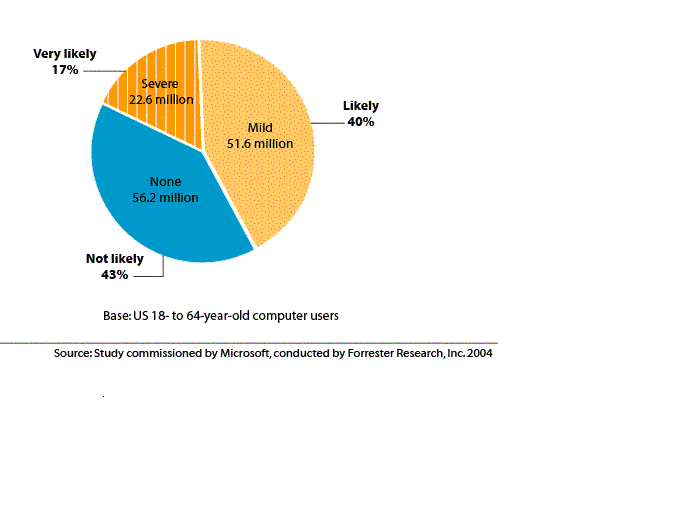
- 40% (51.6 million) of computer users are likely to benefit from the use of accessible technology due to mild difficulties/impairments.
- 17% (22.6 million) of computer users are very likely to benefit from the use of accessible technology due to severe difficulties/impairments.
What does that mean for you? That’s a lot of people who will depend on the accessibility of your application. Accessible technology has the potential to improve computer use for a wider audience because it makes computers easier to use. A key component of encouraging the use of accessible technology is to make it easier to find and highlight the functionality and benefits rather than the impairments they seek to ameliorate.
To get a more personal view of how accessible technology helps people, here is a look at some profiles of computer users today. The following profiles describe how people with common types of disabilities might use accessible technology to help them in their job and everyday life. Each profile is followed by design and development considerations for creating accessible applications.
Computer Users with Vision Disabilities
Vision disabilities include low vision, color blindness, and blindness. Among adult computer users in the United States, 1 in 4 (27%) have a vision disability. There are many options for individuals with vision disabilities to modify the computer displays and appearance so it is more legible, or receive information through sound or touch. Those who are blind cannot use a computer monitor, but have the option to receive information from their computers through hearing or touch offered through screen readers and Braille displays.
Profile: Low Vision
Olivia, a managing editor, has had low vision as a result of glaucoma. Low vision is a term commonly used to mean partial sight, or sight that isn't fully correctable with surgery, pharmaceuticals, contact lenses, or glasses. It includes moderate vision impairment, such as tunnel vision or blind spots, as well as legal blindness and almost total blindness. Sometimes it involves a lack of acuity, meaning that objects appear blurred. Other times, it involves a reduced ability to distinguish colors, see contrasts, or determine spatial relationships among objects.
Olivia can see type and images on her computer screen when they are enlarged to about 1.5 inches in height. As her glaucoma advances, print will appear faded and words will be difficult to read. By using a screen enlargement program, Olivia can effectively view and interact with documents and tools that are an important part of her job. In addition, she uses high DPI for sharpness and turns on the high contrast accessibility setting with the enlarger because having the magnified screen displayed in black on white improves the readability for her.
While she is currently able to use a mouse, she knows she needs to learn more about keyboard access because she will have to switch to keyboard use as her vision continues to deteriorate. Even with her high level of magnification, Olivia tends to sit extremely close to the monitor. In addition, due to the increased level of magnification, she needs to scroll horizontally and vertically many times in order to see what other customers will see all at once on the screen. She has to work to remember where items are in order to retain context, for example, where controls and text are meant to be seen together but aren’t due to her level of magnification. These factors make her prone to headache, eyestrain, and fatigue.
Design and Development Considerations: Low Vision
To ensure that a low vision computer user’s experience is equal to that of users not requiring assistive technology, keep the following design guidelines in mind:
- Ensure that individual objects in the UI can easily be distinguished and that each object has a clear, unique, meaningful label that makes sense when read out of context.
- Respect the Windows user system settings related to accessibility, such as color choices and icon sizes.
- Do not specify hard-coded fonts. Instead, enable users to change the font size and face. Use default font size of 10 points or larger.
- Ensure that users can set color settings on a system-wide basis and have them respected within their applications.
- Check for appropriate use of color in foreground and background combinations.
- Ensure programmatic access to UI elements.
- Provide full keyboard access to your applications functionality via keyboard focus, access keys, and shortcut keys.
- Ensure that the UI adapts well to high DPI settings.
Profile: Blindness
Jorge, a financial analyst, has been blind for five years, ever since a car accident. He can see a little light but no images and uses a guide dog to navigate within buildings and outside.
After his car accident, Jorge went through extensive rehabilitation to learn how to use assistive technology to continue working. He uses a screen reader to relay information from his computer, along with an earphone so that he can work without disturbing co-workers. He also uses a refreshable Braille display to supplement the voice information he receives from the screen reader. He uses Braille copies of the firm’s reports and analyses when needing to work with hardcopy.
Among adult computer users in the United States: 1 in 4 has a vision difficulty - 1 in 4 has a dexterity difficulty - 1 in 5 has a hearing difficulty
Jorge also relies on the keyboard to navigate and on memorization of spatial relationships and keyboard shortcuts. Consistency and predictability within and across applications are great aids to his productivity.
Design and Development Considerations: Blind Computer Users
To ensure that a blind computer user’s experience is equal to that of users not requiring assistive technology, keep the following design guidelines in mind:
- Provide programmatic access to the UI for assistive technologies such as screen readers and Braille displays.
- Use text that is easily understood and that makes sense when read out loud with no visual association. Supply alternative text for images.
- Group information logically and place the main idea of each paragraph in the first sentence.
- Ensure that your feature can be used without a mouse. Provide powerful, intuitive keyboard shortcuts.
- Support prefix navigation (typing the first few characters to reach a known destination).
- Ensure tab orders are logical.
Computer Users with Hearing Disabilities
Hearing disabilities encompass a wide range of conditions-from slight hearing loss to deafness. People who have hearing disabilities might be able to hear some sound, but might not be able to distinguish words. Among adult computer users in the United States, 1 in 5 (21%) have a hearing disability.
Profile: Deafness
Tim is a network architect and has been deaf from birth. He works very effectively with his computer; in addition to using e-mail, he uses instant messaging to communicate with his colleagues and co-workers.
Since he is deaf, he does not need sound information from his computer so he has turned sound off completely. To be sure that he gets information visually that would otherwise be conveyed by sound, he uses SoundSentry to provide visual warnings for system sounds, ShowSounds to display captions for speech and sounds, and Visual Notification to provide visual warnings when features are turned on or off. He has turned on the captioning features where available in products.
Tim also uses a TTY (Telephone Typewriter) device (replacing a handset phone) and a text pager with the keyboard set to vibrate attached to his belt. This pager does text to voice for outgoing messages and voice to text for incoming messages.
Design and Development Considerations: Deaf Computer Users
To ensure that a deaf computer user’s experience is equal to that of users not requiring assistive technology, keep the following design guidelines in mind:
- If your application plays video, provide a way to turn on and off captioning. Use the ShowSounds system setting as a cue to the user’s preference.
- Be sure that your feature works with Visual Notification (Sound Sentry) system setting so that users receive visual cues in lieu of sound notifications.
- Providing visual customizations can greatly enhance the customer experience. For example, provide ways for users to change the size, color, and flashing characteristics of sound alternatives.
Computer Users with Dexterity Disabilities
Individuals with dexterity disabilities experience pain, discomfort, or complete loss of feeling in their fingers, hands, wrists, or arms, making it difficult to use a standard keyboard or mouse. Among adult computer users in the United States, 1 in 4 (26%) have a dexterity difficulty. Dexterity difficulties and impairments can be caused by a wide range of common illnesses and accidents such as carpal tunnel, arthritis, stroke, cerebral palsy, Parkinson's disease, multiple sclerosis, loss of limbs or digits, spinal cord injuries, and repetitive stress injury, among others.
Profile: Repetitive Stress Injury
Jason is a medical researcher, studying molecular biology. In high school, Jason played tennis and has been playing regularly for the last 15 years. Unfortunately, years of playing have been hard on his joints and he recently had surgery for a rotator cuff injury.
Jason is undergoing physical therapy to strengthen the muscles of his rotator cuff. He is able to conduct his work by using a speech recognition program installed on his computer. He also answers phone calls right on his computer and has a mobile phone equipped with voice command.
Design and Development Considerations: Dexterity Disabilities
To ensure that a computer user’s experience is equal to that of users not requiring assistive technology, keep the following design guidelines in mind:
- Provide full keyboard access to your applications functionality via keyboard focus, access keys, and shortcut keys.
- Enable programmatic access.
Computer Users with Learning Disabilities
Learning disabilities can range from conditions such as dyslexia and attention deficit disorder to intellectual disabilities. Some individuals with learning disabilities are better able to process information when it is presented to them in a form and at a pace that is appropriate to them individually. During the learning process, many people with learning disabilities benefit from having a multisensory experience of audio speech paired with a visual representation. Reducing visual and auditory distractions can also aid the learning process for many people.
Profile: Dyslexia
Amelia is a fifth grade student who wants to be a photographer when she grows up. A bright and capable student, she struggles with dyslexia and admits that she used to be scared of reading books aloud in class. Fortunately, Amelia's parents and teacher recognized the dyslexia early, and the school’s assistive technology specialist helped find a software program that helps her read text in class and at home.
Amelia's computer is now outfitted with a reading and writing software program. The program highlights text as it reads the text aloud and includes a talking dictionary, phonetic spell-checking, word-prediction, and homophone support to address key aspects of reading and writing processes. In addition, she has turned on features in the operating system to help her focus on tasks, and she sometimes uses a headset to block out background noise.
Design and Development Considerations: Learning Disabilities
To ensure that a computer user with a learning disability has an end-user experience equal to that of users not requiring assistive technology, keep the following design guidelines in mind:
- Enable users to perceive information in multiple ways, such as visually and aurally.
- Avoid unnecessary animations and distracting UI elements. Provide a way to turn off animations.
- Adhere to common UI visual guidelines to provide a consistent and intuitive experience. For more information, see the Windows Vista User Experience Guidelines on MSDN (http://msdn.microsoft.com/en-us/library/aa511258.aspx).
Aging Computer Users
Do you have trouble seeing things on your computer screen? By the time we reach our fifties, two-thirds of us have vision, hearing, or dexterity impairments that will impact our use of the computer. Some functional losses are accelerated by the onset of age-related degenerative diseases and ailments, including hypertension, osteoporosis, diabetes, and macular degeneration. Disabling conditions, including arthritis and orthopedic impairments resulting from sports, vehicle, and occupational injuries experienced earlier in life tend to manifest themselves as the body ages.
Profile: Aging Population
Fran is a retired librarian and spends her mornings hosting a book club and taking an aerobics class. She and her husband, Roy, bought a new computer when their kids started sharing photos and videos of their families.
Both Fran and Roy have difficulty reading text on the computer screen and prefer different color schemes and settings. Roy prefers larger icons and a slower mouse cursor, while Fran prefers photos of her grandchildren on the desktop, large blue text, and a stylized mouse pointer for easier visibility. They each set up a profile with their preferred settings so they can share files while personalized settings make it easier for each to read text on the computer screen.
They now use the computer for nearly every aspect of their lives including banking and filling prescriptions while traveling, managing digital photos, and communicating with family members using e-mail and video phone conferencing.
Design and Development Considerations: The Aging Population
To ensure that customers like Fran and Roy have an end-user experience equal to that of users not requiring assistive technology, keep the design guidelines for low vision, dexterity, and cognitive changes in mind.
High-level Concepts for Creating Accessible UI
In addition to providing programmatic access and following the considerations described above, what are the high-level concepts to consider to ensure that your application’s UI is accessible?
- Ensure that all functionality of the UI is usable by people with vision, dexterity, hearing, and cognitive limitations.
- Make your application’s default UI accessible. For example, chose a color palette with contrasting colors and avoid color combinations that are not perceivable by people with color-blindness.
- Make your UI flexible and customizable so that users can optimize the UI. As the user specifies their preferences through Windows settings ensure your application responds appropriately. (The user’s settings are discoverable programmatically through the Windows SystemParametersInfo() API: http://msdn.microsoft.com/en-us/library/ms724947(VS.85).aspx.)
- Make the UI easy to navigate regardless of the input device. Ensure that it can be accessed whether a customer uses a mouse, keyboard, on-screen keyboard, or speech recognition.
Descriptions of Assistive Technology Products
Assistive technology products are designed to provide additional accessibility to individuals who have physical or cognitive difficulties, impairments, and disabilities. When selecting assistive technology products, it is crucial to find products that are compatible with the computer operating system and programs on the particular computer being used.
More than 100 companies offer hardware devices, accessories, aids, and software applications that fall under the umbrella of assistive technology. These alternative input products include speech recognition systems, alternative keyboards, electronic pointing devices, sip-and-puff systems, wands, sticks, joysticks, trackballs, and touch screens; and alternative output systems such as speech synthesizers, Braille embossers and displays, and screen readers.
Below are descriptions of the various types of assistive technology products that are currently available on the market today. For more information, you can search the catalog of assistive technology products for products compatible with the Windows operating system on the Microsoft.com/enable site.
Screen magnifiers (or screen enlargers) work like a magnifying glass for the computer by enlarging a portion of the screen, increasing legibility, and making it easier to see items on the computer. Some screen magnifiers allow a person to zoom in and out on a particular area of the screen.
Screen readers are used to verbalize, or “speak,” items on the screen including text, graphics, control buttons, and menus into a computerized voice that is spoken aloud. In essence, a screen reader transforms a graphic user interface (GUI) into an audio interface. Screen readers are essential for computer users who are blind.
Speech recognition, or voice recognition, programs allow people to give commands and enter data using their voices rather than a mouse or keyboard. Voice recognition systems use a microphone attached to the computer, which can be used to create text documents such as letters or e-mail messages, browse the Internet, and navigate among applications and menus by voice.
Refreshable Braille displays provide tactile output of information represented on the computer screen. A Braille “cell” is composed of a series of dots. The pattern of the dots and various combinations of the cells are used in place of letters. Refreshable Braille displays mechanically lift small rounded plastic or metal pins as needed to form Braille characters. The user reads the Braille letters with his or her fingers, and then, after a line is read, can refresh the display to read the next line.
Braille embossers transfer computer generated text into embossed Braille output. Braille translation programs convert text scanned-in or generated via standard word processing programs into Braille, which can be printed on the embosser.
On-screen keyboards provide an image of a standard or modified keyboard on the computer screen that allows the user to select keys with a mouse, touch screen, trackball, joystick, switch, or electronic pointing device. On-screen keyboards often have a scanning option that highlights individual keys that can be selected by the user. On-screen keyboards are helpful for individuals who are not able to use a standard keyboard due to dexterity or mobility difficulties.
Alternative input devices allow individuals to control their computers through means other than a standard keyboard or pointing device. Examples include:
-
Alternative keyboards feature larger- or smaller-than-standard keys or keyboards, alternative key configurations, and keyboards for use with one hand. -
Electronic pointing devices are used to control the cursor on the screen without use of hands. Devices used include ultrasound, infrared beams, eye movements, nerve signals, or brain waves. -
Sip-and-puff systems are activated by inhaling or exhaling. -
Wands and sticks are worn on the head, held in the mouth or strapped to the chin and used to press keys on the keyboard. -
Joysticks are manipulated by hand, feet, chin, etc., and used to control the cursor on screen. -
Trackballs are movable balls on top of a base that can be used to move the cursor on screen. -
Touch screens allow direct selection or activation of the computer by touching the screen, making it easier to select an option directly rather than through a mouse movement or keyboard. Touch screens are either built into the computer monitor or can be added onto a computer monitor. -
TTY/TDD conversion modems are connected between computers and telephones to allow an individual to type a message on a computer and send it to a TTY/TDD telephone or other Baudot-equipped device. -
Light signaler alerts monitor computer sounds and alert the computer user with light signals. This is useful when a computer user cannot hear computer sounds or is not directly in front of the computer screen. As an example, a light can flash alerting the user when a new e-mail message has arrived or a computer command has completed.
Keyboard filters are typing aids such as word prediction utilities and add-on spelling checkers that reduce the required number of keystrokes. Keyboard filters enable users to quickly access the letters they need and to avoid inadvertently selecting keys they don't want.
Reading tools and learning disabilities programs include software and hardware designed to make text-based materials more accessible for people who have difficulty with reading. Options can include scanning, reformatting, navigating, or speaking text out loud. These programs are helpful for those who have difficulty seeing or manipulating conventional print materials; people who are developing new literacy skills or who are learning English as a foreign language; and people who comprehend better when they hear and see text highlighted simultaneously.
Text-to-Speech (TTS) or speech synthesizers receive information going to the screen in the form of letters, numbers, and punctuation marks, and then “speak” it out loud in a computerized voice. Using speech synthesizers allows computer users who are blind or who have learning difficulties to hear what they are typing and also provide a spoken voice for individuals who cannot communicate orally, but can communicate their thoughts through typing.
Talking and large-print word processors are software programs that use speech synthesizers to provide auditory feedback of what is typed. Large-print word processors allow the user to view everything in large text without added screen enlargement.
Conclusion
Whether you know it or not, many people with disabilities probably use your applications. Understanding their needs is the first step to designing accessible applications that can be used by everyone.
