


Polyglot programming refers to leveraging existing platforms by solving problems via solutions that compose special purpose languages.
This concept leverages the multi-language nature of the CLR to create simpler solutions to vexing problems. This article delves into the motivation, benefits, and challenges of writing applications in this style.
Back in 2006, I coined the term polyglot programming in a blog post. It is not a new concept (being at least as old as Unix and probably much older-I just attached a modern term to it). That blog post was a response to what some are calling a renaissance in computer languages. Polyglot programming refers to using special purpose languages combined in the same context to create better problem solutions. To fully appreciate this concept, I’m going to review some recent history about the abstraction mechanisms that developers use to solve problems today, and point to a new way to do so in the future.
A Historical Framework
For the last 20 years or so, developers have been building virtually all applications using object-based languages. One of the promises of object orientation is ease of code reuse. Certainly, the core characteristics of object-oriented languages provide the facilities for reuse: encapsulation, polymorphism, and effective abstraction. But developers found it hard to achieve large-scale reuse using these atomic building blocks. So, they’ve resorted to two approaches that use object-oriented features as building blocks: components and frameworks.
Components work extraordinarily well for visual reuse. First VBX, then ActiveX controls showed that you can create a vibrant ecosystem of reusable components. Building non-visual behavior is harder. Windows platform developers have made attempts with lots of corresponding acronyms: COM, COM+, MTS, BizTalk, etc. And that’s just the .NET space. The Java world took the good ideas of MTS and went down a long, dark path with Enterprise Java Beans. And yet none of these techniques for achieving business domain reuse has worked well (which is why we keep trying).
Components rely on a certain physical ecology to work: tools that understand how to display property inspectors, event mechanisms, and lifecycle control for the components. This ecosystem represents the other great example of code reuse: frameworks.
Frameworks have become the preferred reuse mechanism. Frameworks consist of a large number of related classes with shared context. The most pervasive is, of course, the .NET Framework, and it includes several smaller frameworks (ADO.NET, ASP.NET, etc). Ancillary frameworks exist outside the Microsoft-supplied ones: log4net, nHibernate, iBatis.net, nVelocity, etc. None of this is news, of course: as a .NET developer, you’ve been steeping in this abstraction style so long you no longer even notice it.
But underlying this abstraction mechanism is the idea that you can have one true language to solve every problem. The one true language in .NET is either C# or Visual Basic. These general purpose languages allow you to interact with your component and framework reuse mechanisms. This works well for many of the kinds of applications you need to write, but it has its shortcomings as well. The idea that you can create a single computer language that solves all (or even most) problems ignores the vast variety of problems that developers must solve. Extending the one true language with frameworks helps with difficult abstractions, but mask the fact that sometimes the language you use is poorly suited to the problem you are trying to solve.
Object-orientation is an effective abstraction mechanism for much of the world because it organizes things in hierarchical fashion. Most of the world (as viewed by developers anyway) is hierarchical or can be mashed in to a hierarchy. But developers keep running into cross-cutting concerns: transactions, logging, security, etc. These don’t fit well within our existing hierarchies. This idea is illustrated in Figure 1. Thus, aspect-oriented development was born.
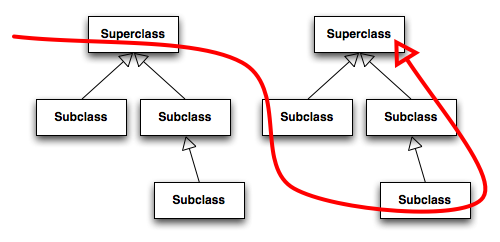
For those not familiar with it, aspects weave code into existing hierarchies. Aspects have a specific syntax (different from either C# or VB) that describes pointcuts, or places where you can inject code (using a special compiler) directly into the compiled artifacts. Aspects allow you to define logging code in one place, and the aspect compiler injects byte code into your compiled code to add the necessary code to make all your logging calls. Consider this simple class:
public class MyClass {

  public int ProcessString(String s,
      out string outStr) {

    // ...

  }
}
If you want to add a logging call determining when this method executes and when it stops executing, you’d have to hand-write it like this:
public class MyClass {

  public int ProcessString(String s,
      out string outStr) {
    log.debug("entering ProcessString
       method");
    // ...
    log.debug("exiting ProcessString
       method");
  }
}
Instead, you can add an aspect that allows you to intercept particular method calls for a class.
using DotNetGuru.AspectDNG.MetaAspects;
using DotNetGuru.AspectDNG.Joinpoints;

public class AspectsSample{

  [AroundCall("*
   MyClass::ProcessString(*)")]
  public static object
   Interceptor(JoinPoint jp) {
     log.debug("entering ProcessString");
     object result = jp.Proceed();
     log.debug("exiting ProcessString");
     return result;
  }
}
Both the class name and method name can use wildcards like the namespace in the example above to allow this to work on a wide variety of classes. This example uses the AspectDNG AOP compiler for .NET, one of several open-source options.
This is more convenient than writing all that logging code by hand in every place it’s needed. But it also shows that the abstractions offered by the underlying language (C# or VB) are not suited to solving every problem.
And that’s fine. We’ll probably never create a language that’s suitable for every situation. In fact, we should stop trying. Microsoft designed the CLR to host multiple languages with a common target intermediate representation (IL). Why not leverage that more aggressively than we have in the past to create solutions by composing languages within the same solution?
Polyglot Programming Today
Actually, developers already do this all the time without even realizing it. Do you write applications that talk to a database? Do you write Web applications? Chances are good that you do, which means that you are already polyglot programming: C# + SQL + JavaScript > 1! We do this without even thinking about it now; it’s a natural part of the development landscape. Why not write all data access code in C# and skip the relational database entirely? You could write an entire application using a flat file or XML document. (Oh, wait. That’s another language!) But it turns out that relational databases are handy things to have around because they use a different abstraction mechanism to handle large quantities of data. Set-based operations on data sets have appealing characteristics, so we’ve created special purpose software (database servers) with their own language (SQL) to handle this chore. The same is true for JavaScript. Love it or hate it, but you can’t avoid it because it is the lingua franca of Web browsers. It has special features that facilitate writing interactive Web pages.
In fact, I would say that multi-language solutions are even more pervasive than the proceeding paragraphs suggest. Every XML configuration file is its own language. They all have document type definitions (DTDs) or schemas, which define the grammar of the language. They all just happen to share the same syntax (XML), just as English and French mostly share the same alphabet but have different words and grammars. Viewed in this light, our development environments today are already awash with multiple languages. But most of these languages are just palliatives for the mistaken notion that we can work most effectively by writing in one language, our one true language. That’s not always the case.
Polyglot Programming for Real
Let’s say you have a desktop application that needs a sophisticated multi-threaded scheduling portion. You could build the entire thing in C#. But, the strong typing in C# doesn’t really help you much when building a user interface. That might be better done with VB, with looser typing enabled.
The scheduling part, though, provides the biggest challenge. Building good thread-safe code in C# is hard. This isn’t particularly C#’s fault: building good multi-threaded code in any imperative language is hard. But functional languages have much better support for those kinds of applications.
An imperative language belongs in the family of languages that are algorithmic in nature: the lines of code execute more or less top down, and you specify each part of the operation to be performed. Imperative languages generally have shared state in variables. Obviously, these are the types of languages most used today.
Functional languages, on the other hand, model themselves from mathematics. The functions in a functional language work more like mathematical functions (in fact, the really strict functional languages give you the ability to create formal proofs that a function works correctly). Generally, functional languages don’t have mutable state, or have it in a way that highlights the differences between mutable and immutable state. Encouraging you to use immutable state makes it easier to write multi-threaded applications. You don’t have to worry about synchronizing code blocks because you don’t use the shared state that requires synchronization.
Why talk about functional languages here? F# is a new entrant into the .NET language world. It spawned in Microsoft Research as a derivative of the OCaml functional language. F# borrows much of OCaml’s syntax, adding features to make it work well within the CLR. You can call CLR methods, pass parameters, and generally interact with the rest of the .NET universe from your F# code.
Building entire applications in functional languages is difficult for several reasons. First, the default style of development eschews variables with shared state. Building applications that do common things like I/O is hard if you can’t change the value of a variable. Of course, F# has facilities for that, but what’s easy to build in C# tends to be more difficult to build in F#. But the converse is also true: building things that are very difficult in C# are easy in F#. Which brings up the second reason why you tend not to build entire applications in F#: it’s hard for developers weaned on imperative languages to wrap their head fully around functional languages.
That’s where polyglot programming shines. In this view of the world, you don’t try to build applications entirely in F#. Instead, for the sophisticated multi-threaded scheduling example cited above, you’ll have a solution that contains three projects, each hosting a different language. Use C# for the workflow part of the application (the Controller in Model-View-Controller parlance). Most of the model also resides in C# (all but the scheduling part). Implement the nasty multi-threaded scheduling part in F#, taking advantage of the greater ease of writing multi-threaded code because the language has better support for it. Finally, implement the view in VB with strong typing relaxed, allowing for faster development of the lightweight user interface of the application.
Practical Polyglot Programming
The benefits of writing in this style include using languages better suited to particular types of problems. Just like developers use SQL today to handle data chores, I can see a time when certain parts of the application are written in functional languages. At least one financial trading firm on Wall Street writes all their applications in OCaml now, believing that it gives them a competitive advantage over similar firms. They are, in fact, building the entire application in one true language (theirs being OCaml), so they are paying a penalty for trying to write things like user interfaces that are easier in imperative languages. Once developers become accustomed to writing polyglot programs, it’ll seem as natural as database applications today.
Of course, one of the things that make writing database applications difficult today is the nasty impedance mismatch between object-oriented languages and set-based SQL. Literally billions of dollars have been spent trying to solve this problem, and we still have mediocre solutions at best. My friend Ted Neward has a great quote related to this very topic: “O/R mapping is the Vietnam of Computer Science. First, you send in a few advisors, then more advisors. Before you know it, you have troops on the ground and no end in sight!” This quote nicely encapsulates the difficulty of this problem. The latest attempt to make this problem go away is the Entity Framework (notice: framework as container for reusable code).
But O/R mapping suffers from two unrelated problems. The first problem is passing information across machine boundaries. To do that, you must have special formats (generally either binary through a database adapter or XML). Passing information across machine boundaries is always expensive and hard to get right; fortunately, that problem is largely solved. The second problem in O/R mapping is the different conceptual models: object-oriented languages use object hierarchies and SQL uses sets. The latest attempt to solve this problem uses a different flavor of polyglot programming, a domain-specific language called LINQ. It eases the translation boundary between these two fundamentally different abstraction styles.
Both these problems diminish because of the presence of the CLR. The language designers at Microsoft have paved over many of the abstraction distractions between the functional F# and other CLR languages. They can do this because they all produce the same IL code. And that’s the other reason why this is an easier problem than O/R mapping. Polyglot programming implies that all the code compiles to a common intermediate representation (like IL). Thus, you don’t have to pass it across machine boundaries and you can take advantage of shared types defined in IL.
One of the problems with polyglot programming lies with debugging multi-language solutions. This is where Visual Studio as the common container for all .NET languages comes in handy. Because it’s all just IL once it’s been compiled, you can step through F# code and end up stepping into C# code and vice versa. In fact, smart tools enable this style of development (which is one of the reasons this style of building applications hasn’t really taken hold in the past). Now, developers have a sophisticated environment that readily handles multiple languages.
Polyglot Programming and Domain Specific Languages
The domain-specific language (DSL) concept (especially text-based languages) is the subject of much current research. DSLs solve some of the same problems that polyglot programming solves: building abstractions more suited to the problem solution. However, DSLs are even more specialized, created on a case-by-case basis for specific problem domains. For example, if the sample problem above, you might build a DSL that handles multi-threaded scheduling for your application.
Here is an example of a simple DSL written as an internal DSL atop C# (an internal DSL is one that uses the underlying language as it’s base). At ThoughtWorks, we had an application that required elaborate descriptions of train cars for testing purposes. Originally, we wrote code like this:
ICar car = new Car();
IMarketingDescription desc =
    new MarketingDescription();
desc.Type = "Box";
desc.Subtype = "Insulated";
desc.Length = 50.5;
desc.Ladder = "Yes"
desc.LiningType = Lining.Cork;
desc.Description = desc;
But the business analysts didn’t like this. When we showed it to them, they weren’t interested in trying to read it because it looked too much like C# code, and our business analysts didn’t want to see code. So we rewrote it to look like this:
ICar car = Car.describedAs()
    .Box
    .Insulated
    .Includes(Equipment.Ladder)
    .Has(Lining.Cork);
We didn’t use any special magic frameworks or extensions to C#. Instead of creating standard properties, we merely created “Get” properties that caused mutating side effects and created methods (each of which returned this) to set values. Add a little creative indentation and you have something much more readable. This is a very simple example, but much more nuanced ones are possible. In fact, LINQ is really just an internal DSL to handle querying of structured data.
The polyglot programming and DSL approaches are more complementary than antagonistic. Nothing stops you from writing the DSL as an internal DSL (in other words, written using the syntax of the underlying language) using a functional language like F#. In fact, Scala, another functional language that runs on the Java virtual machine and .NET, includes features that make it easy to write DSLs within the language.
Summary
Technology sometimes facilitates unanticipated opportunities. When they created the concept of IL and a multi-language runtime, the goal was to unify the programming models across languages. In fact, mixing languages in a solution was discouraged for many of the reasons listed above. Yet, as developers build more and more solutions using the existing abstractions, they’ll see more opportunities to work less and achieve better results. The topology of possible problems is far too large to think that a single computer language could ever be best for every solution. By building an environment that opens the door for building simpler solutions faster, we can walk through to a new style of development. It won’t be without its headaches, but just as we use special purpose languages now, we can aggressively expand that concept and create even better abstractions in the future.
