


Visual Basic 9 in Visual Studio 2008 has a new set of language features that allows developers to work with XML in a much more productive way using a new API called LINQ to XML.
LINQ stands for Language Integrated Query and it allows you to write queries for things like objects, databases, and XML in a standard way. Visual Basic provides deep support for LINQ to XML through what’s called XML literals and XML axis properties. These features allow you to use a familiar, convenient syntax for working with XML in your Visual Basic code. LINQ to XML is a new, in-memory XML programming API specifically designed to leverage the LINQ framework. Even though you can call the LINQ APIs directly, only Visual Basic allows you to declare XML literals and directly access XML axis properties. This article will help you master these new features for working with XML in Visual Basic.
XML Literals and Embedded Expressions
Traditionally to work with XML in code you would use the XML Document Object Model (XML DOM) and use its API to manipulate objects representing the structure of your XML. This API is document centric, which does not lend itself well to creating XML with LINQ. In addition it uses the XPath language, which is unnecessary when using LINQ as you will soon see. Another way to work with XML would be to drop out of Visual Basic code altogether and manipulate XML using XSLT, XQuery, or XPath directly.
With the release of the .NET Framework 3.5, the LINQ to XML API allows developers to work with XML in a much more intuitive way, taking a top-down, element-centric approach to working with XML. Additionally, in Visual Basic 9 you can use XML literals in order to embed XML directly into your code and bring an even more WYSIWYG approach to XML programming. For instance, this is perfectly legal in Visual Basic 9:
Dim myXml = <?xml version="1.0"?>
            <root>
                <node>This is XML</node>
            </root>
The variable is inferred to be an XDocument object in this case. Type inference is another new feature of Visual Basic 9 in order to support LINQ. Types of local variables can be inferred by the compiler by evaluating the right-hand side of the assignment. The above statement in previous versions of Visual Basic would produce a type of Object. With the new Option Infer ON in Visual Basic 9, the statement above is now the same as declaring the XDocument type explicitly so your code still benefits from compile-time checks. XDocument is one of the classes in the new LINQ to XML API and in many cases performs much better than the XML DOM.
As you can see there is no conceptual barrier between the code you write and the XML you’re trying to express when using XML literals in Visual Basic 9. Notice the syntax coloring of the XML in the editor indicating that Visual Basic recognizes this XML literal as a supported data type. As you type the begin tag of the element, Visual Basic will automatically insert the end tag and format the XML. If you change the name of the element begin tag, Visual Basic will update the end tag to match. Also note that underscores are not necessary in multiline XML literals.
XML literals get much more interesting when you use them with embedded expressions. Embedded expressions allow you to write any Visual Basic code and have it evaluated directly in the literal, and you can use any Visual Basic expression. These expressions are compiled code, not script, so you can benefit from the compile-time syntax checking and editor experience just like you’re accustomed to when writing programs in Visual Basic. The syntax you use is <%= expression %>. For instance, taking the simple literal above you could embed an expression in the <node> element in order to write out the current date and time inside the element instead:
Dim myXml = <root>
                <node><%= Now() %></node>
            </root>
Notice this time you did not start with the XML declaration, so instead this is inferred to be an XElement object, the fundamental class in the LINQ to XML API. XML trees are made up of these XElement objects. This is just a simple example; you are not limited to the number of embedded expressions in your XML literals. You can also nest embedded expressions any number of levels deep.
Let’s take an example using a LINQ query that queries the files in the current directory and creates XML using XML literals and embedded expressions.
Dim myXml = _
<files>
   <%= From FileName In _
    My.Computer.FileSystem.GetFiles(CurDir()) _
    Let File = _
    My.Computer.FileSystem.GetFileInfo(FileName) _
    Select _
        <file isReadonly=
            <%= File.IsReadOnly %>>
            <name>
                <%= File.Name %>
            </name>
            <created>
                <%= File.CreationTime %>
            </created>
            <updated>
                <%= File.LastWriteTime %>
            </updated>
            <folder>
                <%= File.DirectoryName %>
            </folder>
        </file> %>
</files>

myXml.Save("MyFiles.xml")
This will produce XML something like this:
<files>
  <file isReadonly="true">
    <name>customers.html</name>
    <created>
      2007-10-07T15:57:00.2072384-08:00
    </created>
    <updated>
      2007-10-22T14:46:48.6157792-07:00
    </updated>
    <folder>C:\temp</folder>
  </file>
  <file isReadonly="false">
    <name>orders.xml</name>
    <created>
      2007-10-07T15:57:00.2773392-08:00
    </created>
    <updated>
      2007-10-27T12:01:00.3549584-07:00
    </updated>
    <folder>C:\temp</folder>
  </file>
  <file isReadonly=”false”>
    <name>plants.xml</name>
    <created>
      2007-10-07T15:57:00.147152-08:00
    </created>
    <updated>
      2007-10-18T18:25:07.2607664-07:00
    </updated>
    <folder>C:\temp</folder>
  </file>
</files>
Notice in the example that you first start writing an XML literal and then embed a LINQ query which selects a collection of XElements <file> in order to create the document. You can nest embedded expressions this way to create very complex documents in a much more intuitive way. This example creates the XML from the top down just as you would read it. This enables you to be much more productive using the LINQ to XML API than its predecessor, the XML DOM, which forced you to think in terms of its API instead of the actual XML you’re trying to express.
XML Axis Properties
You’ll use XML axis properties to navigate the XML. There are three axis properties; the descendant axis, the child axis, and the attribute axis. You’ll use the descendant axis property to access all XML elements that have a specified name that are contained in a specified XML element regardless of the level. You use the child axis property to access just the XML child elements in a given XML element, and it performs much better than the descendant axis. We recommend that you use the child axis unless you really need to search for the element name in all levels of the tree. Finally, use the attribute axis property to access the XML attributes in an XML element.
For instance, taking the files example above, you can access all the <name> elements by using the descendant axis, which uses a three-dot notation by simply writing myxml...<name>. If you want to transform the above XML and select out just the name elements to create a new XElement, you would write:
Dim names = <names>
                <%= myXml...<name> %>
            </names>

names.Save("Names.xml")
This would produce this transformed XML:
<names>
  <name>customers.html</name>
  <name>orders.xml</name>
  <name>plants.xml</name>
</names>
You could produce the same simple transformation using child axis properties instead, walking down the hierarchy like so:
Dim names = <names>
                <%= myXml.<files>.<file>.<name> %>
            </names>
If you want to return the contents of the XElement instead of the object itself you can use the .Value property. For example:
Dim names = _
<names>
    <fileName>
        <%= myXml...<name>.Value %>
    </fileName>
</names>
This results in this transformed XML:
<names>
  <fileName>customers.html</fileName>
  <fileName>orders.xml</fileName>
  <fileName>plants.xml</fileName>
</names>
In order to access the isReadonly attribute in the example you’d use the attribute axis property, which uses the @ notation. For instance, say you want to transform this document and only select all the <file> elements where isReadonly is false:
Dim files = <files>
            <%= From File In myXML...<file> _
                Where File.@isReadonly = "false" _
                Select File %>
            </files>
This would produce the following result:
<files>
  <file isReadonly="false">
    <name>orders.xml</name>
    <created>
      2007-10-07T15:57:00.2773392-08:00
    </created>
    <updated>
      2007-10-27T12:01:00.3549584-07:00
    </updated>
    <folder>C:\temp</folder>
  </file>
  <file isReadonly="false">
    <name>plants.xml</name>
    <created>
      2007-10-07T15:57:00.147152-08:00
    </created>
    <updated>
      2007-10-18T18:25:07.2607664-07:00
    </updated>
    <folder>C:\temp</folder>
  </file>
</files>
XML axis properties make it much easier to navigate XML and also improve readability of your code. One thing to keep in mind when using axis properties is that unlike Visual Basic, XML is case-sensitive. Therefore the casing of the axis property does matter. If you had accidentally written myXml...<Name> in the example instead, then no elements would be returned because there is no <Name> element in the XML, just the lowercase <name>. This is definitely something to watch out for but Visual Basic can help. To decrease the likelihood of making mistakes like this you can enable XML IntelliSense.
Enabling XML IntelliSense
Visual Basic can enable IntelliSense for XML elements and attributes defined in an XML schema (XSD). If you include a schema file in your project, the editor will add the applicable elements and attributes to the IntelliSense list of XML properties. To make it easier to infer and add XML schemas to your Visual Basic project, you can download the XML to Schema tool from the Visual Basic Developer Center (http://msdn.com/vbasic/ under the Downloads section).
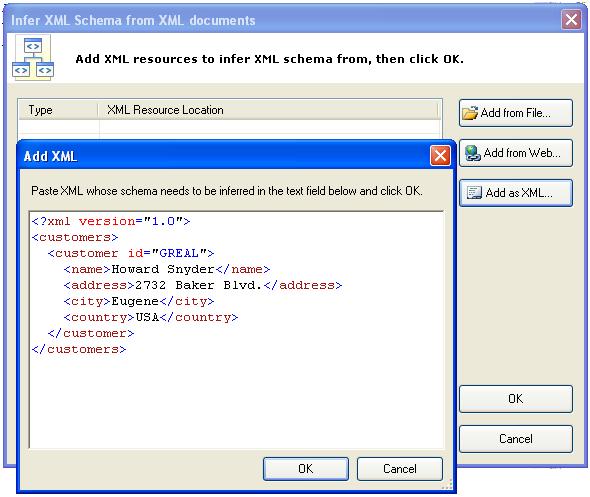
This tool adds a New Item project template to the list of installed templates that you can use. When you add this item to your project, the XML to Schema wizard opens. The wizard allows you to infer the XML schema set for all the XML sources used in your program and it will automatically add the schema files to your project. You can specify the XML sources in three different ways: by specifying an XML file location, specifying an URL on the Web that returns XML, or by pasting or typing an XML document directly into the wizard. Take a look at the walkthrough provided on the Visual Basic Developer Center download page for the XML to Schema tool for detailed instructions.
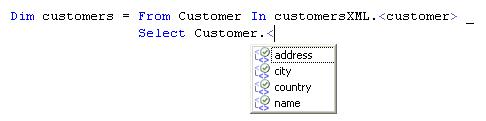
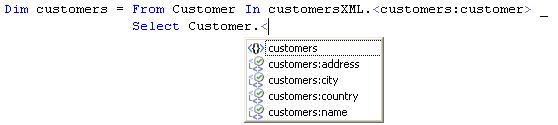
Say you have an XML document of customers. Using the XML to Schema tool you can infer the schema and add the resulting XSD file to your project in one step (see Figure 1). Now when you access parts of the customers XML using XML axis properties you see IntelliSense based on the schema that was inferred from the XML (see Figure 2).
Confidence Levels for XML IntelliSense
The first time you use XML properties on an XDocument or XElement object variable, the IntelliSense list will contain all the possible elements that can appear based on the information known to the IntelliSense engine through the schema. The icon near the entries in the IntelliSense list will have a red question mark to indicate that the exact XSD type is not known. Once you select an item from the IntelliSense list, the next XML property you access in the context of that variable will be displayed in the IntelliSense list as an exact match based on the schema. This is indicated by a green check mark.
For instance, Figure 2 demonstrates IntelliSense items displayed with a green checkmark because it is clear that only the elements listed are possible to choose from under the <customer> element. So in cases where IntelliSense is able to identify a specific type from the schema like this, it will display possible child elements, attributes, or descendants with a high degree of confidence.
However, in cases where IntelliSense is not able to identify a specific type from the schema, it will display an expanded list of possible elements and attributes with a low degree of confidence, indicated by a red question mark instead.
XDocument vs. XElement Effect on XML IntelliSense
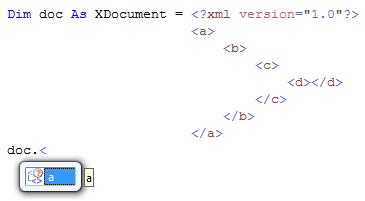
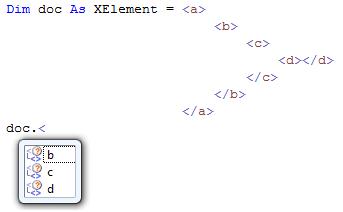
In the LINQ to XML API when the variable type is XDocument, the variable is positioned outside of the root element of the document so the IntelliSense list will contain all the root elements in the XML schemas that are part of the project. If the variable type is XElement it means that the element can be positioned on any element within the project’s XML schemas, therefore the IntelliSense list will contain all the child elements of all the elements in these XML schemas.
For instance, consider the example in Figure 3 where the variable doc is an XDocument created from an XML literal. The IntelliSense list contains all the root elements in the XML schemas in the project; in this case only the <a> element is displayed because there is only one schema. If you change the literal to be of type XElement (as shown in Figure 4) this means that the XElement can be of any XSD type, so the IntelliSense box contains all the child elements of all the elements in the project’s XML schemas, in this case <b>, <c> and <d> elements.
One optimization that the IntelliSense engine makes is to look for the Load method when an XElement variable is created. The Load method is a shared method on the XElement and XDocument objects that allows you to specify a location to the XML source, be that a file on disk or a URL. If the variable is initialized using XElement.Load then the IntelliSense list will contain the child elements of only the root elements in the project’s XML schemas and not all elements. This is because the XElement must be one of the schema root elements itself.
For example, let’s assume that the myDoc.xml file contains the same XML document as the literal in Figure 4. In Figure 5 the IntelliSense list contains only the <b> element because the XElement doc is already the root element <a>.

Importing XML Namespaces
When you work with multiple XSD schemas and XML that defines namespaces you can import the XML namespaces at the top of your Visual Basic code files in the same way you import .NET Framework namespaces. Microsoft expanded the Visual Basic Imports keyword to allow you to specify an XML namespace like so:
Imports <xmlns:customers=
"urn:microsoft:examples:customers">
For example, say your XML declares an XML namespace:
<?xml version="1.0"?>
<customers xmlns="urn:microsoft:examples:customers">
    <customer id="GREAL">
        <name>Howard Snyder</name>
...
When you infer the schema it will contain a targetNamespace attribute:
<?xml version="1.0" encoding="utf-8"?>
<xs:schema attributeFormDefault="unqualified"
elementFormDefault="qualified" targetNamespace="urn:microsoft:examples:customers" xmlns:xs="http://www.w3.org/2001/XMLSchema">
  <xs:element name="customers">
...
Now you can add the Imports statement above and qualify the axis properties with the XML Namespace alias when you create, query or transform your XML (Figure 6).
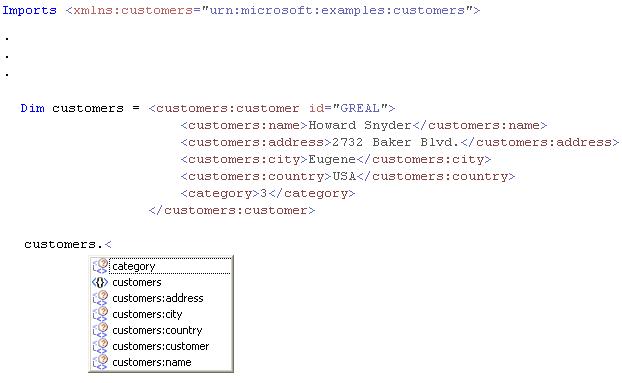
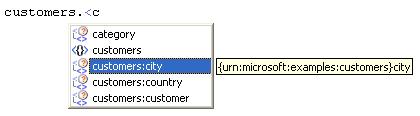
Importing XML namespaces has an effect on XML IntelliSense. When XML IntelliSense is displayed both the namespace prefixes and the local names are matched as you type. This offers greater productivity when coding since instead of typing the prefix, then the colon, and then the local name, you can simply start typing the local name. Figure 7 shows a simple example of how it works, starting with an input document and the applicable IntelliSense. If you just type the letter n in this example, then IntelliSense will select the customers:name entry right away (Figure 8). If you type the letter c then IntelliSense will select customers:city (Figure 9) and the IntelliSense list will also contain the prefix customers and the category element. The next character that you type after the c will determine which single entry will get selected.

Working with Relational Data and XML using LINQ
Now that we’ve laid the foundation for working with XML in Visual Basic, let’s take a look at some practical examples of using these new features. Typically in data-oriented applications developers work with XML as well as relational data stored in a database. Let’s walk though examples of how to create and consume XML in Visual Basic when working with relational data.
Creating XML from Relational Data
A common requirement in modern applications is to be able to create XML from data stored in a database. Visual Studio 2008 offers many ways to access the data in your database, including the new O/R designer and LINQ to SQL to easily connect and query your databases directly and then use the results of those queries to create XML. To work with LINQ to SQL in Visual Studio 2008, right-click on your project, add a new item, and select the LINQ to SQL Classes template. For the example in this section, the Northwind database will be used so name the model Northwind.dbml.
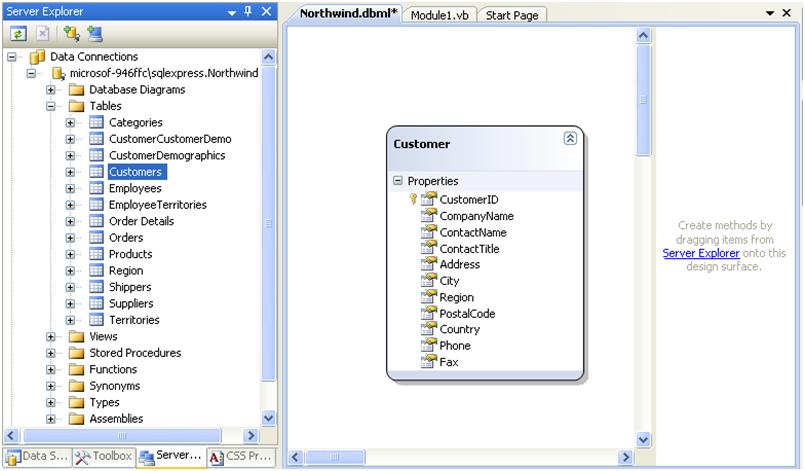
Performing these steps will create a new model and open the Object Relational Designer (O/R Designer), which allows you to drag-drop tables from connected databases in the Server Explorer on to the design surface. Once you have a connection to Northwind in the Server Explorer, drag the Customers table onto the design surface and the O/R Designer will automatically create a class called Customer and infer the properties from the fields in the table. This also sets up a DataContext, called NorthwindDataContext in this case, so you can access the Northwind database (Figure 10). Now you can write a LINQ query to select all the customers in the United States and their addresses from the Customers table and create an XML document of this information.
Dim db As New NorthwindDataContext

Dim customerUSA = _
<customers>
    <%= From Customer In db.Customers _
    Where Customer.Country = "USA" _
    Select <customer id=
               <%= Customer.CustomerID %>>
               <name>
                   <%= Customer.ContactName %>
               </name>
               <address>
                   <%= Customer.Address %>
               </address>
               <city>
                   <%= Customer.City %>
               </city>
               <zip>
                   <%= Customer.PostalCode %>
               </zip>
           </customer> %>
</customers>

customerUSA.Save("Customers.xml")
Notice that this sample uses one LINQ query to create an XML document. Although this example uses LINQ to SQL to handle selecting the data from the database, you are not limited to doing it this way. For instance, if you already have a typed DataSet of the customers then you can write the query using LINQ to DataSets instead. This will perform a query over the in-memory, client-side DataSet.
Dim NorthwindDataSet As New NorthwindDataSet
Dim ta As New _
NorthwindDataSetTableAdapters.CustomerTableAdapter

ta.Fill(NorthwindDataSet.Customers)

Dim customerUSA = _
<customers>
<%= From Customer In NorthwindDataSet.Customers _
    Where Customer.Country = "USA" _
    Select <customer id=
               <%= Customer.CustomerID %>>
               <name>
                   <%= Customer.ContactName %>
               </name>
               <address>
                   <%= Customer.Address %>
               </address>
               <city>
                   <%= Customer.City %>
               </city>
               <zip>
                   <%= Customer.PostalCode %>
               </zip>
           </customer> %>
</customers>

customerUSA.Save("Customers.xml")
The resulting XML document from either query will look something like this (just the first three customers are shown for clarity):
<?xml version="1.0" encoding="utf-8"?>
<customers>
  <customer id="GREAL">
    <name>Howard Snyder</name>
    <address>2732 Baker Blvd.</address>
    <city>Eugene</city>
    <zip>97403</zip>
  </customer>
  <customer id="HUNGC">
    <name>Yoshi Latimer</name>
    <address>City Center Plaza 516 Main St.</address>
    <city>Elgin</city>
    <zip>97827</zip>
  </customer>
  <customer id="LAZYK">
    <name>John Steel</name>
    <address>12 Orchestra Terrace</address>
    <city>Walla Walla</city>
    <zip>99362</zip>
  </customer>
  .
  .
  .
</customers>
As you can see it’s really easy to get started creating XML from your relational data using XML literals and embedded expressions. And since you can easily nest embedded expressions you can create much more complex documents in a single query as well. For instance, what if you also want to include orders and order details for these customers? You can add Orders, Order Details and Products tables to the Northwind data model created by the O/R Designer and then easily include those items in your query (Figure 11).
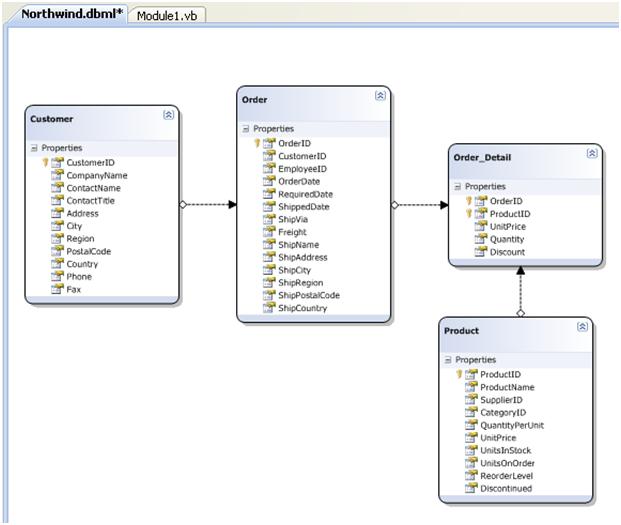
When you add those new tables to the model, the associations are automatically set up between the classes that are created by reading the database relations. Then you can write a query with nested embedded expressions in order to create more complex XML as shown in Listing 1.
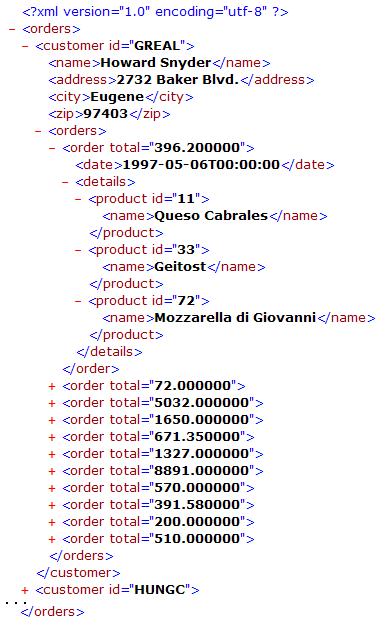
Here you’re just walking down the hierarchy of Customers, Orders, then Order Details and creating XElements as you go. Notice that even though this XML document is complex, LINQ to XML allows you to take a more natural top-down style to writing the code that generates the document. Also notice that you’re using an aggregate query in order to calculate the order totals, completely avoiding any For loops. This query will result in the XML shown in Figure 12. (shortened for clarity and displayed in Internet Explorer).
You can easily create XML from multiple data sources as well, not just a single data source like a database as shown so far. Since most modern systems interact with each other in some form of XML, the possibilities are endless. You can use LINQ to XML to easily create SOAP, XAML, HTML, and RSS. For instance, what if you wanted to display all of the customers on a map generated by Microsoft Virtual Earth? Virtual Earth allows you to pass it an RSS document of items specifying their latitude and longitude to easily map out multiple locations in the world. There are a couple different formats you can pass it and one is the GeoRSS standard. All you have to do is create this XML by obtaining the latitude and longitude from the addresses you have in your customers table and then pass this GeoRSS to Virtual Earth.
For this example you can grab the latitude and longitude of the customers in the United States using the service at http://geocoder.us. This service can return a set of coordinates from any US address in a variety of formats including REST-ful RDF. You can use this service in your LINQ query in order to create the GeoRSS from the customers table. The first thing to do is to import the geo namespace at the top of your code file because you’ll be using it to return the location information in the geo namespace from the XML that is returned from the geocoder.us service.
Imports <xmlns:geo=
"http://www.w3.org/2003/01/geo/wgs84_pos#">
Now you can write a query to create the GeoRSS for our customers. Since the Northwind database contains mostly fictitious addresses you can change the addresses to real locations or you can select just the customers living in Oregon (OR) since there are a couple valid addresses there.
Dim geoRSS = _
<rss xmlns:geo=
    "http://www.w3.org/2003/01/geo/wgs84_pos#">
    <channel>
    <title>Northwind Customer Locations</title>
    <link></link>
<%= From Customer In db.Customers _
    Let Desc = _
    Customer.Address & ", " & Customer.City _
    Let Address = _
    Customer.Address & "," & Customer.PostalCode _
    Where Customer.Country = "USA" _
        AndAlso Customer.Region = region _
    Select _
    <item>
        <title><%= Customer.ContactName %></title>
        <description><%= Desc %></description>
        <%= GetGeoCode(Address).Descendants %>
    </item> %>
    </channel>
</rss>
In this query, we’re building up the GeoRSS and calling a user defined function called GetGeoCode that accepts the address of the customer and returns the latitude and longitude. Also notice that Let keyword is used in the query in order to create query variables for description and address which are being used as we build the <item> elements. The GetGeoCode function will return an XElement of the location if one was found. The Descendants method on the XElement is then called back up in the query in order to place just the <geo:lat> and <geo:long> nodes into the GeoRSS.
Function GetGeoCode(ByVal address As String) _
    As XElement

    Dim url = _
"http://geocoder.us/service/rest/?address=" & _
Server.UrlEncode(address)

    Try
        Dim geo = XElement.Load(url)

        Return <location>
                 <%= geo.<geo:Point>.<geo:long> %>
                 <%= geo.<geo:Point>.<geo:lat> %>
               </location>

    Catch ex As Exception
        Return <location></location>
    End Try

End Function
Now that you have the GeoRSS you can pass this to Virtual Earth to create a map. For this example you can just create a simple ASP.NET application and save the GeoRSS above to a session variable. The default page (shown in Listing 2) contains the JavaScript code you’re going to need to send the GeoRSS to Virtual Earth and a <div> section with the id=”myMap” that identifies the area to place the map on the page. Take a look at the Virtual Earth documentation for more information on the API.
The code behind for the Default.aspx page simply checks to see if there were any <item> elements returned from the geoRSS query above and if so, dynamically adds the code to call the GetMap Javascript function in the onload event of the body.
If geoRSS...<item>.Count > 0 Then
    Session("georss") = geoRSS

    Me.body.Attributes.Add("onload", _
        String.Format("GetMap()"))
Else
    Me.lblStatus.Visible = True
    Session("georss") = <rss></rss>
End If
Another page called GeoRss.aspx is just a blank page that simply returns the GeoRSS stored in the session variable that the JavaScript calls to get the content. It’s important that the ContentType on the Response object is set to text/xml.
Public Partial Class GeoRSS
    Inherits System.Web.UI.Page

    Protected Sub Page_Load( _
                  ByVal sender As Object, _
                  ByVal e As System.EventArgs) _
                  Handles Me.Load

        Dim georss As XElement = _
            CType(Session("georss"), XElement)

        Response.ContentType = "text/xml"
        Response.Write(georss.ToString())
    End Sub
End Class
You can see the results in Figure 13
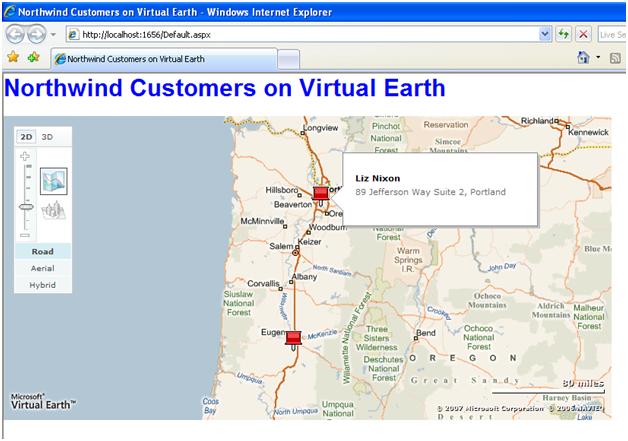
The key takeaway here is that in one LINQ statement you queried over multiple data sources, the Northwind database and the geocoder.us service, to create a single XML document that conformed to the GeoRSS standard and passed that to the Virtual Earth service to generate the map.
Creating Relational Data from XML
As you can imagine it’s also very easy to create relational data by reading XML. You can easily navigate XML in Visual Basic using XML axis properties. For instance, say you want to read an XML document called Customers.xml that contains customers in the United States like the one you created in the first Northwind example. It’s a good idea to first add an XML namespace to the Customers.xml document. This will make it much easier if you need to work with multiple namespaces and schemas in the project later.
<?xml version="1.0" encoding="utf-8"?>
<customers xmlns=
  "urn:microsoft:examples:customers">
  <customer id="GREAL">
    <name>Howard Snyder</name>
    <address>2732 Baker Blvd.</address>
    <city>Eugene</city>
    <zip>97403</zip>
  </customer>
.
.
.
</customers>
Now you need to infer the schema in order to enable XML IntelliSense. As mentioned earlier, you can use the XML to Schema tool, which you can download from the Visual Basic Developer Center (http://msdn.com/vbasic/ and select the Downloads section). After you install the tool, add a new item to the project and select the XML to Schema template and name it Customers.xsd. Then specify the location of the Customers.xml by selecting “Add from file…” and browsing to the file location, then click OK. You can also infer schemas from any URL on the Web or by pasting/typing XML into the tool directly. This process infers the schema and adds it to your project all in one step.
Next import the XML namespace at the top of your code file.
Imports <xmlns:customers=
"urn:microsoft:examples:customers">
Now when you write LINQ to XML queries over this customer document you will get full IntelliSense on the XML axis properties. For instance, say you want to select all the IDs and names of the customers that live in cities that start with the letter P.
Dim custXML = XElement.Load("Customers.xml")

Dim CustomersLikeP = _
 From Customer In custXML.<customers:customer> _
 Where Customer.<customers:city>.Value Like "P*" _
 Select Customer.@id, _
        Customer.<customers:name>.Value

For Each cust In CustomersLikeP
    Console.WriteLine(cust.id & ": " & cust.name)
Next
This query produces a collection of anonymous types with two properties, id and name. These properties were created based on the names of the element and the attribute that you selected from the XML. Anonymous types are another new feature of Visual Basic 9 that allow you to project unnamed types from LINQ queries. This allows you to immediately use the results from your query without needing to explicitly create a class to hold those results.
The next example will read the XML document and add any customers that are not already in the Northwind database. You can write a single LINQ to XML query to do this. In order to select only the customers in the XML document where there is no corresponding customer in the database, the example uses the Group Join syntax to “outer join” the customers in the XML document to the customers in the database and select only those where the count is zero; meaning there is no corresponding row in the database. Additionally, a set of new LINQ to SQL Customer objects is selected in order to create a collection of Customer objects that can be attached to the DataContext and automatically inserted into the database. The Customer class was created when you added the Customers table to the LINQ to SQL model in the O/R designer as described in the first Northwind example. Refer back to Figure 11 if you need to.
Dim db As New NorthwindDataContext
Dim customersXML = XElement.Load("Customers.xml")

Dim newCustomers = _
 From Cust In customersXML.<customers:customer> _
 Group Join CurrentCust In db.Customers _
  On Cust.@id Equals CurrentCust.CustomerID _
 Into Count() _
 Where Count = 0 _
 Select New Customer With _
  {.CustomerID = Cust.@id, _
   .CompanyName = "New Company", _
   .ContactName = Cust.<customers:name>.Value, _
   .Address = Cust.<customers:address>.Value, _
   .City = Cust.<customers:city>.Value}

db.Customers.InsertAllOnSubmit(newCustomers)
db.SubmitChanges()
As you type this query into the editor you’ll get full IntelliSense on the customer XML axis properties. Note that the New Customer With {... syntax is another new feature in Visual Basic 9 called object initializers that allow you to create classes and assign their properties in one line of code. Also note that this code loads the document into an XElement and assumes the level where the <customer> elements are by using the child axis, which is faster than using the descendants axis. However, if you need to query documents where you do not know for sure what level the <customer> element resides, then you would want to use the descendants axis like this customersXML...<customers:customer>.
The result of the query above will be a collection of new Customer objects. You can take this collection and add it to the DataContext by calling the InsertAllOnSubmit method and then insert the new customers into the database by calling SubmitChanges. For more information on LINQ to SQL, see the LINQ to SQL documentation on MSDN.
As you can see, it’s extremely easy to query XML using LINQ and XML axis properties, especially if you enable XML IntelliSense. The possibilities are rather endless.
Advanced Namespace Scenarios
Now that you understand how to create, transform, and query XML using XML literals, embedded expressions, and axis properties, we’d like to talk about some more advanced scenarios around XML namespaces.
The Default XML Namespace
The default XML namespace can be extremely useful when creating an XML document using many functions and literal fragments. When using the default XML namespace you do not need to prefix all the elements in all the literals, you can simply define the default namespace at the top of the code file and all the elements in that file will be in that namespace.
If you don’t define a default namespace, the default XML namespace in Visual Basic is the empty string. There are three places in your applications where you can override this default and define your own; inside the literal, in the Imports section at the top of the code file, or in the Imports section for the project. The important thing to remember when defining a default XML namespace is that the file and the project default namespaces apply to both the XML properties and XML literals but do not apply to attributes.
For example, the following Imports statement sets urn::myNameSpace as the default XML namespace for the file:
Imports <xmlns="urn::myNamespace">
Then you can create an XML document in this namespace like so:
Dim doc = <a>
              <b>
                  <c></c>
              </b>
          </a>
<a xmlns="urn::myNamespace">
  <b>
    <c></c>
  </b>
</a>
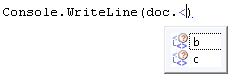
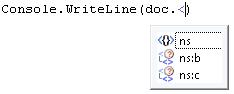
Since the XML properties also pick up this namespace you can observe that the applicable elements are included in the IntelliSense list (Figure 14). You can also override the default namespace inside the XML literal itself. For example:
Dim doc = <a>
              <b xmlns=
                 "urn::AnotherDefaultNamespace">
                  <c></c>
              </b>
          </a>
Now this will produce the following XML document:
<a xmlns="urn::myNamesapce">
  <b xmlns="urn::AnotherDefaultNamespace">
    <c></c>
  </b>
</a>
In order to access the <b> and <c> elements using the XML properties, you’ll need to add another Imports statement and give the other namespace an alias. This is because you can only declare one default namespace at the file level:
Imports <xmlns:ns="urn::AnotherDefaultNamespace">
You can see the result in Figure 15.
Reify XML Namespace
You may encounter cases when you need to get the actual namespace that was declared in the Imports statement as an XNamespace object, another object in the LINQ to XML API. For example, suppose you need to create the name of the XML literal element using an embedded expression. The built-in function GetXmlNamespace allows you to do this easily. For example, say you have the following Imports declarations:
Imports <xmlns="urn::myNamesapce">
Imports <xmlns:ns="urn::AnotherDefaultNamespace">
When you write this code:
Console.WriteLine(GetXmlNamespace())
Console.WriteLine(GetXmlNamespace(ns))
It produces the following results:
urn::myNamesapce
urn::AnotherDefaultNamespace
And this example uses this built-in function when calling the LINQ to XML Ancestors() method, which returns all the ancestor "{urn::AnotherDefaultNamespace}customer" elements of the order element:
Dim customers = _
  order.Ancestors( _
  GetXmlNamespace(ns).GetName("customer"))
Bubbling and Removing Redundant Namespace Declarations
When creating an XML document from multiple functions and embedded LINQ queries, there are usually many redundant XML namespace declarations because each element that is created on its own has to have the full namespace information contained within that element. However when this element becomes part of another element, the namespaces might be declared on the parent element and so they become redundant. The Visual Basic compiler removes the redundant namespaces when the document gets assembled from XML literals during compilation and also at runtime. Figure 16 describes this process.
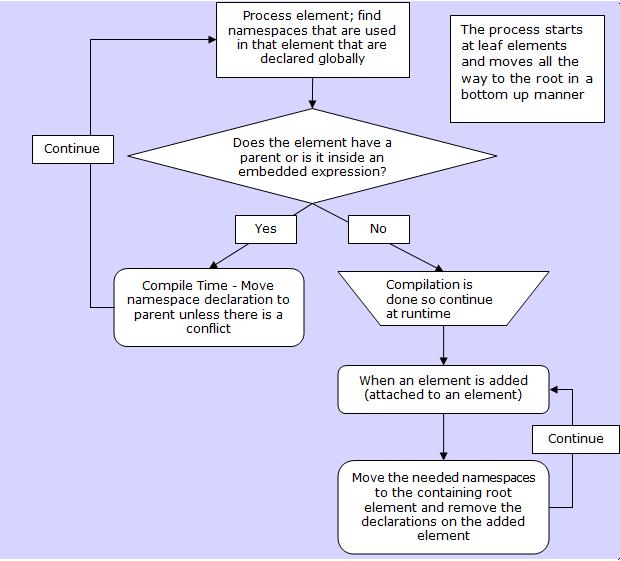
There are a few rules that apply to this process. Only the global namespaces defined using the imports statement and the local declarations that match global declarations are moved up to the parent element creating the bubbling effect. By “match” we refer to both the prefix and the namespace itself. Within a literal, namespaces will bubble up at compile time. If an element is added to another element by calling a function inside the embedded expression, the namespaces will bubble up at runtime.
The following examples show how this process works. Here’s a simple example of bubbling the namespace to the top level:
Imports <xmlns:a="http://mynamespace1">
...

Dim doc = <level0>
              <level1>
                  <a:level2></a:level2>
              </level1>
          </level0>
When you output doc, you’ll get the following results:
<level0 xmlns:a="http://mynamespace1">
  <level1>
    <a:level2></a:level2>
  </level1>
</level0>
In this next example the declaration already exists on the parent element. Note that since it’s the same prefix and same namespace, everything moves to the root element:
Imports <xmlns:a="http://mynamespace1">
...

Dim doc2 = <level0>
               <level1 xmlns:a=
                   "http://mynamespace1">
                   <a:level2></a:level2>
               </level1>
           </level0>
When you output doc2, you’ll get the same results as before:
<level0 xmlns:a="http://mynamespace1">
  <level1>
    <a:level2></a:level2>
  </level1>
</level0>
Local declarations do not bubble up unless the local declaration matches a global one. In this case you don’t declare <b> globally:
Imports <xmlns:a="http://mynamespace1">
...

Dim doc3 = <level0>
               <b:level1 xmlns:b=
                   "http://Othernamespace">
                   <a:level2></a:level2>
               </b:level1>
           </level0>
So now when you output doc3, you’ll see this:
<level0 xmlns:a="http://mynamespace1">
  <b:level1 xmlns:b="http://Othernamespace">
    <a:level2></a:level2>
  </b:level1>
</level0>
The prefix and namespace must match to bubble up; if it doesn’t, then no bubbling occurs. Notice what happens when the declaration exists but with a different prefix:
Imports <xmlns:a="http://mynamespace1">
...

Dim doc4 = <level0>
               <b:level1 xmlns:b=
                   "http://mynamespace1">
                   <a:level2></a:level2>
               </b:level1>
           </level0>
You’ll end up with this result when you output doc4:
<level0 xmlns:a="http://mynamespace1">
  <b:level1 xmlns:b="http://mynamespace1">
    <b:level2></b:level2>
  </b:level1>
</level0>
Namespace bubbling also happens when working with embedded expressions. In the following example, the bubbling happens at compile time:
Imports <xmlns:a="http://mynamespace1">
...

Dim doc5 = _
<level0>
<%= From i In Enumerable.Range(1, 3) _
Select <a:level1 xmlns:a="http://mynamespace1">
           <a:level2></a:level2>
       </a:level1> %>
</level0>
When you output doc5, you’ll see these results:
<level0 xmlns:a="http://mynamespace1">
  <a:level1>
    <a:level2></a:level2>
  </a:level1>
  <a:level1>
    <a:level2></a:level2>
  </a:level1>
  <a:level1>
    <a:level2></a:level2>
  </a:level1>
</level0>
Let’s look at an example of bubbling at runtime. Here the namespace is bubbled from the <level1> elements at runtime because the compiler does not have enough information to remove them at compile time:
Imports <xmlns:a="http://mynamespace1">
...

Dim doc6 = <a:root>
               <%= GetElement() %>
           </a:root>
...

Function GetElement() As XElement
    Return _
    <level0>
        <%= From i In Enumerable.Range(1, 3) _
        Select <a:level1>
                   <a:level2></a:level2>
               </a:level1> %>
    </level0>
End Function
This results in the following output for doc6:
<a:root xmlns:a="http://mynamespace1">
  <level0>
    <a:level1>
      <a:level2></a:level2>
    </a:level1>
    <a:level1>
      <a:level2></a:level2>
    </a:level1>
    <a:level1>
      <a:level2></a:level2>
    </a:level1>
  </level0>
</a:root>
It’s important to note that when bubbling of namespaces happens at runtime, it hurts performance. So in order to achieve the most optimal performance in this case, it’s better to return a single XElement from the function that is called within the embedded expression. Therefore, if the function returns a single XElement, which itself wraps the query, the impact on the performance is negligible because the bubbling and removing of redundant namespaces happens only once for that element instead of each element that is returned from the query.
Tips and Tricks
Now that you’ve mastered XML programming in Visual Basic, here are some additional uses of LINQ to XML and XML literals that you may not have thought about that will probably save you some time.
Using XML Literals Instead of Multi-line Strings
One handy use of XML literals in Visual Basic is to replace your multi-line strings with XML literals for better readability. In Visual Basic, when you need multi-line strings it gets cumbersome with any large amount of text because you have to concatenate string literals with your code and use underscores for readability. For instance:
'Old way to work with multi-line strings
Dim oldWay = "this is a string" & vbCrLf & _
             "with formatting" & vbCrLf & _
             "and stuff" & vbCrLf & _
             "look, underscores" & vbCrLf & _
             " tabs too"


MsgBox(oldWay)
With Visual Basic 9’s built-in XML literals support, you can now easily write a bunch of text directly into the editor without having to use underscores:
'Use XML literals to avoid underscores
' and preserve formatting
Dim newWay As String = <string>
this is a string
with formatting
and stuff
look, *no* underscores!!!
tabs too</string>.Value

MsgBox(newWay)
The text formatting is preserved here as well. All you have to do is get the .Value of the XElement, which is the string literal. As you can see, this is much cleaner than what you’re used to in the first example. And if you still like to see your string literals in the default reddish color, you can easily change the color settings for VB XML literals in Tools --> Options --> Environment --> Fonts and Colors, then select "VB XML Text" and set the custom color to RGB(163,21,21). Here’s another example, some SQL query text now with the reddish color:
'Use it anywhere you want better readability for
' multi-line string literals
Dim query = <query>
SELECT
     Customers.*,
     Orders.OrderDate
FROM
     Customers
INNER JOIN Orders
      ON Orders.CustomerID = Customers.CustomerID
WHERE Customers.CustomerID = @CustomerID
           </query>.Value

Dim cmd As New SqlClient.SqlCommand(query)
cmd.Parameters.AddWithValue("@CustomerID", id)
Text Merging
You can use XML literals to produce a lot more than just XML. In fact, you can easily create any text-based output using XML literals and embedded expressions. Using embedded expressions allows you to do any kind of text merging much cleaner than concatenation of strings with code or use of String.Format, especially as the size of the text increases. Here are some simple examples:
'Simple text-merging example using embedded
' expressions
Dim simple = <string>
This is a simple text merge example:
Hello, <%= Environment.UserName %></string>.Value

MsgBox(simple)

Dim controls = <string>
There are the following controls on this form:
<%= From item In Me.Controls _
    Select item.ToString & vbCrLf %>
              </string>.Value

MsgBox(controls)
Listing 3 shows an example that uses a simple code generation pattern to generate a Customer.vb file that describes a Customer class by reading the schema. This is a good example of having to use the descendants axis to obtain all the elements <xs:element> no matter where they appear in the document.
Conclusion
Working with XML via the LINQ to XML API, XML literals and XML axis properties in Visual Basic 9 completely eliminates the barrier between the code you write and the XML you’re trying to express. The new LINQ to XML API provides a much more intuitive approach to querying, transforming, and creating XML, and in many cases has better performance than its predecessor, the XML DOM. Say good-bye to XPath, XQuery, and XSLT, and hello to Visual Basic 9. Enjoy!
