


Scrum is an agile software development process to manage software projects.
Scrum is based on three simple principles: visible progress, constant inspection, and adaptation. With Scrum, teams use an empirical approach to adapt to changing requirements and priorities. Teams using Scrum focus on delivering working software to their customers on a frequent basis.
In this article I will present an overview of the different roles that each of the team members play in Scrum, the life cycle of projects managed with Scrum, a description of its key practices, why they work, and some practical advice on how to implement them.
Scrum is not prescriptive on engineering practices, but rather is a lightweight framework based on a few (common sense) guidelines for managing projects.
Scrum is an agile process to manage software development projects. Scrum is not prescriptive on engineering practices, but rather it is a lightweight framework based on a few (common sense) guidelines for managing projects. Scrum follows an empirical process control in which the team adapts based on experience rather than following a rigorous set of steps or a very detailed plan. The word Scrum itself comes from rugby and refers to a way of restarting the game.
Scrum as we know it today is the result of the work and collaboration of Jeff Sutherland and Ken Schwaber, circa 1995. In 2001 Ken Schwaber and Mike Beedle wrote the book Agile Software Development with Scrum, which made the practices reach a broader audience and become a mainstream software development process.
Most of the members of a Scrum team are typically found in traditional development teams. Yet, there are some subtle differences in their responsibilities when working in a Scrum team that are worth discussing first.
The Scrum Team
There are three main roles in a Scrum team: ScrumMaster, Product Owner, and Development Team.
The ScrumMaster role is somewhat similar to a project manager in traditional software development. However, the creators of Scrum gave it a different name to emphasize the different nature of this role. Although the ScrumMaster is responsible for making sure the team is moving as quickly as possible, this role is more of a facilitator and coach than one that exercises control and makes decisions. The ScrumMaster helps the team follow the Scrum principles (e.g. making sure iterations are time boxed, removing roadblocks, fostering collaboration among team members, et cetera.) Unlike traditional project manager roles, the ScrumMaster does not assign individual tasks to the developers or QA but rather the development team self-organizes on each iteration and determines who will do each task. The ScrumMaster must be available at all times to remove roadblocks and ensure that the team has all required resources for the job.
The Product Owner is a representative from the business side who determines the priorities of the items to be developed. The Product Owner must be either on site or highly available to the team at all times to answer questions and clarify unclear requirements. For example, she should reply to e-mails and return phone calls promptly, and attend demos of the work in progress to verify that the team is moving in the right direction. Unlike other development processes, the Product Owner in Scrum is actively involved in the project throughout its duration, not just at the beginning or at the end.
The Development Team in Scrum can be composed of developers, QA, and business analysts. In a Scrum team the development team provides estimates and does the work. However, the development team does not select what features should be developed-that is the job of the Product Owner. Once an iteration starts, the development team self-organizes and decides who will do each item and what is the best way to approach it. During each iteration, developers, QA, and business analysts work very closely on a daily basis to make sure the work is properly designed, coded, tested, fixed, and potentially shippable at the end of the iteration.
Team collaboration and self-organization are key practices in Scrum teams since they allow the people doing the work to decide what the best approach to get the job done is and carry it out. It is amazing how much productivity improves when members of a cross-functional team collaborate with each other on a daily basis. This synergy between team members in a Scrum team is one of the greatest benefits of Scrum and in my experience, accounts for a large portion of the success of Scrum teams.
Process Overview
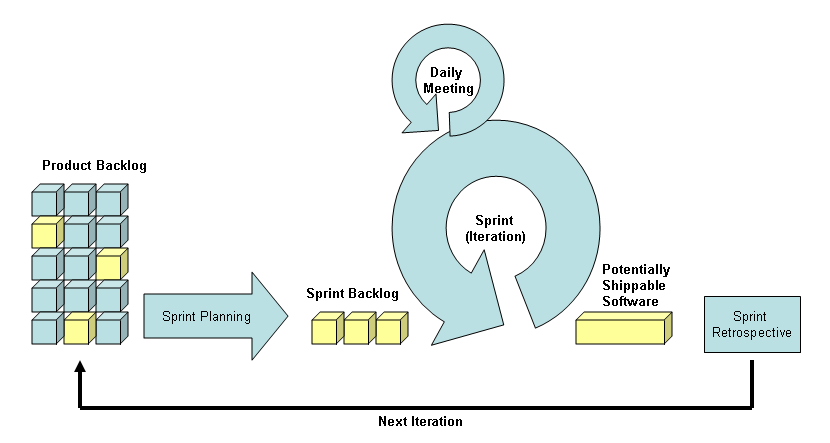
Scrum projects are managed in short iterations (Sprints) where the team works on the most important items of the project, as defined by the Product Owner, and delivers potentially shippable code at the end of each iteration. Everything in Scrum revolves around Sprints. Figure 1 shows the basic skeleton of the Scrum process including key components like the Product Backlog, the Sprint Backlog, the Sprint, and the Daily Meeting. In the following sections I will describe in chronological order what happens in the life cycle of a project using Scrum. Table 1 shows a summary of these steps along with the goals and responsibilities of everyone involved.
Sprint Planning
Before a Sprint starts, the Product Owner (with the help of the ScrumMaster) reviews the list of all new features, enhancements, change requests, and bug reports accumulated over time to decide which ones are most important at the time. If this is a new project, the list includes the features that the new system must provide. The entire list of items is called Product Backlog and each item must include a description of what is requested, the priority for the business, and ballpark estimates. It is the job of the Product Owner to make sure this list is always up to date.
Scrum gives a large degree of control to the Product Owner during the life of a project since it allows her to change priorities as she pleases on every planning meeting (i.e., every two weeks or every 30 days depending on the size of your Sprint.) Even if the Product Backlog has been prioritized before, the Product Owner can reprioritize items on each planning meeting.
Scrum’s practices and guidelines work because they address the most important component of software development: people and their interactions.
Since Product Owners represent the business, they typically have an idea of what customers want and what needs to be delivered first. Armed with this knowledge and preliminary estimates, the Product Owner selects a subset of items from the Product Backlog for consideration in the Sprint planning meeting.
The Sprint planning meeting has two parts. During the first half of the meeting (the first 2-4 hours) the Product Owner describes the features to the Scrum team that she would like to see implemented during the next iteration. Developers and QA ask questions to the Product Owner to come up with “good enough” estimates for each item. This is not a design meeting. The fact that this is a short meeting forces the team not to spend too much time overanalyzing each item. The ScrumMaster helps to keep this meeting focused and within the agreed-upon time.
Once estimates have been provided by the team, if there is more work estimated than time available in the Sprint, it is the job of the Product Owner to decide which Product Backlog items will be removed from the Sprint and which ones will be kept. It is very important to keep only enough items that developers believe they can complete. It is also important to let the Product Owner (and not the developers) decide which ones should be kept on the Sprint. In short: the development team estimates but the Product Owner prioritizes.
As tempting as it might be to extend the duration of a Sprint “just a few more days” in order to make room and squeeze-in a few more items, Scrum practitioners recommend that the Sprint size is kept fixed. The ScrumMaster enforces this practice during the planning meeting. Time boxing forces the Product Owner to make choices and focus on high priority items rather than trying to include every possible feature in one iteration. Remember that Scrum is iterative; there will be more iterations. If the items left out are still very important, they will come to the top of the list in the next Sprint planning meeting.
The items that are kept on the Sprint are called the Sprint Backlog. These items will be the focus of the team for the duration of the Sprint. During the second half of the Sprint planning meeting (the last 2-4 hours) the team comes up with a plan to carry out the items in the Sprint Backlog. For example, the team might break down some of the items in smaller blocks so that multiple developers can work on it, decide how the features are going to be tested, what features depend on each other, and which ones should be handled first on the Sprint.
Sprint
A Sprint is an iteration in which the development team (developers and QA) works on the Sprint Backlog. During this time, the Product Owner must be available to answer questions and provide feedback on features as they start evolving. At the end of the Sprint, the development team has the responsibility of providing potentially shippable code. Potentially shippable code means that it has been coded, tested, and is ready to go to production, even if it will not go to production immediately. Scrum recommends that the team gives a demonstration to the Product Owner of the software with the new features at the end of the Sprint.
A Sprint typically lasts two weeks or 30 days. Early literature about Scrum recommended 30 days but lately I have seen most teams doing two-week Sprints. I prefer two-week Sprints for various reasons. First, a shorter time period makes it easier for the team to plan, estimate, and complete two weeks of work rather than four or six. A shorter time period makes Sprint planning meetings shorter and it tends to make estimates more accurate because the Sprint is smaller. Secondly, two-week Sprints allow the Product Owner freedom to change priorities more often, which helps team to adapt quickly to market pressures.
Whatever time frame you chose for your Sprints, make sure they are time boxed. Time boxing gives the team a tangible goal (e.g. at the end of two weeks you’ll have these four new features completed.) People work better when they know they can succeed and when there is an end in sight. Forcing teams to have potentially shippable code at the end of every Sprint also prevents teams from going into a perennial “85% done” state where the team is always very close to concluding something but it never gets done. Time boxing also encourages the team to keep the system stable since they know there is a checkpoint at the end of the Sprint in which they will need to demonstrate a working, potentially shippable version of the system. This is good for the development team, the Product Owner, and the customers.
Keeping the duration of the Sprint constant for the duration of the project is also a good practice because it provides rhythm to the team.
Product Owners cannot add more work to a Sprint once it gets started. They must delay new requirements until the next Sprint planning meeting. However, since Sprints are usually short in duration and include what the Product Owner thought was most important, Product Owners are typically receptive to the idea of waiting a few days until the Sprint ends to change priorities. Remember that they can reprioritize on each Sprint planning meeting. It is possible to stop and cancel a Sprint in progress if the Product Owner cannot wait and priorities need to be changed in the middle of the Sprint. In my experience this happens rather infrequently in Scrum.
Scrum is also different from other software development processes in that neither the ScrumMaster nor the Product Owner assigns specific tasks to the development team. In Scrum teams, once the Sprint Backlog has been defined the team members decide among themselves how to accomplish it. Some teams prefer to pre-allocate all items among themselves during the planning meeting while others allocate only a handful of items and members pick up the remaining items as they complete the first ones.
The ScrumMaster’s main job during the Sprint is to make sure the team’s needs are met and to remove roadblocks. This includes ensuring that developers and QA have access to all necessary resources (people, documents, hardware, software), they facilitate meetings with external parties, reduce distractions (e.g. people working on things not part of the Sprint Backlog), coach the Product Owner and development team when decisions must be made, and all in all make sure that developers and QA can work in the best possible environment.
The Product Owner needs to be easily accessible during the Sprint to answer questions about Sprint Backlog items, review work in progress with the development team, and make sure features are moving in the right direction.
For the duration of the Sprint, developers and QA work with each other on a daily basis. In some teams, QA works side-by-side with developers to design, develop, and test features while in others they test features within a few hours of being developed (not weeks later). This tight loop between developers and QA is critical to ensure potentially shippable code at the end of the Sprint. Code that was written but not tested is very unlikely to be potentially ready to be shipped to production.
Daily Meeting
During the Sprint, team members get together on a daily basis to report status to the team. The Scrum daily meeting-or daily scrum-is a short meeting time boxed at 15 minutes in which each participant answers three questions:
- What did you do since the last daily meeting?
- What will you do from now until the next daily meeting?
- Are there any roadblocks in your way?
Although the entire team is present at the daily meeting, it is very important to notice that the daily meeting is for team members to report status to their peers, not to the ScrumMaster or the Product Owner. This meeting keeps the pace of the team visible on a daily basis to everybody involved in the team. If the team is moving along as planned it will be evident during these meetings. Likewise, if someone is having difficulties it will not go unnoticed. Frequent reporting to their peers helps teams to efficiently self-organize as the Sprint progresses and provides accountability among team members. It is important for the Product Owner and the ScrumMaster to be present in this meeting to detect roadblocks and act on them as soon as possible.
As a way of an example, on a typical daily meeting one developer might report that yesterday he completed the middle tier component for a particular module and today he plans to wrap up the Web page that will use it. He will inform the Product Owner and QA that they should be able to take a look at it the next day. Another developer might report that she is having problems finding the root of a problem in the login process and could use some help. QA might report that the contacts screen seems to be broken as a result of a fix in another module and that the developers need to fix that before he can continue testing other screens on the same module.
In order to keep the meeting short it is necessary to take aside discussions that only involve one or two team members that might take more than a few minutes. It is common to have the daily meeting as a stand up meeting. This helps to keep the meeting short since people usually do not like to stand for more than 15 minutes to discuss anything.
Sprint Retrospectives
Scrum is an adaptive process. One of the ways Scrum teams achieve this is by conducting regular retrospective meetings to talk about what was successful in the last Sprint, what could be improved in the next one, and new ways in which the team could get better. These are candid meetings in which the whole team (Product Owner, ScrumMaster, developers, and QA) participate.
Ideally, the team will hold these meetings at the end of each Sprint. Retrospective meetings provide a forum for the team to voice concerns and boast about things that went well. It is very important to balance the meeting with successes and areas for improvement. To achieve this balance you can request that every participant brings to the meeting a list of two or three practices that helped the team perform well and two or three areas where the team needs to improve.
Retrospective meetings can be hard to manage since they can easily turn into emotional discussions. To prevent this it is very important to keep the meeting focused on how to work better as a team and not into a forum for personal attacks. I have found retrospective meetings to be of great value to let teams vent things that frustrate them and get ideas from the whole team on how to address these issues. Likewise, when things are going well, it is good for the team to talk about what makes them successful and make sure everybody is aware of what the team needs to maintain to keep the momentum going. These meetings also enforce the concept that everybody involved (ScrumMaster, Product Owner, developers, QA) work together as a single team and that they need to collaborate with each other.
At a retrospective meeting, teams might discuss things like “we need to make sure our unit tests are kept up to date since when we ignored them last Sprint, issues crept up beyond our control” or “I found it really helpful to demo the new screens to Jane early on rather than at the end of the Sprint” or “we need better communication between developers and QA since a lot of bugs didn’t get tested early on because the developers didn’t flag them as ready to be tested on time.”
It is important to follow up on what the team agrees to during these meetings. If the team discussed that it wanted to start doing something new, such as demo work in progress sooner to the Product Owner, the ScrumMaster needs to help the team to make sure demos are being conducted earlier. The ScrumMaster also needs to bring this topic back to the next retrospective meeting to see if the team feels they are moving in the right direction.
After the retrospective meeting the team is ready for a new Sprint. The team gets together for a new Sprint planning meeting and then repeats the cycle. Since the code is potentially shippable at the end of every Sprint, the regression testing process is considerably simplified. Some teams have a special type of Sprint called Release Sprint in which all they do is deploy the system to the testing environment, conduct regression testing, fix any issues found during this process, and then promote to production the features completed in the Sprints since the last release.
Why Scrum Works
Scrum’s practices and guidelines work because they address the most important component of software development: people and their interactions. Scrum provides a framework for the entire team (Product Owner, ScrumMaster, developers, quality assurance, and business analysts) to collaborate, and work with each other on a regular basis.
For example, the daily meeting helps the entire team (not only the ScrumMaster or the Product Owner) monitor progress on a daily basis. If the team starts falling behind, it can adapt and self-reorganize immediately. Time boxing in the Sprint helps the Product Owner monitor progress at specific intervals since at the end of the iteration the features planned during the planning meeting are either potentially shippable or not. The goal of potentially shippable code guides everybody in the team to work towards the same goal. The Sprint retrospective meeting allows the team to reflect on successes, talk about areas for improvement, and to take measurements to improve in the next Sprint.
A common misunderstanding is to see the Scrum process as mini-waterfall. Just having short iterations is not enough to make Scrum work. For Scrum to shine it is vital that all team members work together on the same goal during the Sprint. If developers are coding a set of features but QA is testing a different set of features they are not working together. You are not going to have potentially shippable code at the end of this Sprint. The ScrumMaster must promote this collaboration model, especially on teams that have never worked as close together as Scrum suggests.
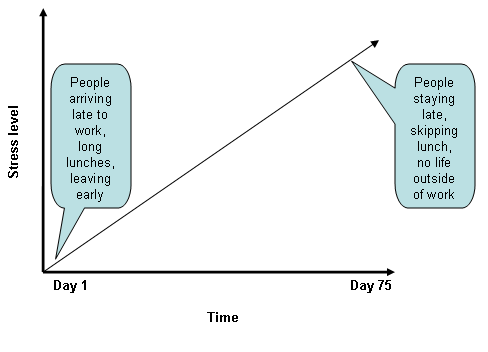
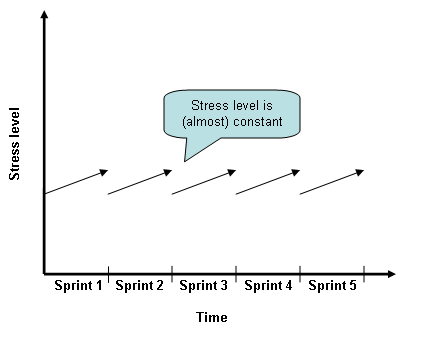
Scrum fosters an environment in which teams can succeed in the long term by keeping a constant pace. Using short iterations and self-inspection every step of the process (e.g. daily meetings, Sprints, and retrospectives) allows Scrum teams to always know the status of the project and to make sure the team is moving towards the same goal. Since Sprints are short in duration and the team is always focused on having potentially shippable code at the end of the iteration, Scrum prevents the so-called “student syndrome” in which people apply themselves only at the last moment before a deadline. Figure 2 shows the stress level on teams that do not have short iterations and regular checkpoints. These teams are often times relaxed at the beginning and stressed out towards the end of the project. Scrum’s short iterations and regular checkpoints lead teams to a more efficient model in which team members themselves detect deviations and make adjustments early on rather than wait until it is too late. The stress level on Scrum teams tends to be low, like the one depicted in Figure 3.
Progress Tracking
Teams using Scrum have several ways to track the status of the project. One is that at the end of the Sprint the team must have potentially shippable code. Having teams giving demonstrations to the Product Owner of the new features at the end of the Sprint is a great way to encourage this goal. At the end of the Sprint the software is potentially ready to be shipped or not. This kind of binary status, common in agile development processes, tends to be more meaningful to Product Owners than the perennial “we are 85% complete.”
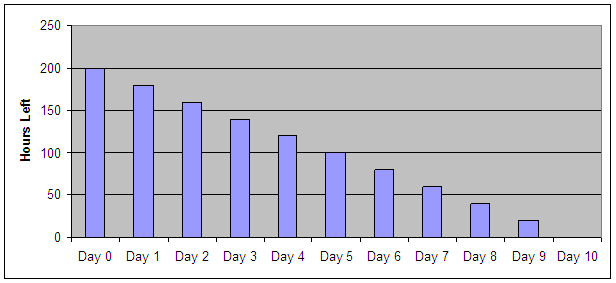
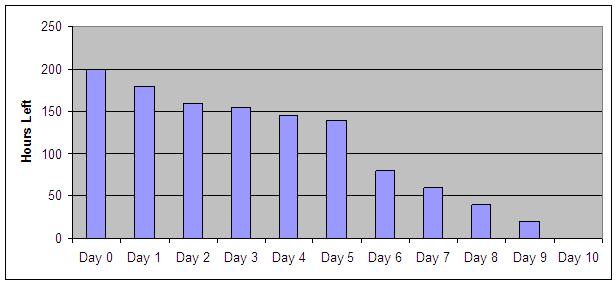
Another way Scrum teams can measure progress is with burndown charts. These are charts in which the amount of work left to be done in a Sprint is updated on a daily basis and made available to the entire team. If at the beginning of the Sprint there are 200 hours of work to be done, on day two the chart is updated to indicate how much work (as estimated by the developers working on each task) is still left.
As tasks are completed-coded and tested-the number of hours left to be done decreases. When no tasks are completed the number of hours remains the same from one day to another. Figure 4 shows an example of a Sprint burndown chart in which everything went perfect. Every day of the Sprint the team completed twenty hours and finished everything on time. On the other hand, Figure 5 shows an example in which the team ran into some difficulties on day 3 (the number of hours left remained almost the same as the day before) and these difficulties continued on days 4 and 5. Perhaps some of the items were harder to implement than the team had anticipated or a teammate got sick. Whatever the reason for the slowdown, by day 6 the team had taken some corrective actions (for example removed a few items from the Sprint after talking to the Product Owner) in order to provide potentially shippable code on what was still achievable by the end of the Sprint.
Scrum is not a silver bullet. Even when using Scrum it is still possible (and likely) that things will go different from what was planned every now and then. However, with frequent inspection and adaptation, the team detects these variations as soon as they happen and adapts to its new environment. This ability to quickly adapt to a new environment is one of the key differences between empirical process controls (like Scrum) and defined process controls like the one used by traditional non-agile software development processes.
Perhaps the best tracking mechanism that takes place in Scrum teams is the constant feedback loop that Scrum provides. By having the entire team (Product Owner, developers, quality assurance, and ScrumMaster) collaborating throughout the duration of the Sprint, teams tend to know better where they are, notice if they are falling behind, and act on it on a regular basis.
Getting Started with Scrum
At its core Scrum is extremely simple; some might even say that it is just plain common sense. However, if you have never managed a project with Scrum, I recommend that you start small. Like with most process change initiatives, success will depend on people truly embracing the new paradigm. The ScrumMaster coaching role during the initial stages is crucial for teams to adopt it and succeed with it. I have included in the sidebar some resources to learn more about Scrum.
Scrum works very well with collocated teams of five to ten members including the Product Owner, developers, quality assurance, analysts, and the ScrumMaster. You can scale it up to work with larger and distributed teams but I suggest that you start with a small collocated team.
Likewise, if you are using six-month iterations in your current development process, perhaps the concept of two-week Sprints would be too much of a shock for your organization. If that is the case, start with 30 days Sprints, see how it works for your team for a while and then reevaluate if you need to do shorter iterations.
Scrum provides a framework for cross-functional self-organized teams to work together towards a common goal. The principles of visible progress and constant inspection provide transparency to teams and allow them to quickly adapt to changes in the environment. In today’s fast-paced world of new technologies, changing requirements, and increased pressure to get to market, Scrum’s practices can help you deliver working software, with the right features, more often to your customers.
Table 1: Check points for a team using Scrum.
| Step | Duration | Participants | Goal |
|---|---|---|---|
| Sprint planning meeting | 4-8 hours | Entire team (Product Owner, ScrumMaster, business analysts, developers, QA) | Select from Product Backlog features to develop in the next Sprint. The result is called the Sprint Backlog. Come up with an initial plan to carry out the Sprint Backlog. |
| Sprint | 2 weeks (or 30 days) | Entire team | Team works on Sprint Backlog. Result is potentially shippable software. |
| Daily meeting | 15 minutes(every day for the duration of the Sprint) | Entire team | Team members synch up with each other, review progress of the Sprint, and identify roadblocks. |
| Sprint retrospective meeting | 1 hour | Entire team | Team members debrief how things went in the Sprint and discuss potential improvements for future Sprints. |
