


“Integrate the data tier developer into the core development life cycle and process.”
That is one of the main objectives of Visual Studio Team Edition for Database Professionals, also known under its project name “Data Dude.” Bringing the data tier developer into Visual Studio is the first step in enabling closer integration between the application and data tier developer. Having both environments leverage the same Team Foundation Build (Team Build) system enables daily and automatic integration of changes into the build process, enforcing closer integration and shorter feedback cycles between the two originally disjoint disciplines.
Visual Studio Team Edition for Database Professionals (VSDBPro) enables you to manage your SQL Server database schema (definition) the same way as you handle your application projects and source code. It starts by representing your database schema inside the newly added Database Project (.dbproj) (see Figure 1). It does so through a collection of T-SQL DDL fragments. Each fragment is stored in a single .SQL file and represents a single schema artifact, for example a table, queue, constraint or procedure definition. Because fragments only represent a single schema object, tracking changes and versioning these schema objects is a lot simpler and precise.
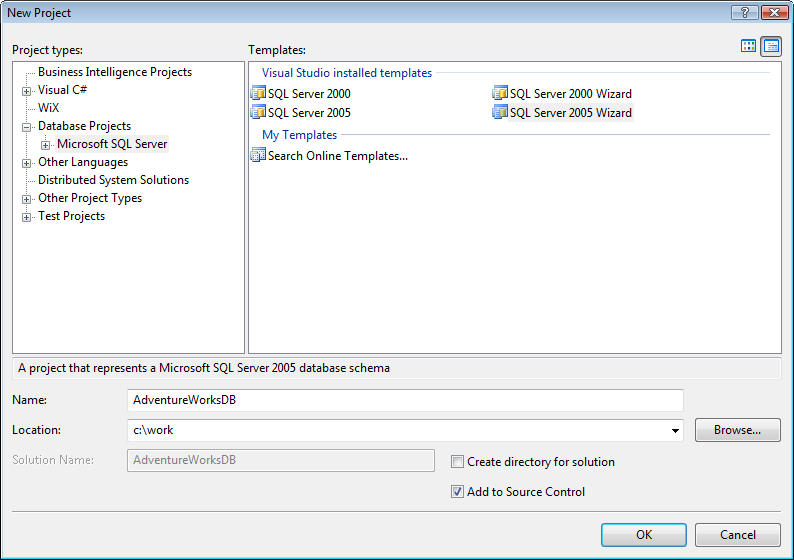
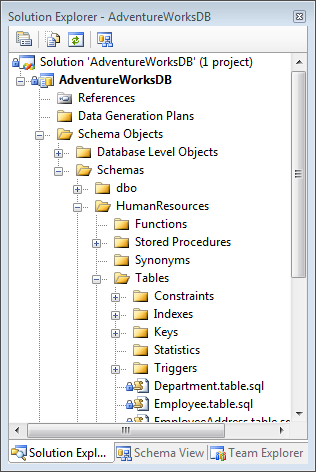
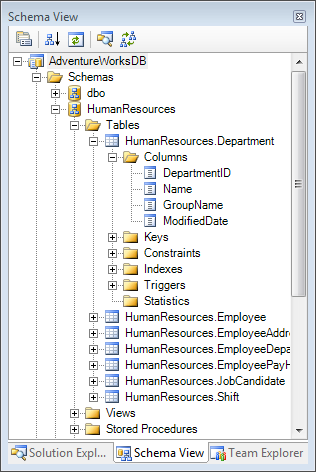
After you have established the Database Project you have two views: The Solution Explorer view presents the physical layout of all the directories and files used to store the objects inside the project (Figure 2). The Schema View provides a logical representation of the complete schema organized by schema and/or object type (Figure 3).
Build & Deploy
Now that you have a collection of .SQL fragments, how do you go about deploying your schema?
This is where “build” comes in. When you build a Database Project, the build engine takes all the fragments inside the project and compares them with the schema inside the target database.
Build is based on a difference-based build engine (Figure 4). The build engine takes two inputs: the project state; which is “what you want” and the target database; which is “what you have.” The comparison results in a set of schema objects that are different, which are sorted to reflect the correct dependency order. The build engine determined this dependency information during the load of the project by parsing and interpreting all DDL fragments for the lifetime of the project. Finally, the build engine generates a deployment script in the form of a .SQL script which contains a set of T-SQL DDL statements to incrementally update the schema on the target server/database. This alleviates the need to manually create and/or maintain incremental update scripts to keep your database schema up-to-date.
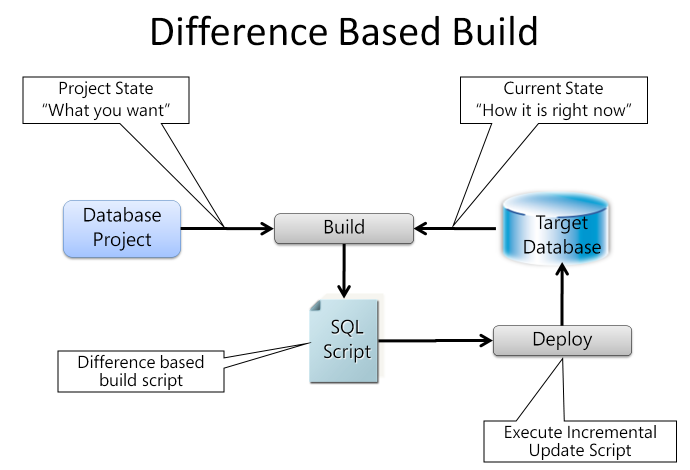
Using the incremental deployment script you can update the target database, using the Deploy command inside Visual Studio.
The Truth Is in the Project
The big change is that the Database Project is now the authoritative source of the schema definition, not the database instance(s) the schema is deployed to. Since the Database Project has become the center of truth for our database schema, placing the project under source code control enables the next step in our crusade of integrating the data tier into the development life cycle: versioning of the schema objects (Figure 5).
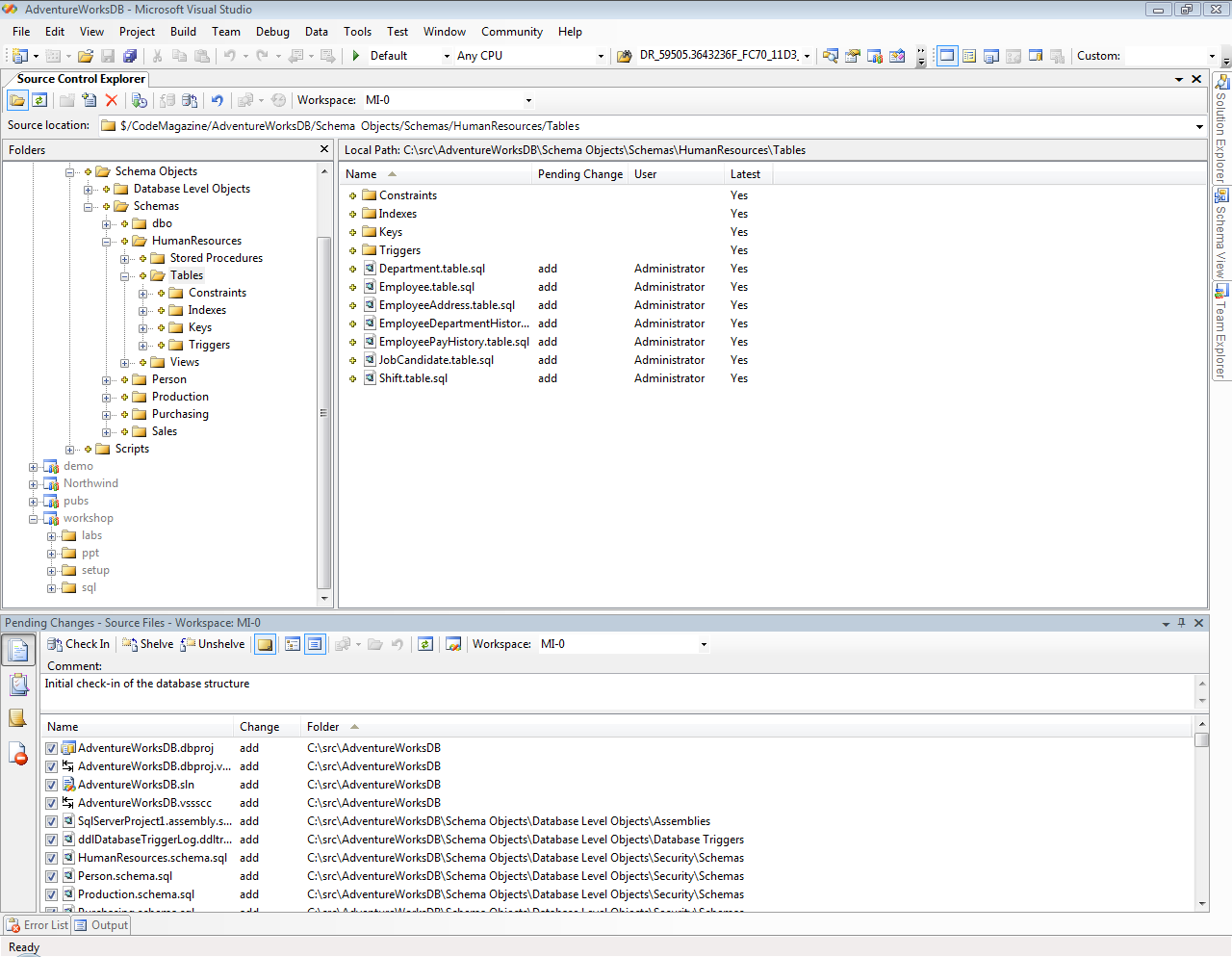
This enables placing the project under source code control (SCC), the versioning of the individual schema objects, and the tracking of the changes of these objects. It also enables alignment in versioning between the application and the data tier. Both can use the same labels to indicate versions at a given point in time and use branching when projects are derived or merged.
So when a developer syncs his or her sources to a certain label inside source code control, this contains the definition of the state of the database schema as it was used at that point in time when the label was created.
Now that you understand how the individual projects work, let me switch gears and focus on how you can integrate this into the team environment.
MSBuild Is Your Friend
Like most Visual Studio-based project systems, the core tasks inside the projects like compilation and linkage are implemented as MSBuild tasks. The same is true for VSDBPro. The two core activities for Database Projects (.dbproj), “Build” and “Deploy” are implemented by two MSBuild tasks named “SqlBuildTask” and “SqlDeployTask.”
All VSDBPro-related MSBuild tasks are defined in the .targets file located in:
%ProgramFiles%\MSBuild\Microsoft\VisualStudio\
v8.0\TeamData\ Microsoft.VisualStudio.TeamSystem.
Data.Tasks.targets
The properties exposed by the MSBuild tasks are documented via an accompanying XSD file located in:
%ProgramFiles%\Microsoft Visual Studio
8\Xml\Schemas\1033\MSBuild\ Microsoft.
VisualStudio.TeamSystem.Data.Tasks.xsd
Any project file that wants to include the functionality offered by the build task includes the .targets file; the .XSD file is used to provide IntelliSense support when you edit the project file inside the XML Editor in Visual Studio.
Building from the Command Line
The biggest benefit of all this? You can build and deploy your Database projects from the command line. When needed you can use the command line to override settings and use MSBuild to automate almost all possible tasks in a normal build process, which now can include building and deploying your database schemas.
To build from the command line you simply start a Visual Studio Command Prompt (this makes sure MSBuild.exe is in the PATH), navigate to the directory where your project file is stored, and execute the following statement:
CD C:\src\AdventureWorksDB <enter>

MSBuild AdventureWorksDB.dbproj /t:build <enter>
This will use all the property settings as defined inside the (.dbproj) project file and use them to build the project. If you need to override some properties you simply pass them to MSBuild.exe via the command line as name-value pairs using the property parameter.
CD C:\src\AdventureWorksDB <enter>

MSBuild AdventureWorksDB.dbproj /t:build
/p:TargetDatabase=”MyAdventureWorks”
/p:TargetConnectionString="Data
Source=(local)\sql90;User=sa;
Password=MySecret99;Pooling=False;" <enter>
This statement will change the target database name to “MyAdventureWorks” and use your local SQL Server instance named SQL90 and connect using standard SQL Server authentication.
The result of the build is a .SQL file, which by default is named the same as your project and lives in the sql directory under the location where your project file is located.
To deploy the resulting build script you change the target of the project to /t:Deploy:
CD C:\src\AdventureWorksDB <enter>

MSBuild AdventureWorksDB.dbproj /t:deploy <enter>
You can combine the build and deploy into a single invocation using:
CD C:\src\AdventureWorksDB <enter>

MSBuild AdventureWorksDB.dbproj /t:build;deploy
<enter>
MSBuild extracts all information needed to execute the tasks from the project files and allows you to override property values via the command line. The Database project file is split in two pieces; projects settings which are stored in the .dbproj file and user settings which are stored in the .dbproj.user file. Both these files are aggregated into a single file image that represent the project and are passed on to the tasks at execution time. You can see the partial content of the AdventureWorksDB.dbproj.user file in Listing 1. It contains properties with their respective values that are specific to the user. In general it contains settings that you want the user to be able to change for him or herself, but not affect other users of the project.
An example of a user setting is the “AlwaysCreateNewDatabase” property which indicates that you always want to drop and recreate your database when it is being deployed.
NOTE: The .dbproj.user file should not be checked in!
In the next section, Team Build, you’ll learn that you need to be aware of which properties are defined inside the .dbproj.user file when you start integrating Database Projects into a Team Build environment.
Team Build
Now you’ll learn to integrate a Database Project into Team Build. The first thing we need to do is add a new Team Build Type, which we will do using the “New Team Build Type Creation Wizard” (Figure 6). This wizard will guide you through the process of creating a Team Build type in six steps. The wizard will ask you to provide the name of the type; which solution you want to build; the configuration section to use; some location settings, and some other options.
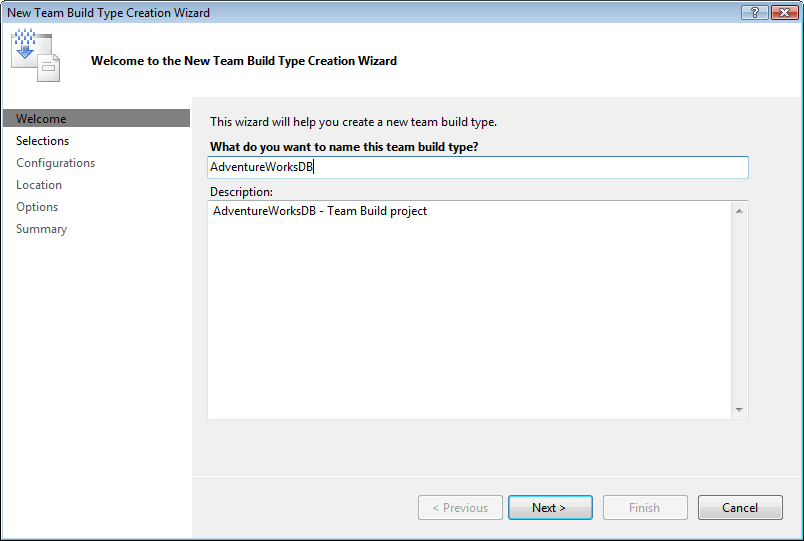
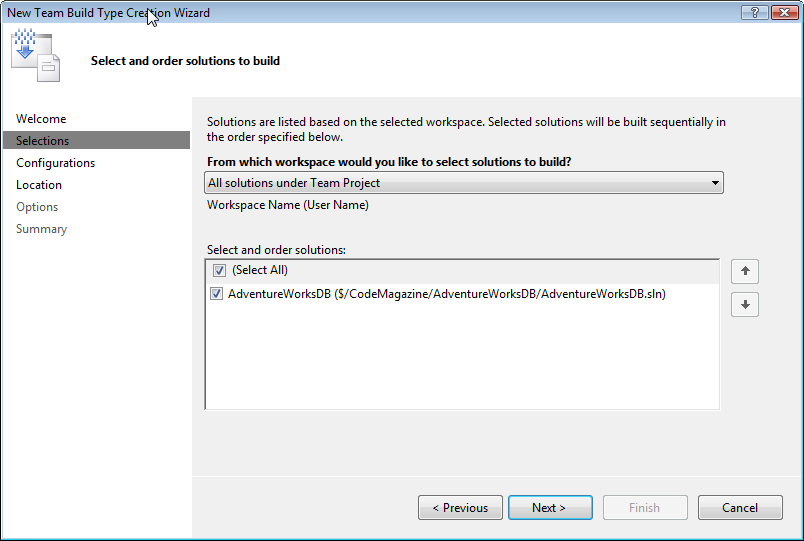
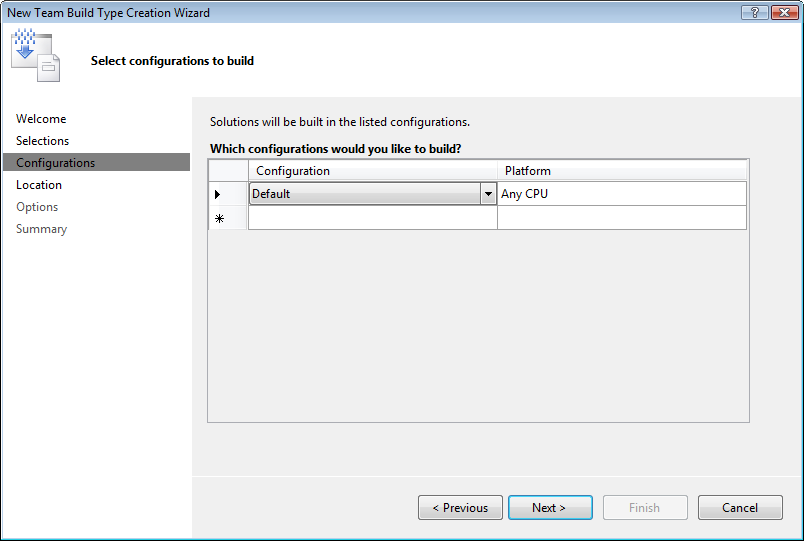
Figure 7 shows where you will select the solution. Figure 8 shows the most important page in the wizard-the Configurations page. Here you would normally choose between Debug and Release, but in this case the Database Project does not implement either of these two configurations; it uses the Default configuration, which is what you need to use when defining the build type.
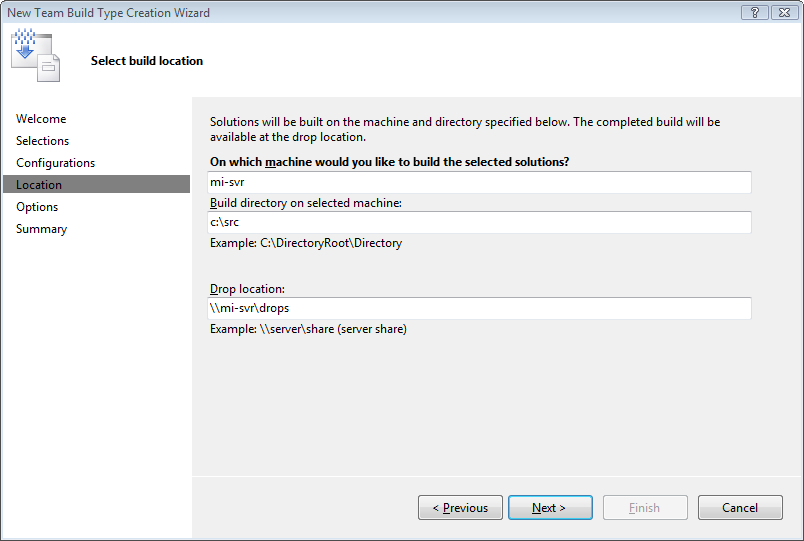
In the fourth page (Figure 9) you specify the relative locations that Team Build will use. For all other options in this article I will use the default values provided by the wizard.
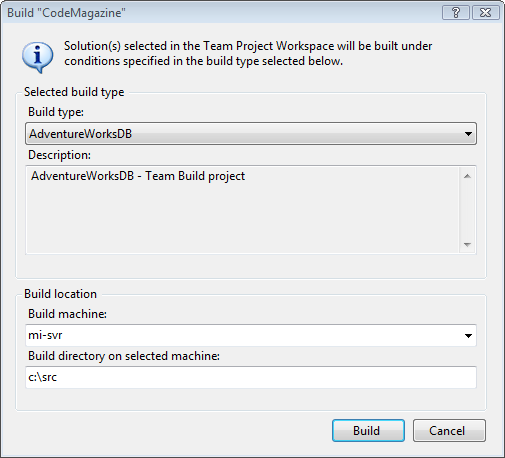
With a completed Team Build Type you can right-click on the build type inside Team Explorer to build the project. Figure 10 shows the Build dialog box.
When you click “Build” you will see the Team Build page which displays the progress of the build process. The first time you build a database project following the steps laid out in this article, the build will fail! (Figure 11)
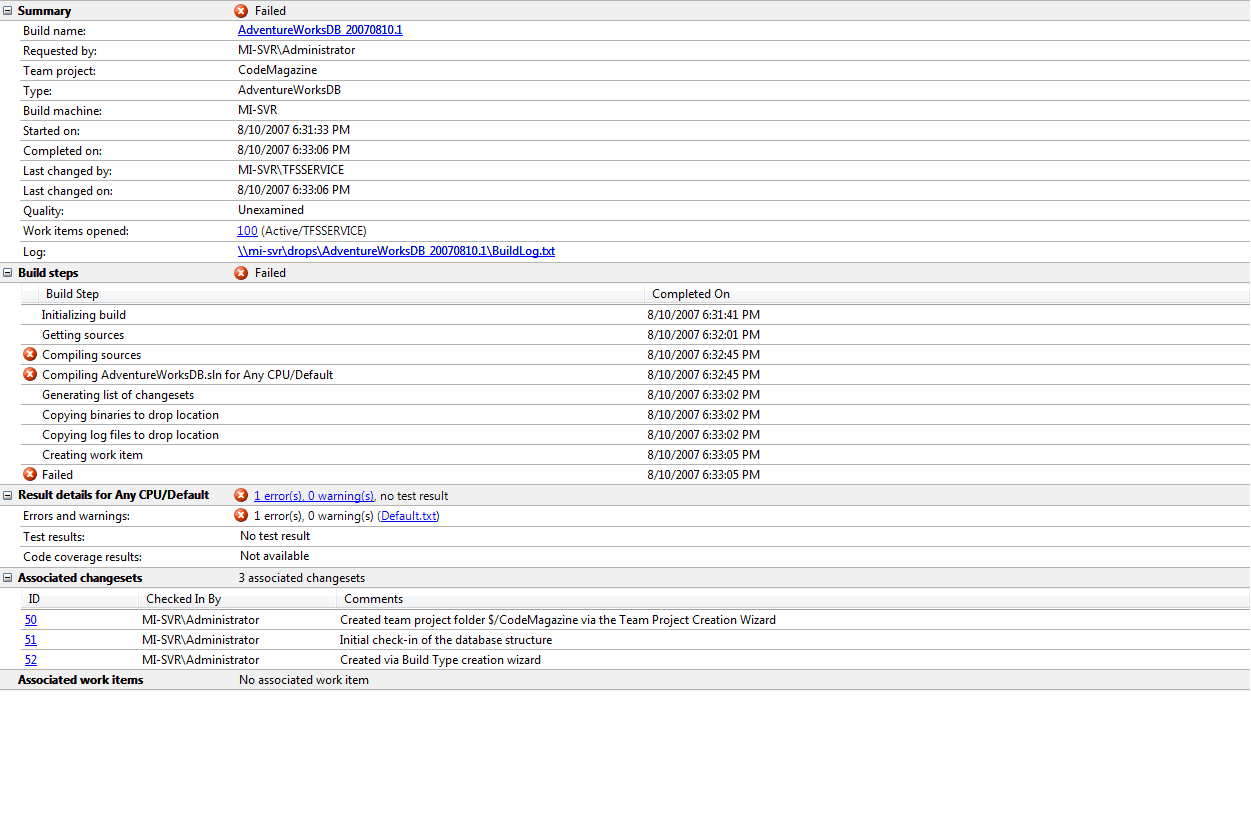
The best way to troubleshoot this is to look at the build output placed in the drop location, which you specified for the Team Build Type when you created it. Since build output is shared between users, it helps to make the drop location available through a share name, which in this example is \\mi-svr\drops.
dir \\mi-svr\drops\AdventureWorksDB_20070810.1 /s /b

\\mi-svr\drops\AdventureWorksDB_20070810.1\BuildLog.txt
\\mi-svr\drops\AdventureWorksDB_20070810.1\Default.txt
\\mi-svr\drops\AdventureWorksDB_20070810.1\
                                  ErrorsWarningsLog.txt
The BuildLog.txt file contains a complete recording of all the steps performed during the build. The Default.txt file contains the warning and error information for the Default build configuration and the ErrorsWarningsLog.txt contains the warning and error information for all configurations.
In the build that failed, look at the files named Default.txt and ErrorsWarningsLog.txt, which will reveal the same information.
Solution: AdventureWorksDB.sln, Project:
AdventureWorksDB.dbproj, Configuration: Default, Any CPU
(0,0): error TSD257: The value for $(DefaultDataPath) is
not set, please set it through the build property page.
The above results clearly point out that the DefaultDataPath is missing. This happens to be a user setting and since .dbproj.user files are not checked in and Team Build does not automatically create one when missing like Visual Studio does, some properties do not have values defined inside the .dbproj file.
In order to resolve this, you need to manually edit the project and provide the values for the missing properties. You will find that the .dbproj file contains the tags for the properties, but either no value is defined or they contain the value “Undefined.”
<PropertyGroup>
  <Configuration Condition=" '$(Configuration)' == ''
">Default</Configuration>
  <DefaultDataPath>Undefined</DefaultDataPath>
  <TargetConnectionString></TargetConnectionString>
  <TargetDatabase></TargetDatabase>
</PropertyGroup>
You need to change the .dbproj file to reflect the correct property values that the Team Build service should use when building the project. Keep in mind that the security privileges of the Team Build service can be different than one of an interactive user building the project inside the Visual Studio IDE. Using the MSBuild-based command line build in combination with the Windows RunAs command provides a good test environment for interactive troubleshooting.
<PropertyGroup>
  <Configuration Condition=" '$(Configuration)' == ''
">Default</Configuration>
  <DefaultDataPath>D:\DATA</DefaultDataPath>
  <TargetConnectionString>Data
Source=TESTHOST\SQL90QA;Integrated
Security=True;Pooling=False</TargetConnectionString>
  <TargetDatabase>AdventureWorksDB</TargetDatabase>
</PropertyGroup>
Make sure to check in the changes to the .dbproj file so that when the Team Build service performs a build and syncs the sources, it will automatically pick up the new project file with the changed values. The build should now complete successfully and without errors as shown in the resulting build report in Figure 12.
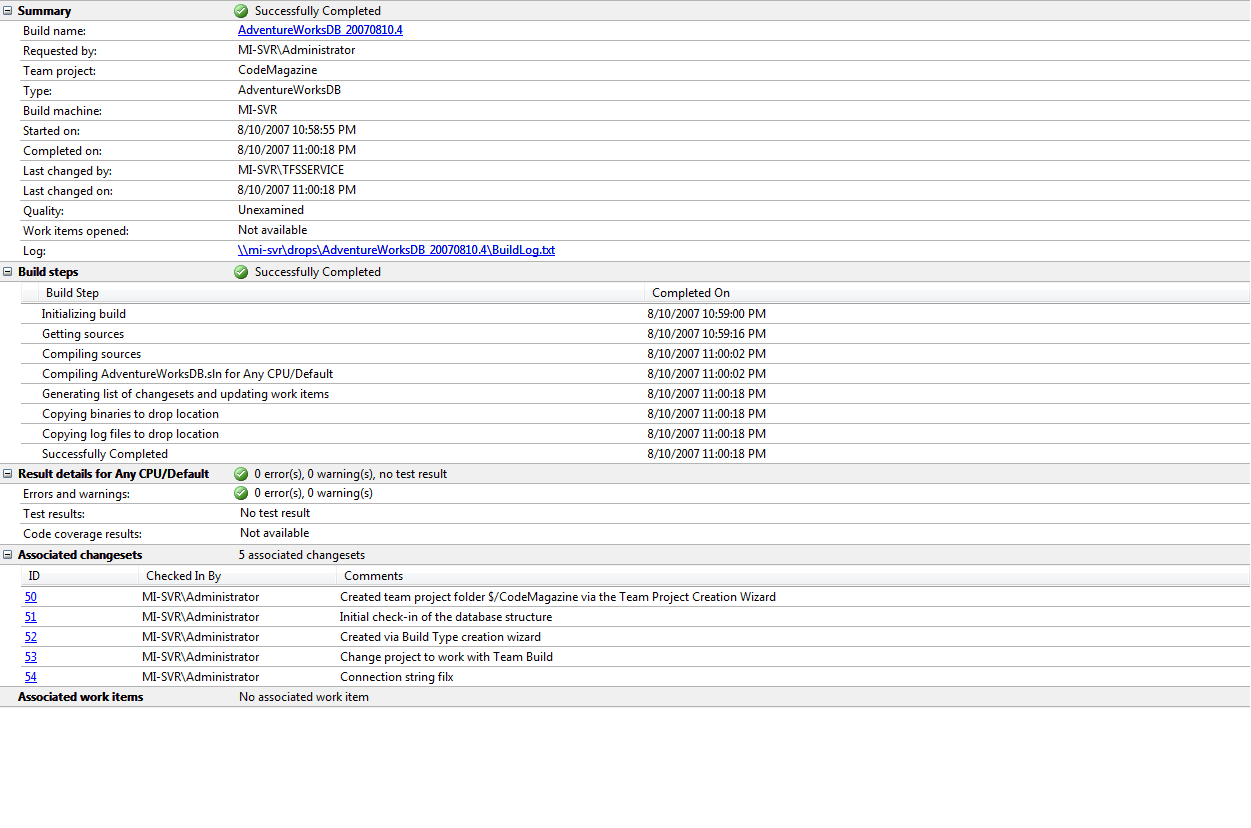
As the last step, check the output of the build by inspecting the drop location using the command:
dir \\mi-svr\drops\AdventureWorksDB_20070810.4 /s /b
The drop location now contains the build script (.sql) and the metadata file (.dbmeta) which you can use to deploy the database schema to the TESTHOST\SQL90QA database instance.
Wrap Up
Now you know how to integrate Database Projects into a Team Build environment. You could achieve more things by extending the approach described above. For example, you could automatically deploy the database schema as part of the build process by adding the SqlDeployTask to the post-build events, or you could integrate database unit testing and data generation into the test execution part of Team Build.
