


Are you a Microsoft developer? Have you heard about SharePoint? Do you use SharePoint in your organization? If you answered “yes” to any of these questions, keep reading.
In these series of articles, I intend to take on common everyday problems that face organizations and solve them using SharePoint. If you already use SharePoint, you will probably raise an eyebrow and think “Neat!” at the end of the article. If you don’t use SharePoint yet, maybe this will tip you over the edge.
Let me use a cliché that Microsoft uses annoyingly often: information workers. These employees deal with semi-organized information all the time. The amount of information the information worker (ugh!) deals with is increasing exponentially. The problem is, in spite of our best efforts, a lot of this information is not structured very well. Thus the information worker ends up being not so well informed.
Northwind Traders, a fictional company invented by Microsoft, seem to be running into a similar challenge. They have a historical Northwind SQL Server database that contains data about all their customers. In addition, there is this annoying bespectacled user in the basement, Milton, who insists on not using the SQL Server-based application; instead, he maintains his data in Excel spreadsheets on his local machine. In addition to his love for Excel, he also loves his red stapler and people fear that he may burn down the building one day. He insists that he can search through his Excel spreadsheets just as easily by pressing CTRL_F and that the newfangled SQL Server-based application doesn’t let him search through customer data very well.
Frankly, there is some dissension amongst the users of the SQL Server-based application. After all, there isn’t a unified way to search through Excel spreadsheets or the SQL Server-based application.
The Project Manager is getting worried!
You Are Hired
It seems you have landed onto the scene like a superhero, except your cape says “SharePoint” on it and you don’t like to wear your underwear outside like many other superheroes do.
In this article, I will walk you through how to create a unified search solution that searches not only those Excel spreadsheets, but also the Northwind SQL Server database. This solution is also extensible to other search sources that may sprout up within the organization afterwards. It does all this and presents users with a simple common search UI-exposed through SharePoint. Also, instead of filling these pages with code that I’ve copied and pasted from other sources, I am going to point you to the sources so you can write the code yourself and keep this article to the point.
The Solution
To begin, you’ll index all those Excel spreadsheets on Milton’s desktop. You can do this using the following steps:
A domain administrator will share Milton’s C:\Excel Sheets location in such a way that the account that is running the MOSS Search account has read-only access to that location. Alternatively, if Milton is in a good mood, he can set up such a sharing policy himself.
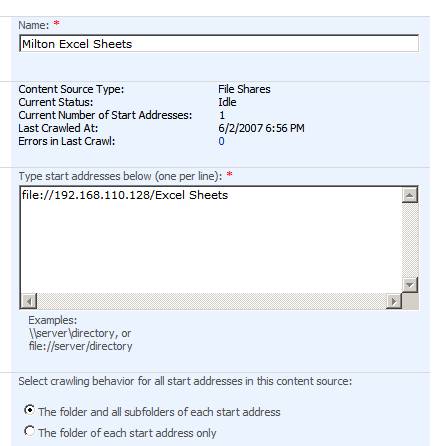
Now under Shared Services > Search settings > Content Sources, add a content source called “Milton Excel Sheets” with the settings shown in Figure 1. Also, set up an Incremental crawl schedule.
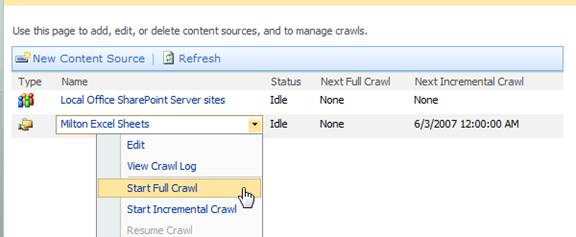
From the search page, issue a full crawl as shown in Figure 2. Assuming you’ve set up the security permissions appropriately, this crawl should succeed.
Next, you’ll bring the Northwind customer data from the SQL Server application into SharePoint in such a way that it is searchable. The most logical way to do so is by importing a Business Data Catalog (BDC) application. Rather than copying and pasting mounds of XML data to describe the structure of such an application, instead, I will point you to the instructions to do so on my blog.
You can find a walkthrough of BDC at http://blah.winsmarts.com/2007-4-SharePoint_2007__BDC_-_The_Business_Data_Catalog.aspx. Also, you can find an example of importing customer data and making it searchable via a BDC application at http://blah.winsmarts.com/2007-4-SharePoint_2007__BDC_-_Enabling_Search_on_business_data.aspx.
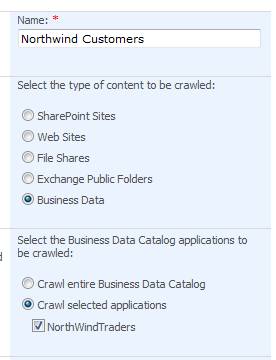
Assuming that you have set up a BDC application that imports Northwind Customers, and is searchable, next go ahead and set up a content source that crawls the Northwind BDC application. You can see this in Figure 3.
Once you have set up such an application and you have set up the appropriate access rights, issue a full crawl for the “Northwind Customers” content source, similar to Figure 2.
Your content sources are ready, but in order to search those content sources, you still need to set up a search scope.
To set up a search scope, under Search Settings, choose View Scopes and create a new Search scope called “Northwind”. Go ahead and add the following rules to it:
Content source “Milton Excel Sheets,” Behavior “Require-Every item in the scope must match this rule.”
Content source “Northwind Customers,” Behavior “Require-Every item in the scope must match this rule.”
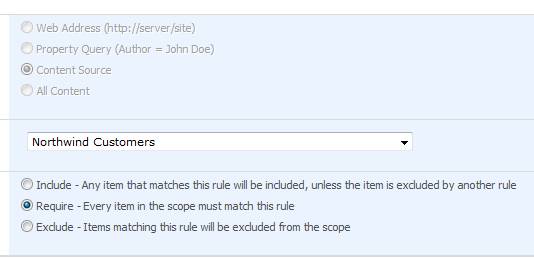
You can see the settings for the “Northwind Customers” rule in Figure 4.
Now from the search settings page, issue an “Update Scopes” command. This will cause the search scopes to update immediately so you don’t have to patiently wait another few minutes or so before such an update kicks in automatically.
You’re almost done. You need to make this search scope available to a given MOSS Web site.
Use the Port 80 site based on the publishing template as the test site for this purpose. You can use the steps below to make the Northwind search scope available on the Port 80 site:
Go to your Port 80 site as an administrator, and then go to Site Settings.
Under “Site Collection Administration,” click “Search Scopes.”
Under “Search Scopes” you will now need to add the Northwind search scope to the “Search Dropdown” display group. You can edit this by clicking the rather non-intuitive location as shown in Figure 5.
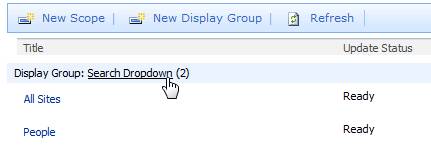
Select the check box for the “Northwind” search scope and make it available to the drop-down control on port 80’s search box.
Now at this time, go ahead and search the Northwind search scope for “Maria.” You can see the results in Figure 6. As you can see, a single search is now able to query both Milton’s Excel spreadsheets and the Northwind SQL Server database and present the results in a unified form.
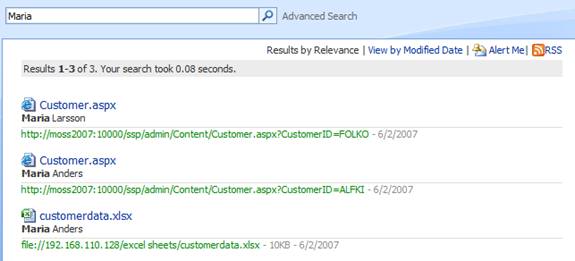
Not only that, there is also an “Alert Me” link, where the end user can set up an alert for any data that might appear in the search results. Remember that you set up an incremental search on Milton’s Excel spreadsheets earlier? This means, as Milton enters new data, that new data automatically becomes searchable as SharePoint does an incremental crawl.
With some clever search configuration, you can now enable the information worker to be alerted via e-mail when data matching a custom search criterion shows up on a file share.
Thus, with some clever search configuration, you can now enable the information worker to be alerted via e-mail when data matching a custom search criterion shows up on a file share.
Finally, the information worker doesn’t have to go hunting for the information he needs. And did you notice, I didn’t have to write any C# here either?
Quite powerful I, must say!
