


Enterprise Application Integration (EAI) is a collection of architectural principles combined to integrate new and existing applications both within the enterprise and in business to business or partner integration scenarios.
This article (Part 1) will provide a conceptual overview of BizTalk Server 2006 and how it serves to address the problem domain common in the EAI space. In Part 2, I’ll introduce a business case for implementing an online ordering and fulfillment system and provide a step-by-step example of how to implement a solution that addresses the problem domain.
Over the last 50+ years, a recurring theme in the advancement of software and hardware technology has been the subtle, yet significant reduction in coupling between both hardware and software itself and its constituent artifacts. From the earliest electro-mechanical machines (with the “code” embedded in the hardware itself) to general purpose systems and microcomputers, each significant advancement in technology has ushered with it a reduction in interdependencies between dependant parts.
Today, complex business process can be exposed via service endpoints so that their service interfaces can be easily leveraged in a location-transparent manner.
For example, assembly languages moved the industry beyond embedding code within moving sprockets and dials. Procedural languages offered an alternative to programming directly against specific hardware. Object-oriented programming introduced an even brighter future in which composition and behavior of a program could be modularized into reusable building blocks that could be compiled and hosted on any machine provided it was built on the same processor architecture. Decades of use have found even this level of flexibility to be too restrictive because intimate, white-box re-use is required to leverage these objects, in a sense coupling the client to the underlying implementation.
Newer, component-oriented technologies such as COM, COM+ and .NET were introduced to address some of these challenges, bringing the concept of black-box reuse, in which clients are bound to objects almost exclusively via interfaces or contracts. When communicating using a predefined interface or contract, objects take the form of components, which are really just more sophisticated objects. With components, objects can communicate within the same application or across machine or process boundaries. However, even though components can communicate with other objects/components across process boundaries with greatly reduced coupling, the protocols, platforms, and technologies are largely proprietary, requiring that objects communicate within vendor-specific offerings. That said, components are a necessary and important evolution within software engineering and have laid the foundation for more recent developments (i.e., services).
Since the advent of component technologies, the Internet has provided unprecedented levels of interconnectivity between systems and networks, accelerating globalization at an alarming rate. Demands for connectivity require further decoupling from vendor-specific frameworks and pseudo-protocols. Through the standardization of data transfer objects with XML, the concepts of object and component orientation set the foundation for services; the latest generation of which has been popularized by SOAP XML Web services. Using a common, textual way to represent data while providing a vendor-neutral manner of moving this data between memory and wire protocols, components, or services can now not only communicate across processes, but messaging through public (Internet) and private (intranet and extranet) networks worldwide is a reality that is quite tenable today.
SOAP, XML, and Web services are now the mainstays of modern services, and many organizations and vendors are under significant pressure to put this newfound level of connectivity and interoperability to work in an effort to maximize returns on existing and future investments. As such, applications can no longer be thought of as islands unto themselves. Although SOAP Web services solve some problems, using them introduces some new challenges as a result.
Developers today face the daunting task of integrating a myriad of applications using this nascent technology for which standards are continuously emerging. Within many organizations, the demands for integrating new and legacy applications has resulted in integration spaghetti, the unfortunate result of having to deal with older legacy protocols and a lack of experience, design, and architecture for braving this new frontier of application integration.
Not only do organizations need to integrate new and existing applications, but those organizations must consider and address goals above and beyond interoperability such as availability, reliability, scalability, performance, and security (to name a few). Due to the disconnected nature of HTTP, the protocol on which SOAP XML Web services ride, delivering on these design goals is not trivial and introduces a host of new problems facing developers and architects. In addition, organizations have made significant investments in legacy applications (for which it would be too expensive or impractical to implement contemporary interfaces) that rely on tried and true protocols such as FTP and SMTP along with flat-file formats that these same organizations must somehow continue to leverage within new integration scenarios. These protocols and formats are prevalent in many systems, and today, the applications that employ them demand the same levels of interconnectivity as their contemporaries.
Enterprise Application Integration (EAI) is the process and supporting architecture for linking distributed systems (both legacy and new) together within the enterprise and in business to business or partner integration scenarios. By integrating existing investments with new products, organizations can maximize the longevity of their intellectual property and return on investment.
Introducing BizTalk Server 2006
Microsoft BizTalk Server 2006 (the fourth release of Microsoft’s flagship messaging and business process management platform) provides a compelling messaging solution and complementary toolset for addressing many of the design goals typical in common EAI scenarios.
Design goals such as availability and reliability often fall beyond the reach of traditional Web services.
Built entirely on the .NET Framework, Microsoft BizTalk Server 2006 (BTS 2006) provides the foundation for business process automation and messaging, two key areas that are common within many integration scenarios. Through its support of messaging and workflow, BTS 2006 is a powerful addition to the EAI space, introducing revolutionary advances in multi-protocol messaging, business process design, management, and debugging. The beautifully intuitive Orchestration Designer (installed as part of Visual Studio 2005) provides a glimpse into the future of building modern, workflow-modeled software.
At its core, BTS 2006 is comprised of the Messaging Engine and Orchestration Engine. Both components are mutually exclusive and each addresses a very specific, yet complementary aspect of application integration. BizTalk Server 2006 features much more than messaging and orchestration, however, for the purpose of this article, I will focus on these important concepts.
While certainly not exhaustive; I will give you a high-level overview of the various messaging and orchestration concepts and corresponding development and deployment-time artifacts before I walk you through an application integration project with BTS 2006.
Much More than Just Messaging
One of the most confusing (or at least misunderstood) aspects of BizTalk is messaging. While messaging is certainly the bedrock of BizTalk, there is a common misconception that BizTalk’s messaging engine is just a proprietary way to develop and deploy Web services. This is a false assumption, and as a matter of fact, Web Services (SOAP, for example) are only one of a myriad of messaging choices at your disposal when choosing BTS 2006 to attack your application integration chores.
Understanding Messaging
Messaging, as the name implies, is concerned with how data (the payload within a message) is sent, received, routed and consumed. In BizTalk, the Messaging Engine deals with low-level protocols and file formats as well as design goals such as reliability and availability. People commonly think of messaging in terms of Web services, where you represent the data or the message as XML, and you place this XML in a SOAP envelope and transmit it over HTTP. While the analogy is a valid one, BTS 2006 takes messaging far beyond SOAP and HTTP.
Despite its popularity, XML is still a rather new file format and many legacy applications cannot consume or conduct messaging in XML. To address this disconnect, BTS 2006 can work with many file formats. BizTalk Adapters support the use of common “flat” file formats such as comma separated (CSV), delimited, or positional files. These Adapters are pluggable software components written in either .NET or COM, that provide broad messaging support and the glue that helps integrate both new and legacy applications with BizTalk services.
In addition to supporting various file formats, the Messaging Engine is extremely robust and helps to address many of the shortcomings of hosting traditional Web services. With typical Web services, a client consumes a service. The service is exposed by an endpoint, typically a URL. When a client invokes a Web service, a series of serialization and deserialization steps take place. An in-memory object on the client side is converted using serialization to an XML format and placed in a SOAP envelope so that it may be sent over an HTTP connection. The service (behind the endpoint), receives a request, processes it, and optionally sends a response. More often than not, this process should occur very quickly because the client calling the service does so in a synchronous (or blocking) manner. That is, the client invokes the service and then patiently waits for a response.
For well-disciplined services, where calls are short and efficient, the synchronous pattern can be a very effective way of managing reliability. Unfortunately, this calling pattern is not always ideal. Service orientation has evolved far past RPC-style services in which a caller asks a component to do some simple work and expects a quick and trivial response. For example, you can expose complex business workflows such as inventory, point of sale, customer relationship management, and supply chain management, via service endpoints in order to leverage these services in an autonomous location-transparent manner. The service(s) behind these endpoints may consist of a long-running process that is either standalone and monolithic or distributed elegantly across other services (because services are autonomous, these details are transparent to the client). In this scenario, the expectation for the client to wait several seconds, minutes (or even hours and days) is unreasonable, if not impossible.
One possible solution to this dilemma is not a new one. In such scenarios where you have a long-running process, you might choose to invoke the service asynchronously (sometimes also referred to as “fire and forget”). Using this approach, a client invokes a service, only this time, instead of consuming client resources waiting for a response, the service returns immediately to the caller while carrying out the work in its own process.
Consider the implications of a transaction being hosted by a service in which a message is sent to a service which consists of several potential steps. How does the client know if the messages are received? What happens if the server that hosts the service goes down in the middle of a complicated business process? In the event that step three, say, in a five-step order fulfillment workflow fails (i.e., the service endpoint it calls is unavailable or returns an error), how will the transaction behave? Can it be resumed?
The ability to model business processes while avoiding the plumbing code required to elegantly coordinate sophisticated business processes while abstracting messaging minutia is perhaps the most compelling reason to consider BizTalk Server for your application integration projects.
This problem domain is by no means limited to services exposed via SOAP over HTTP, however, the vast majority of services today are deployed as such and are simply much too fragile to handle such complex workflows. Implementing some of the more advanced specifications and recommendations, commonly referred to as WS-STAR, is cumbersome at best and the result is that design goals such as availability and reliability often fall beyond the reach of traditional Web services. On a side note, Windows Communication Foundation is a huge leap forward in this regard and provides turnkey support for WS-ReliableMessaging, WS-Coordination and WS-AtomicTransaction specifications to name a few.
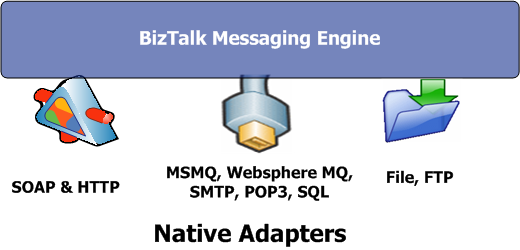
Fortunately, BTS 2006 addresses many of these design aspects using a highly effective messaging model that leverages Microsoft SQL Server as a reliable, scalable, and highly performant persistence mechanism. The BTS 2006 Messaging Engine is not only fully capable of communicating via SOAP and HTTP, but it supports additional transport and application protocols such as MSMQ, WebSphere MQ, FTP, SMTP, and file drops (to name a few).
Figure 2 presents a high-level conceptual diagram to summarize adapter support in BTS 2006. I will cover these important aspects of messaging in the sections that follow.
Adapters and Pipelines
Adapters and pipelines are fundamental aspects of BizTalk Server messaging.
Adapters are pluggable software components (written in either .NET or COM) that support the integration between BizTalk and various applications (custom and/or ERPs), protocols, platforms, and technologies. Table 1, taken from the official BizTalk Server 2006 Documentation (see Additional Resources) provides a summary of native adapters available natively with BTS 2006.
Since the advent of component technologies, the Internet has provided unprecedented levels of interconnectivity between systems and networks, accelerating globalization at an alarming rate.
In addition to this broad offering, Microsoft generously makes the Adapter Framework-a set of interfaces and SDKs for building custom adapters-freely available to the public. This is the same API on which native and commercial offerings are built and provides endless possibilities for connectivity.
Essentially, receive adapters move external data that arrives to the appropriate receive pipeline (covered shortly) and send adapters take prepared data from send pipelines and dispatch it to the configured destination. Adapters use various patterns to communicate, and you can organize these patterns directionally into Send and Receive:
- One Way Receive. Receives a message asynchronously and passes it to a corresponding receive pipeline.
- One Way Send. Performs the complimentary action of the One Way Receive pattern, presenting an outbound message to the configured destination in an asynchronous manner.
- Request Response. Can perform both receive and send operations (as the service) typical in synchronous SOAP communication models.
- Solicit Response. Sends a message, such as with a synchronous SOAP call, and the adapter blocks until a complementary response is received.
A pipeline is analogous to an assembly line in which messages are either composed (when sending a payload) or decomposed (when receiving a payload). The pipeline primarily takes non-XML input from a corresponding adapter and converts it to XML so that the Messaging Engine can persist it to the database. In addition to processing received data, pipelines also take XML and compose it back to the native adapter format. As such, pipelines can be thought of as foreign language interpreters that translate data from foreign formats into native messages that can be understood by BTS (and vice-a-versa).
Like adapters, you can extend existing pipelines and you can create new custom pipelines using the same API and interfaces used to build the pipelines that come out of the box. You may want to build a custom pipeline for several reasons, including: custom authentication, authorization, logging, or message validation using XSD schema.
The MessageBox
Up to this point, I’ve discussed fundamental aspects of messaging and have provided a glimpse into what makes the BizTalk Messaging Engine so unique. Key to BizTalk Server’s ability to provide reliable messaging is the SQL Server MessageBox database. The MessageBox is at the heart of the Messaging Engine and provides the core persistence for the publish and subscribe model on which the Messaging Engine is built. Every message received via an adapter is processed via a pipeline and serialized into the MessageBox. Once a message is written to the MessageBox, BizTalk takes ownership of the message. Based on metadata in the message, orchestrations or ports (covered shortly) subscribing to particular metadata are notified of message arrival and message events of interest.
In addition to providing reliable messaging, the MessageBox supports the ability for orchestration to persist its state at various intervals within a workflow or business process. Orchestration instances can be dehydrated and later re-hydrated, providing the ability to suspend and resume long-running processes.
Ports
In BTS 2006, think of a port as a logical endpoint as well as an authentication and authorization boundary. In general, BTS 2006 supports two types of ports: send and receive. Depending on the direction for which they are intended, Receive ports provide a conduit for consuming messages and send ports provide a manner in which to send messages.
In a messaging context, logical ports are associated with adapters (via physical ports) which define physical aspects of the endpoint such as protocol and URL or URI (including file UNCs or queue names).
For example, a port that is used to receive a file would be associated with the File adapter and a URI of C:\FileDrop would be specified to identify the location for submitting files. A port that is used to send a SOAP message might be associated with a physical URL such as http://localhost/MyService.
BizTalk is all about loose coupling and ports are one area where BTS 2006 really shines. Since ports are a logical construct, it is quite possible to define a receive port with multiple physical locations (known as receive locations). A receive location is paired with a corresponding adapter based on the transport or pseudo-protocol chosen. This level of abstraction allows for a service to be exposed via a SOAP URL, File URI and/or durable message queue, all the while insulating the business process from these low-level implementation details. This is especially true when configuring a port as dynamic.
Consider the following general port option characteristics:
Receive Ports
- one-way. Provides for asynchronous “fire and forget” messaging.
- request-response. Provides synchronous messaging support.
Send Ports
- static/dynamic one-way. The directional inverse of one-way receive.
- static/dynamic solicit-response. The directional inverse of request-response.
Note: Static send ports require physical configuration at design-time, whereas dynamic leaves this to a deployment time decision. Not surprisingly, choosing dynamic send & receive ports is the best option for the ultimate flexibility and is recommended for production scenarios.
Hosts and Applications
In BTS 2006, hosts provide a way to manage many of the messaging artifacts just discussed (such as ports, pipelines, and receive locations) into isolated or combined run-time processes. Services, orchestrations, pipelines, and receive locations can be factored out into different host instances, allowing you to scale out your BizTalk Server deployment. For example, a host instance is associated to a host where the host instance is actually a physical BizTalk Server. By creating multiple host instances for deploying send, receive, and processing artifacts, deployments can be tuned and evolve in accordance with changes in load.
There are two main types of hosts: in-process and isolated. In-process objects are hosted within the BTSNTSVC.exe process. Other services, such as SOAP services hosted by ASP.NET, run on IIS and as such are isolated from the in-process run time.
Applications are a new feature in BTS 2006 that allow for the grouping of similar artifacts for ease of management. For example, you can organize ports, pipelines, orchestrations, and other artifacts within an application called RetailOperations, allowing for the ease of management and deployment of the artifacts as a single logical unit.
Introducing the Orchestration Engine
Orchestration picks up where messaging leaves off. The abstraction between messaging and orchestration is not coincidental. Whereas messaging is concerned with the details of sending, receiving, routing and consuming messages, orchestration addresses the non-technology business domain, keeping plumbing implementation details out of the business process. Orchestration then, is all about taking a business process and scheduling, or orchestrating how a series of activities should take place into a workflow.
BTS 2006 takes messaging far beyond SOAP and HTTP.
The Orchestration Engine, supported by the beautifully rich and intuitive Orchestration Designer, is one of the most important aspects of BizTalk Server. The ability to model business process while avoiding the plumbing code required to elegantly coordinate sophisticated business workflows while abstracting messaging minutia is perhaps the most compelling reason to consider BizTalk Server for your application integration projects.
Understanding Orchestration
Orchestration is all about coordinating the actions and responding to events of constituent services or components that work together to support a business process. As such, orchestration instances consist of one or more transactions (or a series of which can be nested). It is common to refer to orchestrations as schedules. This term aptly applies because orchestrations are not very heavy on code. Orchestration merely schedules and coordinates the work of other services and components for which the same guidelines for object-oriented, component-oriented, and service-oriented programming apply. The ability to represent, communicate, and maintain these complex transactions as visual workflows is extremely powerful as is the messaging paradigm on top of which the Orchestration Engine is built.
Orchestrations, or schedules, are compiled and deployed to a BizTalk host and can be thought of as a class or component for which instances are created on demand. When a message hits the BizTalk MessageBox database, a list of subscribers (typically orchestrations) are checked and the subscribing orchestration fires based on subscription criteria specified within the orchestration itself. This publish-subscribe model provides a very elegant approach to loosely coupled messaging. Figure 3 provides a conceptual illustration of messaging and orchestration in action.
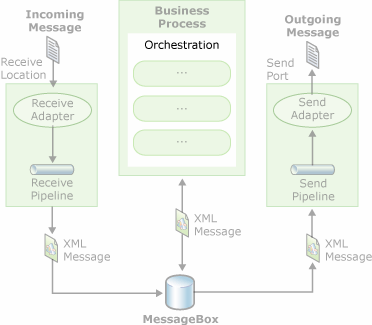
It is important to remember that all messages that hit the MessageBox are serialized to XML. Therefore, when a message activates an orchestration instance, the message itself becomes available to the orchestration as XML. To interrogate elements or fields in a message instance within an orchestration, XSD schema (or serialization equivelent) must be used to mark the elements as either Promoted Properties or Distinguished Fields. Identifying requisite fields using one of the two options creates metadata that will allow the Orchestration Engine to expose these fields as accessible properties to the runtime. The decision between using Promoted Properties over Distinguished Fields has to do with message routing. Of course, since the message itself is XML, you can write custom XPath expressions against the message instance using the Expression Editor (covered under Developer Tools). Note, however, that using Promoted Properties and Distinguished Fields can incur a performance penalty. Instead of going too much deeper into this topic here, I will demonstrate the use of each during the implementation of an EAI solution.
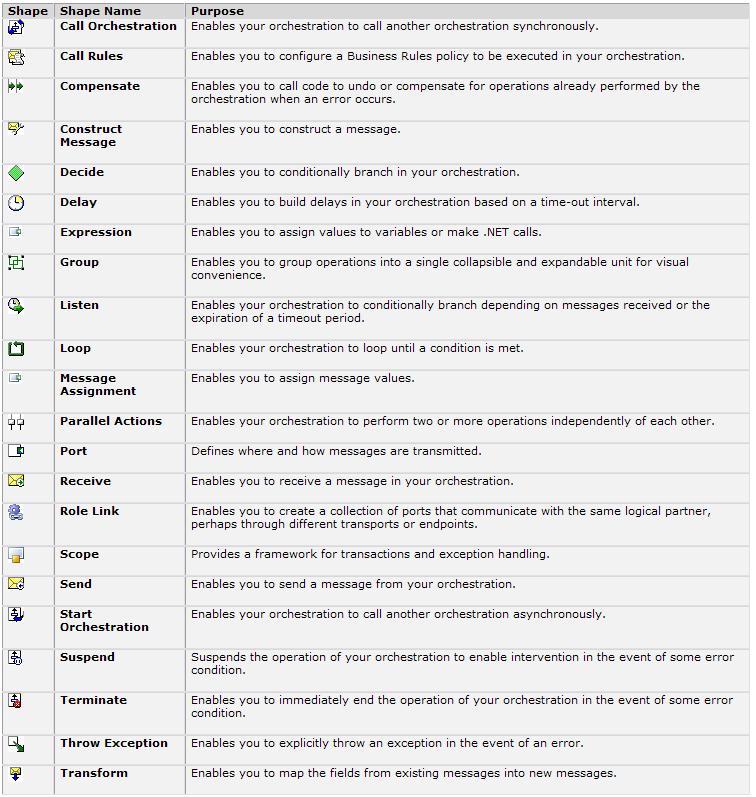
Within orchestration, messages are mapped to message or variable containers. You use shapesto represent various activities for interacting with messages including expressions and flow control to model common programming semantics such as loops, message assignment, and variable initialization. Because orchestration is largely visual, you’ll use shapes and properties to do most of the work. One exception is the Expression Shape, which supports a very lightweight version of the C# syntax. You use Expression Shapes to work with .NET types and make calls to .NET components. I’ll provide more information on common shapes along with practical examples of several shapes later in the article.
Because orchestration coordinates the work represented by a business process, naturally, an orchestration can include one or more transactions. Unlike traditional programming, BizTalk Server supports two distinct types of transactions: atomic and long-running. You can set an orchestration with the transaction type at the orchestration level or, if you need a finer level of granularity for configuring transaction behavior, you can define a construct known as a scope to wrap a unit of work within a transaction boundary.
Atomic Transactions
In order to understand the two different types of transactions in BizTalk, let me review traditional (or classic) transaction concepts. Traditional transactions possess several characteristics that can be described by using the ACID acronym:
- Atomic. All activities that are part of the transaction boundary complete as a unit of work.
- Consistent. Any work resulting in changes to data (presumably within a database or in memory objects) must be left in a consistent state regardless of transaction outcome. Should the transaction abort, the data is returned to the state it was in prior to the transaction.
- Isolated. Changes to the state of objects are isolated within the unit of work such that concurrent access to the data being operated on is unambiguous.
- Durable. The changes as a result of a committed transaction persist even in the event of a system failure.
ACID transactions have long been the staple of reliable database programming. Component-oriented technologies such as COM+ and .NET bring ACID transactions to the middle-tier courtesy of the Microsoft Distributed Transaction Coordinator (DTC) and the System.Transactions namespace in .NET 2.0. As any experienced database or system developer knows, you must take great care in instrumenting ACID transactions. The unit of work within an ACID transaction must happen as quickly as possible due to the fact that maintaining isolation within transactions is both resource intensive and often requires exclusive read and/or write access to the underlying objects or data structures. That said, ACID transactions are a critical requirement for applications that require any degree of reliability and data integrity.
In BizTalk, you can design orchestrations to support ACID transactions by configuring the scope (or the entire orchestration itself) as atomic. Any variables, messages, etc., within an atomic scope are isolated within the transaction and changes to their state are not visible until after the transaction commits. Atomic transactions are married with the appropriate isolation level. Choices include serializable (object-level locking), read committed (only committed data is readable) and repeatable read (row-level locking occurs to prevent “dirty” reads).
It is important to understand that if an orchestration is marked as atomic, the initiating message will not be removed from the MessageBox until the transaction commits. In addition, any work performed within an atomic scope by .NET components will not participate in the transaction unless the .NET component inherits from System.EnterpriseServices.ServicedComponent and is transaction-aware. In this case, the .NET component will be enlisted as part of a COM+ DTC-style transaction and will participate as expected in a two-phased commit. This distinction is very important because the work performed by vanilla .NET components will be persisted regardless of the outcome of the transaction.
Long-Running Transactions
As discussed, one area in which ACID transactions are simply not appropriate is when the work to be done cannot be performed in a very short period of time. This condition is pervasive in modern Service-Oriented Architecture (SOA) applications where the unit of work to be performed can span multiple service endpoints. Maintaining highly disciplined services that are resilient to deadlocking issues is a challenge in itself, not to mention when you have little or no control of the service being consumed itself.
Another common scenario is a business process which can take seconds, minutes, and even days or weeks to complete. This is when a long-running transaction is more suitable. The best way to explain the need for the concept of a long-running transaction is with an example.
Consider an airline booking system. The system reserves seats for passengers pending a credit card authorization. Given the tendency of airlines to overbook flights, the would-be passenger’s ticket may no longer be available on the day of the actual flight. In such a case, the airline might have to refund fees for the fare of the flight and provide additional compensation such as adding a number of miles or points to the disgruntled customer’s “rewards” balance. This scenario is not ideal but is likely to occur during peak travel times.
An ACID transaction would clearly be inappropriate for this transaction. It would likely be impossible to maintain isolation over the course of the days, weeks or months leading up to the actual flight. It wouldn’t be long before locking issues brought the booking system to its knees. Atomicity, in the classic sense, is also not tenable because the outcome of the transaction is non-deterministic-there are variables (such as whether the flight will be oversold, or if the passenger will arrive at the gate on time), that simply aren’t available to the transaction at the time the tickets are reserved.
All is not lost, however. In such an example you can preserve the classic transactional properties of durability and consistency. By persisting the state of the transaction to the MessageBox after the reservation takes place, the transaction itself becomes durable. As soon as the customer boards the plane (triggering an event that notifies the booking system), the reservation system can resume the transaction and the business process completes any remaining activities such as entering the passenger’s information in the flight manifest and ensuring that the passenger’s seat cannot be released. Such is the case for a long-running transaction.
Compensation
In traditional transactions, because the work is atomic, a transaction either fully commits or is rolled back to a consistent state. Typically, an exception within the transaction itself will cause a rollback. Of course, exceptions are not limited to ACID transactions. Long-running transactions can also raise exceptions but in addition, special business exceptions might also be encountered.
Consider what might happen in the event that a long-running transaction consists of more than one discrete unit of work. It is very common to have a transaction that is long-running contain multiple scopes that are atomic.
Revisiting the airline booking system scenario, the transaction authorizes the customer’s credit card as soon as the dubious seat choices are made. The process of charging the customer’s credit card is atomic-it either completes or is aborted. This degree of control over process is not optional due to the financial nature of the activity. So what happens when the poor customer’s seat is oversold? In addition to increased blood pressure and the probable exchange of expletives, the booking system must reverse the credit card charges and perhaps allocate a certain amount of points to the customer’s rewards account. Think of this situation as a special type of business exception that must be addressed and the transaction that booked and charged the customer’s credit card must be compensated, or “backed-out”. Thus, an orchestration can define a compensating action for the billing authorization that performs the exact opposite of the authorization and effectively reverses it. The compensation (manually) cancels out the initial charge. Note, however, that the debiting (within the original authorization), and then crediting (during conditional compensation) of the fare and fees occur as two discrete atomic transactions within the root long-running transaction.
Compensation is a critical concept for providing pseudo-atomicity of a transaction. While with classic transactions, atomicity is essentially free, transactions that are long-running require extra effort by means of compensation to retain similar characteristics.
Overview of the Visual Studio 2005 BizTalk Project System
The BizTalk Project System provides the tools necessary to design, build, and deploy BizTalk Server 2006 solutions within the Visual Studio 2005 IDE:
- The BizTalk Schema Editor provides feature-rich functionality for authoring and maintaining XSD schema.
- The BizTalk Mapper allows source XML messages to be mapped to target XML messages based on XSD schema.
- The Orchestration Designer, the primary tool used to create orchestrations, offers a rich design surface for modeling workflow.
- Finally, the Pipeline Designer provides the ability to create custom pipelines when you require more control over the receiving or sending of messages.
I won’t spend too much time describing these tools here but instead will provide a general orientation of a BizTalk project and important shapes.
Exploring a BizTalk Project
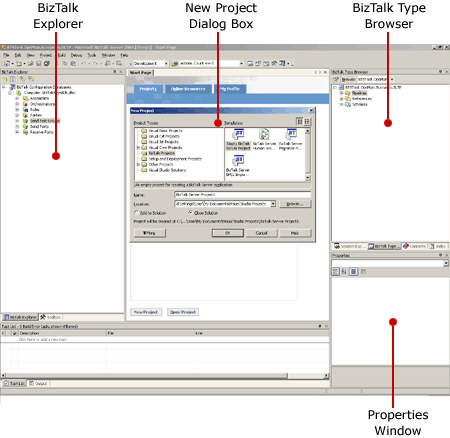
Because BizTalk projects are fully integrated into Visual Studio 2005, the environment is intimately familiar. A BizTalk project is separated into four main panes: The BizTalk Explorer, BizTalk Type Browser, the Properties window, and the design surface corresponding to either the Orchestration Designer, BizTalk Mapper, or Pipeline Designer. Figure 4 shows how to select a BizTalk project from the New Project dialog box along with the respective panes of interest.
While I could explore the BizTalk Mapper and Pipeline Designer as entire topics themselves, for the purpose of this article I will focus exclusively on the Orchestration Designer as it is the most important tool for building BizTalk solutions.
Service Orientation has evolved far past RPC-style services in which a caller asks a component to do some simple work and expects a quick and trivial response.
When you add an orchestration item template and click on the .odx file, the Orchestration Designer sets the entire focus of the IDE to facilitate the creation and management of orchestrations. The Orchestration View tab provides a treeview of various item groups including variables and messages. This allows the developer to create variables and messages and associate them with a .NET type or XSD schema as well as set the various properties for each in the common Properties window.
On the left side, the BizTalk Orchestration Toolbox provides a selection of shapes that you can drag and drop on the Design Surface which is flanked by two Port Surfaces (used for creating logical ports). Figure 5 provides a screenshot of the Orchestration Designer.
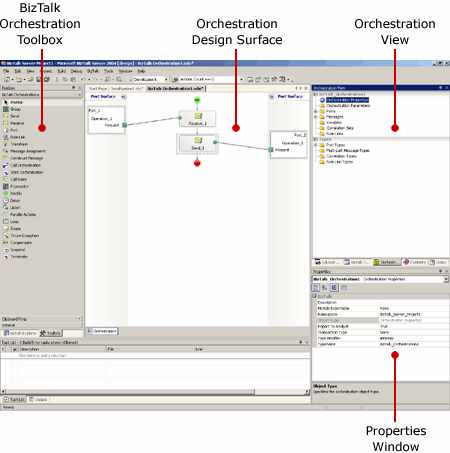
Figure 6, borrowed from the product documentation, provides a list of common orchestration shapes used to create an orchestration. I will use several of these shapes during the implementation of the EAI solution.
The Big Picture and Beyond
As with any new tool, the various concepts, components, and tools can at first seem a bit overwhelming, and a server platform of the magnitude of BizTalk Server 2006 is no exception. Often, it is difficult to understand how all the pieces fit together until you actually put them into practice. This is precisely what I’ll show you how to do in Part 2 of this article. Until then, I would encourage those new to BizTalk Server to install BizTalk Server 2006 (see sidebar for free trial information) and experiment with the BizTalk Project template in Visual Studio 2005. Bringing some familiarity with the Orchestration Designer, including the various shapes and corresponding properties, to the hands-on exercises in Part 2 will give you a great advantage and help you hit the ground running.
As an information technology professional, you no doubt encounter application integration all the time (whether consciously or not). EAI is by no means esoteric-application integration is everywhere.
Moreover, business process automation is gaining more and more traction and will continue to gain popularity as tools evolve. Mature platforms such as BizTalk Server and new technologies such as Windows Workflow Foundation (WF) will continue to drive innovation not only in the EAI space but will change how we think of designing business rules in software (see sidebar, “Getting the Big Picture” for more perspective on the relevance of workflow in moderns software engineering).
BizTalk Server 2006 is a very practical solution for addressing many of the EAI chores that are prevalent within organizations today. In this overview, I demonstrated how BizTalk Server goes far beyond messaging and provides a viable solution for addressing the integration spaghetti that exists as a result of the evolution of new and existing investments in enterprise software.
In addition to a very solid Messaging Engine, the Orchestration Engine is a very flexible approach to getting the most out of messaging while naturally supporting the implementation of complex business process via intuitive and easy-to-use graphical workflows.
.....stay tuned for Part 2
Table1: Native adapters that ship directly with BizTalk Server 2006 (courtesy of the Microsoft BizTalk Server 2006 documentation team).
| Adapter | Features |
|---|---|
| Web Services Adapter | Supports sending and receiving messages using SOAP over HTTP. Because SOAP is the core protocol for Web services, this adapter is critical for BizTalk Server 2006’s ability to interact in a service-oriented world. As usual with Web services, URLs are used to identify the sending and receiving systems. |
| File Adapter | Supports reading from and writing to files in the Windows file system. Because the applications involved in a business process can often access the same file system, either locally or across a network, exchanging messages through files can be a convenient option. |
| FTP Adapter | Supports sending and receiving information between a File Transport Protocol (FTP) Server and BizTalk Server. |
| HTTP Adapter | Supports sending and receiving information using HTTP. The BizTalk Server 2006 engine exposes one or more URLs to allow other applications to send data to it, and it can use this adapter to send data to other URLs. |
| MSMQ Adapter | Supports sending and receiving messages using Microsoft Message Queuing (MSMQ). |
| MSMQT Adapter | Supports sending and receiving messages using BizTalk Message Queuing (MSMQT). MSMQT is an implementation of the MSMQ protocol that can receive and send MSMQ Messages into the MessageBox. Although BizTalk Server 2006 still includes this adapter, developers should use the MSMQ adapter instead. |
| WebSphere MQ Adapter | Supports sending and receiving messages using IBM’s WebSphere MQ (formerly known as MQSeries). |
| SMTP Adapter | Supports sending messages using SMTP. Standard e-mail addresses are used to identify the parties. |
| POP3 Adapter | Supports receiving e-mail messages and their attachments using version three of the Post Office Protocol (POP3). |
| WSS Adapter | Supports accessing and publishing documents stored in Microsoft Windows SharePoint document libraries. |
| SQL Adapter | Supports reading and writing information to a SQL Server database. |
| Base EDI Adapter | Supports sending and receiving messages in the electronic data interchange (EDI) format. |
