



Providing access to information on your PC without having to boot the PC is one of the goals of Windows SideShow™.
Windows SideShow device technology consists of a separate screen, CPU, and memory that you can use to view this information. The devices range from displays on the back of laptop lids to remote controls to credit-card sized screens you can put in your pocket. This article will explain how your applications can provide information on a Windows SideShow device.
The COM API contains the full feature set provided by Microsoft to interact with the Windows SideShow platform.
Originally termed auxiliary display technology, Windows SideShow is a Windows Vista™ operating system technology. Microsoft ships the software components needed to utilize a Windows SideShow device as part of Windows Vista. Each application that wishes to display content on a Windows SideShow display needs to create a Windows SideShow gadget. The term gadget can sometimes be confusing as there are other gadget technologies that are not directly related to Windows SideShow.
This article will explore the different options you have to add your application-specific content to Windows SideShow supported devices. The samples that ship with the Microsoft® Windows® SDK are all written in C++ and utilize the COM APIs Windows SideShow supports. I’ll start the exploration here.
The majority of this article will focus on the Managed .NET Framework API and how you can use it to rapidly create Windows SideShow gadgets. You will learn how to add different types of content for a gadget to display and how you can define the navigation between that content.
You can also create a Windows SideShow gadget through another Microsoft gadget technology: Windows Sidebar. Windows Sidebar provides a simple API for creating a Windows SideShow gadget and adding content from a Sidebar gadget.
How it Works
Windows SideShow devices all support a well-defined set of end points. An end point defines a certain format of content that the Windows SideShow devices can display. How the device displays the content is not defined. A wide range of devices with varying capabilities will ship in the coming year, some devices will have monochrome screens, some will have color screens, some screens will be 2-line LCD displays, and some will be 600 x 400 pixel color displays. A Windows SideShow device is not guaranteed to have any specific capabilities. The code that you will write to display your information on a SideShow device will create a gadget and encode the data for a specific end point. The advantage of providing these defined formats is that you do not need to be concerned about writing any device-specific code. All of your code will run on the PC and send the content to the device.
The end points supported on Windows Vista are SCF (Simple Content Format) and iCalendar. SCF is a new XML data format that you can use to describe text, images, dialog boxes, and menus, as well as navigational constructs. All Windows SideShow compatible devices must support SCF. The iCalendar format provides a consistent way to provide calendaring content to the device. However, not all devices will support the iCalendar format.
Windows SideShow manufacturers can define their own end points. These custom data formats allow the OEMs to provide extended feature sets that your applications can reach.
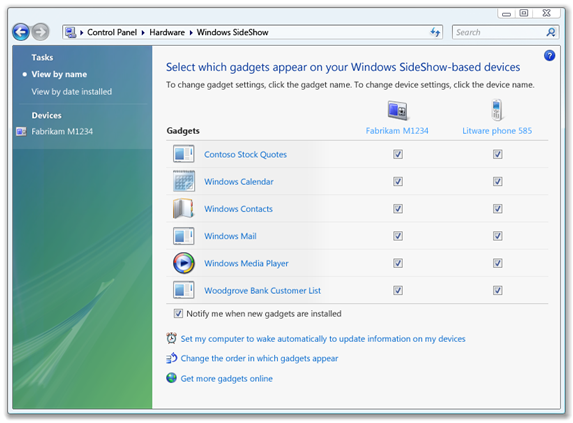
A single Windows Vista PC can support multiple Windows SideShow devices. Users will want to have different information displayed on the different devices. In the Windows Vista Control Panel is a Windows SideShow Control Panel. Users can use this SideShow Control Panel to manage which SideShow gadgets will run on which devices. Figure 1 shows an example of the Windows SideShow Control Panel.
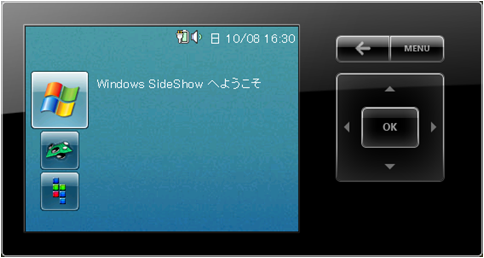
If you are not lucky enough to have a real Windows SideShow device, the Windows Platform SDK ships with a device simulator (Figure 2). You can find this simulator in the \bin folder of the Windows SDK. The simulator executable is called VirtualSideShow.exe, but before you run the simulator you will need to register it on your machine by running the WindowsSideShowVirtualDevice with the /regserver parameter. Note that you will need to run the command with elevated permissions for the registration to take effect.
Microsoft originally designed for Windows SideShow devices (and early prototypes) to run using the .NET Micro Framework. It has become clear that a range of devices available will not run the .NET Micro Framework. As already stated, a Windows SideShow device simply needs to support the required end points. At a number of conferences in 2006, vendors demonstrated Windows Mobile™ devices with support for the SCF end point. If you want to reach the maximum number of Windows SideShow devices, the best option is to send SCF content to the Windows SideShow APIs and leave the rest to the Windows SideShow platform.
Each Windows SideShow gadget has a unique identifier (GUID); this is known as the Application ID. SideShow also identifies the end points by a GUID, or Endpoint ID. Each piece of content for a SideShow gadget has a unique identifier (a 32-bit unsigned integer) called the Content ID.
Simple Content Format
SCF (Simple Content Format) is an XML-based format that defines content to be rendered to a device. With SCF, an application can send four different types of content to the device: Glance Content, Menus, Content Pages, and Dialog Pages.
The Managed API makes creating gadgets and adding content a simple exercise.
Glance content is the summary information the user will see next to the Gadget icon before they activate the gadget. Typically this will be one or two lines of text. Microsoft recommends 2-12 lines and varies by gadget. Glance content always has a content ID of 0 and is UTF-8 encoded text. Nothing else can use this content ID. The Glance content is simply text, you should not provide it in XML tags. Other end points will also use a content ID of 0 for their Glance text and again this will be a plain text field.
All the other SCF content types require the content to be provided within a body element. The body element specifies the start and end of the content. Consider the body tag as the root node for all of the SCF XML.
A menu is a useful component for navigation between content in the gadget. A menu is essentially a list of items, with each item linking to other content IDs. These content IDs could be for other menu pages, content pages, or dialog pages. Windows SideShow has the concept of a context menu and many devices will have a hardware button to summon the context menu. A menu must have a content ID and can optionally have a title and modify the action to take when a user selects a menu item. You should have a title on a menu page to inform the user what they are selecting. The default action taken when a user selects a menu item is to navigate to the page with the content ID identified by the menu item’s target attribute. By changing the selectaction attribute of a menu, when users select a menu item they will navigate to the context menu specified by that menu item’s menuid attribute. A menu for selecting content pages with images might look like this in SCF:
<body>
  <menu id="1" title="Image List">
    <item target="2">Sunset</item>
    <item target="3">Winter</item>
    <item target="4">Water lilies</item>
    <item target="5">Blue hills</item>
  </menu>
</body>
The only required attribute for a menu item is the target. You can include up to five other optional attributes to uniquely identify menu items, such as: add images to display as icons next to a menu item, set a menu item as the default, enable or disable menu items, and identify context menus for a menu item.
Content pages will most likely represent the main part of your gadget information. Content pages can contain text, images, and buttons-the buttons define the hardware button actions and do not get displayed on the page. You use the content element to define a content page. You can style and align each of these items of content. The only required attribute for a content element is the id, but again using the title attribute is recommended. A content page can also have a background image and define how you can lay out the background image, using the bg and bgfit attributes. You can define a menu as the context menu for a content page by using the menuid attribute of the content element. The code snippet below shows the SCF for a simple content page with some test and an image:
<body>
  <content id="2" title="CoDe Focus">
    <txt align="c">
        CoDe Magazine rocks!
    </txt>
    <txt>Coding is fun</txt>
    <img id="100"
   alt="[CoDe.jpg]"
      fit="screen" />
  </content>
</body>
The dialog page content allows a gadget to show a simple dialog box with an icon, title, message, and buttons. Use the dialog element in SCF to define dialog pages and specify the content ID using the id attribute. The optional title attribute will inform the user of the purpose of this dialog box. Using the imgid attribute to identify the content ID of an image will inform the Windows SideShow device to display that image in the dialog page. Similar to the content element, a dialog element can contain txt and btn elements. A dialog page cannot contain img or br elements though. In the example below, you should note that it is possible to add br elements to the txt elements that are children of the dialog element:
<body>
  <dialog id="4" title="SideShow Dialog">
    <txt align="c">
      <br/>This is a SideShow Dialog.
      <br/><br/>Do you like it?
    </txt>
    <btn key="Enter" target="10">Yes</btn>
    <btn key="Back" target="11">No</btn>
    <btn key="Left" target="12">Not Sure</btn>
  </dialog>
</body>
COM Interfaces
The simplest way to build a Windows SideShow gadget using the COM API is to create a C++ executable that CoCreates a SideShowSession object. The ISideShowSession interface provides methods that allow an application to register for sending content and notifications to the SideShow devices displaying the gadget content. When an application calls the RegisterContent method it passes three parameters: a GUID identifying the gadget, an EndPoint ID, and a memory address for the platform to fill with a pointer to an object that supports the ISideShowContentManager interface:
::CoCreateInstance(CLSID_SideShowSession,
  NULL,
  CLSCTX_INPROC_SERVER,
  IID_ISideShowSession,
  (LPVOID*)&m_pSession);

  if (SUCCEEDED(hr))
  {
    hr = m_pSession->RegisterContent(
      HELLOWORLD_APPLICATION_ID,
      SIDESHOW_ENDPOINT_SIMPLE_CONTENT_FORMAT,
      &m_pContentMgr);
.
.
.
The GUID (HELLOWORLD_APPLICATION_ID) is the Application ID of the gadget discussed previously. In order for the Windows SideShow platform to know about this gadget, you need to add this GUID to the registry in the key: HKCU\SOFTWARE\Microsoft\SideShow\Gadgets\ for per-user gadgets and: HKLM\SOFTWARE\Microsoft\SideShow\Gadgets\ for gadgets that are available to all users of the machine. Your gadget should add the GUID as part of the install program.
Once you have a pointer to an object that implements the ISideShowContentManager interface, use the Add method to add content to the Windows SideShow device This Add method takes one parameter: a pointer to an object that implements the ISideShowContent interface. This is an object that your gadget code needs to create. The ISideShowContent interface contains three methods (in addition to the three IUnknown methods): GetContent, get_ContentId, and get_DifferentiateContent (these are properties but implemented in COM as methods).
For every piece of content that a gadget wishes to display on the device, you will need to create an object that implements the ISideShowContent interface. The GetContent method is called from the Windows SideShow platform to retrieve the content to display for the content ID represented by this object:
STDMETHODIMP CHelloWorldContent::GetContent(
    ISideShowCapabilities *pICapabilities,
    DWORD *pdwSize,
    BYTE **ppbData
    )
{
    HRESULT hr = S_OK;

    char* szXML = "<body><content id=\"1\"
title=\"Windows SideShow Hello World\"><txt
align=\"c\" wrap=\"0\">Hello Windows SideShow
World</txt></content></body>";

    *pdwSize = (DWORD)strlen(szXML) + 1;
    *ppbData = (BYTE*)::CoTaskMemAlloc(*pdwSize);
    if (NULL != *ppbData) {
        hr = StringCchCopyA(
            (LPSTR)*ppbData, *pdwSize, szXML);
    }
    else{
        hr = E_OUTOFMEMORY;
    }
    return hr;
}
The code snippet above shows how to send XML content to the device. Microsoft anticipates that the gadget will generate or load the XML rather than be hard coded. This example shows how simple it is to send SCF pages to the device. Images present a slightly more complex issue. An object that represents image content for the device must still implement the ISideShowContent interface. In the GetContent method, the image being sent to the device must be placed in the byte array ppbData. Many devices will have limited resources, so a gadget must first determine the capabilities of the device, and then convert the images into a compatible format. The platform implements the ISideShowCapabilites interface in an object reference passed into the GetContent method.
Building a Windows SideShow gadget using the COM API might be the most challenging way to place content on the device, but it is also the most powerful. The COM API contains the full feature set provided by Microsoft to interact with the Windows SideShow platform.
Building Managed SideShow Gadgets
The COM API is fairly straightforward and would not be overly hard to wrap in a managed library. Fortunately Microsoft has done this already. By the time this article goes to print, Microsoft should have released the Windows SideShow Managed API. I’ll base what now follows in this article on the existing MSDN documentation and a prerelease version of the Managed API.
The Windows Sidebar API is very simple and does not have the full feature set of the Managed API or COM API, but it is a quick way to get content out onto the Windows SideShow device.
In order to help explain how the Managed API works, you can download the sample application from http://Roodyn.com/SideShowContentCreator.ashx
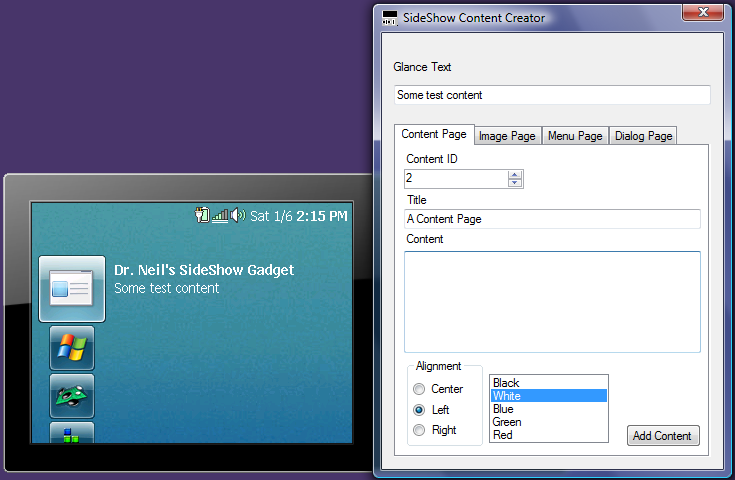
The sample application allows the user to add a different type of page to a Windows SideShow device. You can see the application running alongside the simulator in Figure 3. Each of the tabbed pages enables the user to add a type of content to the gadget.
Before a user can add any content, the user needs to register the gadget. The entry in the registry allows the Windows SideShow platform to find the gadget and provide the user an option to add it to their device.
In order to register the gadget it must have a GUID known as the Application ID. At the top of the Mainform.cs file, declare a static member variable of type Guid:
private static readonly Guid s_gadgetId =
    new Guid(
        "{D1AC24B8-8349-4816-9270-5050C3D9009A}");
You can then use the static method Register on the static class Microsoft.SideShow.GadgetRegistration to register the gadget for Windows SideShow use. This Register method takes parameters to identify the:
- Registry key to use (local machine or current user)
- The gadget identifier
- The end-point to use
- A name for the gadget (that will appear in the Control Panel and next to the Gadget icon on the device)
- A command to use when starting the gadget
- The icon to use to display the gadget
- Online or offline usage
- The cache policy
- A GUID for a property page for the gadget.
This covers everything a Windows SideShow gadget can put in the registry. In the MainForm_Load method of the sample, the call is made to register the gadget. In production code you may prefer to do this in the installer:
string iconPath =
    Environment.CurrentDirectory + "//icon.ico";

GadgetRegistration.Register(false, s_gadgetId,
    ScfSideShowGadget.ScfEndpointId,
     "Dr. Neil's SideShow Gadget", null,
     iconPath, false,
      GadgetCachePolicies.KeepNewest, null);
As this gadget will supply content in SCF, a member variable of the MainForm class represents the gadget:
private ScfSideShowGadget _gadget;
The _gadget object is instantiated in the MainForm_Load method. The ScfSideShowGadget class is designed to help you write gadgets that send SCF to the device. Take note that the GUID of the gadget is required to create the object. This allows the Managed API to connect the gadget to its registered properties and call the methods in the native code to manipulate the correct gadget on the device:
_gadget = new ScfSideShowGadget(s_gadgetId);
In order to add Glance content to the gadget, you can use the ScfSideShowGadget.AddGlanceContent method. This is called from each of the tab sheets in the sample application to update the Glance content. Updating the Glance content is something that most applications should do on a regular basis to provide hints to the user as to changes in the content of the gadget:
_gadget.AddGlanceContent(glanceTextBox.Text);
You create content pages with both the ScfSideShowGadget.AddContent method and the Scf.Content method. The Scf class contains a number of static methods that construct SCF XML strings. In the sample application, the Content Page tab builds a content page containing formatted text. The code snippet below shows the AddContent method being called to create a content page. The method parameters are:
- An ID to represent the content ID for the page.
- Text to place in the title bar of the page being created.
- An array of ScfElement types that represent the contents of the content page.
In this example, I’ve used some text and two buttons:
_gadget.AddContent(Scf.Content(
    (int)contentIdNumeric.Value,
    textTitleTextBox.Text,
    Scf.Txt(
        align, true,
        txtColor, textContentTextBox.Text),
    Scf.Btn(DeviceButton.Left,null,
        (int)contentIdNumeric.Value-1),
    Scf.Btn(DeviceButton.Right,null,
        (int)contentIdNumeric.Value+1)
    ));
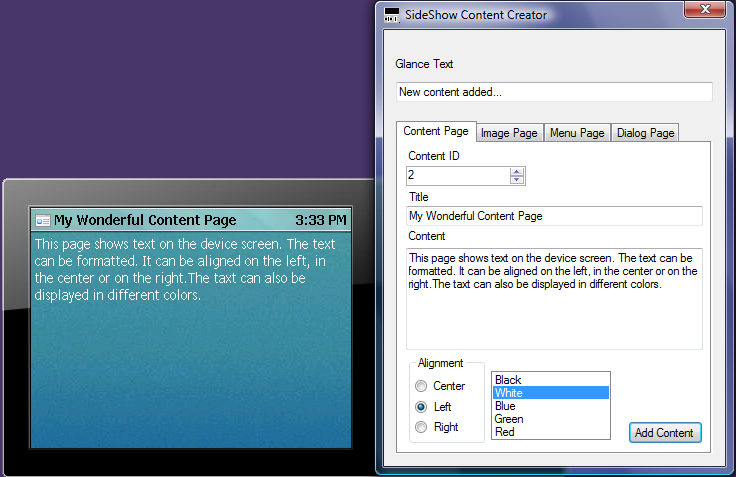
The Scf.Txt method creates a text SCF element with alignment and color properties. The Scf.Btn method creates buttons on the page and maps the buttons to actions. Each button must map to a physical hardware device button and contain a target ID. The target ID is the content ID of the page that the gadget displays when the user pushes the button. Creating a button with a display text of null (as in the example above) will create a hidden button that provides a mapping between the physical device buttons and the content ID of a page to display. The buttons in the code above provide a means to navigate to the previous content ID and the next content Id with the Left and Right device buttons respectively. Figure 4shows the sample application and the output for a text content page.
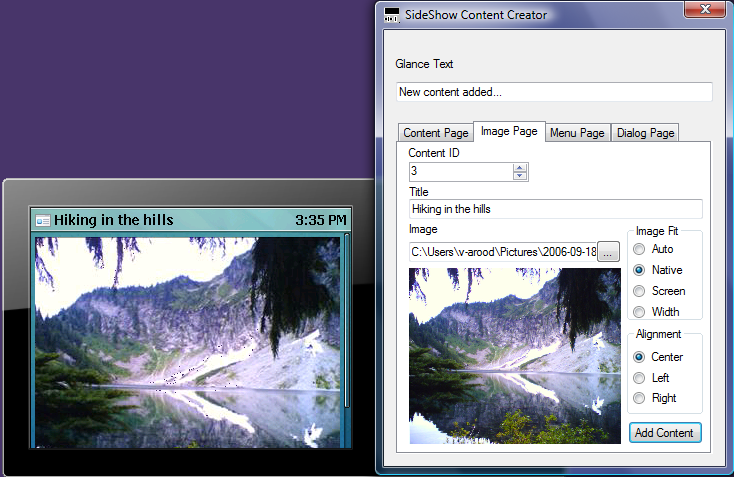
Adding images to the content of a gadget provides some great opportunities for simple games and picture browsing gadgets, as well as providing a richer interface for all gadgets. Displaying an image on a gadget page is a two-step process. You need to add the image to the gadget contents with a content ID. Then you can create a page that uses that image. Adding an image to a gadget is as simple as adding other content; you use the same AddContent method, identifying the content ID, and apply transforms to the image and finally the image object:
_gadget.AddContent(
    imageContentID,
      ImageContentTransforms.ReduceColorDepth
   | ImageContentTransforms.KeepAspectRatio
   | ImageContentTransforms.StretchToFit
   ,imagePictureBox.Image);
Adding the image to a page is then a matter of using the Scf.Img method to generate the SCF for the image to display, defining the alignment, how the image fits on the screen, and some alternative text (similar to how in HTML an img will use the alternative text if the image cannot be displayed). You can view the sample application and the image page created in Figure 5.
_gadget.AddContent(Scf.Content(
    (int)ImageContentIdNumeric.Value,
    imageTitleTextBox.Text,
    Scf.Img(imageContentID,
      align, fit, "Image cannot be displayed"),
    Scf.Btn(DeviceButton.Left,
      null,
      (int)ImageContentIdNumeric.Value - 1),
    Scf.Btn(DeviceButton.Right, null,
      (int)ImageContentIdNumeric.Value + 1)
));
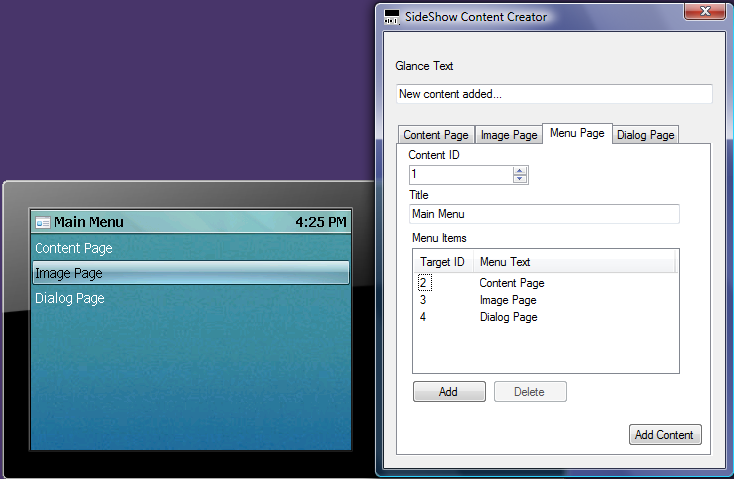
You can create a menu page by using the Scf.Menu method and an array of Scf.Item elements to represent the menu items. In the sample application, I let the user define the menu items in a ListView control. When you create the menu page, the gadget creates an array of ScfElement objects to represent each menu item:
ScfElement[] menuItems =
    new ScfElement[menuItemListView.Items.Count];
int menuIndex = 0;

foreach (ListViewItem item in
        menuItemListView.Items)
{
    int targetID =
         int.Parse(item.SubItems[0].Text);
    string menuText = item.SubItems[1].Text;
    menuItems[menuIndex] = Scf.Item(targetID,
         menuText);
    menuIndex++;
}
You then use this array of ScfElement objects in the call to the Scf.Menu method that creates the SCF for the menu page, as shown in Figure 6:
_gadget.AddContent(Scf.Menu(
    (int)menuContentIdNumeric.Value,
    menuTitleTextBox.Text,
    ScfSelectAction.Target,
    menuItems
));
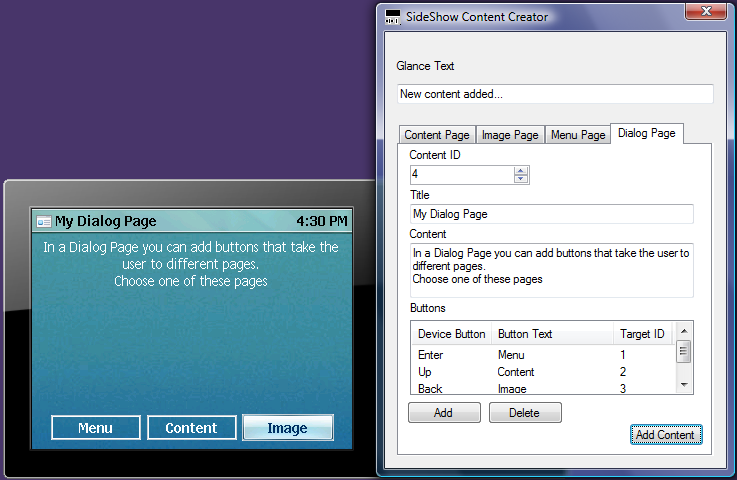
The last page type that you can create is the dialog page. A dialog page is similar to a menu page; instead of menu items the dialog page has buttons. The sample application uses a similar technique to allow the user to define the buttons in a ListView control. The gadget creates the buttons when the user clicks the Add Content button. As previously stated, you must associate a button with a physical hardware device button:
ScfElement[] dlgItems =
    new ScfElement[buttonsListView.Items.Count+1];
int btnIndex = 0;

foreach (ListViewItem item in
        buttonsListView.Items)
{
    DeviceButton devBtn =
   (DeviceButton)item.SubItems[0].Tag;
    string btnText = item.SubItems[1].Text;
    int targetID =
        int.Parse(item.SubItems[2].Text);
    dlgItems[btnIndex] =
        Scf.Btn(devBtn, btnText, targetID);
    btnIndex++;
}
You then use the Scf.Dialog method to create SCF for a dialog page. In Figure 7, I’ve shown the sample application creating a dialog page:
_gadget.AddContent(Scf.Dialog(
   (int)dialogContentNumeric.Value,
   dialogTitleTextBox.Text,
   dlgItems));
The Managed API makes creating gadgets and adding content a simple exercise. The Managed API contains classes and methods that enable a gadget to do far more than simply add content. There are classes and methods to query a device for its capabilities, show notifications on the device, raise events when content is missing, and far more than this article can cover. You can find the full API documentation on MSDN at http://msdn2.microsoft.com/en-us/library/ms744179.aspx
Sidebar to SideShow
One of Microsoft’s other gadget technologies is the Windows Sidebar. Gadgets written for Windows Sidebar can create and show content in Windows SideShow using a set of APIs provided in the Windows Sidebar SDK. The APIs take raw SCF input so an author of a Windows Sidebar gadget pushing content to Windows SideShow needs to be very careful to get the format correct. A useful tool is a Windows Sidebar gadget that provides a way to test the SCF being sent to the Windows SideShow gadget. You can see this in action in Figure 8 and download it from http://www.roodyn.com/sidebarsideshow.ashx
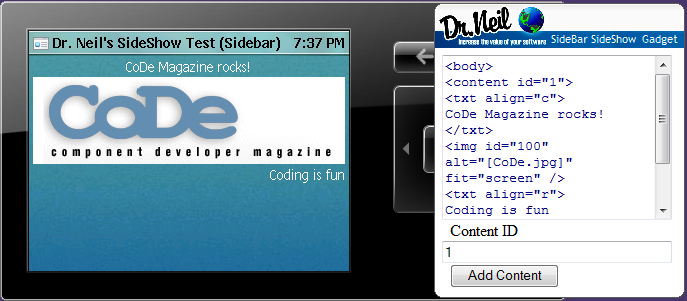
The Windows Sidebar API is possibly the easiest way to create content to display on a Windows SideShow device. The downside is the resulting Windows SideShow gadget is tightly coupled to the Windows Sidebar gadget. If the Windows Sidebar gadget is closed, the Windows SideShow gadget is no longer shown or available.
The Windows Sidebar API for Windows SideShow consists of the System.Gadget.SideShow namespace, which contains five methods, one property, and one event. As you do the implementation of a Windows Sidebar gadget in JavaScript, it is important to remember the limitations of this environment. While powerful, it is not strongly typed and it is easy to make costly mistakes.
To determine if a Windows SideShow device is available before adding content, you should use the enabled property. Although called a property, it is implemented as a method call, so remember the brackets after the method call:
if(!System.Gadget.SideShow.enabled())
{
  contentText.value = "SideShow device not found";
}
Once you have determined the presence of a Windows SideShow device, you create a Windows SideShow gadget by calling the setFriendlyName method. This method takes one parameter that is used as the display text for the gadget in the Windows SideShow Control Panel as well as on the device:
System.Gadget.SideShow.setFriendlyName(
    "Dr. Neil's SideShow Test");
To add Glance text to the Windows SideShow gadget, you should use the addText method with the content ID set to 0. Glance text is just a text string and neither SCF nor any other markup is required (nor should be used):
System.Gadget.SideShow.addText(0,
    "Test your SCF here");
You add an image with the addImage method. This takes as parameters the content ID and a file path to the image. This method supports JPG, GIF, and BMP formats for images. The images will be scaled to display on the device; this might lead to some degradation of the image quality:
var path = System.Gadget.path;
var imgFile = path + "\\code.gif";
   System.Gadget.SideShow.addImage(100, imgFile);
Using the addText method, you can add raw SCF to the gadget content. Unlike most modern browsers, the Windows SideShow rendering engine is very unforgiving-the slightest error in the SCF will prevent the entire page from loading. This is one reason I wrote this gadget to test the SCF for Sidebar gadgets:
var txt =
   "<body><content id=\"3\" title=\"The Title\">";
txt += "<txt align=\"c\" wrap=\"0\">Test</txt>"
txt += "</content></body>"

System.Gadget.SideShow.addText(1, txt);
The Windows Sidebar API is very simple and does not have the full feature set of the Managed API or COM API but it is a quick way to get content out onto the Windows SideShow device.
Final Thoughts
Developing Windows SideShow gadgets can be a rewarding experience. It is a new technology which has huge potential. It allows applications that are running on a PC to place content on other devices that can viewed even when the PC is switched off.
…placing content onto a Windows SideShow gadget will prove a rewarding experience that enables the users to access application information via another user interface.
When choosing which development tools to use for building a Windows SideShow gadget, consider the depth of experience you would like to provide. The COM API is the most powerful toolkit and, like many power tools, it can also be dangerous. The developer needs to have a strong COM skill set and understand the implication of threading and memory management. The Managed API is almost as powerful as the COM API and relieves the developer from much of the drudgery regarding formatting of content such as SCF. The Windows Sidebar API is a great tool for simple Windows SideShow gadgets that extend the information from a Windows Sidebar gadget.
Whichever API you chose, placing content onto a Windows SideShow gadget will prove a rewarding experience that enables the users to access application information via another user interface.
