


The Ultra-Mobile PC (UMPC) expands the market for PC games that run on Microsoft® Windows® XP, as long as developers consider certain design requirements to ensure a good user experience.
In most cases, a single version of games can span both the UMPC and traditional PC platforms.
The Ultra-Mobile PC (UMPC) platform is of increasing importance as a target system for game developers. Because these systems run on Microsoft Windows XP Tablet PC Edition, they don’t require a full operating system port for existing games, but the UMPC form factor does introduce a number of unique considerations in game design. For example, UMPCs typically have a touch screen with an 800x480 or 1024x600 resolution, which are small pixel sizes and unusual aspect ratios. Developers must also accommodate alternatives to conventional keyboard and mouse user interaction, and a CD-ROM drive is typically not available. See the sidebar, Typical UMPC Hardware.
Ideally, games designed with the UMPC in mind should use text sparingly and consider the UMPC screen size when choosing a font.
The best practices in this document for enabling PC games to run successfully on the UMPC platform are based on an analysis of a large number of PC games currently on the market. Those games were executed on a UMPC to identify common strengths and weaknesses associated with the platform, as well as specific game-design factors that contribute to the best user experience. The analysis includes design considerations for providing high-quality games on the UMPC, as well as common issues associated with providing UMPC support, providing best practices to resolve each of those issues.
Screen-Size Considerations
Because the UMPC screen is much smaller than a traditional screen, the size of graphical elements must be handled with some care. Developers must avoid making scaled-down graphical elements too small, as well as allowing elements that are left the same physical size to consume too much screen space. Specifically, text and icons are often hard to see clearly, some buttons or units are difficult to click reliably, and some game windows do not fit entirely onto the screen.
Text and Icon Sizes
Issue: In the interfaces of games that are ported to the UMPC, text or icons may shrink to a size where it becomes difficult to see them clearly. This prevalent issue is important to avoid, because text and icons become useless if they cannot be read or differentiated. Text that appears reasonably sized on a 15” screen can easily become too small when shrunk to a five- to seven-inch screen that you might find on a UMPC. Aside from the actual font size of text, chat and other text windows may become too small. Accommodating smaller window sizes by decreasing the font size can make the text difficult to read.
Best Practice: Ideally, games designed with the UMPC in mind should use text sparingly and consider the UMPC screen size when choosing a font. Likewise, icons should not rely heavily on fine details, so different objects are different enough to be easily distinguished from one another, even on the smaller UMPC screen. In places where increasing text size enough would compromise other elements of the game, allowing text size to be adjustable may be a good solution, allowing individual players to decide for themselves the ideal size for the text.
Clickability of Buttons and Other Elements
Issue: Similar to the issue of small text, buttons and other clickable game elements add complexity to porting games to the UMPC. While the overall interface on the UMPC must be smaller than the corresponding standard PC version, the actual buttons in the UMPC interface must be larger, in order to accommodate being accurately clicked by a stylus or finger, rather than the more precise mouse that is used in the standard PC version. This issue is particularly acute when multiple buttons or other elements are clustered together, which makes it more likely that the user will select a different element than the one they intend. Even when it is possible to select the correct element with some care, this issue can significantly detract from the user experience.
Best Practice: As with the size of text and icons, game developers should avoid this problem by using large, distinct buttons and other elements. These elements should also have enough space between them, making it less likely that the user will inadvertently select the wrong one. In those cases where a text label appears adjacent to a button or other element, that label should be part of the clickable area associated with the element, making it easier to click without having to devote any additional space.
Game Window Size
Issue: If game windows use a fixed size, rather than automatically resizing themselves to fill the full UMPC screen, parts of the game may not be visible all at once, and, in some cases, certain parts may not be reachable at all, as shown in Figure 1. This situation is made more complex by the potential for players to use the 800x480 or 1024x600 resolution enabled by the UMPC’s wide screen, since those aspect ratios must be matched to the standard 4:3 aspect ratio employed by most PC games.
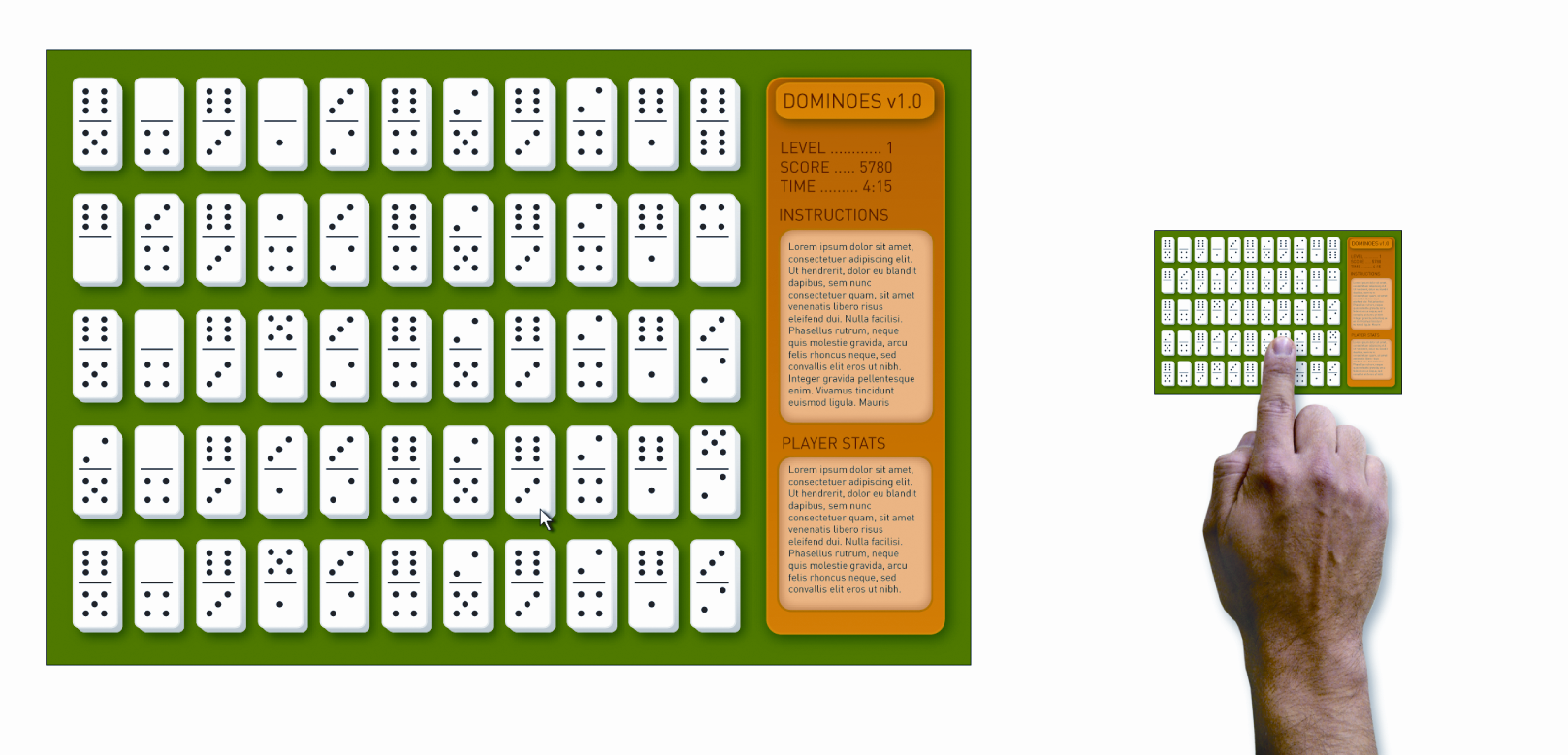
Best Practice: The key to resolving this issue is for game developers to consider the 800x480 and 1024x600 resolutions as they develop game interfaces for the UMPC, shrinking the entire game to fit on the screen or rearranging the interface to take full advantage of the wide screen area. Certain simple accommodations can make games more playable, even in a truncated state. For example, providing scrollbars and allowing the window to be resized (manually or automatically) may be sufficient in some cases to allow the user access to all parts of the screen and to provide an acceptable user experience, particularly for browser-based games.
Touch Screen Considerations
The use of a touch screen instead of a mouse on the UMPC adds another layer of complexity to porting games. For most software purposes, the touch screen behaves like a mouse, except that instead of registering a linear track of movement as the user drags the cursor, it generates a series of button-down events with a location each time the user touches the screen. The inability to move the cursor without clicking and the relationship between left-clicking and right-clicking also causes issues.
Accurate Interpretation of Tap-Only Touch Screen Input
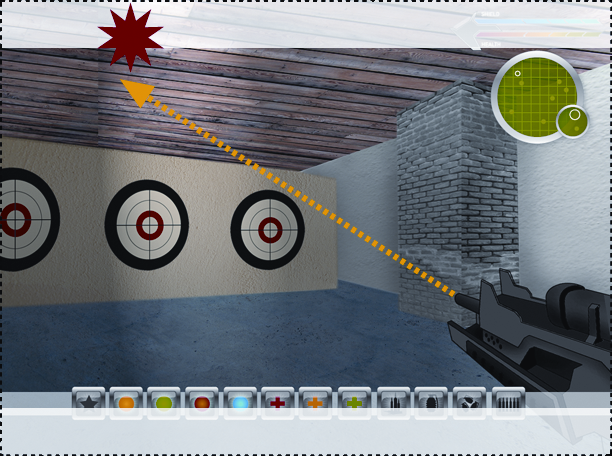
Issue: UMPC games must be able to interpret cursor input provided by the user as a series of points (corresponding to a series of touch-screen taps), rather than requiring a linear pattern of movement (like that provided by mouse movement controlling the cursor). This issue tends to arise particularly often, for example, in games that shift the user’s perspective so that the cursor is always at the center of the screen (which is common in first-person shooters). In such a scenario, when the player touches the screen, the cursor may jump around the screen erratically, instead of moving to where the user touched.
Making games able to be downloaded and installed via the Internet is an ideal alternative to CDs for UMPC games.
Best Practice: If the game tracks movement of the cursor from point A to point B, it must be able to interpret a click at point A, followed by a click at point B, without the cursor first moving between point A and point B. Requiring an external mouse to be plugged into the UMPC will typically correct this problem, although that solution is clearly sub-optimal from a user-experience point of view.
Accurate Touch-Screen Mapping
The touch screen can be mapped incorrectly to the game when the game runs in full-screen mode but does not take up exactly the full screen (either not filling the entire screen or taking up more than the full screen).
Issue (Game Panel Smaller than Screen): When the desktop is centered with space on either side (as in the case of a 640x480 panel being centered on a 800x480 screen or an 800x600 panel being centered on a 1024x600 screen, with black bars on each side), mismapping may occur between the two, with the entire touch-screen surface being mapped to the relatively small display area. That mismapping, as shown in Figure 2, results in inappropriate response of the interface to user interaction, such as a button’s clickable screen area being located away from the visual representation of the button.
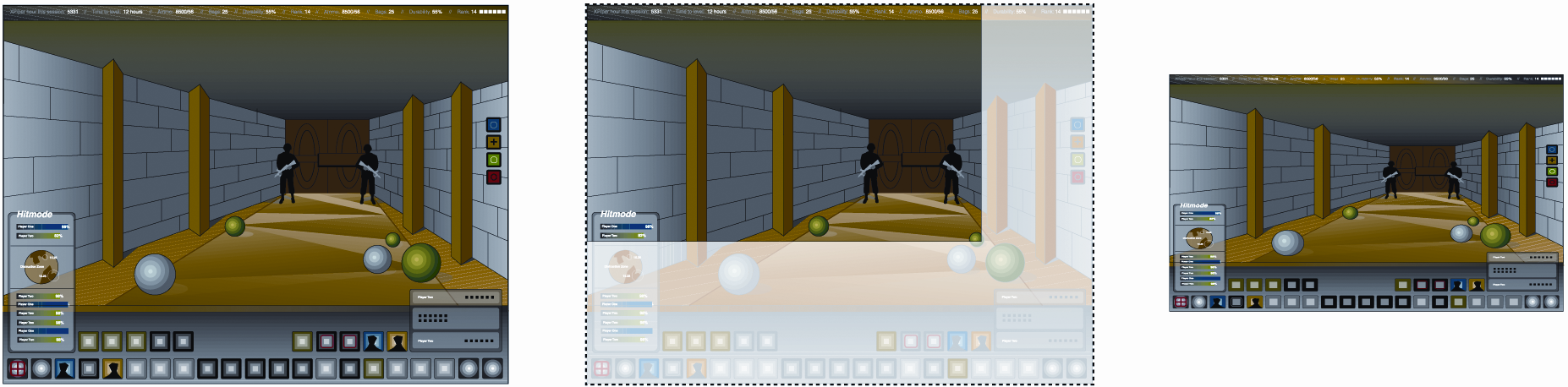
Best Practice: Games can be centered with black bars at the sides without causing the touch screen to be mismapped, as long as the mapping logic considers the black bars as part of the screen (even though they are not used as a part of the game). With this adjustment, touches on the screen map to exactly the location touched.
Issue (Game Panel Larger than Screen): In those cases where the game window takes up more than the full vertical space of the screen, the touch screen may be incorrectly mapped vertically instead of horizontally, as shown in Figure 3. This scenario typically causes the touch screen to be mapped to the whole game window, rather than just to the visible section. In such cases, clicks do not correspond to the area of the game window that the user intends.
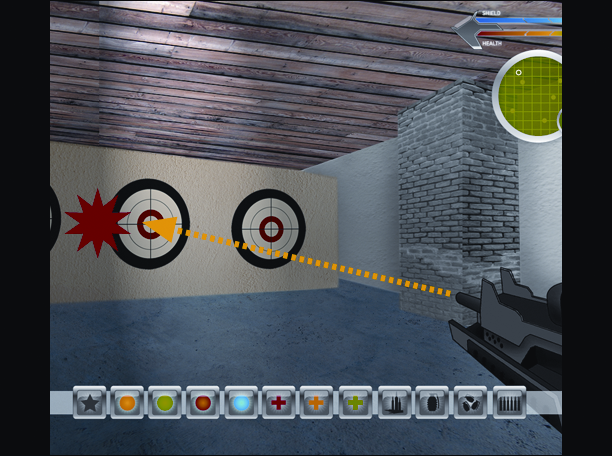
Best Practice: Developers should ensure that the operating system maps the touch screen exactly to the entire visible portion of the screen (including portions not being used by the game), and not including portions of the game window that are not visible. Another solution is for developers to natively support the 800x480 and 1024x600 screen resolutions as a user-configurable option. In some cases, it might be possible for the game to automatically stretch the window to fit the full screen, if the resulting dimensional distortion of game elements is acceptable.
Alternatives to Hover-Over Effects
Issue: Many games use a hover-over feature that enables the user to position the mouse over an object or location in the game (without clicking on it) to trigger an informative animation or tooltip. This feature, which is often used to provide instructions for novice players, is incompatible with touch screens, since a touch screen cannot move the cursor without clicking.
Best Practice: Since the hover-over feature is not compatible with current UMPC hardware, developers should choose alternative events to trigger the animation or tooltip. For example, it could be triggered when the player reaches the part of gameplay when the subject of the animation or tooltip becomes relevant. Another possibility is to design the interface with a means of temporarily interpreting click events as mouseover events, such as a button that can be held down to allow touches on the touch screen to move the cursor without registering a click.
Accommodating Right-Click Functionality
Issue: On a typical UMPC touch-screen, users perform right-clicks by holding down the click on the screen for a longer time than for a left-click, which can cause users to inadvertently left-click when they mean to right-click. Moreover, it is impossible to perform a left-click and right-click simultaneously.
Developers should provide alternative user interactions to replace right-click functionality, such as using double-clicks or clickable controls on the screen that take place of right-clicking.
Best Practice: Developers should provide alternative user interactions to replace right-click functionality, such as using double-clicks or clickable controls on the screen that take place instead of right-clicking. Alternatively, game developers can simply require the use of an external mouse or other pointing device, although that requirement may detract from the user experience.
Form Factor Considerations
A number of issues relate directly to hardware differences in the UMPC form factor, relative to standard PCs. For example, unlike a standard PC, a UMPC may have a touch screen, joystick, user-programmable buttons, and dedicated buttons such as a menu button, but it will typically not have a keyboard or CD-ROM drive. Although it may be possible to add a keyboard, CD-ROM drive, or other peripheral devices, doing so reduces the portability of the UMPC. Moreover, different models of UMPCs may have different elements included in their designs, which causes the limitations associated with the form factor to vary by device. That variability typically requires developers to focus on the lowest common denominator of hardware features when designing games, in terms of core requirements.
CD-ROM Drive
Issue: CDs are currently the most popular method for distributing games. In addition to being installed from a CD, the disk is often required as a means of verifying ownership of the game, as an anti-theft measure, or to dynamically load content from the CD as it is needed, such as video sequence. Because UMPCs typically do not have integrated CD-ROM drives, this modality requires the use of an external drive, which hampers the portability of the UMPC. Further, users may not even own an external CD drive. Notably, this issue has no impact on web-hosted, browser-based games.
Best Practice: Making games able to be downloaded and installed via the Internet is an ideal alternative to CDs for UMPC games. This distribution model is already in widespread use, and developers should consider the emergence of UMPCs as a further impetus to expand upon it. They should also consider using certificates or other software-based means to verify ownership, rather than requiring the physical presence of the CD. Rather than dynamically loading video and other content from the CD as it is needed during gameplay, developers should consider providing the option for that content to be hosted on the UMPC’s hard drive.
Limiting the Need for Diverse Command Inputs
Issue: The UMPC form factor provides for a limited number of inputs, relative to the full keyboard and mouse available from a standard PC. Even those games that are designed to be run on a PC using a joystick may require the use of multiple buttons that are included on a typical joystick controller, which may not be available from the UMPC. UMPCs also have issues with games that incorporate keyboard shortcuts as a key gameplay component. Notably, games that are primarily mouse-driven are not affected by form-factor limitations in this area.
Best Practice: Developers can address limited input options on the UMPC by decreasing the number of commands that are actually required to play the game, as opposed to being optional conveniences such as shortcuts for menu options. A somewhat more flexible solution, however, is to create buttons on the screen. Particularly if the buttons are context-sensitive, appearing only when they are relevant, this can provide an open-ended solution for input requirements.
Addressing Keyboard Requirements
Issue: In addition to issuing commands, many games also use the keyboard for input such as naming characters, creating profiles, saving games, or supporting a chat feature for online games. It is common for games to require a keyboard, for example, to enter a profile name at the beginning of a gaming session but not to require the use of a keyboard at any other time during the session. Some games also require players to use the keyboard to name their saved games. In many cases, the on-screen keyboard will not run on top of the game interface, so it cannot resolve these issues.
Best Practice: Developers should either design games explicitly not to conflict with the onscreen keyboard (e.g., by not defaulting to full-screen mode) or provide an on-screen keyboard within the interface itself that appears only when needed. One simple means of minimizing the need for keyboard input is to provide default values for text strings such as profile names, saved game names, etc. and to allow them to be selected using screen-tap input. Additional values for these text strings can also be provided by adding an interface button that randomly selects a new value from a list of character names created by the developer. Saved games can also be identified using a screen capture of where the player left off, together with a date and time stamp. Since chat features are very rarely a core aspect of gameplay, and they can generally be disabled on the UMPC without negatively impacting the user experience.
Conclusion
Game developers and architects providing support for the UMPC platform in mainstream game offerings can develop a discrete set of design considerations that address common issues that arise during the development process. The best practices described in this document provide a foundation for that effort. Because Windows-based UMPCs run a full version of the operating system, it typically requires less effort to provide this support than a full port to a separate operating environment. Thus, an incremental effort may expand a game’s market to include the expanding deployment of the UMPC platform, providing a competitive advantage to the game software provider.
