



The Tablet PC SDK makes it easy to incorporate digital ink and handwriting analysis into applications; and now the InkAnalysis API (available in Windows Vista™ as well as downlevel to the Microsoft® Windows® XP operating system through a redistributable) takes it one step further.
Actually, the InkAnalysis API exposes some of the lower-level functions that make handwriting recognition possible. It also exposes some functionality that can improve recognition results, support shapes, alternative recognition results, and spatial analysis. In this article, I will take a deeper look into what goes on behind the scenes and how to take advantage of the tablet team’s hard work.
When I first started to work on Tablet PC solutions, the depth and the richness of the Tablet PC API immediately impressed me. Thanks to the well-designed Tablet PC SDK, I could add handwriting recognition and support for digital ink without concerning myself with the gritty details and hard work of handwriting recognition.
As far as most tablet application developers are concerned, handwriting recognition is as easy as calling a ToString method.
The following code best exemplifies the basic scenario of converting ink to text that most tablet developers are familiar with.
string recognitionResults =
inkCollector.Ink.Strokes.ToString();

MessageBox.Show("Recognition Results:" +
recognitionResults);
As you can see in the above code, the Strokes collection’s ToString method does all the work here, easily converting the ink strokes to text.
The ability to interpret structure as well as content from written text opens up a number of possibilities.
But, is handwriting recognition really that easy? Of course it isn’t. A lot of research went into building the handwriting recognition engine to make it this easy for tablet developers.
What goes on behind the scenes? More to the point, is there any functionality exposed at these lower levels of the API? How can you leverage the process to add advanced functionality to applications?
Developers are never happy for long. They have a curious nature and push the envelope-to keep expanding what’s possible. So it is with handwriting recognition. As you develop more Tablet PC applications, you will quickly find that the ToString method of handwriting recognition leaves you wanting more.
What if you wanted to see more than just the top result? What if you wanted to recognize shapes as well? What if, in addition to converting the text of the document, you wanted to copy the structure of the document?
Ink analysis makes all this and more possible.
But first, I will briefly review the basic mechanics of digital ink and what goes on when your code calls the ToString method.
The Basics of Recognition
Most developers know that the Tablet PC can convert handwriting to text, but fewer know about the shape recognition features of the Tablet PC platform. The subject of ink analysis covers handwriting, shape, and document recognition. First, I will examine the path ink takes when you call the ToString method.
Recognizing Handwriting
The ink data type is a vector-based graphics format that consists of a series of strokes. Strokes are Bezier curves, which are made up of a series of discrete points.
The handwriting recognition engine analyzes these strokes, produces a list of possible alternatives comparing them against a system-wide dictionary, and ranks them according to what the engine believes is the most likely result. The result with the highest confidence rank wins and becomes the value returned from the recognizers.
In order to do this, the handwriting recognition engine has to determine several important key factors; the same factors that the human eye takes into account when reading text.
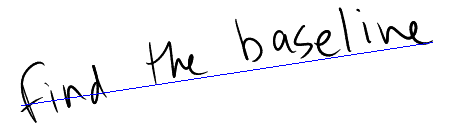
First, the engine performs a rudimentary spatial analysis on the ink: determining the baseline on which the text is written, the boundaries of paragraphs, lines, and even individual words. The analysis in this scenario is quite different than the work done in the InkAnalysis API, which I will dig deeper into later in this article.
Figure 1 shows the baseline drawn out over a line of text. The spatial analysis engine then passes these individual words to the recognition engine, which evaluates them and returns a text value and a confidence level. The recognition engine assigns a confidence level to every text result it associates with a series of strokes. It returns the result with the highest level of confidence as the value from the ToString method in the previous example.
Meet the InkAnalyzer
The InkAnalyzer class contains all the methods, properties, and events required to perform ink analysis. Experienced Tablet PC developers may think of the InkAnalyzer as a new and improved version of the RecognizerContext. The InkAnalysis object contains every API the RecognizerContext has. In short, the InkAnalysis object does everything the RecognizerContext does and more.
You can assist the recognition engine by narrowing the vocabulary to a particular word list.
The InkAnalyzer constructor class accepts two parameters: one is the Ink object it will collect ink from and the other is the control associated with the InkAnalyzer. After initializing the object, I call the AddStrokes method to add strokes to the analyzer. Finally, I will make a call to the Analyze method, which performs the analysis.
The following code demonstrates how to initialize an InkAnalyzer object.
InkAnalyzer analyzer = new
InkAnalyzer(this.collector.Ink,this);
analyzer.AddStrokes(this.collector.Ink.Strokes);
At first it may seem redundant to call the AddStrokes method to pass the Strokes collection into the InkAnalyzer, when it already received the corresponding Ink object in the constructor. Individual stroke objects in the Strokes collection each have a unique identifier. Adding strokes from more than one Ink object could potentially mean that two strokes might have the same ID. This situation would confuse the InkAnalyzer. That is why the InkAnalyzer will throw an exception if I add Strokes from different InkCollectors.
Additionally, the Save and Load methods for the InkAnalyzer persist the analysis results along with the ink. Therefore, the InkAnalyzer needs a reference to preserve the ink.
To actually analyze the ink, I simply call the Analyze method.
analyzer.Analyze();
The InkAnalyzer contains within it all the functionality of RecognizerContext. However, you will need to refactor code in order to perform the same tasks with the InkAnalyzer, due to some architectural changes.
In the following sections, I will demonstrate how to perform some of these basic tasks with the InkAnalyzer.
Improving Recognition Results
The obvious disadvantage of using a system-wide dictionary to compare ink against is that no dictionary, no matter how complete, can contain all the industry-specific jargon, internal company references, or even slang that users might use.
There is also the matter of fields expecting certain types of data. For instance, if an entry field is expecting to only have dates, then you can tell the recognition engine to have a bias towards converting the ink into a date.
Hints and Factoids
You can help the recognizer achieve more accurate results by setting the Factoid property of the AnalysisHintNode object to predefined values in an enumeration.
Using factoids, you narrow down the possible result set as the recognizer interprets the strokes. If you do tell the recognizer to expect an e-mail address, then it is far more likely to interpret the strokes that represent the “@” symbol as “@” and not as a poorly drawn letter “O.” The following code does just that: it tells the recognizer that it should consider the strokes to be an e-mail address.
AnalysisHintNode hintNode =
inkAnalyzer.CreateAnalysisHint();
hintNode.Location.MakeInfinite();

hintNode.Name = Factoid.Email;
The call to hintNode.Location.MakeInfinite() tells the AnalysisHintNode that it should apply the Hint across the entire InkCollector. I could choose to narrow down the area to a particular region.
A good example is an e-mail client, where the top-left corner is an ideal place to write an e-mail address. I can create an AnalysisHintNode and restrict it to a set of coordinates.
Rectangle hintRegion = new Rectangle(0, 0, 4000,
4000);
AnalysisHintNode hintNode =
analyzer.CreateAnalysisHint(new
 AnalysisRegion(hintRegion));
hintNode.Factoid = Factoid.Email;
The ability to narrow down the area that an AnalysisHintNode can influence comes in handy when designing applications that mimic paper forms. I can tell the analyzer to expect certain types of data in certain areas: for example, an e-mail address in the upper-left corner and a date in the upper right. Then I can define areas for numbers and currency values.
I can also chain factoids together. The following code tells the recognizer to expect either an e-mail address or a Web address.
hintNode.Name = Factoid.Email + "|" + Factoid.Web;
Alternatively, you can also use string constants to set the Factoid value. For instance, the following code snippet is functionally equivalent to the above snippet.
hintNode.Name = "EMAIL|WEB";
The Factoid class has values for dates, numbers, file names, and much more-enough to cover virtually every data entry need you will come across.
However, what happens when the data your code expects doesn’t fit neatly into the category of date, number, or e-mail address? For these situations, you can create custom word lists.
Custom Word Lists
By default the recognition engine compares strokes against the generic dictionary for analysis. However, this may not be appropriate for certain situations as each industry has its own jargon. For instance, medical specialties will have different jargon from field insurance agents or sales teams.
You also might encounter a situation where you want to limit the recognition results to a certain set of words, yet still keep the input field a freeform ink field. In these situations, use a word list.
I can assist the recognition engine by narrowing the vocabulary to a particular word list. I do this by creating a string array, populating it with words, and then applying the word list via the SetWordList method and setting Factoid properties appropriately. Note that WordList is a type of Factoid.
Once the amount of digital ink accumulates beyond a few words, it is no longer a string. It becomes a document, complete with paragraphs, list items, callouts, and annotations.
The following code demonstrates how to accomplish this by telling the recognizer to expect certain medical terms.
string[] wordListArray = { "cereberal",
"hyperbaric", "hypoglycemic", "anemic" };

AnalysisHintNode hintNode =
 inkAnalyzer.CreateAnalysisHint();

hintNode.Location.MakeInfinite();
hintNode.SetWordlist(wordListArray);
hintNode.Name = "Wordlist";
You could also create lists consisting of part numbers, office locations, or virtually any discrete list of string values. The source data for custom word lists can come from a database, Web service, or XML file.
Alternate Recognition Results
No matter how smart the recognition engine becomes or how much code can anticipate user input, you can never guarantee that any application will achieve recognition results of 100%.
In short, the InkAnalysis object does everything the RecognizerContext does and more.
However, you can use the Tablet PC Input Panel, which ships as part of the Windows XP Tablet PC Edition 2005 and Windows Vista, to provide an easy means for correcting the recognition engine. Tablet PC Input Panel, as seen in Figure 2, has an excellent user interface for the quick and easy modification of recognized text. So how do you go about adding this type of feature to your own applications?
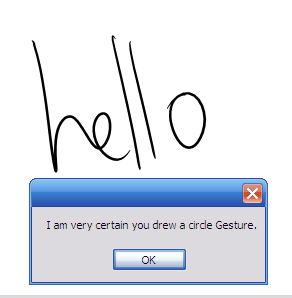
Fortunately, the code to access the alternate recognition results is quite straightforward, as you can see in the following example.
string msgText = "Matches & Confidence Levels:\n";

foreach (AnalysisAlternate recoAlternates in
inkAnalyzer.GetAlternates())
 {
   msgText += recoAlternates.RecognizedString + "
  (" + recoAlternates.InkRecognitionConfidence.
   ToString() + ")\n";
 }
MessageBox.Show(msgText);
This code iterates through the collection returned from the GetAlternates method of the InkAnalyzer. Each of the AnalysisAlternate objects has both a text value and a confidence level.
Most of the time, the recognition engine will return the correct result. However, you can use code similar to the snippet above to build out a list of alternate recognition results and display them to the user.
Introducing Ink Analysis
Once a collection of ink goes beyond several lines, the ink ceases to be mere text and starts to become a document, complete with paragraphs, bulleted lists, callouts, and diagrams.
Beyond Handwriting Recognition to Document Recognition
The structure of the written word is just as important as the contents. There is a lot of semantic richness embedded into the structure and layout of a document.
Users hardly notice this structure in their day-to-day lives, as it’s so familiar to them. They natively understand formatting and structure cues, such as paragraphs, bulleted lists, and annotations.
Accordingly, they, as human beings, have a level of context and understanding on top of the actual content of the document.
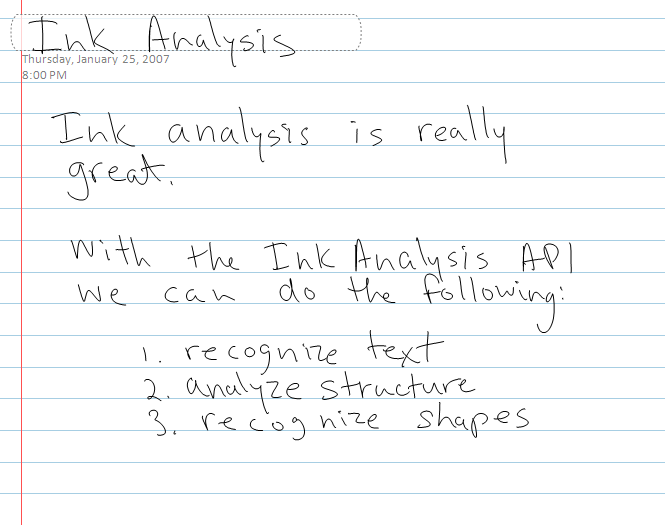
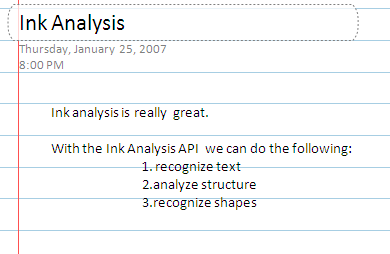
The InkAnalyzer gives the operating system of a Tablet PC the power to parse and understand this organizational structure. Other ink-enabled applications, such as Microsoft OneNote® 2007, also leverage this ability. The ink in Figure 3 becomes the structured text in Figure 4.

Analyzing the Organizational Structure
The structure of a document contains a lot of information. Thanks to the InkAnalyzer, you can now analyze and parse it into a tree structure.
I recursively parse the structure the InkAnalyzer created by starting with the RootNode property.
TraverseNodes(inkAnalyzer.RootNode, sbNodes, 0);
Listing 2 shows the complete contents of the TraverseNodes methods.
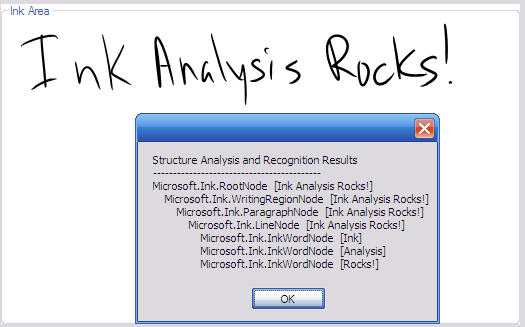
As the InkAnalyzer processes the strokes, it creates a tree structure consisting of ContextNode objects. The tree starts at the top with the RootNode, and then progressively represents smaller and smaller collections of Strokes. These nodes can consist of WritingRegions, Paragraphs, Lines, Drawings, Individual Words, and more.
I can examine the particular type of ContextNode with the following line of code.
contextNode.GetType().ToString()
Figure 5 shows both the original ink on the screen and the contents of the ContextNode tree.
Deeper Dive into InkAnalysis
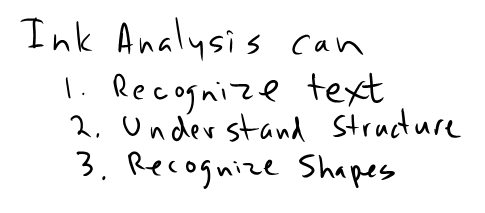
The InkAnalyzer engine parses a block of ink and creates a tree structure. The InkAnalyzer can also recognize bulleted and numbered lists. Table 1 shows the complete analysis of the ink shown in Figure 6.
Recognizing Shapes
The InkAnalyzer can also recognize shapes. Table 2 has all the types of shapes it can recognize. While the analyzer identifies shapes in the ink, it is difficult to actually know what shapes it can recognize. The API does not contain an enumeration of shapes, so the listing in Table 2 will come in handy.
ContextNodeCollection drawingNodes =
inkAnalyzer.FindNodesOfType(ContextNodeType.
InkDrawing);
string results = "Drawings detected:\n";
foreach (InkDrawingNode drawingNode in
drawingNodes)
  {
    results += drawingNode.GetShapeName() + "\n";
  }
MessageBox.Show(results);
The above code creates a ContextNodeCollection, consisting only of InkDrawingNodes. I then iterate through the collection and report the results in a MessageBox.
Relationships between Nodes
Written notes often contain callouts, notations, and underlines. When the InkAnalyzer detects these items, it creates ContextLinks. ContextLinks describe relationships between nodes. ContextLinks have two items of interest: the SourceNode and the DestinationNode.
Rather than analyze the entire amount again, the ink analyzer will only analyze the new content.
For example, in Figure 7, the word “this” has an underline. The InkAnalyzer knows that it is not part of the word, but it is an annotation adding emphasis.
The following code iterates through the ContextLink collection and modifies the color of the strokes.
foreach (ContextLink contextLink in
contextNode.Links)
{
  contextLink.SourceNode.Strokes.
   ModifyDrawingAttributes(new
   DrawingAttributes(Color.Blue));
  contextLink.DestinationNode.Strokes.
   ModifyDrawingAttributes(new
   DrawingAttributes(Color.Red));
}
The sample program above uses blue highlights for SourceNodes and red highlights for DestinationNodes. Listing 3 shows the complete contents of the FindLinkedNodes methods.
The ability to determine relationships between nodes can add powerful functionality to any ink-aware application. A good example would be in editing scenarios. Users mark up some ink, an image, or text with ink annotations and the annotations follow their targeted content. Another example would be in diagram drawing scenarios, where the lines between nodes hold intrinsic data about the relationship between nodes.
Event-based Model
The InkAnalyzer triggers over a dozen events in real time as it performs its analysis. This event-based model is useful for cases when integrating ink analysis into existing code, such as inserting ink directly into a legacy binary file format.
For instance, you can insert the data retrieved during analysis in real time into an existing file format. Another example would be looking for a certain word or phrase that could open a window, create a new file, or trigger any kind of event.
Background Analysis
If I had ten pages’ worth of ink to analyze and my code ran the analysis on a foreground thread, my user interface would lock up until the analysis completed. For anything but simple applications, this amount of lag time would be unacceptable.
However, as the amount of ink to analyze grows, so does the likelihood of users experiencing lag times in both the user interface and the ability to add any more ink. Remember that in addition to analyzing ink, your applications may already be working on other tasks.
Background analysis will not stop the user interface from responding. It runs the analysis on a background thread and will send an event when it has concluded.
If that weren’t reason enough to analyze ink in the background, there are more benefits. If the user adds more ink during the analysis, the InkAnalyzer will automatically combine the new results into the tree while keeping track of the new strokes, which haven’t been analyzed yet. The user can be blissfully unaware of this and does not need to merge results.
Incremental Analysis
The InkAnalyzer also supports incremental analysis, which avoids reanalyzing ink by only analyzing new content added since the last analysis.
For example, consider appending a new sentence to a large amount of ink. Rather than analyze the entire amount again, the InkAnalyzer will only analyze the new content.
It does, however, examine nearby areas to check if the new ink changes any of the previous results. For example, adding an underline to a word in the middle of ink.
Practical Applications of Ink Analysis
Ink analysis has a number of practical applications. The ability to interpret structure as well as content from written text opens up a number of possibilities. Here are some ideas that come to mind.
The Ink to Blog Application
One practical use of the ink analysis engine would be creating a Tablet PC-friendly, blog-writing application. Blog posts generally have a document structure of title and content. Using the hint area attribute, you can easily isolate the blog post title from the main document content.
You can use the InkAnalyzer to analyze the document further to pull out bulleted lists, paragraphs, etc.
With a program like this, writing posts to a weblog could literally become as easy as writing into a journal.
The Ink to SharePoint Connector
Of course, this type of application need not be limited to weblogs. Enterprises would benefit greatly from a connector application for Tablet PC and Microsoft SharePoint®.
As SharePoint use increases, so does the value of a quick and easy way to input ink data into SharePoint. A good scenario would be electronic forms, perhaps even forms filled out by mobile workers.
This application has a similar architecture to the ink-to-blog application. You could define areas in the main writing area to correspond with any given SharePoint form. From there, you could use the ink analysis engine to separate the fields and interact directly with the SharePoint server via a Web service. Ink one minute, data entered into SharePoint the next.
Imagine the potential for field workers and sales personnel to instantly convert and submit handwritten notes and documents into SharePoint server.
The Ink-to-XML Engine
You could power the two previously mentioned examples by one, general-purpose ink-to-XML engine. This engine would take the tree structure defined by the InkAnalyzer and convert the nodes to corresponding nodes in an XML tree.
You could improve the engine by adding XSLT support to automatically transform the basic node types into an XML document that would conform to a specific structure.
Recognition Game
Another potential use for the ink analysis engine would be both fun and educational. The program would tell the user to draw a particular shape and examine the ink to determine if the shape was drawn.
Conclusion
The ability to write notes and convert the ink to text is one of the Tablet PC platform’s most remarkable features. However, to really leverage the power of the platform, handwriting recognition is not enough.
Users expect their Tablet PCs to understand not just their writing, but also their notes, their annotations, and their drawings and diagrams.
The InkAnalysis API provides a rich set of functionality that Tablet PC and mobile PC developers can use to deliver applications that meet these expectations.
Listing 1: Handling a gesture recognition event
void inkCollector_Gesture(object sender,
InkCollectorGestureEventArgs e)
{
     if (e.Gestures[0].Id == ApplicationGesture.Circle)
     {
      if (e.Gestures[0].Confidence == RecognitionConfidence.Strong)
      {
          MessageBox.Show("I am very certain you drew a circle
          Gesture.");
       }
      if (e.Gestures[0].Confidence ==
      RecognitionConfidence.Intermediate)
       {
          MessageBox.Show("I am reasonably certain you drew a
          circle Gesture.");
       }
    }
}
Listing 2: TraverseNodes method
private void TraverseNodes(ContextNode contextNode, StringBuilder
nodes, int Depth)
{
    nodes.Append(string.Empty.PadLeft(Depth * 4, ' '));
    nodes.Append(contextNode.GetType().ToString() + "  ");
    nodes.Append("[" + contextNode.Strokes.ToString() + "]");
    nodes.Append("\r\n");
    foreach (ContextNode subNode in contextNode.SubNodes)
    {
      this.TraverseNodes(subNode, nodes, Depth + 1);
    }
}
Listing 3: FindLinkedNodes method
private void FindLinkedNodes(ContextNode contextNode)
{
   if (contextNode.Links.Count > 0)
   {
     foreach (ContextLink contextLink in contextNode.Links)
      {
        contextLink.SourceNode.Strokes.ModifyDrawingAttributes(new
        DrawingAttributes(Color.Blue));
   contextLink.DestinationNode.Strokes.ModifyDrawingAttributes(new
DrawingAttributes(Color.Red));
      }
    }

// Recursively Parse Tree
foreach (ContextNode subNode in contextNode.SubNodes)
   {
       FindLinkedNodes(subNode);
   }
}
Table 1: Structure of Figure 3.
| Microsoft.Ink.RootNode [Ink Analysis can 1. Recognize text 2. Understand Structure 3. Rocognize Shapes] |
|---|
| Microsoft.Ink.WritingRegionNode [Ink Analysis can 1. Recognize text 2. Understand Structure 3. Rocognize Shapes] |
| Microsoft.Ink.ParagraphNode [Ink Analysis can] |
| Microsoft.Ink.LineNode [Ink Analysis can] |
| Microsoft.Ink.InkWordNode [Ink] |
| Microsoft.Ink.InkWordNode [Analysis] |
| Microsoft.Ink.InkWordNode [can] |
| Microsoft.Ink.ParagraphNode [1. Recognize text] |
| Microsoft.Ink.BulletNode [1.] |
| Microsoft.Ink.LineNode [Recognize text] |
| Microsoft.Ink.InkWordNode [Recognize] |
| Microsoft.Ink.InkWordNode [text] |
| Microsoft.Ink.ParagraphNode [2. Understand Structure] |
| Microsoft.Ink.BulletNode [2.] |
| Microsoft.Ink.LineNode [Understand Structure] |
| Microsoft.Ink.InkWordNode [Understand] |
| Microsoft.Ink.InkWordNode [Structure] |
| Microsoft.Ink.ParagraphNode [3. Recognize Shapes] |
| Microsoft.Ink.BulletNode [3.] |
| Microsoft.Ink.LineNode [Recognize Shapes] |
| Microsoft.Ink.InkWordNode [Recognize] |
| Microsoft.Ink.InkWordNode [Shapes] |
Table 2: Shapes returned from the InkAnalyzer.
| None |
|---|
| Ellipse |
| Circle |
| Triangle |
| IsoscelesTriangle |
| EquilateralTriangle |
| RightTriangle |
| Quadrilateral |
| Rectangle |
| Square |
| Diamond |
| Trapezoid |
| Parallelogram |
| Pentagon |
| Hexagon |
