



The Ultra-Mobile PC (UMPC) presents a new opportunity for existing applications to extend their potential audience.
Microsoft® Windows® desktop applications can mobilize onto the UMPC platform, providing users with desktop functionality while on the move. Windows Mobile™ device applications can take advantage of the larger screen size and storage space of the UMPC to extend the application capabilities.
Whether you are a Windows Mobile device developer or a desktop application developer, the UMPC provides exciting new opportunities for your applications to reach users who might not have previously enjoyed interacting with your software. In order to provide the best user experience on the UMPC, your application is likely to require some user interface changes. If you are looking to extend the reach of your Windows Mobile application, there may also be some functionality changes required.
To resolve the lack of hover support, you need to think about what other visual clues you can provide to the user.
This article will walk through two scenarios: changing an existing desktop Windows application to work well on the UMPC, and then repeating the process but this time with a Windows Mobile device application. The goal in both scenarios is to maintain a single code base that creates an application that continues to run on the original target platform but also provides a great user experience for a user running on an Ultra-Mobile PC.
You can download all the code for this article from http://Roodyn.com/WorkOnUMPC.ashx
Adapting a PC Application to the UMPC
A UMPC is a full PC, running the full version of the Windows operating system. This implies that a PC application should “just run” on a UMPC and it will. However, there is a slight hitch; most PC applications are built with a view that the user will be driving the application with a mouse, the screen size will be at least 1024 x 768 pixels, a keyboard is attached to the computer, and users eyes will be approximately between 20 and 30 inches from the screen.
A user is likely to drive a UMPC application with either their finger or a stylus. The default resolution for the UMPCs available today is 800 x 480 pixels. Many of today’s UMPCs will not have a keyboard attached. Microsoft designed the UMPC to be held in the hand and the user’s face is likely to be approximately 10 to 15 inches from the screen. With these differences in mind, you can create a UMPC version of an application.
The sample PC application converted in this article is a simple picture viewer that allows the user to build collections of pictures to browse-think of the collections as playlists for pictures. Figure 1 shows the application running on a UMPC before it has been converted. You can see that the window has been squashed to try and fit it within the screen size and the right edge of the window is off the screen. The toolbar buttons are small; unless you have delicate little fingers these would cause an issue for most users.
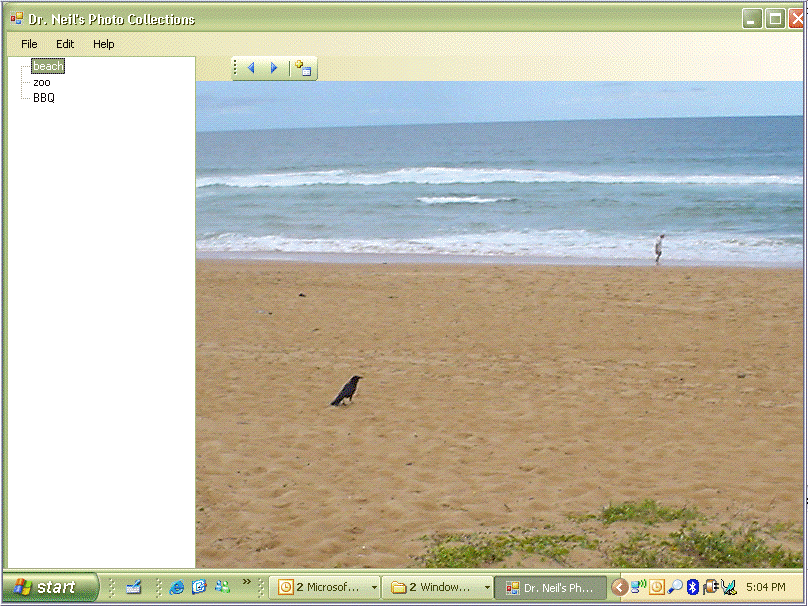
If you run this application on a PC with a larger screen and a mouse you will notice that the default size for the main windows is a quite large 1000 x 700. You will also notice that each toolbar button shows a tooltip when the mouse pointer hovers over the button. These tooltips provide the user with information as to the function of each button. With a UMPC being operated by finger there is no concept of hover. Unlike an active digitizer Tablet PC, the UMPC touch digitizer provides no means to hover with a stylus or your finger. Tooltips, such as those used on the toolbar buttons, are useless for a UMPC application.
The TreeView and Menu controls will also likely present some issues for a UMPC user using their finger to interact with the screen. You can address the size of the buttons, TreeView control nodes, and the menu by simply increasing their respective sizes and font sizes. Microsoft provides a document on MSDN® called the “Mobile PC User Experience Guidelines for Developers” (http://msdn2.microsoft.com/en-gb/library/ms695565.aspx), which addresses many issues such as control sizing.
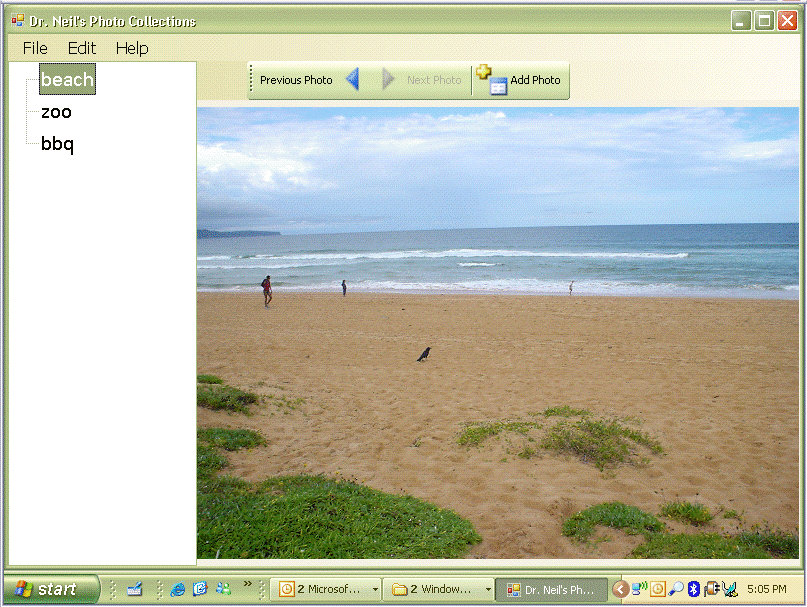
To resolve the lack of hover support you need to think about what other visual clues you can provide to the user. In this case, changing the toolbar button style from Image to ImageAndText provides informative text on the buttons.
You can resolve the issue with sizing the form by ensuring the form is never bigger than the working area of the screen. You should then position the form in the center of the screen. The code in Listing 1 provides an example of a simple approach you should consider. In order to support features, such as changes in screen orientation, you will need to get a little bit smarter. I will explain this further in the next section as Windows Mobile applications need to deal with orientation changes as well.
You can see the final result of these changes in Figure 2. The controls are far more finger friendly. As the UMPC is a full PC there will be no issues with functionality needing to be changed; it is simply a case of ensuring the user interface provides a better experience for your users.
Adapting a Pocket PC Windows Mobile Application to the UMPC
Running a Windows Mobile application on the UMPC requires a little more care and some actual coding, rather than all this mucking around with the user interface. Although, as you will discover, it is not as hard as you might fear.
Remember what your mentor taught you about never hard coding file paths and always getting environment information programmatically? Well it was all true.
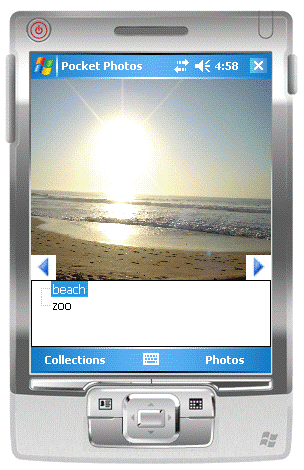
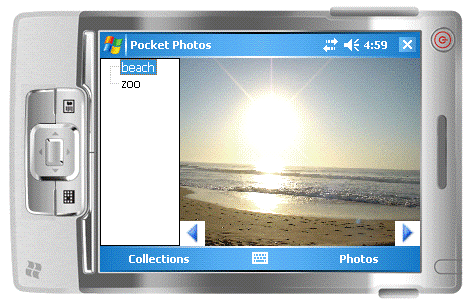
The example application in this case does something similar to the PC application in the last example, except it is designed to be run on a Pocket PC running Windows Mobile 5.0. Figure 3 shows the application running in portrait. As previously mentioned, many Windows Mobile devices provide the user an option to change the screen orientation, hence this application already copes with running in landscape as shown in Figure 4. When switching from portrait to landscape the controls change position to provide a better user experience-notice how the TreeView shifts from being under the image to the left of the image.
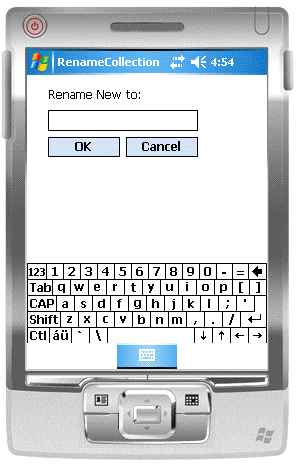
This Pocket PC application has two other interesting features. The first is the RenameCollection form, shown in Figure 5. The RenameCollection form uses the InputPanel that is specific to the Windows Mobile platform. The equivalent on the UMPC would be Tablet PC Input Panel.
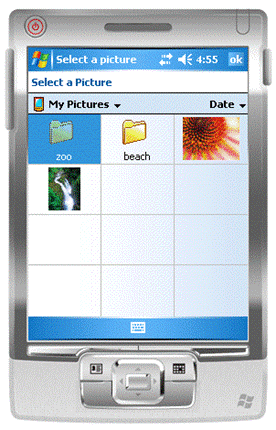
The other feature of interest is the SelectPictureDialog that you use to allow the user to add a photo to a photo collection, shown in Figure 6. This is a dialog box specific to Windows Mobile 5.0 and the nearest equivalent on a UMPC would be the common dialog control, OpenFileDialog.
Before resolving these issues specific to Windows Mobile, you need to be able to run the .NET Compact Framework assembly on a machine hosting the full .NET Framework. Fortunately for Windows Mobile developers, with the introduction of the .NET Compact Framework 2.0, Microsoft added a new keyword into the MSIL that the language compilers generate: retargetable. If you use ILDASM to view the intermediate language of an assembly built using the .NET Compact Framework, you will see this keyword at the top of the Manifest:
.assemblyextern retargetable System.Windows.Forms
{
.publickeytoken = (96 9D B8 05 3D 33 22 AC )
.ver 2:0:0:0
}
This retargetable keyword is going to become your best friend if you want to have your Windows Mobile applications running on a UMPC-or any other PC for that matter. The retargetable keyword informs the CLR that this assembly can potentially run on another compatible version of the CLR and not only the version it is primarily targeting. To determine the version of the CLR the assembly is primarily targeting, use the combination of the publickeytoken and the ver values.
Do you remember what your mentor taught you about never hard coding file paths and always getting environment information programmatically? Well it was all true. If you build a Windows Mobile application using the .NET Compact Framework 2.0 and you stick to these good programming practices, you will find you can have your application running on a full PC device (such as a UMPC) with ease.
If you have downloaded the source code for this article, you can try running the Pocket PC application on your PC. As long as you have the .NET Framework 2.0 (or greater) installed, the application will run. As shown in Figure 7, the size of the application is maintained at Pocket PC size. You need to change this in order to provide a better user experience on the UMPC.
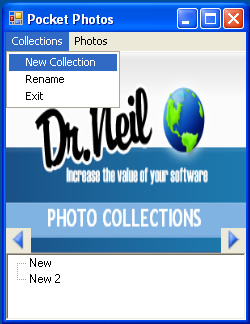
There are also issues with the RenameCollection form and SelectPictureDialog. Selecting either of the menu items (Rename or Add Photo) that create and run these dialog boxes will cause an unhandled exception to be thrown and the application will crash.
The InputPanel being displayed in the RenameCollection form is being caught by the CLR JIT compiler as an invalid class. The offending code is in the GotFocus event handler for the TextBox:
private void renameTextBox_GotFocus(object sender,
EventArgs e)
{
    Microsoft.WindowsCE.Forms.InputPanel ip =
      new Microsoft.WindowsCE.Forms.InputPanel();
    ip.Enabled = true;
}
You may think you could solve this by only calling the code when running on a Windows Mobile (WinCE) device. Something like this:
private void renameTextBox_GotFocus(object sender,
EventArgs e)
{
    if (System.Environment.OSVersion.Platform ==
        PlatformID.WinCE)
    {
        Microsoft.WindowsCE.Forms.InputPanel ip =
           new
           Microsoft.WindowsCE.Forms.InputPanel();
        ip.Enabled = true;
    }
}
However, this will not work as the CLR JIT compiler attempts to compile an entire method at a time, not just the code path being taken in this code run (this makes sense when you think about it). The next step is to extract the contents of the if scope into another method:
private void renameTextBox_GotFocus(object sender,
EventArgs e)
{
    if (System.Environment.OSVersion.Platform ==
        PlatformID.WinCE)
    {
        ShowInputPanel();
    }
}

private static void ShowInputPanel()
{
    Microsoft.WindowsCE.Forms.InputPanel ip =
      new Microsoft.WindowsCE.Forms.InputPanel();
    ip.Enabled = true;
}
This would appear to be the solution as the CLR JIT compiler will only compile the ShowInputPanel method if the method is called and that would mean the platform on which the code is running is Windows Mobile. However there is one more obstacle to overcome. Can you guess what it is?
Think about how the code is compiled. Before the JIT compiler gets to the code it is compiled from C# (or Visual Basic®) into MSIL. During that process the code might be optimized. This optimization process might include inlining some methods, especially short methods that are not called from anywhere else.
To prevent the code from being inlined, add an attribute to the method that is a compiler directive:
MethodImplAttribute(MethodImplOptions.NoInlining)
Using this technique for both the GotFocus and LostFocus event handlers in the RenameCollection form, you can see the resulting code in Listing 2.
With this knowledge you can easily solve the issue with the SelectPictureDialog. The code in Listing 3 shows how you can use the SelectPictureDialog on a Windows Mobile device and the OpenFileDialog on a PC. Examine the code in Listing 3 (and if you know a little something about how I work) you may wonder why it appears that I’ve duplicated the code in the FullWindowsAddPhoto and the WindowsMobileAddPhoto methods. The only difference is in the creation of the dlg object. Unfortunately FileOpenDialog and the SelectPictureDialog do not share the same base class; therefore, refactoring this code to reuse the code becomes less trivial.
Now it is time to turn attention to the user interface aspects of the application. A ScaleForm method handles the orientation and scaling issues (Listing 4). This method determines the orientation and then lays out the control accordingly. This works well on Windows Mobile devices that all have relatively small screens. It also deals well with changes in the DPI.
Now I’ll address three user interface issues: when the application runs on the UMPC the default window size is still the small Windows Mobile size, the buttons seem too small, and the TreeView items could be more finger friendly.
The ScaleForm method is called when you first load the form and also each time the device resizes it, this way it can deal with a device switching from portrait to landscape. You only need to load the code for increasing the size of the controls to be finger friendly for a UMPC once, so add it in the form’s Load event handler, as shown in Listing 5.
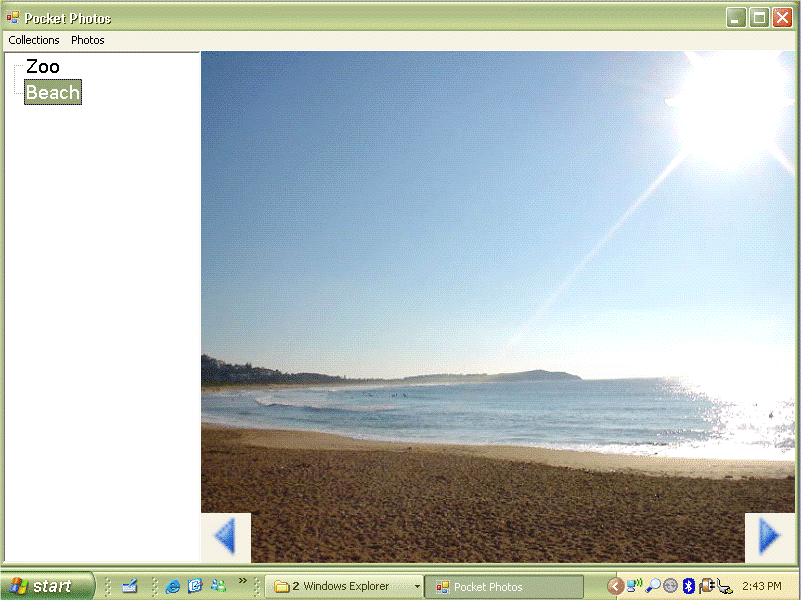
If you now execute the assembly on a UMPC you’ll see that it provides a far better user experience as well as a fully functional application (Figure 8). The fantastic thing about this code is that it will run on either a Pocket PC with the .NET Compact Framework 2.0 installed or a full PC (such as a UMPC) with the .NET Framework 2.0 (or greater) installed. You do not need to recompile the code to move between platforms.
Testing Your UMPC Application
Nothing beats actually running the application on a real UMPC device. This is a good reason to always have an up-to-date installer for your application. A simple installer will make the deployment simpler and testing the application on a real device a smoother experience.
During development, running the application on a UMPC while testing the user interface features can prove tedious. Developing the code on the UMPC (while possible) will become even more stretching for most developers. Let me offer a few tricks to use.
First consider doing the development in a virtual PC (VPC) environment. This has several advantages, and in particular for UMPC development you can change the VPC screen size to match the UMPC screen resolution. If you have enough memory on the development machine, it is worth creating a second VPC image that is set up and running with the same software as on your UMPC and the screen resolution to match.
The UMPC Display Emulator from Microsoft offers another great way to validate your application. It adjusts the resolution of your screen to 800 x 480 pixels and fits it inside an image of a UMPC; Figure 9 shows the UMPC Display Emulator. You can download the emulator from:
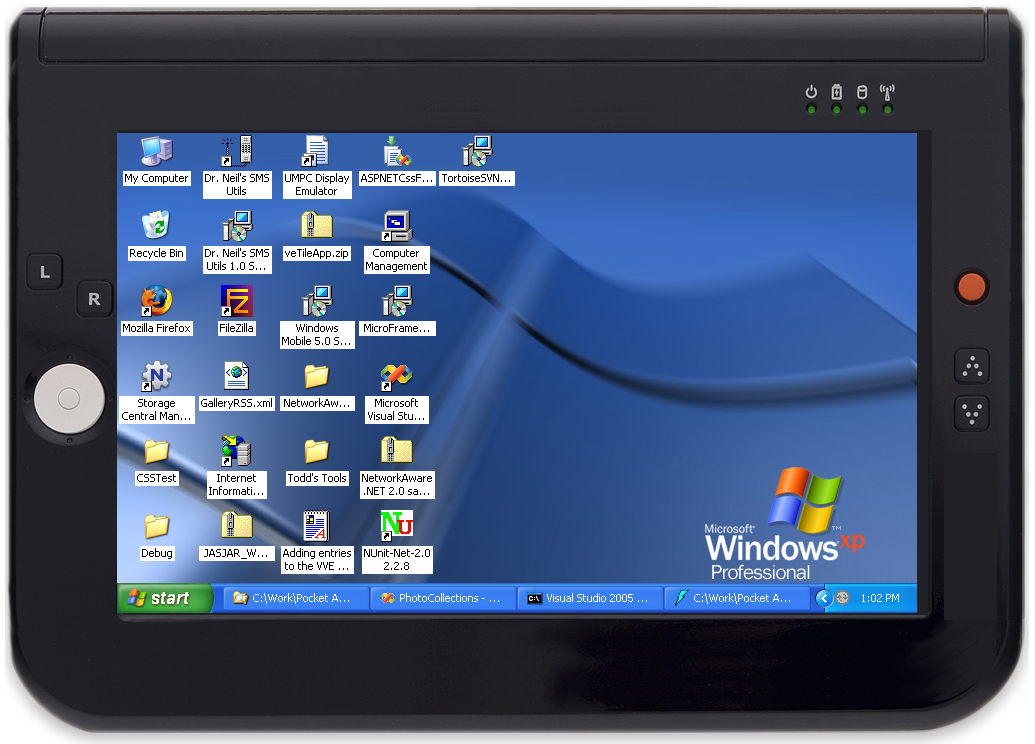
http://www.microsoft.com/downloads/details.aspx?FamilyID=9C01C822-E6D2-4240-9FB3-B00E8FF4FBBF&;displaylang=en
or find it through the Mobile PC Developer Center (http://msdn.microsoft.com/mobilepc)
Final Thoughts
The UMPC hardware platform offers new opportunities for everyone. Windows developers will find their applications run on UMPCs, and with a few user interface changes, these PC applications can provide a great mobile PC experience. Developers who target Windows Mobile devices can extend the reach of their Pocket PC applications to the new Mobile PC hardware options with very little disruption to their existing code and whilst still maintaining support for their Windows Mobile customers from the same code base.
