


When Microsoft® Windows® XP Tablet PC Edition appeared in 2002, developers were sometimes confused about whether to write code on a Tablet PC or if it were possible to develop Tablet PC applications on existing desktop computers.
The solution turned out to be fairly straightforward, if less than intuitive. However, with the addition of Ultra-Mobile PCs (UMPCs), multiple releases of the Tablet and Touch Technology API, and now the Windows Vista™ operating system, this question arises again: What do you need to do to set up your developer environment and create applications for these form factors?
The Windows Vista SideShow platform will also enable hardware manufacturers to build auxiliary displays in a wide range of peripheral devices such as keyboards, LCD display casings, remote controls, and cell phones.
With the increased profile and importance of mobile PC considerations-network awareness, power management, auxiliary displays, screen resolutions, Tablet and Touch Technology, and others, developing applications for mobile customers has never been more dynamic, exciting, and simultaneously challenging. Your customers are probably using laptops, notebooks, Tablet PCs, Ultra-Mobile PCs, or a combination of these. Do you approach these form factors as devices-requiring emulators-full-fledged Windows computers, or some sort of hybrid? The truth is that it depends. It depends on which version of Windows you’re developing on, which version of Windows you’re developing for, which version of the various SDKs you’re using, and which form factor your applications deploy on. But before you fling your UMPC through a twelfth-story window, take a breath. It’s really not all that complicated, and it’s getting simpler and simpler.
Size Matters
Well, at least the size of the operating system’s footprint. Mobile PC form factors are computers, running the full Windows operating system. I cannot emphasize this enough, because this is the main point of confusion developers run into. Mobile PCs-including Tablet PC and UMPC-run Windows XP or Windows Vista. You develop for them by drawing upon the .NET Framework and Windows API. Mobile PCs are full computers, although they are often confused with Windows Mobile® devices. For Windows Mobile devices, you use the .NET Compact Framework for development and run Windows Embedded on the client.
A quick note: you can find all of the resources mentioned in this article through the Mobile PC Developer Center, the main Microsoft portal for information about developing applications for mobile PCs (http://msdn.microsoft.com).
Windows Vista
With Windows Vista, one of the major changes for developers of Tablet PC applications is that the Tablet PC DLLs-and hence the Tablet and Touch Technology-ships as a part of Windows Vista Home Premium, Windows Vista Enterprise, Windows Vista Business, and Windows Vista Ultimate editions. If your development computer has one of these versions installed, there’s no need to download any additional packs. Ink, recognition, and Tablet and Touch Technology are sitting on your computer-even if it is not a Tablet PC-and will just start working when called upon. Likewise for your customers’ computers: if end users are running Windows Vista, all Tablet and Touch Technology is available for those running these premium versions, as well.
To develop your applications, you must install Windows Software Development Kit for Windows Vista and .NET Framework 3.0 Runtime Components. You’ll find this single download is available on MSDN or through the Windows Vista Developer Center. The Windows Software Development Kit (SDK) includes the necessary materials to develop applications with, among other things:
- The .NET Framework 3.0, including Windows Presentation Foundation (WPF).
- Tablet PC features that enable input, recognition, and rendering of ink.
- User experience guidelines for developers of mobile applications.
- Improved APIs for handling changing network conditions.
- Windows SideShow™
- Ink Analysis (Note: When you add a reference to one of the InkAnalysis namespaces, you must also register the corresponding DLL in the GAC. You can either do so manually or also add a reference to IALoad.dll, which handles registration for you.)
- Data synchronization so that customers have the most current information in the least obtrusive manner.
- Network awareness APIs to handle connected/disconnected scenarios.
- Power management functions to keep batteries operating for the maximum amount of time.
- Many samples.
- Connections to communities from which you can get answers to solve even the most troublesome bugs.
The Windows SDK enables you to decide which programming model you want to use. Windows Forms (either COM or managed) and WPF are available for you to use in your Tablet PC and mobile PC applications. In addition to the documentation available for each of these, the SDK loads samples into “C:\Program Files\Microsoft SDKs\Windows\v6.0\Samples\TabletPC” directory.
COM
The Windows SDK installs the following header files that pertain to Tablet and Touch Technology. These are saved by default in “C:\Program Files\Microsoft SDKs\Windows\v6.0\Include”.
- msinkaut.h contains the core ink capabilities for COM.
- IACOM.h contains the InkAnalysis functionality for the COM layer.
- RTSCOM.h contains the RealTimeStylus and StylusPlugin calls for COM.
.NET Framework Windows Forms
The Windows SDK installs all the managed DLLs for Tablet and Touch Technology, which include the following namespaces that contain Tablet and Touch Technology APIs. (Don’t forget using or imports statements in your applications):
- Microsoft.Ink. This namespace contains APIs that implement digital ink on the Tablet PC and was the original managed namespace from the first release of the Tablet PC API. This has all of the managed elements for ink, recognition, rendering, and persisting ink. Additionally, starting with Windows Vista, the managed layer of the InkAnalysis API resides in this namespace. InkAnalysis gives developers the ability to parse free-form ink into words, lines, paragraphs, bullets, and other meaningful data.
- Microsoft.Ink.TextInput. New in Windows Vista, this namespace contains the APIs exposed by Tablet PC Input Panel.
- Microsoft.StylusInput. This namespace contains APIs that handles the stylus packet data from a digitizer in real time. It has become known as the RealTimeStylus API because of the major object in the namespace.
- Microsoft.StylusInput.PluginData. This namespace contains the data passed to RealTimeStylus plug-ins.
Windows Presentation Foundation
Windows Presentation Foundation (WPF) provides the basis for building applications and high fidelity experiences in Windows Vista, blending together application UI, documents, and media content, while exploiting the full power of your computer. The functionality extends to the support for Tablet PC, UMPC, and other forms of input, a more modern imaging and printing pipeline, accessibility and UI automation infrastructure, data-driven UI and visualization, as well as the integration points for weaving the application experience into the Windows shell.
Overly dense content is difficult to read quickly in mobile situations, and a dense user interface layer requires a great degree of user attention.
You can also use the following namespaces that are directly designed to be used with WPF.
- System.Windows.Controls. Use the InkCanvas control, an element in this namespace, to receive and display ink input. Generally done through a stylus, though you can also use a mouse with a digitizer to produce ink strokes. The created strokes are represented as Stroke objects, and can be manipulated programmatically and by user input. If you only need to render ink onto a surface (rather than recognize or parse the ink) the InkPresenter control renders ink on a surface.
- System.Windows.Ink. Provides classes to interact with and manipulate ink on the Windows Presentation Foundation (WPF) platform.
- System.Windows.Input. Contains a lot of classes that provide access to the stylus, gestures, and other important classes related to ink and commands.
- System.Windows.Input.StylusPlugIns. Provides classes that support manipulating data from a tablet pen in WPF. Essentially, this is the WPF version of the StylusInput managed API.
With the various layers available, you can decide which platform is best suited for your mobile PC needs. You can use WPF for applications deployed on computers running Windows Vista, but WPF is also backward-compatible on computers running Windows XP. One development hitch is ensuring that you use the correct version of InkAnalysis or StylusPlugin APIs, as there are three of each-COM, managed, and WPF.
You Changed What?
WPF and Windows Forms have different object models for collecting, storing, manipulating, and rendering ink. With essentially three platforms that support digital ink, the Windows Forms and COM platforms share a similar object model, but the object model for the WPF platform is newly architected.
Do you treat these form factors as devices, requiring emulators, full-fledged Windows computers, or some sort of hybrid?
All three platforms ship objects and controls that enable an application to receive input from a tablet pen. The Windows Forms and COM platforms ship with InkPicture, InkEdit, InkOverlay and InkCollector classes. InkPicture and InkEdit are controls that you can add to an application to collect ink. You can attach InkOverlay and InkCollector to an existing window to ink-enable windows and custom controls. The WPF platform includes the aforementioned InkCanvas and InkPresenter controls.
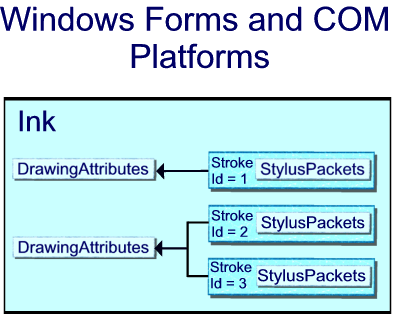
On the Windows Forms and COM platforms, InkCollector, InkOverlay, InkEdit, and InkPicture each expose a Microsoft.Ink.Ink object. The Ink object contains the data for one or more Microsoft.Ink.Stroke objects and exposes common methods and properties to manage and manipulate those strokes. The Ink object manages the lifetime of the strokes it contains; the Ink object creates and deletes the strokes that it owns. Each Stroke has an identifier that is unique within its parent Ink object.
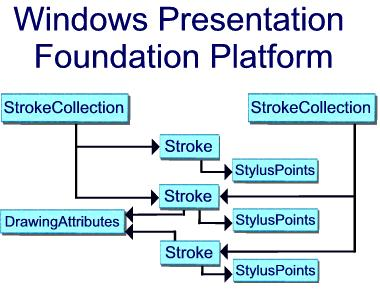
On the WPF platform, the System.Windows.Ink.Stroke class owns and manages its own lifetime. You can collect a group of Stroke objects together in a StrokeCollection, which provides methods for common ink data management operations such as hit testing, erasing, transforming, and serializing the ink. A Stroke can belong to zero, one, or more StrokeCollection objects at any give time. Instead of having a Microsoft.Ink.Ink object, the InkCanvas and InkPresenter contain a System.Windows.Ink.StrokeCollection.
On the Windows Forms and COM platforms, the Microsoft.Ink.Ink object constrains the lifetime of the Microsoft.Ink.Stroke objects, and the stylus packets belong to the individual strokes. Two or more strokes can reference the same Microsoft.Ink.DrawingAttributes object, as shown in Figure 1.
In WPF, each System.Windows.Ink.Stroke is a common language runtime object that exists as long as something has a reference to it. Each Stroke references a StylusPointCollection and System.Windows.Ink.DrawingAttributes object, which are also common language runtime objects (Figure 2).
I’m Working on XP Here
Some of you are still using Windows XP as your operating system. If you fall into this category, then there are some special considerations to take in order to develop and test Tablet PC and UMPC applications fully.
Windows Vista SDK
You can still install the Windows Vista SDK onto your Windows XP development computer and insert the Tablet and Touch Technology within your applications. And if you are one of the developers who are using a Tablet PC as your development environment, you are all set. If your developer computer is not a Tablet PC, you should first download and install the Windows XP Tablet PC Edition Software Development Kit 1.7 and then download the Windows Vista SDK.
Remember, too, that I mentioned that the recognizers are incorporated directly into premium versions of Windows Vista. The same, however, is not true for computers running Windows XP (except for computers running Windows XP Tablet PC Edition). In order to enable handwriting recognition in this case, install the Microsoft Windows XP Tablet PC Edition 2005 Recognizer Pack, after first installing the Tablet PC SDK. (Although the recognizers and their functionality are not redistributable, you are free to use them on your development computer in order to build, troubleshoot, and test your applications.)
The Recognizer Pack provides ten handwriting-recognition engine languages:
- English (US)
- English (UK)
- French (France)
- German (Germany)
- Italian
- Japanese
- Korean
- Chinese (Simplified)
- Chinese (Traditional)
- Spanish (International Sort)
Tablet PC Platform SDK
If you cannot or do not wish to install the Windows Vista SDK, you can still create highly robust Tablet PC and UMPC applications. The most glaring loss of functionality is that you cannot use the Windows Presentation Foundation for rendering, nor can you take advantage of the APIs for the Tablet PC Input Panel that ship with the Windows Vista SDK.
Having said that, you still have exceptional APIs with which to work. As I mentioned, the latest version of the Tablet PC Platform APIs is the Tablet PC SDK 1.7, available through MSDN Downloads. The Tablet PC SDK 1.7 documentation contains reference and conceptual topics about core ink scenarios, the StylusInput APIs (for managed code), and details about ink-enabling Web pages. You’ll find many samples and updates to topics from earlier versions. The SDK also contains the COM version of ink functionality, the SetInputScope API reference, and the following managed namespaces:
- Microsoft.Ink
- Microsoft.StylusInput
- Microsoft.StylusInput.PluginData
You can add further functionality by installing the Update for Microsoft Windows XP Tablet PC Edition Development Kit 1.7, from MSDN Downloads. This update includes a COM version of the StylusInput API, as well as the InkAnalysis API for COM and managed Windows Forms. (Note that the version of InkAnalysis for Windows Presentation Foundation is only available in the Windows Vista SDK.) Again, to enable handwriting recognition on a non-Tablet PC running Windows XP, install the Microsoft Windows XP Tablet PC Edition 2005 Recognizer Pack after installing the SDK.
One avenue of functionality that enables cross-platform scenarios is the Windows Journal Reader Supplemental Component for the Windows XP Tablet PC Edition Development Kit 1.7. One of the first applications to support ink was Windows Journal. For a while, it was the shining example of how a Tablet PC running an ink-enabled application could provide for a great user experience. Using the Journal Reader component, you can develop an application that converts Journal notes to an XML format. From the Journal XML format you can either open and view Journal notes in your own application or convert them to a new format. For more information about the Journal Reader, see Converting Journal Notes to XML, SVG, and OneNote in the MSDN Library.
Sharing Between Platforms
Although the platforms have different object models for the ink data, sharing the data between the platforms is very easy. The code example in Listing 1 saves ink from a Windows Forms application for use in a WPF application.
With its compact, ergonomic design, the Ultra-Mobile PC is ideal for use in limited attention scenarios, such as driving or walking.
For more information about the differences between the object model for ink in WPF and the .NET Framework, take a look at The Ink Object Model: Windows Forms and COM versus WPF in the MSDN Library.
How Do I Write?
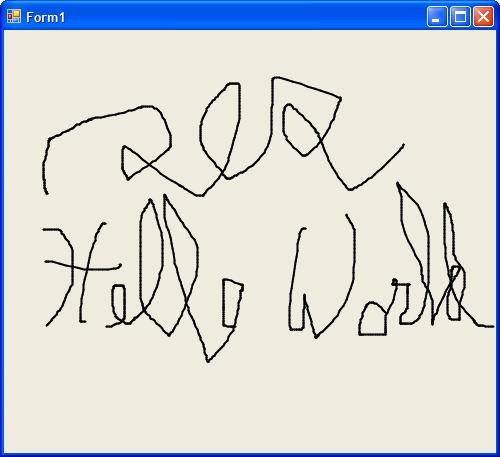
Just because you have the software to create ink-enabled applications, it doesn’t mean you can pick up your favorite pen or stylus and write on your 22-inch flat screen. If you are not lucky enough to have a computer with a built-in digitizer, there are a number of ways to get around this. First of all, you can use the mouse for ink input. Mouse commands are intercepted by the pen thread and will trigger ink rendering on appropriate surfaces in an application. Because the sample rate for ink is so much higher than for mouse input, however, mouse input tends to be a little jagged. In addition, it’s pretty hard to write cursive characters with a mouse. I’ve shown both drawbacks in Figure 3.
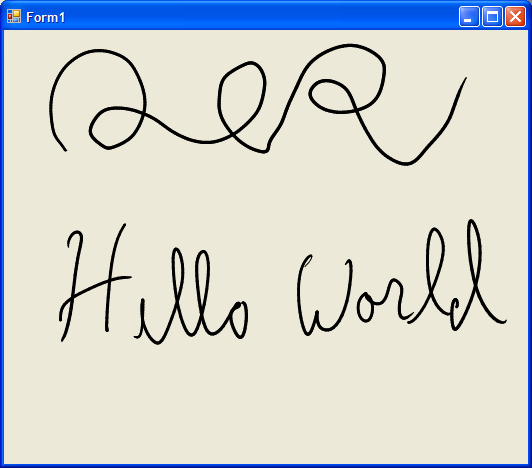
If you are fully testing an application that you know will be deployed on a Tablet PC or UMPC, the best testing scenario is to use the same hardware you’re targeting. If you are on a tight budget, though, all is not lost. With a relatively modest investment, you can use an external digitizer that plugs into your computer. I recommend that you get one of the models with pressure sensitivity, especially if you plan on incorporating that feature into an application. Figure 4 shows how input using a digitizer flows much more smoothly than a mouse.
What about UMPC and the Little Screen?
Developing for Ultra-Mobile PC is just like developing for Tablet PC. The UMPC is a device-like computer that is small, mobile, and runs the full Windows operating system (Windows XP Tablet PC Edition 2005 or Windows Vista). The UMPC accomplishes what many and varied portable devices do today, but because it runs the full Windows XP operating system, the UMPC does everything your desktop computer can.
Developers of Tablet PC and mobile PC applications have the expertise gained from using the API for pen and ink, designing for flexible display layouts, and network and power awareness that will enable them to optimize applications for this new class of computer.
Because the UMPC runs Windows, all of the familiar Windows APIs are still available to you when you design applications for it. In addition, developers of Tablet PC and mobile PC applications have the expertise gained from using the API for pen and ink, designing for flexible display layouts, and network and power awareness that will enable them to optimize applications for this new class of computer.
The typical Ultra-Mobile PC has a slate form factor (ie., no physical keyboard), weighs less than 2.5 pounds, and has a LCD display between five and seven inches in size and with a resistive touch digitizer. With its compact, ergonomic design, the Ultra-Mobile PC is ideal for use in limited attention scenarios, such as standing or walking. In these and other mobile situations, users must be able to interact quickly and simply with their UMPCs by using such methods as direct touch, stylus, hardware control buttons, soft keyboard, dial keys, and speech.
Because of this, the most important factor when developing UMPC applications is being aware of the display limitations. Ultra-Mobile PC applications should present information in a form that users can easily digest at a glance. Overly dense content is difficult to read quickly in mobile situations, and a dense user interface layer requires a great degree of user attention.
To help with this, download the Ultra-Mobile PC (UMPC) Display Emulator from MSDN Downloads. The UMPC Display Emulator enables you to test your application within the screen confines of the UMPC from your higher resolution desktop or mobile PC. Launch the emulator, use the Windows UI to run your application, and see how your application works in the smaller format UI and screen resolutions.
Windows SideShow
Windows SideShow technology enables laptop manufacturers to include a secondary or auxiliary display in laptop designs, many of which were unveiled this year at the 2007 International CES. Users that have laptops that support Windows SideShow can easily view critical information, whether the laptop is on, off, or in sleep mode. The convenience provided by these auxiliary displays will also save time and battery life by allowing users to quickly view meeting schedules, phone numbers, addresses, and recent e-mail messages without having to start up the laptop.
The Windows Vista SideShow Platform also enables hardware manufacturers to build auxiliary displays in a wide range of peripheral devices such as keyboards, LCD display casings, remote controls, and cell phones. These devices can then display information received from a Windows Vista-based PC, providing even more convenience to everyday computing. Figure 5 shows some possible examples of Windows SideShow-compatible devices.
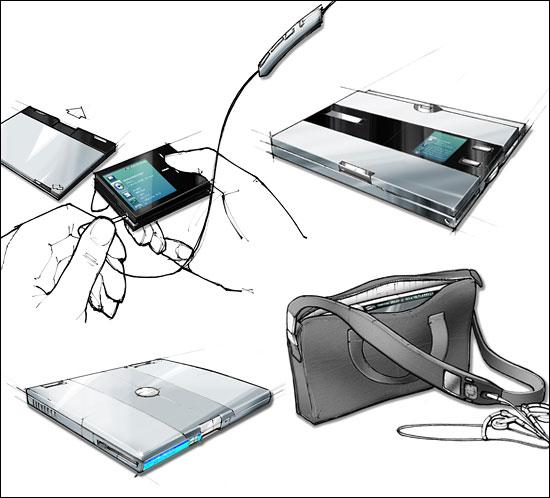
To take advantage of Windows SideShow, your application must register for the service. The Windows Vista Software Development Kit includes a Windows SideShow-compatible device simulator that developers can use to test their gadgets without physical hardware. The SDK also includes sample gadgets that work with the simulator and illustrate how to build a simple gadget for Windows SideShow. Reference topics are available both for COM and managed versions of Windows SideShow. In fact, the January issue of MSDN Magazine has a great article by Jeff Richter, “Get Started Writing Gadgets for Windows SideShow Devices,” that details the managed API. You should also review Neil Roodyn’s article, “SideShow Development in Depth” in this issue of CoDe Focus.
User Experience Guidelines for Developers
In addition to suggestions like those for UMPC, the “Mobile PC User Experience Guidelines for Developers” (in the MSDN Library) offers a wide range of findings pertinent for developing applications for portable computers. These guidelines describe how you can optimize the computing experience for your mobile PC users by following established user interface design principles in your application, whether or not the application is designed specifically for mobile computing scenarios. These guidelines include the following topics:
- Power and Device Awareness
- Responding to Changing Network Conditions
- Adapting to a Flexible Display Environment
- Supporting Pen and Touch Input
- Integrating Ink
- Text Input Using the Pen
- Command Input on the Tablet PC
- Ultra-Mobile PC
- Windows SideShow Gadgets
Just because you have the software to create ink-enabled applications, it doesn’t mean you can pick up your favorite pen or stylus and write on your 22-inch flat screen.
Finally, the Mobile PC Developer Center (http:msdn.microsoft.com/mobilepc) contains new and updated content, samples, hands-on labs, videos, and other resources to ensure that your development environment is up to date and that you have all the resources and knowledge you need to create world-class mobile PC applications. All you need now is the will to develop and the time to write code. We all know how hard it is to get those. But when more than half the world’s computers are mobile computers, it’s time to make them a priority (see “Will the Notebook Market Hit a Tipping Point in ‘07?” eWeek.com: http://www.eweek.com/article2/0,1895,2074603,00.asp).
Listing 1: Moving ink from Microsoft.Ink to System.Windows.Ink
using System;
using Microsoft.Ink;
using System.Windows.Ink;
using System.IO;

namespace WinFormsXAMLInkConversion
{
  class InkInterop
  {
    System.Windows.Ink.StrokeCollection
      InkToStrokeCollection
          (Microsoft.Ink.Ink inkToSave)
    {
      byte[] savedInk = inkToSave.Save();

      MemoryStream theMemoryStream =
        new MemoryStream(savedInk);

      System.Windows.Ink.StrokeCollection strokes =
        new System.Windows.Ink.StrokeCollection
          (theMemoryStream);

      return strokes;
    }
  }
}
