


We all know that applications have evolved, and not just towards Web deployment, .NET Framework development, and mash-up functionality.
Applications are also evolving in terms of where and when customers are accessing their applications, their data, facts, and other computing resources.
Customers-and we, ourselves-now demand and expect instant access to everything on a computer without having to drop everything and focus to interact.
Factoring in the context of where users are and what they’re doing when they use your code will ensure your application is meeting all your customers’ needs. Because of its versatility, when you develop an application to deploy on a Microsoft® Windows® computer you should consider aspects such as:
- What additional tasks users are doing at the same time.
- The dimensions of the PC they’re interacting with.
- The ambient distractions in the environment.
- The amount of time and concentration available for the tasks at hand.
Chances are you architect your application that typically has an on-line component (such as one needing services from the Web) so that it performs when isolated from that source of data. That’s good, because to build good on-line applications you need to build awesome off-line applications. Not only can connectivity be intermittent and interrupted, so are the user’s usage patterns, which have evolved from long periods of work to bursts of usage. And do you really want to write the application that runs the user’s battery from 8% down to nothing during a major synch, because you forgot to cache data in case of low battery? Sure, there’s a lot to think about, but these are also opportunities to shine.
Variety of Locations and Interactions
Windows-based computers are no longer just beige boxes sitting under desks. Cutting-edge hardware like the Toshiba Portege R400, Motion LE1600TS, Lenovo Thinkpad X60, HP TouchSmart IQ770 PC (Figure 1), and TabletKiosk eo (Figure 2) signal a new age of computing where users will find a Windows-based device in kiosks, kitchens, and even coat pockets. Developers should consider two implications of these additional locations:
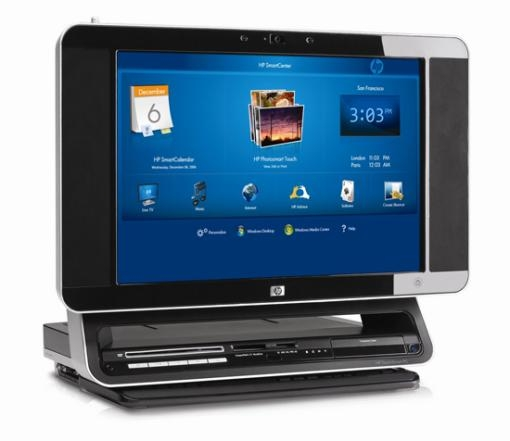
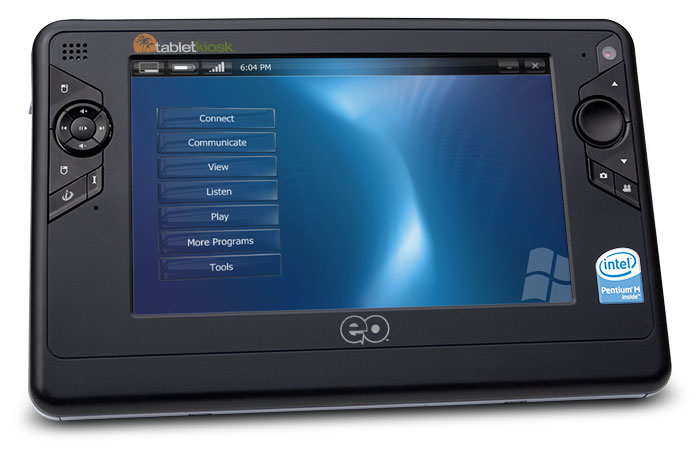
- Ease the user experience to address technology challenges inherent in mobile computing.
- Create new innovative applications and services to cater to needs that come up in the context of a customer’s life away from the desk.
Technology challenges include the need to bridge connectivity outages, multiple power states, and direct interaction with the screen, as in the case of Ultra-Mobile PCs. Creating new applications means responding to the customer’s opportunities through quick bursts of interactions to get up-to-date, glanceable reference information, and to make quick updates or pass time casually. Applications which are thoughtful of these new technological challenges of mobility and respectful of the new usage patterns of the customer are the new best-of-breed of tailored applications.
As you read through this edition of CoDe Focus, you’ll see many scenarios, many technological approaches, many development hints, and a great overview of how the Windows Vista™ operating system helps you and your customers in this truly mobile, truly tailored world of computing.
… don’t expect customers to complete a task fully before starting the next one.
And it’s a good thing. Customers-and we, ourselves-now demand and expect instant access to everything on a computer without having to drop everything and focus to interact. By taking advantage of the new platform and out-of-the-box features in Windows Vista, such as how the Search box appears in folders, you can deliver what your customers expect-and more. When you can anticipate your customers’ needs and tailor your applications to provide ease of use in specific scenarios, those customers will view your applications as more than good-they will see them as indispensable.
Tailoring Applications
Central to an understanding of the technologies provided by the Windows Vista Platform is a sound understanding of the features that we expect to see in these tailored applications; a few to consider are listed here.
Collaboration
Collaboration is about sharing information with the person next to you or a teammate on another continent. With a Tablet PC, sharing may mean turning or angling the screen to share baby photos. And while going through the photos, capturing quick ink annotations right on the screen to indicate who is in the photo and add interesting captions. As a developer, you might write the application as a Web service where the photos are available locally in cached mode. The user can upload the ink annotations whenever a strong network connection becomes available. Because the Windows Vista Platform can recognize ink in the background, the user can elect to save recognized text in the background and then add the results to the JPEG metadata for easy searching. If the computer has a low battery, your application can default to display the photos in lower resolution with a thicker black border.
Multitasking with the Environment
It’s common to see customers physically and mentally juggling various items they have with them: phone, keys, briefcases, book bags, to-do lists, complex project plans, and the like. It’s the same when customers use a computer. A well-developed application can take advantage of gestures to quickly implement commands. For example, while accessing maps on a UMPC in the car, an application should make it easy to accept ink written anywhere on a screen and simple gestures to process the location desired. Or the developer can create UI that fits the situation, like big buttons for easy touch finger targeting and straightforward defaults that demand little interaction from the customer. Also, ensure the application and service is easy to see and use on smaller screens with lower resolution.
Time-Slicing Activities
With all that juggling, don’t expect customers to complete a task fully before starting the next one. They very well may need to come back to ideas, information, and status at a later time. This means updating application state while being mindful of disk access to save battery and expecting network connections to be frequently dropped.
Quick Data and Note Capture for Later Analysis and Retrieval
Add unstructured note taking and file markup functionality to your scenario by taking advantage of out-of-the-box Windows Vista functionality for any mobile PC with a digitizer. Windows Journal is as flexible as a piece of paper with the added advantages of searchable ink and easy adding of “important” flags. Users can read documents and customers can annotate with personal comments if the customer prints to Windows Journal through a printer driver-which means organizing projects with supporting paperwork electronically in one place is actually feasible.
Core Customer Scenarios
We have done a lot of research with our customers to try and define some core areas and scenarios for which they want and need to use their computers more times of the day. Taken together, we often hear: “Give me more applications to help me when I am traveling, shopping, on the train or bus-basically, fill the gaps where I know access to information can help me.” Consider these exciting areas when thinking about projects.
Personal Productivity
Customers want to access their e-mail anywhere and at any time. They want easy-to-use software that lets them build a shopping list while they’re waiting in line at the bank. They want to see where the traffic bottlenecks are before they get on the road, and they want the information to plan an alternate route while they’re stopped in traffic. Their need to access personal productivity tools shouldn’t end when they leave their desk. Your applications should assume that your users are mobile.
Thru Car Navigation
Users want to say “I don’t need to stop for directions” with authority. They want to know that they can find and get to the marine sanctuary, if that’s what their spouse wants to see that day on vacation. Or perhaps they want to find the best place nearby for a celebratory milkshake while they’re watching their kids play soccer.
Social Communities
As social communities become more and more a part of life, people will want pervasive access to their contacts. What good is an instant message if you receive it three days later? And with increased location awareness (such as GPS), a user’s computer should tell them when they are near a friend or contact who have signed up to let them have that information.
Home Automation
Perhaps users want to control their home automation settings from a UMPC while on the couch or as they get ready for bed. Or maybe they want to change the temperature at home if they’ve already left on a trip and they realize they forgot to turn down the thermostat.
Games
Imagine users being able to continue play on your latest game while they sit on the bus or at the airport. Designing games that allow users to play them in short bursts requires a different approach than designing them for extended multiplayer interaction.
Education
Applications that promote mobile educational tools allowing students to travel from the classroom to the library to home presents an exciting area to help change the world! As calculators did in the past, the mobile PC can become a tool to help students at all grade levels do better in school. Applications that help teach handwriting, character-based languages, drawing, painting, surgery-these are just a few possibilities when a school system employs stylus-based computers. Distance education, accessibility, and collaboration are just a few of the pedagogical hurdles that mobile PCs can help conquer. You can imagine endless scenarios for mobile PCs in education, and the technology is now available.
Media and Entertainment
Want to watch the last episode of your favorite reality show that you saved to Windows Media Center? Do you want pervasive access to your satellite radio, from home to the car to work? Maybe you need navigation information to a movie or concert? Imagine extending your home media system to automatically integrate with your car’s systems. Your customers want this too, and they are willing to pay for the ability. The features available to developers now make building these sorts of applications within reach.
Seize What’s Before You
We’re embarking on an amazing odyssey through time and space; the scenery is changing, the customer is demanding, the opportunities are endless. We’re excited about what the Windows Vista Platform has to offer to enable the tailored application to take hold. We’re going to be watching as developers and ISVs work with us to change the world. Don’t underestimate the opportunity to provide applications and services for customers who have just discovered they’ve got time to kill due to a delayed flight, a longer than expected wait at the doctor’s office, or while seated at dinner waiting for ...YOU! to seize the opportunity.
Your applications should assume that your users are mobile.
We’d like to extend a personal note of thanks to a few people who contributed to this article: Eliot Graff, Lora Heiny, Todd Landstad, and Tina Snyder.
