



New to Sedna, Visual FoxPro emulates the My namespace first introduced in Visual Basic 2005.
The My namespace makes .NET Framework classes more discoverable and allows you to write less code. Sedna, the next version of Visual FoxPro (VFP), includes a My namespace as well, for the same reasons. In this article, I’ll look at how Sedna implements My.
In his MDSN article “Navigate the .NET Framework and Your Projects with My” (http://msdn.microsoft.com/msdnmag/issues/04/05/VisualBasic2005/default.aspx), Duncan Mackenzie provides an example of why My is a great addition to Visual Basic (VB). Instead of writing the following to read the contents of a text file:
Dim sr As New IO.StreamReader("c:\file.txt")
contents = sr.ReadToEnd
sr.Close()
you can write this:
contents = _
 My.Computer.FileSystem.ReadAllText("c:\file.txt")
Thanks to IntelliSense on the My namespace, not only is it easier to figure out how to do this task, it’s also less code to write and debug.
The My help file, My.CHM, documents the My namespaces and their properties and methods in detail, including sample code.
Sedna includes a My namespace as well, for the same reasons that VB 2005 does. Many of the My classes are wrappers for SYS() functions, Windows API functions, Windows Script Host properties and methods, and so on. For example, the Play method of Audio, which plays an audio file, is a wrapper for the sndPlaySound Windows API function. So, without having to DECLARE this function or even know it exists, your VFP application can play a sound file. You can replace this code:
#define SND_SYNC 0
declare integer sndPlaySound in WinMM.dll ;
  string lpszSoundName, integer uFlags
sndPlaySound(SoundFile, SND_ASYNC)
with this:
My.Computer.Audio.Play(SoundFile)
In the article, I’ll introduce My in Sedna, showing you some of the namespaces available. I’ll also describe in detail how My controls IntelliSense to display just the members of the namespace you want to see, and how it dynamically instantiates a class hierarchy at run time. Finally, I’ll show you how to extend My to add your own classes as namespaces so they’re easily accessible.
Introduction to My
My is included with the Sedna Community Technology Preview (CTP) available from the VFP Web site (http://msdn.microsoft.com/vfoxpro). You must register My with IntelliSense before you can use it; to do so, run My.APP. You can then type “LOCAL My as” in a code window and choose My from the list of types that appears. The following code is automatically inserted:
local My as My
My = newobject('My', 'my.vcx')
Type “My.” to see a list of the namespaces available within My. They are:
- App: provides application methods and properties, including Execute to open a file such as an HTML document.
- Computer: provides access to various components of the computer system, including the file system, audio, printers, and Registry.
- Data: provides data-handling features, such as methods to close all cursors opened by some code.
- Settings: provides methods to save and restore application settings, such as form size and position and user configuration settings. Interestingly, this class saves settings in an XML file using the same schema as VB’s My.
- User: provides information about the current user, such as their full name and domain.
The My help file, My.CHM, documents these namespaces and their properties and methods in detail, including sample code.
To use My in a development environment, be sure to SET PATH to the directory containing My.VCX.
Examples
The sample form for this article (see the Download sidebar) demonstrates some of the My classes. For example, the following code in Init restores the former size and position of the form:
local My as My
This.oMy = newobject('My', 'my.vcx')
My = This.oMy
if file('sample.xml')
  My.Settings.Load('sample.xml')
  if My.Settings.Exists('FormTop')
    This.Top    = My.Settings.FormTop
    This.Left   = My.Settings.FormLeft
    This.Height = My.Settings.FormHeight
    This.Width  = My.Settings.FormWidth
  endif My.Settings.Exists('FormTop')
endif file('sample.xml')
Note this code instantiates My into a form property so it’s available in any method requiring My but the code declares the local variable My of type My and stores the form property into that variable so IntelliSense works properly.
The code in Destroy saves the form size and position:
local My as My
My = This.oMy
My.Settings.Add('FormTop',    This.Top)
My.Settings.Add('FormLeft',   This.Left)
My.Settings.Add('FormHeight', This.Height)
My.Settings.Add('FormWidth',  This.Width)
My.Settings.Save('sample.xml')
Init also uses properties of My.Computer.FileSystem.SpecialDirectories, such as Desktop and MyDocuments, to populate a list of the locations of certain directories on your system.
The Click method of the Download File button downloads and displays an HTML document:
local My as My
My = Thisform.oMy
lnResult = ;
  My.Computer.Network.DownloadFile('http://' + ;
  '<a href="http://downloads.stonefield.com/pub/repobj.html'";>downloads.stonefield.com/pub/repobj.html'<;/a>, ;
  'repobj.html')
if lnResult = 0
  My.App.Execute('repobj.html')
else
  messagebox('File download failed.')
endif lnResult = 0
Note the simplicity of this code: you don’t have to know what Windows API function to call to download a file from a Web site or to display an HTML document in a browser.
How My Works
Two things make My useful: IntelliSense at design time and the class hierarchy at run time.
IntelliSense for My
IntelliSense is easily the best feature ever added to Visual FoxPro. For VFP developers, it provides a greater productivity boost than anything added before or since. However, one thing that bugs me about IntelliSense is that when used with a class, it displays all members of that class rather than the ones I really want to see.
The secret behind My’s IntelliSense lies in two things: how IntelliSense deals with things defined as “types” in the IntelliSense table and IntelliSense scripts.
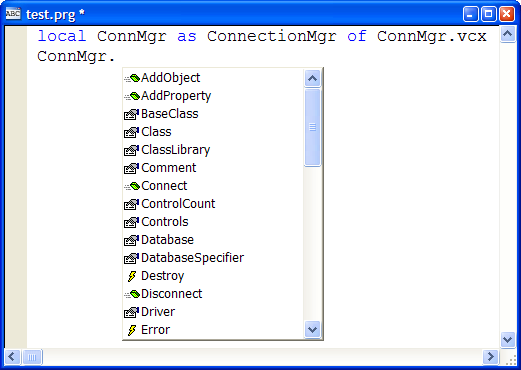
For example, Figure 1 shows the IntelliSense display for the ConnectionMgr class. Although this class has only a few custom properties and methods that I’m interested in, IntelliSense displays everything. This requires more effort to select the exact member you want, especially if you’re not very familiar with the class.
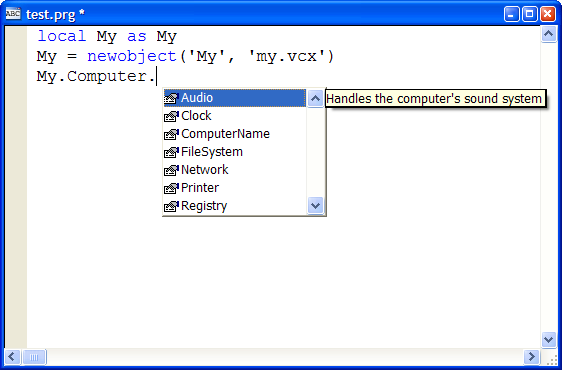
However, as you can see in Figure 2, IntelliSense on members of the My namespace shows only those properties and methods that I’m actually interested in.
The secret behind My’s IntelliSense lies in two things: how IntelliSense deals with things defined as “types” in the IntelliSense table and IntelliSense scripts. The IntelliSense table contains type records for data types, such as Integer or Character, and base classes, such as CheckBox and Form. However, you can define other things, such as custom classes or COM objects, as types as well, either by manually adding records with TYPE set to “T” or using the IntelliSense Manager in the Tools menu. This provides IntelliSense for these classes or COM objects. My uses a type record in the table as well, but it also customizes how IntelliSense works using a script and a custom IntelliSense-handling class.
Look in your IntelliSense table (USE (_FOXCODE) AGAIN and BROWSE) after registering My and you’ll see two new records at the end of the table. One is the type record for the namespace; it doesn’t contain much information other than “My” in the ABBREV and DATA fields and “{myscript}” as the name of the script to use for IntelliSense purposes in the CMD field. The other is a script record, with TYPE set to “S” and ABBREV containing “myscript.”
The DATA memo of script record contains the code shown in Listing 1. This code defines a subclass of the FoxCodeScript class contained in the IntelliSense application specified by the _CODESENSE system variable. This subclass overrides the Main method, which IntelliSense automatically calls. Main instantiates the MyFoxCode class in My.VCX and calls its Main method, passing it a reference to the IntelliSense data object. This object contains information about what the user typed and other IntelliSense settings. As a result of this script, MyFoxCode.Main executes for all IntelliSense tasks for My, such as when you select “My” from the IntelliSense list displayed when you type LOCAL My AS or when you type one of the “trigger” characters-such as a period, an opening parenthesis, or an equals sign-in a statement containing My.
MyFoxCode
The MyFoxCode class does all of the custom IntelliSense work for My, so I’ll examine this class in detail.
The Init method does just two things: turns on debugging in system components (without this, you can’t easily debug problems in the code) and opens the My table, which contains information about the My namespace members (I’ll discuss this table in more detail later), by calling OpenMyTable. If the table can’t be opened, Init displays an error message and returns .F. so the class isn’t instantiated. Since My uses a table of members, it’s data-driven. As you’ll see later on, having My be data-driven gives a number of benefits.
* Turn debugging on.

sys(2030, 1)

* Open the My table.

local llReturn
llReturn = This.OpenMyTable()
if not llReturn
  messagebox(ccERR_COULD_NOT_OPEN_MY_LOC, ;
    MB_ICONEXCLAMATION, ccCAP_MY_FOXCODE_LOC)
endif not llReturn
return llReturn
As you saw earlier, the IntelliSense script calls the Main method (see Listing 2), passing it a FoxCode object. Main handles all of the IntelliSense tasks for My. If the MenuItem property of the FoxCode object contains “My”, you must be on the LOCAL My AS statement, so Main calls the HandleLOCAL method to deal with it. Otherwise, Main determines which character triggered IntelliSense and calls the GetMyMember method to determine which My member you typed (it could also be My itself) and returns a SCATTER NAME object from the appropriate record in the My table. If the trigger character is a period, you need to display a list of the registered My members, so Main calls DisplayMembers to do the work. If the trigger character is an opening parenthesis and the LIST field in the My table is filled in, you’ll call DisplayEnumeratedValues to display a list of enumerated values available for a parameter for the method (similar to what IntelliSense displays when you type “DBGETPROP()". Finally, if the trigger character is an opening parenthesis, an equals sign, or a comma and the TIP memo of the My record is filled in, Main uses the trigger character as the tooltip for IntelliSense. This displays the signature of a method, such as “Login(UserName as String, Password as String) as Boolean.”
Listing 3 shows the code for GetMyMember. This method, called from Main, looks for the member you typed in the My table. It uses the UserTyped property of the FoxCode object (passed as a parameter), which contains the text you typed pertaining to the namespace. For example, when you type:
llStatus = My.Computer.Audio.Play(
UserTyped contains “Computer.Audio.Play”. GetMyMember finds the record for the appropriate member in the My table and it returns a SCATTER NAME object from that record.
Main calls DisplayMembers, shown in Listing 4, to tell IntelliSense to display a list of registered My members when you type a period in the command line. DisplayMembers calls GetMembers to retrieve a collection of members for the specified member. It then fills the Items array of the FoxCode object with the names and descriptions of the members and sets the object’s ValueType property to “L,” which tells IntelliSense to display a list box with the contents of the Items array. This code shows one slight design flaw in IntelliSense: the FoxCode object has a single Icon property which contains the name of the image file to display in the list box. You actually need an additional column in the Items array, since in this case, you want to display different images for properties and methods. Unfortunately, you get only a single image displayed for all items.
Run-time Class Hierarchy
IntelliSense is one thing; it’s another to actually have the My namespace work when you run the code. Although it would be simple to have a class called My with members named App, Computer, Data, and so forth, My is actually more extensible than that; like IntelliSense, it’s data-driven (in fact, using the same My table).
Since there’s one record in the My table for every class, property, and method, it would be tedious to fill out this table by hand. Fortunately, there’s an easier way: with a builder.
The My class is actually a subclass of MyBase, as is the Computer, User, and other classes. MyBase, a subclass of Custom, dynamically adds members to itself based on what it finds in the My table. AddMembers, called from Init, does the work.
Listing 5 shows the code for AddMembers. This method selects records from the My table matching the namespace specified in the custom cNameSpace property, which contains the namespace of this object (for example, “My” for the My class and “My.Computer” for the Computer class). It then instantiates the classes specified in those records and adds them as members. For example, for the My namespace, the My table has records for members named My.App, My.Computer, My.Data, and My.User. Thus, instantiating the My class, which is based on MyBase, dynamically creates all of the members registered in the My table. My actually has no code; it simply has cNameSpace set to “My.”
Computer, the class representing the My.Computer member, is also a subclass of MyBase. So, when the AddMembers method of My instantiates it, its AddMembers method goes through the My table, looking for members of the My.Computer namespace, such as My.Computer.Audio, My.Computer.FileSystem, and so on. Those classes are also based on MyBase, so simply instantiating one class (My) builds a hierarchy as deep as necessary. For example, My has four levels of classes for the My.Computer.FileSystem.SpecialFolders namespace.
Data-Driven Design
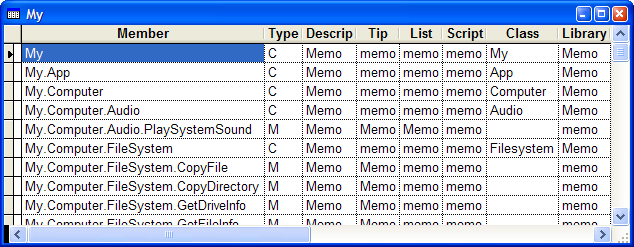
Figure 3 shows the structure of the My table. The MEMBER field contains the name of the member the record is for, with a fully qualified namespace. The TYPE column indicates what type of record this is: “C” for class, “M” for method, and “P” for property. DESCRIP contains a description for the member displayed as a tooltip in the IntelliSense member list. TIP contains the tooltip for a method displayed when you type the opening parenthesis; IntelliSense displays this tooltip as the signature of the method. LIST contains a list of enumerated values displayed for the parameter of a method; this listing capability was discussed earlier. CLASS and LIBRARY contain the class and class library for the class to instantiate for “C” records.
Since there’s one record for every class, property, and method, it would be tedious to fill out this table by hand. Fortunately, there’s an easier way: using a builder. MyBase has a custom Builder property containing “My.VCX,MyBuilderForm.” This tells VFP to use MyBuilderForm in My.VCX as the builder for this class and any class based on it. You can register a subclass of My and its members in the My table by right-clicking the class and choosing Builder. Figure 4 shows what the builder form looks like.
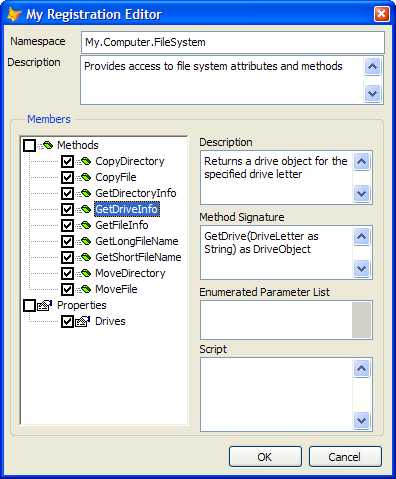
The My Registration Builder allows you to specify the namespace for the class. It defaults to “My.” plus the name of the class, but you can specify something else if you wish. For example, the FileSystem class is a member of My.Computer, so its namespace is My.Computer.FileSystem. IntelliSense displays the description as the tooltip for the class in the type list. The description defaults to the class description as specified in the Class Info function in the Class menu or by choosing the Edit Description function in the Project menu when you select the class in the Project Manager.
The TreeView shows public custom properties and methods for the class; if you want native members displayed as well, change the AMEMBERS() statement in the LoadTree method of the MyBuilderForm class in My.VCX. The check box before the name indicates whether IntelliSense displays the member or not; by default, all custom members are included. IntelliSense displays the description as the tooltip for the member in the member list; it defaults to the description you entered for the member when you created it. IntelliSense displays the method signature as a tooltip for a method when you type an open parenthesis or a comma in the parameter list for the method; this tooltip shows you what parameters you can pass to the method. The signature defaults to the method name and the contents of any LPARAMETERS statement in the method, but you can edit it to display anything you wish, including the data type of the return value. The Enumerated Parameters edit box allows you to see the list of enumerated values for the method’s parameter.
Extending My
What if you want to add your own namespaces to My? You could do that by subclassing MyBase to create new classes with the desired functionality, but what if you already have a class you want to use that isn’t based on MyBase? No problem: open the class and DO FORM MyBuilderForm. This form is an instance of the MyBuilderForm class and can register any class in the My table. Of course, since classes that aren’t based on MyBase won’t dynamically add members to themselves, these classes won’t have a dynamic hierarchy below them nor will you get IntelliSense on members that are objects.
What if you want to add your own namespaces to My? No problem: open the class and DO FORM MyBuilderForm.
To see this in action, open the ConnectionMgr sample class in ConnMgr.VCX, and then DO FORM MyBuilderForm. Make the desired changes, and then choose OK. Close the class. In a PRG window, type LOCAL My as My followed by My.ConnectionMgr. You see IntelliSense on the members you specified.
Summary
My is an exciting new feature in Sedna. It provides easy access to many Windows API functions and Windows Script Host properties and methods, making them both discoverable and easy to use. Like IntelliSense, My is data-driven, so it’s extensible, allowing you to add your own classes to the My namespace so they’re more discoverable and you have more control over what IntelliSense displays for them. Be sure to check out My and see how it can help your application development efforts.
Listing 1: The code in the DATA memo of the MyScript record in the IntelliSense table executes every time you type My in a code window (in this code, Path is replaced with the path for My.VCX)
lparameters toFoxcode
local loFoxCodeLoader, ;
  luReturn
if file(_codesense)
  set procedure to (_codesense) additive
  loFoxCodeLoader = createobject('FoxCodeLoader')
  luReturn        = loFoxCodeLoader.Start(toFoxcode)
  loFoxCodeLoader = .NULL.
  if atc(_codesense, set('PROCEDURE')) > 0
    release procedure (_codesense)
  endif atc(_codesense, set('PROCEDURE')) > 0
else
  luReturn = ''
endif file(_codesense)
return luReturn

define class FoxCodeLoader as FoxCodeScript
  cProxyClass    = 'MyFoxCode'
  cProxyClasslib = 'Path\my.vcx'

  procedure Main
    local loFoxCode, ;
      luReturn
    loFoxCode = newobject(This.cProxyClass, This.cProxyClasslib)
    if vartype(loFoxCode) = 'O'
      luReturn = loFoxCode.Main(This.oFoxCode)
    else
      luReturn = ''
    endif vartype(loFoxCode) = 'O'
    return luReturn
  endproc
enddefine
Listing 2: The Main method of MyFoxCode does all the work of handling IntelliSense for My
* This is main routine that gets called from the IntelliSense
* script for My.

lparameters toFoxCode
local lcNameSpace, ;
  loData, ;
  lcReturn, ;
  lcTrigger
with toFoxCode
  .ValueType = 'V'

* Get the namespace and an object from the My table for that
* namespace.

  lcNameSpace = .Data
  loData      = This.GetMyMember(.UserTyped, lcNameSpace)
  lcReturn    = ''
  do case

* You couldn't figure out which member was specified.

    case vartype(loData) <> 'O'

* If you're on the LOCAL statement, handle that by returning text
* you want inserted.

    case atc(lcNameSpace, .MenuItem) > 0
      lcReturn = This.HandleLOCAL(toFoxCode, lcNameSpace, ;
        trim(loData.Class), trim(loData.Library))

* Other IntelliSense. Start by getting the character that triggered
* IntelliSense.

    otherwise
      lcTrigger = right(.FullLine, 1)
      do case

* If you were triggered by a ".", display a list of members.

        case lcTrigger = '.'
          This.DisplayMembers(toFoxCode, loData)

* If you were triggered by a "(" (to start a method parameter list)
* and the method accepts enumerated values specified in the LIST
* memo, display them.

        case lcTrigger = '(' and not empty(loData.List)
          This.DisplayEnumeratedValues(toFoxCode, loData)

* If you were triggered by a "(" (to start a method parameter
* list), an "=" (for a property), or "," (to enter a new parameter)
* and you have a script, execute it.

        case inlist(lcTrigger, '=', '(', ',') and ;
          not empty(loData.Script)
          lcReturn = execscript(loData.Script, toFoxCode, loData)

* If you were triggered by a "(" (to start a method parameter list)
* or "," (to enter a new parameter), display the parameters for the
* method.

        case inlist(lcTrigger, '(', ',') and not empty(loData.Tip)
          .ValueTip  = loData.Tip
          .ValueType = 'T'
      endcase
  endcase
endwith
return lcReturn
Listing 3: The GetMyMember method looks for the member you typed in the My table
* Determine which member of the namespace the user typed and return
* a SCATTER NAME object from the appropriate record in the FFI
* table.

lparameters tcUserTyped, ;
  tcNameSpace
local loReturn, ;
  lcUserTyped, ;
  llFound, ;
  lnPos, ;
  lcMember, ;
  lnSelect

* Grab what the user typed. If it ends with an opening parenthesis,
* strip that off.

loReturn    = .NULL.
lcUserTyped = alltrim(tcUserTyped)
if right(lcUserTyped, 1) = '('
  lcUserTyped = substr(lcUserTyped, len(lcUserTyped) - 1)
endif right(lcUserTyped, 1) = '('

* Find the record for the class in the FFI table. If there's a
* period in the typed text, try to find a record for the member.

if seek(upper(padr(tcNameSpace, len(__My.CLASS))), '__My', ;
  'MEMBER')
  llFound = .T.
  lnPos   = at('.', lcUserTyped)
  if lnPos > 0
    lcMember = alltrim(__My.MEMBER) + substr(lcUserTyped, lnPos)
    llFound  = seek(upper(padr(lcMember, len(__My.MEMBER))), ;
      '__My', 'MEMBER')
  endif lnPos > 0

* If you found the desired record, create a SCATTER NAME object for
* it.

  if llFound
    lnSelect = select()
    select __My
    scatter memo name loReturn
    select (lnSelect)
  endif llFound
endif seek(upper(padr(tcNameSpace ...
return loReturn
Listing 4: DisplayMembers fills the Items array of the FoxCode object so IntelliSense displays the desired members of a My class
* Builds a list of members for IntelliSense to display.

lparameters toFoxCode, ;
  toData
local loMembers, ;
  lcPath, ;
  lnI, ;
  loMember
with toFoxCode

* Get a collection of members for the current class.

  loMembers = This.GetMembers(alltrim(toData.Member))
  if loMembers.Count > 0

* Add each member to the Items array of the FoxCode object.

    dimension .Items[loMembers.Count, 2]
    lcPath = iif(file('propty.bmp'), '', home() + 'FFC\Graphics\')
    for lnI = 1 to loMembers.Count
      loMember       = loMembers.Item(lnI)
      .Items[lnI, 1] = loMember.Name
      .Items[lnI, 2] = loMember.Description
      if loMember.Type = 'P'
        .Icon = lcPath + 'propty.bmp'
      else
        .Icon = lcPath + 'method.bmp'
      endif loMember.Type = 'P'
    next loMember

* Set the FoxCode object's ValueType property to "L", meaning
* display a list box containing the items defined in the Items
* array.

    .ValueType = 'L'
  endif loMembers.Count > 0
endwith
Listing 5: AddMembers dynamically instantiates all registered members of the current namespace
* Add all member objects registered in the My table.

local lnSelect, ;
  lcNameSpace, ;
  lnLen, ;
  lcCursor, ;
  lcMember, ;
  lcLibrary

* Create a cursor of all objects in this namespace.

lnSelect    = select()
lcNameSpace = upper(This.cNameSpace) + '.'
lnLen       = len(lcNameSpace) + 1
lcCursor    = sys(2015)
select * from __MY where upper(MEMBER) = lcNameSpace and ;
  not empty(CLASS) and not deleted() into cursor (lcCursor)

* Go through the members, adding any that are directly within this
* namespace (for example, if this is "My", add "My.Computers"
* but not "My.Computers.Audio").

scan
  lcMember  = alltrim(substr(MEMBER, lnLen))
  lcLibrary = fullpath(alltrim(LIBRARY), This.ClassLibrary)
  if at('.', lcMember) = 0 and file(lcLibrary)
    This.NewObject(lcMember, alltrim(CLASS), lcLibrary)
  endif at('.', lcMember) = 0 ...
endscan
use
select (lnSelect)
