


It’s crucial to understand how your ASP.NET code compiles in order to debug your Web applications effectively.
ASP.NET 2.0 has changed the way compilation and deployment works, and in this article I’ll dig in and show you how compilation works now and what has changed from ASP.NET 1.x.
ASP.NET 2.0’s release offers many welcome changes and additions to the ASP.NET model of Web development. Compilation and deployment has changed drastically in ASP.NET 2.0 and these changes are somewhat controversial. In this article, I’ll look at the stock project model and explain how the different compilation models work. I’ll look at the project system, the page parsing mechanism and page compilation, and how applications deploy. Because developers have raised a number of concerns about stock projects, Microsoft recently released a couple of add-ins for Visual Studio that address some of the shortcomings and complaints. The tools are Web Deployment Projects and Web Application Projects and I’ll look at these two tools and explain how they complement or replace stock projects.
The New Project Model in ASP.NET 2.0
Microsoft has tightly linked the new project model in ASP.NET 2.0 with the new compilation and deployment features. They completely overhauled the way that page compilation works in the new version without breaking the way that original compilation worked in ASP.NET 1.1.
Making Things Easier
The motivation behind these changes in the model was to make it easier to use ASP.NET and Visual Studio for Web development. In Visual Studio 2003, creating a new project-or even worse trying to open an existing project moved from another machine-was a fairly involved process that required creating a virtual directory, ensuring that FrontPage extensions were installed, and making sure that the project file was configured correctly to point at the virtual directory before you could even start to look at the project. It’s much easier to perform these tasks in Visual Studio 2005.
The changes in the new project model make it quicker and easier to get a new project up and running or to open an existing project.
The changes in the new project model make it quicker and easier to get a new project up and running, or to open an existing project. You can now open a project simply by pointing at a directory and ASP.NET and Visual Studio can figure out from the directory structure how to display, compile, and run that project without any manual configuration or an explicit compilation step. As shown in Figure 1, to open an existing Web Project you can simply point at a directory in the file system and open it as a Web site.
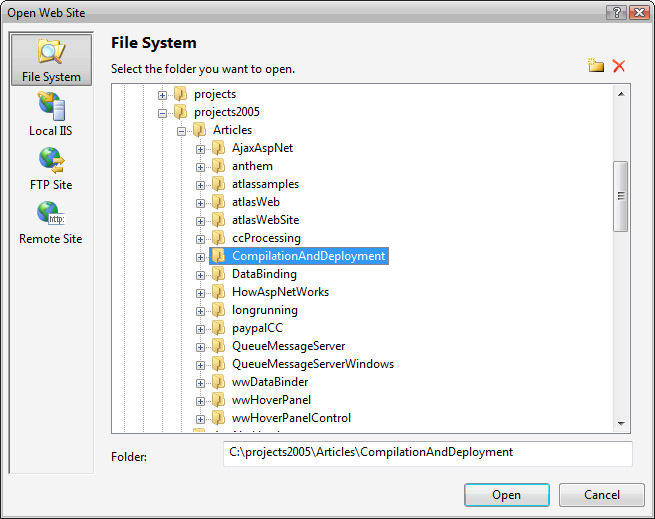
The new project system allows you to open projects from a directory, a local IIS server, an FTP site, and a remote site. Local IIS uses the IIS metabase to find the directory on the local machine. Other than that there is not a big difference from a file-based project. An FTP site opens a remote site through an FTP connection and it uses FTP to figure out the project structure in much the same way as a file-based project does, so everything is pulled into the project.
You can also open a Remote Site, which like Visual Studio 2003, requires installing the FrontPage extensions on the remote or local server (accessed through HTTP). The Remote Site configuration is more rigid in that you have to explicitly add files to the project as it doesn’t auto-detect content. This project opening format is useful if you want to remotely connect to another machine, but it’s also useful for local projects that contain lots of static content that you don’t want to automatically include in your project. For example, if you have a root Web site that has subdirectories that are in turn virtual directories, a Remote Site prevents importing all the child virtual directories, which is not the case with file projects.
The file system project is the easiest and most common way to open a project. Add to that the new built-in Web server that ships with Visual Studio and you can have a new or existing Web application up and running instantly without having to configure anything. Open the directory as a File Web Project in Visual Studio, click View in Browser and your page runs. It’s very easy and this is surely what the ASP.NET designers were shooting for: Making ASP.NET less daunting when creating a new application or running an existing one.
Easy on the Surface-Complex Underneath
But while the overall operation gets easier, the underlying model used to provide this simplicity is actually very complex and requires a lot of help from ASP.NET internals to make it happen. Compared with the ASP.NET 1.1 CodeBehind model, which was purely based on simple inheritance, this new model uses run-time control and event generation, partial classes, inferred referencing of assemblies, delayed run-time compilation, and single-page assembly compilation along with a lot of help from the ASP.NET runtime and Visual Studio to make it all work.
There is a lot of magic that happens inside the ASP.NET runtime to allow features such as individual page compilation, ensuring proper linking of “reference” assemblies, and making sure that the development environment can display accurate IntelliSense information on all of this inferred type information that logistically wouldn’t be available until run time. What this means is that you don’t plainly see all there is to see at design time in terms of code, and you’re relying on Visual Studio to provide you with a rich design-time experience with IntelliSense.
Most of the time you don’t need to worry about these internals because they are encapsulated within the ASP.NET internals. However, once you step beyond simple scenarios and run into situations where the simple method just doesn’t work, you as the developer have to fully understand all of the intricacies of this complex model in order to make it work for you. Depending on the type of applications, this will affect some developers more than others. I think developers building and working with reusable and extensible Web frameworks with lots of generic code will quickly reach the limitations of the new project model.
Deployment
Compilation in ASP.NET 2.0 works by running the new ASPNET_COMPILER.EXE against a Web application. The compiler offers many options to compile your projects including in-place compilation, which requires source code distribution, pre-compiled compilation into all binary code, and partial compilation, which compiles your user code, but lets you distribute and modify the ASPX markup pages. There are at least 16 different compilation and pre-compilation combinations and none of them are likely to be exactly what you want-most combinations produce non-repeatable installs and none of the stock combinations create a single deployable assembly that most developers would expect from a pre-compiled application.
While the overall project behavior gets easier, the underlying model used to provide this simplicity is actually very complex and requires a lot of help from ASP.NET internals to make it happen.
The only simple deployment method is in-place deployment-you simply copy your entire development environment, including source code, to the server. All the other options require that you delete files on the server and then recopy newly compiled files, which disrupts application uptime on the server and requires a fairly strict deployment regimen to work reliably.
To address some of the shortcomings with compilation, Microsoft released Web Deployment Projects (WDP), which provides a mechanism to post-process the output from the ASPNET_COMPILER.EXE and create a single assembly. This add-in is now available from the Microsoft Web site at http://msdn.microsoft.com/asp.net/reference/infrastructure/wdp/.
How Things Work in ASP.NET 1.x
If you’re like me, you probably come from an ASP.NET 1.x background and you’re very familiar with that model. To put things in perspective, let’s first review how things work in ASP.NET 1.x and Visual Studio 2003.
The CodeBehind Model
In ASP.NET 1.1, the model is based primarily on inheritance. When using the default CodeBehind model that Visual Studio 2003 promotes, you have a CodeBehind class that acts as the base class for the final ASPX page class that ASP.NET 1.x generates at run time. So there are two classes: One class contains your user code, the control definitions, as well as event hookups. At run time, ASP.NET generates the second class that contains the page parse tree which is code representation of all of the HTML markup and control definitions that live in the ASPX page.
The ASP.NET 2.0 compiler can compile Web sites directly from source code without an explicit compilation step.
The CodeBehind base class includes control definitions, event hookups, and of course page-specific code, which handles the various page-level events like Page_Load and event triggers like button clicks or change events. Visual Studio generates control definitions and event hookups at design time. This has been a sore point in Visual Studio 2003 because it occasionally mangles the event hookups, mysteriously losing events you had previously mapped to page handlers. Then, when you run the application for the first time, ASP.NET dynamically creates a new class that contains the page control tree, which is responsible for turning the HTML markup, script tags, and control definitions on the page into executable code. Basically each control is parsed into a method that assigns the control attributes to properties. Containers call child methods to set up controls, so this is why it’s called a parse tree-potentially it could be many levels deep depending on the page control hierarchy. This generated class inherits from your CodeBehind class and your control definitions and event handling code is accessible to this class. The additional code generated is responsible for rendering the page.
Visual Studio (or the command-line compilers) explicitly handles the compilation of all the CodeBehind code in ASP.NET 1.x, which creates a single assembly from all of your CodeBehind code of all pages, controls, and classes defined in the project. On the other hand, any markup pages (ASXP/ASCX/ASHX etc.) always parse and compile at run time. ASP.NET dynamically creates this page class and compiles it into an individual assembly in the Temporary ASP.NET Files folder, one assembly per page. This assembly in turn imports a reference to the CodeBehind assembly, so all the CodeBehind pages, control classes, and support types are always accessible to the generated page class. Although each page and control compiles into a single individual assembly, each page or control has a dependency on the single CodeBehind assembly that contains the user code for all of the pages and controls in the project. It’s a relatively simple yet elegant model and it has worked well for ASP.NET 1.x.
Single Page, Inline Markup Pages
In addition to the CodeBehind model, ASP.NET 1.x also supports single page, inline markup pages. In this model, the ASPX page (or ASCX control) contains both the HTML markup along with all the required script code placed inside of <% %> or <script runat="server"> tags. In this page model, all compilation occurs at run time and ASP.NET parses the single page into the control tree class directly inherited from System.Web.UI.Page. The class contains embedded user code inside of script tags, which ASP.NET parses into the appropriate class areas. Server <script> tags become class members, so event handler methods, custom methods, and property definitions are created inside of server <script> tags. You can also use inline code snippets which use <% %> (for code blocks) or <%= %> (expressions). The <% %> are parsed inline to the rendering code.
Like the CodeBehind model, this class compiles into a single assembly stored in the Temporary ASP.NET files folder. The single page model is very simple and there is no explicit compilation. Unfortunately, Visual Studio 2003 did not support the single page model very well, and developers rarely used it, and maybe for good reason, since using the CodeBehind model encourages separating your markup and code. This single page model has carried over to ASP.NET 2.0 and changed very little in the process, but Visual Studio 2005 now supports creating single inline pages.
Page Compilation in ASP.NET 2.0
At the core of the changes in ASP.NET 2.0 is the new way that page compilation works. The key difference is that ASP.NET itself takes over much more control when compiling your Web application. By doing so, the ASP.NET compiler is more self-contained and can produce more modular output than ASP.NET 1.x was able to accomplish. This feature makes it possible for Visual Studio to provide an easy model for creating or changing an ASP.NET page or control and immediately being able to run that page or control without first having to recompile it. ASP.NET uses its new compilation model at run time and Visual Studio uses it at design time, which allows it to dynamically compile pages and provide IntelliSense information about the pages and controls you’re working on.
The ASP.NET Compiler
The key compilation feature is the new ASP.NET pre-compiler, which compiles Web applications. You use the pre-compiler instead of explicit compilation using the C# or Visual Basic .NET compilers. The compiler is comprised of a set of internal APIs in the System.Web assembly, as well as a new command-line utility called ASPNET_COMPILER.EXE.
The ASP.NET compiler manages the compilation process of pages and controls dynamically, and decides how to compile them individually. It parses the content of the site and passes off the compilation of each page/control to the appropriate C# or Visual Basic .NET compiler. In fact, in ASP.NET 2.0 it’s possible to mix .NET languages in a single Web project so you can create pages and controls in either C# or Visual Basic .NET in the same directory. ASP.NET figures out which language the developer used and creates a separate assembly for the C# and Visual Basic pages/controls.
The ASP.NET 2.0 compiler is much more thorough in compiling pages because it picks up related resources; specifically the CodeBeside classes (using the CodeFile= attribute discussed a little later) that contain your user code as well as the traditional markup that is stored inside of the ASPX, ASCX, ASHX, or MASTER page. This makes it possible for the ASP.NET to compile all code at run time-or more accurately, at pre-compile time-without requiring an explicit compilation step by Visual Studio or another development environment. Remember that in ASP.NET 1.x with CodeBehind you had to explicitly compile your CodeBehind classes. In ASP.NET 2.0 this explicit compilation step is no longer necessary because the ASP.NET compiler compiles everything related to the Web project on its own.
Your application-specific code can go inline of the ASPX page or control, it can go into a CodeBeside partial class, or you can create completely autonomous classes in the APP_CODE folder. The APP_CODE folder is a special folder in an ASP.NET 2.0 project and any non-page or control-related source code in your Web project must go into this folder. ASP.NET treats the content of APP_CODE like a library project and compiles the content into a separate assembly. This assembly is then referenced by all of the page or directory-level assemblies that ASP.NET creates from your ASPX/ASCX pages that use any of the classes defined in APP_CODE.
By default, ASP.NET compiles pages and controls on a per-directory level. The compiler takes all pages, controls, and master pages of a given language (C# or Visual Basic .NET) in a directory and compiles them into a single assembly that contains everything that the page or control requires. If you have multiple directories you will have one assembly for each. By default each directory compiles into a separate assembly, but the compiler can also create one assembly per page/control. When running Visual Studio you can use directory-level compilation and every time you make a change in a page or control, the directory-level assembly recompiles. If you make a change in any files in the APP_CODE folder, the APP_CODE assembly also recompiles.
The APP_CODE assembly is referenced by each of the directory/page assemblies, as are any explicit references that are added to the page via the @Reference, @Import, and @Register directives and any external assembly references that are stored in the BIN directory. Because your entire Web application is no longer contained in a single assembly, these explicit directives are often required in order to make content from other directories available to the page in the current directory. This has a number of implications in terms of being able to reference other pages and controls from a page, which I’ll discuss a little later.
As a result of this more full-featured and complex approach to compilation, the compiler can completely handle site compilation on its own. If you take all of your ASP.NET ASPX/ASCX/MASTER Pages and .cs or vb.net files and copy them to the server, ASP.NET 2.0 will compile everything completely at run time on the server and execute the site.
This is a nice development feature that makes it very easy to share applications with others. However, for real-life deployment scenarios, this all-code deployment method is less than optimal so ASP.NET also supports pre-compiling of your Web site including the markup code in ASPX/ASCX/MASTER files. Pre-compilation is a separate step that creates a copy of your Web site or development Web site and compiles the site into a ready-to-deploy installation. The scope of pre-compilation depends on the options chosen, which can range from no pre-compilation to pre-compiling both code and ASPX pages using the ASPNET_COMPILER.EXE command-line utility. There are many different compilation options and I’ll come back to this later in the article when I talk specifically about deployment.
At this point you have a high-level view of how the compilation process works, so let’s dig a little deeper into the actual page compilation mechanisms.
Page Parsing
The first step in ASP.NET compilation really comes down to page parsing where the ASP.NET compiler takes your ASPX page (or user control or master page) and parses it into code that you can compile and then execute. At a very high level, ASP.NET turns the ASPX page with its HTML markup, control definitions, and script content into a class that executes at run time. This process varies depending on the mechanism used (inline or CodeBeside) to set up your Web pages.
By default, ASP.NET 2.0 compiles pages and controls on a per-directory level. This means that your application probably contains pages in multiple separate assemblies.
The simplest model of compilation for ASP.NET has always been the inline compilation mode. The idea of this model is that everything-code and markup-are contained in the single ASPX/ASCX/MASTER page with no external code anywhere. In the CodeBeside model you can store your user code in an external partial class, which allows cleaner separation of the presentation and application logic. I’ll come back to CodeBeside a little later as it is a specialization of the general ASP.NET compilation model.
The inline model takes the content of an ASPX markup page and creates a single class out of this page at compile time. Inline pages don’t use a special inheritance mechanism. Instead, ASP.NET only creates a single page class derived from System.Web.UI.Page that contains both the page parse tree and your user code.
The page parsing mechanism used for inline pages also applies to CodeBeside pages with the main difference between the two models being that user code is applied. In the CodeBehind and CodeBeside model, ASP.NET inherits the generated class from a separate base class you create with your application-specific code. Inline pages, on the other hand, inherit directly from System.Web.UI.Page and have all code generated directly into this single class.
Let’s look at a very simple inline ASPX page shown in Listing 1, which consists of a page with a couple of controls, a single event handler for a button click, and a custom property.
Figure 2 shows the layout of the generated class in .NET Reflector (http://www.aisto.com/roeder/dotnet/), which is a decompiler that lets you see the class structure and source code for a class and its implementation.
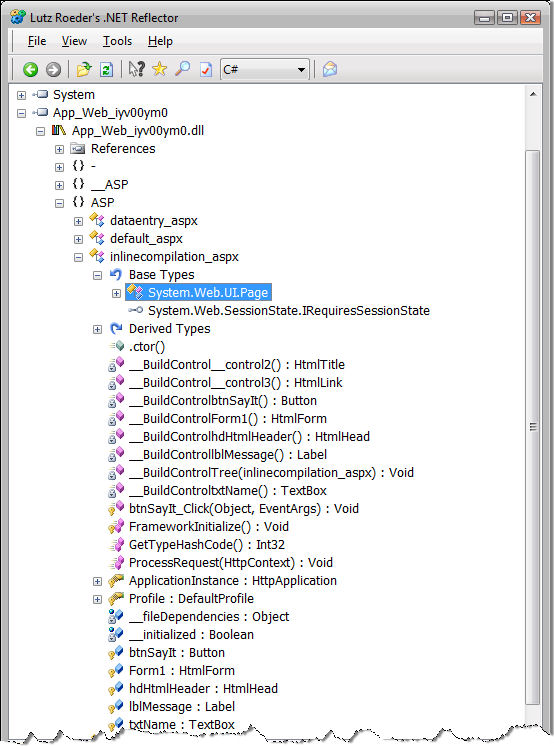
When ASP.NET parses this inline ASPX page, it creates a class that consists of the control declarations as fields. It also adds any methods that you declare (such as the btnSayIt_Click event handler) to handle control or page-level events as well as any custom properties or methods you define in your code. In addition, the class generates code to create the page parse tree, which consists of a bunch of __BuildXXX methods that are responsible for constructing the control definitions and adding them to each naming container’s Controls collection.
You can check out the generated class if you run your Web application in debug mode (<compilation debug="true" /> in web.config) by looking in your Temporary ASP.NET Files folder in the .NET Framework directory. On my machine, the path looks something like this.
C:\Windows\Microsoft.NET\Framework\v2.0.50727\
 Temporary ASP.NET Files\compilationanddeployment\
 fc448eb9\60feb83a
The directory names below the virtual name will vary for your machine and there may be multiple directories-you have to find the right one by looking at timestamps or simply by looking at file content. In this directory you will find the compiled DLLs for the APP_CODE assembly, as well as any directory-level page and control assemblies that you can inspect with Reflector as shown in Figure 2. Also in this directory will be a set of .cs or .vb files that contain the generated ASP.NET classes that ASP.NET uses to compile the assemblies. The names for these assemblies and source files are randomly based on a hashcode, so you have to open them individually to find the one you’re interested in.
If you look at the .cs file for the generated class you will find a class that inherits from System.Web.UI.Page. The class contains a bunch of __BuildXXX methods that build the page parse tree. Listing 2 shows an excerpt of these methods that demonstrate how the page control tree is constructed.
At the highest level is the FrameworkInitialize method, which is called when the page class instantiates. This method handles “housekeeping” functionality for the page, such as managing file dependencies that determine which related pages/control references are pulled in for compilation and assembly referencing. It also validates the safety of request input (unless ValidateRequest="false"). But most important, it fires off the control tree creation by calling the __BuildControlTree method, which corresponds to the top-level node of the parse tree, which is the Page object.
The Page object is the top-level naming container of an ASP.NET page and it, in turn, contains other controls. __BuildControlTree sets up any custom properties of the Page object and then proceeds to add the top-level controls. The Page object typically consists of several literal sections that are static HTML text, an HtmlHeader control, and a Form control. The static text is turned into Literal controls, which are added to the control tree. Individual __BuildXXX methods for each server control returns an instance of a fully-configured child control, which are then added to the container’s Controls collection via the AddParsedSubObject method. There is one method for each control on the Web page with each container control referencing and instantiating its contained controls. The same logic applies to each of the containers. Each container contains literal content and controls, which are also parsed and added to the control tree. __BuildControlForm1 is an example of what a generated container method looks like. This method references the child control’s __BuildXXX methods for each of the controls defined in the form, so the TextBox, Button, and Label controls are added by referencing their respective __BuildXXX methods.
You can also define class-level code inside of <script runat="server">tags of the markup. Any code that is coded inside of the <script> tag is placed at the top of the class and essentially adds to the class prototype. You use this mechanism to add fields, properties, events, and methods-anything that you would normally do to add members to a class. You also define your event handling methods in this <script> block as shown in Listing 1. <script runat="server"> is most common in inline pages, but it also works in CodeBeside and CodeBehind pages.
<%= %> and <% %> Script Tags Complicate Matters
Like <script runat="server">, the <% %> tags allow you to inject code into the generated page class that ASP.NET creates as part of the compilation process. Think of the <script> tag as a class-level insertion point, while the <% %> tags are Render method insertion points that are executed at page rendering time. <% %> script code is also fairly complicated because it can intermix with static and markup code of the page. Take this example:
<asp:Panel runat="Server" id="panelScript">
<%
    for (int x = 0; x < 10;x++ )
    {
%>
<asp:Label runat="server" ID="lblMessage"
           Text="Counting: " />
<%= x.ToString() %><br />
<%} %>
</asp:Panel>
In this code, a script expression spans a literal control, a server control, and an embedded expression and could even span a whole bunch of controls wrapped around a structured program statement. And it’s perfectly legal in ASP.NET.
To make code like this work, ASP.NET needs to override the rendering of the particular container in which any script code is hosted. It does this by using SetRenderMethodDelegate on the container and creating a custom rendering method that handles this code scenario as shown in Listing 3.
Rather than building up the control tree literal controls, ASP.NET only adds server controls to the control tree when <% %> tags are present for a container. To handle the literal content and the script markup, ASP.NET generates a custom rendering method. This method then explicitly writes out any static HTML content and any script expressions using an HTML TextWriter. Any script code (<% %>) is generated as raw code of the method itself.
Because of this hard-coded mechanism, ASP.NET does not allow you to add controls to the container if any <% %> tags are defined in the container. Now you should understand the reason for receiving this error:
The Controls collection cannot be modified because the control contains code blocks (i.e., <% ... %>).
Because the method that renders the container with the script tags is hard coded and uses hard-coded indexes to any referenced controls, adding new controls would not work correctly. The indexes of any added controls would only throw off the hard-coded index used by the generated method.
The CodeBeside Model
Inline page parsing parses a single ASPX/ASCX/MASTER markup file into a single class and creates a single assembly from it. The CodeBeside model is a specialization of the inline model, which breaks out delegation of page or control operation into two distinct classes. Rather than the single class that Inline pages use, CodeBeside contains two classes: The CodeBeside class contains your user code and the ASP.NET control definitions, and the generated class contains the control tree generation code that inherits from this class. Figure 3 shows an overall view of how the CodeBeside model works.
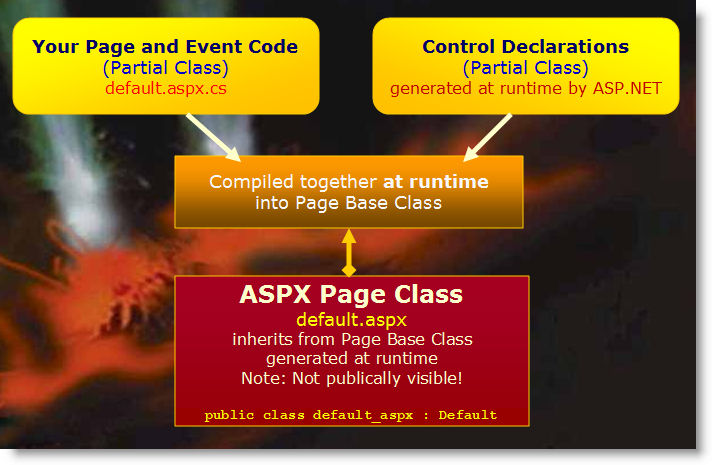
The advantage of this two-class model is that you can separate your user interface (the markup in the ASPX) and your application logic (your .cs or .vb file) into separate entities that are edited separately. For example, this makes it easier to hand off ASPX pages or controls to designers who should see as little as possible about the code that drives the page.
ASP.NET does not allow you to dynamically add any controls to a container if <% %> tags are present.
The base CodeBeside class actually contains two partial classes: One contains your user code, while the other is generated by ASP.NET at compile time and contains the control property definitions. The ASP.NET compiler creates the control definition’s partial class and compiles it together with your user code class to create the CodeBeside base class.
ASP.NET then creates the control tree class as described earlier. The difference is that the generated class doesn’t create the control property definitions but inherits them from the CodeBeside class. Note that in this scenario the controls are defined in the base CodeBeside class, but all the assignments for property values and event hookups are done as part of the control tree class in the various control __BuildXXX methods. Both classes are tightly coupled together. ASP.NET then compiles both classes into the same assembly.
Pages created for CodeBeside use the CodeFile= attribute on the @Page element to tell ASP.NET that it has to find and compile a CodeBeside class. Here you can see the syntax.
<%@ Page Language="C#"
CodeFile="DataEntry.aspx.cs" Inherits="DataEntry"
%>
You need to specify the path to the CodeBeside file and the fully-qualified class name. For demonstration purposes, let’s use the simple ASPX page code defined in Listing 4.
The page is super simple but I’ve added a couple of custom controls to it. One control is defined in this project (CustomControl), and one is an external control in a separate assembly (Westwind.Web.Controls).
Here you can see the DataEntry.aspx.cs CodeBeside class for the markup shown in Listing 3.
public partial class DataEntry :
System.Web.UI.Page
{
    protected void Page_Load ( object sender,
    EventArgs e)

    {
    }

    protected void btnSayHello_Click( object
sender,EventArgs e)
    {
        this.ErrorDisplay.ShowMessage("Hello " +
this.txtName.Text);
    }
}
Note that there are no control definitions and none of the InitializeComponent code that ASP.NET 1.x used. Instead you have a simple, clean class that only shows you your specific user code. IntelliSense works in this code while you’re typing in Visual Studio, even though there’s no second partial class anywhere in your project.
So where is the other half of this partial class coming from? ASP.NET generates it at compile time. What’s interesting is that IntelliSense works in Visual Studio, which means that Visual Studio quietly compiles your ASP.NET page in the background and puts the pieces together at design time to provide you with IntelliSense.
One advantage of using compile time to generate controls is that there’s a very consistent model for control property generation. In Visual Studio 2003 there were many problems with the designer not properly synching up the control definitions, often resulting in lost event hookups or even missing controls in the CodeBehind class. With control generation and event hookup generation delegated to compile time, these inconsistencies have gone away. I have yet to run into any issues yet with the ASP.NET 2.0 compilation engine missing a control definition or event hookup.
If you open up the assembly created from the DataEntry page in Temporary ASP.NET Files with Reflector, you’ll see something like Figure 4.
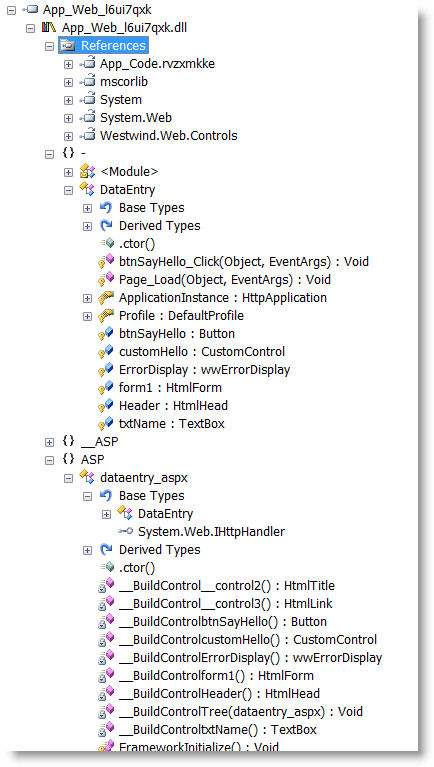
Notice that the DataEntry base class contains the control definitions that come courtesy of the generated partial class that ASP.NET created and combined with your CodeBeside user code class. This combined class is the base class. The dataentry_aspx class is the fully generated class and you can see that it inherits from DataEntry. This class consists purely of the parse tree logic code you can see in the various __BuildXXX methods for each of the controls and containers on the form. This code is identical to the code you saw in the inline page processing routines, except that the control property definitions are coming from the base class. The __BuildXXX method set the control properties and hook up the event handlers. Note that the control property definitions and the control initialization code is split up across the two classes.
The page above contains a custom control that is defined in the APP_CODE directory. You’ll recall that the APP_CODE directory is where any non-page or control code must live, so this creates the custom server control as a separate class in this folder. Notice the References section in the DataEntry class and the APP_CODE.xxxxx reference, which has been added to the assembly and makes any code from the APP_CODE directory available to the page, and any pages or controls in this assembly. Along the same lines, the Westwind.Web.Controls assembly has been imported to support the wwErrorDisplay custom control used to display messages. This is driven by the @Register directive in the HTML markup for the page.
The DataEntry base class inherits from System.Web.UI.Page in this example, but you can override the base class in the partial class definition by inheriting from any other page-derived class. For example, you can create a common base page class for your application and store it in the APP_CODE folder and have any number of pages in the Web application inherit from this class. Keep in mind that if you do this, the page base class will not have strongly typed access to any controls on the page since the controls are defined and assigned higher up in the hierarchy, even if you define the control properties in this base class. ASP.NET creates the control definitions in the generated CodeBeside partial class with the new keyword so any existing control definitions are ignored.
There’s a partial workaround for this problem using the CodeFileBaseClass attribute on the @Page directive. When set to a class name, ASP.NET will not override any pre-existing properties on the specified base class. For example:
<%@ Page Language="C#" AutoEventWireup="true"
         CodeFile="DataEntry.aspx.cs"
         Inherits="DataEntry"
         CodeFileBaseClass="PageBaseClass"%>
In this case, any control properties defined on PageBaseClass will be used instead of new properties generated in the DataEntry class and so PageBaseClass will be able to reference the control properties it defines.
Unfortunately, this only works if you have a CodeFile attribute in your page directive. If you want to inherit a page directly from a base class in APP_CODE or an external assembly, you can’t use CodeFileBaseClass and ASP.NET will continue to blithely generate control definitions in the generated partial class. This means that it will not work to use existing control properties in the wwMessageDisplay class.
<%@ Page Language="C#"
    Inherits="Westwind.WebStore.MessageDisplay"
CodeFileBaseClass="Web.Controls.wwMessageDisplay"
%>
The only workaround to get the wwMessageDisplay page to receive control assignments is to use FindControl(), which is slow and cumbersome.
Referencing Other Pages and Controls
Remember that page and control compilation happens on a per-directory basis! So referencing other pages and controls becomes a little trickier for ASP.NET 2.0, because you cannot assume that a CodeBeside class from another page or control is available in the current assembly. At best, all pages and controls in the same directory end up in the same assembly; at worst, each page or control gets its own assembly and they know nothing about each other.
If you need to reference another page from a control or another page entirely, you need to explicitly import it with the @Reference directive. In ASP.NET 1.1, all CodeBehind classes are immediately available to your entire Web application. ASP.NET 2.0 requires an explicit assembly reference to load it.
Assume for a minute that you have the DataEntry.aspx page I showed earlier and you want to create a second page that uses the same CodeBeside class so you can reuse the page logic, but change the page layout in DataEntry2.aspx by changing a few colors and moving around the page controls. In essence, you want to have two ASPX pages reference the same CodeBeside file. Here’s how to do this:
<%@ Reference Page="~/DataEntry.aspx" %>
<%@ Page Language="C#" AutoEventWireup="true"
         Inherits="DataEntry" %>
I’m leaving out the CodeFile attribute reference and the CodeBeside class of the DataEntry page, and adding the @Reference tag to the page to force the CodeBeside class to import.
The same is true with any user control definitions. To import a user control you need to use the @Register tag, which imports the assembly that the control lives in. ASP.NET is smart during compilation and figures out exactly where related assemblies live based on how the project compiles. If the control or page lives in the same assembly, ASP.NET does not actually add a reference. But if the user control is external-in another directory, for example-then ASP.NET adds the assembly reference.
Referencing Problems
If you can explicitly reference other pages and controls in your markup pages, things work fairly well, but if you dynamically load controls or reference pages in your code, things get a lot more complicated.
The most common problem I run into is loading controls dynamically. In ASP.NET 1.x, you might have run code like this to dynamically load controls into a page.
public partial class DynamicControlLoading :
System.Web.UI.Page
{
    protected CustomUserControl MessageDisplay;

    protected void Page_Load(object sender,
                             EventArgs e)
    {
        MessageDisplay = this.LoadControl(
          "~/UserControls/CustomUserControl.ascx")

          as CustomUserControl;
        this.Controls.Add(MessageDisplay);
    }
    protected void btnSay_Click(object sender,
                                EventArgs e)
    {
        MessageDisplay.ShowMessage(
                       this.txtMessage.Text);
    }
}
CustomUserControl, in this case, is a simple user control that lives in another directory and is loaded dynamically at run time. Let’s also assume that if you dynamically load this control you’ll have a choice of several controls, or the end-user might even create a custom control that is dropped into place instead.
If you run the code above in ASP.NET 2.0, it will likely fail. I say likely because there are some inconsistencies that will sometimes pick up control references automatically. For example, this will happen if the user control lives in the same directory and compiles into the same assembly as the page, or if another page has the control referenced.
It should and usually will fail. Why? Because ASP.NET compiles on a directory level and the CustomUserControl lives in a separate directory and goes into a separate assembly. It’s not visible to the page class to get a strongly-typed reference. IntelliSense will show a big, red exclamation point or nothing at all for the MessageDisplay control. When you run the page it will bomb.
You can reference the control as the Control type of course, but if you need to access any custom properties on the user control beyond Control properties, you have to resort to using reflection. As far as I know, there’s no way to add a reference to another user control or page programmatically at run time.
As an alternative, you can choose to not load controls dynamically or at least provide a mechanism to load user controls beforehand on a page with the appropriate @Register tags. But that’s not always possible. Another option is to create a user control base class in APP_CODE and expose the public interface there. The main problem with this is that this base class can’t see the page’s controls unless FindControl() is used, making this method cumbersome and ugly.
I’ve run into similar situations with inheritance scenarios, such as inheriting one master page off another’s CodeBeside class. There are cases where inherited controls are not recognized properly by the higher level classes resulting in type mismatches, especially when loading UserControls on master pages. Removing controls on inherited pages also will cause problems, even if the controls are defined explicitly in lower-level classes.
Inconsistencies that reference other types are incredible time wasters because you think that you have things working consistently only to find out later that’s not so when you change a completely different page. What’s worse is that you must understand the model in order to get your head around the problem.
The overall ASP.NET 2.0 compilation model is internally complex. Most of the time you don’t need to understand it, but when you run into these boundary scenarios, you really must understand what goes on behind the scenes so you can work around the quirks.
Deployment with ASP.NET 2.0 Stock Projects
Once you’ve created your ASP.NET application and have it running inside of the development environment for testing, the next big step is to deploy the application. When it comes to moving your Web application online there are a number of deployment models available. These are listed in Table 1.
Full pre-compilation allows you to compile all ASP.NET application code and markup.
All three models have their strengths and weaknesses. Let’s take a closer look.
In-Place Deployment
In-place deployment is the simplest way to get a Web site online, but it’s also the most insecure. With in-place compilation you essentially copy your exact development configuration to the Web server, including ASPX/ASCX/MASTER markup pages and CodeBehind pages, all the code contained in APP_CODE and any static content-like images, themes, style sheets, etc. There’s no pre-compilation involved with this model and the copy process is truly one-to-one between your development environment and the Web server. ASP.NET 2.0 completely compiles the site at run time. ASP.NET uses the in-place model when you’re running inside of Visual Studio.
Although in-place deployment is the simplest format conceptually, it has a few serious shortcomings. First and foremost you have to deploy your source files, which is a security issue both for source code protection as well as for security concerns. If you put the source code on the server, the code is potentially accessible to anybody with physical access to the box. Someone else could look at the code and even change it on the server. That’s good if you need to make changes, but obviously that’s bad if an unauthorized person or a hacker tampers with the code. Though this may be unlikely, the potential for damage if somebody gains access to the machine is huge.
If you have a vertical application you probably don’t want to ship your source code to your customers, so in-place compilation also doesn’t work well if you want to keep the source code from prying eyes.
Actual deployment to the server involves simply moving the files from a development directory to the server, but it means that anytime you make a change you have to remember which files to update on the server unless you redeploy the entire site.
Full Pre-Compilation
The most common deployment scenario is full pre-compilation. In this model you use the ASPNET_COMPILER utility or the Web Site Publish feature inside of Visual Studio, which uses the same compilation APIs, to pre-compile your site in its entirety. This means that all markup pages (ASPX/ASCX/MASTER), CodeBeside classes, and all code in the APP_CODE directory are pre-compiled. The compiler takes the existing Web site and publishes the site to a new directory copying all files that relate to the Web sites including static files like images and CSS files. The compiler is essentially generating a complete copy of your Web site outputting a large number of compiled files in the BIN directory.
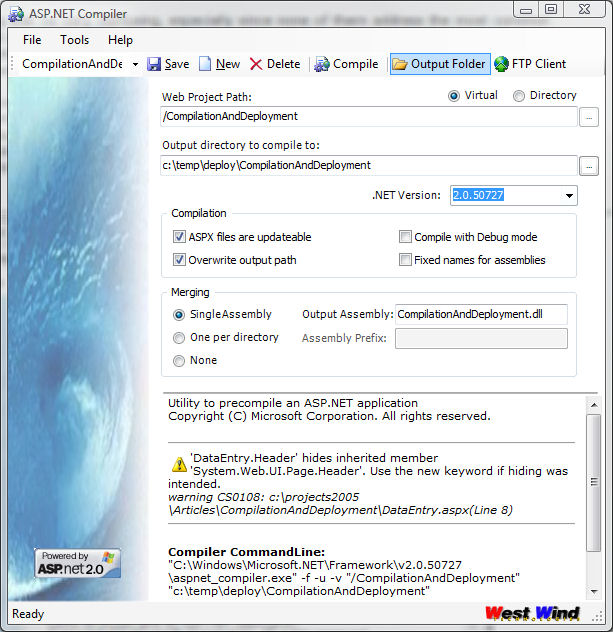
Pre-compilation comes in many different flavors. You can choose to compile pages into one assembly per page or compile them into a directory. You can compile with debug mode on or off. You can compile a physical path or an IIS virtual directory etc., (I’m not going to go through all of the options here). I’ve provided a tool (shown in Figure 7) that you can use to experiment for yourself and check out the output generated from the compilation. Instead I’ll run through a few common scenarios that I’ve used to successfully deploy my applications.
The first example compiles the entire site with directory-level assemblies that are as close to a default compilation as it comes:
aspnet_compiler.exe -f -v
"/CompilationAndDeployment"
"c:\temp\deploy\CompilationAndDeployment"
This takes the Virtual Directory (-v "CompilationAndDeployment") to be compiled into the output path (c:\temp\deploy\CompilationAndDeployment) forcing the directory to be recreated (-f). Figure 5 and Figure 6 show the Visual Studio Solution and the output of the BIN directory created by this compiler command line.
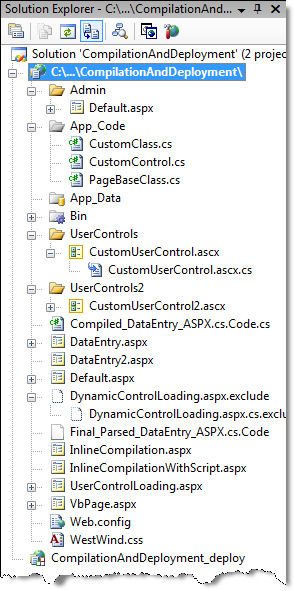
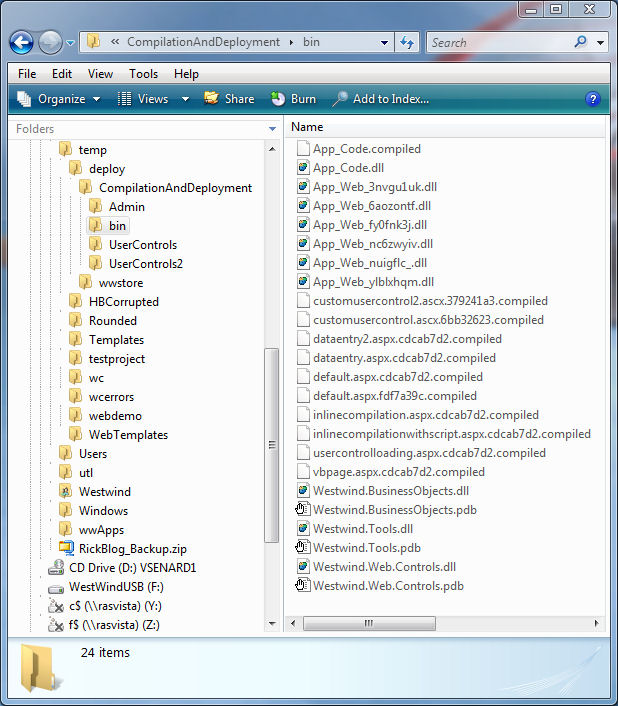
You’ll notice that the compiler recreated the entire directory structure in the output path. The root directory still contains ASPX/ASCX pages, but these pages are merely marker files that contain this text:
This is a marker file generated by the precompilation tool, and should not be deleted!
The file’s actual ASPX code file is compiled and contained in one of the assemblies in the BIN directory. The marker file is maintained for one reason only: To support Windows Authentication. If you need to set specific Windows file rights on a directory or specific file, an actual file must exist in order for Windows Authentication to work. If you don’t use Windows Authentication, you can remove these marker files.
The BIN directory itself contains a number of assemblies. The App_Web assemblies contain compiled page and control classes, one for each directory and for each language. Remember that I had one Visual Basic .NET page in the project and this page compiles into a separate assembly. There’s also the App_Code assembly that contains all the code from the App_Code directory. If you have a global.asax file it will also use another separate assembly, as will each ASP.NET theme used. The theme classes provide ASP.NET with the location of the theme directory and any of the linked style sheets used with a theme.
Themes are hard-coded into a pre-compiled Web application. Whatever value is configured in web.config at compile time becomes the hard-coded default theme for the site, and changing the value in web.config has no effect after compilation. If you need to override themes in a pre-compiled application, you have to explicitly override the theme for each page in the OnPreInit() event of the page.
You’ll also notice a large number of .compiled files in the BIN folder. The .compiled file is a marker file for each page and control in the Web site, and identifies the class used inside of the assembly. These files are not optional as they map the ASPX pages to the appropriate precompiled classes in the precompiled assemblies. If you remove the .compiled file, the page that it maps will not be able to execute and you get an ASP.NET error.
I already showed the directory-level compilation mode. One really annoying aspect of this mode is that it creates new IDs for all of the files on each build. Notice that each assembly has a generated name, and any time you re-compile the site the names of the assemblies and support files change. In other words, you can’t create a repeatable build. For deployment to a Web site this means that you pretty much need to completely redeploy all files in the BIN directory every time!
Directory-level compilation is just one of about 20 compilation combinations available. In another mode, the fixed names mode, you can create assemblies with fixed names, which means that each page/control is created in its own assembly. Here is the command line to use fixed names mode.
aspnet_compiler.exe -f -fixednames -v
"/CompilationAndDeployment"
"c:\temp\deploy\CompilationAndDeployment"
In this mode there’s one assembly and one .compiled file for each page and control. App_Code is still compiled into a single assembly as is each theme. The one advantage of this approach is that it produces a repeatable install, but the file names still have a randomly generated hashcode at the end. However, it is possible to update just the pages or controls that have changed, unlike directory-level compilation where every single compiled file and its associated .compiled file has to be updated. But there are a lot of assemblies generated. Copying these assemblies to a live server will cause your online application to become unstable (and likely fail) as the files are updated one at a time.
If you’re thinking: Yuck, that’s a lot of files, I agree! Neither of these two approaches offers a really clean deployment scenario because you have to copy a lot of files. Compared to ASP.NET 1.x’s CodeBehind deployment scenario, ASP.NET 2.0’s deployment modes can be a nightmare.
To avoid this unstable site situation, you can copy a special marker file-App_Offline.htm-to the root of your Web site. When present this page is displayed whenever any request hits the ASP.NET pipeline. This is a pretty clumsy mechanism that requires file access to the server, but it’s better than the alternative of a crashing Web site while the files are being copied to the server.
Partial Compilation
Another option is partial compilation, which compiles only the CodeBeside classes but leaves the ASPX pages to compile at run time on the server. The ASP.NET Compiler calls this an Updateable site, but this is only partially correct. You still have to run the ASPNET_COMPILER but include the -u flag to make the site updateable.
aspnet_compiler.exe -f -fixednames -u -v
"/CompilationAndDeployment"
"c:\temp\deploy\CompilationAndDeployment"
When compiled with the -u option, the ASPX pages remain intact. In turn you will no longer need the .compiled files since ASP.NET can parse the ASPX pages to figure out what classes and dependencies are required to execute to the page. So the BIN directory looks a bit cleaner with this approach.
However, now you need to make sure to deploy your ASPX pages and keep them in sync with the server. It’s important to understand that although you can edit the ASPX pages on the server, the pages have been modified from your original development pages.
<%@ page language="C#" autoeventwireup="true"
         inherits="DataEntry, App_Web_9kasz7w7" %>
Note that the Inherits tag includes the dynamically generated assembly name. This means that you can modify the page on the server directly, but it also means that you can’t simply make a change to the page in Visual Studio and directly upload your page back to the server because it will not have the dynamic assembly name. Unless you use fixed names compilation, the assembly name will change on every build so you still have to update the page along with the assemblies if you use the default directory-level compilation.
You need to decide whether this mode makes sense-it’s really hard to keep changes in sync between development and live sites in this scenario because your development files and the server files are not compatible without a full re-compile.
All of these options can be very confusing and it’s not easy to see which of these solutions works best for your scenario. To figure the compilation process option out, I built a small ASP.NET Compiler Utility that provides a graphical front end to the ASP.NET compiler for the most common options. The utility, shown in Figure 7, allows you to play with the various compiler combinations and quickly see the results in the output folder. It can also generate a batch file for you and lets you jump directly to your FTP client to upload the code to the server. It also works with Web Deployment Projects for single assembly compilation, which you’ll learn about in the next section.
Web Deployment Projects to the Rescue
As you can see there are lots of problems and no sensible deployment options with ASP.NET 2.0’s stock projects. It’s a pain primarily because you can’t create a single deployable assembly and you can’t create a repeatable install. The best you can hope to do is a full re-deploy of your BIN directory that potentially contains a lot of files.
Even before ASP.NET 2.0 shipped, Microsoft got an earful from developers about the new deployment scenarios and they quickly responded by creating a tool called Web Deployment Projects (WDP) (http://msdn.microsoft.com/asp.net/reference/infrastructure/wdp/) as an add-in for Visual Studio.
To create a new WDP project you add a WDP project to your Visual Studio .NET solution (Figure 8).
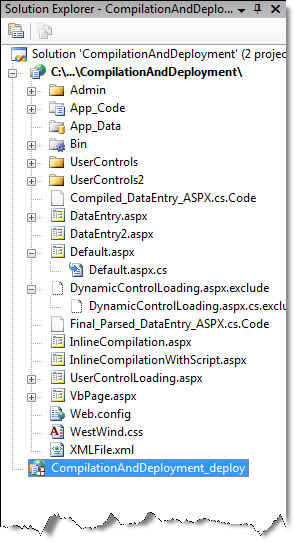
WDP is a separate MSBUILD-compatible project and you can administer it through a Project Property Pages interface. The most important feature is that WDP can create a single assembly from the mess of files that the ASP.NET compiler creates from stock projects. There are actually several other options for compilation including creating directory-level assemblies or page-level assemblies, but WDP adds support for fixed names for each of these options so the compilation of these assemblies is repeatable.
Once you run WDP you can specify an output path, and how you would like to “merge” your Web project output. WDP takes over the ASP.NET pre-compilation process by first creating a standard ASP.NET compilation of your site and then merging the resulting assembly output into a single assembly, one per directory or one per page. In all cases, use repeatable names for the assemblies created. You’ll see the main configuration form for WDP in Figure 9.
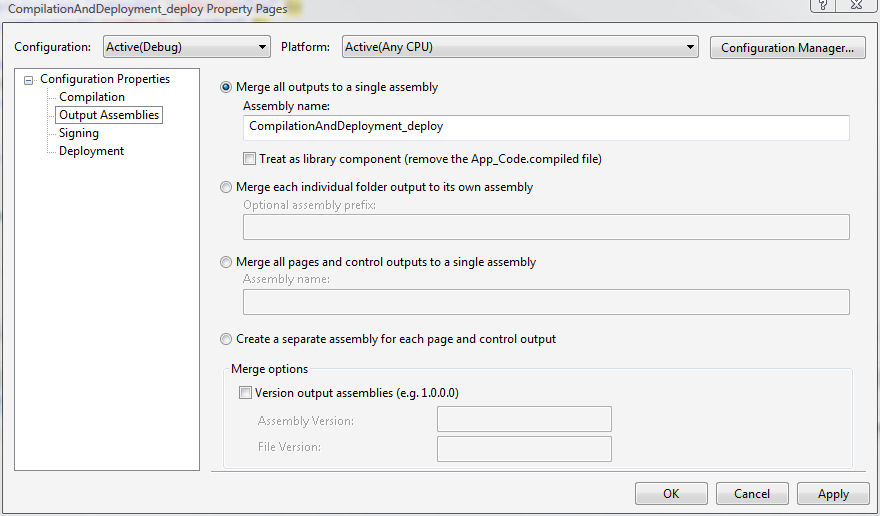
The tool includes other options such as signing and versioning the resulting assemblies, as well as the ability to create a virtual directory in the output folder. It even has the facility to change the content of your web.config file by overriding specified sections with content from an XML file.
Because WDP is a Visual Studio .NET project type, it is also an MSBUILD script that you can automate for build automation, which is difficult to do with stock projects. And while you can integrate WDP with Visual Studio as a new project type, the tool also provides a new ASPNET_MERGE.EXE command line utility which you’ll find in:
C:\Program Files\MSBuild\Microsoft\WebDeployment
You can run this utility against a compiled ASP.NET project and produce the desired assembly merging. I used this tool to provide the integration into the ASP.NET Compiler Tool shown in Figure 7, which is compatible with this tool and can merge into a single assembly as well.
If you use stock projects with Visual Studio 2005, WDP is a no-brainer since it produces much more manageable deployment output. The output generated still includes .compiled files in most cases, but because output is repeatable you don’t need to redeploy these files every time. In most update scenarios you only update the main assembly (plus any changed support assemblies).
Web Application Projects
ASP.NET’s 2.0 project model, compilation, and deployment model has come under some criticism from many developers early on for some of its inconsistencies and complexities when dealing with inheritance and dynamic loading scenarios, along with its complicated deployment options. Add to this the fact that stock projects are housed in a project format that is not like other standard Visual Studio projects and you have a recipe for grumbling developers who are used to a fairly straightforward compilation, project, and deployment model from previous versions of Visual Studio.
Again Microsoft listened and heard the community feedback early on and created yet another tool called Web Application Projects (WAP) (http://msdn.microsoft.com/asp.net/reference/infrastructure/wap/default.aspx). WAP brings back a more structured project style in Visual Studio that is in many ways more similar to a Visual Studio 2003 project, but at the same time embraces all of the new ASP.NET 2.0 features.
First and foremost, WAP is a new Visual Studio Project type. To create a new WAP project you use the New Project dialog as you do with any other project in the Visual Studio IDE. Any project that you create doesn’t automatically pick up files off disk like stock projects, but relies on you to add files explicitly. Because the project is a standard Visual Studio .NET project, it automatically contains built-in support for XML comments, compiler directives, and assembly versioning, as well as MSBuild support, pre- and post-build events etc., and you can automate it with MSBUILD. All of these things that you take for granted in Visual Studio .NET projects are missing in stock projects.
More important though, WAP does away with the CodeBeside model and instead returns to a modified version of the CodeBehind model that ASP.NET 1.x used with Visual Studio 2003. In this model, Visual Studio is responsible for explicitly compiling all CodeBehind classes, and any other classes defined anywhere in the project. So, all of the code in your project compiles into a single assembly.
Web Application Projects bring back sanity to the Web development process with a predictable and consistent project and compilation model.
Because WAP brings back a true Visual Studio project, it is stricter than stock projects. You can’t mix C# and Visual Basic .NET code in the same project any longer and you have to explicitly compile your code in Visual Studio each time you make a change to any of the CodeBehind classes. Debugging is also more exacting-a code change in most cases requires you to recompile and restart the debugger.
However, compilation is fast once again with WAP. I have one project with roughly 80 pages and control classes and it compiles in a couple of seconds. With stock projects a full compile took a painful 25-30 seconds. Using WAP you’ll have to get used to the Ctrl-Shift-B three finger salute (or F6) for building your projects for every code change you make. But, in my opinion, it’s a small price to pay for the simpler model that WAP provides.
WAP also supports Edit and Continue if and only if you use the built-in Web server to debug your applications. The built-in Web server is required because Visual Studio needs to control the parent process it debugs when you use Edit and Continue. This is not possible when you’re debugging against IIS, which attaches the debugger to a running instance of a worker process.
The single assembly compilation for all CodeBehind code does away with a lot of the problems regarding inheritance and control and page referencing, because every page and control of the Web project guarantees that it can freely reference every other control and page of the project, since they all end up in the same assembly. The page parse tree classes are still separate, but all the base classes exist in a single assembly that defines both the control properties and custom method interface from your user code. The class interface is no longer split across two classes as is the case in the CodeBeside model, which is the root of many of the problems I discussed earlier. You’ll see the page compilation model shown in Figure 10.
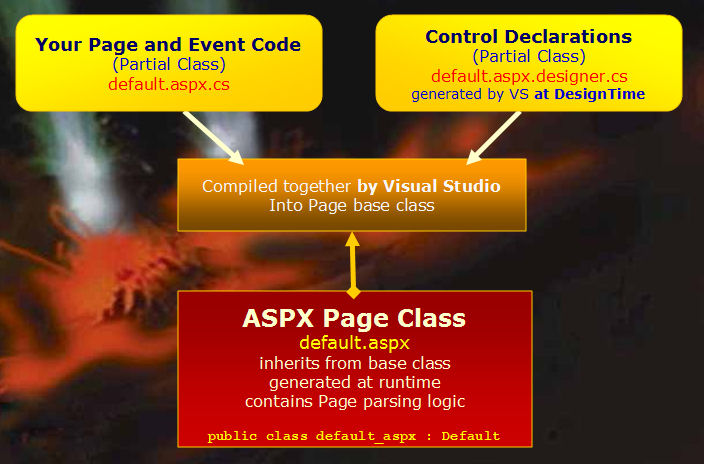
The model is essentially similar to the CodeBehind model in Visual Studio 2003, but WAP projects handle the CodeBehind classes a bit differently than Visual Studio 2003 did. It uses partial classes to separate out the user code and the designer-generated control definitions. So a WAP page consists of three different files:
- Default.aspx the markup page
- Default.aspx.cs the CodeBehind class of your user code
- Default.aspx.cs.designer the control property definitions
Listing 5 shows the page and class headers for these three classes.
If you’re familiar with Windows Forms 2.0 in Visual Studio, you’ve seen the .designer partial class approach, which creates a separate partial class that contains control property definitions. By not generating code into the CodeBehind class, WAP keeps the user code file clean like stock projects, and also minimizes problems by keeping the designer file and visual designer surface in sync. This seems like a subtle change but it has a big effect. By creating property definitions on the user code base class, the class interface is fully defined at this level and when Visual Studio compiles these classes into a single assembly, the classes are fully defined and you can reference them from anywhere in the project as the generated CodeBehind assembly is global to the Web application.
The other big benefit of WAP is that it makes deployment much easier than stock projects-easier even than stock projects with WDP. When you compile a WAP project the BIN directory creates a single assembly. You can now deploy your BIN directory, plus any ASPX/ASCX/MASTER files and any static files.
After deployment, if you find a bug and need to make a quick change you can make the change, recompile the project, and simply upload the CodeBehind assembly back to the server, which is much easier than the stock project’s approach of re-deploying and then copying the entire barrage of files to the server.
By itself, WAP does not compile the ASPX/ASCX/MASTER pages of the project, so by default you still have to deploy those files to the Web site and sync them up with your development or staging site. Because WAP doesn’t compile markup pages it also doesn’t directly catch errors in these pages. However, you can combine WAP and Web Deployment Projects and let WDP compile the entire site for a binary-only installation as described earlier. You won’t end up with as clean an install because WDP will create .compiled files, but it’s still a lot cleaner than what you would end up with in stock projects.
Upgrading from Stock Projects
Upgrading a stock project to WAP involves creating a new WAP project and then copying the old site’s files into the WAP project. The easiest way to do this is to use Explorer and drag-and-drop the files from the old project directly into the WAP project in Solution Explorer. You have to rename the APP_CODE folder because WAP doesn’t support it. You have to convert all markup pages that contain any CodeBeside code. Once you have copied the files to the new project, use the Convert to Web Application option on the Project menu to convert a single file, a folder, or the entire project to a WAP project. The conversion goes through each of the stock project pages and fixes up the @Page directive, converting the CodeFile attribute to a CodeBehind attribute and creating the .designer file that holds the control definitions.
It’s a fairly smooth process, although you may run into a page here or there that doesn’t want to convert. Before you move files over for conversion, make sure your project compiles properly in stock projects as the conversion relies on resolving references and dependencies to figure out how to upgrade them.
Summary
Any way that you look at it, compilation in ASP.NET has some complexities and I hope this article has given you some deeper insight into the compilation and deployment process. ASP.NET 2.0 has brought some improvements and some steps back in this area, but most of all it offers a lot of different options to choose from. Usually options are good, but I think in this case the choices can be overwhelming. This becomes even worse by the fact that the stock project model seems easier to use and doesn’t show some of its problems until later in a typical Web development process, such as when a site is refactored and ready to deploy. So watch out for the gotchas and start thinking about these issues early on in the project.
I prefer to use Web Application Projects whenever I can for any serious work. To me, Web Application Projects bring sanity to the Web development process with a predictable and consistent project and compilation mode that was lacking with stock projects. I’ve worked with stock projects for over a year now and I’ve just hit too many dead ends in this model to feel comfortable with it. Although WAP is a bit more rigid than stock projects when it comes to configuration and explicit compilation, I’ll take the more logical and quick compilation, simple inheritance model, and single assembly output any day over the somewhat unpredictable stock project model.
But that doesn’t mean that WAP is for everybody. If you’re working with stock projects and not running into any problems and you can live with the deployment issues, then there’s no need to switch to WAP. The file-based model using its Edit and Go model of running applications is appealing and make stock projects more easygoing and productive. And even if you use stock projects and run into a dead end you can easily switch to WAP. I will continue to use stock projects for demos and samples and it really can’t be beat for that because of its portability. Even if you are perfectly happy with stock projects, I would still recommend that you check out Web Deployment Projects to simplify deployment-it’s a no brainer to use this tool unless your applications are very small.
Web Deployment Projects can create a single assembly out of the mess of files that stock projects create on compilation.
Please keep in mind that both Web Application Projects and Web Deployment Projects are available only for Visual Studio-they don’t work with Visual Web Developer.
