


Tablet PC and Mobile PC development is very popular today, and it will get more popular and important in the future.
For Mobile PC developers, there are significant changes coming in the near future, some in the Windows XP timeframe, others in Windows Vista. This article provides an overview over what’s on the drawing board or already available in technology preview builds.
Since they were first released, Tablet PCs have gained significantly in popularity; as time goes on, they will move more and more into the mainstream. Currently, Tablet PCs run on a specialized version of Microsoft Windows XP. In the future, all Windows operating systems will support Tablet PC fundamentals, such as digital Ink.
In May 2005, for the first time, notebooks sales surpassed sales of desktop computers.
Mobile PC development has been important for a long time. In fact, in May of 2005, notebook sales surpassed desktop PC sales in the US for the first time ever (for a full month), and they have not given up their lead since then (nor are they predicted to). These devices are used in an ever-growing variety of scenarios, and expectations from features, such as extended battery life, are on the rise.
The Tablet PC and Mobile PC scenarios are of strategic importance to Microsoft, and as a result, many exciting new things are scheduled to release with Windows Vista and with new versions of the Tablet PC SDK, currently available as a CTP (Community Technology Preview) and which also runs on Windows XP.
New Devices
Software developers are most interested in what software can do, which SDKs are available, and how they can use these components in their own applications. In Mobile PC and Tablet PC scenarios, the hardware is equally important, as it is part of what drives new scenarios and opportunities.
One of the obvious next steps is for devices to get both bigger and smaller in physical dimension to supplement the currently available devices. This means that devices will have much larger displays with higher resolutions. On the other end of the scale, devices are getting smaller, moving toward the domain that is currently solely occupied by Pocket PCs.
A development that may be less obvious and less expected is the move toward touch displays. Conventional Tablet PCs use electromagnetic digitizers to sense the tip of the pen on the display. This has advantages. For instance, it allows hardware manufacturers to mount the digitizer (the device that senses the pen) behind the LC display, providing better and brighter display quality.
There are also disadvantages. For instance, you always need a special pen that can be sensed by the EM digitizer. If lost, replacing it can be expensive. It is not possible to interact with the device without the special pen. On the other hand, it is possible to double-tap an icon with a finger(nail) on Pocket PCs (which typically use touch-sensitive digitizers.
Touch screen Tablet PCs provide an additional option. The reason we have not seen them before is that there are some technical hurdles that need to be overcome to provide touch-sensitive displays. The problem is that people rest their hands and arms on the large Tablet PC displays while writing. This is not a problem on smaller devices such as Pocket PCs. On larger displays, it is important to differentiate between a tap of a fingernail that is meant to select an icon (or interact in another meaningful way), and the tap of a fingernail or palm pressure that occurs accidentally while writing with the pen. The software has to do a lot of intense processing to filter unwanted “noise” from meaningful interaction data.
Touch devices have the disadvantage that hovering fingers can not be detected the same way a hovering electromagnetic pen can be. Hovering (or any mouse movement that is not a click) is therefore not natively available on touch devices. Microsoft provides software that makes up for that shortcoming.
For developers, these new devices provide new opportunities, and they also create some new challenges. Higher screen resolutions in Windows Vista will rely on resolution-independent display technologies. This can be handled through vector graphics and exciting new techniques and APIs such as the Windows Presentation Foundation (WPF) formerly known as Avalon. (For more information on WPF, see below.)
Smaller form factors also require some developer consideration. User interfaces that may have worked well on 1024x768 displays may not work well on smaller devices, so developers may have to account for that in their applications. Using techniques such as flow layout (a layout option available in WPF) are helpful in these scenarios. Using this approach, user interfaces can re-flow to accommodate smaller displays without the need for the dreaded horizontal scrollbar, which is known to not work well at all.
New Tablet PC SDK Features for Windows XP
The Tablet PC SDK and its ability to make very complex tasks, such as handwriting recognition, ridiculously easy, has always been nothing short of amazing. Microsoft keeps pushing the limits with a recent Community Technology Preview (CTP), made available in September 2005. This version of the SDK targets the Windows XP-based Tablet PC operating system and it provides some amazing new features, particularly in the area of Ink recognition.
Tablet PCs will be available in new form factors, both larger and smaller than current devices.
The most exciting new feature is Ink Analysis, which is Ink recognition on steroids. Although simple Ink recognition is based on a collection of strokes, Ink Analysis takes a more sophisticated approach, applying both Ink recognition and Ink parsing at the same time. These two aspects are worthy of further explanation.
Ink recognition (or handwriting recognition) refers to the task of recognizing handwriting stored in individual strokes of Ink, and returning it as strings of text. Handwriting recognition is usually tied to a specific spoken language and culture.
Ink parsing refers to two further distinct tasks: Ink classification and layout analysis. Ink classification refers to the division of Ink and strokes into meaningful entities, such as words, lines, and paragraphs. It is also possible to designate certain areas of a larger recognition area, such as a title area in a notepad-style Inking area.
Layout analysis determines the position of Ink and how it relates spatially and semantically. For instance, layout analysis can determine that certain parts of a document are circled and connected to a paragraph, making it an annotation. This allows for advanced features, such as keeping annotations with a certain part of the document, even if the document is re-formatted.
Ink analysis also allows for shape recognition, a feature that was previously very difficult to implement. This feature can be used to recognize simple primitives, such as rectangles, circles, different types of triangles, trapezoids, and more (about a dozen, all in all). This ability is very useful as the basis for many non-text recognition models, such as the recognition of flow diagrams and the like. The provided default set of recognized shapes should handle many needs. Figures 1 and 2 show an example of Ink interpreted through Ink analysis and exported to MS Word. And there is an opportunity for third parties wanting to extend that default set.
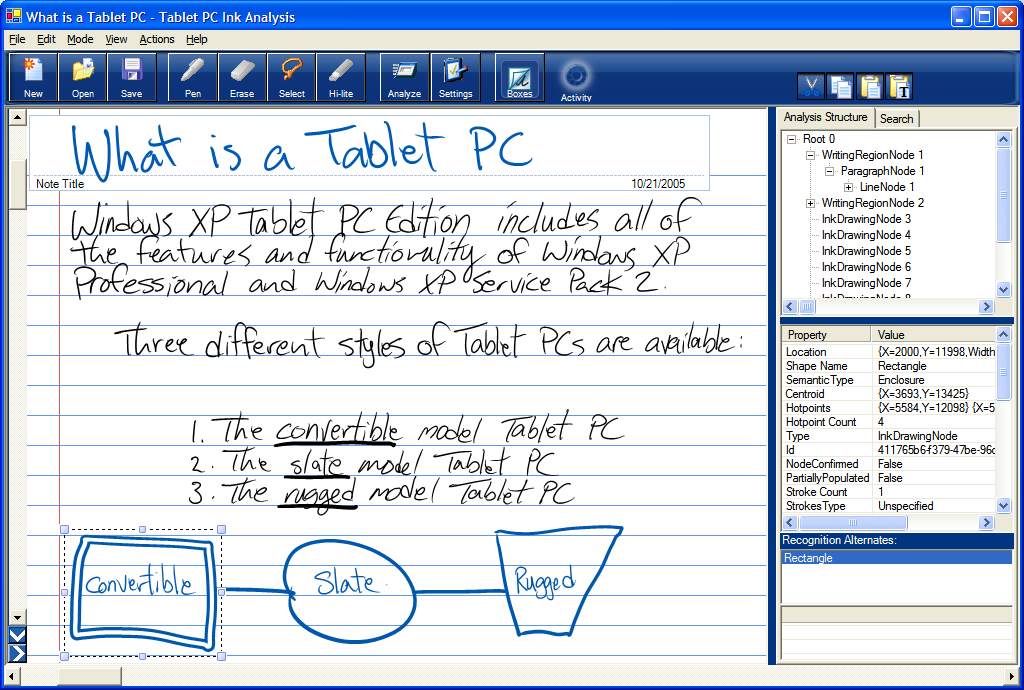
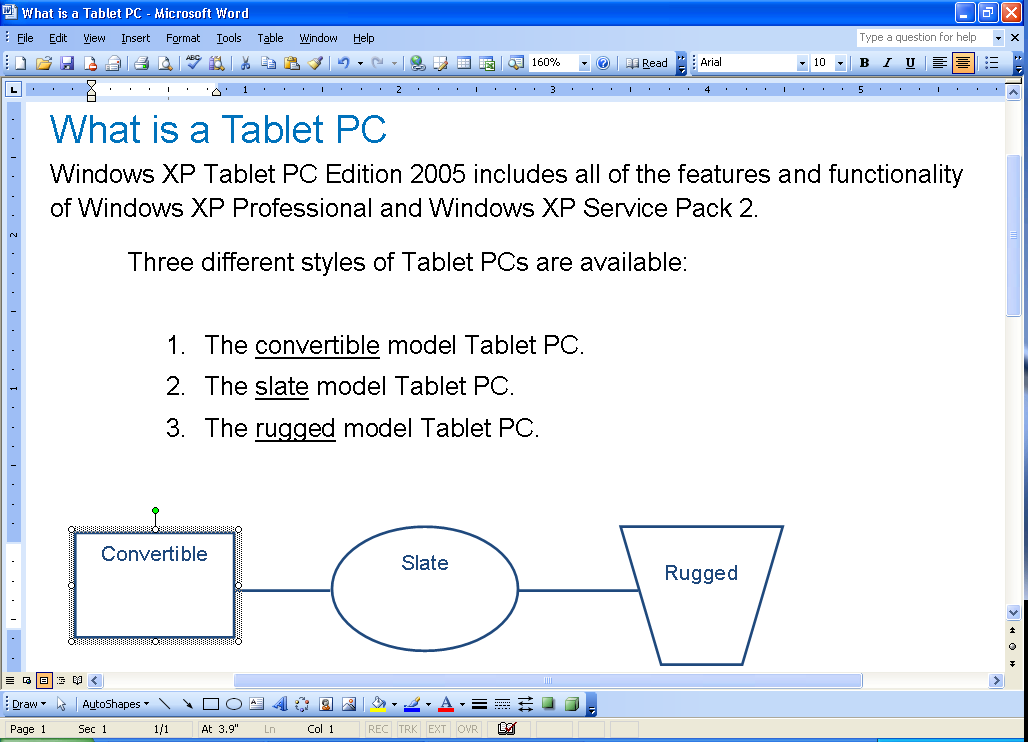
For some examples of what’s possible with Ink analysis, see the “Ink Recognition and Ink Analysis” article in this issue.
Another important new feature is the COM-based Real Time Stylus support. In previous releases of the SDK, the Real Time Stylus API was only available for managed developers. C++ developers, and other COM-based developers such as Visual Basic 6 developers, could only use interop to use the Real Time Stylus. This, of course, defeated one of the fundamental goals of the Real Time Stylus-performance-and has now changed with a native (COM-based) implementation of the Real Time Stylus API. (For more information on the Real Time Stylus, see the “Get Control and Performance with the Real Time Stylus API” article in this issue.)
New in Windows Vista
In Windows Vista, many of the components that were specific to the Tablet PC version of Windows XP have been migrated into the main operating system. Fundamental features, like the ability to recognize or render Ink, are available on all versions of Windows Vista. You can see any version of Windows Vista as a Tablet PC operating system. There are a few components that are specific to actual Tablet PCs. Those fall into the category of accessory applications, such as the Windows Tablet PC Journal, or the TIP (Tablet PC Input Panel). These simply do not make sense unless you have a real Tablet PC.
Ink Analysis is Ink Recognition on steroids.
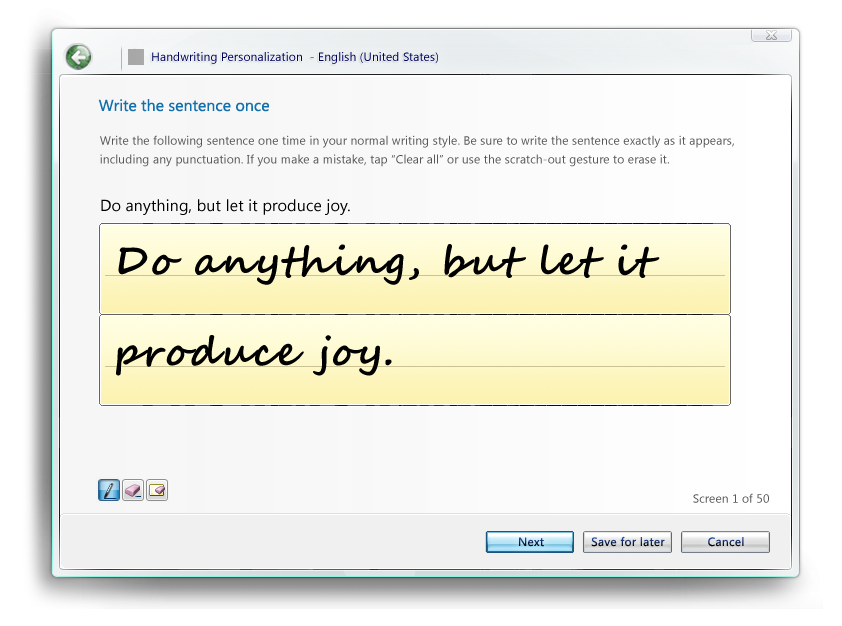
Windows Vista also sports an area of major change when it comes to handwriting: Vista supports personalization. This means that you can train the handwriting recognizer to recognize your handwriting. In Windows XP, all handwriting was recognized the same way, no matter who used the device. Some people think that recognition in Windows XP gets more accurate over time, but this really is not the case; people tend to adjust their handwriting subconsciously. People get trained by the device. Vista supports the opposite, allowing users to run a wizard that can be used to train the recognizer to various degrees, ranging from simple training for characters or words the recognizer gets wrong regularly (Figure 3), to in-depth training by providing vast handwriting samples (Figure 4). Furthermore, users can send feedback to Microsoft about incorrect recognition results, similar to how users can submit application error information to Microsoft today.

Another area that has been greatly improved in Vista is the TIP (Tablet PC Input Panel). It is now smarter in where and at what size it appears on the screen. It can also be resized, an ability that was sorely lacking in Windows XP. It can appear either as a little icon like in Windows XP, or it can appear as a docked panel that can be customized by the user. Figure 5 shows the new TIP in action.
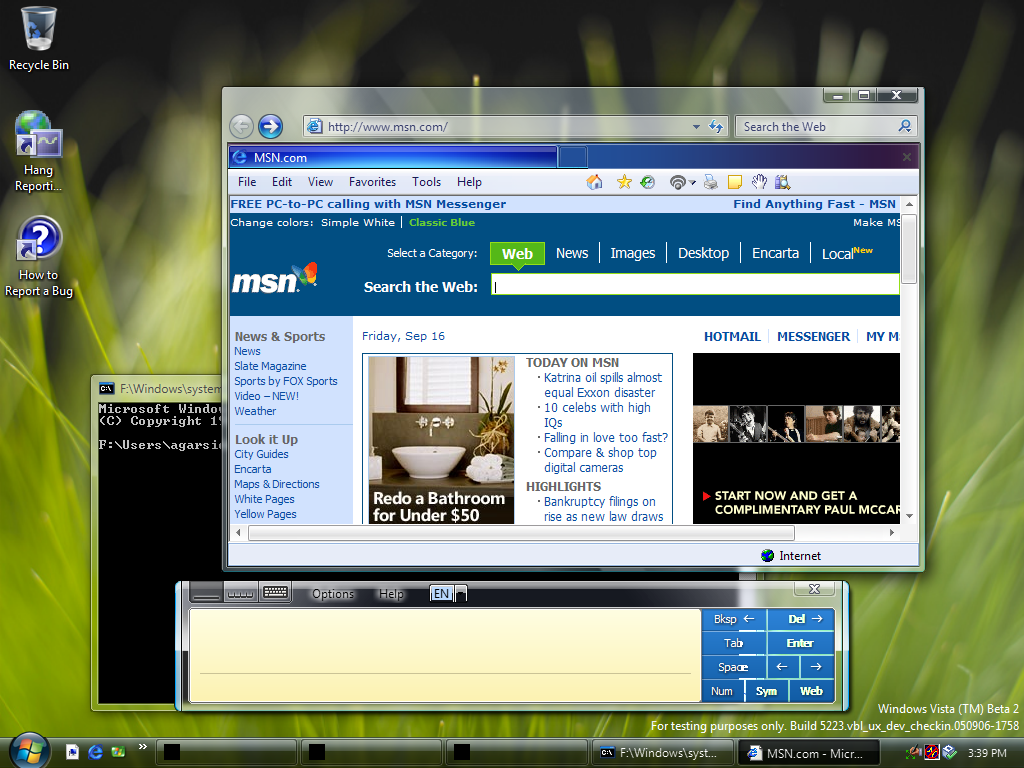
Writing on the TIP has been improved as well. It now supports more sophisticated scratch-out gestures as well as end-of-pen erasing. The overall input area has been optimized for space, which is especially useful in languages that tend to have longer words and sentences.
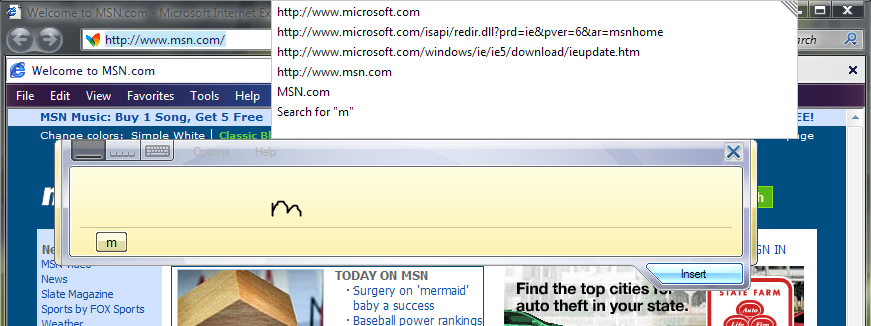
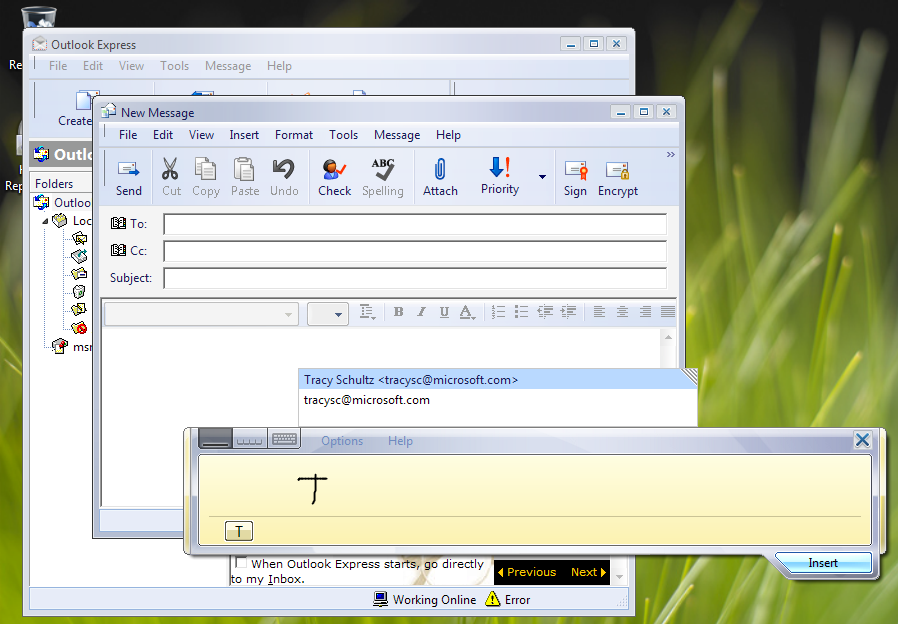
The new TIP now also supports auto-complete in applications such as Internet Explorer (Figure 6 and Figure 7). In XP versions of the TIP, when you write a word, such as Microsoft, it doesn’t get communicated to the focused control (in particular, to the address bar in Internet Explorer) until you hit the insert button. Internet Explorer’s auto-complete does not appear before the insert button is tapped. In Vista, all recognized text is sent to IE’s auto-complete immediately, showing the list of sites IE associates with the word right away, making the whole user experience much more satisfying. This works in Internet Explorer, but also in other instances, such as the WinForms 2.0 auto-complete. There is also an API developers can use for this specific feature, if it is needed for text entry in controls where Ink auto-complete is not supported natively.
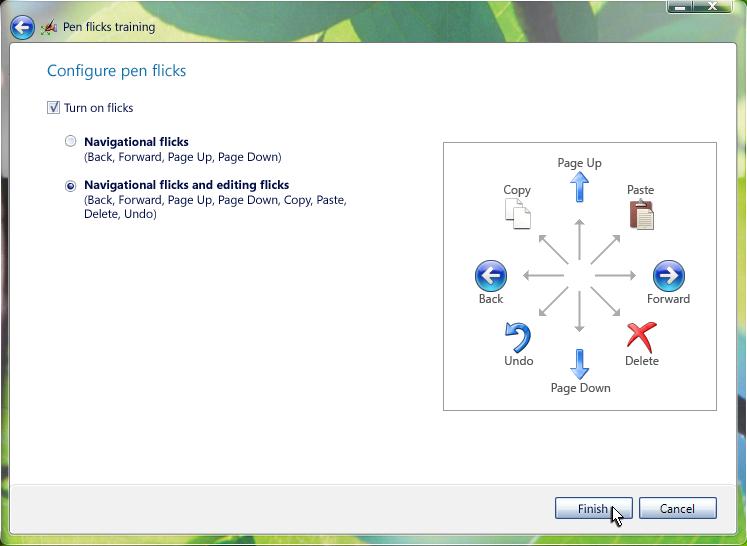
The overall experience for pen users has also improved in Windows Vista through the addition of “flicks.” Flicks are simple gestures you can perform by quickly drawing a line in a certain direction. Draw a quick line to the right (flick the pen to the right) to perform a gesture that is interpreted as “navigate back”. There are different degrees of flick support users can choose, from relatively simple flicks in two or four directions, to more advanced flicks in eight directions. The action associated with each flick is user configurable (Figure 8).
Programming Vista Tablets
There are changes for Tablet PC developers in Windows Vista. Some are small, such as the addition of APIs or new features in existing APIs. Others are larger and go along with the new UI development paradigm that is inherent to WinFX and WPF (Windows Presentation Foundation) development.
Ink Layout Analysis allows for semantics recognition, such as finding annotations that are anchored to a certain part of a document.
Let’s start out with API changes. The new TIP API affords much greater control over the TIP (Tablet PC Input Panel) and its features, compared to components such as PIP on Windows XP. There is a special Text Input API that can be used to control how text is recognized and inserted by the TIP. This API can be used to suggest alternate recognition results right inside the TIP. A related API is used to control the TIP’s interaction with text controls that support auto-complete (see above).
There is a feature that has been retired in Windows Vista: in previous versions of the Tablet PC SDK, developers were able to “content tag” controls on existing applications, providing hints to the recognizer as to what kind of content is to be expected. For instance, textboxes used to enter e-mail addresses could be tagged with the “EMAIL” factoid, which drastically improves recognition results for e-mail addresses. This tagging information was stored in external manifests. It turned out that this approach was somewhat fragile and not entirely productive. Whenever developers reused the same control in various user controls or classes, they had to tag the same control in each instance where it was used. It would have been much more productive to programmatically indicate the content type of the control once. Also, if the external manifest was lost, corrupt, or inaccessible for some reason, none of the tagging information was communicated to the recognizer. In Windows Vista, the content tagging approach is no longer supported. Instead, this is now handled programmatically through the InputScope property on the UIElement base class. Context tagging is gone, but you can set the recognizer hints in XAML.
The Windows Presentation Foundation
With WinFX, Microsoft introduces a successor to the Win32 API. The public API surface of WinFX is completely managed (written in .NET) and includes technologies such as the Windows Presentation Foundation (WPF, formerly known as Avalon), Windows Communication Foundation (WCF, formerly known as Indigo), and the Windows Workflow Foundation (WWF), among others. Tablet PC-related functionality focuses almost exclusively on user interfaces. For this reason, WPF is most important for our purposes.
In the past, all versions of Windows (including Windows XP), created almost all graphical output using a technology known as GDI (Graphics Device Interface). Although this technology has served us well for a long time, it has its problems. GDI is completely pixel-based. Everything drawn on the screen is created by pixel-based drawing operations that take place on the PC’s main CPU. Unfortunately, pixel-based drawings do not scale well, which means that pixel-based output can not easily adjust to various display resolutions. Also, modern displays have a lot of pixels, which puts significant burden on the CPU, and advanced graphics accelerator cards that are present in almost all computers these days lie dormant.
Some of the downsides of GDI become apparent in applications that require high-performance graphics output, such as games or multi-media applications (videos). For this reason, these kinds of applications do not use GDI, but DirectX, a high-performance interface capable of accessing graphics hardware directly, including the utilization of graphics accelerators known as GPUs (Graphics Processing Units), which are secondary processors optimized towards processing graphics.
The problem with using both approaches is that they do not mix very well. The issue is most easily demonstrated with videos on Web pages. Whenever a Web page with a video is viewed in a browser and the browser window is moved, the video lags behind, although the rest of the window moves very smoothly. This is a result of the combination of two rather different technologies. For Tablet PC developers, this also becomes obvious in the support for Inking. It is possible to collect and render Ink in GDI and it is also possible to collect and render Ink in DirectX. However, it is very difficult to Ink annotate a video and then write beyond the edge of the video and continue the annotation on a GDI-rendered area of the screen.
WPF takes a completely different approach. From the ground up, it was built to be a unified, high-performance graphics API. All output in WPF is based on vector graphics instead of pixels. This has the advantage of resolution independence. All graphical output can be resized or transformed in other ways at a very high level of quality. WPF also utilizes graphics hardware if it is present, making all the CPU power available for other processing.
WPF doesn’t draw screen output in the same way GDI or even DirectX did; instead, it “composes” output. Typical WPF user interfaces are composed of windows, buttons, textboxes, lines, and other WPF controls, such as videos. These controls are themselves composed of primitives defined as vectors (such as lines). The composition engine allows for great flexibility. For instance, a button control can itself be composed of a text label and a video. The same video can be used to compose the contents of a drop-down list, a menu, or any other WPF control.
What is particularly important for Tablet PC developers is that Ink is a native component of WPF. Therefore, every WPF application can support Ink natively, without the need for any additional components. Of course, because Ink is based on vectors, it is a perfect match for WPF’s composition engine and can be drawn very quickly at a high level of quality.
Before you look at your first WPF Ink example, I should discuss one more technology introduced by WinFX: XAML.
XAML is a declarative language that supplements the conventional programmatic languages. In programmatic languages, you instantiate objects, set properties, and call methods in a language such as C# or Visual Basic .NET. In a declarative environment, you use some sort of markup language (XML in this case) to specify the desired result. For instance, the following could be a programmatic approach for creating WinForms UI (as it is found in the designer-generated code region):
Button btn1 = new Button();
btn1.Top = 100;
Form.Controls.Add(btn1);
In XAML, the same idea could be expressed as follows:
<Button Name="btn1" Top="100"/>
In many cases, the declarative approach is simpler and more efficient, because you only worry about the “what” and not the “how.” In the programmatic example, the button object had to be instantiated and the developer had to know whether or not the object received constructor parameters. The developer also had to know to add the button to the form’s Controls collection for the form to become functional. In the declarative approach, all of this is left up to the XAML compiler and the developer only concerns herself with the desired outcome.
XAML is a great addition to the developer’s toolbox, with advantages so compelling that practically all WPF examples are based on it. However, it is important to point out that XAML is entirely optional in WinFX, and developers are free to use the more conventional programmatic approach if they so desire.
XAML, although entirely optional, is so convenient that practically all WPF examples are written in this language.
As a simple XAML example, a window containing a few controls can be defined in the following fashion:
<Window x:Class="_2_LayoutExamples.Window3"
  xmlns =
  http://schemas.microsoft.com/winfx/avalon/2005
  xmlns:x =
  http://schemas.microsoft.com/winfx/xaml/2005
  Text="_2_LayoutExamples" >
  <Canvas Width="500" Height="500">
    <Rectangle Width="100" Height="100"
      Canvas.Top="100" Canvas.Left="100"
      Fill="blue"/>
    <Rectangle Width="100" Height="100"
      Canvas.Top="150" Canvas.Left="150"
      Fill="yellow"/>
    <Rectangle Width="100" Height="100"
      Canvas.Top="200" Canvas.Left="200"
      Fill="green"/>
    <Rectangle Width="100" Height="100"
      Canvas.Top="300" Canvas.Left="200"
      Fill="green"/> <Rectangle Width="100" Height="100"
      Canvas.Top="350" Canvas.Left="150"
      Fill="yellow"/>
    <Rectangle Width="100" Height="100"
      Canvas.Top="400" Canvas.Left="100"
      Fill="blue"/>
  </Canvas>
</Window>
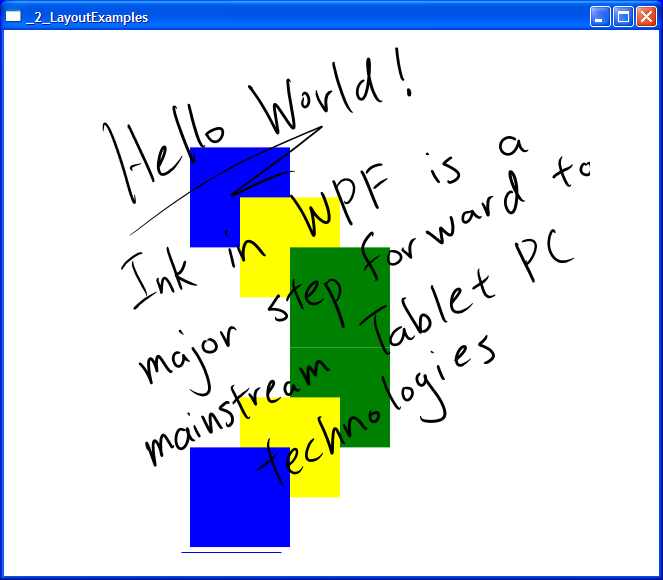
The result of this is shown in Figure 9. This code may appear a bit confusing for people unfamiliar with XAML or WPF, but it is actually pretty straightforward. The root tag defines a window as well as some namespaces used by XAML. The window contains a canvas element/control. This means that you want to create an area in your window that is 500x500 pixels-in “logical” pixels, at 1/96tth of an inch- in dimension that you can place other controls on (or in). The nature of this control is such that you can position other controls (rectangles in this case, but it could be anything) within it, providing absolute positions and dimensions.
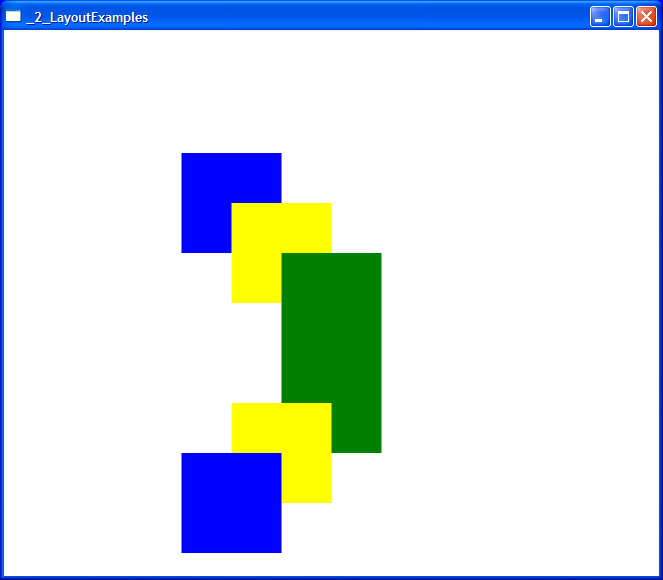
At this point, you may be wondering why you needed a Canvas, rather than just positioning other controls on the window. The reason is that WPF supports many different ways of positioning controls. The Canvas that contains controls with absolute positions and dimensions is only one example (this is also known as grid layout). Another example is flow layout. Within a flow layout control, all other elements are positioned left-to-right and top-to-bottom, similar to how it is done on Web pages.
What does it take to add Ink functionality to this example? Not a lot! All you need to do is add an InkCanvas object to your composition (or replace the regular Canvas with an InkCanvas). The following example shows a modified version that supports Ink:
<Window x:Class="_2_LayoutExamples.Window3"
  xmlns =
  http://schemas.microsoft.com/winfx/avalon/2005
  xmlns:x =
  http://schemas.microsoft.com/winfx/xaml/2005
  Text="_2_LayoutExamples" >
  <Grid>
    <InkCanvas Width="500" Height="500">
      <Rectangle Width="100" Height="100"
        Canvas.Top="100" Canvas.Left="100"
        Fill="blue"/>
      <Rectangle Width="100" Height="100"
        Canvas.Top="150" Canvas.Left="150"
        Fill="yellow"/>
      <Rectangle Width="100" Height="100"
        Canvas.Top="200" Canvas.Left="200"
        Fill="green"/>
      <Rectangle Width="100" Height="100"
        Canvas.Top="300" Canvas.Left="200"
        Fill="green"/> <Rectangle Width="100" Height="100"
        Canvas.Top="350" Canvas.Left="150"
        Fill="yellow"/>
      <Rectangle Width="100" Height="100"
        Canvas.Top="400" Canvas.Left="100"
        Fill="blue"/>
    </InkCanvas>
  </Grid>
</Window>
The result can be seen in Figure 10.
It is important to note that although it is possible to write XAML by hand, most people will be using visual designers, such as the recently announced Sparkle designer that is part of Microsoft’s Expression series of products (www.Microsoft.com/Expression). Because Ink controls are part of the native WPF control set, interactive designers like Sparkle support Ink controls (like Ink Canvas) natively.
Pushing Forward
Microsoft is pushing very hard on Tablet PC and Mobile PC technologies as the market for these technologies gains importance. For users, this means new and better devices and software. For developers, there are a lot of opportunities, and the new versions of the Tablet PC SDKs are more sophisticated, in many ways they are easier to use, and, in the case of WinFX and Windows Vista, they are more integrated in all versions of the platform.
To sum it all up: the future for Tablet PC and Mobile PC developers and users looks very bright.
