


Partial classes are a hot new feature of the next .NET compilers.
Specifically designed to overcome the brittleness of tool-generated code, partial classes are a source-level, assembly-limited, non-object-oriented way to extend the behavior of a class. A number of advantages derive from intensive use of partial classes; for example, you can have multiple teams at work on the same component at the same time. In addition, you have a neat and elegant incremental way to add functionality to a class.
Until I got a copy of Jeff Prosise's book on MFC, I thought that Windows programming with MFC was only possible through wizards. In his book, Jeff showed me the way by creating a small but working MFC application without Visual Studio and its rich suite of wizards. Likewise, until I saw partial classes in action in Beta 1 of Whidbey, I thought that Windows Forms programming was only possible through wizard-like, and, frankly, bothersome, tool-generated code.
Whenever you set the DataSource property of a ComboBox control, the control retrieves and updates its binding context to reflect the new data source.
Technically speaking, a partial class is a class whose definition spreads over multiple and distinct source files. In real-world programming, there are several situations where splitting the definition of a class is desirable. By declaring a class partial, you state that source files can be added to the same project to extend the functionality of the class.
No hidden object-oriented principles lay behind partial classes?just the made-to-measure compiler's ability to build and process a class definition from various sources. Partial classes are a source-level, assembly-limited, non-object-oriented way to extend the behavior of a class.
In this article, I'll take a look at the motivation and definition of partial classes and the use you can make of them, especially in the context of Web applications.
Motivation for Partial Classes
If you have used Visual Studio .NET, you know about regions. A region is an IDE construct that expands and collapses blocks of source code. Regions were introduced with Visual Studio .NET and used mostly to hide tool-generated blocks of code. Tool-generated code is a characteristic inherited from Visual Basic 4. Remember FRM files?
You used to open FRM files in the IDE to see the graphical contents?buttons, textboxes, and any variety of controls. In the end, an FRM file was nothing more than a text file filled with the declaration of visual objects: their sizes, locations, component names and versions, and current properties. In Visual Studio .NET, the declarative part of the form is available per view but hidden in a collapsed region. Why is this code tool-generated? Because developers never get to write it.
When you drop a control onto a form, some code needs be generated to track the name, size, and location of the selected control. The IDE or wizards writes this code for you. You don't need to interact with this code; you can move or delete controls through the visual interface and the designer. Whenever this happens, the hidden code is properly adapted.
As you can tell, the model is effective because it works, but it's very brittle too. Any changes made to the hidden code can potentially break the application or component. Any crash or anomaly in Visual Studio .NET potentially leaves the code in an inconsistent state.
A form class (both Windows and Web) consists of declaration code plus action code. The two are logically separated but can't just be placed in physically separated classes, no matter the relationship between them. Partial classes are a way to work around the issue. Logic and declaration go into distinct files but compilers have to be updated to be able to process a class from multiple source files.
By marking a class as partial, you enable the compiler to retrieve the whole set of members from various files, perhaps written at different times by different developers.
What's a Partial Class, Anyway?
With the .NET Framework 2.0, it is possible to split the definition of a class or an interface over two or more source files. Each source file appears to contain an ordinary class definition from beginning to end. Multiple files in the same project declare the same class but add a distinct fragment of the needed code to the overall definition. In other words, each constituent source file contains a section of the class definition. All parts are then combined together when the application is compiled. Here's a quick example.
public class Person
{
   public string FirstName;
   public string LastName;
   public int Age;
   public DateTime Birth;
}
Today, you need to save the preceding code in the same file and add it to a project. By using partial classes, you can split the above declaration in two or more pieces, each going to a different file. Here's how.
public partial class Person
{
   public string FirstName;
   public string LastName;
}
You save this block of code to a file named, say, Person.Name.cs. Next, you create a second file and name it, say, Person.Birth.cs.
public partial class Person
{
   public int Age;
   public DateTime Birth;
}
With any compiler other than the .NET 2.0 compilers, you get an error. An ambiguous reference to the class Person is at the origin of the error. It would be hard for the compiler to figure out which one is the right Person class to work with. The partial keyword does the trick. It informs the compiler that multiple blocks of code pertaining to the class can be found in various files on the command line. The compiler takes note of that and arranges a tree with the class representation as it finds partial sections of the class in the files on the command line. (See Figure 1.)
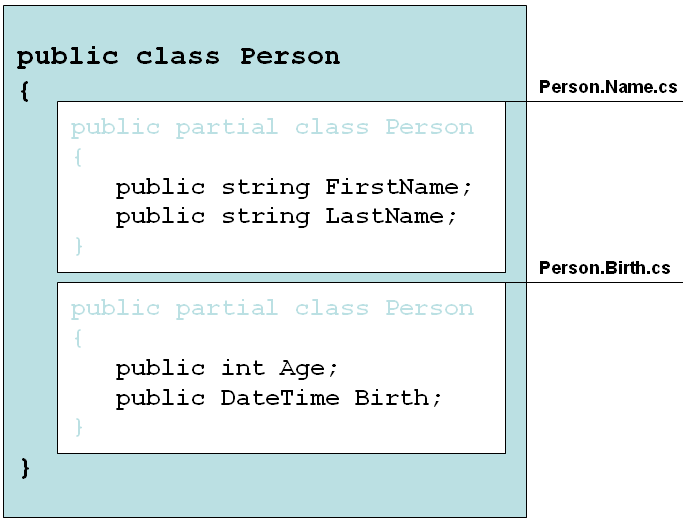
When the compiler processes a class declaration that is characterized by the partial keyword, it adds any member information to an internal table and generates the bytecode for it later in the compile process. As a result, all the members found in the various partial declarations are combined into an all-encompassing class definition. For partial classes to work, it is important that all classes involved sport the same class name.
Partial Classes Are a Framework Feature
Like it or not, Visual Studio .NET generates some code on your behalf and there's no known way to stop this procedure. If you don't want tool-generated code dirtying your files, you have no other choice than to manually delete and replace it with your own similar code. With the traditional class compile model, Visual Studio .NET can only edit the source code within the class. It created a common InitializeComponent block, wrapped by a region and hidden from view. Any change to the programming interface of the class results in a change to this piece of code. Sure it works, but it's probably not the model you want to hand down to posterity.
You can handle events (Format and Parse) to control how the data is marshaled back and forth between the user interface and the back-end memory.
When working with tool-generated source, made-to-measure code can be added to the class without having to edit existing sections or recreating the file. Many classes in Visual Studio are partial classes that developers can extend by creating an additional file. In Windows Forms, Visual Studio .NET 2005 stores designer code to a separate file, say, the form1.designer.cs file, that is hidden from view by default (Figure 2).
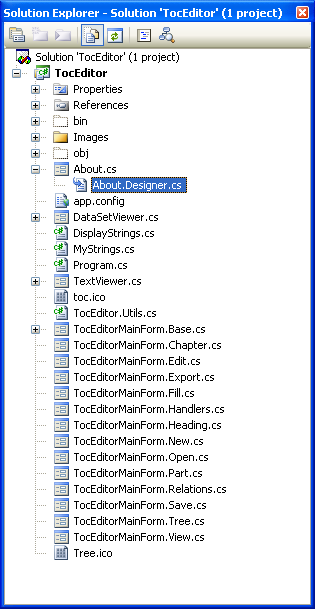
The About form of the application in the figure is associated with a designer file. That file contains the source code in charge of the creation and positioning of the various controls. The huge difference with previous versions of Visual Studio .NET is that now you have this code insulated in a specific project file.
So far, it may seem that partial classes are an exclusive feature of Visual Studio .NET created to solve some of the past issues that some .NET 2.0 compilers supported. There's more than this, of course.
The key thing going on is that partial classes are a full .NET Framework feature. Partial classes are first-class citizens in the post-Whidbey era and should be part of any .NET developer's toolbox. Let's see why.
When working on large projects, or when working on a very complex component, spreading a class over separate files has a number of benefits. First off, it allows multiple developers and/or teams to work on it simultaneously. Members of the development team can work on different files with no need to keep anything in sync. When everybody is done, the compiler finalizes the job. Simple and effective; neat, and elegant.
In Figure 2, you also see that a pretty complex form, the form named TocEditorMainForm, is composed of several constituent files. In the end, a form is a class and to spread its code over multiple files, you normally need to design it very carefully so that each file implements an independent "subclass" with some points of contact with the main one. Allow any of the methods on the "subclass" to access a member on the main form by passing a reference to the main form.
Note that I used quotes to wrap the word subclass just to assign it a special meaning. Subclass here doesn't hint at some hierarchical relationship existing between classes. The form and the "subclass" are both at the same logical level. I used the term "subclass" to indicate that the "subclass" specializes and fleshes out the body of the main form class adding some ad hoc functionality.
The mechanism of partial classes lends itself very well to completing classes with additional features without resorting to sophisticated design patterns. For example, if your class implements multiple interfaces, it is generally a good idea to create multiple partial classes to contain the implementation for each interface.
More Depth
A partial class can be formed by any number of building blocks. However, all of the parts combined must form a valid class definition. Put another way, if two of the parts define the same method with the same signature, it is signaled as a compile error. The same happens with properties, constructors, and so forth. The merge occurs at the class level; two methods with the same name are considered overloads and are never merged into a larger method.
Likewise, you can't reference methods with the same name from one another in an inheritance-like fashion. Let's say it again?at its core, partial classes are primarily a sophisticated form of text-merging and have nothing to do with inheritance and object-oriented programming.
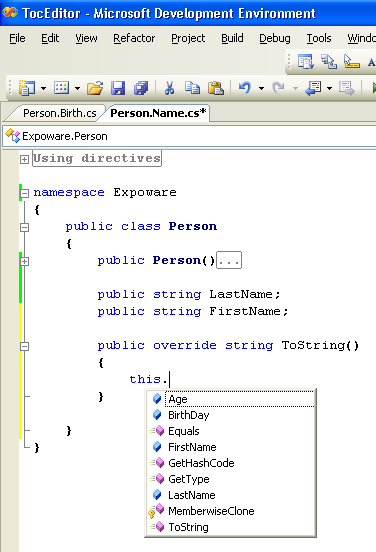
Partial types are fully integrated into the Visual Studio .NET 2005 IDE. Whenever you type the keyword this (or Me, if you're using Visual Basic .NET) in any area of the source editor, you will experience full IntelliSense capabilities and see everything about the class, including the members defined in the other parts (Figure 3).
Usage of Partial Classes
Visual Studio .NET 2005 makes intensive use of partial classes when generating code for Windows and Web forms. In general, for code generators, partial classes represent an effective tool to leverage for building complex blocks of code in an incremental way. As mentioned, this pattern is largely used within Visual Studio .NET 2005 but can be applied to similar, custom scenarios where your own generator tool operates.
In addition, you can use partial classes to logically break down large classes into smaller pieces, which can be very time-saving and advantageous in team work scenarios when implementing parallel development.
Partial classes also prove a handy feature when it comes to adding debug and trace capabilities to a class. One of the constituent parts could be stuffed with all of the debug, trace, and log functionality. In this way, adding and removing the debug layer is as easy as adding and removing the specified file, and it doesn't affect the overall behavior of the class.
Partial classes may also affect the design of the data access layer of distributed systems. It is normally advisable to keep data access code off business objects.
Business objects, though, need to work on data in an efficient way, and proper data structures, to make data flow into the business tier, must be figured out. In the end, a common problem for architects and developers is figuring out how the data is moved into the business tier. If business and data layers are physically separated, you must find collection classes, custom objects, and a technology for data serialization and deserialization. This is neither unusual nor uncommon; it's just one of the typical tasks for architects of distributed systems.
No doubt this represents a best practice for real-world systems of a certain complexity. But can you say the same for small-sized systems?
The design pattern and its principles remain valid, but with partial classes you can get the same "virtual" code separation within a single set of classes: the business tier. For example, you can create a business object as a partial class in which you distinguish two sets of functionality, facade and data access.
Let's consider a class named Customer. You can define methods for managing the customer within the application in a partial class named Customer.Facade.cs. Elsewhere in the project, perhaps saved within another folder, you can have a second set of methods to load, save and delete customer information to and from the database of choice. This second block belongs to a file named, for example, Customer.Data.cs. The two files end up forming the same class; each set of methods has full access to private members of the other block.
In this way, the data access methods could store data directly into the private members of the class. At the same time, the coupling between the business object and the persistence medium is minimal. You can modify the data access logic by tweaking the code in the file Customer.Data.cs. More, you can switch to another database by replacing the same file. You have the best of two worlds: a single file with full access to private members and a good deal of separation if you want to change persistence details or, perhaps, refactor data access.
Is this approach recommended? It depends. It surely provides you with an alternative. If you're a design and OOP purist, you're already putting a curse on me. So, guess what? In this case, I wouldn't even suggest this to you. On the other hand, if you're more open-minded and used to looking at final results, you might want to take a closer look at this approach.
Partial Classes to the Rescue
Raise your hand if you're a developer who faced the following issue or a similar one in .NET 1.x. Imagine you have a data abstraction object that represents a table in your database. Again, let's call this class Customer. What if, at a certain stage in the development process, the database changes to add a new field? There are two scenarios. The Customer class is simply a wrapper around the table and doesn't contain any logic. If so, you just run the tool that generates the class Customer automatically, replace the file and compile. If this is your situation, you're all set.
Much more likely, though, the Customer class underwent a lot of modifications and additions along the way. The generator tool called to recreate the Customer class overwrote all the changes you entered. To avoid that, you can resort to manual editing to incorporate the new field in the class in a more "controlled" and non-destructive way. This appears to be the only way out, but it's a quite tedious way, too.
In .NET 1.x, smart developers solved this issue by creating a base class CustomerBase that defined the schema of the class and was directly affected by the database schema. (See Listing 1.) The class with the logic?the real Customer class?derived from CustomerBase and extended it with specific behaviors and functionalities. In this way, you modified the database and regenerated the base class any time you wanted; you could put any additional logic inside the Customer class without facing the maintenance problems.
With partial classes, this is greatly simplified, as Listing 2 shows. Everything lives in the context of a single class, the Customer class, but key functionalities are neatly separated and easily modifiable. You can change the schema, and adapt the core code, without heavily refactoring the classes.
Partial Classes in ASP.NET
As a further example of the usefulness of partial classes, let's review how ASP.NET pages work in 1.x and what changes are slated for version 2.0. When a user requests page default.aspx off an ASP.NET Web site, the back-end server environment generates a class on-the-fly, based on the source code of the default.aspx resource. The source code for this class is temporarily saved to an internal server folder, compiled, and loaded into memory.
In ASP.NET 1.x, the dynamically created wrapper class inherits from System.Web.UI.Page (or any code-behind class in turn derived from Page) and provides a property for each declared control. Methods and properties defined in the base page must be declared as protected to be successfully resolved.
Thanks to partial classes, the new ASP.NET 2.0 class derivation model enables the page to define controls as private members. This removes a level of brittleness caused by the previous code-behind model because Visual Studio .NET was required to keep the markup declarations and code-behind file in sync within hidden and marked as inaccessible regions. With partial classes, this tool based synchronization is no longer necessary.
Imagine you have a default.aspx page with a button.
<asp:button runat="server" id="Send"
            text="Send"
            onclick="Send_Click" />
Any code bound to the page?for example, the code to respond to the button clicking?will be defined in the associated default.aspx.cs code.
public partial class Default_aspx :
                     System.Web.UI.Page
{
   void Send_Click(object sender, EventArgs e)
   {
      Response.Write("Hello");
   }
}
In order to fully interact with the ASP.NET pipeline, the page must be completed with some system-defined code. This code completion code was inherited through OOP techniques in ASP.NET 1.x. It's added through the partial class mechanism in ASP.NET 2.0. If you take a look at the full source code of the Default_aspx class as completed by the ASP.NET runtime, it will look like this:
public partial class Default_aspx :
                     System.Web.UI.Page
{
     // Other code here generated by the
     // ASP.NET pipeline
}
In summary, partial classes help ASP.NET to build more easily dynamic classes that combine together user- and system-defined code.
Conclusion
There was a lot of tool-generated code in Visual Studio .NET 2003 and the .NET Framework 1.x. Although this code was hidden in properly created visual regions and commented to be left intact by developers, it ultimately added a level of fragility and brittleness to the overall project. Keeping code in sync is hard both for developers and for automatic tools. If there's a way to get rid of it, that way must be found and pursued. This is exactly what happens with partial classes in the upcoming .NET Framework 2.0.
Partial classes allow you to spread the contents of a class over multiple source files. This simple statement has a lot of implications and applications. It is a mechanism specifically designed to simplify the synchronization of user- and system-generated code. This is just what ASP.NET 2.0 does with page compilation and it's more or less what you can do yourself within your own applications as long as you use code generators.
Being able to split code over more files is great news as well. It makes things easier for teams to develop code in parallel and to build a lightweight form of separation between business logic and data that might suit you in more than one real situation.
As I write this, partial classes are still a beta technology. As far as ASP.NET is concerned, breaking changes exist also between Beta 1 and Beta 2. What does this mean? Partial classes are a hot new feature that certainly will have significant repercussions on the way you develop code for the .NET Framework 2.0. In this article, I outlined what appear to be the most significant of these repercussions. The final word, though, could only be said when you have the bits in your own hands.
