


Using the new Data Sources Window in Visual Studio 2005, developers can now drag columns of their typed DataSets or properties of their own business objects directly to their form.
Visual Studio 2005 will create, name, and label controls for each bound property. For those that prefer to lay out the forms with the toolbox, developers can use "Connect the Dots DataBinding" to drag and drop from the Data Sources Window onto their existing controls.
Developers want easier ways to create their forms. There are many approaches including UI frameworks that aim to simplify forms creation. Typically each approach makes assumptions about how the UI may be formatted, or they require interfaces or base classes. While these frameworks would allow developers to quickly create forms based on some schema of objects, it can be difficult to customize the layout. Building a great application isn't just about how fast you can complete the application. A great application includes developer productivity and intuitive use by its end users. In order to create great UI, developers need precise layout for each control on the form.
If you change the schema of your business object, typed DataSet or Web service, the Data Sources Window will refresh to show this new schema.
If we look at the goals for enabling RAD form development we find some basic requirements:
- Easily create controls based on some schema
- Precise layout for each control
- Mapping data types to specific controls
- Ability to vary the default control for a particular column/property
- Ability to add custom controls to the list of available controls
- Creating a label for each databound control
- Establish databinding for each control
- Naming each control something more meaningful than TextBox1, Label1, etc.
Enter Visual Studio 2005 and the Data Sources Window
Visual Studio 2005 introduces a new, simple, yet very powerful model for building forms. The Data Sources Window is a new tool window that displays selected objects within your project that you can use to create data bound forms. The Data Sources Window can display several different types of data sources including typed DataSets, user defined objects (business objects), and Web services. Developers may drag items to their form and Visual Studio will create databound controls, labels for the controls, and name the controls based on their bound properties.
"Connect the Dots"
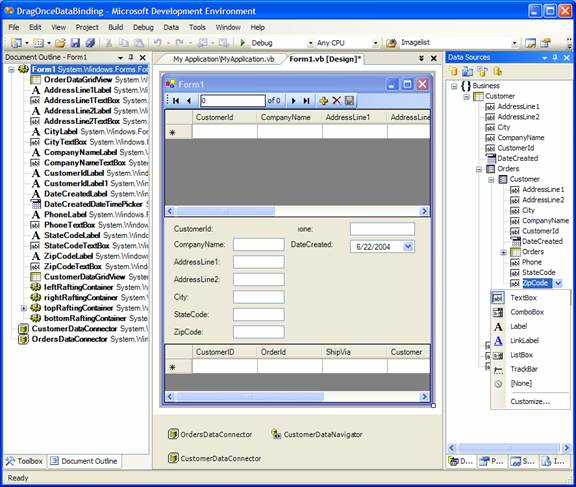
While it's very helpful to create UI from a new tool window, developers like to work in different styles. Some developers prefer working from the Toolbox. In addition to the Drag-Once DataBinding from the Data Sources Window, the Data Sources Window also has a feature the VB team calls "Connect the Dots." To use it, developers lay out their form from the ToolBox and then drag from the Data Sources Window onto existing controls. Rather than create a new control, the Data Sources Window will establish the databinding to the default binding property of the existing control using some new databinding attributes. Since we assume the developer has already designed the user interface, Visual Studio will not create labels or change the name of the controls.
Data Source Types
The Data Sources Window supports different types of data sources and each type is handled slightly differently.
The DataConnector is a new WinForms control that wraps the FX 1.0 CurrencyManager and provides the ability to bind to types, in addition to instances of component objects.
Typed Datasets
Any typed DataSets defined in the current project with an XSD file will automatically be displayed in the Data Sources Window. If you've defined your own class that inherits from DataSet it will not be added automatically. However, you can use the Object Data Source Type to add it manually. Each DataTable of the DataSet will be listed with the corresponding list of columns. After Beta 1 the foreign keys and relations will also be displayed.
Web Services
Similar to DataSets, any Web service references that have been added will also automatically display in the Data Sources Window. Visual Studio 2005 will evaluate each Web method and it will display the public properties of the object returned by that method. For instance, the GetBook method on a Web service may return a Book object. The Data Sources Window would display the public properties of the Book object within the Data Sources Window. For Beta 1 you'll need to do a relatively simple work around to get the properties of the object to be visible in the Data Sources Window. See the sidebar, "Running WSDL.exe for Web Services."
User Defined Objects
It is up to the developer to define the specific implementation of user defined objects. In Visual Studio 2005 you will no longer need to inherit from Component, implement specific interfaces, or even provide a default constructor. You just need to create public properties.
Business Object Example
Without getting into religious battles over specific design patterns, let's look at a common yet simple business object. In Listing 1 I've defined a Customer object with two properties, CustomerId and CompanyName. I've also disabled the default constructor and I require the CustomerId to instance a Customer object. While this private constructor isn't necessary because the compiler will remove the default parameterless constructor when a constructor with parameters is provided, I've added it for clarity. If I ever make a mistake and remove the parameterized constructor, the compiler will remember that I didn't intend for this class to be created directly.
Adding Objects to the Data Sources Window
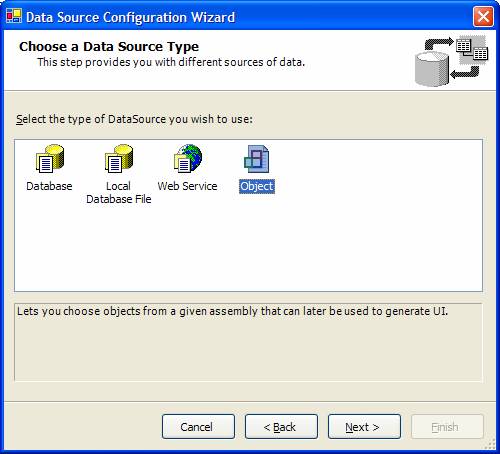
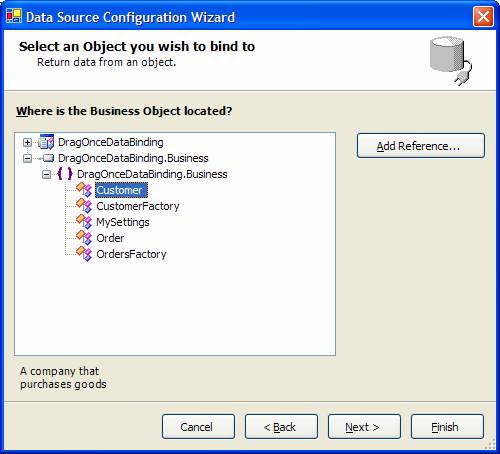
Since we only require public properties, it's difficult for the Data Sources Window to know what to display. Using the Add New Data Source command, developers can simply add their objects to the window. Figure 2 and Figure 3 show some of the steps for adding the Customer object to the Data Sources Window.
Giving It a Test Drive
Let's walk through an example. For the purposes of this example you'll use the Object data source type. This example uses Visual Basic, but all of this applies just as easily to C#, C++, and J#.
Using the Edit Columns Smart Tag of the DataGridView or the Columns property in the Property Grid, you can change the order of the columns, fonts, header text, etc.
You first want to create a simple hierarchy of a Customer with a collection of Orders. Each Order will have a collection of OrderItems.
To begin, create a new Windows Forms project and name it DragOnceDataBinding. To follow a typical solution, create your Customer object in a separate assembly. From the File menu, select Add New Project, then select Class Library and name it DragOnceDataBinding.Business. See the "Beta 1 Namespace Bug" sidebar for help resolving the namespace. Within the class library, add a new Customer class. To demonstrate some default behavior of the DataConnector, keep the public constructor.
Let's see what this looks like in the Data Sources Window. Build the entire solution and then select the exe project.
Open Form1 in the Designer then open the Data Sources Window. If it's not visibly docked with the solution explorer, you can activate it by selecting Show Data Sources Window from the top level Data menu. In the Data Sources Window select Add New Data Source. Within the wizard, select Object as the data source type. You'll now see what appears to be a mini class viewer displaying each assembly and the classes within their namespaces. If your class library assembly isn't listed you probably didn't add the reference. No problem. You can add it directly within the wizard with the Add Reference button.
Now you should be able to expand the DragOnceDataBinding.Business.dll and find your Customer object. If you still don't see your class, you probably just need to rebuild your solution. If you added some XML comments on the Customer class you should see them in the bottom of the wizard. Select the Customer object and finish the wizard.
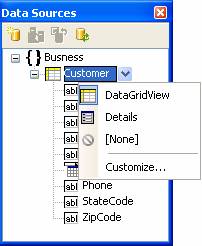
You should now see your Customer object displayed in the Data Sources Window. If you expand the Customer object you'll see each property with a default control. The icons should look familiar and you'll notice that the DateCreated property is defaulted to a DateTimePicker. You may also notice that the selected node in the TreeView has a drop down. For the root Customer object you'll see DataGridView, Details, and None. Set the Customer DropType to DataGridView then drag the Customer node to your form. This will create a DataGridView that is indirectly databound to the Customer type. To get a quick, VB-like feel for this, let's run the project.
Hit F5 and notice the grid displays with the columns of the Customer object. You'll also notice that by default a new row was added. If you've used the code sample from above, the CustomerId has a new GUID by default. When the DataConnector receives a request to instance a new item, it will look to see if the type within the list has a parameterless default constructor. Let's look at what the Visual Studio Designer did for you behind the scenes.
In order to make this work, Visual Studio created a CustomerDataConnector. The DataConnector supports binding to types. This means that Visual Studio can look at a type and get its public properties without actually instancing the object on the form designer. The equivalent of doing this in code would be:
Me.CustomerDataConnector.DataSource = _
    GetType(DragOnceDataBinding.Business.Customer)
The DataGridView is bound to the Customer object through the DataConnector with the following line of code:
Me.CustomerDataGridView.DataSource = _
    Me.CustomerDataConnector
The DataConnector will then represent the bindable items as any public property of Customer. As you'll see later, this would include any sub list of Orders.
Individual Controls
While the new DataGridView has a lot more functionality than the Visual Studio 2003 DataGrid, you may want to display your object with individual controls. Let's change the CustomerDataGridView to Dock=Top and then leave some room at the bottom of the form.
In order to enable Drag Once DataBinding and "Connect the Dots," the Data Sources Window needs to know which property should be bound on each control. To determine which property should be auto-bound, the VB team added 3 new attributes to System.ComponentModel.(1.) Use DefaultBindingProperty for simple controls like the TextBox.(2.) Use ComplexBindingProperties for form controls that manage a list like the DataGridView.(3.) Use LookupBindingProperties for controls that manage a list as well as an individually bound item such as ComboBox.
Within the Data Sources Window, select the Customer object and change the DropType to Details by selecting the DropDown next to the Customer node in the TreeView. You can modify any of the DropTypes for the individual properties as well, including your own custom controls. Change the DropType for CustomerId to a Label. With the Customer DropType set to Details, drag it from the Data Sources Window and drop it on the form below the CustomerDataGridView. As a result you'll see controls for each public property created. Each control is databound to the selected property and a label is provided.
Hierarchal Objects
As Columbus discovered, the world isn't flat. Neither are our object models. Many developers prefer objects because they can better define their data hierarchies. They may have Order, OrderItem, and Product objects. They may even have Address objects they wish to represent in their object model.
Generics allow us to define the "shape" of an object within a list. So, rather then return a collection of Objects which you would then have to cast back to your Order object, you can return a collection of Order objects.
Let's take a look at how Visual Studio 2005 takes this into consideration. First let's create a basic Order object and look at its properties. Later you'll build upon this. Add the code in Listing 2 to your Business class library.
Now that you have your Order object you need to add it to your Customer object. What you really want is something that looks at the Customer object to see a collection of strongly typed Orders. In previous versions of Visual Studio you might have created your own implementation of a collection. However, Visual Studio 2005 VB, C#, and C++ with managed extensions will support a concept referred to as generics. The .NET Framework 2.0 has several collections that leverage generics. The basic collection would be:
System.Collections.Generic.Collection(Of T)
T represents the type you want the collection to return.
Dim _orders as Collection(Of Business.Order)
In the Customer.Orders example you'll want to leverage some of the databinding infrastructure to handle deleting or adding new objects. For instance, when the end user clicks to create a new OrderItem you want to default the new OrderItem to have its OrderId set to the parent. You should place this code within the Order object rather then the form it's instanced on. To leverage these events the.NET Framework 2.0 includes a new BindingList that leverages generics.
System.ComponentModel.Collections.Generic.
BindingList(Of T)
You will expose the Orders as a property on the Customer object.
To minimize the amount of code you must type each time, add an Imports to the top of the class:
Imports System.ComponentModel.Collections.Generic
Then, add a property for the Order object:
Private WithEvents _orders As _
   BindingList(Of Business.Order)
Public Property Orders() As _
   BindingList(Of Business.Order)
    Get
        Return _orders
    End Get
    Set(ByVal value As _
   BindingList(Of Business.Order))
        _orders = value
    End Set
End Property
At this point let's see what this looks like. Build the class library and then activate Form1 in the Form Designer. With Form1 active in the designer, activate the Data Sources Window. If you've built the Business class library, the Data Sources Window will now display your Customer with a collection of orders, which is also expandable. Due to a bug in Beta1, you may get an error and need to close Form1, rebuild, and then reopen it. Change the DropType of the Orders property to DataGridView and drag it to the form below the Customer details. To make the form a little more manageable, use the Property Grid to set OrdersDataGridView.Dock = Bottom.
If you look in the component tray you'll notice a new DataConnector was created named OrdersDataConnector. Looking at the code you'll see the OrderDataConnector is linked through the CustomerDataConnector.
Me.OrdersDataConnector.DataSource = _
    Me.CustomerDataConnector
Me.OrdersDataConnector.DataMember = "Orders"
This means the OrdersDataConnector will provide a list of orders for the Current item in the Customer DataConnector.
Loading Customers in Form1
Now that you've databound Form1 to the Customer and Order objects, let's get some data. To keep things relatively concise you'll use a CustomerFactory and OrdersFactory set of classes. They will expose a couple of shared/static methods that will return a bunch of stubbed out customers with orders.
CustomerFactory
To return a collection of customers let's add a new class to the Business class library named CustomerFactory. See Listing 3 for the Customer Factory code.
OrdersFactory
We'll need a similar object for Orders. Add a new class named OrdersFactory and add the code in Listing 4.
Loading the Form with Data
When you use the Database Data Source type a typed DataSet is created along with a typed DataAdapter. When you drag it to your form, the Data Sources Window will generate a line of code that auto-loads the selected DataTable within the DataSet using the new TableAdapters. To change the default label for each column of a DataTable, change the Caption property on the column within the DataSet Designer.
With the CustomerFactory and OrdersFacotry added you're ready to load some data. When you created the Customer and Order controls for Form1 you configured the CustomerDataConnector and OrdersDataConnector to have their "shape" by setting the DataSource to the Customer and Order types. Now you want to get some actual customers. It would be nice if Visual Studio 2005 auto-loaded your objects, however, the VB Data Team didn't want to make any assumptions or enforce a specific design pattern so you'll need to load the DataConnectors with your own pattern. See the sidebar, "AutoLoad Data." You can auto-load your objects in one of two ways: the quick way, and the more usable way.
The quick way:
Private Sub Form1_Load(...
    Me.CustomerDataConnector.DataSource = _
        Business.CustomerFactory.GetAllCustomers()
End Sub
This takes the generic BindingList(Of Customer) returned by the CustomerFactory and puts it directly into the DataConnector. This works, but this approach makes it a little more difficult to write code to get it out of the DataConnector. To get the current item from the CustomerDataConnector you would need to write the following code:
Dim selectedCustomer As Business.Customer
selectedCustomer = _
  CType(Me.CustomerDataConnector.Current, _
  Business.Customer)
If your solution does not write a lot of code in the form, that's fine, but let me show you a cleaner approach where you declare a form scoped variable to hold onto the Customers.
Private _customersBindingList As BindingList(Of _
  Business.Customer)
Don't forget to add the imports:
Imports System.ComponentModel.Collections.Generic
In the Form.Load event set the variable and assign it to the DataConnector.
_customersBindingList = _
  Business.CustomerFactory.GetAllCustomers()
Me.CustomerDataConnector.DataSource = _
  _customersBindingList
This makes it a little easier to grab the current item. You don't have to always cast the DataConnector.Current; you can just use the Position property.
' Get the current Customer
Dim selectedCustomer As Business.Customer
selectedCustomer = _
  _customersBindingList(_
    Me.CustomerDataConnector.Position)
' Get the CustomerId from the current Customer

Dim selectedCustomerId As String
selectedCustomerId = _
  _customersBindingList( _
    Me.CustomerDataConnector.Position).CustomerID
Use either one of the above methods and press F5. You should now have customers loaded in your form. As you navigate through customers, the list of orders is displayed for the selected customer.
Linked Forms
Now let's suppose you want to display the order on a separate form. On the first form you'll display a list of customers and a list of orders for each customer within a DataGridView. Let's say you want to show the selected order with OrderDetails on another form. Using the CurrentItem property of the DataConnector you can easily pass this information between two forms.
You'll start by adding a new form to your exe project named OrderForm. You'll add the Order controls to the form and then expose a property to set the current order displayed on the form.
First let's leverage the Drag Once DataBinding features of the Data Sources Window. With the OrderForm active in the Form Designer, activate the Data Sources Window. Expand the Customer object to see the Orders object. Change the DropType of the Orders property to Details.
You also want to create the customer information for this particular order. Notice how the Orders object has the Customer property. If you look at the DropTypes available, you'll notice you can only see Details and None. The Data Sources Window can tell that this isn't a collection but rather a single instance. Let's change the Orders.Customer DropType to Details. Now drag the Orders property to the OrderForm. Notice how you only have one DataConnector for the OrdersDataConnector. Visual Studio is smart enough to know that there will only ever be one Customer object for the OrderDataConnector, so it doesn't create another DataConnector. If you drag just the customer node from the Data Sources Window a second time, you'll notice Visual Studio 2005 does create a CustomerDataConnector. This is just a bug. After Beta1 Visual Studio will reuse DataConnectors configured to the same node in the Data Sources Window. For this form you'll only show one Order at a time so you can simply delete the DataNavigator. Notice how deleting the DataNavigator has no affect on the DataBinding. Since the controls are created, databound, labeled, and named, all you have to do is move the controls around to your own specific tastes.
Now let's expose a way to set which order the form will display. Within the order form, double click to go to code view. We'll expose a public property that will represent the Order object of the form. In the Setter, we'll also set the OrderDataConnector to the specific Order.
Private _order As Business.Order
Public Property Order() As Business.Order
    Get
        Return _order
    End Get
    Set(ByVal value As Business.Order)
        _order = value
        Me.OrderDataConnector.DataSource = _order
    End Set
End Property
Notice how the DataConnector.DataSource can work with different types of values. The following are valid:
DataConnector.DataSource = _
    GetType(Business.Customer)
DataConnector.DataSource = _
    New BindingList(Of Business.Order)
DataConnector.DataSource = New Business.Order()
The first line sets the "shape" of the DataConnector. Internally the DataConnector maintains a BindlingList(Of T). The second line tells the DataConnector to use this new list as its internal BindingList(Of T). The third line tells the DataConnector to use its internal list but set the shape to that of the item being added.
Back to Form 1
On Form1 you want to capture the selected item and pass it to the OrderForm. Since you know the OrdersDataConnector manages list of bindings for the Order you can leverage its Current property. Then you'll want to pass it to the OrdersForm. In the DoubleClick event of the OrdersDataGridView, add the following code:
My.Forms.OrderForm.Order = _
  CType(Me.OrdersDataConnector.Current, _
  Business.Order)
My.Forms.OrderForm.Show()
Linked Forms in Action
Press F5 to see how this all works. Form1 is now loaded with the two customers. Navigating through the two customers in the DataGridView or the DataNavigator you'll see the individual controls and the OrdersDataGridView automatically refresh. You can then double-click one of the orders and open the OrderForm.
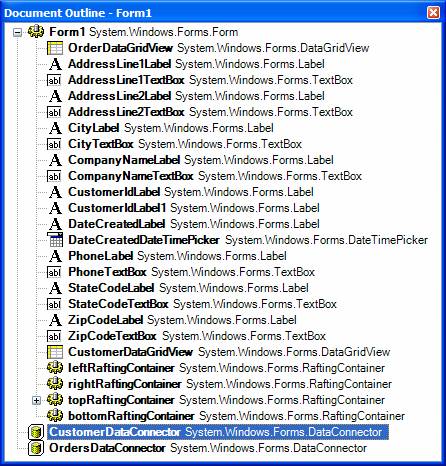
To get an overview of all the controls on the form you can use the Document Outline. From the View menu, select Other Windows and then choose Document Outline. (Figure 5)
The OrderForm displays the order with the Customer sub-object. By switching back to Form1 and double-clicking another order, the same OrderForm is updated.
Wrapping Up
The new features of Visual studio 2005 continue to enable developers to focus on the business code they need to write. Having to manually create labels, name controls, and bind them is a tedious, time-consuming step that adds little value to your end product. You've seen how Microsoft is opening the doors that limit the design patterns required to support the designer features. You no longer need to add interfaces or inherit from FX base classes just to get designer support. Visual Studio 2005 continues to build on developer productivity. Please contact us with your feedback.
